Colony Rules - BGG-z.md
PREORDER BEZIERGAMES.COM/PROOUCTS/COLONY

& GET FREE FLGS CARDS


Eighty years after the nanopocalypse, Earth is mostly ruins. It's up to you to rebuild civilization in this stark new world, using the few scarce resources you can find. Of course, other post-humans have the same idea, so it's a race to see who can build up their colony first.


ロ中日→
123456
COLLECT MULTIPLE FALLOUT SHELTERS

TABLE SETUP

Place the scoreboard where all players can see it, and place a scoring marker from each player on the "0"bar.


S PROTEIN LAB

FABRIC REPLICATOR

FIBER MILL


136 9 12 16
FALLOUT SHELTER


4 asstaomiabace for a 2 player game, use 2 cards in each Variable card stack, 3 cards for 3 players, and 4 cards for 4 players. While you can use any combination of Variable cards, suggestions for some unique combinations of Variable cards are shown on page 7. You can also use the free Colony app (located at beziergames.com), which generates custom Variable card setups.
Place the stable (white) and unstable (gray) resources (dice) and the CHIPIs in the middle of the table.

Place all of the Basic cards (GMO Farm, Protein Lab, Fabric Replicator, Fiber Mill, Uranium Mine, and Fallout Shelter) below the scoreboard with their basic (white) side face up. The number of cards in these stacks is always the same (6 for each of the green Production cards, and 8 Fallout Shelters), regardless of the number of players in the game.

WHEN ATTACKED ROLL A DIE IF ITISORIGNORE THE ATTACK AND KEEP THE?
TIME-LOCK VAULT


CLEANUP: STORE UP TO 2 ?
WHEN BUILT ROLL →→ ADD THE LOWEST VALUE ? BELOW

PLAYER SETUP


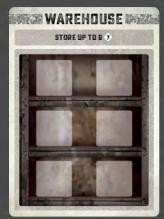
Each player takes a colored set of Starting cards, consisting of a Warehouse, Supply Exchange, Upgrade, and Construction card in their player color (each of which matches one of the colored score markers), and places them in front of himself with the white (basic) side up to form his starting colony. If the play area is limited, cards may be stacked to display only the bottoms of the Supply Exchange, Upgrade, and Construction cards, as seen below.


Everyone then takes 3 stable (white) resources, rolling them and placing all 3 in their Warehouse. The player with the lowest sum of resource values (shown on the top of the dice) becomes the Active Player. If there is a tie for the lowest sum, all players roll again until only one player has the lowest sum. In a four-player game only, the fourth player (immediately to the right of the Active Player) receives a CHIPI at the beginning of the game.
FIRST GAME SETUP
For your first game only, turn the Upgrade and Construction cards to their 2.0 sides. Each player should move their scoring marker to the "1" spot on the Scoreboard.


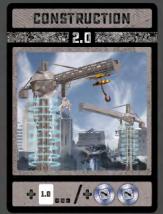
Use the Variable cards shown to the left for your first game.
SETUP FOR SUBSEQUENT GAMES
If you're playing back-to-back games of Colony, change the Variable card setup between games by having all the players who did not win choose one Variable card stack to remove from the game, and then choose its replacement, in player order from lowest to highest score. This will keep games fresh without requiring players to totally readjust to an entirely new set of cards.

GAMEPLAY
On a turn, the Active Player does the following phases in order:
- Prepare 2. Scavenge 3. Activate 4. Cleanup
There are two reference cards provided to help new players become familiar with the 4 phases of the game.
1. PREPARE
The Active Player places all dice from his Warehouse into his play area (the space below the player's cards). Other cards that happen during the Prepare phase (Gambling Den and removal of resources from the Time-Lock Vault) are also activated now.
2. SCAVENGE
The Active Player picks up 3 stable resources (white dice) from the supply and rolls them. Then he chooses one of those resources and places it in his play area (not on his Warehouse card), keeping the value shown on top of the resource. Then the player to his left chooses one of the remaining resources and places it in his Warehouse (again, keeping the value shown on top of the resource). If there isn't room there, that player may remove a resource from his Warehouse and return it to the supply, or he may simply return the chosen resource to the supply. Then the player to his left does the same. In a two-player game, the Active Player takes the remaining resource and places it in front of him (not in his warehouse). In a four-player game, the fourth player will not get a resource during the Scavenge phase.
If the Active Player has any CHIPIs, he may exchange those for an equal number of unstable resources (frosted dice) which he rolls along with the 3 stable resources. The Active Player keeps all unstable resources he rolls. See more details in the CHIPIs section on page 6.
3. ACTIVATE
The player may activate any number of his cards (including upgrading, which may be done once per turn—see page 7 for more on upgrading). Activating may be done in any order. Activated cards should be tilted slightly so you know they have been activated this turn.
4. CLEANUP
The Active Player adds all newly-built cards (from activating the Construction card) to his colony of cards, returning all cards to their portrait orientation (untilting activated cards). The Active Player then returns all unused unstable resources back to the supply, and then places all remaining stable resources in his Warehouse (or Time-Lock Vault, if he has one). Any stable resources that do not fit in the Warehouse or Time-Lock Vault are returned to the supply. While the Active Player may choose which resources are stored, he may not discard resources if he has room in his Warehouse or Time-Lock Vault for them.
Finally, the player moves his scoring marker on the scoreboard to show the number of VPs (Victory Points) he has at the end of his turn, and the player to his left becomes the Active Player.
If the player does not build any new cards on his turn (Remember: upgrading is not building), he receives a CHIPI from the supply (or 2 CHIPIs if the Construction card has been upgraded to Construction 2.0).
During the Activate phase, the Active Player may discard one of his cards (whether it has been activated on the current turn or not) in return for a number of stable resources equal to the difference between his score (at the end of the last turn) and the leader's score. The resources are rolled and placed in his play area. The discarded card is placed in the box for the rest of the game. Any card may be discarded, including starter cards. This may only be done once per turn. If the discarded card had VPs on it, the player will not get those VPs when they tally their score at the end of their turn.
GAME END & WINNING
If a player has at least 15 VPs (4 players), 16 VPS (3 players), or 20 VPs (2 players) at the end of his turn, he wins the game.
SINGLE PLAYER GAME
Challenge yourself to get the best score possible. Use the Standard cards and seven stacks of Variable cards of your choice, with one card in each stack. Place all 30 stable resources and 12 unstable resources in the supply.
Each turn, roll 3 stable resources. Keep one and place the other two back in the box (out of play for the rest of the game). Resources used for purchases and exchanges go back to the supply. If there are not enough stable resources for exchanges or production on a turn, you may use unstable resources in their place (but you may not store those unstable resources).
Continue playing until you can't roll 3 stable resources from the supply at the beginning of a turn. You may choose to discard stable resources from your Warehouse so that you have enough of those resources to roll.
Your goal is to earn as many points as possible. Part of the challenge is figuring out which combination of Variable cards results in the highest point totals. While Attack, Defensive, and Trading Variable cards have no value other than their VPs in a single player game, their costs are very different from the other Variable cards, and might provide a way to gain extra VPs with resources that otherwise would be useless.

田田日田

WAREHOUSE
SAMPLE TURN




40000 FALLOUT SHELTER

COLLAET MOLTILE TRINUT SHGITORE SS 5 12 19 11111235
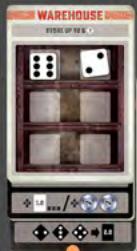
Red player Doug has the above cards and resources when it is his turn in a four-player game. He currently has 12 VPs.


80000 FALLOUT SHELTER

123 5 5 41236 1365121
日用日
PREPARE: Doug moves thefrom his Warehouse to his play area.


80000 FALLOUT SHELTER

123 455 912 15 13551215
SCAVENGE: Doug picks up 3 stable resources from the supply, turns in his CHIPI for 1 unstable resource, and rolls .He keeps theand passes theto his left. Shelley puts thein her Warehouse and passes the to Audrey, who puts it in her Warehouse. The player to Doug's right, Dean, doesn't get any resources this turn.


08

0000 FALLOUT SHELTERI

COLLLET MULTIPCE PALLBUT SHELTERS 123 51214 13581215
WAREHOUSE
ACTIVATE: Doug takesfrom the supply (from his Scrap Shack, Fabric Replicator 2.0, and Uranium Mine), and places them in his play area.


…/+5
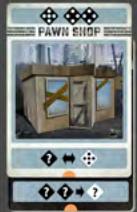

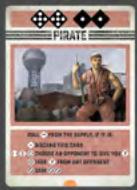
ACTIVATE: Doug activates his Pirate card, and rolls a 8, which allows him to take one die from one opponent's Warehouse. Shelley has a, but it is stored in her Time-Lock Vault, so it is safe from Doug's Pirate. Audrey has a Chain Link Fence, lowering the chances of Doug taking Audrey'sthat she just gained during Doug's Scavenge phase. Dean has a8 however, which Doug merrily takes from Dean's Warehouse.


40000 FALLOUT SHELTERIM

DRAEET METPE FALLNT BHILTIRS SS 1389215
ACTIVATE: Doug needs ain order to build another out Shelter, so Doug exchanges hisfor aby Activating his Supply Exchange 2.0 card.

FALLOUT SHELTER

12345S 13651210 138621 13651215
ACTIVATE: Doug pays 田田田田 for a third Fallout Shelter. This gives him a total of 15 VPs, and he declares victory.
Pirate: 1 VP
Scrap Shack: 1 VP
Fabric Replicator 2.0: 2 VPs
Uranium Mine: 2 VPs
Upgrade 2.0: 1 VP
Pawn Shop: 1 VP
Supply Exchange 2.0: 1 VP
3 Fallout Shelters: 6 VPs
RESOURCES
Resources are represented by dice. The value (face) of the die that is on top shows what kind of resource it is:
is Scrap Metal,is a Genetically Modified Organism, is Protein,is Polymer Fabric, is Fiber, and is Uranium.
are unstable versions of those resources.
Most resources are stable; after procuring them, you may store them between game rounds in your Warehouse (or Time-Lock Vault). Unstable resources break down and are of no use if you don't use them on your turn; any unstable resources in your play area at the end of your turn are placed back in the Supply.
There are enough stable and unstable resource dice in the game for most situations. However, it is possible to run out of these physical dice at some point in the game with different combinations of Variable cards and play styles. If this happens, you may temporarily use dice from another game or simply write down what resources you or other players currently have. The number of dice is never limited in the game.
Resources can never be modified so that their value is more than 6 or less than 1.
Unless modified by a card's power, resources do not change in value.
RESOURCE SYMBOLS:
is a stable or unstable “2” resource that you pay to the supply or another player.
is a stable "2” resource, while•is an unstable "2” resource.
is a stable or unstable resource of any value that must match the value of all otherresources (stable or unstable) that you are paying to the supply.
7is a stable or unstable resource of any value that you pay to the supply or another player.
?is a stable resource of any value.
?is an unstable resource of any value.
is a stable resource that is rolled.
is an unstable resource that is rolled.
is a CHIPI (see below).
CHIPIS
A CHIPI (Cybernetic Holder of Instant HOLER Production Improvement) is a way to store unstable resources between turns; the catch is that the player doesn't know what resource he'll end up with (after all, the resources are unstable)

CHIPīs are collected from different cards a player may have: Construction, Experimental Generator, and Recycling Bin.
The Active Player may use up to 3 CHIPIs he has during the Scavenge phase. For each CHIPI placed back in the supply, the Active Player takes one unstable resource and rolls it along with the three stable resources. The Active Player immediately receives all rolled unstable resources following the Scavenge roll. Players may accumulate more than 3 CHIPIs, but may only use 3 on their turn. CHIPIs are unlimited; if the number of physical CHIPIs runs out, mark down additional accumulated CHIPIs on a piece of paper.
HELPFUL TIPS
• As you accumulate cards, stack similar cards together so that the bottom portion shows on each card; this can save a lot of table space.
• If you have trouble remembering to use certain cards (like placing resources in your Gambling Den before Scavenging or using your Attack cards), place those cards near where you roll your dice, and you'll be much more likely to remember to use them.
• During the first few turns, it's easy to remember which cards you've activated during a turn. Later in the game, however, when there's a lot going on, mark activated cards by tilting them or placing something on the activated cards. This is especially helpful for the last few turns of a game, when many Exchange and Production cards are in play.
• When you are the Active Player in three-player or fourplayer games, you usually don't need to wait until the other players have taken the remaining Scavenger stable resources to continue with your turn.
• When it isn't your turn, you might find it helpful to place the resources you'll be gaining from Production on, above, or to the side of your Production cards. Later in the game this might not be possible if a lot of dice are being used/stored by other players.
• Remember that your Construction card provides you with a CHIPI (or 2 if your Construction card has been upgraded to Construction 2.0) if you haven't built any new cards on your turn. Upgrading doesn't count as building, so if you've upgraded but not built, you still get a CHIPI.
• Keep an eye on your opponents' scores; once they are within 5 VPs of the target score necessary to win and ahead of you, consider discarding a card to gain the difference in the number of standard resources between the highest score and your score.
• Different card types always require at least one specific resource: Attack cards require's, Production cards require's, Trading cards require 's, Exchange cards

CARDS
There are always six of the standard Production cards, and eight Fallout Shelters, regardless of the number of players.

There are always seven Variable card types in every game, from the 28 available. The section to the right shows a variety of different sets of variable cards you can choose from, or simply pick and choose your own cards. The number of cards in a Variable card stack is always equal to the number of players in the game.
ACTIVATING CAROS
Most cards can be Activated once per turn. Once you have Activated a card, tilt it slightly to show it has been Activated. You can never Activate a card the same turn that you build it. If you have multiple copies of a card, you may Activate each copy of the card independently. You may not Activate a card on the same turn it is built.
BUILOING CAROS
The Construction card allows you to build one card during your activate phase: pay the resources indicated at the top of the card (in black) to the supply, then take the new card and put it under your play area with the basic side up (and the 2.0 side down). You may pay with any combination of stable (white) and unstable (frosted) resources. You may have multiple copies of any card that may be built. If you upgrade to a Construction 2.0 card, you'll be able to build any number of cards on a turn.
UPGRADING CAROS
All cards can be upgraded to a better, 2.0 version of the original card. The cost to upgrade each card is(if you upgrade the Upgrade card to Upgrade 2.0, the upgrade cost will decrease to. To upgrade a card, pay the resources for the upgrade to the supply and turn the newly upgraded card over to its 2.0 side, then tilt the Upgrade card (Upgrade can only be activated once per turn). You may use the ability of an upgraded card immediately on your turn (provided you didn't already use the non-upgraded side prior to upgrading it). Upgraded cards often provide enhanced abilities and more VPs than their non-upgraded sides. You may not upgrade a card on the same turn that it is built. Once a card is upgraded, you may no longer use its 1.0 side.
VPS
VPs (Victory Points) are shown at the bottom of each card as orange half-circles. Each orange half-circle is one VP. On Paragon cards, the amount of VPs is variable (see each card description below for details).
VARIABLE CARDS
Games will be most balanced if they have one of each type: Attack, Production, Trade, Exchange, Defense, Paragon, and Other, though you can mix any sets of cards for each game. Each stack of variable cards should have as many cards as there are players.
Use the free Colony Setup app (from beziergames.com) to quickly get started with a new set of cards. This app will provide usable, fun sets of cards that are different every time. If you don't have the app, here are some examples of non-traditional setups to get you started.
NON-CONFRONTATIONAL
If you don't like other players messing with your cards and resources, we suggest using these Variable cards:


ALL OUT CONFLICT
On the other hand, if you like getting up in everyone else's business, we suggest using these Variable cards (recommended for 3 or 4 players only):




MASS PRODUCTION
For a production and point-heavy game, we suggest using these Variable cards:




ロ中日8十四
中日8→2
STARTING CAROS
There are 4 Starting cards that each player always gets to start his or her colony at the beginning of the game.
During the Cleanup phase, store up to six stable resources between turns by placing them on the Warehouse. If you obtain a resource when it is not your
turn and your Warehouse is full, you may
discard a resource from your Warehouse and replace it with the new one, or simply discard the new one. Unstable resources may not be stored in the Warehouse.
Purchase one new card from the supply
by paying the cost at the top of the card
or take a CHIPI. Built cards are placed in the play area, and are not available for activation or upgrading until the following turn.


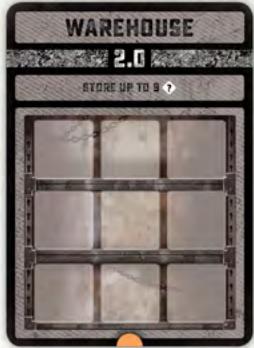
Store up to nine stable resources between turns.

Build any number of new cards from the supply by paying the cost at the top of the card or take two CHIPIs.
Upgrade one card by paying to the supply. A card is upgraded by turning it over so that its 2.0 (black) side is face up. You may upgrade the Upgrade card.


Upgrade one card by payingto the supply.
Exchange two resources of the same value with the supply for a stable resource of your choice. You may exchange any combination of unstable and stable resources, and you will receive a stable resource in return.


Exchange two resources of any value with the supply for a stable resource of your choice.
BASIC CAROS
Basic cards are the six cards that are always included in every setup regardless of player count: five are Production cards and one is a Paragon card (Fallout Shelter).
Produce one unstable•.


Produce one stable.


Produce one unstable.


Produce one unstable:.
Produce one stable :.
Produce one unstable .

Produce one unstable.
Produce one stable.


Produce one stable.
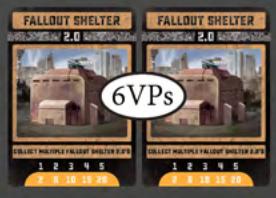
Collect Fallout Shelters to increase VPs per the chart at the bottom of the card. For instance, one Fallout Shelter is worth 1 VP. Two Fallout Shelters are worth 3 VPs. Three Fallout Shelters are worth 6 VPs, etc.


FALLOUT SHELTER SCORING EXAMPLES
How to score multiple Fallout Shelters and Fallout Shelter 2.0's.
Collect Fallout Shelter 2.0s to increase VPs per the chart at the bottom of the card. For instance, one Fallout Shelter 2.0 is worth 2 VP. Two Fallout Shelter 2.0s are worth 6 VPs. Three Fallout Shelters are worth 10 VPs, etc.
Fallout Shelter 2.0s cannot be combined with basic Fallout Shelters; for instance, if you have one of each, they are worth a total of 3 points.


Exchange? for stable ?? so that3 is equal to the sum of stable?+ ?.
Exchange? for stable ??? so that 3is equal to the sum of stable?+


PROOUCTION CAROS
Most production cards produce unstable resources each turn until they are upgraded, at which time they produce stable resources.
Gain a CHIPI (). This CHIPI may not be turned in for an unstable resource until the beginning of your next turn.

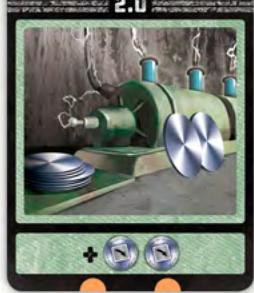
Gain two CHIPIs ().

Produce one unstable and one unstable

Produce one stableand one stable.
When built (as soon as the card is taken from its card stack), immediately produce a stable. Each turn, produce an unstable


When upgraded, immediately produce a stable. Each turn, produce a stable.
EXCHANGE CARDS
Exchange cards allow you to exchange one or more resources for one or more other resources during the Activate phase of your turn.
Upgrading these cards typically results in a better exchange rate. You may not use Exchange cards on dice that are not resources.
When exchanging, you must exchange one for two resources (you cannot exchange one for one).


? + ?. When exchanging, you must exchange one for three resources (you cannot exchange one for one or one for two).
Exchange any for your choice of stable [?].


Exchange any for your choice of stable?.
Re-roll any number of your7 resources.
Convert up to three unstable??? into CHIPIs (

Re-roll one of your resources.
Exchange a 3for a stable or exchange a stable for any stable ?.
Convert an unstable ? into a CHIPI


Exchange a ? for a stable , or exchange a stable for any stable ?.
Convert up to two unstable = and = into stable [=] and [=] of the same values. You may convert two different unstable resources (the unstable resources do not have to match each other).
Exchange a?resource for a stable ?
resource with a value exactly one higher
or lower than the original resource (with a minimum of 1 and a maximum of 6). You may use Tweaker to exchange a
resource that has already been tweaked
and/or modified this turn. You may not tweak a 6 into a 1 or a 1 into a 6.


Exchange aresource for a stable ? resource with a value exactly one or two higher or lower than the original resource (with a minimum of 1 and a maximum of 6). You may use Tweaker 2.0 to exchange a resource that has already been tweaked and/or modified this turn. You may not tweak a 5 or 6 into a 1 or 2, and you may not tweak a 1 or 2 into a 5 or 6.
TRADE CARDS
If you have one or more Trade cards, you may trade between yourself and one other player (the other player must agree to the trade). A trade consists of trading one or more stable resources for one or more different stable resources. You may never trade the same resource with any opponent, even if there are different quantities of those resources. For instance, you may not trade afor a. Non active players participating in a trade must trade to and from their Warehouse, and all gained stable resources must be stored in their Warehouse. Unstable resources may never be traded. The Trade card is not activated until a trade is completed between two players. If a trade is offered and rejected, the Trade card is considered unactivated.
If you do not have a Trade card, you can still be part of a trade that is initiated by another player (who does have a Trade card).
Allows the owner to initiate trading with one other player on the owner's turn. If you complete a trade with one other
player (on your turn), both you and your opponent each roll and gain a stable (the values of the rolled resources may be different).
Allows the owner to initiate trading with one other player on the owner's turn. If you complete a trade with the other player, both you and the other player gain a stable.


Allows the owner to initiate trading with one other player on the owner's turn. If you complete a trade with one other
player, ignore the first attack on you until your next turn.

Allows the owner to initiate trading with one other player on the owner's turn. If you complete a trade with one other player (on your turn), you roll and gain stableand your opponent rolls and gains a stable(the values of the rolled resources may be different).
Allows the owner to initiate trading with one other player on the owner's turn. If you complete a trade with the other player, both you and the other player gain a stable.
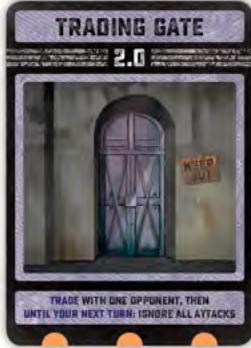
Allows the owner to initiate trading with one other player on the owner's turn. If you complete a trade with one other player, you are immune to all attacks from other players until your next turn.
ATTACK CAROS
If you have an Attack card, activating it will often result in a negative effect for an opponent and a positive effect for you.
Rollfrom the supply, and then do the following based on the value on top of the die (after the attack, the rolled die is returned to the supply):
: Discard this Pirate card from the game (reducing your score by 1 VP at the end of your turn).
:Choose an opponent who must give you their choice of stable [? from their Warehouse.
: Choose an opponent and take stable? from his Warehouse. .: Gain stable .
An attack takes place whenor is rolled (this will trigger a Defensive card of the targeted opponent).
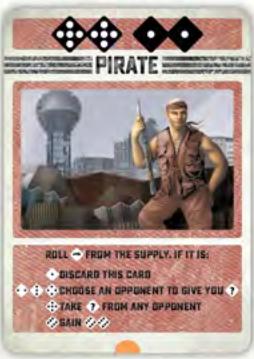

Rollfrom the supply, and then do the following based on the value on top of the die:
Choose an opponent who must give you their choice of stable [? from their Warehouse.
Choose an opponent and take stable ? from his Warehouse.
Gain stable : .
An attack takes place when oris rolled (this will trigger a Defensive card of the targeted opponent).
Roll afrom the supply. Each opponent must give you one stable resource of that value (if they have it in their Warehouse). An attack takes place (for Defensive card purposes) if
an opponent has a resource of the value
rolled in their Warehouse. The rolled die is returned to the supply. Choose an opponent and take a stable ? from their Warehouse, replacing it
with one of your stable [?(the resource
values must be different). An attack takes
place if and when an opponent is chosen (for Defensive card purposes).
OTHER CAROS
During the Prepare phase, place up to 2 stable??on the card from your personal resources. When Scavenging,
if any of thematches a gain all matching stable [? from the supply and keep the?? from the card. If none of thematches,
return the ??to the supply. Unstable are ignored when determining Gambling Den results.
These are general purpose cards that provide unusual abilities.
Reactivate a Production, Attack, Exchange (including your Supply Exchange), or Trade card that you've
already activated this turn. May not be used on upgraded (2.0) cards.
If you have multiple Reactivator cards, they may target the same card for Reactivation.
During the Cleanup phase, store up to 2 stable??on the card (even if the Time-Lock Vault was built earlier that same turn). ?? may not be used for trades and cannot be targeted for any attacks. During the Prepare phase, all resources are removed from the Time-Lock Vault. During other players' Scavenge phases, resources may not be placed in the Time-Lock Vault. Resources received from trades on other players' turns may not be placed in the Time-Lock Vault.


EACH OPPONENT DIVES YOU


EXCHANGE AN OPPONEN'S ? FOR A ?


REACTIATEL





Roll twofrom the supply. Each opponent must give you one stable resource of the value of each rolled die (if they have it in their Warehouse). An attack takes place (for Defensive card purposes) if an opponent has a resource of either or both of the values rolled in their Warehouse. The rolled dice are returned to the supply.
Exchange one opponent's stable ? or stable ?? from their Warehouse for one of your stable[?]or two of your stable ??respectively (your resource values must be different than your opponent's resource values). An attack takes place if and when an opponent is chosen (for Defensive card purposes).
During the Prepare phase, place up to 3 stable???on the card from your personal resources. When Scavenging, if any of thematches a ???, gain all matching stable? from the supply and keep the??? from the card. If none of the matches, return the???to the supply. Unstable are ignored when determining Gambling Den 2.0 results.
Reactivate a Production, Attack, Exchange (including your Supply Exchange), Trade, or a 2.0 version of one of these cards that you've already activated this turn.
If you have multiple Reactivator and Reactivator 2.0 cards, they may target the same card for Reactivation.
During the Cleanup phase, store up to 4 stableon the card. ? may not be used for trades and cannot be targeted for any attacks. During the Prepare phase, all resources are removed from the Time-Lock Vault 2.0. During other players' Scavenge phases, resources may not be placed in the Time-Lock Vault 2.0. Resources received from trades on other players' turns may not be placed in the Time-Lock Vault 2.0.
PARAGON CAROS
These cards are very expensive, but they can provide a lot of VPs.
When built, addfrom the supply to the card. Every turn during your Prepare phase, increase the?by 1 (up to). The value of? is the VPs for this card.
Every two of your upgraded cards (rounded down) is worth 1 VP.

When built, addfrom the supply to the Investment Bank. Payto increase ?by 1 (up to ). You may increase?as many times as you'd like during a single turn. The value of? is the VPs for this card.


When built, rollfrom the supply. Add the lowest value?to the Prize Safe. The value of?is the VPs for this card.


Every set of stable == that you have at the end of your turn is worth 1 VP. The resources must fit in your Warehouse or Time-Lock Vault at the end of your turn in order to count for your Stockpile.

When upgraded, move? from the basic side of the card to this upgraded card. Every turn during your Prepare phase, increase the?by 2 (up to). The value of? is the VPs for this card.
When upgraded, upgrade any other card of your choice at no cost immediately. Every two of your upgraded cards (rounded down) is worth 1 VP.
When upgraded, move? from the basic side of Investment Bank to this upgraded Investment Bank 2.0 and increase it by 1. Payto increase ?by 1 (up to). You may increase [? as many times as you'd like during a single turn. The value of?is the VPs for this card.
When upgraded, rollfrom the supply. Add the highest value?to the Prize Safe 2.0. The value of? is the VPs for this card.
Every set of stable ??(the resources do not need to match each other) that you have at the end of your turn is worth 1 VP. The resources must fit in your Warehouse or Time-Lock Vault at the end of your turn in order to count for your Stockpile 2.0.
DEFENSIVE CAROS
If an opponent you attack has a Defensive card, that Defensive card activates automatically when the opponent is attacked. Missed attacks (such as a player's Robber rolling a number that the opponent does not have) do not result in activation of that opponent's Defensive card. When a Defensive card is activated during an opponent's attack, tilt the card to show it has been activated; each card can only be activated once when it is not your turn. Activated (already-used) Defensive cards are not re-activated when attacked. Defensive cards are reset to their unactivated, vertical orientation during the Cleanup phase of a player's turn.
If the opponent has multiple Defensive cards when attacked, that opponent chooses which unactivated Defensive card will activate.
Players may not opt to not activate a Defensive card if they are attacked.
Ignore one attack. Tilt the card after the attack to show that Barricade has been activated. Reset the card vertically during your Cleanup phase.
When attacked, roll a stable. If the
resource is ,, or, ignore that attack and keep the stable ?. Tilt the
card after the attack to show that Chain Link Fence has been activated. Reset
the card vertically during your Cleanup phase.
When built, place afrom the supply on the card. When attacked, the [?]is reduced by 1 and the attack is ignored.
Tilt the card after the attack to show that Force Field has been activated. If
the?iswhen attacked, the attack is
ignored and theis removed from the card. If there is no ? on the card, the
attack is successful. Reset the card vertically during your Cleanup phase. When attacked, place a stablefrom the supply on the card (the attack is successful) and tilt the card to show it has been activated. During the Activity
phase, gain the stable [? from the card.
When a stable?is on the card, attacks
are not ignored, and no new stable [?]is
placed on the card. Reset the card verti-
cally during your Cleanup phase.


Ignore one attack from each opponent. The 2nd (3rd, 4th) attack from the same opponent is not ignored. Tilt the card after the attack to show that Barricade 2.0 has been activated. Reset the card vertically after every player's turn.
When attacked, roll a stable. If the resource is,,田,, or , ignore that attack and keep the stable[?. Tilt the card after the attack to show that Chain Link Fence 2.0 has been activated. Reset the card vertically during your Cleanup phase.
When upgraded, place a from the Supply onto the card. When attacked, the ?is reduced by 1 and the attack is ignored. Tilt the card after the attack to show that Force Field 2.0 has been activated. If the ?iswhen attacked, the attack is ignored and the • is removed from the card. If there is no [?] on the card, the attack is successful. Reset the card vertically during your Cleanup phase.
When attacked, place 2 stable from the supply on the card (the attack is successful) and tilt the card to show it has been activated. During the Activity phase, gain the stable ?? from the card. When2 stable ?? are on the card, attacks are not ignored, and no new stable ??are placed on the card. Reset the card vertically during your Cleanup phase.
ABOUT THE DESIGNERS
Ted Alspach is the designer of several games, including One Night Ultimate Werewolf, Castles of Mad King Ludwig, America, and Suburbia.
Toryo Hojo is based in Osaka and during his 15 years as an indie board game designer, he has released over 70 different titles and occasionally designs war games. His most famous design is Three Kingdoms Tactical Warfare (boryaku sangokushi).
Yoshihisa Nakatsu is based in Nara and is the head of Chicken Dice games. He started out as a figure modeler, and via miniature games entered the world of board games, preferring historical and science fiction themes. Among his designs are Acapulco.
ABOUT THE ARTISTS
Ollin Timm has created artwork for several games, including Castles of Mad King Ludwig, Favor of the Pharaoh, Terra, and Suburbia.
Stephanie Gustafsson has provided graphic design for several games, including One Night Revolution and America.
Digital Imaginary Studios is a team of game artists and illustrators. http://www.distudios.pl
ABOUT BEZIER GAMES, INC.
Bezier Games, Inc. publishes great party and strategy games, including America, Castles of Mad King Ludwig, Favor of the Pharaoh, One Night Ultimate Werewolf, One Night Ultimate Vampire, Suburbia, and many more.
THANK YOU
Big thanks to everyone who has playtested this game in all its incarnations, with a special shout out to Doug Garrett, who not only playtested, but was instrumental in having Bezier Games publish this game. Likewise, extra special thanks to Joe Huber, Mikko Saari, and Lorna Wong, all of whom provided an enormous amount of detailed feedback throughout development.
PLAYTESTERS
Shaun Adams, Jason Adler, Carol Alspach, Gage Alspach, Toni Alspach, Jeff Ashton, Ruth Ashton, Linda Baldwin, Bill Bass, Amanda Betat, David Betat, Carolyn Bierman, Jake Blackmer, Christina Bouchard, Matt Bouchard, Evan Bourns, Jacob Bradt, Dave Campos, Scott Caputo, Patrick Casey, Carolyn Castagnetto, Chris Castagnetto, Anthony Castanos, Ken Chaney, Bay Chang, Paul Chapman, Gabriel Cohn, Dan Collinson, Jeremy Commandeur, Audrey Cueto, Nick Debusk, Nick Dorian, Josh Edwards, Dave Eisen, Gabrielle Falconer, Sondra Falconer, Donald Fields, Evan Fitzgerald, Shelley Ganschow, Nick Gastino, Gabe Golden, Ben Isaac Green, Sai Grundmann, Lom Friedman, Jonathan Grothe, Nancy Hagmann, Aapo Halminen, Marsha Hamel, Ville Hannula, Brett Hardin, Graydon Hendershott, Brian Henk, James Holley, Valerie Holley, JR Honeycutt, Daniel Hopkins, Lynne Hopkins, Michael Hopkins, Taylor Hopkins, Gil Hova, Veli-Pekka Jaakkola, Braeden Jackson, Collin Jackson, Mark Jackson, Kevin Jacobs, Brett Johnson, Michael Jones, Lauri Koivunen, Alexander Kozyrenko, Chris Landon, Matt Leigh, Brittany Livesay, Dean Lizardo, Rob Lopez, Brent Mair, Bill Masek, Nooa Mäntynen, Jessica McCartney, Joseph McNeely, James Miller, Mark Monroy, Ian Moore, William Morrison, Ella Muldoon, Richard New, Aaron Newman, Karissa Pairot, Amelie Pardell, Jonathan Pardell, Rylie Pardell, Zander Parkinson, Jeff Patino, Tuomo Pekkanen, Imran Pirani, Krystal Pirani, Phil Polli, Lisa Poole, Matt Poole, Mary Prasad, Raisa Rautiola, Adam Reum, Chad Roberts, Doris Roberts, Bryon Quick, Eddie Saoud, Vincent Salzillo, Steve Samson, Andy Scheffler, Ariel Schreiman, Ryan Schwartz, Robert Schweiger, Ali Shamsi, Hannu Sinisalo, Andrew Sirkin, David Slusser, Kellen Snook, Jeph Stahl, David Steele, Mike To, Micah Troyer, Raeannon Troyer, Sampo Uimonen, Dustin Vance, Joni Viitala, Marvin Voormann, Chris Vosler, Daniel Webber, Candy Weber, April Wells, Sean Wells, Dan West, Nolan Wilcox, David B. Williams, Ray Wizneski, Gordon Wohlers, Karen Woodmansee, Brandon Wright, Ken Wright, Nathaniel Wright, Daniel Yoo, and Frank Zilahy.

These rules and all game contents are copyright ©2016 Ted Alspach and Bezier Games, Inc.
No physical or digital reproduction of any part of this game, including rules, box, imagery, and components may be made without express written authorization from Ted Alspach and Bezier Games, inc. All rights reserved.