rules_zh_深入绝地:黑暗传奇_4577.md
深入绝地:黑暗传奇 中文规则书
来源:
descent-legends-of-the-dark_source_zh_4577.pdf(集石文档 4577,扫描件,无文本层)
转写:本机 MinerU 3.4.5 + MinerU2.5-Pro-2605-1.2B(vlm-engine),2026-10-31
说明:原书图位保留为「〔图:images/xxx.jpg〕」并在mineru/images/存原图;文字条款以本文件为准,涉及图标数量的细节与英文官方规则书交叉核对。
暗黑世界傳說
深入絕地 DESCENT™ LEGENDS OF THE DARK
鮮血與烈焰
特瑞諾斯大陸正面臨危機。凱爾的領地已淪陷,來自烏圖克耶蘭的魔化野蠻人在邊境四處盤據。在密斯特蘭,不死者威卡所率領的奴僕們肆虐八方,挑舉般的試圖首次跨越邊境。男爵評議會針對來自各方的威脅無法達成共識,更遑論採取任何行動。
在弗希北方的領地中,下一場特瑞諾斯與黑暗勢力對峙的舞台已準備就緒……
遊戲概述
《深入絕地: 暗黑世界傳說》是一款適合1至4名玩家的合作遊戲。玩家們扮演在廣闊戰役中對抗邪惡的英雄、提升自己的能力、殲滅敵人、探索特瑞諾斯大陸,並打造自己的傳說。每個任務都是“鮮血與烈焰”戰役的一部份,在此期間,英雄們要盡力在敵人的計謀完成之前達成一系列的目標。
當英雄們探索禁忌的地城、黑暗的森林、以及古老的戰場時,他們也要試圖挫敗邪惡的計劃並收集力量和經驗。英雄們的道路充滿了艱難的選擇,這些選擇到戰役的最後可能會改變特瑞諾斯的命運。
〔图:images/74a3b3b1cba3157242cb673e070b052678b5a10677b6501f9da617f1f81565b2.jpg〕
natural_image
Illustration of a fantasy creature with a winged dragon and a horned creature, set against a textured background (no text or symbols)-APP應用程式-
要進行本遊戲,其中一名玩家必須在相容的設備上下載免費的《深入絕地: 暗黑世界傳說》app。該app可追蹤並控制敵人、地圖拼放、英雄庫存和戰役進度,使玩家可以自由專注於英雄和他們正在經歷的故事。該app還允許玩家儲存他們的戰役,讓玩家可以分段進行多場遊戲以完成戰役。
〔图:images/073425c9d8a5ae69f19e8d7da6df609cc3980221a281aa41700d116ef29602b9.jpg〕
App Store
圖標
要下載app應用程式,請在Amazon™ Appstore、Apple iOS App Store™、Google Play商店™、或Steam®上搜索《深入絕地:暗黑世界傳說》(Descent: Legends of the Dark)。
配件
初次遊玩前,請按照遊戲盒中隨附的“配件組裝指南”上的說明組裝微縮模型、生命值轉盤和地形配件。
規則結構
本文件的目的是教導玩家如何遊玩《深入絕地: 暗黑世界傳說》。可閱讀本文件直到“戰役規則”章節為止,開始遊玩遊戲無需閱讀該欄位。
本遊戲包含了一個app內的規則參考,描述了更詳細的規則和特例。在遊戲期間出現問題時,請從app的選單中查閱app內的規則參考。
〔图:images/d922bf802cf495f9ab0cd8f4929d9034eb5b8d41f31e924e498f93d2f5ec2d7a.jpg〕
内容物
〔图:images/a220331b5ff5b0d10603a001b65a9e4c44987d6e2b0bf8f3b3dcb653def7e874.jpg〕
1份配件組裝指南
〔图:images/d9194ffbb746739475bc25a6c55f36d6ea4050d165c9cf7f6db0f93c8c917144.jpg〕
1本世界觀
〔图:images/1967197a454742d8a89a9dda702986d20bcebe5cbebef8b0a356b4fb3191583d.jpg〕
12顆骰子
〔图:images/6c3780423c72961e16a9091b804d95298c1cb9cbdbd90958993d167c450da17a.jpg〕
16個身份標記
(每個顏色各4個)
〔图:images/5af181dd1729853ad3377ef9cc5784870a21b2f20cd4ab360737f1369d8ea185.jpg〕
40個微縮模型
(34個敵人,6個英雄)
和1個台座
〔图:images/01b55073758c2580bcea2cde0dff2856a80d1a7990ab7b1c2de65b3ac2ff8a29.jpg〕
natural_image
Grid of weathered landforms including stone blocks, grass, and erosion (no text or symbols)18個地圖板塊
〔图:images/8cecfe6f4f6f6269d40d2926197a7b552af31c02d52589fe11b663e6a4f1aa72.jpg〕
natural_image
Illustration of a wooden cabin, wooden fence, and a tree with branches (no text or symbols)47個地形配件
〔图:images/752ee77686f9213fc7582b8ab60148e1dd8b8ebf3f2a0dd570a13cfe59356a51.jpg〕
6個底板
〔图:images/3db87afbad2140537d1f1e92f8b9c610feb5bc4afc2cc963e8a7edbb4dbec43b.jpg〕
6張英雄卡
〔图:images/aee491ec572d3c7e740b4ba0f522b9298f7df736b0c32b6f6d6ff7ec61f0eb97.jpg〕
40張武器卡
〔图:images/a2be4633d80eef815b944ab84a0cff0d5e07e8716204a0c0461cec7a0ebc8acd.jpg〕
18張防具卡
〔图:images/72833a0a9ce4c70e6fe0119101c25204d72235a9b6d6ca8f23b09b08ca5d8d5e.jpg〕
12張飾品卡
〔图:images/9ed0ec427c6233ac2af4ad7da82050b44dd2ffcee2f5df08fb62e47c122becad.jpg〕
42張道具卡
〔图:images/3209f43eec32d14ebaf5ccd6b5f9d1c48bc8c73084e9be123ecac85d7f0ee036.jpg〕
42張技能卡
〔图:images/17f82801da6197ee06f830853511809832b65667ce192daefa862a06040dd4c3.jpg〕
10張損傷卡
〔图:images/a38b05a72f580608c5b39d76eaf53e8749f5c7678f5e4e06436bc7001713c52a.jpg〕
4張幫助卡
〔图:images/cf2fb6da68113392d1f69bb04aca0efb76a1b5df1285ce331677c11da445f784.jpg〕
8張牌套
〔图:images/67db90970b94f9778d6da82db0bd8233d0dcf3387398303b654934f6c9faec53.jpg〕
12個探索/觀察指示物
〔图:images/ff614fe57778245d849fe111f7af15c838c7759e8c29b1a4bc6a0826c3ccf55d.jpg〕
80個狀態指示物
(每個種類各16個)
〔图:images/e2168ef90da3d35addf9f764215f7b161f8e6ec6f7c6f40f2cd313906b2598ea.jpg〕
54個疲勞指示物
〔图:images/b8865ce5d0d4924a4a6f365195b8899f3c378ebad21013c9cc2d1f18eb374110.jpg〕
4個生命值轉盤
基本概念
本章節包含《深入絕地: 暗黑世界傳說》的基本概念,這些概念為即將閱讀遊戲規則的玩家提供了背景脈絡。
英雄
在遊戲中,每名玩家都控制一名英雄,該英雄由英雄卡和一個微縮模型表示。每個英雄的微縮模型表示該英雄在遊戲地圖上的位置,每張英雄卡均包含了該英雄的訊息,包括其數值和特殊能力。
〔图:images/916101f3d7d2e51281d528912a31cfcdb3e71efada723ea56f16dbbdec4a056c.jpg〕
賽勒斯的英雄卡及模型
戰役開始時只能使用四名英雄,但隨著戰役的進行,將有更多的英雄可供使用。在兩場遊戲之間,玩家可以選擇控制不同的英雄。且在一些任務中,app會指定玩家必須控制特定的英雄。
英雄简介
戰役開始時可以使用以下四名英雄:
人類復仇者布琳:面對敵人時負責帶頭衝鋒,並隨時準備防禦他們的反擊。
- 妖精獵人葛雷登:適應能力和專注力強,能夠在任何必要的場合造成傷害。
人類智者賽勒斯:在鳳凰的幫助下,使用魔法來操縱攻擊並擊潰敵人。
- 混血龍流浪者瓦里克斯:治療團隊,並以龍之怒重創敵人。
隨著戰役的進行,將可使用以下兩名英雄:
- 猨猁族俠盜潛斯:運用隱匿和高機動性來從意想不到的方向發動攻擊,並毫髮無傷的躲避追擊。
- 矮人工匠喀莉:一名大膽而充滿好奇的英雄,運用獨特的發明來幫助自己和她的盟友。
武器及攻擊卡
每名英雄都有兩張武器卡,代表了他持有的兩種武器。每個武器都有一個可以在戰役開始時使用的標準面,以及可以在戰役進行時解鎖的升級面。在升級面的左下角的“武器”後面帶有升級圖標( $\approx$ )。
〔图:images/1f9793332ef144e832b2c7f761b79c5042e45e0d0a00bc69942b6d2eeacdb7bb.jpg〕
(图内文字:守望者之可 武 14(在你的决策或数据中) 如果你的指令中只读,要写 2)
升級圖標 (≈) 表明了這是“守望者之刃”的升級版本。
英雄的兩張武器卡都堆疊在一起並放在單個卡套中。這兩張上套的武器卡可以當作單張雙面的攻擊卡。在遊戲中,英雄可以將攻擊卡翻面來使用另一面的武器。
〔图:images/5a8d1934d744b8c7a0e345434b98f065bedc3f7ff0262ee5c329e0c7032c5213.jpg〕
flowchart
graph LR
  A["初始游戏"] --> B["游戏引擎"]
  B --> C["游戏引擎"]
葛雷登的起始攻擊卡已創建完成,因此他的雨張武器卡的升級(≈)側是隱藏的。
—翻轉卡牌—
在遊戲中,英雄可以翻轉他的英雄卡、技能卡,以及上述由兩張武器卡所組成的攻擊卡。
翻轉卡牌會改變英雄可用的能力和武器。此外,翻轉卡牌會移除該卡上的所有指示物,包含狀態和疲勞,這些都將在後文詳述。
在遊戲過程中將挑戰玩家如何有效管理自己的卡牌,確保在劇本安排的情況下將每張卡牌翻轉到他們所希望使用的一面。
-APP應用程式-
《深入絕地: 暗黑世界傳說》app通過提供敘述和目的,顯示地圖和敵人,以及確定英雄何時於任務中獲勝或落敗,來指導玩家完成其戰役。該app還能儲存戰役進度和庫存。
該app有兩個主要畫面:一個顯示英雄正在探索的地圖,另一個顯示目前場上的所有敵人。
〔图:images/ea53e7c20aae09e458fc25923100b53171d5bd706f0e926f339b144f816242c9.jpg〕
natural_image
Game interface screenshot showing a central scene with a central platform and surrounding icons (no readable text or symbols)地圖畫面
〔图:images/0c9662c0a82151fcdaeee437183b9d2e0cd2e25775030ae3bf2738c54ce18071.jpg〕
(图内文字:Bouquet Bouquet Bouquet)
敵人總覽畫面
玩家可以通過選擇右上角的按鈕在每個畫面之間切換。目前畫面的按鈕將突出顯示。
〔图:images/f5c31c3e2aefdfed5688b0614c5f2a4f6941ccec12fd0e31ef2469129b12b7a4.jpg〕
地圖畫面(左)和敵人總覽畫面(右)的切換按鈕
這兩個畫面都有多樣的遊戲功能,稍後將進行介紹。
-敵人
敵人是英雄在遊戲中會遇到的各種怪物和反派。地圖上的每個敵人都由一個模型表示,並且app會追蹤關於該敵人的資訊。
當敵人生成時,app會創建一個敵人色條,為該敵人分配一種顏色,以將其與其他相同類型的敵人區分開,並顯示該敵人在地圖上的放置位置。
在將敵人模型放置在地圖上之前,玩家必須在該人物的底座中嵌入指定顏色的身份標記。身份標記也為辨色力弱的玩家設計了刻紋(請參閱下文的“辨色力弱玩家”)。
〔图:images/0cd8bf7ab29e6d0618c95f39bb6d072c57caf5c148f0c79e2deddf5eed0925f0.jpg〕
(图内文字:Diagram illustrating a scene with a central painting and a decorative sculpture, showing directional arrows and labels.)
此敵人的色條為橘色,所以在該敵人模型的底部嵌入橘色的身份標記。
辨色力弱玩家
每個身份標記的側面都有1至4個刻紋。如果玩家無法通過顏色區分敵人,則應確保身份標記上顯示的刻紋數量,與app中該敵人色條上顯示的刻紋數量一致。
〔图:images/dfc539b73a82bf1537bd89a2a41016b17c94921e587c1edc3336a4d7547e39e4.jpg〕
〔图:images/d5aac0a3593d2055862e7cdb1fc433d4bb0c641e0ae57ee4d2205893d599d050.jpg〕
此敵人的色條和身份標記都顯示了三條刻紋。
-遊戲設置
要設置《深入絕地: 暗黑世界傳說》,請按照本章節中介紹的步驟進行。
- 啟動app: 玩家啟動《深入絕地: 暗黑世界傳說》app,然後選擇“新遊戲 (New Game)”。該app將指示玩家瀏覽一系列畫面以創建一個儲存位置、選擇難度設置,並選擇初始角色。
除了選擇儲存位置之外,其他選擇都不是永久性的。玩家可以隨時調整難度設置,並且可以在整個戰役過程中扮演不同的角色。
單人玩家: 如果遊玩單人遊戲,則玩家選擇並控制兩名英雄,但所有其他規則保持不變。
〔图:images/c64bce81eabd7fc7a40b9466c99d3a470c584200cabac41aec36b72cf6a59ceb.jpg〕
(图内文字:DESCENT New Game Lone Game)
- 拿取英雄元件: 每名玩家拿取一張幫助卡、一個生命值轉盤、與他們在app中選擇的英雄一致的微縮模型及英雄卡,以及該英雄的兩張初始武器卡,如下所示:
布琳:守望者之刃、重型戰鎚
» 葛雷登:血木弓、鏡像雙刀
》 賽勒斯:曲木法杖、微光魔杖
» 瓦里克斯:鐵刺戰鐘、望河城長矛
每名玩家通過將一種武器放在另一種武器之上來組合其初始武器。帶有升級(2)圖標的那面應彼此相對,因此不可見(請參閱第4頁的“武器及攻擊卡”)。然後,將這對卡牌插入牌套中,並在遊戲過程中將其當作一張攻擊卡。
然後,每名玩家在他們前面設置一個遊戲區域,在該區域中放置拿取的元件。一名英雄可以使用英雄卡和攻擊卡的任一面朝上開始進行遊戲。
〔图:images/ecbd1b0dd5e69c54ab3365179f851a82d88d67fb3f1eac4f515a032c2b0fb189.jpg〕
葛雷登的英雄卡、模型、生命值轉盤,以及初始武器
〔图:images/d49845c5c1e8f025d60ec0b47a55952381d5579e4c60e8ecea762ecbc9bf8e3c.jpg〕
攻擊卡正面
攻擊卡背面
〔图:images/f3c8b2c1e5fc99f96936fa7e37865608add2e245fd78c1cc8da422a83b4f9cb4.jpg〕
幫助卡
- 設置生命值轉盤: 每名玩家將自己的生命值轉盤的數字, 設置為其英雄卡生命值的最大值。
〔图:images/9f7e80fd7f5525d95e425e5e320599725fb2b9b41f2efb5ed9caa93d72689956.jpg〕
葛雷登以九點生命值開始遊戲
- 建立供應區:按類型分別所有指示物,並將其各自放成一堆以建立供應區。將地圖板塊、地形配件、敵人模型、道具卡,以及損傷卡放置在供應區中一一不需要對損傷卡和道具卡進行洗牌。將其他所有卡都放回遊戲盒中,因為在第一個任務中不需要使用它們。
〔图:images/daad71ccd9bfe965d73fe6690589ae190dad2d8347368f22755db54d026bf815.jpg〕
損傷卡
〔图:images/858782762b912b01887c825cc6fee86cd30a7146b55766d176785899248f2f23.jpg〕
道具卡
- 建立初始地圖:按照app的說明,以設置第一張地圖、放置地圖板塊、指示物、地形配件,以及模型。
每個地圖板塊上都印有一個獨特的代碼,以便輕鬆找到正確的板塊。在遊戲區域中留出空間以在遊戲過程中放置額外的地圖板塊。
〔图:images/30710f2c13d9165a419fbc8d4ee9f8da66f6a2fe3f0df245a9848d7e50b90cba.jpg〕
(图内文字:放置板塊16b、2顆樹,以及1個觀察指示物 16b)
〔图:images/4d146697d86ecbadb2b097343a3f1e245488910df34eb7bb736b1fbd8b8e124e.jpg〕
(图内文字:板塊代碼)
-進行任務
一場《深入絕地: 暗黑世界傳說》遊戲即為一個任務,該任務是在一系列的遊戲輪中進行的,每個遊戲輪都包含兩個階段,玩家按照以下順序進行結算:
- 英雄階段: 在此階段中, 英雄可以在地圖上移動、攻擊敵人, 以及並與周圍的環境互動。
- 暗黑階段: 在此階段中, app將結算時間、敵人, 以及任務的效果。
結算暗黑階段之後,從英雄階段開始新的一輪。玩家繼續以這種方式結算遊戲輪,直到任務結束。
英雄階段
在英雄階段中,英雄選擇各自進行回合的順序。這個順序在不同遊戲輸中可以變更。在所有英雄都進行過自己的回合後,選擇“結束階段(End Phase)”按鈕以進入暗黑階段。
結束階段
在各自的回合中,每名英雄可以按任意順序執行最多三項行動:一個移動行動以及兩個額外的行動。一名英雄可以多次執行相同的行動。例如,布琳可以執行戰鬥行動,然後執行兩次移動行動。
英雄可以選擇的五種行動如下:
- 移動
• 戰鬥
- 探索
- 重整
- 特殊
在接下來的幾頁中將更詳細的描述每一項動作。
—移動—
移動行動使英雄可以在地圖上移動。當英雄執行移動行動時,他們獲得等於其速度的移動點數。
〔图:images/86801c893d63b876657f5f70ed1f7ff85a99a5b830a119ea0fe3b766340a7431.jpg〕
(图内文字:布娜 3 10 速度)
英雄可以花費一個移動點數來移動到相鄰的格子中。地圖板塊劃分為多個格子,如果兩個格子共享一個邊線或角,則兩個格子為相鄰。
〔图:images/99b43eab819414d52f2d0fce6cb3f7608525a2a6ab6e65f5751ca2c1fb6484d2.jpg〕
natural_image
Illustration of a chess knight on a grid of blue and orange squares (no text or symbols)此英雄的格子與這八個格子相鄰
英雄無法進入一個包含敵人或3D地形的格子,但是可以進入包含另一名英雄的格子,前提是如果他可以立刻移出該格子。
英雄可以在花費每個移動點數之間執行行動。
英雄結束回合後,任何未花費的移動點數都會失去。未花費的移動點數不會延續到將來的回合。
阻凝
如果一名英雄與敵人相鄰,他們將會被阻礙。當英雄被阻礙時,他會失去所有移動點數。當被阻礙的英雄獲得超過一點移動點數時,改為只會獲得一點移動點數。
觀察指示物
觀察指示物代表引起注意的地點。當英雄接近時,可以擴展地圖、展示新的細節,或者觸發陷阱。
〔图:images/0fe7de869572f09c24cbb8631eda99cf1cc63a357895e0d2b17fa6996b39851c.jpg〕
觀察指示物
當英雄進入或相鄰一個包含觀察指示物的格子時,玩家必須立即啟動該觀察指示物。為此,在app中選擇該英雄頭像,並將其拖到該觀察指示物中。這不視為使用一項行動。
如果某個效果導致此動作在暗黑階段發生,則英雄會在下一輪開始時結算該觀察指示物。
〔图:images/c360ba124717eee9bf1fa7462b42862cf8abc358d40fd6d3bde8ea624a87a235.jpg〕
natural_image
Illustration of a character interacting with a map and trees, with a small group of framed portraits below (no text or symbols)布琳移動到這個觀察指示物的相鄰處,所以在她繼續她的回合之前,她必須啟動它。
移動範例
布琳想要移動到藏寶箱附近,以便進行搜索。布琳執行一項移動行動。她的速度為“3”,因此她獲得了三個移動點數。
- 布琳花費第一個移動點數向右移動。
- 她花費第二個移動點數,斜向進入賽勒斯的格子。
- 她花費第三個移動點數向右移動並立即退出賽勒斯的格子。她需要走得更遠,所以她又執行了一次移動行動,又獲得了三個移動點數。
- 她花費第四個移動點數,使其靠近寶箱。作為該遊戲輪的最後一項行動,她執行了探索行動以搜尋寶箱。
- 她花費第五個移動點數,使其靠近大釜並結束回合,失去最後一個移動點數。
〔图:images/6fd0c3e03390a172e6c0a98b98a91b046b8209fae4bbe347b7ad86e4bde39e99.jpg〕
阻碍移動範例
在上一回合探索寶箱之後,布琳想攻擊亡者。布琳執行移動行動並獲得三個移動點數。
- 她花費一個移動點數移動到亡者的相鄰處。這會導致她被阻礙,因此她失去了所有剩餘的移動點數。
- 她使用第二個行動來攻擊亡者(請參閱第10頁的“戰鬥”),但她沒有擊敗它,因此仍然受到阻礙。
- 她將自己的最後一個行動用於另一個移動行動。由於仍然被阻礙,因此她只能獲得一個移動點數。她使用它來擺脫亡者。
〔图:images/bac9d1c606b6a6d3a01bdca940372c90d78b505cbe62ca279b10bb55901ab4e7.jpg〕
flowchart
graph LR
  A["Central Block"] --> B["Step 1"]
  B --> C["Step 2"]
  C --> D["Step 3"]
—戰鬥—
戰鬥行動允許英雄攻擊敵人,以擊敗敵人並將其從地圖上移除。英雄攻擊的範例位於第12頁。
英雄的攻擊卡面朝上的武器即為英雄在攻擊中所使用的武器。當英雄攻擊時,他們必須選擇攻擊在其攻擊範圍內,且在其視線內的敵人。
攻擊範圍
攻擊範圍用於確定敵人是否在英雄武器的打擊範圍內。對所有武器來說,如果敵人與英雄相鄰,則該敵人位於該英雄的攻擊範圍內。對於擁有“延伸”關鍵字的武器來說,如果敵人與該英雄相鄰、或相隔兩個格子以內,則該敵人位於攻擊範圍內。
如果英雄使用擁有攻擊範圍值的武器,則該攻擊為遠程攻擊。英雄可以對相鄰或不相鄰的敵人進行遠程攻擊。
〔图:images/9b8c49c1fe799d2f76a25df18cd689ada743b71fb8663c5c3fd0e799554940b3.jpg〕
(图内文字:精準彈弓 3 2 24:在你的攻擊中,重要1顆 架子。 攻擊 範圍值)
使用擁有攻擊範圍值的武器進行攻擊時,英雄必須確定到敵人的攻擊範圍。要確定攻擊範圍,英雄將沿著相鄰格子的最短路徑計算其格子與敵人格子之間的格子數量。英雄開始計算於與其相鄰的格子,結束於敵人的格子。如果該數字小於等於武器的攻擊範圍,則敵人在攻擊範圍內。
〔图:images/6425e7820b2fa96c2308c0bf108945bd867e1e268f46ca109a153daf87f7171e.jpg〕
(图内文字:1 2 3)
葛雷登和右邊的敵人相鄰,因此他可以用任何武器攻擊它。左邊的敵人在三個距離之外,因此葛雷登需要一種攻擊範圍至少為“3”的武器來攻擊它。
視線
視線是指模型可以看到的東西。要確定視線,英雄要從自己模型所在格子的中心,到另一個模型所在格子的中心連出一條假想線。如果該線被地圖邊緣或包含阻擋地形的格子所中斷,則視線將被阻擋。第22頁列出了阻擋地形。
格子的轉角不會阻擋視線。並且,模型也不會阻擋視線。
如果一個模型和另一個模型之間的視線被阻擋,則它們不能攻擊彼此。
〔图:images/84f5ff55d24d5836a93e7b8b208a60e359868534c8d8c17a80ea2a59e4b7f877.jpg〕
(图内文字:① ② ③)
英雄到2號敵人之間的視線被樹阻擋,但1號敵人和3號敵人沒有被阻擋。
視線工具
如果玩家想嚴格確認視線,則可以在選單中選擇“視線”。然後,玩家選擇app中的任意格子——app就會突出顯示所選格子視線內的所有格子。該app還顯示該格子的攻擊範圍:紅色為相鄰的格子、橘色為相隔兩格的格子、黃色為相隔三格以上的格子。
〔图:images/5e1e5bad7382ce1c748f60243b03e892de4736d73177b3456160665309c9e9a2.jpg〕
選單
〔图:images/8dc75cae3a11045f6c16c8557f715794584f536fa7acb4a102b533f3034d8739.jpg〕
natural_image
3D-rendered wooden game board with red and orange squares, featuring a central crosshair and wooden structure (no text or symbols visible)所選格子的視線沒有被阻擋的格子會突出顯示,所以門後的格子就不會顯示。
英雄攻擊
當英雄攻擊敵人時,使用app選擇英雄頭像並將其拖曳到要攻擊的敵人的圖像上。
〔图:images/d0ce3da24caed8c738a147f6beb2e87cada4076a02dce8d83e350f2535264f7b.jpg〕
(图内文字:BANCET ZERACUT BANG)
要攻擊綠色盜賊,將賽勒斯的頭像拖曳到該盜賊的圖像上。
如此將開啟英雄攻擊畫面,英雄通過在app中選擇武器來指定他們正在使用的武器(其面朝上的武器)。然後,他們丟擲顯示在英雄卡上的攻擊圖標旁邊的骰子。
〔图:images/9a60aaf9afce386598234677cb7bfb1faa7a3aa9c02cd339a86e301e1a2e53e0.jpg〕
(图内文字:攻擊圖標)
葛雷登在他的戰鬥中丟擲一顆藍色骰子
通常來說,英雄會希望獲得盡可能多的成功(★)結果來傷害敵人。英雄可以以下列方式結算每個骰子圖標:
- 成功(★): 英雄可以花費每個成功來對敵人造成傷害。
- 優勢(♦): 英雄可以放置疲勞將一個優勢(♦)結果轉換為一個成功(★)結果,每放置一個疲勞就轉換一個結果。關於疲勞會在第18頁詳述。
- 湍動(4): 英雄可以花費湧動(4)結果來結算湧動能力。湧動能力可為英雄們帶來各種效果,詳見第20頁。
對於英雄花費的每一次成功(★)結果造成的傷害,選擇“>”按鈕以將該成功輸入到app中。在英雄輸入成功的總數之後,再選擇“確認”。
〔图:images/dcc421137514ac746f8819f14c0812f822a3278f4c201e296732aec95d27773b.jpg〕
每一個成功都會使敵人受到傷害(※),並自動從其生命值中扣除。每次成功使敵人受到的傷害量取決於英雄使用的武器的傷害值。
〔图:images/91e2ca021151af0129bc5465ff2dc2623e1e97edf82013a6a966b6c8d1338ee8.jpg〕
血木弓的傷害值為“2”。由於擲出了兩個成功,因此敵人將受到4點傷害。
敵人防禦及能力
每個敵人的生命值旁邊都會顯示一個防禦值。每次敵人被攻擊時,其受到的傷害都會減少零至防禦值之間的數量。這是由app自動計算的。
〔图:images/fdad255c253167f43ae08eacd6fd0f76b9fc79d23c0df8981f9681131e2068aa.jpg〕
當盜賊被攻擊時,app會將它受到的傷害減少零至兩點。
多數敵人也擁有防禦能力,英雄在敵人被攻擊時需要結算這項能力。
〔图:images/70a169d482af5ae81db56c0fe72b6f86df32089ac1fdc852fec8f84901e53efb.jpg〕
(图内文字:燈霜炸彈:在攻擊後,該盜賊瞬步2 遠離該英雄。)
傷害類型
每種武器在卡牌的左側會顯示一種或多種傷害類型。多數敵人會以某些傷害類型作為弱點。在英雄攻擊期間,每花費一個成功,將使武器的每種敵人弱點的傷害類型造成一點額外的傷害。這個過程是由app所計算的。
〔图:images/f0fdb89dfff73b909c0a67dfbe566eade80685ec1f46af38ecda60d1666e1479.jpg〕
打擊
傷害類型
敵人的弱點傷害類型會顯示為“?”直到弱點被發現為止。敵人第一次遭受自己的弱點傷害時,該弱點會在戰役期間被展示。
〔图:images/528e40cb2befc4d39092911cab367b068ea3e075bfda72576fb8da6c6f832dae.jpg〕
此敵人的弱點是風系傷害類型的武器。其它弱點則為未知。
英雄攻擊範例
- 賽勒斯執行戰鬥行動以攻擊敵人。他裝備的武器為“微光魔杖”,攻擊範圍值為“4”,因此他必須選擇一個距離他最多四個格子的敵人。
〔图:images/a6063d39f5e3cde56893b8966f641abad4b43779b77324df5502beb9d5409e9e.jpg〕
(图内文字:微光推敲 4 2 4 (我你的梦想) 一名是就可以 山峰2 3)
- 3號敵人不在距離賽勒斯的四個格子內,因此賽勒斯無法對其進行攻擊。1號和2號敵人都在範圍之內,但是到1號敵人的視線被地圖邊緣阻擋,因此賽勒斯只能攻擊2號敵人。
〔图:images/b3e136e4e82a2ff204e861034bd513448f3e5f8d726894c4505af1f9a767c635.jpg〕
(图内文字:① ② ③)
- 在app中·賽勒斯選擇將他的英雄頭像拖曳到2號敵人的模型以展開攻擊。
〔图:images/e26ab0668dac8a52d4e894a6c3e4f44b098eadf56c790680bcee0e4de063655c.jpg〕
(图内文字:1 BANDIT 2 ZEALOT 2 BANDIT 1 2 2 2)
- 出現提示時,賽勒斯確認他正在使用“微光魔杖”。然後,他擲出英雄卡上顯示的橘色骰子,獲得一個成功(★)和兩個優勢(⊕)。
〔图:images/7c45e2b19cfa0e1f53c16dc94a3d680c66f96289b5c1f0a1881cbf44506a82dd.jpg〕
natural_image
Illustration of a medieval-style sword and diamond with a golden octagonal emblem, accompanied by a fiery scene and a flame (no text or symbols)- 賽勒斯放置一個疲勞到他面朝上的武器上,將自己的一個優勢(♦)轉換為成功(★),因此總共有兩次成功。他通過在app中點選兩次“>”按鈕以輸入兩次成功,然後選擇“確認”。
〔图:images/e125bf4cc5edb99cc0dae1a5a8118ba1792a135a08ef1d1c77e7dff6b911a772.jpg〕
- App計算攻擊結果。“微光魔杖”的每次成功都會造成兩點傷害。由於“微光魔杖”具有揮砍(€)傷害類型——該敵人的弱點——因此每次成功,敞人都會受到額外的一點傷害,從而使總數增加到六點。
〔图:images/4d41df55a570fda774c9ace73810dce8b7a75651e3a602a9a6f28319ce38b27e.jpg〕
- 敵人的防禦值為“2”,因此傷害最多隨機減少兩點。在此範例中,傷害減少一點,因此敵人受到五點傷害,使其剩餘22點生命值。
〔图:images/8abf40a025ac474182314fe8b77050c2d7c0926bd084782b74ec0c962c18039f.jpg〕
- 狂熱者的防禦能力也會結算。該app隨機選擇了一個敵人,當該敵人下次攻擊時,app將增加兩點傷害。
〔图:images/ce4fa9d381a35daffbb6aeee92dd11a644b2a45f0bbb77aa993da8eb1e61cf31.jpg〕
(图内文字:狗教者:隨機一個敵人在其 下一個動作中增加2點傷害。)
探索
探索行動使英雄可以搜索環境並影響地圖上的標記和3D地形,從而可以前進和改變任務的敘述方式,並為英雄提供獨特的選擇和體驗。
〔图:images/2fdab8927bd232ed3e85d67e4cb515d77ca3ccdc125ca2f229299abf124dc1a3.jpg〕
探索指示物
〔图:images/704c675f7687a8a47cdebf25bc28501dfddb87955dedca520528c5ee057c2fa9.jpg〕
3D地形配件
當英雄執行探索行動時,他會與3D地形或探索指示物互動。該部件必須與英雄的模型相鄰或在同一格子。要進行互動,玩家需要選擇英雄頭像並將其拖曳到與之互動的部件上,並按照app提供的說明進行操作。
〔图:images/c48a894c5a5cf82deeb3e0709871e26f319ed3ad464728dfe57d9a43aec2f00d.jpg〕
natural_image
Illustration of a spacecraft with a long nose and four inset images of characters (no text or symbols present)布琳透過將她的頭像拖曳到寶箱以探索寶箱。
與3D地形和指示物互動可產生各種效果,例如執行檢定、獲取物品和擴展地圖,所有內容將在後文詳述。
英雄可以通過在app中點擊任意3D地形配件或指示物來選擇它。這允許英雄無需執行任何行動,即可查看有關該地形配件或指示物的資訊。
—重整—
重整行動允許英雄在其遊戲區域內翻轉一張卡。這使英雄可以改變他的英雄能力或武器,以更加有利於當下的情況。
當英雄執行重整行動時,可以翻轉自己的英雄卡、攻擊卡或其中一張技能卡。技能將在第28頁詳述。
當英雄出於任何原因翻轉卡牌時,他會棄掉該卡牌上的所有指示物。這是英雄移除疲勞指示物和某些狀態的好方法。
〔图:images/7df4ef216cf92a30eaa3288d8d168213ce627a4a83c38aa7a5dc1938b1be1265.jpg〕
flowchart
graph LR
  A["Watch"] --> B["Outdoor Story"]
  B --> C["Another Animal"]
—特殊行動(◆)—
許多卡牌具有以行動 (◆) 圖標開頭的能力。行動圖標前的數字表示英雄用於執行特殊行動所需的行動數量。
2◆:攻擊一個敵人2次。在每次攻擊中,增加1★。
此能力需要使用兩個英雄行動。
〔图:images/e5f303b39bfb836dea7863a7b7ef0ea6f3d34b17c07ff6ec306fd7ebde6f7927.jpg〕
(图内文字:擇它。這允許英雄無需執行任何行動,即可查看有關該地形配件或指示物的資訊。)
暗黑階段
暗黑階段代表了時間的流逝,在此期間,敵人和其他任務元素將試圖挫敗英雄的目標。App會指示玩家完成暗黑階段,但此處簡要介紹這些步驟:
- 時間流逝: 英雄會受到“感染”和“震懼”狀態的影響, 這將於第20頁詳述。並且, 每名英雄可以棄掉一個疲勞, 疲勞將於第18頁詳述。
- 敵人啟動: App會依次啟動地圖上的每個敵人,使其移動並發起攻擊。敵人的啟動將於第15頁詳述。
- 任務: App可能會顯示有關新事件的消息, 在地圖上放置敵人、更新英雄的目的等等。
- 譜略: 某些敵人可能計劃在下一輪執行強大或狡猾的謀略。如果他們這樣做,則app會顯示一條訊息來提示敵人的意圖。
〔图:images/99fce82fa86108f4742baabe16cdaa07ebae78bb66acde5c85b7604e187d2293.jpg〕
natural_image
Illustration of a fantasy warrior wielding a sword with a fiery dragon flying overhead, set against a stylized sky background (no text or symbols)獲勝及落敗
每個任務都有各自的目的,這些目的會顯示在畫面頂部。
目的:抵禦商隊·直到男爵抵達·
如果英雄們完成了任務的最終目的,則英雄們獲勝,任務結束。
如果最終目的無法完成,或者有任何受到重大損傷的英雄再次進入受傷狀態,則英雄們將失敗並結束任務。受傷狀態的英雄及損傷將於第18頁詳述。
當任務結束時,英雄們將前進到下一個任務。但是,任務的結果(無論英雄輸贏)都可能影響未來的任務和戰役的其他方面。
啟動的敵人
在暗黑階段,每個敵人都會輪流啟動。當敵人啟動時,通常會朝特定的英雄移動並攻擊他們。
敵人啟動的順序由app決定。當輪到一名敵人啟動時,app會開啟一個動作畫面,顯示該敵人的圖片和名稱,以及該敵人用於其動作的其他資訊。
〔图:images/c2694ef490f6199056f053a0afe02c3dced6922cbfa6703e70cbbb512cbe8c6b.jpg〕
(图内文字:狂热者 目标:布糖 清水崩没:在翻转快,如果目标没有取出◆ 他的英雄卡被感染? 3 3 5 中糖 完成)
敵人動作畫面
目標
每個敵人都會在其動作期間攻擊英雄。該英雄是敵人的目標,並顯示在其動作畫面上。啟動時,敵人會移動,使其可以在可能的情況下結算對目標的攻擊。
如果敵人無法攻擊顯示的目標,則距離該敵人最近的英雄將成為目標。如果有多個距離最近的英雄,則其中生命值最低的英雄成為目標,而如果有多個距離最近且生命值一樣低的英雄,則英雄們從符合資格的選項中選擇被攻擊的目標。
如果敵人在動作期間無法攻擊任何英雄,則該敵人會向距離最近且生命值最低的英雄移動。
移動
敵人在其動作過程中要做的第一件事是移動。當一名敵人被啟動時,它獲得等於其速度的移動點數。如果敵人被阻礙,它只會獲得一個移動點數。
〔图:images/ec3bfcf50cb2d584ed84ee9d14686f296544e4d4ea34953f42ba396ae6de8221.jpg〕
敵人移動速度
然後,該敵人花費移動點數,移動到地圖上可以攻擊其目標的格子上。沒有攻擊範圍值的敵人會移動到目標的相鄰格子。但是,如果敵人有攻擊範圍值,它會移動到使其和目標的距離等於其攻擊範圍值的距離。這可能意味著,如果敵人離目標太近,它將會遠離目標;如果目標距離太遠,則敵人會朝目標移動。
敵人無法移入包含英雄或3D地形的格子,但是如果他們立即移出該格子,則他們可以移入包含另一個敵人的格子。
—攻擊範圍及視線—
可以進行遠程攻擊的敵人,必須具有從其所在格子連到目標格子的視線。如果一名敵人沒有一條從任何格子連到目標、且與目標的距離和攻擊範圍值相等的視線,則該敵人將移動到盡可能遠離目標、同時保持在目標範圍及視線內的格子上。
視線和攻擊範圍的確定使用和第10頁的“戰鬥”部分所述的規則相同。
—阻礙—
與英雄相似,如果敵人在與英雄相鄰的格子中開始動作,或進入與英雄相鄰的格子上,則敵人會受到阻礙。
敵人希望盡可能不遭到阻礙。但是,此優先順序是在滿足所有其他移動標準之後的最終考慮因素。
攻擊
在一名敵人移動之後,它會對目標攻擊,造成等於顯示在它動作畫面的傷害值數量的傷害。
目標英雄進行防禦,以減少將受到的傷害。要進行防禦,該英雄投擲顯示在他英雄卡的防禦圖標旁的骰子。然後,英雄可以以下列方式結算每個骰子圖標:
〔图:images/bea49f9f2edee57042ee405cd32c0c52cd1bc450ac3b58aa86ddff31700aff04.jpg〕
傷害值
- 成功(★): 英雄可以花費每個成功來減少他將受到的1點傷害。
- 優勢(♦): 英雄可以放置疲勞將一個優勢(♦)結果轉換為一個成功(★)結果,每放置一個疲勞就轉換一個結果。關於疲勞會在第18頁詳述。
- 湧動(4): 英雄可以花費湧動(5)結果來結算湧動能力。湧動能力可為英雄們帶來各種效果,詳見第20頁。
防禦圖標
〔图:images/807ecee1e43895292d0e4bf70b50c878bcae6a2a5e061b2f2d434f17a47da616.jpg〕
〔图:images/b40e3c49f211228d7fa832199680d3e635acf6de24fb237c057e3f2183090132.jpg〕
〔图:images/08ea008cf1a4aa3f3199e6e20a17ce04d7cb104bf4f55a20eb7c9740a4b39304.jpg〕
葛雷登在他的防禦期間投掷一顆黑色骰子。
減少傷害後,英雄會受到所有剩餘的傷害。要受到傷害,英雄要旋轉其生命值轉盤,以使其生命值扣除所受到的傷害數量。第18頁介紹了生命值減少至零的狀況的影響。
〔图:images/97f176061d5da07692dad3ee52ab7c563b1c8d239a4ac7910402a2cddf132c64.jpg〕
(图内文字:7 3)
葛雷登承受四點傷害。
敵人動作能力
每個敵人都有一種能力,例如狂熱者的“膿水噴濺”,可以改變其動作。當敵人啟動時,英雄要閱讀該技能並將其應用於敵人的動作中。
膿水噴濺:在擲殼後,如果目標沒有擲出,他的英雄卡被感染。
中斷
敵人動作畫面中有一個“中斷”按鈕,如果英雄需要結算發生在敵人動作之前或之間的效果,可以點選它。
〔图:images/074a428476cf0db7c766c2ddf7021b050e2c52b782ec13fe51504a2167e7aa6d.jpg〕
當英雄選擇“中斷”按鈕時,敵人動作畫面會關閉,英雄可以訪問遊戲的主畫面。當英雄準備好繼續敵人的動作時,選擇“繼續動作”按鈕。
〔图:images/797f80ed4e7b5f22e969e3f869f79c255c77dfc82e85d3e5205240c8f093aa65.jpg〕
(图内文字:繼續動作)
英勇冒險規則
在敵人的動作過程中,玩家應以最佳方式完成敵人的指示,並儘可能以避免敵人受到阻礙的方式移動,以及使用敵人的能力。若不想遵循此規則,則玩家無需以對抗英雄的最佳方式移動敵人。
敵人動作範例
- 紫色狂熱者啟動。該狂熱者顯示的目標為布琳,並且它的速度為“3”、攻擊範圍為“3”。
〔图:images/37453fec744b349c70fa8eb7ec7e6754ada0a852b1b700a6b86a14abd008e28a.jpg〕
(图内文字:狂热者 以记“布神” 魔法秘笈:万神秘笈,如果最后没有被击? 它的秘笈都被击。 3 3 5 全部 完成)
-
狂熱者並未被阻礙,因此獲得了三個移動點數。由於狂熱者的攻擊範圍是“3”,因此它希望與布琳保持正好三格距離。在遠離布琳三格遠的格子中,狂熱者將移動到帶有綠色打勾標記的格子上,此區域對布琳的視線保持暢通,並且不會受到阻礙。
-
狂熱者攻擊布琳。布琳為了防禦而擲出一顆黑色骰子。她擲出一個成功(★)和一個湧動(▼)。由於她擲出湧動,狂熱者的動作能力沒有效果。
〔图:images/9dbf804653fc0575e3a55cb24ea71f4a487c220f1261beb7dde4434892b2c05c.jpg〕
- 狂熱者的攻擊造成五點傷害。布琳的一個成功將傷害減少到了四點。布琳承受了四點傷害,將她的生命值轉盤轉為符合她目前的生命值狀態。
〔图:images/ac53100a522bf639d540c81f546695ba55f670fc5076c6cfce81ab62b729f139.jpg〕
〔图:images/e8fe0491f1929a83b2de68aae0719258eba17ad2f6efa2fad1498001d2a11f65.jpg〕
natural_image
Two blue circular objects with yellow markers and a yellow arrow indicating a transformation or comparison (no text or symbols present)〔图:images/257df3418ca09e0a5c4b2e78e062ab9188b17927c4345dc5608cc0832d707417.jpg〕
natural_image
Illustration of a chessboard with wooden games, a bronze statue, and a wooden cabinet, all marked with a checkmark (no text or symbols present)- 狂熱者的動作在它攻擊後結束。英雄們點選“完成”以進行下一個敵人的動作。
〔图:images/0c3746cde00c80ddc91cdb6fe9967c483218440ad197cab88859570baceab133.jpg〕
傷害及疲勞
本章節將介紹傷害英雄和敵人的規則,以及英雄疲勞的規則。
英雄傷害及損傷
英雄的生命值轉盤始終顯示其當前的生命值。當英雄治癒(♥)時,他會增加生命值,但不能超過生命值上限。
〔图:images/0b3682be6087605571591ed01dbbe6077e571d86aab02596c6a8b634b849cc6b.jpg〕
英雄卡上的生命值上限
英雄遭受一個或多個傷害(★)後,他的生命值會減少該數量。如果英雄的生命值減少至零,他們就會進入受傷狀態。當英雄為受傷狀態時,他們將生命值轉盤設置為
大值,並在app中選擇他們的頭像以查看該英雄的資訊畫面。然後,選擇“受傷英雄”按鈕並按照app提供的說明進行操作。
〔图:images/21cf9162dcf0e8e4d35415d3e0e1f3462f6c2feeae5c39c699839e3b49d0ca2a.jpg〕
如果指示英雄承受損傷,將按照以下步驟進行:
- 輕微損傷:藉由拿取app指定的輕微損傷卡,並將其正面朝上放置在遊戲區域中,英雄即遭受輕微損傷。英雄要閱讀卡牌的效果並遵循其指示。
- 重大損傷:藉由翻轉損傷卡讓“重大”面朝上,英雄即遭受重大損傷。英雄要閱讀卡牌的效果並遵循其指示。
如果重大損傷的英雄進入受傷狀態,app通常會通知英雄他們失敗了,任務結束。
〔图:images/8dfe55af0830866c2c7a76989db97a2b45f8e31e805fe5e0b98f8993fedeeb60.jpg〕
輕微損傷卡
〔图:images/077e13dab0ee4418aea6b9933bcfee60df9fd859a5ee534d505b4f80bc83a262.jpg〕
重大損傷卡
-敵人傷害及擊敗
當敵人遭受攻擊傷害時,app會自動處理該傷害。如果英雄的能力直接對敵人造成傷害,則該英雄會在敵人總覽畫面中選擇該敵人,並使用“<”按鈕手動減少敵人的生命值。
如果敵人的生命值達到零,則該敵人被擊敗,並且其模型將從遊戲地圖中移除。
〔图:images/051a19f199911ac71398215044440413031a5dcf7e8b25a541844f6f94f76e39.jpg〕
在敵人資訊畫面上輸入直接傷害
疲勞(♪)
疲勞是英雄在任務過程中所付出的額外精力。這種精力可以幫助英雄在關鍵時刻獲得成功,但是如果他們不仔細管理,他們積累的疲勞就會妨礙他們。
—轉換優勢—
當英雄在攻擊、防禦或檢定期間投擲骰子時,他們可以藉由在其牌上放置疲勞指示物來將優勢 (♦) 結果轉換為成功 (★) 結果。每放置一個疲勞指示物,英雄就能將一個優勢結果轉換為成功結果。英雄可以將每個疲勞指示物放置在其卡牌的右下角有疲勞極限的任何卡
牌上。疲勞極限表示該卡牌上可以放置的疲勞指示物的最大數量。
〔图:images/f60f686c73f603f56c40be251922af03f30b7f79a4e338d897c3b33c828899ec.jpg〕
疲劳指示物
—疲勞能力—
如果一個能力以數字和疲勞 (▲) 圖標開頭,則其為一個疲勞能力。要結算疲勞能力,英雄必須放置該能力指定的疲勞指示物數量,並且這些標記只能放置在具有該能力的卡牌上。如果卡牌上的指示物數量將超過其疲勞極限,則無法結算該能力。
如果在疲勞(♠)圖標之前出現“X”,則英雄可以在卡牌上放置任意數量的疲勞,只要它們不超過其疲勞極限即可。
疲労能力
〔图:images/bf33e58b4fa50736a797faa8801ea10a8bd82f1987e2a202cf7e4f6e560ecc9a.jpg〕
(图内文字:24:在一個散人的動作中,如果它和你相鄰,你成為目標。 在你的防禦中,增加1★。 3 疲勞極限)
要使用此能力,英雄必須在這張卡上放置兩個疲勞指示物。卡牌的疲勞極限為“3”,因此如果卡上已經有兩個或更多疲勞指示物,則無法使用該能力。
—承受疲勞—
此外,某些遊戲效果可能需要英雄“承受”疲勞。除非另有說明,否則當英雄承受疲勞時,他必須將指定數量的疲勞指示物放置在其任何具有疲勞極限的卡牌上,且不能超過該極限。這種疲勞可以分散到多張卡牌上。承受疲勞時,該英雄每有一個無法放置在卡牌上的疲勞指示物,都會使他受到一點傷害。
檢定
當英雄與地圖上的地形和指示物互動時,通常會被指示進行檢定。每個檢定都會要求英雄使用其英雄卡上顯示的其中一種數值:力量、敏捷、洞察或意志。每個數值可以有一個正(+)或負(-)修正值,可用於該數值的所有檢定。
當指示英雄對特定數值進行檢定時,英雄要擲出兩顆黑色骰子。然後,將修正值用於他擲出的成功次數。
〔图:images/a1d777f43715364157d85bd579a6e153980215ef3a1d693864bb390137beaa6d.jpg〕
〔图:images/8592f8d9c72258fb1e4bfc5e3aabb283024d28d9940f8dc246e9e07c22514c2c.jpg〕
〔图:images/cd923b1a85117c8c49f3ef06f404947cb613bda0ade3d409552ca0d661fc797f.jpg〕
布琳檢定意志並擲出五個成功。她使用她的修正值,最終結算總計為六個成功。
經過修正值修改後的成功總數決定了檢定結果。共有兩種類型的檢定:
- 有些檢定要求英雄在app中輸入成功數。然後,app將提供檢定結果。其中一些檢定的成功是累積性的一一英雄可以多次執行檢定,並且app會紀錄成功的總數。
- 有些檢定會提供一個數字,指示通過該測試需要多少個成功(例如,“檢定力量6”)。如果英雄的成功數大於等於要求的數字,則通過檢定。否則將無法通過檢定。英雄根據結果選擇“通過”或“失敗”後,app將向英雄顯示結果。
在進行檢定時,英雄可以花費湧動(◀)圖標來結算湧動能力,且可以放置疲勞使優勢(◀)結果轉換為成功(★)結果。
〔图:images/9100384ee5abdb64e6592e8b256044ed2b21f59dca0d1ae687cf1a42eae5dd52.jpg〕
(图内文字:一個短條指頭,只有在你發現真正的力量,將上級的那個過獎,才有辦法選擇說。 進行力量相定。 〔3〕 確認)
此英雄檢定力量,並擲出三個成功。
消除
App可以使英雄有機會在承受傷害或疲勞之前將其消除。發生這種情況時,會向英雄提供一個數值檢定(例如,“每個英雄承受4點傷害;力量消除。”)。在承受傷害或疲勞之前,英雄可以檢定app所指示的數值,並且在檢定過程中每獲得一次成功(★),均可以防止一點傷害或疲勞。
〔图:images/0c65d2f4ffad16fc0e2b479a4225649bed98e8a2d51b4bd371a31dfb26bda9cb.jpg〕
natural_image
Illustration of a demonic warrior with long white hair and a sword, set against a mountainous backdrop (no text or symbols)英雄效果
本章節將介紹與英雄有關的能力和效果。
能力
英雄遊戲區域中的大多數卡牌都具有能力。每個能力都描述了何時以及如何結算它。
英雄結算能力時,除非該能力另有說明,否則它不會影響其他英雄。例如,如果一個能力寫到“1◆:專注1張卡”,則結算該能力的英雄無法將專注指示物放置在另一名英雄的卡牌上。
—湧動能力—
湧動能力即是以湧動(4)圖標開頭的能力。許多卡牌都有湧動能力,包括所有英雄卡牌。英雄每次擲骰子都可以使用其湧動能力。要使用湧動能力,英雄會從其擲骰結果中花費一個湧動圖標,然後結算該能力的效果。每個湧動能力在每次擲骰中只能使用一次。
〔图:images/32dfc08580940231072cee201ce21ca22fa6837cffd21a3c54e9a656dbffbdd9.jpg〕
英雄卡的湧動能力
—重擲骰子—
一些能力允許英雄重新擲骰。重新擲骰的能力必須在結算任何骰子結果之前使用。如果英雄具有多個重新擲骰能力,則他可以選擇重擲多個骰子,也可以重擲任意骰子多次,依照玩家的喜好。
—使用道具—
道具是一種提供立即增益的物品。每個道具都描述了何時可以使用它,以及它的效用。使用完之後,將其放置於場外,並且在該任務期間無法再次使用。
〔图:images/1c24938ba6805b557f40fbe6ed72317f6322cf453baa7c1277b98ceacec0f2b3.jpg〕
道具卡
關鍵字
英雄和敵人使用的能力會以關鍵字表示。關鍵字是頻繁出現的效果的簡寫。每個關鍵字的規則如下:
- 充能: 翻轉卡牌後 (包括在任務開始時將其放置在英雄的遊戲區域中時), 如果該卡牌朝上的那面具有“充能”關鍵字, 則將該關鍵字所指明的指示物類型及數量放置在該卡上。當該卡上沒有該類型的指示物時, 將該卡牌翻轉。
例如,如果英雄將一張卡牌翻轉後,其面朝上的能力顯示為“充能:備戰2”,則該英雄在該卡牌上放置了兩個備戰指示物。當英雄花完該卡的最後一個備戰指示物時,英雄立即翻轉該卡。
- 延伸: 具有此關鍵字的武器可用於攻擊最多兩格距離遠(如果視線未被阻擋)的模型。
- 展示:翻轉卡牌後(包括在任務開始時將其放置在英雄的遊戲區域中時),如果該卡牌朝上的那面具有“展示”關鍵字,則該關鍵字之後的效果必須立即結算。
- 瞬步: 此關鍵字允許模型移動最多特定數量的的格子數。當模型以此方式移動時,它忽略阻礙規則,但仍會遵守所有地形規則。
-英雄狀態
英雄狀態是以放置在卡牌上的狀態指示物所表示的正面和負面影響。如果效果指示英雄“感染”、“震懾”、“負傷”、“專注”或“備戰”一張牌,則該英雄會在該牌上放置適當類型的狀態指示物。例如,如果指示一名英雄“專注”其英雄卡,則他會獲得一個專注指示物,並將其放置在他的英雄卡上。
如果沒有指明哪張卡,則英雄可以將指示物放置在其英雄卡、攻擊卡或他的任意技能卡上。
當卡牌將獲得一種狀態,但其已經具有該類型的指示物時,該卡牌將無法獲得該狀態。結算“充能”關鍵字則是此規則的例外。
當英雄翻轉一張卡時,該卡牌上的所有指示物都會返回到供應區中。
每個狀態都有獨特的效果,如下所示:
〔图:images/f3037694d38fd37ed1a5f44fe321041cdae8a402f9d94e40d7f03b1be5b29e9d.jpg〕
感染:在暗黑階段的時間流逝時,英雄承受與其卡牌上感染指示物數量相等的傷害。
〔图:images/99f36beab729159748202317f9bd014bd68e4d60ed5505da77f03533c57a0cad.jpg〕
震懾:在暗黑階段的時間流逝時,英雄的每張具有震懾指示物的卡牌都承受一點疲勞。
〔图:images/1654335abc5df9dd312ce928d6fab0eec1a5daf15036f9d2a1a68137383a877a.jpg〕
負傷:當英雄翻轉一張具有負傷指示物的卡牌時,該英雄承受兩點傷害。
〔图:images/9cddbd7b4b1cc0c518221de1e5f38553013525f59d0d9090213871016861b100.jpg〕
專注:在攻擊、防禦或檢定期間,英雄可以從一張卡牌上棄掉專注指示物,以重擲他的一顆骰子。
〔图:images/958fbcbf823b605738520d6942be6366452149fe3ebad513dd818848f53ab68d.jpg〕
備戰:在英雄的回合中,他可以棄掉他其中一張卡牌上的備戰指示物,無須執行重整行動即可翻轉該卡牌。
額外的敵人規則
本章節將介紹與敵人有關的其他規則。關於敵人的啟動於第15頁詳述。
-放置敵人
當敵人生成時,app會顯示該敵人模型於地圖上應該被放置的所在位置。如果該格子已經被其他模型佔據,則玩家將現存的模型任意移動到最近其它格子。
〔图:images/6193fe9e39c9fc1b28b93f8b8e72d72d6f2465996fe01e4ece12cb288a25669a.jpg〕
狂戰士在app上生成
-敵人等級
每個敵人的等級都意味著該特定模型的強度。敵人的等級顯示在app的敵人畫面中。等級愈高的敵人擁有愈高的生命值和防禦力,並且擁有更強的攻擊力和能力。
〔图:images/3fc25b82bf8ab10f69b473b9d996ef595f73c23912f4112053ae727e761f0614.jpg〕
敵人等級
-敵人異狀
敵人異狀是在app中紀錄的負面效果。如果英雄使敵人承受某種異狀,則英雄會透過在敵人總覽畫面中點選敵人,並點選適當的異狀。
〔图:images/039e4eb5996e506c78f0c753726ab67ceb41dd058d84c0532ba4289194868b7d.jpg〕
(图内文字:創傷 弱化 星眩 卸甲 命定 緩慢)
敵人異狀由app自動結算,並在每輪結束時由app移除。敵人無法承受已經擁有的異狀。
App按以下方式結算每個異狀,並且所有百分比都以四捨五入計算。
- 創傷:在暗黑階段,每個創傷的敵人都承受四點傷害。
- 暈眩:英雄攻擊暈眩的敵人時,英雄武器上的輔助能力提高10%的使用可能(輔助能力將於第27頁進行說明)。
- 命定: 在一輪結束時, 命定敵人的“命定”異狀會被移除, 但所有其它異狀在敵人身上保留到下一輪。
- 弱化:弱化的敵人造成的攻擊傷害降低20%。
- 卸甲:卸甲的敵人承受的攻擊傷害提高20%。
- 緩慢:緩慢的敵人的速度降低為一。
小型和大型敵人
佔據一個格子的敵人模型為小型。佔據超過一個格子的敵人模型為大型。當大型敵人移動時,英雄要選擇與大型敵人佔領的格子相鄰的一個格子。然後,他移動敵人,使它底座的任意部分佔據選定的格子。其他所有移動規則仍適用。
當要確認大型敵人的視線時,其視線路徑可以連到大型敵人所佔據的任一格子中心。此外,在確認往大型敵人的攻擊範圍或從大型敵人發出的攻擊範圍時,英雄可以大型敵人佔據的任一格子進行計算。
〔图:images/58e4c8acbbe836e2d659d562af2bfaff481bd72d28808ef0a721a25b5dbee91f.jpg〕
natural_image
Illustration of two mythical creatures on a grid with directional arrows and a clock icon (no text or symbols)此大型敵人可花費兩個移動點數來移動到相鄰兩名英雄的位置。
台座
台座用於防止大型敵人在樓梯上傾斜。如果一個大型敵人模型停止移動時,使其懸在樓梯台階上(或該樓梯前面的兩個格子上方),則將台座放置在模型不受支撐的部分下方。
〔图:images/cdd531c14e754290ae2088b330f09a1aabff70e909fdd0ffaf38eaef849e0bcc.jpg〕
natural_image
3D-rendered scene showing a winged creature on a pedestal with a block of bricks, and a small block on a grid (no text or symbols)地形
地形代表自然元素,例如水域、熔岩和樹木,以及諸如寶箱、棚架和門之類的物體。有些地形會以底板表示,將在下一頁中進行介紹。但是大多數地形都以3D紙板表示。
英雄可以執行探索行動來與3D地形互動,這些互動可能包括打開門或寶箱、觸發陷阱、發現製作指南和獲取材料。
英雄可以在app中選擇一塊3D地形以顯示有關該地形的資訊。
地形及移動
除非規則或效果另有明確規定(例如樓梯規則),否則英雄和敵人無法進入包含3D地形的格子。模型可以在包含3D地形的兩個格子之間以對角移動。
〔图:images/4af4954dc212b7ed2687b7945922ec30dc710128c11d03df3905a9a22d03f3ac.jpg〕
natural_image
Illustration of a tree with a beaker and a lantern, showing a transformation or comparison of two scenes (no text or symbols present)-阻擋的地形
以下所示的3D地形為阻擋地形。該地形會阻擋視線,英雄無法越過阻擋地形來計算攻擊範圍。
〔图:images/036488e5cbc1b22aa196d550f2bc3f328e5e2d7a9994c16522dbe66f50e31830.jpg〕
柱子
(短柱及長柱)
〔图:images/63ef1853664934350de52268c25050dfee8b107ab4908221e375526a3af1f261.jpg〕
樹木
〔图:images/0c9fc46580b7aea249eb813ef1a6db1ccc108d80ad6980a26c12732056776fe2.jpg〕
natural_image
Ornate decorative floral or plant-shaped object with textured stem and leaf (no text or symbols)巨龍雕像
〔图:images/19ac5d7c4b1ff252e90babd785a8d91c3e61b3cd80202823c8de4f0230785a5e.jpg〕
棚架
〔图:images/b913873056f26224e8951f192c568493fe229c8727928b70f6ae2b686503e20f.jpg〕
門
路障
路障對英雄和敵人都有危險性。
如果英雄攻擊與路障相鄰的敵人,則該英雄的攻擊增加一個成功。
如果敵人攻擊與路障相鄰的英雄,則該敵人的攻擊增加一點傷害。
〔图:images/ca03e5c5588c73b647bfc642756ec323b8bdc71f583ae461d2949627eb3f6515.jpg〕
〔图:images/774513532fd5489a4e4f6e73dee649fdca5246a20eba570674d54b014e67a1ab.jpg〕
natural_image
Illustration of two cartoon characters: a round bomb and a ram, with no visible text or symbols.-拱門
拱門是一塊由兩個柱子和一個石拱所組成的地形。拱門的柱子佔據的格子會阻止移動並阻擋視線。模型可以從柱子之間的兩個格子通過及追蹤視線。
〔图:images/de687355eb28e1b1bc300564739ca30417b57893a896b1248b1fa6fa9bf3c909.jpg〕
natural_image
Illustration of a stone archway with a grid of colored squares (no text or symbols)英雄和敵人可以從石拱下方的兩個格子通過及追蹤視線。
如果模型因為太高或太寬而無法容納在拱門下方,則玩家應移除拱門,直到該模型不再位於拱門下方。在拱門的柱子佔據的格子上放置柱子或指示物可能會有所幫助,以提醒玩家他們無法在這些格子中移動或追蹤視線。
〔图:images/a257d1ef6c710ce77d7ae4be91107c8ea15099d1d87af9c6a0d88d65efe9d7ff.jpg〕
natural_image
Illustration of a fantasy creature with a horned creature and a horned creature in a dynamic pose, set against a mountainous backdrop (no text or symbols)底板
有些印在底板上的地形會有一部份放置於地圖板塊的下方。放置此地形時,要留意只有app上顯示的格子才會露出。
〔图:images/cdcb2f8ed13f4464100df8446661f505e25e7ce74681727c04fc121fbb0c1d6f.jpg〕
水域底板在地圖板塊之下
底板上的格子與共享邊界或角落的格子相鄰,英雄和敵人可以正常進入底板的格子。每種類型的底板對英雄和敵人都有獨特的效果,如下所示:
〔图:images/1777003f7b809d537cbb64b74d8f8719adcb89d3e4cbd6e7ccc0f594734d2f41.jpg〕
餘燼:如果英雄進入餘燼格子,他的其中一張卡負傷。如果敵人進入餘燼格子,該敵人成為創傷和命定異狀。
〔图:images/19bb031e88baf5b16d9c4a830688deeea394e71056b4a744013583e5fdecf82f.jpg〕
毒物:如果英雄進入毒物格子,他的其中一張卡感染。如果敵人進入毒物格子,該敵人成為弱化異狀。
〔图:images/25944a776e88528e911ddf687e1a3d220ab792fbbc42ccf18285f2956e0cdd3a.jpg〕
尖刺:如果英雄或敵人進入尖刺格子,他被阻礙並承受兩點傷害。
〔图:images/21050c2c541f147b477bed05dd787940cc5e6f988b33acf24a3cb1308d922c8c.jpg〕
水域:當花費移動點數移出水域格子時,英雄或敵人必須花費一個額外的移動點數。
英雄可以在app中選擇底板,以顯示此資訊的提醒。
高地
地圖通常具有多個層級的高地。當放置的板塊為高地時,將其插入柱子來支撐它們。
每個柱子都可以通過兩種方式附加到地圖板塊上,使用刻畫石像鬼的凹口,或使用未刻畫石像鬼的凹口。建構地圖上的高地的任何部分時,請參考app以確保柱子的方向與app顯示的方向相同。
〔图:images/462e9d88cd089a677115774aa7d49813b4f71483df4882a41f1e8e8fc957b251.jpg〕
natural_image
Close-up of a wooden panel with grid pattern and a metal bracket (no visible text or symbols)〔图:images/214e0a8726d2b86639f10fec24af944b2d7b41f26ef1d58d2cc6e76a00c4884e.jpg〕
柱子上的石像鬼
App指示玩家按照所示安裝此板塊,以石像鬼的頭部那側夾住板塊。
從桌面上的板塊開始,高地的每個層級都比前一個層級高出大約一個樓梯的高度(或到柱子上的下一個凹口的距離)。
〔图:images/8f8a6ffc86056a6caf7e856f5353f52eb757eda5293f5783971f94e5a8026290.jpg〕
(图内文字:層級3 層級2 層級1)
楼梯
模型不能直接往上移動一個層級(例如,從一個層級1的地圖板塊到一個層級2的地圖板塊)。取而代之,他們必須使用樓梯。每個樓梯都有三個台階。
底部和中間的台階位於由樓梯銜接的層級之間,因此模型可以從較低層級的地圖板塊移到那些台階,或從那些台階移到較高層級的板塊。
最頂層的台階和較高層級的地圖板塊處於同一層級(即使該板塊放在頂層台階之上)。所以,模型不能直接從較低層級的地圖板塊移至最頂層的台階。
〔图:images/e5c5358aa6e4acd3ba15440086b444c8b688a0790c1c6ca136dfd8936920758b.jpg〕
(图内文字:Game interface screenshot showing a stone game with a red 'X' and green checkmarks, and a character on a grid background)
向下移動
除了使用樓梯外,英雄和敵人還可以通過離開板塊的邊緣來向下移動任意數量的層級。為了達成向下移動,如果假設將所有層級的地圖板塊展平,則彼此相鄰的任何格子都被視為相鄰的格子。判斷此狀況的最佳方法是從上方俯瞰地圖。
〔图:images/09cc8888cc5872df6efa7db6ad4c03660b3d6bc0c5e45b6f6e24e4b2a87bb3cf.jpg〕
natural_image
Illustration of a stone wall with a cart and checkmark symbols, no text or labels present突出顯示的格子比英雄所在的格子還低,英雄可以移動到那些任一格子上。
-高地和攻擊
英雄和敵人可以向上或向下追蹤視線及確定攻擊範圍,如同所有層級都被展平了一樣。如此一來,英雄和敵人可以從上方或下方相互攻擊。
〔图:images/d751717eec1bf22f671c100122e9380d70117a02ea9403808553b86cc6983a18.jpg〕
(图内文字:Diagram illustrating a process where two animal models are processed through a grid, with an arrow indicating transformation or transformation direction.)
為了測量與此敵人的視線和攻擊範圍,英雄將自己視為與敵人處於同一高度。
懸空地形
懸空地形是板塊的一部分,存在於高出一層或多層的板塊,但直接位於下層板塊的上方。英雄和敵人都可以移動到懸空地形下方的格子中。但是如果模型太大而無法放在懸空地形下一一也就是說,如果模型在不碰觸上方板塊的情況下無法正常站立,則該模型不能移入該格子。
〔图:images/911c8b9d1d6190b2e4425bf29e52fe2d3ef62a097256ffd71c1c59120b84201d.jpg〕
natural_image
Two identical solar panels with a small figure emerging from the bottom panel (no text or symbols visible)賽勒斯站在一個懸空地形下方。
-懸空地形和視線
懸空地形可能會阻擋兩個模型之間的視線。通常,一個模型可以追蹤視線到另一個較低層級的模型上,前提是該視線從一個格子連到較低層級的模型路徑上沒有懸空地形。建議玩家使用app中的視線工具。有關詳細規則和懸空地形的視線範例,玩家可以查閱app內的規則參考。
—懸空地形和攻擊範圍—
在確定不同層級的兩個格子之間的攻擊範圍時,英雄會正常計算相鄰格子之間的距離(請參閱第10頁的“攻擊範圍”)。在計算攻擊範圍時,英雄可以向上和向下層級計算。有關懸空地形攻擊範圍的詳細規則,玩家可以查閱app內的規則參考。
由於某些效果不需要視線,因此模型或格子的效果範圍可能會直接位於該原點的上方或下方。
〔图:images/0dea91a8a30bd57fbc7f4fb2913f1fd7ae8a3ba14e6e19b29bdc3676713752a0.jpg〕
(图内文字:1 2 3 1 2 3 4 5 6)
瓦里克斯右邊的敵人在他的視線內,他可以使用攻擊範圍為“6”以上的武器攻擊它。由於視線被阻擋,瓦里克斯無法攻擊左側的敵人;但是,該敵人會受到瓦里克斯以三個格子內的敵人為目標的能力影響。
戰役規則
本章節介紹的規則對於開始進行遊戲不是必要的。當英雄獲得app中戰役地圖的執行權限時,應閱讀本章節中介紹的規則並繼續戰役。
在戰役初期,英雄會獲得使用app中的其他功能的權限。這包括製作物品、升級裝備和獲得技能卡的機會。這些機會僅在弗洛斯蓋特的城市中有效,英雄在完成大部分任務後會返回這裡。
装備
英雄在整場戰役中使用的武器和物品稱為裝備。每名英雄都以兩個武器開始遊戲,隨著戰役的進行,除了防具、飾品和道具外,英雄們還可以找到及製作不同的武器。
英雄們統稱為團隊,團隊可以使用的裝備會在app中進行被紀錄。英雄可以擁有的裝備數量沒有限制。但是,在任務開始之前,每個英雄都要選擇裝備哪些有限制數量的武器和物品,如下所示:
- 兩個武器(創建一張攻擊卡)
- 一個防具
- 一個飾品
- 三個道具
所有裝備卡都是雙面的,一側顯示裝備的標準版本,而另一側顯示其升級版本。每名英雄將所選擇的裝備以標準面朝上放置在其遊戲區域上。如果裝備升級了,則將其改為以升級面朝上放置。裝備升級的規則在第27頁的“製作及升級”中進行描述。
〔图:images/053d98a8fae7d4880352e28a5f7ff9d0d925ee1022c7c445b60178d40e4aad4d.jpg〕
標準面
〔图:images/ad728e5bfa6846eef02826106c2541526b91399019fe72a18d68712fb3f9bc7d.jpg〕
升級(≈)面
—防具—
防具用於提升英雄的生命和防禦力,並可以通過其他方式協助英雄存活。
每張防具卡都具有描述何時可以使用以及如何結算其效果的能力。除了能力之外,防具還可以增加英雄的最大生命值,並在防禦時提供額外的擲殼結果甚
至骰子。如果防具增加了英雄的最大生命值,則該英雄卡上的生命值視為增加了防具所指明的數量。
〔图:images/5f206c1565aa776a86959154b0874974573873a556029ad3122dcf896000a200.jpg〕
防具卡
〔图:images/ee70fe2ddb309f877eb19f82144f6f382370b137f7c0d2221135adce14bb1410.jpg〕
最大生命值提升一點
〔图:images/ae09f86e26b63c737e007a963e5d572b2f641f7bf40e45a7b5382c9e22ca697a.jpg〕
當防票時額外增加一個成功(★)
防具限制
每張防具卡都會標明是輕型、中型還是重型防具。英雄無法裝備英雄卡上未顯示的防具類型。
〔图:images/da0597e1e7c59ec25e44e38ba5c2c45b87c09ebd56588d5cc77674f8f975cb28.jpg〕
英雄卡(左)及防具卡(右)上的防具類型
〔图:images/05495fc1a38727f23ab0e9c06b26106774b44c4e66818f859993dfb9227a0238.jpg〕
—飾品—
飾品可為裝備的英雄提供效果。App會自動管理所有裝備的飾品效果;但是,當英雄裝備飾品時,仍然要將飾品卡放置在其遊戲區域中,以提醒其效果。
〔图:images/92575f3480a544836c010aa778288ecdeea09ff7d5b75837c1eb80a534543cc8.jpg〕
飾品卡
—符文—
在戰役期間,英雄可能會獲得符文。有些符文是飾品,而其他符文是沒有英雄限制的武器——任何英雄都可以裝備它們。
〔图:images/f38b63caa4608fd68650b185f64954a410f54be5218da847b2f8d6ea79e0cc3a.jpg〕
符文卡
—道具
道具會提供獨特的效果,每種效果都在卡牌上進行了說明。每個道具的能力也說明了何時可以使用它。使用道具後,英雄將其從遊戲區域中移除。
〔图:images/9d6cc0fbcb3a211501449684018dfc4917e19e3247901a0229febd82edace657.jpg〕
道具卡
在製作時,英雄可以製造一大批道具,
使英雄可以在以後的每個任務選擇這些道具。英雄無法裝備多個相同的道具。
道具分為三種類型:
- 普通:每種普通道具卡各有四張。
- 限量: 每種限量道具卡各有兩張。只有卡牌上列出的英雄可以使用這些道具。
- 特殊:每種特殊道具卡各只有一張。這些都是強大的珍品,只能在任務中被發現。
—武器部件—
武器由三個部件組成。第一部分指示了英雄使用的是哪張卡。另外兩個部分為武器提供了輔助能力。
每次英雄攻擊時,許多能力都有一定的發生機率。它們是由app自動計算和結算的。其他可能會影響英雄或地圖的能力會在適當的時候顯示額外的提醒文字。
〔图:images/140e39923a1f4ed46b117703bae4e6ec1a62bb9c7197308d44b38342f219b9d9.jpg〕
(图内文字:游戏 游戏 游戏 游戏)
第一個武器部件
—特性—
許多卡牌具有在卡名下方顯示的特性,諸如“領導”或“槍矛”。特性本身沒有效果;但是,其他遊戲效果可能會參照這些特性。
如果一個效果參照具有特性的卡牌,則其僅會參照該卡牌朝上的那面。
製作及升級
在整場戰役中,英雄們會獲得以下資源:黃金、材料、魔素和製作指南。所有這些資源在英雄之間共享,並由app紀錄。英雄們可以在任務之間使用這些資源,來製作新的裝備和升級現有的裝備。
—黄金—
黃金是特瑞諾斯大陸的主要貨幣。當英雄們造訪弗洛斯蓋特
的城市時,他們可以花費黃金購買用於製作的材料。有些任務和事件也提供了花費黃金的機會。
〔图:images/9b054089d86db2dba2e04d8f947cb600ccc0ca80a6ee2a194ab2b784fa387a2e.jpg〕
—材料及魔素—
英雄製作和升級裝備所需的主要資源是材料和魔素。材料是英雄可以通過探索找到,或者是在城市中使用黃金購買的普通資源。包括金屬、骨頭、皮革、布料、礦物、草藥和古董。魔素是稀有資源,代表構成現實結構的組成部分,例如火和風。
〔图:images/f062591f0078ad6ce65447ec87679aa8fff0b4d2bc8985e4001733bb78d92b77.jpg〕
(图内文字:材料 0200 骨质 使用磁盘的材料,应与所有对象的材料进行核对,无需修改或删除)
—製作指南—
在整場戦役中,英雄們會獲得製作指南。每個製作指南都會為英雄提供製作特定裝備所需的材料和魔素清單。要製作該裝備,英雄可以在任務之間造訪工藝廳,將清單的材料與製作指南結合在一起。製作完一件裝備後,製作指南和與之結合的材料將被花費,並自動從團隊的庫存中刪除。在剩餘的戰役中,製作後的任何裝備(包括道具)都將成為該團隊庫存的一部分。
每件裝備都有兩個製作指南。第一個製作指南用於製作裝備,使其可用於任務中被英雄使用。第二個製作指南用於將裝備升級,使英雄可以使用升級後的版本。
〔图:images/a653c227e6369484e04138b332f43fc6c1d92cae27a8825026d136283f4f29fe.jpg〕
(图内文字:利爪手套 皮革 16/10 骨頭 23/10 布料 42/15)
城市畫面
弗洛斯蓋特是特瑞諾斯王國的自由城市之一。雖然不受弗希的管轄,但它存在於其邊境之內。既是盟友,也是競爭對手。
〔图:images/9b8c1024e35cb4c831fad7be738221be8abc45dee7e8c212af10624369babb73.jpg〕
natural_image
Illustration of a medieval city with mountains, rivers, and stylized arches (no text or symbols)城市畫面
城市是歷經戰役的英雄們的家園,他們在任務之間會返回城市。英雄可以造訪各個地方以購買材料及製作裝備,以及從繁華都市的居民那裡收集情報。
城市有三個重要的地點供英雄造訪:
〔图:images/42e9f5876ebd6e9a584351cf2b0a7f1aa44d2d2253e12868b2a35ba4876d6a4a.jpg〕
工藝廳
英雄們在整場戰役中可以獲得力量的重要途徑,便是製作和升級裝備。工藝廳使英雄們可以花費他們獲得的製作指南、材料和魔素,來製作和升級裝備。
〔图:images/d8c8eff84f8b6569a02d72e5203bfca6524d833f188bae9ca1d9fee29fd519e2.jpg〕
武器鋪
武器鋪允許英雄修改武器的各個部分,以便可以針對即將到來的任務進行優化,探索新策略並根據自己的遊戲風格進行客製化。
〔图:images/2355e33277322bdb49bf59fec50436968d4ec182b36d5084932f7a882398537e.jpg〕
商店
商店內有可以花費黃金來購買的材料、製作指南,有時還有裝備。另外,材料可以出售以換取黃金。
—事件—
事件可能出現在城市和戰役地圖上,並顯示各種地點、人物和狀況。要結算事件,需在app中選擇事件,然後按照說明進行操作。有些事件會要求英雄們前往特定的目的地。事件會促進故事發展,並為英雄們提供獎勵和其他驚喜。
〔图:images/7471a01599cfeff3525098547ed722a12923757f31ec1e24e57be031bc5d34be.jpg〕
一般事件: 此類事件會出現在城市和戰役地圖上。英雄可以透過選擇事件來結算它。
〔图:images/1d9b2b77ed0b668625561d439387b7e930b0ead85529a31bce501d7ff7187810.jpg〕
旅行事件: 此類事件會出現在戰役地圖上。英雄可以旅行至該事件,並透過選擇該事件來結算它。
—成就—
每名英雄都有獨特的成就,以完成個人的角色成長過程。App可追蹤英雄的成就,指示其進度並在達成成就時通知英雄。完成一項成就後,英雄將獲得所示的獎勵,例如新的技能或獨家製作指南,並選擇一項新的成就來進行。
〔图:images/bd06e696f8b18d72a503d6b3cc20339c649651682dc0f82d5a02f4b00bc2f13f.jpg〕
(图内文字:成就 在其他英雄之前先承受剑魂(1/2)。 真趣:质量剑魂(制作指南) 完成)
—技能及經驗值—
隨著英雄在戰役中的過程,他們會自動解鎖技能並獲得經驗值(XP),這兩個項目都由app進行追蹤。技能為英雄提供如同技能卡中所述的能力。在每個任務開始時,英雄會選擇要裝備的技能。英雄所裝備的技能總費用不能超過英雄的經驗值。
英雄可以裝備在卡牌左下角描繪了該英雄圖像的解鎖技能。
英雄限制
經驗值費用
〔图:images/a8cc4b89adb033b4531a683169ce6a6cd9369630f1a4021b3b8f0757ccb67555.jpg〕
(图内文字:工程链接 3)
與英雄卡類似,技能卡是雙面的,具有疲勞極限,並且可以在場上翻轉。
—長處—
每個英雄都有兩個代表其主要長處的屬性。這些獨特、專屬英雄的屬性,會在app追蹤英雄的故事發展選擇時被使用。
在故事中,英雄們做出的選擇可能會增加自己的長處。長處本身沒有效果,但app會使用它們來為英雄決定獨有的發展和選擇。
請注意,對於app而言,提升兩種屬性和只專注單一屬性相同,都是既可行且有用的,因此玩家可以根據故事、遊戲玩法或希望英雄成長的方式做出選擇。
〔图:images/1d323f2c6af5cb77bc9993ead86ce90c401fb4a77fe5d3f0a2233e28dd00bc2a.jpg〕
(图内文字:布琳拔起她的武器,並喊出號召呼替。一群烏圖克將她團團包圍。 “大群加强防守!” 羅麗 “幹阔道群烏罷克!” 羅麗)
戰役地圖
戰役地圖顯示了弗希的領地,及部分其邊界以外的地區。在城市中,英雄可以透過選擇“城市出口”按鈕以造訪戰役地圖。戰役地圖允許英雄可以查看他們可用的任務和事件。
〔图:images/19d4106ec3d660ddd7e544c13475b88af76a4be77f8061ec6ee31d4164dee74a.jpg〕
城市出口按鈕
〔图:images/aab97f1f732ebf9c931e128dab6078de92c285b1eb10976e31545a8556600fc2.jpg〕
natural_image
Illustration of a mountainous landscape with labeled terrain features and water bodies (no text or symbols)戦役地図畫面
—任務—
戰役地圖上的任務以任務圖標指示。英雄們可以選擇一個任務來查看它的簡短描述:
〔图:images/202cd8918521695deb63e0c9cdb286a566e890dc265ced962d1d094b1ad71afa.jpg〕
戰役任務:無論英雄獲勝還是落敗,這些任務都會推動戰役故事的發展。這些任務通常會針對特定的英雄。
〔图:images/84c5ed63e5e21ac277f4872121e030f20b30746a0495e37960899c1c635dc236.jpg〕
支線任務:這些任務是可選的,但可以提供額外的獎勵和故事。每個支線任務可以嘗試一次,之後就會從地圖上移除。
當英雄準備進行其他任務時,從地圖上選擇一個任務,然後選擇“準備”按鈕。
—準備—
選擇任務後,每名玩家都必須為該任務選擇一名英雄。每次遊玩時,玩家可以選擇不同的英雄陣容,但是多數任務都會指定一名必要的英雄。
〔图:images/398830792ca8e1a9faf3b24941e9225d7c73ce5ef3f5f743501c909e6895810d.jpg〕
(图内文字:THE TREASURE OF DAVIN THROM Rumors about that the resting place of Dawn Throm has been found. It's treasures are no longer pursued, however, for those who go looking never return. PREPARE)
布琳的頭像有個上鎖圖標,表示她在“達文·索姆的寶藏”任務中是必要的。
選擇英雄後,每名玩家在“英雄載入”畫面中選擇武器和飾品。他們還要按照前幾個章節中描述的限制,為即將進行的任務選擇防具、道具和技能。然後,他們選擇“踏上冒險”並開始任務。
〔图:images/d57d2175e097a1aa868693020431aafe429a1bd53c120372e356248b9295e63a.jpg〕
(图内文字:路上打脸 取消)
英雄載入畫面允許英雄瀏覽並裝備自己的武器及飾品。
儲存一場戰役
玩家可以隨時透過從選單中選擇“儲存並退出”來儲存他們的戰役。如果玩家選擇在任務期間儲存遊戲,很重要的一點是,英雄們必須在地圖上記錄所有模型的位置,以及遊戲區域的擺放——這包括卡牌的類型和方向(面朝上/面朝下)、指示物的放置,及其當前的生命值。
繼續一場戰役
要繼續一場戰役,玩家要選擇app標題畫面上的“載入遊戲”按鈕。然後,選擇要繼續的戰役的儲存位置。
玩家可以按照第7頁“遊戲設置”的第四個步驟來設置供應區。玩家選擇英雄後,便會拿取英雄元件並設置生命值轉盤。然後,在app中選擇下一個任務並選擇“踏上冒險”。
本章節闡明了一些一般用語和規則。App中的“規則參考”提供了所有規則的全面詳細信息,包括此處提供的說明。
卡牌用語
- 當一個能力提到“擲骰”時,它指的是英雄擲出一個或多個骰子的情況,例如在攻擊、防禦或進行檢定時。
- 如果一個元件“朝向”另一個元件移動,則移動的元件要移入的每個格子都必須減少兩個元件之間的距離。
- 如果一個元件從另一個組件“離開”,則移動的元件要移入的每個格子都必須增加兩個元件之間的距離。
- 如果一個能力使用“連續”一詞,則是指一系列連續的格子,該系列中的下一個格子與上一個格子相鄰。
- 如果一個能力指示英雄“交換”兩個元件,則將每個元件放在另一個元件之前的位置。
- 如果一個能力使用“集體”一詞,則該能力會影響整個團隊而不是單個英雄。團隊必須決定效果如何在英雄之間分配。
狀態
- 如果英雄要選擇放置狀態指示物的位置,他不能將其放置在已經具有該類型指示物的卡牌上。
- 當英雄翻轉一張卡時,該卡上的所有指示物都將被棄掉,即使那些狀態指示物可提供正面效果。
疲勞
- 如果一個能力提升了一張疲勞極限為“0”的卡牌的疲勞極限,則可以在它上面放置疲勞。
生命值
- 英雄的治癒不能超過其最大生命值。
- 如果英雄承受了一定數量的傷害,使他的生命值降低到零以下,那麼該傷害改為將他的生命值降低至零。
說明
英雄回合
- 英雄在執行完所有行動後,依然可以花費移動點數以及使用能力。英雄的回合只有在其宣告結束時才會結束。
楼梯
- 有些地圖是用放在樓梯頂層台階的地圖板塊所構成的。放在頂層台階的格子被視為該台階的一部分。
-APP應用程式
- 英雄可以在app中點擊對象,以查看有關它們的更多資訊。這樣做不會使用英雄的行動。當英雄選擇他的頭像並拖曳到app中的對象時,才會視為使用行動。
時機
- 每個能力都描述了何時可以使用它。通常,可以在遊戲中的特定時機或行動“之前”、“之後”或“中”被使用,如下所示:
如果一個能力的時機使用“之前”或“之後”一詞,則可以在所述時機事件之前或之後立即結算該能力的效果。
◇ 如果一個能力的時機使用“中”一詞,則可以在所述時機事件之中的任何時機結算該能力的效果。
每個能力在其描述的時機只能使用一次。例如,可以在“你的回合中”使用的能力,只能在每個回合中使用一次,但不能在同一回合中使用兩次。
金科玉律
金科玉律是構建所有其他遊戲規則的基本概念。
- 如果“規則參考”中的資訊與“遊戲規則”手冊相抵觸,則以“規則參考”為準。
- 如果卡牌能力直接與“規則參考”中的資訊矛盾,則以卡牌為準。如果可以同時遵守卡牌和規則,則應該遵守。
- 如果一個卡牌能力使用“不能”一詞,則它是絕對的,不能被其他能力所取代。
- 如果app中的能力直接與遊戲規則或卡牌上的資訊矛盾,則以app的能力為準。
-製作人員
遊戲設計與開發:Kara Centell-Dunk and Nathan Hajek
其他開發:Jim Cartwright, Todd Michlitsch, Brandon Perdue, and Amudha Venugopalan
技術編寫: Adam Baker and James Kniffen
製作人:Jason Walden
編劇:Daniel Lovat Clark
編輯: Sam Gregor-Stewart and Joshua Yearsley
校對: Alexis Dykema and Jeremy Gustafson
桌遊經理:Andrew Fischer
深入絕地故事檢閱:Michael Gernes
故事與設置創意總監: Katrina Ostrander
平面設計: WiL Springer with Shaun Boyke and Evan Simonet
版圖工程師: Joseph D. Olson
平面設計經理: Christopher Hosch
封面美術: David Auden Nash
地圖板塊美術: Yoann Boissonnet
角色美術:Sebastian Luca
内装美術: Francesca Baerald, Julio Bencid, João Bragato, Ivan Dedov, Ana Fedina, Kiana Hamm, Ivan Kunakh, Tanya Maksimuk, Ario Murti, Igor Shapochkin, and Lenka Šimečková
美術指導:Tim Flanders and Preston Stone
美術總監:Tony Bradt
雕刻: Robert Brantseg, Grace Cheung, Rowena Frenzel, Adam Martin, Gary Storkamp, and Irek Zieliński
雕刻專員: Mike Jones
配件美術: Kevin Van Sloun
雕刻領導: Cory DeVore
雕刻經理: Derrick Fuchs
軟體開發: Mark Jones, Paul Klecker, and Xavier Marleau
數位美術師:Gary Storkamp
數位營運專員: Emma Hunt
音樂: Steven Gernes
品質維護專員: Andrew Janeba and Zach Tewalthomas
生產管理: Justin Anger and Jason Glawe
視覺創意總監: Brian Schomburg
資深專案經理:John Franz-Wichlacz
執行遊戲設計: Nate French
工作室負責人: Chris Gerber
中文化平面設計 / LOGO設計: Gru.Tsow
中文化翻譯 / 校稿: 光濠 / Demi / 阿毅
遊戲測試:Adriano Alberti La Marmora, Craig Bishell, Doug Christiano, Kevin De Kock, Andrea Dell'Agnese, Emeric Dwyer, Julia Faeta, Malachi Gardner, Jeremy Gustafson, Stian Haugen, Thomas Hvizdos, Brian Ingvoldstad, Petr Knapp, Erik Miller, Lacey Miller, Roderick D Mitchell Jr., Daniele Palman, Max Ribaric, Kristian Steinli, Erik Strybos, Anna Svitilova, Joris Van der Vorst, Steinar Watne, and Eric Wellens
特別感謝Andrew Navaro及所有試作品測試員
〔图:images/a188519a96d7f679ce5c2c262203c25666b6105d7fc7bcea0f959b8e50b3e4ed.jpg〕
© 2021 Fantasy Flight Games. Descent: Legends of the Dark is TM of Fantasy Flight Games. Fantasy Flight Games and the FFG logo are * of Fantasy Flight Games. Gamegenic and the Gamegenic logo are TM and * of Gamegenic GmbH. Fantasy Flight Games is located at 1995 West County Road B2, Roseville, Minnesota, 55113, USA, 651-639-1905. Actual components may vary from those shown.
〔图:images/203c3c4b54f648df1a0a81fe12960a172a2c06fe253c153bfb09deae9207bc80.jpg〕
natural_image
Illustration of a fantasy warrior in red armor holding a sword, standing in a dark, abstract landscape (no text or symbols)-快速參考
-遊戲輪的結構-
每個遊戲輪包括以下兩個階段:
- 英雄階段: 在此階段, 每名英雄輪流執行回合行動來移動、攻擊敵人, 以及與指示物和地形互動。
- 暗黑階段: 在此階段, 時間流逝, 並且敵人啟動。
行動
在英雄回合期間,他可以執行一個移動行動和兩個額外行動。英雄可以多次執行相同的行動(包括多次移動行動)。
- 移動: 英雄獲得等於其速度的移動點數。
- 戰鬥:英雄攻擊一名敵人。
- 探索: 英雄與探索指示物或3D地形互動。
• 重整: 英雄將其一張卡牌翻轉。 - 特殊: 英雄結算所有以行動 (◆) 圖標開頭的能力。
圖標
★ 成功
◆ 特殊行動
+ 優勢
$\Leftrightarrow$ 升級
湧動
❤ 生命
疲勞
※傷害
關鍵字
- 充能: 翻轉卡牌後 (包括在任務開始時將其放置在英雄的遊戲區域中時), 如果該卡牌朝上的那面具有“充能”關鍵字, 則將該關鍵字所指明的指示物類型及數量放置在該卡上。當該卡上沒有該類型的指示物時, 將該卡牌翻轉。
- 延伸: 具有此關鍵字的武器可用於攻擊最多兩格距離遠(如果視線未被阻擋)的模型。
- 展示: 翻轉卡牌後 (包括在任務開始時將其放置在英雄的遊戲區域中時), 如果該卡牌朝上的那面具有“展示”關鍵字, 則該關鍵字之後的效果必須立即結算。
- 瞬步: 此關鍵字允許模型移動最多特定數量的的格子數。當模型以此方式移動時, 它忽略阻礙規則, 但仍會遵守所有地形規則。
英雄狀態
〔图:images/5680679943a9d090d619785c62159697019a2e9ef26e94f082409b6ca2bb20ab.jpg〕
感染: 在暗黑階段的時間流逝時, 英雄承受與其卡牌上感染指示物數量相等的傷害。
〔图:images/3d55d9b10d386546fcfe9872944bdcfc564f2257dbc6523a99cfce76fdd8a335.jpg〕
震懾:在暗黑階段的時間流逝時,英雄的每張具有震懾指示物的卡牌都承受一點疲勞。(和一般情況相同,如果該英雄每有一個無法以此方式放置在卡牌上的疲勞指示物,都會使他受到一點傷害。)
〔图:images/3a4e1f13ff65162bcf297884dde4ee17bfc296a6d38e3a82151819aefd2cd4b1.jpg〕
負傷: 當英雄翻轉一張具有負傷指示物的卡牌時,該英雄承受兩點傷害。
〔图:images/65cbb441c29b218311f5eddc4d8634d676d3339529561534bf9620c2d4fdc7dc.jpg〕
專注: 在攻擊、防禦或檢定期間, 英雄可以從一張卡牌上棄掉專注指示物, 以重擲他的一顆骰子。
〔图:images/6564c7249a34332bd6a00d569e20618a1ef6683c024ed874ecf052cccd8f1182.jpg〕
備戰:在英雄的回合中,他可以棄掉他其中一張卡牌上的一個備戰指示物,無須執行重整行動即可翻轉該卡牌。
底板
底板對於英雄和敵人具有以下效果:
〔图:images/4d12d2327ae0593234b4db6827f8aaee21c868d259f80f3aa071f0c928e42da9.jpg〕
餘燼:如果英雄進入餘燼格子,他的其中一張卡負傷。如果敵人進入餘燼格子,該敵人成為創傷和命定異狀。
〔图:images/a37097ff2269efb4e5c1f7afafbc23c3ec9ec32e522a24d24c3b48a0c4f511ef.jpg〕
毒物:如果英雄進入毒物格子,他的其中一張卡感染。如果敵人進入毒物格子,該敵人成為弱化異狀。
〔图:images/7ac34b2551c20e33de77de2e27265f6ab59b3a2679e64d694630d42b354cab9a.jpg〕
尖刺:如果英雄或敵人進入尖刺格子,他被阻礙並承受兩點傷害。
〔图:images/508e82d9ab10c3e4ed10b1c32be381ffb659c9bb74803bf499500aab8a054a48.jpg〕
水域:當花費移動點數移出水域格子時,英雄或敵人必須花費一個額外的移動點數。
經常被忽視的規則
- 英雄可以在花費移動點數之間執行行動。
- 英雄在回合中可以多次執行相同的動作。
- 當放置疲勞以結算疲勞能力時,必須將疲勞放置在該能力所印刷的卡牌上。
- 當放置疲勞以將優勢轉換為成功時,可以將疲勞放置在該英雄任意具有疲勞極限的卡牌上。
- 當英雄翻轉一張卡牌時,該卡牌上的所有指示物都將被棄掉,即使是提供正面效果的指示物亦同。
84-descent-legends-of-the-dark-rulebook.md
DESCENT Lé G € H D S OF T H€ D R K
Learn to Play
BLOOD AND FLAME
Terrinoth is in peril. The barony of Kell has already fallen, and the demon-tainted barbarians of the Uthuk Y’llan stalk the realm. In the Mistlands, the undead servants of Waigar the Undying stir, venturing beyond their borders for the first time in memory. The Council of Barons cannot agree on which enemy is the graver threat, let alone on a course of action.
And in the northern barony of Forthyn, the stage is set for the next great confrontation between Terrinoth and the forces of darkness...

OVERVIEW

Descent: Legends of the Dark is a cooperative game for one to four players. The players assume the roles of heroes who oppose evil throughout an expansive campaign, improving their abilities, slaying foes, exploring Terrinoth, and forging their own legend. Each quest is part of the Blood and Flame campaign, during which the heroes attempt to complete a series of objectives before succumbing to either their injuries or the enemy's plans.
As the heroes explore forbidden dungeons, dark forests, and ancient battlegrounds, they attempt to thwart the schemes of evil and gather power and experience. The heroes’ path is plagued with difficult choices that, by the end of the campaign, may transform the fate of Terrinoth.

THE APP.
To play this game, one player must download the free Descent: Legends of the Dark app on a compatible device. The app tracks and controls the enemies, map layout, hero inventory, and campaign progression, leaving the players free to focus on their heroes and the story they are experiencing. The app also allows the players to save their campaign to complete it over the course of many gaming sessions.
App Store Icon
To download the app, search for Descent: Legends of the Dark on the Amazon™ Appstore, Apple iOS App Store™, Google Play™, or Steam®.

·ASSEMBLY

Before playing for the first time, assemble the plastic figures, health dials, and terrain pieces following the instructions on the Component Assembly insert that is included in the game box.

RULES STRUCTURE

The purpose of this document is to teach players how to play Descent: Legends of the Dark. Read this document and stop at the “Campaign Rules" section, which is not necessary to begin playing the game.


1 Component Assembly Insert
1 Lore Guide

9 Custom Dice
16 Plastic ID Markers (4 of each color)


18 Map Tiles

40 Weapon Cards

42 Skill Cards

12 Explore/Sight Tokens
46 Terrain Pieces


18 Armor Cards
40 Plastic Figures (34 enemies, 6 heroes) and 1 Riser
10 Injury Cards

80 Condition Tokens (16 of each type)

6 Underlays
12 Trinket Cards


4 Reference Cards

56 Fatigue Tokens

6 Hero Cards

42 Consumable Cards

8 Card Sleeves

4 Health Dials
·FUNDAMENTAL CONCEPTS-
This section contains the fundamental concepts for Descent: Legends in the Dark that provide context for players who are about to learn how to play the game.
HEROES
During a game, each player controls a hero that is represented by a hero card and a plastic figure. Each hero's plastic figure indicates that hero's position on the game map, and each hero card contains information about that hero, including their stats and unique abilities.

Syrus's Hero Card and Figure
Only four heroes are available at the beginning of the campaign, but more heroes become available as the campaign progresses. Between games, players can choose to control different heroes, and for many quests, the app specifies heroes that players must control.
THE HEROES
The following four heroes are available at the start of the campaign:
Brynn, the human avenger, leads the charge against her foes and stands ready to defend against their reprisal.
• Galaden, the elf huntsman, is adaptable and focused, able to deliver damage wherever it is needed.
• Syrus, the human prodigy, uses magic to manipulate his attacks and enemies with help from his phoenix.
• Vaerix, the dragon-hybrid outcast, heals the party and lashes out at their foes with draconic wrath.
The following two heroes become available as the campaign progresses:
Chance, the hyrrinx rogue, uses stealth and high mobility to attack from unexpected directions and slink away unharmed.
• Kehli, the dwarf artificer, is a bold and curious hero who crafts unique inventions to help herself and her allies.
—WEAPON AND ATTACK CARDS—
Each hero has two weapons that are represented by a pair of weapon cards. Each weapon has a standard side, which heroes use at the start of the campaign, and an upgraded side that heroes can unlock as the campaign progresses. The upgraded side has an upgrade icon () after “Weapon” in the lower-left corner.

The upgrade () icon indicates that this is the upgraded version of the “Warden's Blade."
Both of a hero's weapon cards are stacked together and placed into a single card sleeve. This pair of sleeved weapon cards function as a single, double-sided ATTAck cARD. During the game, a hero can flip their attack card to use the weapon on the other side.

Galaden's starting attack card is created so that the upgraded (à) sides of his two weapon cards are hidden.
—FLIPPING CARDS—
During the game, a hero can flip their hero card, skill cards, and their attack card, which is made up of two weapon cards as described above.
Flipping a card changes the abilities and weapons that are available for a hero to use. Additionally, flipping a card removes all tokens that are on that card, which includes conditions and fatigue, all of which is described later.
During the game, players are challenged to efficiently manage their cards, making sure each one is flipped to the side they wish to use for a given situation.
The Descent: Legends in the Dark app guides the players through their campaign by providing narratives and objectives, revealing maps and enemies, and determining when heroes win or lose a quest. The app also saves their campaign progress and inventory.
The app has two primary screens: one that displays the map that the heroes are exploring and another that displays all of the enemies that are currently in play.

Map Screen

Enemy Overview Screen
Players can toggle between each of these screens by selecting the buttons in the upper-right corner. The current screen's button is highlighted.

Toggle Buttons for Map Screen (left) and Enemy Overview Screen (right)
Both of these screens have numerous game functions that are described later.
Enemies are the various monsters and villains that the heroes encounter during the game. Each enemy on the map is represented by a figure, and information about that enemy is tracked by the app.
When an enemy spawns, the app creates an enemy bar, assigns that enemy a color that is used to distinguish it from other enemies of the same type, and shows where that enemy is placed on the map.
Before an enemy figure is placed on the map, players must insert an ID marker of the assigned color into that figure's base. ID markers also have notches for colorblind players (see “Colorblind Players” below).

This enemy bar’s color is orange, so an orange ID marker is inserted into the enemy figure’s base.
COLORBLIND PLAYERS
The side of each ID marker has one to four notches. If players cannot distinguish an enemy by its color, they should make sure that the number of notches that are exposed on the ID marker match the number of notches depicted on that enemy's bar in the app.

This enemy's bar and ID marker both display three notches.
To set up a campaign of Descent: Legends of the Dark, follow the steps presented in this section.
- Launch App: Players launch the Descent: Legends of the Dark app and select “New Game." The app guides players through a series of screens to create a save slot, select a difficulty setting, and choose starting characters.
Other than selecting a save slot, none of these choices are permanent. Players can adjust the difficulty setting at any time, and they can play different characters over the course of the campaign.
Single Player: If playing a single-player game, the player chooses and controls two heroes, but all other rules remain the same.
- Gather Hero Components: Each player takes a reference card, a health dial, the plastic figure and hero card that match the hero they chose in the app, and that hero's two starting weapon cards, as follows:
» Brynn: Warden's Blade, Weighted Warhammer
» Galaden: Bloodwood Bow, Mirror Blades
» Syrus: Crook’d Staff, Glimmering Wand
» Vaerix: Ironthorn Warbell, Riverwatch Spear
Each player combines their starting weapons by placing one weapon on top of the other. The faces that have the upgrade (à) icon should face each other so they are not visible (see “Weapon and Attack Cards” on page 4). Then, the pair of cards is inserted into a card sleeve and treated as a single attack card during the game.
Then, each player sets up a play area in front of them where they place their gathered components. A hero can begin the game with either side of their hero card and attack card faceup.


Galaden’s Hero Card, Figure, Health Dial, and Starting Weapons

Front of Attack Card

Back of Attack Card

Reference Card

-
Set Health Dial: Each player sets their health dial to the number that matches the maximum health value on their hero card.
-
Create Supply: Separate all tokens by type and place them in piles to create the supply. Place the map tiles, terrain, enemy figures, consumable cards, and injury cards in the supply—the injury and consumable cards do not need to be shuffled. Return all other cards to the game box, as they are not used during the first quest.
-
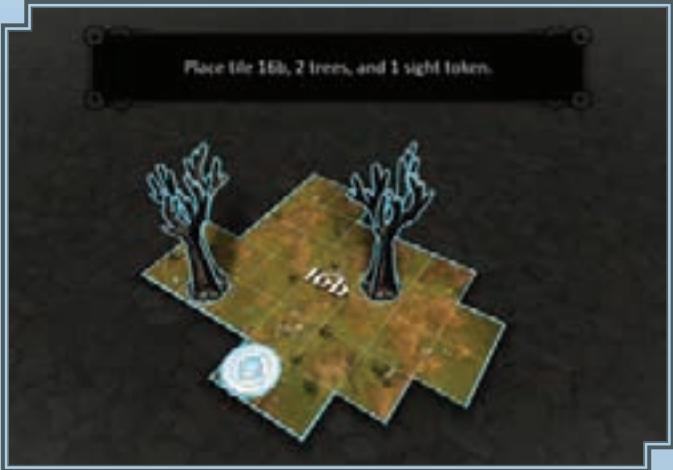
Create the Starting Map: Follow the app's instructions to set up the first map, placing map tiles, tokens, terrain, and figures.
A unique code is printed on each map tile to make it easy to find the correct tiles. Leave room in the play area to place additional map tiles during the game.


Galaden starts the game with nine health.

Injury Cards
Consumable Cards

PLAYING A QUEST
A single game of Descent: Legends of the Dark represents one Quesī that is played over a series of rounds, and each round consists of two phases that players resolve in the following order:
-
Hero Phase: During this phase, the heroes can move around the map, attack enemies, and interact with their environment.
-
Darkness Phase: During this phase, the app resolves the effects of time, enemies, and the quest.
After resolving the darkness phase, a new round begins, starting with the hero phase. Players continue to resolve game rounds in this manner until the quest ends.
-HERO PHASE
During the hero phase, the heroes choose the order in which they take their turns. This order can change from round to round. After all heroes have taken a turn, they select the “End Phase" button to proceed to the darkness phase.
During their turn, each hero may perform up to three actions in any order: one maneuver action and two additional actions of their choice. A hero can perform the same action multiple times. For example, Brynn could perform a fight action followed by two maneuver actions.
The five actions a hero can choose from are as follows:
• Maneuver
• Fight
• Explore
• Ready
• Unique
Each of these actions is described in more detail over the next several pages.
The maneuver action allows a hero to move around the map. When a hero performs a maneuver action, they gain a number of movement points equal to their speed.

A hero can spend one movement point to move into an adjacent space. Map tiles are divided into spaces, and two spaces are adjacent if they share a border or corner.
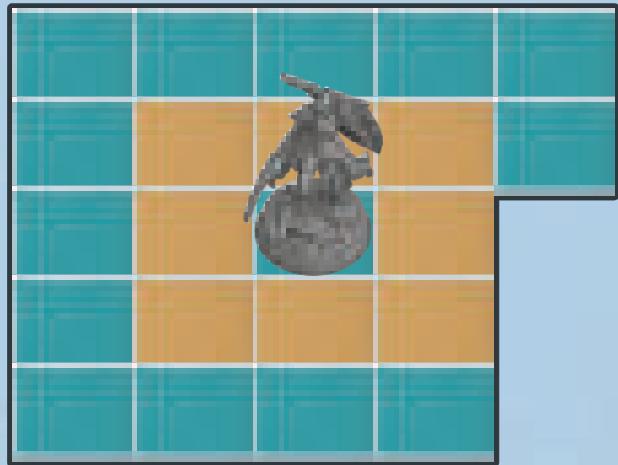
The hero's space is adjacent to the eight highlighted spaces.
A hero cannot move into a space that contains an enemy or a piece of 3D terrain, but they can move into a space that contains another hero if they can immediately move out of that space.
A hero can perform actions between spending movement points.
After a hero ends their turn, any movement points that they did not spend are lost. Unspent movement points do not carry over to a future turn.
Impeded
A hero is IMPEDED if they are adjacent to an enemy. When a hero becomes impeded, they lose all movement points. When an impeded hero would gain more than one movement point, they gain only one instead.
Sight Tokens
Sight tokens represent points of interest. As heroes approach them, they can expand the map, reveal new details, or trigger traps.

Sight Token
When a hero moves into or adjacent to a space that contains a sight token, they must activate the sight token immediately. To do so, they select and drag from their hero's portrait to that sight token in the app. This does not use an action.
If an effect causes this movement to occur during the darkness phase, the hero resolves that sight token at the start of the next round.

Brynn moved adjacent to this sight token, so she must activate it before she continues her turn.
-MOVEMENT EXAMPLE-
Brynn wants to move adjacent to the nearby treasure chest so she can search it. Brynn performs a maneuver action.
Her speed is “3," so she gains three movement points.
-
Brynn spends her first movement point to move to the right.
-
She spends her second movement point to move diagonally into Syrus's space.
-
She spends her third movement point to move to the right and immediately exit Syrus's space. She needs to move farther, so she performs another maneuver action, gaining three more movement points.
-
She spends her fourth movement point to move adjacent to the chest. For her final action of the round, she performs an explore action to search the chest.
-
She spends her fifth movement point to move adjacent to the cauldron and ends her turn, forfeiting her last movement point.


-IMPEDED MOVEMENT EXAMPLE
After exploring the chest on her previous turn, Brynn wants to attack the wight. Brynn performs a maneuver action and gains three movement points.
-
She spends one movement point to move adjacent to the wight. This causes her to become impeded, so she loses all of her remaining movement points.
-
She uses her second action to attack the wight (see “Fight" on page 10) but she does not defeat it, so she is still impeded.
-
She uses her last action for another maneuver action. Since she is still impeded, she gains only one movement point. She uses it to move away from the wight.

FIGHT
The fight action allows a hero to ATTAck an enemy in an attempt to defeat it and remove it from the map. An example of a hero’s attack is on page 12.
The weapon that is faceup on a hero's attack card is the weapon that a hero uses during an attack. When a hero attacks, they must choose and attack an enemy figure that is within RANGE and in LINE OF SIGHT of their hero figure.
Range
Range is used to determine if an enemy is within striking distance of a hero's weapon. For all weapons, an enemy is within range of a hero if it is adjacent to that hero. For weapons that have the “ReAch” keyword, an enemy is within range if it is adjacent or two spaces away from that hero.
If a hero is using a weapon that has a range value, the attack is a ranged attack. Heroes can perform ranged attacks against adjacent or non-adjacent enemies.

When attacking using a weapon that has a range value, the hero must determine the range to the enemy. To determine range, the hero counts the number of spaces between their space and the enemy's space along the shortest path of adjacent spaces. The hero starts in a space that is adjacent to them and ends in the enemy's space. If that number is equal to or less than the weapon's range, the enemy is within range.

Galaden is adjacent to the enemy on the right, so he can attack it with any weapon. The enemy on the left is three spaces away, so Galaden needs a weapon that has a range value of at least “3” to attack it.
Line of Sight
Line of sight refers to what a figure can see. To determine line of sight, a hero traces an imaginary line from the center of a figure's space to the center of another figure's space. If the line is interrupted by map edges or spaces that contain blocking terrain, line of sight is BLockED. The pieces of blocking terrain are shown on page 22.
The corners of spaces do not block line of sight. Also, figures do not block line of sight.
A figure cannot attack another figure if line of sight between them is blocked. 1
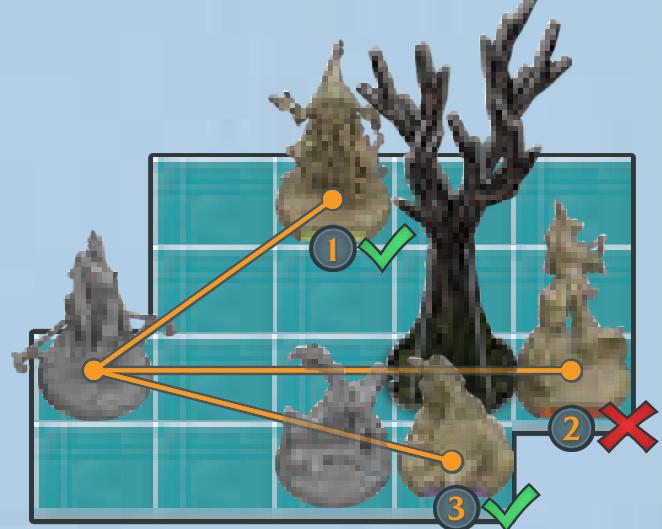
Line of sight from the hero to enemy 2 is blocked by a tree, but it is not blocked to enemies 1 and 3.
LINE OF SIGHT TOOL
If a player is struggling to determine line of sight, they can select “Line of Sight" in the options menu. Then, the player selects any space in the app—this causes the app to highlight all of the spaces that are within Options Menu line of sight of the selected space. The app also displays range from that space: red spaces are adjacent, orange spaces are two spaces away, and yellow spaces are three or more spaces away.


The selected space has unblocked line of sight to the highlighted spaces, but not to the spaces behind the door.
Hero Attacks
When a hero attacks an enemy, they use the app to select and drag from their hero's portrait to the image of the enemy that they are attacking.

To attack the green bandit, Syrus drags from his portrait to that bandit's image.
This opens the hero attack screen, where the hero indicates the weapon they are using (their faceup weapon) by selecting it in the app. Then, they roll the die that is displayed next to the attack icon on their hero card.

Galaden rolls one blue die during his attack.
Typically, the hero wants as many success () results as possible to damage the enemy. The hero can resolve each die icon as follows:
Success (): The hero can spend each success to apply damage to the enemy.
Advantage (): The hero can place fatigue to convert one advantage () result to one success () result for each fatigue that is placed. Fatigue is described on page 18.
Surge (): The hero can spend surge () results to resolve surge abilities. Surge abilities provide heroes with various effects and are described on page 20.
For each success () result the hero spends to apply damage, they select the “>" button to input that success into the app. After the hero has input the total number of successes, they select “Confirm.'

For each success, the enemy suffers damage (), which is automatically subtracted from its health. The amount of damage that the enemy suffers for each success is determined by the damage value of the weapon the hero used.

Bloodwood Bow has a damage value of “2." With two successes, the enemy suffers four damage.
Enemy Defense and Abilities
Each enemy has a defense value displayed next to its health bar. Each time an enemy is attacked, the damage that it suffers is reduced by an amount between zero and its defense value. This is automatically calculated by the app.

When the bandit is attacked, the app reduces the damage it suffers by a number between zero and two.
Most enemies also have a defense ability that the heroes resolve when the enemy is attacked.

Damage Types
Each weapon has one or more damage types shown on the left side of the card. Most enemies are weak to some damage types. During a hero’s attack, each success spent causes one additional damage for each of the weapon's damage types that the enemy is weak to. This is calculated by the app.
Crush Damage Type
The damage types that an enemy is weak to are displayed as “?” until the weakness is discovered. The first time an enemy suffers damage of a type that they are weak to, that weakness is revealed for the duration of the campaign.

This enemy is weak to weapons that have the anemos damage type. Their other weakness is unknown.
HERO ATTACK EXAMPLE-
- Syrus performs a fight action to attack an enemy. His equipped weapon, “Glimmering Wand," has a range value of “4," so he must choose an enemy that is up to four spaces away from him.

- Enemy 3 is not within four spaces of Syrus, so Syrus cannot attack it. Enemy 1 and 2 are within range, but line of sight to enemy 1 is blocked by the map edge, so Syrus can attack only enemy 2.

- In the app, Syrus selects and drags from his hero portrait to enemy 2's figure to start the attack.

- When prompted, Syrus confirms he is using “Glimmering Wand." Then, he rolls the orange die shown on his hero card, resulting in one success () and two advantage ().


- Syrus places one fatigue on his faceup weapon to convert one advantage (+) to a success () for a total of two successes. He inputs two successes in the app by selecting the “>" button twice and selects “Confirm."

- The app calculates the result of the attack. Each success for “Glimmering Wand" does two damage. Since “Glimmering Wand” has the slash () damage type— which the enemy is weak to—the enemy suffers one extra damage for each success, raising the total to six damage.

- The enemy has a defense value of “2," so the damage is randomly reduced by up to two. In this case, the damage is reduced by one, so the enemy suffers five damage, leaving it with 22 health.

- The zealot's defense ability is also resolved. The app selects a random enemy, and when that enemy attacks next, the app will add two damage.
—EXPLORE—
The explore action allows a hero to search the environment and affect the tokens and 3D terrain on the map, which can progress and alter a quest's narrative and provide the heroes with unique choices and experiences.

Explore Token

3D Terrain Piece
When a hero performs the explore action, they INTERAcT with a piece of 3D terrain or an explore token. That component must be adjacent to or in the same space as the hero's figure. To interact, the player selects and drags from their hero's portrait to the component they are interacting with and follows the instructions that the app provides.

Brynn explores the chest by dragging from her portrait to the chest.
Interacting with 3D terrain and tokens can produce a variety of effects such as performing tests, gaining items, and expanding the map, all of which is described later.
—READY—
The ready action allows a hero to flip one card in their play area. This lets the hero change their hero ability or weapon to something more useful for their current circumstances.
When a hero performs the ready action, they can flip their hero card, their attack card, or one of their skill cards. Skills are described on page 28.
When a hero flips a card for any reason, they discard all tokens on that card. This is a great way for the hero to remove the hindering effects of fatigue tokens and some conditions.

—UNIQUE ACTIONS ()—
Many cards have abilities that are prefaced with an action () icon. The number preceding the action icon indicates how many actions the hero uses to perform the unique action.
2 ◆: Attack an enemy 2 times. During each of these attacks, add 1 ★.
This ability uses two of the hero's actions.

DARKNESS PHASE
The darkness phase represents the passage of time, during which foes and other elements of the quest attempt to thwart the heroes’ goals. The app guides players through the darkness phase, but the steps are briefly described here:
-
Time Passes: Heroes suffer the effects of the “infected” and “terrified” conditions, which are described on page 20. Also, each hero can discard one fatigue; fatigue is described on page 18.
-
Enemy Activation: The app activates each enemy on the map, one at a time, causing them to move and attack. Enemy activations are described on page 15.
-
Quest: The app may display messages about new events, place enemies on the map, update the heroes’ objectives, and more.
-
Tactics: Some enemies may plan to execute a powerful or cunning tactic for the next round. If they do, the app displays a message that hints at the enemy's intent.
WINNING AND LOSING
Each quest has its own objectives that are displayed at the top of the screen.
OsJECTIVE: Defend the caravan until the baron arrives.
If the heroes complete the final objective of a quest, the heroes win and the quest ends.
If the final objective cannot be completed, or if any hero who has a major injury is wounded again, the heroes lose and the quest ends. Wounded heroes and injuries are described on page 18.
When a quest ends, the heroes progress to the next quest. However, the outcome of the quest—whether the heroes won or lost—may affect future quests and other aspects of the campaign.

During the darkness phase, each enemy takes a turn activating. When an enemy activates, it typically moves toward a specific hero and attacks them.
The order in which the enemies activate is determined by the app. When it is an enemy’s turn to activate, the app opens an activation screen that displays the picture and name of that enemy as well as other information the enemy uses for its activation.

Enemy Activation Screen
TARGETING
Each enemy wants to attack a hero during its activation. That hero is the enemy's TArGET and is displayed on its activation screen. When activating, the enemy moves so it is positioned to resolve an attack against that target if possible.
If the enemy cannot attack the displayed target, the hero who is closest to the enemy becomes the target instead. If there are multiple heroes who are the closest, the hero among them with the least health becomes the target, and if there are multiple closest heroes who have the least health, the heroes choose the target of the attack from among the eligible options.
If an enemy cannot attack any hero during its activation, that enemy moves toward the closest hero who has the least health.
The first thing an enemy does during its activation is move. When an enemy is activated, it gains movement points equal to its speed. If the enemy is impeded, it gains only one movement point instead.

Enemy Speed
Then, that enemy spends movement points to move to a space on the map where it can attack its target. An enemy that does not have a range value moves adjacent to its target. However, if an enemy does have a range value, it moves so it is a number of spaces away from its target equal

Enemy Range
to that range value, or as close to equal as possible. This may mean that the enemy moves away from its target if it is too close, or toward the target if it is too far away.
An enemy cannot move into a space that contains a hero or a piece of 3D terrain, but they can move into a space that contains another enemy if they immediately move out of that space.
—RANGE AND LINE OF SIGHT—
An enemy that can attack from range must have line of sight to its target from the space it moves to. If an enemy does not have line of sight to its target from any space that is a number of spaces away from its target equal to its range, that enemy moves to a space that is as far from its target as possible while remaining within range and in line of sight.
Line of sight and range are determined using the same rules described in the “Fight” section on page 10.
—IMPEDING—
Similarly to heroes, an enemy becomes impeded if it begins its activation in a space that is adjacent to a hero or if it moves into a space that is adjacent to a hero.
Enemies prefer not to become impeded if possible. However, this preference is the final consideration after all other movement criteria are satisfied.
·ATTACKING
After an enemy moves, it attacks its target for an amount of damage equal to the damage value displayed on its activation screen.

Damage Value
The target hero defends to reduce the amount of damage they suffer. To defend, the hero rolls
the die that is displayed next to their defense icon on their hero card. Then, they may resolve each die icon as follows:
• Success (): The hero can spend each success to reduce the damage they would suffer by one.
Advantage (): The hero can place fatigue to convert one advantage () result to one success () result for each fatigue that is placed. Fatigue is described on page 18.
Surge (): The hero can spend surge () results to resolve surge abilities. Surge abilities provide heroes with various effects and are described on page 20.

Galaden rolls one black die during his defense.
After reducing damage, the hero suffers all remaining damage. To suffer damage, the hero rotates their health dial to decrease their health by the amount of damage suffered. The effects of being reduced to zero health are described on page 18.

Galaden suffers four damage.
-ENEMY ACTIVATION ABILITIES
Each enemy has an ability, such as the zealot's “Ichor Lash," that modifies their activation. When an enemy activates, the heroes read and apply the ability to the enemy's activation.

INTERRUPT
The enemy activation screen has an “Interrupt” button that the heroes can select if they need to resolve effects that occur before or during an enemy activation.

When a hero selects the “Interrupt" button, the enemy activation screen closes, giving heroes access to the game's main screens. When the heroes are ready to resume an enemy’s activation, they select the “Resume Activation” button.

THE HEROIC ADVENTURE RULE
During enemy activations, the players should move and use enemy abilities in a way that best accomplishes the enemy's instructions and avoids the enemy becoming impeded if possible. Otherwise, players are not required to make the enemies move in a way that optimally opposes the heroes.
-ENEMY ACTIVATION EXAMPLE
- The purple zealot activates. The zealot's displayed target is Brynn, and it has a speed of “3” and a range of “3."
- The zealot is not impeded, so it gains three movement points. Since the zealot has a range of “3," it wants to be exactly three spaces away from Brynn. Of the spaces that are three spaces away from Brynn, the zealot moves to the space with the green checkmark, where it has unblocked line of sight to Brynn and does not become impeded.
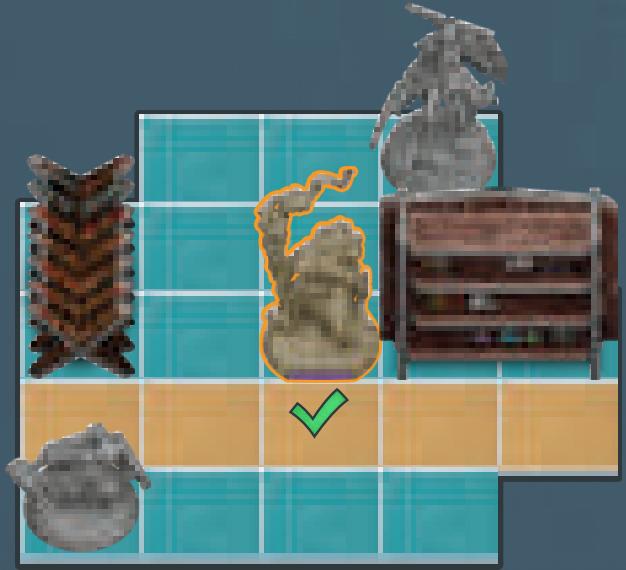
- The zealot attacks Brynn. Brynn rolls a black die for her defense. She rolls one success () and one surge (). Because she rolled a surge, the zealot's activation ability has no effect.


- The zealot's attack does five damage. Brynn's one success reduces that damage to four. Brynn suffers four damage, rotating her health dial to reflect her current health.


- The zealot's activation ends after it attacks. The heroes select “Done" to proceed to the next enemy's activation.

·DAMAGE AND FATIGUE-
This section describes the rules for damaging heroes and enemies, and the rules for hero fatigue.
十 -HERO DAMAGE AND INJURIES-
A hero's health dial always displays their current health. When a hero heals (), they increase their health, but they cannot have more than their maximum health.

Maximum Health on Hero Card
After a hero suffers one or more damage (), they decrease their health by that amount. If a hero's health is reduced to zero, they are
wounDED. When a hero is wounded, they set their health dial to their maximum health and select their portrait in the app to view their hero information screen. Then, they select the “Wound Hero” button and follow the instructions that the app provides.
If the hero is instructed to suffer an injury, they do so as follows:
Minor Injury: The hero suffers a minor injury by taking the minor injury card specified by the app and placing it in their play area with the “Minor” side faceup. The hero reads the card’s effect and follows its instructions.
Major Injury: The hero suffers a major injury by flipping their injury card so the “Major” side is faceup. The hero reads the card's effect and follows its instructions.
If a hero with a major injury is wounded, the app typically informs the heroes that they have failed and the quest ends.

Minor Injury Card

Major Injury Card
ENEMY DAMAGE AND DEFEAT
When an enemy suffers damage from an attack, the app applies that damage automatically. If a hero's ability directly damages an enemy, the hero selects that enemy in the enemy overview screen and manually reduces the enemy's health using the “<” button.
If an enemy's health ever reaches zero, that enemy is defeated, and their figure is removed from the game map.

Direct Damage Input on Enemy Information Screen
Fatigue is the result of a hero exerting additional effort during their quest. This effort can help a hero succeed at a crucial moment, but the fatigue they accumulate can hinder them if they do not manage it carefully.
—CONVERTING ADVANTAGE
When a hero rolls dice during an attack, defense, or test, they can convert advantage () results to success () results by placing fatigue tokens on their cards. For each fatigue token that is placed, the hero converts one advantage result to a success result. The hero

Fatigue Token
can place each fatigue token on any of their cards that has a FATıGuE LImIT in the lower-right corner of the card. The fatigue limit indicates the maximum number of fatigue tokens that can be on that card.
—FATIGUE ABILITIES—
If an ability is prefaced with a number and the fatigue () icon, it is a FATIGuE ABILITY. To resolve a fatigue ability, a hero must place the number of fatigue tokens specified by the ability, and these tokens can only be placed on the card that has the ability. If the number of tokens that would be on the card exceeds its fatigue limit, that ability cannot be resolved.
If an “X” precedes the fatigue () icon, the hero may place any number of fatigue on the card as long as they do not exceed its fatigue limit.
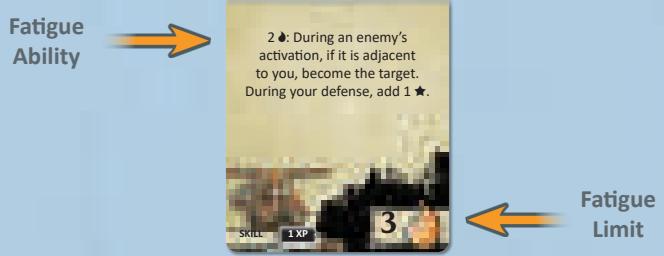
To use this ability, the hero must place two fatigue tokens on this card. The card’s fatigue limit is “3,” so the ability cannot be used if there are already two or more fatigue tokens on it.
—SUFFERING FATIGUE—
Additionally, some game effects may require a hero to “suffer” fatigue. Unless specified otherwise, when a hero suffers fatigue, they must place the specified number of fatigue tokens on any of their cards that has a fatigue limit without exceeding that limit. This fatigue can be spread across multiple cards. When suffering fatigue, for each fatigue token that a hero cannot place on a card, they suffer one damage instead.
When heroes interact with terrain and tokens on the map, they often are instructed to perform a test. Each test requires a hero to use one of the stats that is displayed on their hero card: might, agility, insight, or will. Each stat can have a positive (+) or negative (-) modifier that is applied to all tests of that stat.
When a hero is instructed to perform a test of a specific stat, they roll two black dice. Then, they apply the modifier to the number of successes they rolled.

Brynn tests will and rolls five successes. She applies her will modifier, resulting in a final total of six successes.
The total number of successes after modifiers are applied determines the outcome. There are two types of test:
Some tests require the hero to input the number of successes in the app. Then, the app provides the outcome of the test. The successes for some of these tests are cumulative—the heroes can perform the test multiple times, and the app tracks the total number of successes.
While performing a test, the hero can spend surge () icons to resolve surge abilities and can place fatigue to convert advantage () results to success () results.

This hero tested might and rolled three successes.
·NEGATING
The app may grant a hero the chance to negate damage or fatigue before they suffer it. When this occurs, the hero is presented with a stat to test (e.g., “Each hero suffers 4 damage; might negates."). Before suffering the damage or fatigue, the hero may test the indicated stat, and each success () produced during that test prevents one damage or fatigue.

HERO EFFECTS
This section describes abilities and effects pertaining to heroes.
·ABILITIES
Most of the cards in a hero’s play area have abilities. Each ability describes when and how it is resolved.
When a hero resolves an ability, it cannot affect other heroes unless the ability specifies otherwise. For example, if an ability reads “1 ◆: Focus 1 card," the hero resolving that ability cannot place a focus token on another hero’s card.
—SURGE ABILITIES—
A suRGE ABILITY is any ability that is prefaced by a surge () icon. Many cards have surge abilities, including all hero cards. A hero can use their surge abilities any time they roll a die. To use a surge ability, a hero spends a surge icon from one of their die results and then resolves the ability's effect. Each surge ability can be used only once per roll.

Surge Ability on Hero Card
—REROLLING DICE—
Some abilities allow heroes to reroll dice. Reroll abilities must be used before any die results are resolved. If a hero has multiple reroll abilities, they can reroll multiple dice or reroll any dice multiple times, using their rerolls as they choose.
—USING CONSUMABLES
A consumable is an item that provides an immediate benefit. Each consumable describes when it can be used and what it does. After it is used, it is set aside and cannot be used again during that quest.

Consumable Card
KEYWORDS
Heroes and enemies use abilities that are presented as κEYwoRDs. A keyword is a shorthand for an effect that appears frequently. The rules for each keyword are as follows:
Charge: After a card is flipped (which includes when it is placed in a hero's play area at the start of a quest), if the faceup side of that card has the “ChARGE” keyword, the type and number of tokens specified by the keyword are placed on the card. When there are no tokens of that type on that card, that card is flipped.
For example, if a hero flips a card and the ability on the faceup side reads, “ChARGE: Prepare 2," the hero places two prepare tokens on that card. When the hero spends the last of that card’s prepare tokens, the hero immediately flips that card.
Reach: A weapon with this keyword can be used to attack a figure that is up to two spaces away (if line of sight is not blocked).
Reveal: After a card is flipped (which includes when it is placed in a hero’s play area at the start of a quest), if the faceup side of that card has the “RevEAL” keyword, the effect that follows the keyword must be resolved immediately.
Shift: This keyword allows a figure to move up to the number of spaces specified. When a figure is moved in this way, it ignores the rules of impeding, but it still obeys all terrain rules.
-HERO CONDITIONS
Hero conditions are positive and negative effects represented by condition tokens that are placed on cards. If an effect instructs a hero to “infect,” “terrify,” “scar,” “focus,” or “prepare” a card, that hero places a condition token of the appropriate type on that card. For example, if a hero is instructed to “focus" their hero card, they gain a focus token and place it on their hero card.
If a card is not specified, the hero can place the token on their hero card, attack card, or any of their skill cards.
When a card would gain a condition but already has a token of that type, the card cannot gain that condition. Resolving the “chARGE” keyword is an exception to this rule.
When a hero flips a card, all tokens on that card are returned to the supply.
Each condition has a unique effect, as follows:


Infected: When time passes during the darkness phase, the hero suffers damage equal to the number of infection tokens on their cards.
Terrified: When time passes during the darkness phase, the hero suffers one fatigue on each of their cards that has a terrify token on it.

Scarred: When a hero flips a card that has a scar token on it, that hero suffers two damage.

Focused: During an attack, defense, or test, a hero may discard a focus token from a card to reroll one of their dice.

Prepared: During their turn, a hero may discard a prepare token from one of their cards to flip that card without performing a ready action.
ADDITIONAL ENEMY RULES.
This section describes additional rules pertaining to enemies.
Enemy activation is described on page 15.
PLACING ENEMIES-
When an enemy spawns, the app displays the enemy in the space where the heroes should place the enemy's figure on the map. If that space is already occupied by a figure, the heroes move the existing figure to the nearest space of their choice.
Berserker Spawning in App
·ENEMY LEVELS
Each enemy has a level that indicates the strength of that particular figure. The enemy's level is displayed in the app on the enemy screen. Higherlevel enemies have more health and defense, and they have stronger attacks and abilities.

Enemy Level
·ENEMY STATUSES
Enemy statuses are negative effects that are tracked in the app. If a hero causes an enemy to suffer a status, the hero applies it by selecting the enemy in the enemy overview screen and selecting the appropriate status.

Enemy statuses are resolved automatically by the app and are removed by the app at the end of each round. An enemy cannot suffer a status that it already has.
The app resolves each status as follows, and all percentage calculations are rounded up.
Afflicted: During the darkness phase, each afflicted enemy suffers four damage.
Dazed: When a hero attacks a dazed enemy, the secondary abilities on the hero's weapon are 10% more likely to be used (secondary abilities are explained on page 27).
Doomed: At the end of the round, a doomed enemy's “Doomed” status is removed, but all of its other statuses remain on the enemy for another round.
Enfeebled: An enfeebled enemy's attack damage is reduced by 20%.
Exposed: An exposed enemy suffers 20% more damage from attacks.
• Slowed: A slowed enemy's speed is reduced to one.
SMALL AND LARGE ENEMIES
Enemy figures that occupy one space are smALL. Enemy figures that occupy more than one space are LARGE. When a large enemy moves, the heroes choose one space that is adjacent to a space that the large enemy occupies. Then, they move the enemy so that any part of its base occupies the chosen space. All other movement rules apply.
When determining line of sight for large enemies, a path can be traced to and from the center of any space that the large enemy occupies. Additionally, when determining range to or from a large enemy, heroes can count from any space that the large enemy occupies.

The large enemy can move adjacent to both heroes by spending two movement points.
RISER

Terrain represents natural elements, such as water, lava, and trees, as well as objects such as treasure chests, shelves, and gates. Some terrain is represented as underlays, which are described on the next page; however, most terrain is represented by 3D punchboard.
Heroes can perform an explore action to interact with 3D terrain, and those interactions may include opening a door or a treasure chest, springing traps, or discovering recipes and harvesting materials.
The heroes can select a piece of 3D terrain in the app to display information about that terrain.
-TERRAIN AND MOVEMENT
Heroes and enemies cannot move into a space that contains a piece of 3D terrain unless a rule or effect specifically states otherwise (e.g., the rules for staircases). Figures can move diagonally between two spaces that contain 3D terrain.
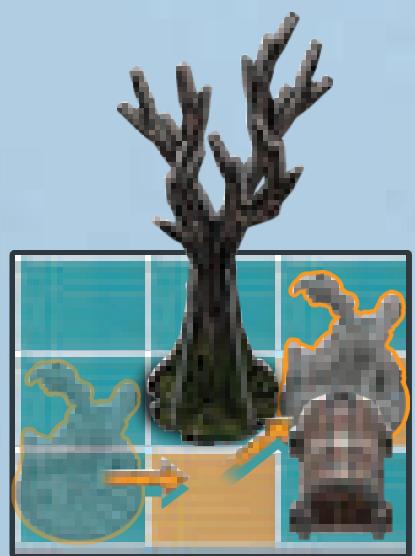
The 3D terrain pieces shown below are BLockING TERRAIN. This terrain blocks line of sight, and heroes cannot count range through blocking terrain.


Pillar (short and tall)
Tree
Dragon Statue

Shelf

Door
BARRICADES-
Barricades are dangerous to heroes and enemies alike.
If a hero attacks an enemy that is adjacent to a barricade, the hero adds one success to their attack.

If an enemy attacks a hero who is adjacent to a barricade, the enemy adds one damage to its attack.

An archway is a piece of terrain that consists of two pillars and an arch. The spaces that are occupied by an archway's pillars prevent movement and block line of sight. Figures can move into and trace line of sight through the two spaces between the pillars.

Heroes and enemies can move and attack through the two spaces under the arch.
If a figure is too tall or too wide to fit underneath an archway, players should remove the archway until the figure is no longer positioned underneath it. It may be helpful to place a pillar or token on the spaces occupied by the archway's pillars to remind players that they cannot move or trace line of sight through those spaces.
Some terrain is printed on sheets that are placed partially under map tiles. When placing this terrain, it is important that only the spaces shown in the app are exposed.


Water Underlay under a Map Tile
The spaces on underlays are adjacent to spaces that they share a border or corner with, and heroes and enemies can move into underlay spaces normally. Each type of underlay has unique effects for both heroes and enemies, as follows:

Embers: If a hero moves into an ember space, they scar one of their cards. If an enemy moves into an ember space, the enemy becomes afflicted and doomed.

Poison: If a hero moves into a poison space, they infect one of their cards. If an enemy moves into a poison space, the enemy becomes enfeebled.

Spikes: If a hero or enemy moves into a spike space, they become impeded and suffer two damage.

Water: When spending movement points to move out of a water space, a hero or enemy must spend one additional movement point.
The heroes can select an underlay in the app to display a reminder of this information.
Maps frequently have multiple levels of elevation. When placing tiles that are elevated, those tiles are supported by inserting them into pillars.
Each pillar can attach to a map tile in two ways, either using a notch that depicts a gargoyle or a notch that does not depict a gargoyle. When constructing any elevated portion of the map, reference the app to ensure that the pillars are oriented the same way that the app displays.
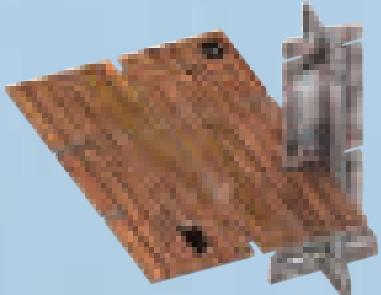

Gargoyle on Pillar
The app instructs the player to insert this tile as shown, with the gargoyle head side gripping the tile.
Starting from the tile on the table, each level of elevation is higher than the previous level by approximately the height of one staircase (or the distance to the next notch on a pillar).

-STAIRCASES
Figures cannot move directly upward an entire level (i.e., from a level-1 map tile to a level-2 map tile). Instead, they must use a staircase. Each staircase has three sTEps.
The bottom and middle steps are between the levels bridged by the staircase, so a figure can move from the lower level's map tile to those steps, or from those steps to the higher level's tile.
The top step is at the same level as the higher level's map tile (even if that tile is resting on the top step). Thus, a figure cannot move directly to the top step from the lower level's map tile.

In addition to using staircases, heroes and enemies can move downward any number of levels by moving off a tile edge. For the purposes of downward movement, any spaces that would be adjacent to each other if the map tiles of all levels were flattened are treated as adjacent. The best way for players to assess this is by looking at the map from overhead.

The highlighted spaces are lower than the hero's space, and the hero can move to any of them.
·ELEVATION AND ATTACKS-
Heroes and enemies can trace line of sight and determine range up and down elevation as if all levels were flattened. As such, heroes and enemies can attack each other from above or below.

To measure line of sight and range to this enemy, the hero treats themself as being at the same elevation as the enemy.
OVERHANGS
An ovERHANG is a portion of a tile that exists one or more levels directly above a tile that is below it. Both heroes and enemies can move into a space that is underneath an overhang. However, if a figure is too large to fit under an overhang—that is, if the figure cannot stand normally without touching the tile above it—that figure cannot move or be moved into that space.

Syrus stands under an overhang.
OVERHANGS AND LINE OF SIGHT—
Overhangs may or may not block line of sight between two figures. Generally, a figure can trace line of sight to another figure that is under an overhang if the line traces through a space on the lower figure's level that does not have an overhang above it. Players are encouraged to use the line of sight tool in the app. For detailed rules and examples of line of sight with overhangs, players can consult the in-app Rules Reference.
—OVERHANGS AND RANGE—
When determining range between two spaces on different levels, heroes count range through adjacent spaces as normal (see “Range” on page 10). When counting range, heroes can count up and down levels. For detailed rules about range with overhangs, players can consult the in-app Rules Reference.
Because some effects do not require line of sight, it is possible for a figure or space to be in range of effects whose origin is directly above or beneath them.
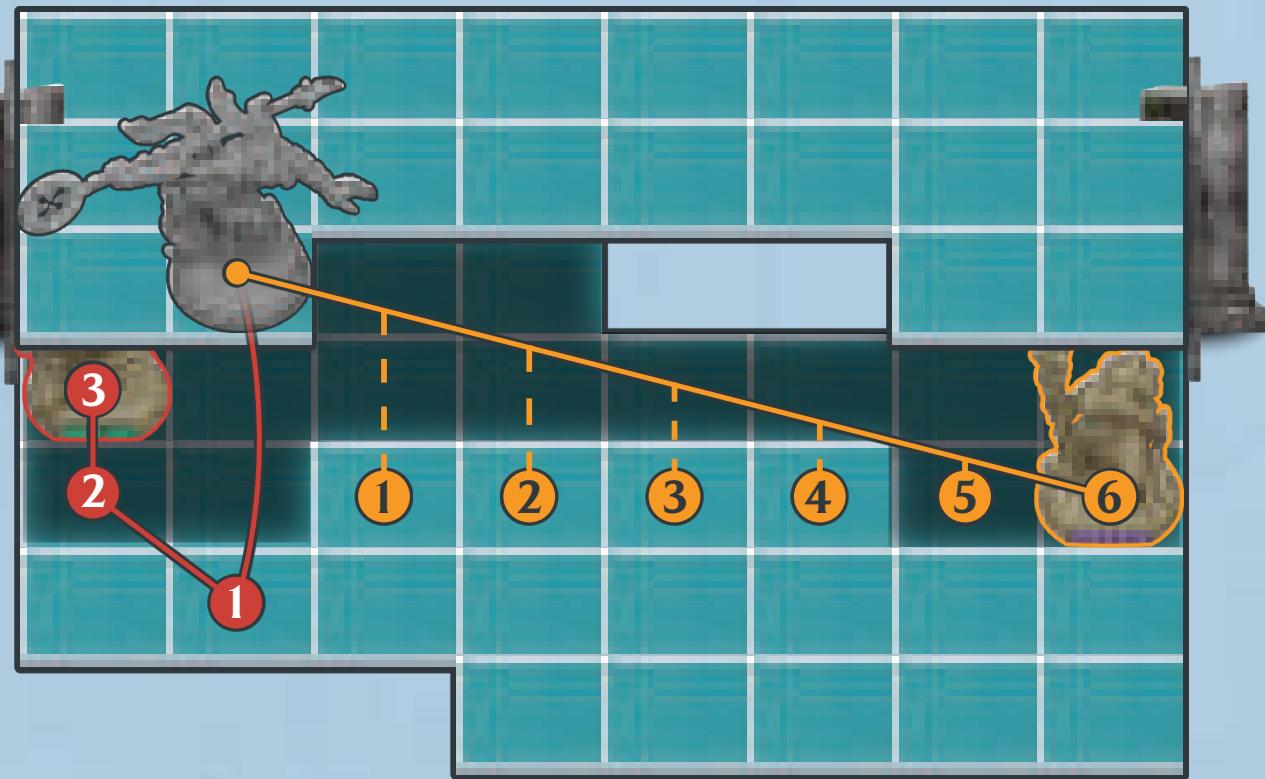
Vaerix has line of sight to the enemy on the right, and he can attack it using a weapon that has a range ${ \tt o f } ^ { \prime \prime } { \tt f } ^ { \prime \prime }$ or greater. Vaerix cannot attack the enemy on the left because line of sight is blocked; however, that enemy can be affected by abilities that target enemies that are within three spaces of Vaerix.
.CAMPAIGN RULES
The rules presented in this section are not necessary to begin playing the game. When the heroes gain access to the campaign map in the app, they should read the rules presented in this section and continue the campaign.
Early in the campaign, the heroes gain access to additional features in the app. This includes the opportunity to craft items, upgrade equipment, and acquire skill cards. These opportunities are available in the city of Frostgate, where the heroes return after most quests.
·EQUIPMENT
The weapons and items that the heroes use throughout their campaign are referred to as EQuiPMENτ. Each hero begins the game with two weapons, and as the campaign progresses, the heroes can find and craft different weapons in addition to armor, trinkets, and consumables.
The heroes are collectively referred to as a PARTY, and the equipment that the party has access to is tracked in the app. The amount of equipment that the heroes can have in their inventory is limitless; however, before embarking on a quest, each hero chooses a finite number of weapons and items to equip, as follows:
• Two weapons (creating one attack card)
• One armor
• One trinket
• Three consumables
All equipment cards are double-sided with one side showing the standard version of the equipment and one side showing its upgraded version. Each hero places their chosen equipment in their play area with the standard side faceup. If the equipment has been upgraded, they place it with the upgraded side faceup instead. The rules for upgrading equipment are described in “Crafting and Upgrading” on page 27.

Standard Side

Upgraded () Side
Armor is used to increase a hero's health and defense and can aid in a hero’s survival in other ways.
Each armor card has an ability that describes when it can be used and how its effect is resolved. In addition to an

Armor Card
ability, armor may increase a hero's maximum health and provide additional die results or even dice when defending against attacks. If armor increases a hero's maximum health, that hero treats the health value on their hero card as if it was increased by the amount that the armor specifies.

Maximum Health Increased by One

One Additional Success (★) When Defending
Armor Restrictions
Each armor card indicates whether it is light, medium, or heavy armor. A hero cannot equip any armor type that is not presented on their hero card.


Armor Type on Hero Card (left) and Armor Card (right)
TRINKETS—
A trinket provides effects to the hero who has it equipped. The app manages the effects of all equipped trinkets automatically; however, when a hero equips a trinket, they still place that trinket's card in their play area as a reminder of its effect.

Trinket Card
—RUNES—
During the campaign, it is possible for a hero to find a rune. Some runes are trinkets, while others are weapons that do not have a hero restriction—any hero can equip them.

Rune Card
—CONSUMABLES
Consumables provide unique effects, each of which is described on the card. The ability of each consumable explains when it can be used. After using a consumable, a hero removes it from their play area.

Consumable Card
When crafting, the heroes can create batches of consumables, which allow heroes to choose those consumables for all future quests. A hero cannot equip multiple copies of the same consumable.
There are three types of consumables:
Common: There are four copies of each common consumable.
Limited: There are two copies of each limited consumable. These can be used only by specific heroes, who are listed on the card.
Unique: There is one copy of each unique consumable. These are powerful brews that can only be found during quests.
—WEAPON PARTS-
Weapons are made up of three PARTs. The first part dictates which card the hero uses. The other two provide the weapon with secondary abilities.
Many of these abilities have a percent chance of occurring each time the hero attacks; they are calculated and resolved by the app automatically. Other abilities that may affect heroes or the map display additional reminder text at the appropriate time.

First Weapon Part
TRAITS
Many cards contain traits such as “Leadership” or “Spear” that are presented below their card name. Traits have no inherent effects; however, other game effects may refer to cards that have those traits.
If an effect is referencing a card with a trait, it is only referencing the faceup side of that card.
CRAFTING AND UPGRADING
Throughout the campaign heroes gain the following resources: gold, materials, essences, and recipes. All of these resources are shared among the heroes and are tracked by the app. The heroes can use these resources between quests to craft new equipment and upgrade existing equipment.
—GoLD—
Gold is the primary currency of Terrinoth. When the heroes visit the city of Frostgate, they can spend gold to purchase materials used for crafting. Some quests and events also provide opportunities to spend gold.

—MATERIALS AND ESSENCES—
The primary resources that heroes need to craft and upgrade equipment are MATERIALS and ESSENcES. Materials are a common resource that heroes can either find through exploration or purchase in the city using gold. These include metal, bone, leather, cloth, minerals, herbs, and curios. Essences are rare and represent the components that make up the fabric of reality, such as ignos (fire) and anemos (air).

—RECIPES—
Throughout the campaign, the heroes gain recipes. Each recipe provides a hero with a list of materials and essences needed to craft a specific piece of equipment. To craft that equipment, the hero combines the listed materials with the recipe in the crafthall, which the heroes can visit between quests. After crafting a piece of equipment, the recipe and the materials that were combined with it are spent and automatically removed from the party's inventory. Any equipment that is crafted becomes part of the party's inventory for the remainder of the campaign, including consumables.
There are two recipes for each piece of equipment. The first recipe that is used crafts the equipment and it becomes available for the heroes to use during quests. The second recipe that is used upgrades the equipment, which allows the heroes to use the upgraded version.

THE CITY SCREEN'
Frostgate is one of the Free Cities of the kingdom of Terrinoth. While not subject to the barony of Forthyn, it exists within its borders and is both an ally and rival.

City Screen
The ciTy is home to the heroes during the campaign, and they return to it between quests. They can visit various locations to buy materials and craft equipment, as well as gather information from the residents of the bustling metropolis.
The city has three featured locations that the heroes can visit:

Crafthall
An important way that the heroes can gain power throughout the campaign is to craft and upgrade equipment. The crafthall allows heroes to spend the recipes, materials, and essences they have gained to craft and upgrade equipment.

Armory
The armory allows the heroes to modify the parts of their weapons so they can optimize for their upcoming quest, explore new strategies, and customize to their play style.

Shop
The shop contains materials, recipes, and sometimes equipment that can be purchased for gold. Additionally, materials can be sold for gold.
—EVENTS—
Events can appear in the city and on the campaign map and represent a variety of locations, people, and occurrences. To resolve an event, the heroes select the event in the app and follow the instructions. Some events require the heroes to travel to a particular destination. Events advance the narrative and provide the heroes with rewards and other surprises.

Regular: This type of event can appear in the city and on the campaign map. Heroes can resolve the event by selecting it.

Travel: This type of event can appear on the campaign map. Heroes can travel to that event and resolve it by selecting it.
—FEATS—
Each hero has unique feats that they can complete to progress their personal growth. A hero's feats are tracked by the app, which indicates their progress and notifies them when a feat is completed. After a feat is completed, the hero claims the reward shown, such as a new skill or an exclusive recipe, and selects a new feat.

—SKILLS AND EXPERIENCE—
As heroes progress through the campaign, they automatically unlock skills and gain ExPERIENcE (xP), both of which are tracked by the app. Skills provide a hero with abilities that are resolved as described on the skill cards. At the start of each quest, heroes choose which skills to equip. The combined cost of a hero's equipped skills cannot excede the hero's experience.
A hero can equip unlocked skills that depict that hero's image in the lower-left corner.

Similar to hero cards, skill cards are double-sided, have fatigue limits, and can be flipped during play.
—VIRTUES—
Each hero has two attributes that represent their primary virtues. These are unique, hero-specific attributes that the app uses to track a hero's narrative choices.
During the story, heroes make choices that may increase their virtues. Virtues have no inherent effects, but the app uses them to determine exclusive outcomes and choices for a hero.
Note that increasing both attributes is just as viable and useful to the app as focusing on a single attribute, so players can make their choices based on the story, gameplay, or how they would like their hero to grow.

CAMPAIGN MAP
The campaign map displays the barony of Forthyn and a glimpse into the regions beyond its borders. While in the city, the heroes can access the campaign map by selecting the City Exit button. The campaign map allows the heroes to view quests and events that are available to them.
City Exit Button

Campaign Map Screen
—QUESTS—
Quests on the campaign map are indicated by a quest icon. The heroes can select a quest to view a short description about it:

Campaign Quests: These quests progress the campaign's story whether the heroes win or lose. These quests often focus on a specific hero.

Side Quests: These quests are optional but offer additional rewards and story. Each side quest can be attempted once, and then is removed from the map.
When the heroes are ready to play another quest, they choose a quest from the map and select the “Prepare" button.
—PREPARING—
After a quest is selected, each player must choose a hero for that quest. Players may choose a different arrangement of heroes each time they play, but many quests indicate a required hero.

Brynn's portrait has a lock icon, which means she is required for the “The Treasure of Davin Throm” quest.
After selecting their heroes, each player chooses their weapons and trinket in the Hero Loadout screen. They also choose their armor, consumables, and skills for the upcoming quest, following the restrictions described in the previous sections. Then, they select “Embark” and the quest begins.

The hero loadout screen allows heroes to view and equip their weapons and trinkets.
-SAVING A CAMPAIGN-
Players can save their campaign at any time by selecting “Save & Quit” from the options menu. If players choose to save their game during a quest, it is important that the heroes record the location of all figures on the map as well as the arrangement of their play areas—this includes the types and orientation (what is faceup/facedown) of cards, the placement of tokens, and their current health.
CONTINUING A CAMPAIGN
To continue a campaign, the players select the “Load Game” button on the app's title screen. Then, they select the appropriate save slot for the campaign that is being continued.
Players can set up the supply by following step four of “Setup” on page 7. After players select their heroes, they gather their hero components and set their health dials. Then, they select their next quest in the app and select “Embark."
CLARIFICATIONS
This section clarifies some common language and rules. Entries are organized alphabetically by topic. The Rules Reference in the app provides comprehensive details for all rules, including the clarifications presented here.
CARD LANGUAGE
When an ability refers to a “roll,” it refers to any situation in which a hero rolls one or more dice, such as when attacking, defending, or performing a test.
If a component moves “toward" another component, each space that the moving component moves into must reduce the distance between both components.
If a component moves “away” from another component, each space that the moving component moves into must increase the distance between both components.
If an ability uses the word “consecutive," it is referring to a series of contiguous spaces in which the next space in the series is adjacent to the previous space.
If an ability instructs a hero to “swap” two components, each component is placed where the other component was previously.
If an ability uses the word “collectively," that ability affects the party as a whole instead of an individual hero. The party must decide how the effect is divided among the heroes.
CONDITIONS
If a hero has a choice of where to place a condition token, they cannot place it on a card that already has that type of token on it.
When a hero flips a card, all tokens that are on that card are discarded, even condition tokens that provide positive effects.
FATIGUE
A card that has a fatigue limit of “0” can have fatigue placed on it if an ability increases that card’s fatigue limit.
HEALTH
• A hero cannot heal above their maximum health.
If a hero suffers an amount of damage that would reduce their health below zero, that damage reduces their health to zero instead.
HERO TURNS-
A hero can still spend movement points and use abilities after performing all of their actions. The hero's turn does not end until they declare it has ended.
-STAIRCASES
Some maps are constructed with a map tile resting on the top step of a staircase. The spaces resting on the top step are treated as part of that step.
THE APP
Heroes can tap on objects in the app to view more information about them. Doing so does not use a hero's action. When a hero selects their portrait and drags to an object in the app, they are using an action.
TIMING
Each ability describes when it can be used. Most commonly, abilities can be used “before,” “after,” or “during” a specific time or action of the game, as follows:
If the timing of an ability uses the word “before” or “after," the ability's effect can be resolved immediately before or after the described timing event.
If the timing of an ability uses the word “during," the ability's effect can be resolved any time during the described timing event.
Each ability can only be used once during its described timing. For example, an ability that can be used “During your turn” can be used once during each turn, but it cannot be used twice during the same turn.
GOLDEN RULES
The golden rules are the fundamental concepts on which all other game rules are built.
If information in the Rules Reference contradicts the Learn to Play booklet, the Rules Reference takes precedence.
• If a card ability directly contradicts information in the Rules Reference, the card takes precedence. If both the card and the rules can be followed at the same time, they should be.
• If a card ability uses the word “cannot," it is absolute and cannot be overridden by other abilities.
• If an ability in the app directly contradicts information in the rulebooks or on cards, the app ability takes precedence.
Game Design and Development: Kara Centell-Dunk and Nathan Hajek
Additional Development: Jim Cartwright, Todd Michlitsch, Brandon Perdue, and Amudha Venugopalan
Technical Writing: Adam Baker and James Kniffen
Producer: Jason Walden
Fiction: Daniel Lovat Clark
Editing: Sam Gregor-Stewart and Joshua Yearsley
Proofreading: Alexis Dykema and Jeremy Gustafson
Board Game Manager: Andrew Fischer
Descent Story Review: Michael Gernes
Creative Director of Story and Setting: Katrina Ostrander
Graphic Design: WiL Springer with Shaun Boyke and Evan Simonet
Punchboard Engineer: Joseph D. Olson
Graphic Design Manager: Christopher Hosch
Cover Art: David Auden Nash
Map Tile Art: Yoann Boissonnet
Character Design: Sebastian Luca
Interior Art: Francesca Baerald, Julio Bencid, João Bragato, Ivan Dedov, Ana Fedina, Kiana Hamm, Ivan Kunakh, Tanya Maksimuk, Ario Murti, Igor Shapochkin, and Lenka Šimečková
Art Direction: Tim Flanders and Preston Stone
Managing Art Director: Tony Bradt
Sculpting: Robert Brantseg, Grace Cheung, Rowena Frenzel, Adam Martin, Gary Storkamp, and Irek Zieliński
Sculpting Coordinator: Mike Jones
Part Design: Kevin Van Sloun
Sculpting Lead: Cory DeVore
Sculpting Manager: Derrick Fuchs
Software Development: Mark Jones, Paul Klecker, and Xavier Marleau
Digital Artist: Gary Storkamp
Digital Operations Coordinator: Emma Hunt
Music: Steven Gernes
Quality Assurance Coordination: Andrew Janeba and Zach Tewalthomas
Production Management: Justin Anger and Jason Glawe
Visual Creative Director: Brian Schomburg
Senior Project Manager: John Franz-Wichlacz
Executive Game Designer: Nate French
Head of Studio: Chris Gerber
Playtesters: Adriano Alberti La Marmora, Craig Bishell, Doug Christiano, Kevin De Kock, Andrea Dell’Agnese, Emeric Dwyer, Julia Faeta, Malachi Gardner, Jeremy Gustafson, Stian Haugen, Thomas Hvizdos, Brian Ingvoldstad, Petr Knapp, Erik Miller, Lacey Miller, Roderick D Mitchell Jr., Daniele Palman, Max Ribaric, Kristian Steinli, Erik Strybos, Anna Svitilova, Joris Van der Vorst, Steinar Watne, and Eric Wellens
Special thanks to Andrew Navaro and to all of our beta testers.

© 2021 Fantasy Flight Games. Descent: Legends of the Dark is TM of Fantasy Flight Games. Fantasy Flight Games and the FFG logo are ® of Fantasy Flight Games. Gamegenic and the Gamegenic logo are TM and ® of Gamegenic GmbH. Fantasy Flight Games is located at 1995 West County Road B2, Roseville, Minnesota, 55113, USA, 651-639-1905. Actual components may vary from those shown.

ROUND STRUCTURE
Each game round consists of the following two phases:
-
Hero Phase: During this phase, each hero takes a turn performing actions to move, attack enemies, and interact with tokens and terrain.
-
Darkness Phase: During this phase, time passes and enemies activate.
-ACTIONS
During a hero's turn, they can perform one maneuver action and two additional actions. A hero can perform the same action multiple times (including multiple maneuver actions).
Maneuver: The hero gains movement points equal to their speed.
• Fight: The hero attacks an enemy.
Explore: The hero interacts with an explore token or piece of 3D terrain.
• Ready: The hero flips one of their cards.
• Unique: The hero resolves any ability that is prefaced by the action () icon.
-ICONS
★Success
Unique Action
Advantage
Upgrade
Surge
Health
Fatigue
Damage
KEYWORDS
Charge: After a card is flipped (which includes when it is placed in a hero's play area at the start of a quest), if the faceup side of that card has the “ChARGE” keyword, the type and number of tokens specified by the keyword are placed on the card. When there are no tokens of that type on that card, that card is flipped.
Reach: A weapon with this keyword can be used to attack a figure that is up to two spaces away (if line of sight is not blocked).
Reveal: After a card is flipped (which includes when it is placed in a hero's play area at the start of a quest), if the faceup side of that card has the “RevEAL” keyword, the effect that follows the keyword must be resolved immediately.
Shift: This keyword allows a figure to move up to the number of spaces specified. When a figure is moved in this way, it ignores the rules of impeding, but it still obeys all terrain rules.

HERO CONDITIONS
Infected: When time passes during the darkness phase, the hero suffers damage equal to the number of infection tokens on their cards.

Terrified: When time passes during the darkness phase, the hero suffers one fatigue on each of their cards that has a terrify token on it. (As normal, the hero suffers one damage for each fatigue token that cannot be placed in this way.)

Scarred: When a hero flips a card that has a scar token on it, that hero suffers two damage.

Focused: During an attack, defense, or test, a hero may discard a focus token from a card to reroll one of their dice.
Prepared: During their turn, a hero may discard a prepare token from one of their cards to flip that card without performing a ready action.
UNDERLAYS
Underlays have the following effects for heroes and enemies:

Embers: If a hero moves into an ember space, they scar one of their cards. If an enemy moves into an ember space, the enemy becomes afflicted and doomed.

Poison: If a hero moves into a poison space, they infect one of their cards. If an enemy moves into a poison space, the enemy becomes enfeebled.

Spikes: If a hero or enemy moves into a spike space, they become impeded and suffer two damage.

Water: When spending movement points to move out of a water space, a hero or enemy must spend one additional movement point.
FREQUENTLY OVERLOOKED RULES—
A hero can perform actions between spending movement points.
A hero can perform the same action multiple times during their turn.
When placing fatigue to resolve a fatigue ability, that fatigue must be placed on the card where that ability is printed.
When placing fatigue to convert an advantage to a success, that fatigue can be placed on any of that hero's cards that have a fatigue limit.
When a hero flips a card, all tokens that are on that card are discarded, even tokens that provide positive effects.
下载 Markdown