rules_zh_木卫三_9806.md
GANYM≡D≡
《木卫三》
——隔壁木卫六是灭霸老家
翻译 & 排版:陈斌华


游戏配件
30 拓荒者板块,包括 4 块起始板块
90 张卡牌,包括:
- 30 张 “地球穿梭机” 卡牌
- 30 张 “火星穿梭机” 卡牌
- 30 张 “拓荒者飞船” 卡牌
52 个拓荒者米宝(4 种颜色,每种 13 个)
4 块玩家版图
4 声望标记(木质方块)


关于这个游戏
每个玩家都扮演着一个公司的角色,专门派拓荒者去开拓银河系中未被探索的行星。这些公司正在寻找具有不同技能的移民:
蓝色拓荒者从事营销和传播工作:他们使企业更容易招聘拓荒者。
红色拓荒者是专家领导者和称职的管理者:他们帮助企业组织拓荒者以满足他们的需要。
黄色拓荒者是工程师:他们帮助拓荒者旅行更快。
紫色拓荒者在社会和医疗领域工作:他们有助于提高公司的声誉。
拓荒者前往无限远的第一阶段是转移到木卫三,木卫三是木星众多卫星中最大的卫星,也是拓荒者飞船的发射地。

设置
最近一个看科幻电影或电视剧的玩家将成为起始玩家。
[1] 将一块玩家版图放在你的面前,然后将声望标记(木质方块)放到你声望轨道的最左边一格。
[2] 然后拿取每种颜色的 7/10/13 拓荒者米宝(根据 2/3/4 人游戏的不同拿取不同的数量)来创建供应堆并将其放到游戏区域旁。
[3] 拿取 4 块起始拓荒者板块(上面含有 1 个米宝和 1 飞船符号)并将它们正面朝上放在桌子中央。将剩余的 26 块拓荒者板块作为板块堆。
[4] 将地球和火星拓荒者分类,分别洗混它们并创造 2 堆正面朝下的抓牌堆。将这 2 堆卡牌分别翻开 4 张排成一行,拓荒者板块上方放着地球穿梭机的卡牌,并将火星穿梭机上方放着地球穿梭机(见下方图示)。正面朝上的板块和卡牌构建了游戏区域,信息对所有玩家都公开。
[5] 拿取 30 个拓荒者飞船,背面朝上洗混它们,并翻开其中 3 块拓荒者板块放在 4 个火星穿梭机的上方一行。然后为每位玩家分别派发 4 张拓荒者飞船卡。每位玩家从各自手牌中选择 2 张拓荒者飞船并将其正面朝下放在各自玩家版图的对应区域。将每位玩家剩余的 2 张拓荒者飞船卡会洗回到拓荒者抓牌堆。然后所有玩家同时展示各自的拓荒者飞船。

2 人游戏的设置举例

游戏概念
玩家版图代表了拓荒者从地球到木卫三的旅程,分为几个部分:
[A]首先,玩家将其拓荒者板块放到指定的槽位内。这些板块允许他们招募拓荒者并将它们放到地球上。
B. 这座位于地球上的太空飞行中心最多可容纳 6 名等待登上飞往火星的地球穿梭机的拓荒者。
C. 火星太空飞行中心只能容纳 5 名拓荒者,因为他们正在等待登上飞往木卫三的火星穿梭机。

CANYMED
D. 木卫三的发射场有 2 个容纳 “拓荒者飞船” 卡牌的区域。在游戏开始时,有 2 艘飞船被放置在玩家版图上。他们的 “发射条件” 显示在各自的方框右侧:3 个相同的拓荒者或 4 个不同的拓荒者。一旦所有需要的拓荒者都在船卡上,拓荒者船就会起飞。然后换上新卡。
[ E ]玩家将自己的拓荒者卡牌放置玩家版图的底部对应列(与符号匹配的位置)并触发其效果。
被招募的拓荒者通常被放在地球上。当玩家使用一个地球穿梭机时,拓荒者从地球传送到火星。当一个火星穿梭机被使用时,拓荒者从火星被传送到玩家在木卫三上自由选定的拓荒者飞船。当完成传送时,拓荒者飞船自动在当前玩家回合结束时离开。永久离开太阳系的拓荒者会返回供应堆。
如果玩家已经拥有一些相同类型的游戏效果,他们将能够倍增拓荒者板块和穿梭机的效果。(○,◇,◇,◇,◇)。


回合概述
从起始玩家开始,玩家们轮流进行各自回合直到游戏结束条件被触发。当进行玩家回合时,当前玩家必须从 3 种行动中选择其中 1 种行动来执行。在玩家回合结束时,玩家补充其游戏区域的空置区域。然后下一位顺时针方向的玩家成为当前玩家。这 3 种可用行动为:
选择一个拓荒者板块
使用一个穿梭机来移动拓荒者
弃掉拓荒者板块来执行基础行动
选择一个拓荒者板块
当前玩家选择一个拓荒者板块并将其放到他玩家版图顶部的 3 个指定的区域的其中一个区域内。之后他触发该板块的效果(大多数情况是从匹配板块的拓荒者符号中招募拓荒者,并将其放到地球上。
每个拓荒者板块上面都印有一个类型(☑,☑,☑,☑)。如果所选板块是放在玩家版图上同类型的第2(或第3)块板块,当前玩家可以结算该效果两次(或对应的效果3次)。如果所选的板块恰好提供了不同效果的选择,则他们可以按照这种方式选择不同的效果。
在任何时刻,玩家都不能操控超过 3 块以上的拓荒者板块。如果玩家拿取一块拓荒者板块并且已经拥有 3 块板块在其玩家版图上,则他必须弃掉其中一块拓荒者板块,然后将新的板块放到其玩家版图上。
GANYMEDE®
如果拓荒者板块堆是空置的,洗混弃牌堆来创建一个新的正面朝下的抓牌堆。拓荒者板块被弃置时是正面朝上放置的,以便任何玩家可以在任何时刻查看它们。
举例:霍普选择一块☑拓荒者板块并将其放到他的玩家版图上。由于这是他的第2块☑拓荒者板块,触发了板块的效果两次。这个板块允许他招募一个红色拓荒者或者一个黄色拓荒者。霍普有3种选择:拿取2个红色拓荒者,或者拿取2个黄色拓荒者,或者分别拿取1个红色和1个黄色拓荒者。他选择了分别拿取各1个。

2 使用穿梭机卡牌来移动拓荒者

地球穿梭机:
如果当前玩家在地球上拥有地球穿梭卡牌顶部注明所需的拓荒者数量和类型,则他可以使用地球穿梭机。然后他可以拿取穿梭机卡牌,将其放到自己玩家版图匹配列底部的位置并将拓荒者从地球移动到火星上。然后他可以结算穿梭机卡牌的效果。这个效果可以根据该玩家版图底部的同类型穿梭机卡牌数量结算多次,包括卡牌本身这一次。
举例:霍普可以选择使用他的地球穿梭机,因为他在地球上拥有 1 蓝色和 1 红色可用拓荒者。他拿取穿梭机卡牌,将其放到自己玩家版图底部的列内,然后移动这些拓荒者到火星。他可以结算穿梭机的效果一次,因为这是他使用的第一张卡牌。这个效果允许他在地球上招募一个紫色拓荒者。

"GANYMEDE
火星穿梭机:
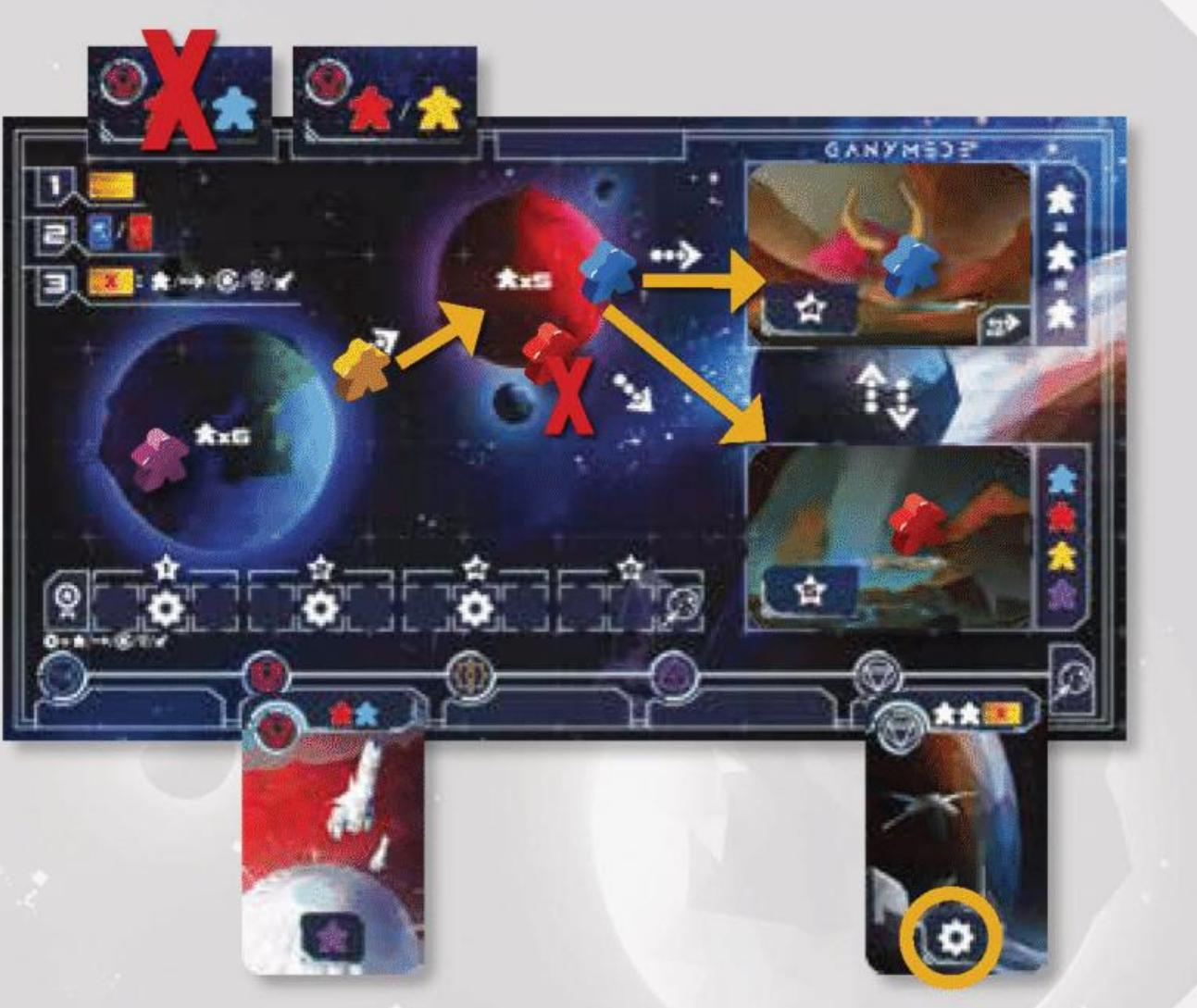
如果当前玩家在火星上拥有火星穿梭卡牌顶部注明所需的拓荒者(数量和类型),则他可以使用火星穿梭机。然后他可以拿取穿梭机卡牌,将其放到自己玩家版图匹配列底部的位置并将拓荒者从火星移动到他所选择的木卫三飞船上(可以两项都做)。这些船的起飞条件很严格。如果拓荒者因为没有可用的有效空间而不能进入船上,他们就会迷失在太空中,并返回供应堆。然后他可以结算穿梭机卡牌的效果。这个效果可以根据该玩家版图底部的同类型穿梭机卡牌数量结算多次,包括卡牌本身这一次。

举例:霍普可以使用这个穿梭机,因为他在火星上拥有2个可用拓荒者,并且他至少操控一块拓荒者板块。他拿取穿梭机卡牌,将其放到自己玩家版图底部的列,移动这些拓荒者到木卫三的任意拓荒者飞船并弃掉一块拓荒者板块。蓝色的拓荒者可以移动到任意2艘拓荒者飞船,因为起飞的条件在两种情况下都满足。然而木卫三上没有可供红色拓荒者的空间,因此它会迷失在太空并返回供应堆。之后他结算一次穿梭机的效果,因为这是他第一次使用的卡牌。由于这个穿梭机允许他使用一个基础行动(见下文),他选择从地球移动他的黄色拓荒者到火星。

所有☑穿梭机需要至少1个白色拓荒者。任意颜色1个拓荒者可以作为1个白色拓荒者使用。

一些穿梭机需要当前玩家从其玩家版图中选择弃置一个拓荒者板块。如果玩家不能从其玩家版图上弃置拓荒者板块,则不能使用这种类型的穿梭机。
当一艘拓荒者飞船被完成时:
完成一艘拓荒者飞船所需要的拓荒者数量都在每个玩家版图的右侧:3 个相同的拓荒者或者 4 个不同的拓荒者。
重要提示:当一艘拓荒者飞船被完成时,在你回合结束时它会发射,所以你必须在结算”完成一艘拓荒者飞船“步骤之前执行你的所有行动。
当一艘飞船起飞时,当前玩家按顺序执行以下 3 个步骤:
[1] 将拓荒者飞船上的所有拓荒者返还到供应堆。
2 如果拓荒者飞船有效果,在其卡牌右下角有指示,则现在结算其效果。之后将飞船卡正面朝上放在玩家版图旁。
3 现在将拓荒者行中拿取一张新的拓荒者飞船卡并将其加入玩家手牌。之后他从手牌选择一艘替换的飞船并将其放到玩家版图的空置区域上。
3 弃掉拓荒者板块来执行基础行动
弃掉任意数量的拓荒者板块来至对应数量的基础行动。如果当前玩家以此法执行了多次基础行动,则他可以选择不同的或者相同的行动。
基础行动


招募:选择从供应堆招募一个你想要的拓荒者并将其放到地球上。

改编:从你玩家版图上弃掉一个拓荒者并从供应堆替换一个你想要的颜色的拓荒者。

移动:从地球移动一个拓荒者到火星,或从火星移动到木卫三上的拓荒者飞船,或从一艘拓荒者飞船移动到另一艘拓荒者飞船。

声望:在你的声望轨道上向前(向右)移动你的声望标记1格。
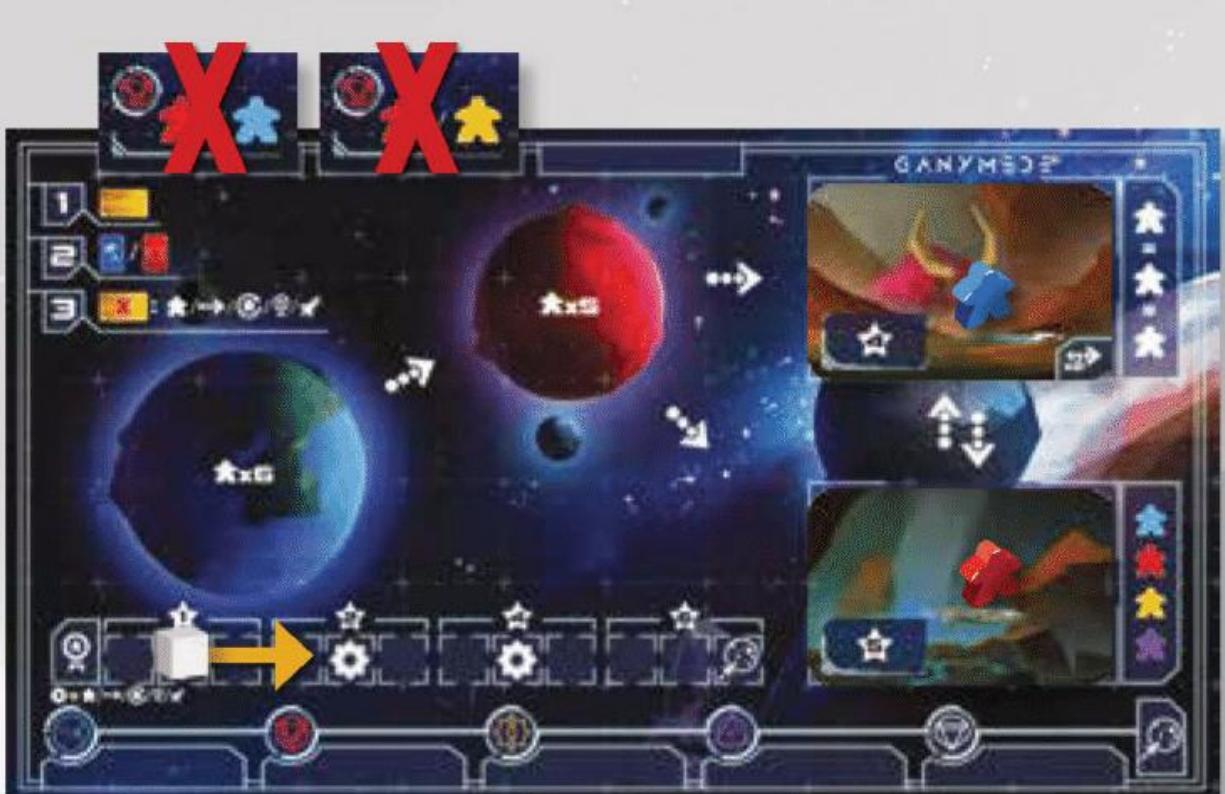
举例:霍普弃掉 2 个拓荒者板块来执行 2 次基础行动。他决定获得 2 点声望。

抓牌:从拓荒者行中(从抓牌堆顶部)拿取一张拓荒者飞船并将其加入你的手牌。
回合结束
在玩家回合结束时,当前玩家从对应的牌堆翻开新的板块或者卡牌来补充游戏区域。
举例:如果你在你回合内使用火星拓荒者,则从火星拓荒者牌堆补充一张新的火星拓荒者卡牌到游戏区域。

重要额外规则
行奖励

每当玩家使用每种类型的 1 个穿梭机(☑,☑,☑,☑,☑)时,他可以选择他的一艘拓荒者飞船立即起飞,即使该飞船还未完成或是空置。然后该玩家在回合结束时,将该飞船视同起飞来结算所有“完成拓荒者飞船”步骤。

"CANYMEDE"
2 声望轨道
在玩家声望轨道上,有 3 个奖励区域允许玩家执行一个基础行动。当获得声望时,当前玩家如果想要执行这个基础行动,他必须停在该奖励区域上。他也可以为了在声望轨道上提升更快而忽略该奖励。
1 2 4 6 ☆ = ★/↔/☆/☆/☆/☆/☆/☆/☆/☆/☆/☆/☆/☆/☆/☆/☆/☆/☆/☆/☆/☆/☆/☆/☆/☆/☆/☆/☆/☆/☆/☆/☆/☆/☆/☆/☆/☆/☆/☆/☆/☆/☆/☆/☆/☆/☆/☆/☆/☆/☆/☆/★/★/★/★/★/★/★/★/★/★/★/★/★/★/★/★/★/★/★/★/★/★/★/★/★/★/★/★/★/★/★/★/★/★/★/★/★/★/★/★/★/★/★/★/★/★/★/★/★/★/★★★★★★★★★★★★★★★★★★★★★★★★★★★★★★★★★★★★★★★★★★★★★★★★★★★★★★★★★★★★★★★★★★★★★★★★★★★★★★★★★★★★★★★★★★★★★★★★★★★★★★★★★★★★★★★★★★★★★★★★★★★★★★★★★★★★★★★★★★★★★★★★★★★★★★★★★★★★★★★★★★★★★★★★★★★★★★★★★★★★★★★★★★★★★★★★★★★★★★★★★/★★★★★★★★★★★★★★★★★★★★★★★★★★★★★★★★★★★★★★★★★★★★★★★★★★★★★★★★★★★★★★★★★★★★★★★★★★★★★★★★★★★★★★★★★★★★★★★★★★★★★★★★★★★★★★★★★★★★★★★★★★★★★★★★★★★★★★★★★★★★★★★★★★★★★★★★★★★★★★★★★★★★★★★★★★★★★★★★★★★★★★★★★★★★★★★★★★★/★/★★★★★★★★★★★★★★★★★★★★★★★★★★★★★★★★★★★★★★★★★★★★★★★★★★★★★★★★★★★★★★★★★★★★★★★★★★★★★★★★★★★★★★★★★★★★★★★★★★★★★★★★★★★★★★★★★★★★★★★★★★★★★★★★★★★★★★★★★★★★★★★★★★★★★★★★★★★★★★★★★★★★★★★★★★★★★★★★★★★★★★★★★★★★★★ ★★★★★★★★★★★★★★★★★★★★★★★★★★★★★★★★★★★★★★★★★★★★★★★★★★★★★★★★★★★★★★★★★★★★★★★★★★★★★★★★★★★★★★★★★★★★★★★★★★★★★★★★★★★★★★★★★★★★★★★★★★★★★★★★★★★★★★★★★★★★★★★★★★★★★★★★★★★★★★★★★★★★★★★★★★★★★★★★★★★★★★★★★★★★★★★★★★★★★★★ ★★★★★★★ ★★★★★★★ ★★★★★★★ ★★★★★★★ ★★★★★★★ ★★★★★★★ ★★★★★★★ ★★★★★★★ ★★★★★★★ ★★★★★★★ ★★★★★★★ ★★★★★★★ ★★★★★★★ ★★★★★★★ ★★★★★★★ ★★★★★★★ ★★★★★★★ ★★★★★★★ ★★★★★★★ ★★★★★★★ ★★★★★★★ ★★★★★★★ ★★★★★★★ ★★★★★★★ ★★★★★★★★★★★★★★★★★★★★★★★★★★★★★★★★★★★★★★★★★★★★★★★★★★★★★★★★★★★★★★★★★★★★★★★★★★★★★★★★★★★★★★★★★★★★★★★★★★★★★★★★★★★★★★★★★★★★★★★★★★★★★★★★★★★★★★★★★★★★★★★★★★★★★★★★★★★★★★★★★★★★★★★★★★★★★★★★★★★★★★★★★★★★★★★ ★★★★★★★★★★★★★★★★★★★★★★★★★★★★★★★★★★★★★★★★★★★★★★★★★★★★★★★★★★★★★★★★★★★★★★★★★★★★★★★★★★★★★★★★★★★★★★★★★★★★★★★★★★★★★★★★★★★★★★★★★★★★★★★★★★★★★★★★★★★★★★★★★★★★★★★★★★★★★★★★★★★★★★★★★★★★★★★★★★★★★★★★★★★★★★★★★★★★★★★★★★★★★★一一★★★★★★★★★★★★★★★★★★★★★★★★★★★★★★★★★★★★★★★★★★★★★★★★★★★★★★★★★★★★★★★★★★★★★★★★★★★★★★★★★★★★★★★★★★★★★★★★★★★★★★★★★★★★★★★★★★★★★★★★★★★★★★★★★★★★★★★★★★★★★★★★★★★★★★★★★★★★★★★★★★★★★★★★★★★★★★★★★★★★★★★★★★★★★★★★★★★★★★!!★★★★★★★★★★★★★★★★★★★★★★★★★★★★★★★★★★★★★★★★★★★★★★★★★★★★★★★★★★★★★★★★★★★★★★★★★★★★★★★★★★★★★★★★★★★★★★★★★★★★★★★★★★★★★★★★★★★★★★★★★★★★★★★★★★★★★★★★★★★★★★★★★★★★★★★★★★★★★★★★★★★★★★★★★★★★★★★★★★★★★★★★★★★★★★★★★★★★★★➢★★★★★★★★★★★★★★★★★★★★★★★★★★★★★★★★★★★★★★★★★★★★★★★★★★★★★★★★★★★★★★★★★★★★★★★★★★★★★★★★★★★★★★★★★★★★★★★★★★★★★★★★★★★★★★★★★★★★★★★★★★★★★★★★★★★★★★★★★★★★★★★★★★★★★★★★★★★★★★★★★★★★★★★★★★★★★★★★★★★★★★★★★★★★★★★★★★★★★★招投标
举例:霍普获得 3 声望点。距离他当前声望位置的前方 2 格有奖励。他可以选择获得 2 点声望并执行一个基础行动作为奖励,或者选择获得所有的 3 声望点而忽略该基础行动奖励。
3 研究到你声望的最大值

如果玩家的声望抵达其最大值,当前玩家可以选择木卫三上的自己的一艘拓荒者飞船:该飞船立即起飞,即使其尚未完成或者空置。然后该玩家将该飞船视同起飞来结算所有“完成拓荒者飞船”步骤。
一旦玩家的声望抵达其最大值,他无法再获得更多声望,但依旧可以使用能提升其声望的穿梭机。

- 在游戏结束时,玩家根据最终的声望等级获得0/1/2/4/6胜利点。

4 其他规则
有时,玩家可能无法移动拓荒者,因为目的地已满或不合理:目的地已满(火星)或起飞条件不允许玩家将拓荒者移到那里(木卫三)。在这种情况下,拓荒者迷失在太空,并返回到供应堆。
地球能容纳至多 6 个拓荒者,火星能容纳至多 5 个拓荒者。如果一个玩家在没有空间的情况下招募新的拓荒者,因为他不能丢弃已经就位的拓荒者,那么新招募的拓荒者将会丢失。但是,如果一个玩家招募了 2 个拓荒者并且只剩下一个可用的位置,他们仍然可以招募两个拓荒者中的一个。
在玩家回合结束时,玩家的手牌上限是 4 张拓荒者飞船卡牌。如果玩家的手牌超过了上限,则他立即将多余的卡牌放到拓荒者抓牌堆底部,顺序由玩家自行决定。
拓荒者的供应堆根据 2/3/4 位玩家分别有 7/10/13 的上限。玩家可以执行 1, 2 或 3 的行动,即使该行动允许他获得供应堆内不能使用的拓荒者。

GANYMEDE

举例 1: 供应堆没有蓝色和红色拓荒者。霍普决定拿取一个 ☐ 板块,这块板块允许他招募一个蓝色
或一个红色拓荒者。他依旧能拿取该板块,即使供应堆没有该颜色的拓荒者。

举例 2:供应堆没有蓝色拓荒者。霍普决定使用穿梭机,该穿梭机允许他招募一个蓝色拓荒者。他依旧能拿取改穿梭机卡牌并将其放到玩家版图下方,但不会结算穿梭机的效果。

游戏结束
玩家轮流进行回合,直到触发游戏结束条件:
玩家完成了自己的第 4 艘拓荒者飞船。如果玩家在最后回合完成自己的第 4 和第 5 艘飞船,则这两艘飞船都会起飞。
2 堆穿梭机牌库的其中一堆牌被用光(地球或火星)。
回合一直进行到结束,这样所有玩家都将进行相同的回合数。
之后每位玩家获得以下胜利点:
完成的拓荒者飞船
根据声望轨道获得 0/1/2/4/6 胜利点
未完成的拓荒者飞船:每艘未完成的拓荒者飞船 =1 胜利点
最终分数最高的玩家获胜。平局时,在火星上拥有最多拓荒者的玩家获胜。如果还出现平局,在地球上拥有最多拓荒者的平局玩家获胜。如果依旧出现平局,则大家共同获胜。

拓荒者效果

招募:从供应堆拿取 1 个你想要的拓荒者并将其放到地球上。


改编:从你玩家版图上弃掉一个拓荒者并从供应堆替换一个你想要的颜色的拓荒者。如果是穿梭机上指定的颜色,你可以选择弃掉该颜色的一个拓荒者并替换供应堆的任意一个拓荒者,或者弃掉你玩家版图上的任意一个拓荒者并将其替换为供应堆指定颜色的一个拓荒者。如果拓荒者是白色的,你自行选择(类似执行一个基础行动选择“改编”)


移动:从地球移动一个拓荒者到火星,或从火星移动到木卫三上的拓荒者飞船,或从一艘拓荒者飞船移动到另一艘拓荒者飞船。

抓牌:从拓荒者行中(从抓牌堆顶部)拿取一张拓荒者飞船并将其加入你的手牌。
声望:在你的声望轨道上向前移动你的声望标记 1 格。

基础:执行任意一个基础行动(招募,改编,移动,声望,抓牌)。如果这个穿梭机效果是多次行动,你可以在每次选择不同行动。
双色招募:从供应堆招募一个指定颜色的拓荒者并将其放到地球上。

GANYMED

拓荒者板块效果

招募 1 个蓝色或 1 个红色拓荒者并将其放到地球上。

招募 1 个蓝色拓荒者或者移动 1 个拓荒者。

招募 1 个红色拓荒者或者获胜 1 声望。

招募 1 个黄色拓荒者或者添加 1 艘拓荒者飞船到你手牌。

拓荒者飞船
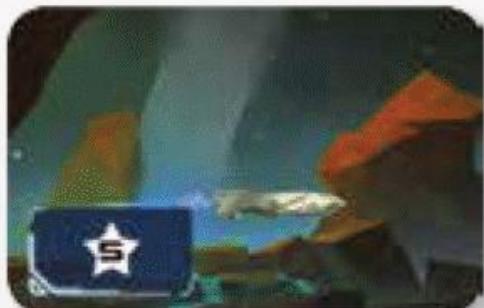
5 胜利点。


4 胜利点并执行 2 次 “移动” 行动。
游戏结束时,你版图下方可见的每有 1 个指定类型的穿梭机


游戏结束时,你版图下方的穿梭机顶部,每种可看到颜色就获得 1 胜利点。
如果你至少有 5 种不同颜色的穿梭机(+ + + + +),则获得 6 胜利点。

4 胜利点(这艘飞船需要至少1 拓荒者来完成)。

4 胜利点并且立即招募你想要的 1 个拓荒者到地球上。

额外对你声望轨道计分一次。

4 胜利点并获得 1 声望点。

在游戏结束时,你每拥有 1 块拓荒则板块就获得 2 胜利点。
设计师特别感谢:Hwang Min-woo, Hwang Min-ji, Yohan Go, Gary Kim, Park Sung-jun, Kim Mun-hyeok, Juhwa Lee。再次感谢。

Ganymede Unified Rules.md
Ganymede Unified Rules
Game Components:
30 “Settler” tiles, including 4 starting tiles
• 90 Cards, including:
30 “Earth Shuttle” cards
- 30 “Mars Shuttle” cards
- - 30 “Settlers Ship” cards
• 52 Settler meeples (13 in each of the 4 colors)
• 4 Player boards (Including Moon + Council of Ganymede)
• 4 Reputation markers (wooden cubes)
• 16 Adviser tiles
• 5 tokens (Earth-Mars space route, Virus, Monolith, Upgrade, Trader, )
• 6 wooden meeples (Adviser 4x, President, VIP)
About the game:
Each player plays the role of a corporation specialized in sending Settlers to colonize unexplored planets of the galaxy. These corporations are looking for Settlers with diWerent skills: Blue Settlers work in marketing and communication: they make recruiting Settlers easier for corporations. Red Settlers are expert leaders and competent managers: they help corporations organize Settlers to suit their needs. Yellow Settlers are engineers: they help Settlers travel faster. Purple Settlers work in the social and healthcare sector: they are useful to increase corporations’ reputation. The first stage of the Settlers journey to infinity and beyond is the transfer to Ganymede, the largest of Jupiter’s many moons and the launch site of the Settlers Ships.
Setup
The last player to watch a Sci-Fi movie or TV series becomes the 1st player.
-
Place a player board in front of you and put a Reputation marker on the leftmost space of your Reputation track.
-
Then, take 7/10/13 Settlers per color (respectively in 2/3/4 players games) to form the supply and place them next to the playing area.
-
Take the 4 starting Settler tiles (with 1 meeple + 1 ship symbol on them) and place them face up in the center of the table. Form a stack with the 26 remaining Settler tiles.
-
Sort the Earth and Mars Shuttles, shuWle them separately and make 2 face down draw piles. Reveal 4 of each and place them in a row with the Earth Shuttles above the Settler tiles and the Mars Shuttles above the Earth Shuttles (see picture below). The face-up tiles and the cards form the playing area, common to all players. ShuWle the Adviser tiles and reveal 5 of them face up next to the play area. The remaining Adviser tiles are stacked face down next to the revealed ones.
-
Take the 30 Settlers Ships, shuWle them face down and then reveal 3 of them to form a row of 3 Settlers Ships above the 4 Mars Shuttles. Then deal 4 Settlers Ship cards to each player. Each player chooses 2 Settlers Ships from his hand and place them face down on the appropriate space of their 2 player board. Each player’s 2 remaining Settlers Ship are shuWled back into the Settlers Ship draw pile. Then, all players reveal their Settlers Ships simultaneously.
-
Each player takes an Adviser meeple and places it on the Moon, located on their Moon board. Place the remaining wooden bits and other tokens next to the play area: they will be used if specific Advisers are recruited during the game.
Idea of the Game
The player board represents the journey of the Settlers from Earth to Ganymede and is divided into several sections:
A. At the top, players place their Settler tiles in slots. These tiles allow them to recruit Settlers and place them on Earth or Moon.
B. The Moon Space Center is limited to 4 Settlers. The Moon is your Adviser’s starting location and where you will return it from Ganymede at the end of your turn, after picking an Adviser tile.
C. The Earth-based Space Flight Center can accommodate up to 6 Settlers waiting to board an Earth Shuttle to Mars.
D. The Martian Space Flight Center can accommodate only 5 Settlers as they are waiting to board a Martian Shuttle to Ganymede.
E. The launch site of Ganymede hosts 2 “Settlers Ship” cards. These 2 Ships are placed on the players’ boards at the beginning of the game. Their “launch conditions” are indicated on the right side of their respective holding boxes: 3 identical Settlers or 4 diWerent ones. A Settlers Ship takes oW once all the required Settlers are on the Ship card. It is then replaced with a new card.
F. At the bottom of the player board, players place their Shuttle cards in the corresponding columns (with the matching symbol) and trigger their eWects.
G. Recruited Settlers are usually placed on the Earth, but you may recruit Settlers on the Moon thanks to a 4th Settlers tile slot.
H. Once per turn, one settler may move for free from Moon to Earth using the space lane (You cannot move your Adviser and the President meeple this way (see Advisers abilities below). When a player uses an Earth Shuttle, Settlers are transferred from Earth to Mars. Similarly, when a Martian Shuttle is used, Settlers are transferred from Mars to the Settlers Ships at the player’s discretion on Ganymede.
I. When completed, a Settlers Ship automatically takes oW at the end of the active player’s turn. The Settlers, having left the solar system for good, are then returned to the supply. Players will be able to multiply the eWects of their Settler tiles and their Shuttles if they already own some of the same type.
Turn Summary
Starting with the 1st player, players play in turns until the end of the game is triggered. On her turn active player must choose 1 action. And at the end of their turn, the player refills the empty spaces of the playing area. The 3 available actions are: 1) Choose a Settler tile 2) Use a Shuttle to move Settlers 3) Discard Settler tiles to perform Basic Actions.
1) Choose a Settler Tile:
The active player selects one Settler tile and places it in 1 of the 4 dedicated spaces at the top of his player board. He then triggers the eWect of this tile (most of the time consisting in the recruitment of a Settler meeple from the supply that matches the Settler symbol of the tile, and placing it on Earth
When performing Action 1 “Choose a Settler tile” you may place it on your Moon board slot. You may still multiply its e?ect. If all your 4 Settler tiles slots are occupied, you may place the selected tile on the Moon board if you wish to : simply discard the Settler tile previously placed on the Moon slot. Settlers recruited that way are placed on the Moon and not on Earth.
In addition, the Moon slot has a special ability: when recruiting on the Moon, you may adapt the recruited Settlers: this means the color of the Settlers on the Settler tile you placed on the Moon board is not important, only its symbol.
Each Settler tile has a type printed on it. If you already have tiles of the same type on your board, you may repeat the eWect of your selected settler type as many times as you have matching symbols. You may choose diWerent eWects in this manner, if the selected tile oWers a choice of eWects. Players cannot control more than 4 Settler tiles at any given time. Should a player take a Settler tile and already has 4 of them on his player board, he must discard one Settler tile of her choice before placing the new one on her player board.
2) Use a Shuttle Card (Earth or Mars) to move Settlers

Earth Shuttle: The active player may use an Earth Shuttle if they have on Earth the required Settlers indicated at the top of the Earth Shuttle card (in numbers and types). Then, they take the Shuttle card, place it on the matching column at the bottom of their board and physically move the Settlers from Earth to Mars.

Mars Shuttle: The active player may use a Mars Shuttle if she has the required Settlers on Mars indicated on the Shuttle card (in both number and type). Then, she takes the Shuttle card, places it on the matching column at the bottom of her board, and moves the Settlers from Mars to the Ship of her choice (it can be both) on Ganymede. The take-oW conditions of the Ships are Settlers cannot get into a Ship because there is no valid space available, they are lost in space and returned to the supply.
Regardless of type, after moving settlers, the player can resolve the eWect at the bottom of the shuttle card as many times as she controls Shuttle cards of the same type at the bottom of her player board (including this one)
- All Shuttles require at least one white Settler: a Settler of any color may be used for a white Settler.
Some Shuttles require discarding a Settler tile of the active player’s choice from his player board to be used. A player cannot use this type of Shuttle if he cannot discard a Settler tile from his player board.
When a Settler Ship is completed:
The number of Settlers required to complete a Settlers Ship is indicated on the right side of each player board: 3 identical Settlers or 4 diWerent ones. IMPORTANT: When a Settlers Ship is complete, it takes o= at the end of your turn, so you must perform all your actions before resolving the “Completed Settlers Ship” steps.
When a Settler Ship takes oW, the active player executes the 3 following steps in order:
-
All the Settlers on the Ship return to the supply.
-
The eWect of the Ship, if any, is indicated on the bottom right corner of the card and is now applied. The Ship card is then placed face up next to the player board.
-
A new Settlers Ship is picked from the Settlers Ship row and added to the player’s hand. Then, she chooses a replacement Ship from her hand and places it on the empty space of her player board.
3) Discard Settler Tiles to Perform Basic Actions

Discard any number of Settler tiles to perform that many Basic Actions ( ). If the active player performs several Basic Actions this way, he can choose diWerent ones or the same one.

Recruit : Recruit one Settler of your choice from the supply and place it on Earth.

Reputation : Move your Reputation marker one space forward (to the right) on your Reputation track.

Adapt: Discard a Settler from your player board and replace it with one of the color of your choice from the supply.


Move: Move one Settler from Earth to Mars, from Mars to a Settlers Ship on Ganymede, or from a Settlers Ship to the other Settlers Ship.
Draw: Take a Ship from the Ships row (or the 1st one from the draw pile) and add it to your hand.
End of the Turn:
At the end of the turn, the active player refills the playing area by revealing new tiles or cards from their corresponding pile.
Important Additional Rules
Launch Bonus:

Each time a player has 1 Shuttle of every type, he may choose one of his Ships to take oW immediately, even if it is still incomplete. Then, this player resolves all the “Completed Settlers Ship” steps as if that Ship had taken oW at the end of his turn.
Reputation Track:
There are 3 Bonus spaces on your Reputation track that allow you to perform a Basic Action. When gaining Reputation, the active player must stop on the Bonus space if he wants to perform this Basic Action. He may also ignore the Bonus if he prefers to progress faster on the Reputation track.

If a player’s Reputation reaches its maximum, the active player may choose one of his Settlers Ships on Ganymede: this Ship takes oW immediately, even if it is still incomplete or empty. Then, this player resolves all the “Completed Settlers Ship” steps as if that Ship had taken oW at the end of his turn.
Once a player’s Reputation has reached its maximum, he cannot gain more Reputation but may still use a Shuttle that would increase his Reputation. At the end of the game, players score 0/1/2/4/6 VP according to their final Reputation level.
Advisers:
Your Adviser cannot be part of the condition to use an Earth or Mars Shuttle as they are not Settlers. Advisers have their own way of moving from the Moon to Ganymede
Advisers do not count towards the limit of each location. Moon is limited to 4 Settlers, Earth is limited to 6 and Mars is limited to 5. When Advisers reach Ganymede, they return to the Moon at the end of the active player’s turn. This symbolizes another Adviser willing to make the long journey to Ganymede.
Your Adviser can only move with a “Move” eWect or a “basic” eWect for which the “move” eWect is chosen.
Adviser Special Abilities:
Advisers give players a special ability depending on where they are located, except for the Moon as it is their starting location:
Earth: during your turn, you may swap a Settlers Ship from your hand with a Settlers Ship from your player board or swap both Settlers Ships from your player board. If there are Settlers on the Ship cards, they stay where they are and will be placed back on the new Ship Thus, they are not lost if the Ship card goes to your hand.
Mars: when using a Mars Shuttle, you may perform its eWect 1 additional time, as if you had an additional Shuttle of the corresponding symbol in your column below your board.
Ganymede: to move your Adviser from Mars to Ganymede, (place the Adivser meeple on Ganymede, not on a Settlers Ship), you must discard a Settler Ship card from your hand as an additional cost and place it secretly at the bottom of the Settlers Ships draw pile.
At the end of your turn, pick an Adviser tile among the 5 available and place it on the lowest numbered spot of your Council of Ganymede board. Then, gain the bonus indicated on that spot: 1, 2 or 3 diWerent Basic actions, or an immediate takeoW. You now benefit from this Adviser’s special ability.
Then, draw an Adviser tile and place it face up in the Adviser tiles row. If you completed a Settlers Ship during the same turn, choose if you want to gain an Adviser tile before or after resolving this Ship’s takeoW steps.
Then, move your Adviser meeple back to the Moon.
Other Rules:
Sometimes, it is possible that a player cannot move a Settler because the destination is full or not eligible: the destination is full (Mars) or the take oW conditions do not allow a player to move a Settler there (Ganymede). In this case, the Settler is lost in space and returns to the supply.
Moon is limited to 4 settlers, Earth is limited to 6 Settlers, and Mars is limited to 5 Settlers. Should a player recruit new Settlers with no space available, because he cannot discard Settlers already in place, the new recruits are simply lost. However, should a player recruit 2 Settlers with only one available slot remaining, they still may recruit one of the two Settlers.
Players’ hand is limited to 4 Settlers Ships at the end of their turn. Should a player exceed this limit, they replace any extra Ships under the Ships draw pile, in the order of their choice.
The Settlers supply is limited to 7/10/13 of each color in 2/3/4-player games respectively. A player may still perform Action 1, 2 or 3, even if that would allow him to gain a Settler not available in the supply.
End of the Game
Players take turns until one of the following end-game conditions occur:
- A player launches his 4th Settlers Ship. If a player completes his 4th and 5th Ship in their same final turn, both Ships take oW.
One of the two Shuttle draw pile is empty (either Earth of Mars).
The turn is played till its end so that all players will have played the same number of turns. Scoring is then performed with each player gaining victory points for:
The Settler Ships they have successfully launched
Their Reputation track 0/1/2/4/6 VP
- Their uncompleted Ships: 1VP per Settler on an uncompleted Settler Ship
Points from any claimed Advisers
The player with the highest score wins the game. In case of a tie, the player with the most Settlers on Mars wins the game. If there is still a tie, the player with the most Settlers on Earth wins the game. And if it is still a tie, well … then it’s a tie!
Ganymede: Moon Advisor Abilities
A. Weber Ph.D
Immediate e)ect: Play another turn after his one. Doctor A Weber is an expert-engineer in production, time-management and optimization of manufacturing processes. Her qualifications on Ganymede will be priceless.
Ahu-Lani
Place the “Upgrade” token on the column with the symbol at the bottom of your player board.
Permanent e)ect: When using a Shuttle of the type that matches where the Upgrade token is, you may perform its e)ect 1 additional time, as if you had an additional Shuttle of the corresponding symbol in your column. If you adapt at least one Settler during your turn, move your Upgrade token to the next column on the right, once per turn only. If you reach the space with the symbol, one of your Ships takes o) immediately. Then, put the Upgrade token back in the box.
Ashwatthama
Place the “Virus” token on an opposing Settlers Ship. Permanent e)ect: This Ship needs an additional Settler of any color to complete and cannot take o) via a takeo) bonus (Row bonus, Reputation maximum, 4th Adviser, etc.) This Ship cannot be swapped via the Earth ability of the Advisers. When this Ship is completed, put the Virus back in the box.
Ayati
Take the “VIP” Settler and place it on Earth.
Permanent e)ect: The VIP Settler replaces a Settler of any color when using Shuttles or when you complete a Settlers Ship. The VIP may use James King “space road” and can be lost in space. When using a Shuttle with the VIP, you may perform its e)ect 1 additional time, as if you had an additional Shuttle of the corresponding symbol in your column. When you complete a Settlers Ship with the VIP in it, put it back in the box. You cannot recruit Ayati if you already have 6 Settlers on Earth.
Chahrazad
Immediate e)ect: Gain 2 Reputation points OR recruit a Settler of any color on Mars. If you discarded a Settler Ship card with an animal on its illustration, you may do both. In this case, show the card to your opponents before placing it at the bottom of the Settlers Ships draw pile.
Ender
Place the “Monolith” token on this Adviser. At any time during your turn, when you have a Settler of each color on Mars and your Adviser meeple on Mars, place the Monolith on Phobos, the small moon below Mars.
Permanent e)ect: When using a Mars Shuttle, you may place this Shuttle in the column of your choice: it becomes a Shuttle of that column’s color for all purposes (multiplying its Phobos e)ect, Ship scoring, Row bonus, etc.)
Hipt Liber
Place the “Trader” token between 2 Mars Shuttles of the play area. Permanent e)ect: When using a Mars Shuttle adjacent to the Trader
token, you may change its e)ect into “Basic”. Only the controller of Hipt Liber may use his ability and the Trader token cannot move after it has been placed.
James King
Place the “Earth-Mars space road” token between the Earth and Mars. Permanent e)ect: At the beginning of your turn, you may move a Settler from Earth to Mars for free, unless there are already 5 Settlers on Mars. You may move the same Settler by using both your space roads.
Marty Simon
Immediate e)ect: Select an Earth Shuttle of your choice: place it in the corresponding column of your player board. Do not trigger the ability of the Shuttle and do not move the Settlers to Mars.
Michelle de la Rose
Place the “President” Settler meeple on the Moon. The President moves like your Adviser but counts as a Settler for planet limits and cannot use any space road. When the President reaches Ganymede, place it on Michelle de la Rose tile: you will score 5VP at the end of the game. If there are 4 Settlers on the Moon you cannot recruit Michelle de la Rose. If there are 6 Settlers on Earth or 5 on Mars, you cannot move the President to this planet as the President cannot be lost in space.
Mr. Wu
Permanent e)ect: Once per turn, when using a Shuttle, you may move 2 Settlers of the same color instead of a Settler of another color indicated in that Shuttle condition.
Ms. Chau
Permanent e)ect: Whenever a Settler is lost in space by any player, you may recruit this Settler on the Moon. When using a Shuttle that requires you to discard a Settler tile, do not discard the tile. You may even use this kind of Shuttle if you control no Settler tile.
Ms. Lee
Permanent e)ect: When using an Earth Shuttle, you may move one of the transported Settlers directly to one of the two Settlers Ships on Ganymede.
Nakkia
Immediate e)ect: Draw 4 Settlers Ships or swap a Settlers Ship from your hand with one you already completed. If you discarded a Settlers Ship with a takeo) bonus (indicated on the bottom right of the card) to recruit this Adviser, you may perform both actions. In this case, show the card to your opponents before placing it at the bottom of the Settlers Ships draw pile.
Noor
Permanent e)ect: When performing Action 3 “Discard Settler tiles to gain Basic actions”, gain an additional Basic action.
Tarak Freeman
Immediate e)ect: Recruit up to 3 Settlers of any color on the Moon.
Ganymede: Shuttle E@ects

Recruit: Recruit one Settler of your choice from the supply and place it on Earth.

Bicolor Recruit: Recruit one Settler of one of the indicated colors from the supply and place it on Earth.

Adapt: Discard a Settler from your player board and replace it with one of any color of your choice from the supply (some icons erroneously include a color on this icon, disregard that).

Move: Move one Settler from Earth to Mars, from Mars to a Settlers Ship on Ganymede, or from a Settlers Ship to another Settlers Ship.

Draw: Take a Settlers Ship from the Settlers Ships row (or the 1st one from the draw pile) and add it to your hand.
Reputation: Move your Reputation token one space forward on your Reputation track.

Basic: Perform any Basic action (Recruit, Adapt, Move, Reputation, Draw). If this Shuttle eWect is multiplied, you may choose diWerent Basic actions each time.
Settler Tile E@ects

Recruit 1 Blue or 1 Red Settler and place it on Earth
Recruit 1 Blue Settler or Move 1 Settler
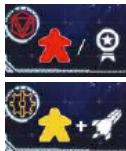
Recruit 1 Red Settler or Gain 1 Reputation
Recruit 1 Yellow Settler and add 1 Settlers Ship to your hand
Settlers Ships

5VP

4 VP and gain 1 Reputation point

Score your Reputation an additional time

2 VP per Shuttle of the indicated type indicated under your board at the end of the game.

4 VP and perform 2 “Move” Actions

2 VP per Settler tile you own at the end of the game

1 VP per color visible at the top of the Shuttles positioned under your board at the end of the game

6VP if you completed at least one series of 5 diWerent Shuttles

4 VP and immediately recruit 1 Settler of your choice on Earth

4 VP (This Ship needs one less Settler to complete)
下载 Markdown