rules_zh_colors-of-paris_3252.md
Colors of Paris 规则(集石文档 3252)
逐页 VLM 转写(qwen3-vl-plus),源:集石文档 3252,未翻译。
# 游戏流程

- 游戏无回合数限制,持续进行直至终盘
- 每回合分为3个阶段
  1. 放置助手
  2. 执行行动
  3. 下轮准备

## 流程详解

### 放置助手

- 从起始玩家开始,依次轮流放置1名助手
  初始助手3名
  最多可达6名
- 所有玩家放置完助手后该阶段结束

#### 限制条件

- 除中央工位以外,每工位仅能容纳1名助手
- 深色禁止区域不可放置助手

### 执行行动

- 从起始玩家开始,依次轮流将1名助手放倒并执行工位效果

#### 外圈行动

- A. 获取基础色
  即红黄蓝,数量取决于玩家的颜料技能
- B. 获取次级色
  支付对应的基础色,获取对应的次级色,数量取决于玩家的调色技能
- C. 获取三级色
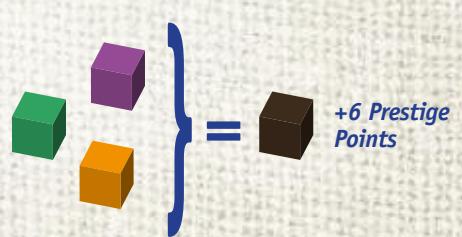
  支付对应的次级色,获取黑色(=6VP),与玩家的调色技能无关
  **注:黑色不计入玩家的12色彩颜料上限**
- D. 能力升级
  - 支付任意2个颜色(基础色、次级色、白色),将某项技能提升1级
  - 技能水平达到6级时,可以获得6VP或额外1名助手
  - 技能水平达到8级时,可以获得10VP(将6VP标记翻面)
- E. 拿取绘画卡
  从画架上取下1个绘画卡,为下回合做准备
- F. 执行绘画
  将颜色方块放置到绘画卡上,可放置的方块数由绘画能力决定
  **白色方块可视作万能色,但一幅画不得超过3枚白色方块**
  **每枚白色方块 -2VP**

#### 内圈行动

- A. 获取先手
  获取先手标记 + 1枚白色方块
  **已经拥有先手标记的玩家不能执行行动**
- B. 工位模仿
  只能模仿外圈行动的工位
- C. 轮盘旋转
  在下轮准备阶段,玩家可以选择将转盘转动0/2格,而非1格

#### 中心行动

- A. 获取白色
  获取白色方块

### 下轮准备

1. 将外圈顺时针转动1格
2. 补充绘画卡
3. 弃置手头颜料,使其数量 ≤12(黑色不计算在内)
4. 回收工人
   - a. 将1名外圈的助手站起来,回收所有其他助手
   - b. 已经站起来的助手,视作已经放置
   - c. 移动先手标记

## 游戏终盘

### 终盘条件

- a. 有玩家完成2幅画
- b. 有玩家获取了第5枚黑色方块

### 最后VP高者获胜

## 画家模组

| 画家 | 规则 |
|------|------|
| Paul CÉZANNE | 执行能力升级时可连续2次对同一技能进行升级,第1次消耗2方块,第2次消耗的方块数量 = 升级后的技能等级 |
| Edgar DEGAS | 完成绘画之后,可从上面回收3枚非白方块,立即放置到自己另一幅画上 |
| Paul GAUGUIN | 游戏开始时选择1种次级色,当调和该次级色时,其中1枚方块可用白色替代 |
| Edouard MANET | 执行获取红色行动时,可立即在自己的画上放置1-2枚红色方块 |
| Claude MONET | 执行获取黄色行动时,可立即在自己的画上放置1-2枚黄色方块 |
| Auguste RENOIR | 执行获取蓝色行动时,可立即在自己的画上放置1-2枚蓝色方块 |
| de TOULOUSE-LAUTREC | 完成绘画时,每幅画上有2个格子可用其他色彩代替,白色方块依然可用 |
| Vincent VAN GOGH | 回合结束时可以保留16枚色彩方块 |

[图: 《Colors Paris》游戏封面,画面中一位画家在工作室作画]
CdP-Rules-EN-new_compressed.md
Rules of the game
The grand painters' studio, le Bateau-Lavoir in Montmartre has launched a friendly competition to determine whose name is soon to become as famous as such illustrious predecessors as Cézanne, Monet, Renoir, Toulouse-Lautrec...
In order to distinguish yourself from the others, you must become the best in your field, by fulfilling "in the style of..." orders as quickly as possible while improving your tools and your technique. Take heart! The competition may be tough, but the glory to be gained is worth the effort!

Contents
11 double-layer gameboard (the upper, circular layer turns)
② 4 player boards
3 4 easels
4 24 Assistant meeples (6 × 4 colors)
⑤12 octagonal Development markers
6 211 Pigment cubes (30 × blue, 30 × red, 30 × yellow, 25 × orange, 25 × green, 25 × violet, 40 × white, 6 × black [5 for the game + 1 spare])
7 32 Painting cards (8 × 10, 8 × 12, 8 × 14, 8 × 16 Prestige Points)
8 12 Prestige Point tokens (6 points on the front, 10 points on the back)
9 4 Forbidden Action tiles (2 × 1 space and 2 × 3 spaces) for 2- or 3-player games
10 1 1st Player token
11 15 Bonus cards (3 × 5 types) (Advanced Rules)
12 8 Painter tiles (Advanced Rules)
Note: Except for the 5 black cubes, all the cubes are considered available, even if none are left.
4-Player Setup
A Assemble the gameboard (Insert the little plastic clip through the hole in the middle of the lower board from the bottom, then through the upper circular board) and place it in the middle of the table, with the Acquire Red Pigments on the top board aligned with the Forbidden Action of the lower board.
B Place the Pigments in supplies of each color near the board.
Create a supply with the Prestige Points sorted by development (Paint Tube, Palette, and Brush).
Shuffle the Painting cards to form a face-down deck. Display the pigment side of the first 4 cards from the deck on the 4 easels.
Give the 1st Player token to the person who most recently touched a paintbrush, or just choose randomly.
Each Player Takes:
• 1 player board ②.
• 3 Development markers ⑤ which you place on the first space of each row of your player board.
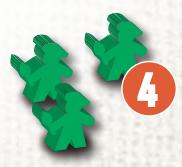
• 6 Assistants 4 of your color, of which only 3 will be used at the beginning of the
• 3 Pigments : 1 red, 1 yellow, and 1 blue.
2- and 3-Player Setup
Use the Forbidden Action tiles① to cover certain spaces of the board, according to the illustration on the right matching your player count.
In a 2-player game, only use 3 easels.
Goal of the Game
Have the most Prestige Points at the end of the game, proving that you are the best painter in this Parisian studio!


3-player board setup

2-player board setup


3-Player Setup



The Bonus cards are placed next to the easels only if you choose to play with the Module 1 of the advanced rules.


Only set up the Painter tiles you see here if you choose to use Module 2 of the Advanced Rules.
Level: Determines the number of Pigments you can acquire (Paint Tube), produce (Palette), or paint (Brush).
Paint Tube: Lets you acquire primary-color and white Pigments.
Palette: Lets you mix Pigments to obtain ne
Brush: Lets you place your Pigments on your Paintings.

Development Bonus

Pigment supply: You don't have to place your Pigments in the corresponding areas — in fact, it won't even be possible once you have developed your Paint Tube and start acquiring a lot of Pigments at once.
Spaces for your Development Bonuses

Playing the Game
You will play an unspecified number of rounds until one of the endgame conditions is triggered (see End of the Game).
EACH ROUND COMPRISES 3 PHASES:
-
Place Assistants
-
Assistants Perform Their Actions
-
Prepare for the Next Round
Phase 1. Place Assistants:
Starting with the first player, take turns placing 1 Assistant on an empty space of one of the boards.
At the beginning of the game, you each have 3 Assistants, but later in the game, you might have as many as 6 Assistants. This phase ends once everyone has placed all of their available Assistants. If it is your turn to place, and you have no more Assistants, simply pass.
Placement Rules:
• You can place your Assistant on any space of the upper or lower board, except for the dark Forbidden Action spaces.
Each Action space can contain only one Assistant (except for the center space of the upper board, Acquire White Pigments, which can hold any number of Assistants).
• On the lower board, there may be 1, 2, or 3 different spaces to perform the same Action. There are no restrictions as to which player can occupy each of these spaces: The same player could use them all, or different players could use them.
• Actions that are aligned with a Forbidden Action on the lower board (or covered by a Forbidden Action marker in a 2- or 3-player game) are unavailable, and cannot be performed this round.
Phase 2. Assistants Perform Their Actions:
Starting with the first player, take turns laying down 1 of your Assistants (on either board) and performing the corresponding Action.
A. ACTIONS ON THE LOWER BOARD

• Acquire 1 Primary Color: Collect Pigments of the corresponding color (blue, red, or yellow). The number of Pigments you get depends on the level of the Paint Tube on your player board (see description on page 3).

Mix 2 Primary Colors: Spend 1 Pigment of each of the required primary colors to collect Pigments of the corresponding secondary color (orange, green, or violet). The number of Pigments you get depends on the level of the Palette on your player board.

Mix the 3 Secondary Colors: Spend 1 Pigment of each of the 3 secondary colors (orange, green, and violet) to collect just 1 black Pigment, regardless of the level of your Palette.
You will not use black Pigments to paint your
Paintings; rather, each one is worth 6 Prestige Points. Simply take the black Pigment and place it on your player board.
NOTE: Black Pigments do not count toward your 12-Pigment limit at the end of the round (see Phase 3).


Placing Assistants: You can place an Assistant on an unoccupied space on either of the two boards, including the central Acquire White Pigments space.

Example: A level-3 Paint Tube = I acquire 3 Pigments of the primary color on my Action space:


Example: A level-2 Palette = I spend 1 and 1 to acquire 2 violet Pigments:

Example: A level-5 Palette = I spend 1 and 1 to acquire 5 orange Pigments:
Improve a Tool: Spend 2 Pigments of any color (primary, secondary, or white), which can be identical or different, to improve 1 of the tools on your player board (Paint Tube, Palette, or Brush) 1 step. Move the marker in its row 1 space to the right.

• Paint Tube: This indicates the number of Pigments you acquire by using the Acquire 1 Primary Color or Acquire White action.
• Palette: This indicates the number of Pigments you acquire by using the Mix 2 Primary Colors action.
Brush: This indicates the number of Pigments you can place at the same time on one or more Paintings during the Paint action.
Development Bonus:

- As soon as the marker reaches the tool's sixth improvement space, choose a bonus: Hire an Assistant or 6 Prestige Points. According to your choice, either take a new Assistant, which you can start using next round, or take a 6 Prestige Points token matching this tool, and place it on its space on your player board.

- As soon as the marker reaches the tool's final improvement space, you score 10 Prestige Points if you took a new Assistant on the earlier Development Bonus space on this row. Take a 10 Prestige Points token, and place it on its space on your player board.
If, on the other hand, you took 6 Prestige Points on the earlier Development Bonus space on this row, you score 4 Prestige Points by flipping the 6 Prestige Points token over to its 10 Prestige Points side.

• Take a Painting Card: Take the Painting card from one of the easels and lay it in front of you, pigment side up. Do not replace it yet; it will be replaced during the Prepare for the Next Round phase.
You can have as many Painting cards in front of you as you want.
If you are playing with the Advanced Rules, this space lets you take a Bonus card instead, if you prefer.

Paint: Place Pigments on any number of your Painting cards. The number of Pigments you can place depends on the level of the Brush on your player board (see description on page 3). You do not have to work on
your Paintings in any particular order. Each Pigment space requires 1 matching Pigment.
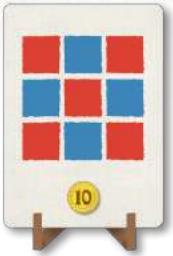
You can place a white Pigment on any Pigment space, regardless of the color it requires; however, each Painting is limited to 3 white Pigments. White Pigments enable you to complete Paintings more quickly, but for each white Pigment you used on a Painting, you will be penalized 2 Prestige Points in the final scoring.
When you have completed a Painting (each of its 9 spaces is covered by a Pigment), flip it over to its completed side and place the white Pigments on the card. Return the other Pigments to their respective supplies near the gameboard.
B. ACTIONS ON THE UPPER BOARD

NOTE: You cannot place an Assistant on this Action if you have the 1st Player token.
Take the 1st Player Token: Acquire 1 white Pigment. You will take the 1st Player token at the end of Phase 3. You will be the first player during the next round, and you will remain so as long as you have the 1st Player token.


Develop your tools by spending 2 Pigments of any colors.

When your Development marker reaches this space, choose:


When your Development marker reaches this space, gain 4 additional Prestige Points (if you took 6 Prestige Points for the previous bonus) or 10 Prestige Points (if you chose an additional Assistant for the previous bonus).

You have a level-4 Brush. Thus, you place up to 4 Pigments when you Paint.

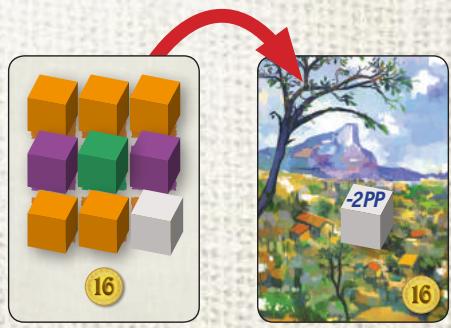
You can use up to 3 white Pigments to replace any Pigments in a single Painting. Each white Pigment on a completed Painting loses you 2 Prestige Points at the end of the game.

Imitator: Copy the action of an Assistant (yours or an opponent's) still standing on the lower board. You cannot copy actions from the upper board.
Rotate the Action Board: At the beginning of phase 3 (see Prepare for the Next Round), instead of rotating the upper board 1 step, you choose whether to rotate it 2 steps or 0 steps.
Acquire White Pigments: Collect white Pigments. The number of Pigments you get depends on the level of the Paint Tube on your player board.
You can use white Pigments instead of other Pigments when you paint. You can also use them to improve a tool, because they can replace one or both Pigments that you
must spend to advance the development marker a step on your player board.
If you are using the Advanced Rules, you will also need them to buy Bonus cards.
The Assistants Perform Their Actions phase is complete once everyone has laid down all of their Assistants on the two boards.
Note: At any time, you can lay down one of your Assistants without performing that Assistant's action.
REMEMBER:
• Any number of Assistants can use the Acquire White Pigments space (notice the ∞ symbol on the space).
There are 2 actions that you do not perform immediately after laying down your Assistant on them:
Rotate the Action Board defer this action until the beginning of phase 3.
• Take the 1st Player Token defer this action until the end of phase 3.
Phase 3. Prepare for the Next Round:
Preparing for the following round comprises 4 steps.
STEP 1. ROTATE THE UPPER BOARD: Rotate the upper board one step clockwise.
REMEMBER: Rotate the board 0 or 2 steps if someone has chosen to use the deferred action Rotate the Action Board. That player must choose 0 or 2.
STEP 2. REPLACE THE PAINTING CARDS
Fill any easel without a card with a new one from the deck.
ATTENTION: If, after rotating it, the upper board has completed a 180° half-turn (i.e. the Acquire Red Pigments space has reached or passed one of the Forbidden Action spaces printed on the lower board), replace all of the Paintings still on the easels with new ones from the deck. Remove the replaced cards from the game.
STEP 3. DISCARD DRIED PIGMENTS
Each player checks the number of Pigments they have. If you have more than 12 on your player board, discard the Pigments of your choice to the general supply to get back down to 12. You shouldn't open too many tubes at once: Only 12 are still usable, because the others have dried out!!
ATTENTION: Black cubes do not count toward your limit of 12 Pigments; they are worth 6 Prestige Points each.


Example: Level-5 Paint Tube = collect 5 white Pigments:

Rotate the board 1 step clockwise.
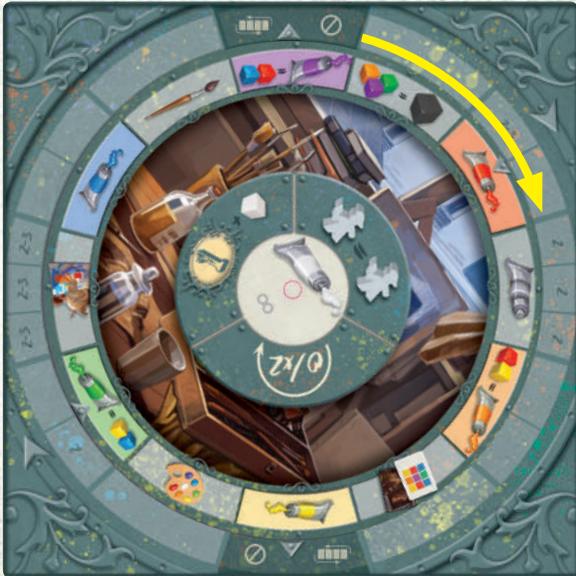
If you placed an Assistant on the Rotate the Action Board space, you choose either to leave the board where it is, or to rotate it 2 steps clockwise.

STEP 4. STAND 1 ASSISTANT AND RETRIEVE THE REST
In turn order, stand 1 of your Assistants on the lower board (if you have one), and leave it in its place. Retrieve the rest of your Assistants. The Assistant you stood back up is considered already placed for the next round.
- If you have not placed any of your Assistants on the lower board, simply retrieve all of your Assistants; you will start the next round without one placed already.
- If you placed an Assistant on the Take the 1st Player Token space, take the 1st Player token.
- If nobody placed an Assistant on that space, the current 1st player remains the 1st player for next round.
End of the Game
There are 2 ways for the game to end:
Someone finishes painting 2 Painting cards.
• Someone acquires the 5th and final black Pigment.
As soon as either of these conditions occurs, this will be the final round; finish the Assistants Perform Their Actions phase, always respecting the turn order, so all of the standing Assistants can finish their actions.
Counting Your Points
Add the following:
• Prestige Points for your completed Painting cards (and only those).
Incomplete Painting cards do not count.
• 6 Prestige Points per black cube.
• Prestige Points indicated on the tokens you have earned (6 or 10). Then subtract:
• 2 Prestige Points per white Pigment on your completed Painting cards.
The player with the most Prestige Points wins, and is declared the best Painter of the studio. This player will become the new head of the studio!
• If there is a tie, the tied player who used the fewest white Pigments to finish their Paintings wins.
• If there is still a tie, the tied player who completed the most valuable Painting card wins.
• If there is still a tie, the tied player with the most black Pigments wins.
• If, after all that, there is still a tie, the tied players will simply have to share leadership of the studio.


The game ends when someone finishes their 2nd Painting.

or the 5th black cube is taken

Remember: The 6th black cube in the box is just a spare in case you lose one of the 5 you need for the game.

Advanced Rules
You can add either or both of the following two modules to the base game.
Module 1: Bonus Cards
Instead of choosing the Take a painting card action, you can buy a Bonus Card by immediately paying with white Pigments. At the

beginning of the game, agree on which rule will determine how everyone uses their Bonus cards:
Rule A: After you acquire the Bonus
card, you immediately perform all or part of the bonus, then discard the card. This enables you to play several Bonus cards during a single round if several of your Assistants are performing this action (possibly including an Imitator).
Rule B: After you acquire the Bonus card, place it face up in front of you to save it for later. You can perform all or part of the bonus before or after performing an action with an Assistant. With this option, you could accumulate several Bonus cards in front of you during the game; however, you can only use one per round. Also, once you use a bonus this way, flip the card face down to remind you that you have used a Bonus card this round, and cannot use another. In phase 3, step 2 (Replace the Painting Cards), discard your face-down Bonus card. Of course, you could choose to use the bonus immediately (like in rule A). because it is after an Assistant's action. Just flin the

card face down as if you'd waited to use it later.
Paint card: costs 4 white Pigments. When you use this card, immediately Paint according to your Brush level.
Imitator card: costs 4 white Pigments. When you use this card, immediately perform the action of an Assistant (yours or an opponent's) still standing on the lower board.


Mix card: costs 4 white Pigments. When you use this card, immediately either Mix 2 Primary Colors according to your Palette level or Mix the 3 Secondary Colors.
Exchange Colors card: costs 5 white Pigments. When you use this card, immediately exchange 1 – 4 color Pigments (not white, not black). You can only exchange primary (blue, yellow, red) for primary and/ or secondary (green, orange, violet) for secondary.

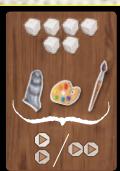
Tool card: costs 6 white Pigments.
When you use this card, immediately advance for free either:
- 1 Development marker 2 spaces.
- 2 Development markers 1 space each.
Module 2: Painter Tiles
During setup, give each player 2 random Painter tiles. Keep 1 of your Painter tiles, and return the other to the box. Connect your Painter tile to the notch in the left side of your player board. Your Painter tile gives you a special power during the game. This power is some sort of talent or gift that is unique to you, as every artist should have....
Descriptions of the Painter tiles
Paul CÉZANNE: Each time you perform the Improve a Tool action, you can improve the same tool a second time in the same round by spending a number of Pigments equal to the new improvement level to which you are improving it.

Example: Your Paint Tube is level 4 at the moment (its 2nd Development space). You perform the Improve a Tool action, and spend any 2 Pigments to advance its Development marker to the first 5.
If you wish to use your power to advance it an extra space, so you are closer to increasing its power, you must spend any 5 Pigments (but not the usual 2).
Edgar DEGAS: When you complete a Painting, retrieve 3 Pigments (but not white) from it, and immediately paint them onto another Painting you have.
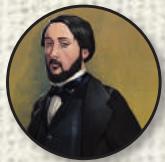
Paul GAUGUIN: At the beginning of the game, choose a secondary color (orange, green, or violet) and place a Pigment of this color on this tile. Each time you perform the Mix 2 Primary Colors action to produce this color, you can replace one of the required primary Pigments with a white Pigment.

Edouard MANET: Each time you perform the Acquire Red Pigments action, you can immediately paint 1 – 2 red spaces (which could be on 1 – 2 Paintings).

Claude MONET: Each time you perform the Acquire Yellow Pigments action, you can immediately paint 1 – 2 yellow spaces (which could be on 1 – 2 Paintings)

Auguste RENOIR: Each time you perform the Acquire Blue Pigments action, you can immediately paint 1 - 2 blue spaces (which could be on 1 – 2 Paintings).

Henri de TOULOUSE-LAUTREC: On each Painting, you can paint 2 spaces with no regard to the colors of those spaces. You can use any other color of Pigment on them but white; however, you can still use white Pigments in the usual way, with the 2 Prestige Point penalty at the end of the game.

Vincent VAN GOGH: You can keep 16 Pigments at the end of each round, rather than 12.

CREDITS - Designer: Nicolas De Oliveira • Team Super Meeple: Sébastien De Poortere, Charles Amir Perret, Bernard Philippon • Illustrations: Fabrice Weiss & Igor Polouchine • Editing and revision of the French rules: Guillaume Gille-Naves & Bernard Philippon • English translation: Nathan Morse • Artistic Direction: Igor Polouchine • Packaging: ORIGAMES Made in China by Whatz Games. Les Couleurs de Paris is a game published by SUPER MEEPLE 193, rue du faubourg Saint-Denis - 75010 Paris ©2019 SUPER MEEPLE. SUPER MEEPLE and its logo are trademarks of Super Meeple.
