Ecos Rulebook.md
ecos
FIRST CONTINENT RULEBOOK

AAVAV
1 Score Board
Ecos: Fírst Contínent ís a game by John D Claír for 2-6 players ages 14 and up.
Introductíon
What if the formation of Earth had gone differently? In Ecos™ players are forces of nature, creating the planet together but with competing visions of its grandeur. You will have the chance to mold and create a part of the world similar, but different, to the one we know. Which landscapes, habitats, and species thrive will be up to you.
There are no turns in the game of Ecos. Instead one player will be revealing elements in the form of element tokens, one at a time, from the element bag. Each element revealed can give some or all players energy, depending on what effect they are trying to activate. When a player's card has enough energy to activate, that player gets to resolve the effect, which usually results in terrain or wildlife being added to the board. The game ends at the end of a round in which at least 1 player has 80 victory points (). The player with the most points wins.
In Thís Book
What's in the Box .. .
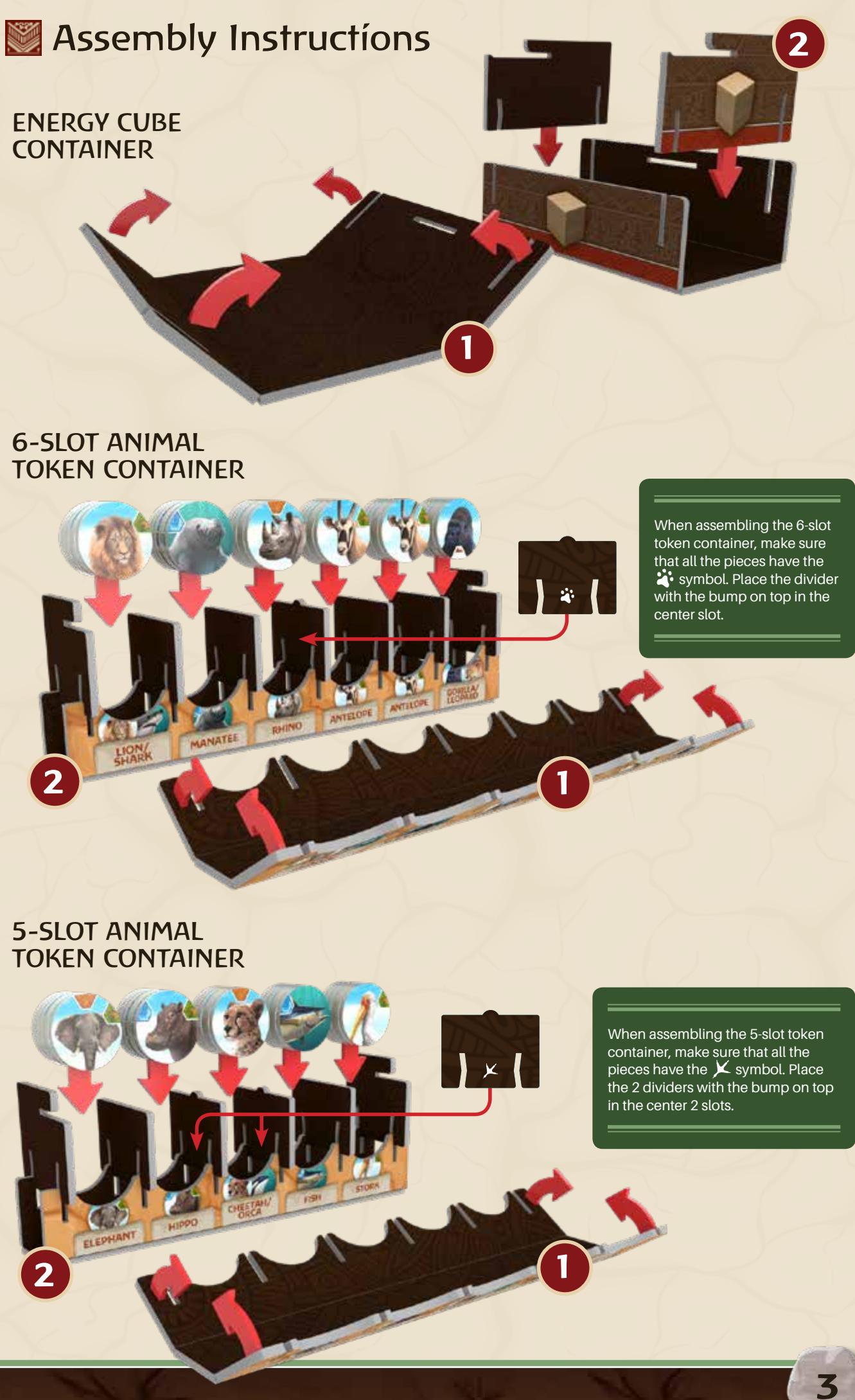
Assembly Instructions.. 3
Setup.
Game Play . Completing a Card Using Your Dial . . . . Gaining Cards ..... Game End .
Card Anatomy ..
Card Effects.. Placing Map Tiles... ... 8 Placing Mountain and Forest tokens. . . . .. . . 8 Placing Animal tokens Gain an Element. .. Moving Animals . .. . . . ………………………… 9 Gaining Cube.... 9 Gaining Victory Points . . 9 Impact Cards . . . . 9 Replacing or Removing a Map Tile. . . . ... Adjacent.... .10 Community, Habitat & Landmass ....... ...10
Two-Player Rules ... ... 11
Credits. 11
What's ín the Box


105 Game Cards

15 Mountaín Tokens (Some Mountain tokens are double-thick, this is just for aesthetics and has no game-play significance).

66 Energy Cubes and Storage Contaíner


6 Score Markers


VAVAAAV


Setup
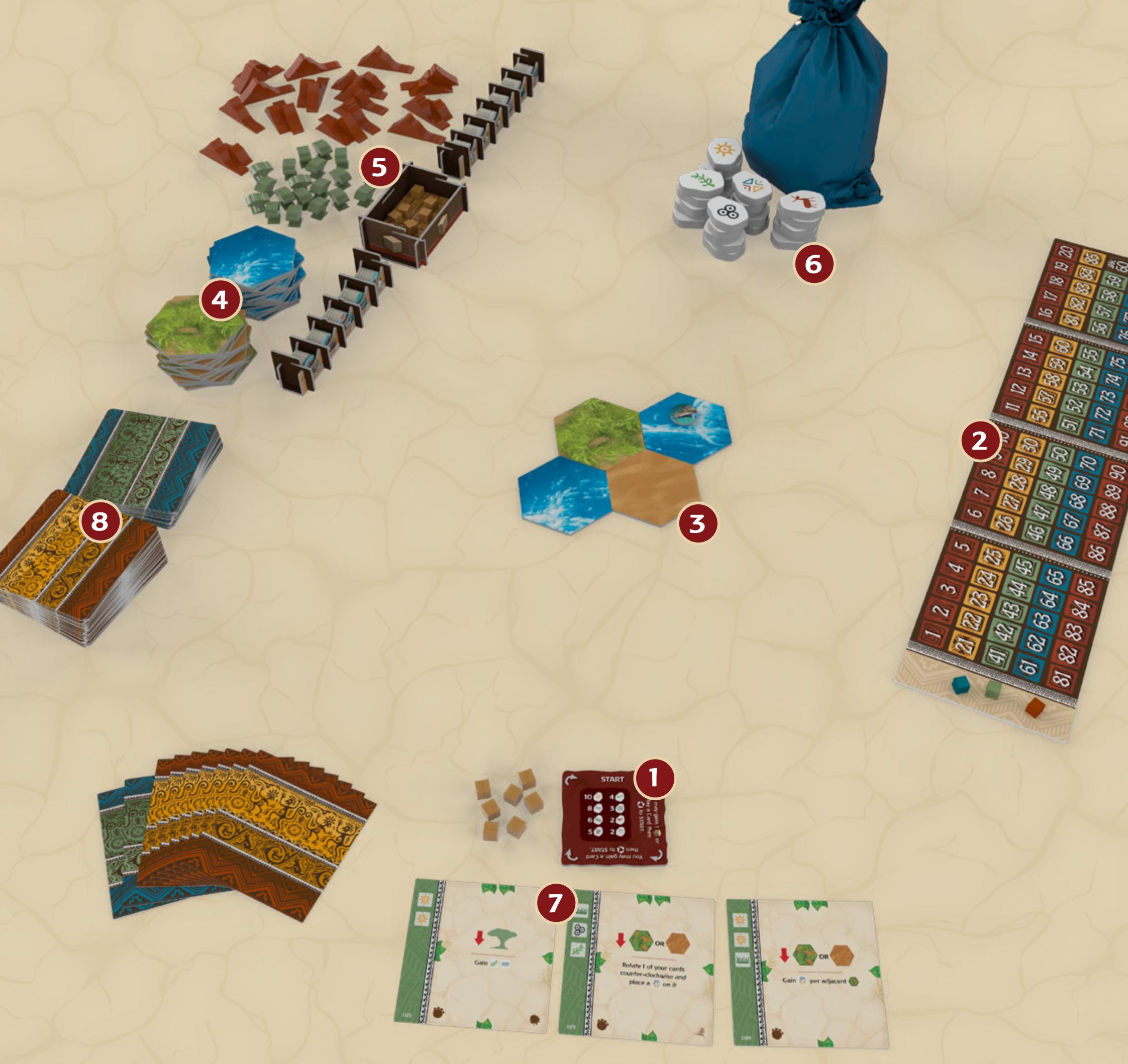
The sections below are numbered to correspond to the number on the setup image. Setup is the same for any player count 3 to 6, and slightly different for 2 players.
- Each player chooses a color and takes the Dial token in their color. The Dial tokens show the distribution of Element tokens in the game. Your Dial token should be oriented with the word “START” at the top. Each player also gets 7

-
Place the Score Board on the table. Also take the Score Markers for each player and place them on the starting space of the Score Board.
-
Create the initial landscape with 1 Desert,
1 Grassland, and 2 Water tiles as shown:

In future games you can try the alternate configurations shown below:
RIVER

COASTAL

ISLANDS

-
Put the rest of the Map tiles nearby, with one stack of Land tiles and one stack of Water tiles.
-
Place the token organization trays, the Mountain tokens, and Forest tokens nearby on the table.
-
Make sure all 40 Element tokens are in the Element bag. The player who went for a hike most recently is the start player and takes the Element bag.
-
Create starting hands and active cards (see below).
FIRST GAME
If this is your first time playing, you should use the recommended pre-set starting hands. To do so, go through all of the cards from both decks and take out those with footprint icons in the bottom left of the card.
Sort these into 6 piles based on the footprint icons. These piles should each have 12 cards. Place the piles face down. Players each randomly choose 1 pile, which becomes their starting set of cards.
3 cards in your set of 12 have the footprint icon printed darker than the rest. These 3 cards become your 3 starting “active" cards and should be placed on the table face up. The other 9 cards are your starting hand, which you can look at but should keep hidden from other players.
STARTING HAND SET ICONS

Lion


Gorilla
Bird of Paradise


Impala Lily
Rhino


Honeypot
Elephant


Calla Lily
Antelope


Stork

Daisy
Aloe
SUBSEQUENT GAMES
If players have played previously, then you can try one of 2 options for more variety.
More preset hands: On the opposite side from the footprint icons are leaf icons. These can be used to sort the cards in the same manner as the footprints for more variety of pre-set cards.
Draft: Alternatively, you may want to try drafting your starting cards. To do so follow these steps:
A. Deal 5 blue-backed cards to each player face down. Each player looks at their 5 blue cards, chooses 1 to keep and passes the other cards face down to the player on their left. Once all players have done so, players take the cards passed to them and repeat. Continue until all players have 4 blue cards. Shuffle the remaining undrafted cards back into the deck.
B. Next, deal 9 brown-backed cards to each player face down. Repeat the same process as above but this time passing to the right. This time players draft until they have exactly 8 brown cards. Shuffle the remaining undrafted cards back into the deck.
C. Each player should now have 12 cards. From your hand of 12 cards choose any 3 cards to be your starting 3 active cards and place them face up in front of you, facing you (the side with the most leaves should be at the top). Keep the other 9 in your hand until they are played.

If your game includes multiple experienced players and one or more new or less-experienced players, you may want to give pre-set starting hands to the new or less-experienced players, and then have the experienced players draft their starting hands amongst themselves.
- All blue and brown cards not in any players' initial 12 cards should be shuffled separately and placed into separate face down decks.
You are now ready to begin!
Note: The two decks of cards are slightly different. The blue cards tend to score more points than the brown cards. The brown cards are generally more concerned with setting the map up.

Game Play
The start player begins as the “Harbinger". They take the Element bag and draw out 1 random Element token, announcing what it is, and placing it on the table. The possible elements are listed below and also on each player's Dial tokens along with their commonality..

All players, including the Harbinger, may place one of their on one of their cards in play on an uncovered spot with the same element icon as the one drawn. If you have no available that are not already placed, you may first remove one from any of your cards, then place it.
You only place one for each Element token drawn.
Instead of placing a , a player may rotate their Dial token one turn clockwise (90 degrees). If you are unable to place a you must rotate your Dial token.
Any cards that have all their energy spots full must now resolve their effect (“Completing a Card“ on page 6).
Once all players have either placed a or rotated their Dial token, and all card effects are resolved, the process is repeated, starting with the Harbinger drawing another Element token.
If the Harbinger draws a Wild Element token the round and their time as the Harbinger has come to an end. The Wild Element token lets players place a on ANY type of icon and resolve card effects as normal. Once all players have done this, check to see if the game is over (see the “Game End” section), otherwise put all Element tokens back in the Element bag and pass the bag to the player on the left; they are the new Harbinger and play continues as normal.
If you ever place a on the last spot on a card you announce “Eco!" Then you must do the following..

-
Remove allfrom the card and add them back into your supply of available
-
Carry out the effect on the card (see pages 8 to 10).
-
If the card shows more than one leaf at the top then rotate the card 90 degrees so that the number of leaves at the top of the card is 1 less than it used to be. These leaves indicate how many more times a card may be used before it is discarded. If a card shows only 1 leaf at the top it is discarded instead of rotating it. Discarded cards simply accumulate in a discard pile.


If several players announce “ECO” at the same time, then they resolve their effects in clockwise turn order starting with the Harbinger. Each player resolves all of their effects (including rotating their Dial token) before the turn proceeds to the next player.
If one or more players resolve their “ECO” before you, when it is your turn to resolve yours, you may choose to instead remove theyou just placed and rotate your dial one rotation instead (see “Using Your Dial on page 7). You may want to do this if the resolution of other players' card abilities causes changes to the landscape making you no longer want to, or able to do the effect you were about to do.
Sometimes resolving your card will not have an effect on the landscape, nor will it affect other players. To speed up game play if desired, in these cases, you don't need to announce “ECO", and instead you can just resolve your effect right away. Any players resolving effects that do affect or are affected by the landscape or gain cards, always need to announce “ECO" and resolve their effects in turn order.
Usíng Your Díal
Every time an Element token is drawn and you either can't place a or don't want to, you instead turn your Dial token 90 degrees clockwise.
Once your Dial token has made 2 rotations, you MAY immediately reset the Dial token to start (so the “Start“ side is at the top) to “gain a card” (see “Gaining Cards” section).
If you choose not to use the gain a card effect after 2 rotations, then after the 3rd rotation, you may either play a card from your hand or gain a new from the extra supply. This is the primary way to play cards and gain additional . Then you reset your Dial token to start.
Played cards start facing you (the side with the most leaves should be at the top). Gained are added to your personal available
Gaíníng Cards
Your Dial token and some card effects will let you “Gain a card“. When you gain a card you may either...
Look at two cards from the top of either deck or one from each deck, and add one of those cards to your hand. Then place the other card face up next to the decks.
OR
Take any 1 face up card left there by a prior gain a card effect.
Multiple cards can accumulate face up if players more commonly choose the first option.
Gaining cards is not always essential and it is often possible to win with only your starting 12 cards if you play them right.
Game End
After a Wild Element has been drawn and all effects have been resolved, if at least one player has 80 or more then the game is over and the player with the most wins.
In the case of a tie, pass the Element bag to the new Harbinger as normal and they pull out one more Element token. All players resolve this Element token as normal, after which if only one player has the lead, they win. If there is still a tie, repeat until there is only one player in the lead. Note, in this case, it's possible for any player to win, not just the originally tied players.
For a shorter game, you can play to 60instead of 80.
Card Anatomy


Card Effects
There are many different cards in Ecos™ and every card is unique. Below are some key concepts. All card effects are resolved from top to bottom.
IMPORTANT: Down arrow placement effects are present on many cards. These are special in that if you are unable to resolve all placement effects, then you cannot resolve any following effects on the card.
All of the effects of a card must be resolved before the effects of another card are resolved.
PLACING MAP TILES
Many effects will cause you to add a new Map tiles to the landscape. These are shown as a placement effect followed by a Map tile.
Whenever an ability has a placement effect followed by a token type, you will add that token type to the landscape. When you add a Map tile to the landscape, place it such that at least one of its edges touches the edge of at least one Map tile already in the landscape.

Add a Grassland tile to the landscape.

Add a Desert tile to the landscape.

Add a Water tile to the landscape.
PLACING MOUNTAIN AND FOREST TOKENS
If an effect tells you to add a to the landscape then you take a and place it on any Land ( or tile that does not already have a mountain. These effects are shown as a followed by a All Land tiles can support up to one In your copy of Ecos there are 2 different types of Mountain tokens. In terms of gameplay they function exactly the same way.

Add a to any Map tile that can support a

If an effect tells you to add a to the landscape then you take a and place it on any Map tile that can support that . These effects are shown as a followed by a
All Grassland tiles

can support one
Also, all Map tiles with a


can support +1


A Desert tile

with no

can have no

A Desert tile
with a


can have 1


» A Grassland tile
with no


can have 1
A Grassland tile

with a

can have 2

PLACING ANIMAL TOKENS


Animals marked with terrain must be placed in on a Map tile whose type matches one of the tabs shown.
Animals marked with a or icon must be placed on a Map tile with the depicted token.
If an effect tells you to add an Animal token to the landscape then you take a token of that animal type and place it on any Map tile that can support that animal AND DOES NOT ALREADY HAVE AN ANIMAL TOKEN ON IT. If there are no Map tiles of the appropriate type without an animal, you may place on any Map tile of the appropriate type regardless of animals already on the spaces.
All Animal tokens indicate where they can be placed.


A green tab means you must place this animal token onto a Grassland tile

A brown background means you must place this animal onto a Desert tile

A blue background means you must place this animal onto a Water tile

Multiple tabs means you must place this animal onto any of the indicated type of Map tiles.

Gorillas don't care about the type of Map tile. Instead they can only be placed on Map tiles that have a

Leopards don't care about the type of Map tile. Instead they can only be placed on Map tiles that have at least one
RUNNING OUT OF TOKENS
If an effect requires you to place a specific token on the landscape and there are none of that token type left, you may instead remove a token of that type from the landscape and then place it following normal placement rules.
GAIN AN ELEMENT
Many effects let you “Gain“ an element. When you use this effect you may place a of the indicated type just like you would when an Element token is drawn. As always, instead of placing a , you may rotate your Dial token.
Important! A card can never place a onto itself; i.e. the elements gained by one card allow you to place on other cards. However, it is possible to gain elements from one card, allowing you to place on and resolve the effect of a different card, which then also gains you elements that you use to place one or more back on the first card.
Remember, are removed from a card before using the effect on the card. Thus, the removed from a card can immediately be placed using any elements you gained from that card effect.
All card effects must be completely resolved before moving on to any other card effect. However, any effect from using the dial is immediate.
For example, if you had a card effect that created 8Energy you could use 3 of those to fill up a card. However, you could not resolve the second card until you have used the remaining 5
Because the Dial token effect is immediate, you could use the sun icons to rotate the dial 3 times to gain a cube, then another three times to play a card, and then use the 2 remainingto place cubes onto that newly played card.
MOVING ANIMALS
Some effects let you “Move” 1 or more Animal tokens. The effect will tell you which animal you can move and how many spaces the animal(s) can move. When moving an Animal token, the animal may move onto a Map tile containing other animals and may even move onto a type of terrain that does not match it. The exception is that animals with only a Water type may not move onto Land tiles, and animals with only Land types may not move onto Water tiles (unless the card explicitly says otherwise).

In this example while this Rhino can only be initially placed on a Desert map tile, if it is moved, it can move onto a Map tile with one or more other Animal tokens, and can be moved onto Grasslands tiles. It cannot however move onto Water tiles.
GAIN
Some card effects let you gain a
This works the same as gaining a from your Dial token; simply take a from the cube container and add it to your personal suppy of
GAIN已
Many cards let you gain victory points (). When you gain, simply move your Score marker up that number of spaces on the Score Board. If you reach 80 or more , announce it to everyone so that all players know that when the current Harbinger's round is finished the game will come to an end.
IMPACT CARDS

Some cards have a red strip. These are cards with effects that can destroy or change parts of the landscape rather than just add to it. When you play an Impact card you should announce to all players that you are playing it and read aloud to the players what it does.
There is no other specific rule with Impact cards, it is just a warning to other players that you have the power to destroy or alter the landscape rather than just adding to it.
REPLACING OR REMOVING A MAP TILE
Some effects let you replace one Map tile with another. If you replace a Land tile with a Water tile, then all and , along with any land-only Animal tokens on that Map tile are removed. Likewise, if you replace a Water tile with a Land tile, then all water-only Animal tokens are removed. However, if you replace a Desert tile with a Grassland tile, or vice-versa, then all the Animal,, and are transferred to the new Map tile.
If a Map tile is removed but not replaced then all tokens also on the tile are removed.
“ADJACENT"
Many effects use the word “Adjacent”. Adjacent means within 1 space; for example, 2 tokens on the same Map tile are considered adjacent as well as any tokens 1 Map tile away. This card effect lets you place a Grassland tile. Then for each Grassland tile adjacent to the one you just placed you gain 1.
Tokens and tiles cannot be adjacent to themselves.
“COMMUNITY"
Many effects use the word “Community”. A community is a contiguous group of any number of adjacent Animal tokens of the same type. A single Animal token is considered a community of size one if it is not adjacent to any other Animal tokens of the same type.
The term “this community" always means the community into which you just placed the token, unless specifically stated otherwise.


“HABITAT"
Many effects use the word “Habitat“. A habitat is any number of adjacent adjacent, or adjacent Map tiles of the same type (Water, Grasslands or Desert). A single or Map tile is considered a habitat of size one if it is not adjacent to any other tokens or Map tiles of the same type.
The term “this habitat always means the habitat into which you just placed the token, unless specifically stated otherwise.

“LANDMASS"
Some effects use the word “Landmass”. A landmass is all Land tiles ( and/or tiles) that are connected in a contiguous group. Water tiles can cause there to be multiple landmasses. Depending on how the landscape is built, there can be landmasses with as few as 1 Land tile, or all the Land tiles on the landscape could be part of the same landmass.
The term “this landmass" always means the landmass into which you just placed the token, unless specifically stated otherwise.

Two-Player Rules
To play Ecos with two players follow all of the normal rules with the following changes:
At set up, players get 12 brownbacked cards and 6 blue-backed cards instead of the regular 8 and 4.

Each player starts with 5 cards in play.
If you are using the pre-set hands, the extra cards you get are randomly drawn, and the fourth and fifth cards you start with in play are your choice.
If you are drafting, you are dealt 2 blue-backed and 4 brown-backed cards and then you draft the rest of your hand (4 more blue-backed and 8 more brownbacked cards), but drafting 2 cards at a time instead of 1.
Each turn when the Harbinger would pull a token from the bag, they pull out 2 tokens instead. Players then use each token for either a dial rotation or a placement.
If using the preset deck we recommend the following parings for two players:

Deck versus
Deck

Deck versus

Deck

Deck versus

Deck

Deck versus

Deck

Credíts
Design: John D Clair
Director of Projects: Nicolas Bongiu
Production: Dave Lepore
Project Leads: Josh Wood, Mark Wootton
Development Leads: Josh Wood, Mark Wootton
Proofing: Ryan Dancey, Todd Rowland
Graphic Design: Matt Paquette
Rules: Paul Grogan, Phil Pettifer
Art Direction: Josh Wood
Art: Sabrina Miramon
Editing: John D Clair, Josh Wood, Mark Wootton
Playtesters
Matt Bahntge, Jonathan Baker, Leon Blight, Chris Buckley, Chris Buskirk, Csilla Clair, Ehren Evens, Scott Freeman, Nye Green, Rhys Green, Sean Growley, Karen Haugland, Tim Herring, Kyle Huibers, lan Ingoldsby, Toni Johnson, Mara Kenyon, Neil Kimball, Michael Kutan, Dave Lepore, Ben Lesel, Erik Lima, Damon Mair, Eric Martinez, Mike McDonald, Any McGuire, Chris McPherson, Kaz Nyborg-Andersen, Matt Paquette, Tucker Riley, Scott Rogers, Stephanie Rose, Andrew Rosenberg, Jonathan Shanks, Taylor Shuss, Zak Stoltz, Paul Vaillant, Rob Watkins, Josh Wood, Mark Wootton, Erik-Jason Yaple, John Zinser
Desígner's Note
The design of Ecos really benefited from the great input and development work of Mark Wootton, Josh Wood, and John Zinser. Their efforts and ideas really helped me to improve the game from its initial conception. Thanks are also due to the great folks who volunteered their time and creative energies to playtest Ecos in its multiple iterations. Much ideating, playing, and fun was had, and l'm very proud of the game we’ve created, and hope it brings fun to many tables.