rules_zh_迷你高尔夫设计师_19999.md
MINIGOLF DESIGNER
设计:Alban Nanty
美术:Gul E Raana

MINIGOLF DESIGNER
游戏目标
一对夫妇要在他们买下的一块土地上建一个迷你高尔夫球场。为此,他们请了多位设计师来设计。这对夫妇将选择他们最喜欢的方案来实现他们的梦想。
每位玩家都是一名迷你高尔夫球场设计师。游戏的目标是设计一个最能满足客户期望的9洞迷你高尔夫球场。
客户有一长串设计要求需要满足(也就是得分清单),玩家需要尽最大努力满足这些要求,来获得客户满意度得分。胜利者就是最后获得最高满意度得分的玩家。


这是客户满意度图标,您在可以加分的地方都能看到它。
设计: Alban Nanty
美术: Gul E Raana, XiaoLong Wang (桌游盒封面, Mrs Evergreen & Mr Straightforward 卡牌)
测试: Pascal, Justine, Léonard, Ludivine, Florian, Jean-Luc, Amaury, Gauthier, Typhaine, Oliver, Gul, Ubaid, Monika, Ali, Carolina, Alex, Sophie Cho, Riccardo Cavaglia, Dylan Coyle.
特别感谢: Gul E Raana 和 Hercules Matthijs Schaap 的付出, 以及 Justine 的耐心和帮助。


24 块
池塘板块
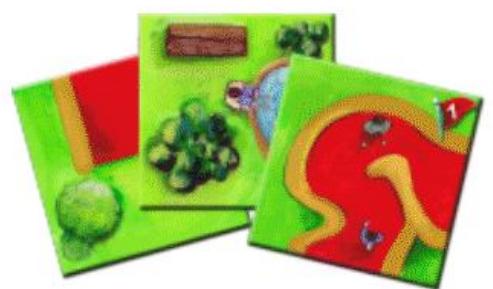
264 块迷你高尔夫板块


6 块客户来访板块


24 块
河流板块

1 个布袋
1 块记分棋盘


3 根排位条
1 块统计板


47 张地图卡牌
14 张客户卡牌
(7 张先生 & 7 张夫人)

说明书


5x7 张承诺卡牌 (5种颜色)

1 张板块
索引表
5 块记分板 (5 种颜色)

5个圆角入口板块 (5种颜色)

5 个玩家棋子 (5 种颜色)

5x7 个承诺棋子 (5 种颜色)

5x36 颗
彩色方粒
(5 种颜色)
30颗黑色方粒

5x9 个
球道标记
家庭版和高级版
此游戏有两个版本。家庭版适合初学者和小朋友。高级版竞争更激烈,需要玩家更加关注其它玩家的设计。
在高级版中,玩家使用承诺卡牌,代表他们向那对客户夫妇所做的承诺。实现承诺将大大提升客户满意度,而未能实现承诺也将严重影响客户满意度。
在接下来的章节中,高级版的规则将像这样以绿框显示。第一次玩,我们建议先尝试家庭版本,现在可以跳过绿框的章节。
开局设置
您可以参照说明书最后一页,进行开局摆盘设置。
① 随机抽取一位“先生”卡牌和一位“夫人”卡牌,将他们放在桌子中央让大家都看到。他们就是本局的客户夫妇,针对所有的玩家(设计师)。
2 每个玩家使用各自颜色相应的附件,包括球道标号(数字1-9),一个入口板块,一块记分板,杆数标记方粒,高级版中还有承诺卡牌和承诺棋子。
3 每位玩家随机获得 3 张地图卡牌,并选取 1 张,将其正面朝上摊开,然后将另外 2 张放回。剩余的客户和地图卡牌也要放回,因为游戏中将不再会用到。

4 将双面的池塘与河流板块叠放在一边,供所有玩家使用。


将迷你高尔夫板块放进布袋,在布袋中打乱它们。由一名玩家负责在袋中抽取迷你高尔夫板块。


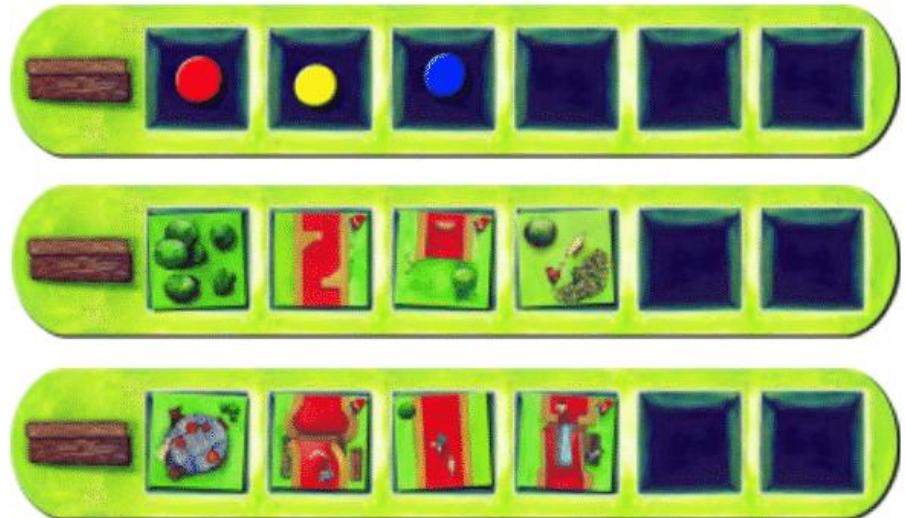
5 把 3 根排位条置于桌子中央。将所有玩家棋子随机放于第一根排位条上。可以在手中打乱它们,并逐个放出。

左图最上面一根排位条上放置了3名玩家,红色玩家最先玩,其次黄色玩家,最后是蓝色玩家。
然后负责布袋抽取的玩家填放后面两根排位条,每根上放置的板块数比玩家数目多一个。
6 将首次抽取的迷你高尔夫板块放置在第二和第三根排位条上(下章有介绍如何按照板块背后的数字填放排位条)。抽取的板块数需比玩家数多一块。
7 根据家庭版或是高级版,将记分棋盘的对应面放在桌上。在家庭版中不会用到承诺卡牌和承诺棋子。

高级版中:
8 根据玩家数,在布袋中放入对应数目的“客户来访”板块。

9 每位玩家需至少选择一张(可以多选)承诺卡牌,并将它们正面朝下放于各自的记分板下面。承诺卡牌代表了玩家的秘密承诺和目标。其它承诺卡牌也正面朝下叠放在玩家面前,以免暴露他们的选择。

在一开局就抽取很多承诺卡牌并不明智,因为在客户来访时还可以承诺(见 P8),但是并不保证一定会有客户来访。
玩家可以随时查看自己的承诺卡牌,以提醒自己需要关注的项目。但需要注意将已承诺和未承诺的卡牌分开。
游戏规则
拿牌顺序
排位条上玩家棋子的先后代表了每轮的顺序。左边第一位的玩家就是下一轮的首名玩家。
在每一轮中,您只有两种选择:从中间的排位条上拿一块牌,或者放弃。
拿牌
当您拿了牌后,就将棋子填在这个位置。您棋子的位置决定了您在下一轮中的拿牌顺序。您只能从中间的排位条上拿牌,而不能从最底下的排位条上拿牌。
最底下的排位条告诉玩家后面一轮有哪些牌。如果您非常想要最底下排位条上的牌,您可以选择在这一轮上拿一块尽量靠左的牌,或直接放弃。这样就可以在后面一轮的选牌上处于有利位置。
拿牌后,您必须马上将它放置到您的迷你高尔夫球场(见 P10,放牌规则)。
放弃
您不必非得拿牌。如果中间的排位条上没有您需要的牌,您可以放弃本轮,将自己的棋子放在中间排位条左端的长凳上,比其它棋子都靠前。
如果别的玩家在您之后也选择放弃,那他的棋子将放在更左面。所以,最后放弃的玩家总是下一轮的第一名玩家。
红色玩家第一个玩,因为他的棋子在最左面,其次是黄色玩家,最后是蓝色玩家。

红色玩家拿了第三块牌,并将棋子放在第三块牌的位置。

后一名是黄色玩家。因为他不喜欢中间一行的任何一块牌,他选择放弃,将棋子放在长凳上。

蓝色玩家拿了第一块牌。他是最后一个玩的,现在我们需要准备下一行牌。

玩家们现在可以将最上面空了的排位条移动最底下。

负责布袋的玩家抽取了背面数字是5的牌,接着是数字2,5和12。将它们正面朝下放在桌上后,按从小到大的顺序放上最底下那根排位条。然后将刚才剩下2块牌放入布袋。黄色玩家将开启新的一轮。
每轮过程
一旦一名玩家结束了他那一轮(或者拿牌或者放弃),按照棋子排位顺序,轮到下一名玩家。当所有玩家都结束了本轮,最上面的排位条就空了。
空了的排位条接着被移到最下面,将另外两根顶上去,这样刚才中间的那根现在变成了最上面的那根。
然后在布袋中抽取新的牌填充新空出的排位条。
抽取新牌
填充一根排位条时,负责布袋的玩家需要抽取比玩家数目多一块的牌。抽到的牌需要正面朝下放在空出的排位条下方,这样人人都能看到背后的数字。抽放的顺序很重要,因为可能多块牌背面都有着相同的数字。
然后,按照背面的数字从小到大,从左到右,将牌正面翻上最底下的排位条。如果有多块牌背面的数字相同,就按抽取的顺序放置。
如果抽到了“客户来访”,告知所有的玩家,并抽取另一块(见下页的“客户来访”)。
当新的排位条被填满,将最上面那根上剩下的牌放入布袋。
新一轮
当最下面那行被填满,新的一轮就开始了,照例由最左边的玩家开始。
游戏一直进行直到所有的玩家都决定停止(见 P9 “游戏结束” 章节),或当布袋中没有牌了。
高级版:客户来访
当抽到一块 “客户来访” 牌(握手的图案)时,就意味着客户夫妇要考察每个人到目前为止的进度。作为迷你高尔夫球场设计师,这时您可以承诺客户最终球场的质量,这通常是我们消除客户担心的时刻...
当抽到了一块“客户来访”牌,将它放在布袋外面,抽取另一块牌补充它的位置。确保每位玩家都看到了“客户来访”牌,因为这是他们选择一张或多张承诺卡牌的机会。并不是必须要选,您可以保留先前的承诺不变,不追加任何新的承诺。您也可以追加多张承诺卡牌。即便您已经停止建设您的迷你高尔夫球场,您仍然可以在“客户来访”时追加承诺。
注意,您不能撤销或改变已作出的承诺。一旦承诺就必须兑现...不然就会影响到客户满意度。
您可以从剩下的承诺卡牌中挑选一张或多张您觉得可以实现的承诺。然后将选择的牌正面朝下放在记分板下,避免与剩下的承诺卡牌混淆。剩下未选的承诺牌也正面朝下放在旁边。
有 7 张不同的承诺卡牌,每张对应一个必须完成的满意度项目。每张承诺牌上都有一个图标,对应记分棋盘上的图标。选择一张承诺卡牌意味着您需要特别关注这个满意度项目,并争取比别的玩家做得更好。


承诺卡牌代表了玩家扮演的设计师。正面的卡牌名称是7种满意度项目之一,下面是相应的图标,也对应棋盘上的图标。
另一种规则:如果您不喜欢这种随机的“客户来访”,您可以忽略以上规则,在游戏中间设置客户来访。这样的话,将每一轮中未被选中的牌放在旁边,而不是放回布袋。您可以将它们围绕在棋盘周围,当棋盘的3条边被排满时(也就是围了21块牌),客户就会来访,然后将这21块牌重新放回布袋。

将您选择的承诺卡牌放在您的记分板下面,与未选择的承诺牌分开。
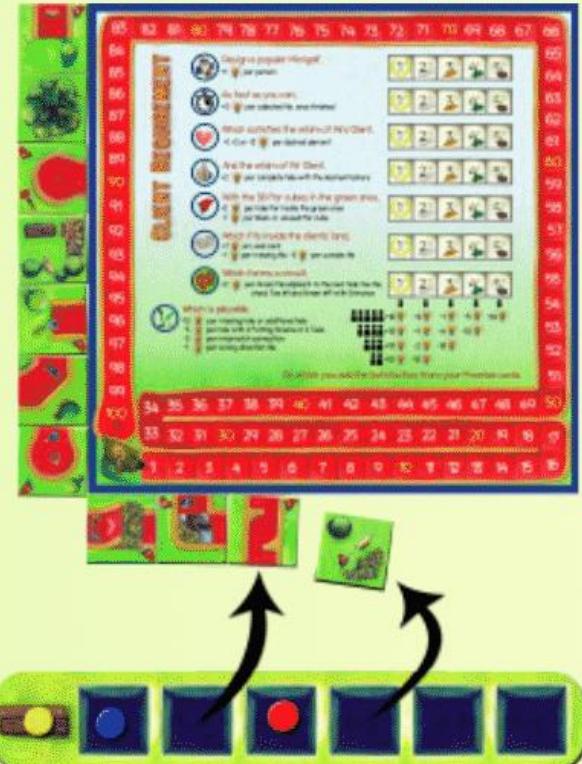
另一种客户来访的规则:每轮中未被拿掉的牌被移到记分棋盘边缘。

黄色玩家在上一轮中第一个完成迷你高尔夫球场地图的建设。这一轮中(他在红色玩家后第二个玩),他拿了一块牌并面朝下放在他的球场旁边。

三轮之后,红色玩家决定停止(即使还有一块没有填满)。他也开始集牌,但是蓝色玩家还想继续建造。

又两轮过后,蓝色玩家最终决定停止,并集了一块牌正面朝下放在一边。一旦所有玩家都在这轮集了牌,游戏就结束了。
游戏结束
触发最后阶段
玩家们建造各自的迷你高尔夫球场直到有人完成了他的球场地图(不管有没有超出地图的板块)。第一名完成的玩家触发了游戏的最后阶段,使得其它玩家可以选择停止建造或继续建造。
选择停止
在这个最后阶段,还没完工的玩家可以继续建造他们的迷你高尔夫球场,或者决定停止。如果选择停止(或者已经完工),您可以按照正常顺序继续拿牌,等待其他玩家停止或完成他们的球场地图。
在接下去的每轮中,结束的玩家不能放弃,必须每轮拿牌并照常放置棋子。拿到的牌不再放到球场上,而是收集起来正面朝下放成一堆。这样拿到的每块牌都值3分。在这个阶段,您仍然可以骚扰别的玩家,有机会拿掉他们想要的牌。所以其他玩家必须评估继续建造迷你高尔夫球场的得失,或者停止建造即便它还未全部完成。
停止了就不能更改
一旦您决定停止,并开始集牌,就不能再给您的球场添砖加瓦了。
游戏结束
当所有玩家都结束了,也就是最后一个建造的玩家决定停止,并拿了第一块正面朝下的牌,这时本轮结束,游戏结束。现在玩家们开始计算他们的得分(见计分章节)。
放牌
放牌规则
游戏开始时,您可以任意方向放置您的圆角入口,建议按照地图方向放置,便于识别和比较。
从排位条上拿牌后,就必须放在您的迷你高尔夫球场上(不能留着之后放置)。放牌时,必须贴着已有的板块或入口。只碰到一个角也是允许的。
板块边缘的颜色必须与相邻的板块一致。有两种基本的连接类型:绿色草地或者红色迷你高尔夫球道。绿色草地必须连着绿色草地,红色球道必须接着红色球道。
如果您在放牌时违规了,也没被及时发现,不用改变球场布局,继续建设。您将在最后失掉一些满意度得分,以示惩罚。
球道设计
每根球道都有一个 “Tee” (起始块,3 边绿草地 1 边红球道),一个 “Putting Green” (结束块,一大块圆形球道,中间有一个球洞,同样也是 3 边绿草地 1 边红球道),以及中间任意数量的红色球道(2 边红色球道 2 边绿草地)。也可以起始块直接连接结束块构成一条球道。
如果您的球道不符合这样的设计,游戏结束时,每一根不合规的球道都会让您丢失3分(见计分章节)。

上例中,玩家可以将第6块牌放在任意灰格中。

绿色箭头指示绿草地,红色箭头指示红球道。

一条球道以 “Tee” 块开始(类似左边那块),接着任意数量的球道,以 “Putting Green” 块结束。
建造迷你高尔夫球场时需要遵守的地图布局。代表板块数的球场面积也标注在上面。

您在完成球场建设后能够获得的满意度得分。
高尔夫球数代表了难度。
地图中间的池塘。

球场面积:这张地图面积为 $410 \mathrm{~m}^{2}$ , 表示您需要 41 块牌来填满它 (包括占据 4 块面积的入口)。

红色玩家放置了池塘,为了看得更清楚。他可以在上图的灰格中连着已有的球场板块放牌。但是不能只连着池塘放牌。
地图
客户在周边考察了一番,为了挑选一块适合的场地以建造迷你高尔夫球场,他们委托您来设计。有几块场地可供选择,地图上的满意度分数代表了客户的喜欢程度,但是他们还是让您来选择适合的地图。
游戏开局时,您可以从三张地图中任意选择一张(在开局设置时随机发给每名玩家)。将您选择的地图摊开放在前面,让每名玩家都能看到,将另外两张放回盒中。
游戏中,您要在所选地图上的蓝线格子内建造迷你高尔夫球场。
窍门:地图上同时标明了球场面积。选择一个小的球场让您可以早点结束(如果不考虑放弃),这让您在建造速度上占得先机。
窍门:一些地图会比较难建造。地图上标注了难易度(高尔夫球越多的地图越难建)。您最好在学习游戏的时候先挑简单的,逐步挑战困难的。
池塘和河流
有些地图上有池塘或河流。如果选择了这样的地图,您需要绕开它们建造迷你高尔夫球道。您不能在池塘或河流中放牌,如果放了,这些牌相当于出界,您将在地图环节上失分。为了便于分辨,您可以随时将池塘或河流板块放在地图上相应的位置。
但是,您不能只靠着池塘或河流边放牌。放牌时请忽略这些水源板块。
球道号
开局时,每名玩家都有9个小标记,从1到9。这些是应放在球道起始块上的标记,以标明球道号。它们将地图上的球道和记分板关联起来。
游戏中您随时都能放置或调整这些球道号。您也可以随时改变主意,更改球道号,尤其是犯错的时候。但是在最后算分时,每条球道都需要被标好。
球道杆数
每条球道都有一个难度值,叫做“杆数”,表示通常需要打几次球才能进洞。
因为球道的杆数取决于它的难易程度,直接与您在球道上设计的障碍有关。这个杆数值显示在板块的小旗子上。
要知道整条球道的杆数,需要将组成球道的所有板块的杆数相加。注意有些板块(通常上面没有障碍物)没有任何杆数,这些板块可以使球道更长而不会影响球道的总杆数。
球道的杆数最好在 3-5 之间。杆数为 2 的球道太容易,杆数超过 5 的球道又太难。注意起始块和结束块至少杆数为 1。

球道号标记。
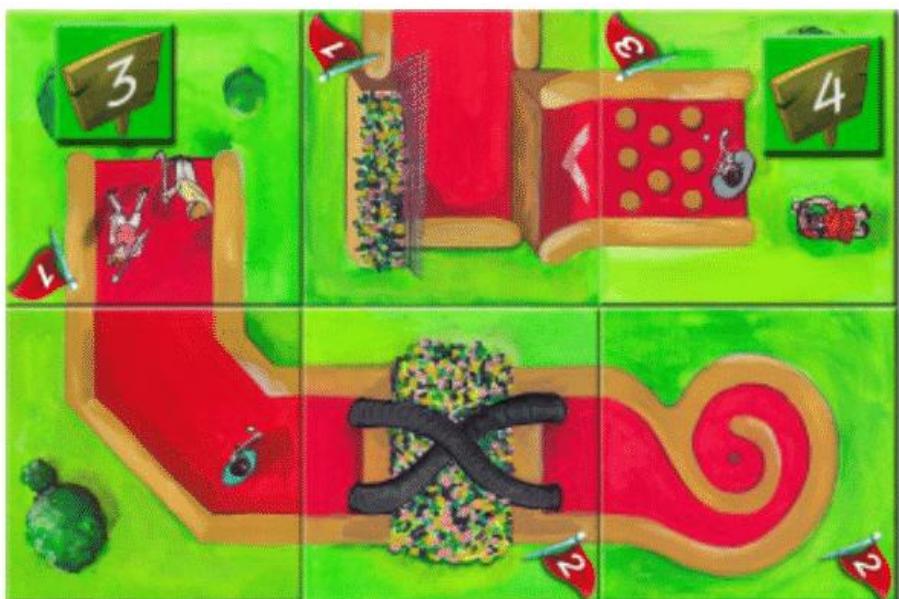
标记 3 和 4 被放置于两根球道的起始块上。当心不要遮挡球道上的人。
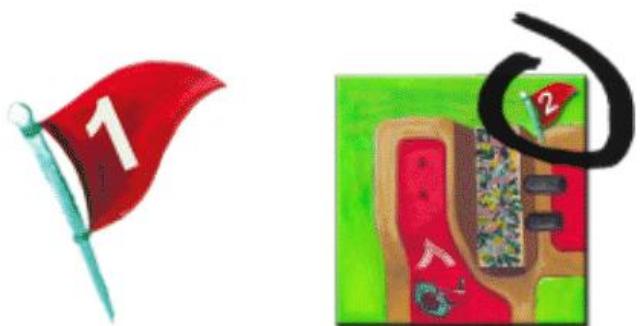
杆数图标是一面小红旗,里面的数字从1到3,位于板块角落上。

3号球道的总杆数是5:起始块杆数为1,转角无杆数,第三块带花和管道的杆数为2,结束块同样是2杆(1+2+2=5)。4号球道已有4杆(3+1=4)。
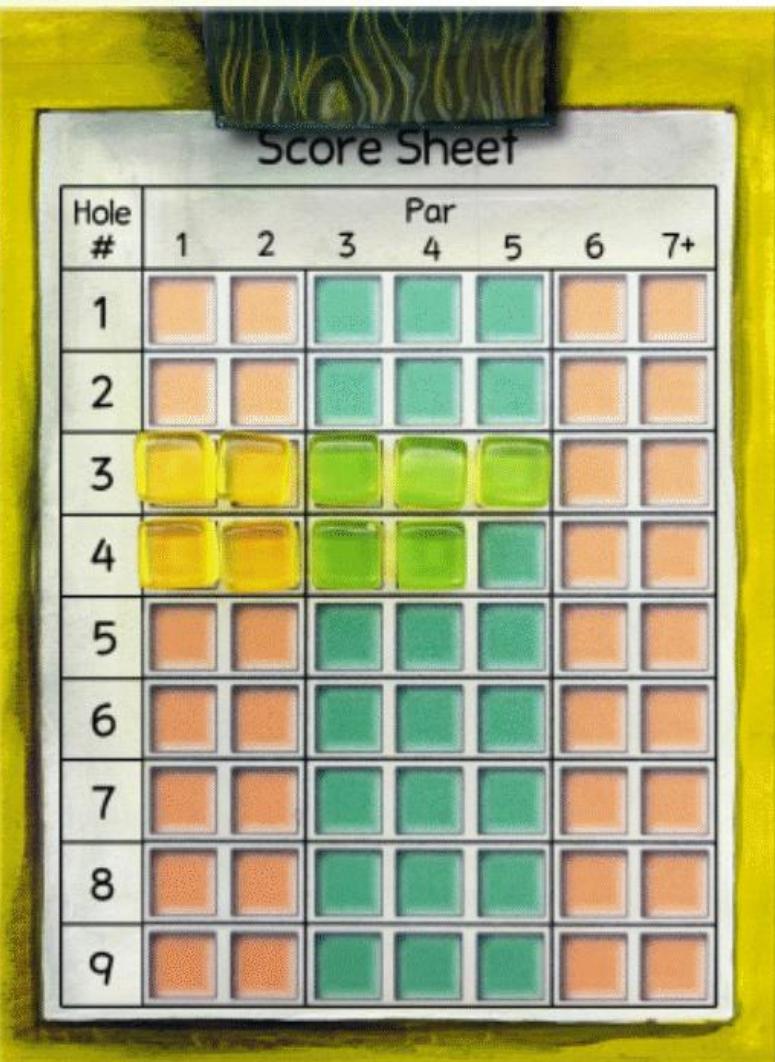
在记分板上,黄色玩家用 5 颗方粒标记第 3 根球道的杆数,4 颗方粒标记第 4 根球道。
记分板
一旦您有了整条球道的杆数,您就可以用亚克力方粒标记在您的记分板上。记分板上列出了需要设计的9根球道,让您可以方便地跟踪整个迷你高尔夫球场的总杆数,以及查看单根球道的杆数是否落在绿色区域中。
一个设计良好的迷你高尔夫球场需要每根球道的杆数在 3-5 之间。4 杆是平均值,由于有 9 根球道,整个迷你高尔夫球场应为 $9 \times 4 = 36$ 杆。所以每个人有 36 颗代表杆数的亚克力方粒。
如果您用完了 36 颗方粒,还需要方粒来补充球道的杆数,您就需要使用公用的黑色方粒来标记您的记分板。
按照您的球场设计以及球道号的分配,您可以随时更新记分板,但是在游戏最后,记分板需标注完成以计算杆数满意度的得分。

游戏结束后,黄色玩家用完了36颗方粒,并补充黑色方粒标记了所有球道的杆数。
迷你高尔夫球场设计总览
您可以发挥创造力自由设计您的迷你高尔夫球场,但是为了赢得比赛,您需要提前了解所有您客户的限制和需求。
我们建议在玩之前(尤其对于新玩家),您应该了解棋盘上的满意度得分列表,然后专注于您的设计。
计分
当所有玩家都结束了建造,也就是说最后一名玩家拿了一块正面朝下的牌时,游戏结束,玩家们可以开始计算满意度得分了。按照满意度列表从上往下算分。
在每个满意度得分项上,计算每位玩家的得分,并在棋盘上移动他们的棋子。计算所有玩家这个项目上的得分,然后进入下一个满意度得分项。
使用 “100/200” 板块标记得分超过 100 的玩家,然后在棋盘上重新开始计分。
得分排行说明
满意度项目在家庭版和高级版中都是相同的。然而棋盘上高级版那面每个满意度项目右边都有一个排行表,按得分顺序排列玩家们的承诺棋子。从上到下逐个计分每个满意度项目。
项目计分时,每名玩家各自安静地计算得分,并将相应的承诺棋子放在得分条上。当所有玩家都计完该项得分后,从得分最高的玩家开始:将承诺棋子的分数加到同色的得分棋子上,然后把承诺棋子放到排行表的首位。同样将其他玩家的承诺棋子按各自顺序放到排行表上,并将分数加到各自的得分棋子上。
相同得分:如果几名玩家在同一个项目上得分相同,他们的排名也相同,获得同样的加分或减分。这样剩下的排位就会空缺,见示例。
满意度项目
列表
每个项目的得分排行(高级版)


100/200
板块
得分条

在这三名玩家中,黄色玩家在人数项目上占优,红色其次,蓝色最后。
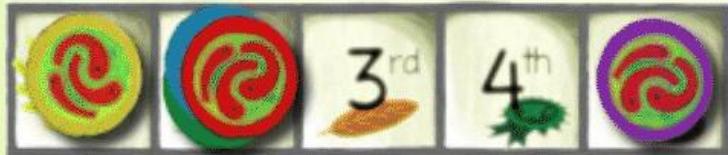
在这五名玩家中,黄色玩家在球道布局中占优,绿色,蓝色和红色玩家同为第二,紫色最后。

最后这个示例中,蓝色和黄色玩家在建造速度上同为第一,紫色和绿色同为第二,红色最后。
当所有该项的承诺棋子都放在排行表上后,进入下一个计分项目。排行表会在最后根据承诺卡牌算分。

人数
迷你高尔夫球场上的人数反映了球场的受欢迎程度。打高尔夫的人越多,说明球场建造得越好。数一数您球场上的总人数(不算狗),加起来就是这项的得分。
人数最多的玩家占据首位,以此类推。

没有任何人数分。

人数1分。

人数2分。

人数3分。

建造速度
您球场完工后拿的正面朝下的牌,每块 3 分。数一数您拿了几块,乘以 3 ,在计分条上移动您的棋子。
获得牌数最多的玩家占据首位,以此类推。

夫人的偏好
客户夫人会关注一些事物,写在了客户夫妇卡牌上。数一数您球场上满足夫人要求的物件数(夫人卡牌上的每件事物能得1-3分不等)。少数板块上,这种事物会出现多次(如一块牌上有2条狗,或3根管道),这种板块能给您更多得分。将此项获得的总分添加到您的棋子上。

这块牌有 2 条狗,3 堆树,Mrs Hotdog 能得 6 分(2x3),Mrs Evergreen 能得 3 分(3x1)。
这块牌有 1 个池塘,1 个花坛,1 条长凳,1 堆树,Mrs Sprinkle 和 Mrs Bloom 能得 2 分,Mrs Lazy 能得 3 分,Mrs Evergreen 能得 1 分。
这块牌有 2 个花坛,Mrs Bloom 能得 4 分 (2x2)。
得分最多的玩家占据首位,以此类推。
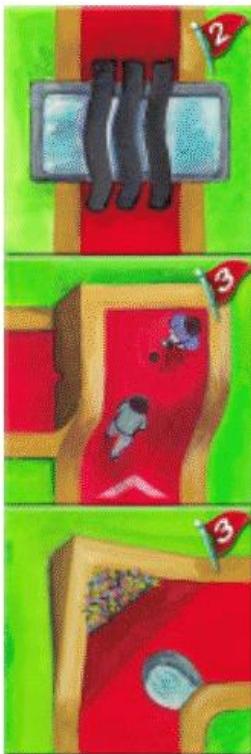
这块牌有 3 根管子,1 个池塘,Mrs Plumber 能得 6 分(3x2),Mrs Sprinkle 能得 2 分。
这块牌有 1 根暗管,1 个斜坡,
Mrs Plumber 能得 2 分(1x2),
Mrs Sloppy 能得 3 分。
这块牌有一个斜坡,1个花坛和1个池塘,Mrs Bloom能得2分,Mrs Sprinkle能得3分,Mrs Sloppy能得3分。


先生的偏好
先生更关注球道的布局特点。每根能满足这些特点的球道得2分。未建完的球道不记分。将此项获得的总分添加到您的棋子上。
这里 5 个球道示例告诉您哪个能得到 2 分。
| Mr Short | 2 pt | ||||
| Mr Long | 2 pt | 2 pt | |||
| Mr Linear | 2 pt | 2 pt | |||
| Mr Turner | 2 pt | 2 pt | 2 pt | ||
| Mr Luckyford | 2 pt | 2 pt | |||
| Mr Überstitious | 2 pt | 2 pt | 2 pt | 2 pt |
Mr Short Mr Short 喜欢短球道,每根只有两块牌组成的球道都能得 2 分,也就是起始块直接连着结束块。
Mr Long Mr Long 喜欢长球道,每根 4 块或以上牌组成的球道都能得 2 分。
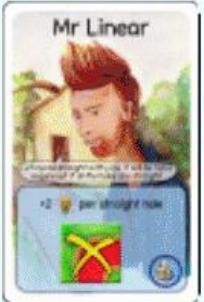
Mr Linear Mr Linear 喜欢直道,每根直球道,也就是没有拐弯的球道都能得 2 分。
Mr Turner Mr Turner 喜欢弯道,每根有一个或多个拐弯的球道都能得 2 分。注意是每根球道 2 分,而不是球道上的每个弯 2 分。
Mr Lucky- ford Mr Luckyford 喜欢杆数为 4 的球道,每根杆数正好是 4 的球道都能得 2 分。
Mr Überstitious Mr Überstitious 不喜欢 4,除了第 4 根球道,每根杆数不为 4 的球道都能得 2 分。而第 4 根道如果杆数为 4 才能得 2 分。其它球道只要杆数不为 4 都能得 2 分。
Mr Straight-forward Mr Straightforward 方向明确,如果球道的起始方向与上根球道的结束方向一致,就能得 2 分。如果 8 根球道都满足这个方向要求,还能额外获得 2 分。


这里只有第一种情况才能得到 Mr Straightforward 的 2 分。
得分最多的玩家占据首位,以此类推。

杆数
如果游戏结束时您还没有在记分板上放好每根球道的杆数方粒,那就把它们放好。即使是未建完的球道(计算未完工球道上的总杆数)。
数一数记分板上杆数落在绿色区域的球道数(杆数为3,4或5)。每根这样的球道得2分(也就是说您最多能得18分)
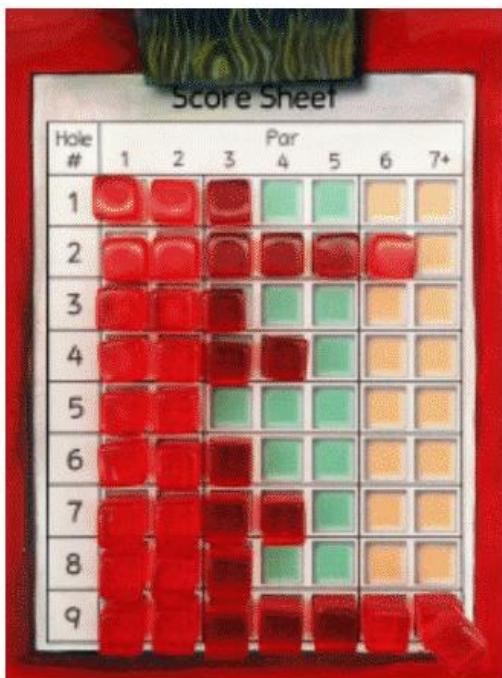
红色玩家有6根球道落在绿色区域内(球道#1,#3,#4,#6,#7 and #8)。其它球道的杆数都在记分板的红色区域(球道#2为6杆,球道#5为2杆,球道#9为8杆)。对于这些太容易或太难的球道都不得分。
此外,每名玩家都有 36 颗方粒,最好用完它们,不多也不少。
如果您正好用完它们,那您就不会失分!如果您到最后还有剩下的,或补充的黑色方粒,那它们的总数就得从您的杆数分值中扣除。
然后将杆数的最后得分加到您的棋子总分上(也就是绿色区域的球道得分减去未用完的或补充的方粒数)。

这里蓝色玩家只用掉 34 颗方粒,剩余的 2 颗将使他失掉 2 分)。
他有 7 根绿色区域的球道,所以整个球场的杆数得分为 2x7-2=12 分。

黄色玩家使用了 40 颗方粒,4 颗补充的黑色方粒将扣掉他 4 分。
他有 8 根球道在绿色区域,所以整个球场的杆数得分为 2x8-4=12 分。
杆数得分最多的玩家(绿色区域的球道得分减去未用完或黑色补充方粒数)占据首位。

地图
地图项目的计分由两部分组成。首先您获得开局时选择的地图上的分值。然后每一块建在地图之外或池塘河流上的牌都要扣3分,每块没有填满地图的空位都要扣1分。将您的地图项目分数(地图分值减去错误分值)加到总分棋子上。

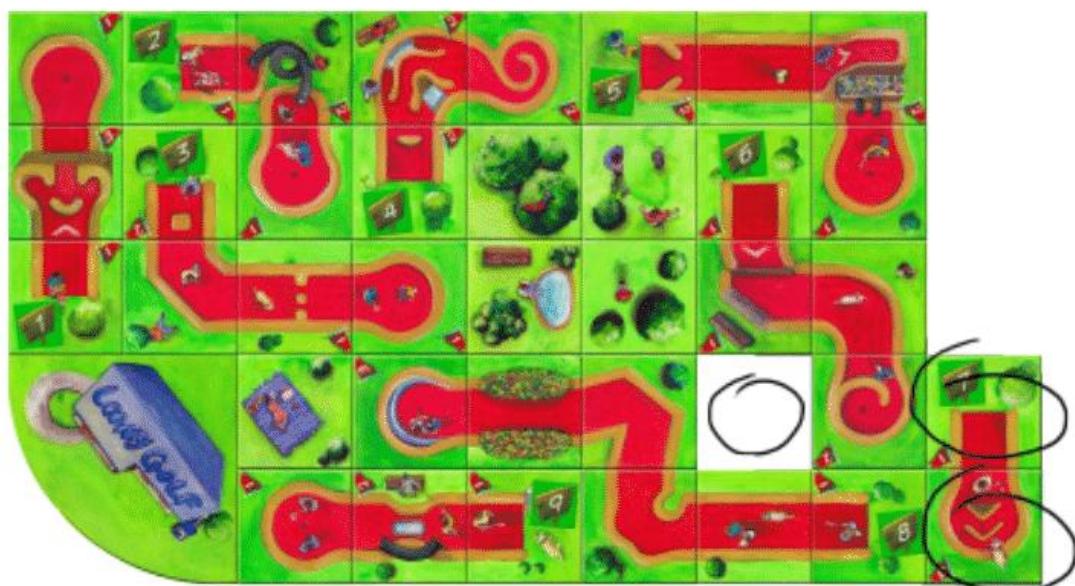
这名玩家试图建造左图上的球场,但是建造的7号球道有点问题。他先获得地图上的15分,然后比较建好的球场和地图。有2块牌位于地图以外,要扣6分。1块未完成,扣1分。总得分:15-6-1=8分。
得分最多的玩家(地图分值减去错误失分)占据首位,以此类推。

球道布局
为了打球的流畅性,迷你高尔夫球场的设计需要球道绕一圈后回到入口。1号球道的起始块必须挨着入口,2号球道的起始块需要靠着1号球道的结束块,以此类推首尾相连。这样,高尔夫玩家可以一直顺着球道打球,并在打完第9号球道后回到入口。

这是一个完美的球道布局。
每个首尾相连的板块都能获得 2 分(一根球道的结束块连着下一根球道的起始块)。仅对角相连不算首尾相连。如果起始块和结束块缺位,也不得分。
如果 1 号球道的起始块靠着入口块也能得 2 分, 如果 9 号球道的结束块靠着入口也能得 2 分。
根据您的球道得分移动您的棋子。因为有 10 个接口,所以您最多可得 20 分。

这个迷你高尔夫球场布局有很多错误。白色箭头显示了正确的首尾相连,一根球道的结束块连着下根球道的起始块,每个这样的连接得2分。黄色箭头显示结束块没有连着下一个开始块。
1 球道:起始块没有靠着入口,玩家不得2分。
2 球道:1 号道的结束块和 2 号道的起始块之间隔着 1 块牌,玩家不得 2 分。
3 球道:2 号道的结束块连着 3 号道的起始块,玩家得 2 分。注意 2 号道的结束块同样连着 4 号道的起始块,但是由于球道标号不连续,所以这个接口不算分。
4 球道:3 号道的结束块与 4 号道的起始块仅对角相连,没有挨着,所以玩家不得分。
5 球道:即使 4 号道空缺的结束块连着 5 号道的起始块,玩家也不得分,因为结束块缺位。
9 球道:9 号道的结束块与入口板块间隔了一块,也就是说 9 号道的结束块没有连到入口块,所以玩家不得分。
总得来说,这里有 2 个正确的首尾相连,玩家获得 4 分。
球道布局得分最高的玩家(正确的首尾相连接口数)占据首位,以此类推。

错误检查
最后,在统计完所有的得分项目后,您需要检查迷你高尔夫球场设计的合理性。错误放置的板块导致球道不能打,影响客户夫妇的满意度。如果是初次玩这个游戏,或者有小朋友玩,您可以忽略这些错误。
球道数
玩家们需要设计一个9道迷你高尔夫球场。少一根或多一根球道都要扣10分。如果在9根球道外,有一块单独的红色球道,或多块组成的一根球道,将被视作是一根多造的球道。如果您的地图没有建完(因为您决定停止建造),请在开始计算得分前假设您的球场已经建完,解释缺位的板块,以判定缺失或多造的球道。
两个起始或结束块
每根球道都要有一个起始块和一个结束块。没有这两个板块的球道(比如球道两头都是起始块或结束块),扣3分。如果因为球场没有建完,球道的起始块或结束块缺位,明显有位置可以放置它们的,这里无需扣分(因为它们在地图项目里已经扣分)。


上面是两头都是结束块的球道和两头都是起始块的球道,每根这样的球道扣3分。

错误连接
如果玩家错误地连接了两块牌,比如将绿色的草地与红色的球道相连,每个这样的错误连接扣3分。地图边界包括池塘和河流都被看作是绿色草地。
在这个球场中,
有3处连接错误,玩家将被扣9分(每处错误扣3分)。

方向错误
有些球道板块有方向(比如有斜坡的板块)。这个方向以白色箭头标在了红色球道上。方向放错的板块会被扣1分。

图例中球道上的箭头标明了这块牌的方向。

上图的所有 4 根球道中都有一块方向放错。
1 球道:斜坡放错,如果从起始块开打,高尔夫玩家不可能将球打上斜坡。
2 球道:同样的问题,斜坡放错。
3 球道:管道的出口对着起始块,而不是斜坡面。球应在斜坡上落入管口,再从管道里滚出。
4 球道:同样的问题,起始块对着管道出口。斜坡上的管口总是管道的入口,所以这一面应朝着起始块。
设计这个迷你高尔夫球道的玩家将被扣4分(每个方向错误的板块扣1分)。
每名玩家计算错误的总罚分,然后在棋盘后退棋子。
球场的合理性对客户来说是显而易见,必须遵守的,没有承诺卡牌。来吧!难道您真要交给甲方一个不能玩的迷你高尔夫球场吗?
承诺卡牌
在高级版中,一旦所有项目计分完毕,玩家们就要翻开各自所选的承诺卡牌。
对于每个您所作的承诺,您将根据您在排行表中的位置和游戏人数,获得或损失相应的得分。参考右侧图例(同样也印在了棋盘上),了解得失分数。
| 1st | 2nd | 3rd | 4th | 5th | |
| 2名玩家: | 10 | -10 | |||
| 3名玩家: | 10 | -2 | -10 | ||
| 4名玩家: | 10 | 1 | -4 | -10 | |
| 5名玩家: | 10 | 2 | -1 | -5 | -10 |
即使您没有选择承诺卡牌,您仍然会被排在排行表上。但是您不会获得承诺带来的奖励或惩罚。您只获得您所选的承诺项目对应的得分。
例如,即便您在某个项目中占据首位,但是您没有选择相应的承诺卡牌,您就不会有加分。同样,如果您是最后一位,但是您没有做出相应的承诺,您也不会被扣分。


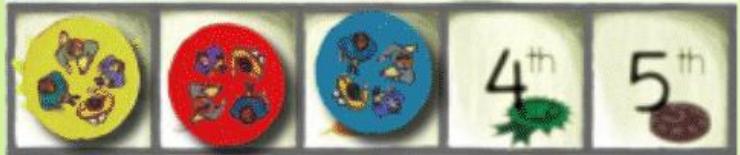
第一例中,黄色和蓝色玩家做出了人数承诺。为此,黄色得10分(因为黄色第一),蓝色扣10分(因为蓝色是3人游戏中的第三名)。红色玩家没有承诺人数,不得分也不扣分。

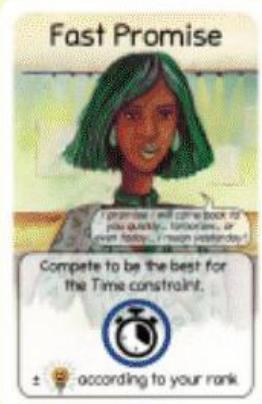
第二例中,蓝色,紫色和绿色玩家承诺了建造速度。蓝色得10分,因为他是5人游戏的第一名。紫色和绿色各失1分,因为他们都是第三。黄色和红色不得分不扣分,因为他们没有在这项上承诺。
胜利者
所有项目计分完毕后,胜利者就是:满意度得分最多的玩家。如果得分相同,第一个建完球场(获得第一张正面朝下的牌)的玩家获胜。
单人游戏规则
开局设置
在规则上做出一点调整,您就能独自玩这个游戏。首先您无需排位条,可以将它们放回盒中。将您的棋子放在棋盘的初始0位。
拿牌和放牌
每轮中,您抽取2块牌,并放置一块在您的球场上。您不必将另一块牌放回布袋,当然您想放回去也可以。
如果两块牌都不合适,您可以选择放弃。如果您放弃,需将棋子后退3格(如果您首轮放弃,您的棋子将退到97,然后94,91...)。游戏结束后,在您现在的位置上添加您的得分。忽略“速度”项,您因放弃而倒退的分就是“速度”得分。依照下表评估您的满意度分值:
| 客户满意度: | 不满意 | 失望 | 一般般 | 高兴 | 被惊艳到 |
| 家庭版: | <70 | 70-89 | 90-109 | 110-149 | ≥150 |
| 高级版: | <80 | 80-99 | 100-119 | 120-169 | ≥170 |
高级版单人游戏
单人游戏也有高级版,高级版的规则没有任何改变。如果您没有出错,承诺被认为完成。这时您就加10分,相反,如果您没有兑现承诺,您就失掉10分。更多细则:
- 人数承诺:如果超过 50 人,就成功了。
- 速度承诺:如果一次都没放弃,就成功了(也就是您的棋子到游戏结束都在“0”位)。
- 夫人的偏好:如果您在这个项目上获得至少 20 分就成功了。
- 先生的偏好:如果每根球道都满足他的偏好就成功了(也就是在这个项目上获得了18分)。
- 杆数承诺:如果您的 36 颗方粒都在绿色区域就成功了(也就是在这个项目上获得 18 分)。
- 地图承诺:如果您没有差错地填满地图就成功了。
- 球道承诺:如果您的球道布局完美就成功了(也就是在这个项目上获得20分)。
记录个人得分:

6x 4x 3x 2x
开局设置



记分棋盘翻到家庭版或高级版。
随机抽取一张客户先生和一张客户夫人卡牌,放在记分棋盘旁边让所有玩家看到。
将黑色方粒,池塘和河流板块放在记分棋盘旁边。

打乱并分发 3 张地图给每名玩家,然后每人选取 1 张。


一名玩家负责布袋抽牌。


将 3 根排位条放在桌子中央。
随机放置玩家棋子在第一根排位条上,然后将第二根和第三根填满。


玩家们拿好各自的材料(入口,记分板,亚克力方粒,球道标记,承诺卡牌,和承诺棋子)。每名玩家选择至少一张承诺卡牌(高级版)。
rules_en_minigolf-designer-minigolf-empire-extension_379293.md
Minigolf Designer: Minigolf Empire Extension
逐页 VLM 转写(qwen3-vl-plus),保留原文结构,未翻译。
MINIGOLF EMPIRE EXTENSION
MINIGOLF DESIGNER
RULE BOOK
Design by Alban Nanty
Art by Vicente Sivera and Gul E Raana
[图: A bald man in a suit reclines in an office chair, holding a pen and looking at a large green minigolf course diagram on the wall; a laptop with charts rests on his lap; a woman’s hand points to the diagram.]
MINIGOLF EMPIRE EXTENSION
MINIGOLF DESIGNER
The client couple for whom you designed a Minigolf Course, loved your work! They hire you to open a full chain of Minigolf venues!
With this extension, you can play a series of 5 games of Minigolf Designer as a campaign. The difficulty of the clients’ whim will increase after each game and your performance has an impact on the next game you play.
Apart from a notepad to record your progress, this extension mainly contains two new decks of cards: One full of new design challenges, and one to help you mitigate the randomness of the game.
- Designer: Alban Nanty
- Illustrators: Vicente Sivera, Gul E Raana (Rulebook, Land cards)
- Proofreading: Hercules Matthijs Schaap
- Testers: Justine, Alban, Ludivine
[图: Decorative border with red flags, golf tees, and green grass along top and bottom edges; Thematic Games logo with hedgehog at bottom left]
Copyright Thematic Games 2023
CONTENT
-
2 Client Cards
(1 female and 1 male)
[图: Two character cards: “Mrs Pressco” (female, pink background) and “Mr Profeet” (male, blue background), each with stats and icons] -
23 Land Cards
[图: Two land cards: one showing a rolled-up blueprint with grid and measurements, another partially visible behind it] -
49 Press Cards
[图: Three press cards: “Putt Putt”, “Mini Golf”, and a yellow card with number “3” and text “At least 1 windmill”] -
68 Fame Cards
[图: Two fame cards: one titled “Mini Golf” with image of golf course and trophy, another with coffee cup, pencil, and handwritten note] -
A Notepad of balance sheets with a pencil
[图: A “Campaign Balance Sheet” form with rows for courses, columns for resources (ball, club, money, etc.), filled partially; a wooden pencil lies diagonally across it] -
This rule book
[图: Cover of the rule book showing title “MINI GOLF” and a bald man in suit gesturing toward a colorful map]
CAMPAIGN EXTENSION
What is a campaign?
- This extension will bring a campaign mode to your Minigolf Designer game.
- A campaign will string multiple plays of the game together into a single story. The results of each play has an impact on the next one(s).
- Thanks to two new clients, you can play through 5 games of Minigolf Designer linked together.
Same clients but New Challenges!
- Most of the variety and replayability of Minigolf Designer comes from the combination of the two Client Cards drawn during Setup. You may wonder what will happen to the variety if the two clients do not change during the campaign?
- Well, the minigolf design challenges of games in the campaign come from a combination of new cards called Press Cards.
[图: Decorative border with red flags and golf tees along top and left edges, green grassy background]
Each Press Card proposes a small and specific challenge to the players, and the more challenges your Minigolf Course can satisfy, the more victory points you get (see the following pages for more details).
How to record your progress?
This extension comes with a notepad of balance sheets. You should give a balance sheet to each player, who can then write their name in the dedicated box.
This sheet links the outcome of plays to the setup of the next game. Each player has to write down their scores and track their progression at the end of each game.
Some cards in the game come with you from one game to the next. You save your unplayed cards together with the balance sheet in the plastic bag that holds your pawns. Ready to be used in the next game of the campaign.
[图: Decorative border with green grass, red flags, and white golf tees along top, right, and bottom edges]
MRS PRESSCO
To establish a minigolf chain brand, one needs good press coverage, and Mrs Pressco is a marketing expert. She will give you Satisfaction Points for every article published in the press.
Each press article is represented by a Press Card. The article is only considered published if your Minigolf Course design satisfies the challenge written on the card.
[图: Mini Newspaper icon]
This extension introduces a new icon (a Mini Newspaper) to represent the Press Points. For Mrs Pressco, one Press Point equals one Satisfaction Point, you’ll want to earn as many Press Points as you can. Press Points will also give your Fame Cards (see the following pages).
Therefore, scoring Mrs Pressco is quite simple: count your Press Points and score that many Satisfaction Points on the score track.
[图: Mini Newspaper = smiling lightbulb icon]
MR PROFEET
In order to become a minigolf chain tycoon, Mr Profeet needs to maximize his profit to invest in the next Minigolf Course.
Therefore Mr Profeet will give you Satisfaction Points, depending on the profit that he can make.
[图: Mr Profeet card showing a bald man in a suit holding money, with text “The more visitors we get, the more cash we can make! Profit that I can reinvest in the next minigolf course!”, and stats: “Profit = 15 😊 (max 10 😊)”, “+4 😊 If Profit > last One”, “+4 😊 If it’s your best Profit so far”, plus icons for profit calculation.]
This extension introduces a fictional currency called Golfar which has the symbol ¢.
Golfar is used to buy land and potential marketing campaigns during the Investment Phase (see the “Game Rule Changes” chapter for more details).
Visitors of your Minigolf Courses will generate Golfar:
Every character drawn on your Minigolf Course at the end of the game, will add ¢1 to your income.
Profit is then the number of characters on your Minigolf Course minus the cost of the Land Card and the cost of the marketing campaigns. (see the Scoring chapter for more details).
[图: Small cartoon figure of a person in red shirt on green grass, followed by “= ¢1”]
PRESS CARDS
The number of Press Points that you can earn if your Minigolf Course satisfies this card.
An extract of the Press Article.
[图: A sample Press Card showing: top-left “3” with newspaper icon; top-right headline “Minigolf Greenery” with text “This minigolf course is amazingly green...” and image of 13 green balls labeled “x13”; bottom green bar stating “At least 13 grass tiles”]
The illustration of the challenge.
A short description of the challenge. The color of the frame can help you identify the type of challenge that this card offers:
- Purple: Minimum Requirement challenge
- Green: Grass Tile challenge
- Red: Hole Tile challenge
- Yellow: Special Tile challenge
- Cyan: Hole Shape challenge
- Blue: Course Design challenge
FAME CARDS
The client couple tends to be less demanding and more forgiving with famous designers. To increase your fame and design experience during the campaign, this extension introduces Fame Cards.
[图: A sample Fame Card labeled “I changed my mind...” with annotations pointing to: “The number of copies of the card, in the game”, “The name of the card”, “When to play the card”, and “The card action”]
The background color of the second frame is a hint regarding the type of action provided by the Card:
- Dark Blue: This action impacts the tiles on the Rack or on your Minigolf Course, such as drawing new tiles.
- Gray: This action impacts the player order, such as putting you in first position for the next turn.
- Orange: This action concerns the scoring. You can play these cards at the end of the game and don’t need to pay them much attention during the game.
NEW SETUP
Setup Modifications
Most of the setup stays unchanged: each player takes their starting tile, score sheet and their other components. Place the Scoreboard and the 3 Racks on the center of the table, and fill the 2 last Racks, as usual.
The modifications concern the Client Cards, the initial player order on the top Rack, and the Land Cards (do not deal 3 Land Cards to each player). There are also additional setup steps for the Press Cards and the Fame Cards.
Client Setup
You don’t need the Client Cards of the base game. Instead, place Mrs Pressco and Mr Profeet face up on the table (the two new Client Cards coming in this extension).
[图: Two client cards shown: "Mrs Pressco" with a woman illustration and "Mr Profeet" with a man illustration; next to them, two stacks of cards—one blue with a thumbs-up icon, one pink with a heart icon—each topped with a red X.]
Player Order
For the first game of the campaign, determine the player order randomly, following the normal rules from the base game.
During the following games of the campaign, add the pawns to the top Rack based on the winning order (rank) of the last game. Place the winner on the left and add pawns going to the right according to the winning order. If several players had the same score in the previous game, draw the order randomly among these tied players.
[图: Three Campaign Balance Sheets labeled "Yellow", "Red", and "Purple", each showing scores and rankings (e.g., Yellow has rank 1 circled, Red has rank 1 circled with a red arrow pointing to a red pawn in the first slot of a green rack, Purple has rank 2 and 3 circled with a purple arrow pointing to a purple pawn in the third slot of the same rack). The green rack has six slots, with a red pawn in slot 1, a yellow pawn in slot 2, a purple pawn in slot 3, and three empty slots.]
Press Cards
Shuffle the Press Card deck. For each game in the campaign draw and place a number of Press Cards face up on the table. Use the table below to see how many cards you need for each game in the campaign:
- For your first game, draw 4 cards
- For your second game, draw 5 cards
- For your third game, draw 6 cards
- For your fourth game, draw 7 cards
- For your fifth game, draw 8 cards
Leave the deck on the table for now, so that players can buy additional Press Cards during the Investment Phase.
[图: A central "Putt Putt Mini Golf" card with four arrows pointing to four different Press Cards labeled 4, 3, 3, and 5, each showing a condition (e.g., "No two successive holes have the same par", "Every hole has at least a tile without Par value", "At least 13 grass tiles", "At least 8 dogs")]
Fame Cards
-
Shuffle the Fame Card deck. In player order, deal an amount of Fame Cards to each player at a time, until the total of Press Points equals their Press Coverage (Press Points earned during the previous game). For your first game, each player has a Press Coverage of 5.
-
The amount of Press Coverage must be dealt exactly. Use the newspaper logos on the back of the cards to help you find the final card with the correct number to match the Press Coverage of the player precisely.
[图: A Fame Card titled "Mini Golf" showing two newspaper logos circled in red, with text "Best Mini Golf Course", and below it a spilled orange mug, papers, and a pencil on a wooden surface.]
The number of Mini Newspaper Logos printed on the diploma on the back of the Fame Card indicates the Press Points of the card. In the example beside, the card is worth 2 Press Points.
[图: A diagram showing five "Mini Golf" cards labeled 1st through 5th Card, with arrows indicating point values (+3, +2, +1) and groupings; two stacks of cards above labeled with "+3" and "+1", connected by blue and green arrows to the bottom row.]
The blue player has a Press Coverage of 5. The first card of the Fame deck is worth 3 points and the second 1 point, which make a total of 4. But the next card is worth 2 points, which would exceed the Press Coverage (6 instead of 5). This is not the card we are looking for. The card after that is worth 3 points, still too high. The next card is worth 1 point which is perfect to meet the blue player's Press Coverage. Deal this card to the Blue player. The next player to receive Fame Cards (for example, the green player) will receive the cards that did not fit the Blue player. They get a 2 and 3 for a total of 5 Press Points, which is a perfect fit for their Press Coverage of 5.
Once all players have the precise amount of Press Coverage in Fame Cards, you can put the remaining Fame Cards back in the box. You won’t need them for the rest of the game.
In the rare situation where a player cannot get the exact amount of Press Coverage in Fame Cards that player has to play with less Fame Cards. This is why you should distribute the Fame Cards in player order.
Add your newly acquired Fame Cards to the Fame Cards that you didn’t play during the previous game.
Land Cards
Sort all the Land Cards by Satisfaction points, and make 11 piles face up, one pile for each value of Satisfaction points. Place the piles in order from 15 to 25 Satisfaction points.
[图: Ten illustrated Land Cards arranged in three rows (4, 4, 2), each showing a grid map with a satisfaction point value circled in red: 15, 16, 17, 18, 19, 20, 21, 22, 23, 24, 25 — note: 25 appears on the bottom-right card, and the cards are labeled with values matching the instruction’s range]
GAME RULE CHANGES
Investment Phase
Buying Land
In player order, each player chooses one Land Card among the ones available in the Land Card piles. When you buy your Land Card, you cannot spend more Golfar than the profit you made during the last game (this is your Golfar Budget).
For the first game of the campaign every player starts with a budget of ₵ 20 which is the amount that Mr Profeet can initially invest.
[图: An arrow labeled "$22" points from a stack of five face-up Land Cards (each showing "22" and a grid layout) to a single selected Land Card; text to the right explains the example.]
In this example the player chooses to buy a land costing ₵ 22. They look in the pile of Land Cards with 22 satisfaction points and choose one card.
If you don’t have enough budget to buy any Land Card available, you must choose a Land Card from the cheapest pile. And of course, you won’t be able to buy additional Press Cards, since there is no Golfar left over to do so.
Buying Marketing Campaigns
You are not obliged to spend all your budget to buy a Land Card. If you have remaining ¢ to spend after buying your Land Card, you can also buy Press Cards from the top of the Press Card pile. Each Press Card costs ¢ 2.
You can only buy Press Cards after you have bought a Land Card. Any ¢ you have left over after this phase is lost.
[图: Two card piles shown: left pile contains “Putt Putt” and “Mini Golf” Land Cards with price tags (¢2 each); right pile shows a Press Card labeled “4” with text “One complete hole crossing over itself”, priced at $2, with an arrow indicating purchase flow from Land Card to Press Card.]
The player had a budget of ¢25. After buying their ¢22 Land Card, they buy a Press Card for ¢2, and lose the remaining ¢1.
- The Press Cards that you bought are resolved in the same way as the public ones. However these Press Cards stay secret and can only be scored by the player who bought them.
- Once the last player completes the investment phase, you can put the piles of Land Cards back in the box, in their numerical order. For your next game the Land setup will be way quicker.
Playing Fame Cards
- Most of the time, these cards can be played during your turn and help you to modify the turn order, to influence the scoring, or to mitigate the randomness of the tiles drawn from the bag.
- Your Fame Cards hand is not public information, you should keep your hand of Fame Cards face down.
- In the top frame of the card it states clearly when you can play the card.
[图: A Fame Card showing text “Play during your turn before picking a tile.” with an hourglass-and-question-mark icon circled in red]
This icon indicates when the card can be played. In this example just before you pick your tile.
- The second frame tells you the special action that you can perform. For a detailed description of each Fame
Card, look at the card reference at the end of this rule book.
This icon indicates what to do when playing the card.
[图: A hand pointing to a card with text: "Draw a tile and insert it at its correct place on the middle rack (winning tie against pawns and tiles)"]
Play the card and perform the action written on the card, then discard the card. There’s no limit to the number of cards that you can play during your turn.
There are multiple copies of the same Fame Cards in the deck, indicated with the number in the top left corner. A player can play multiple copies of the same card in a row.
Example: During scoring, you can play two "I'm a bankable Designer" cards to add 8 visitors to your score (if you are lucky enough to have those two cards in hand).
In case two players can legitimately and want to play a Fame Card at the same time, use the player order to decide who gets to play their card first.
Example: The blue player plays the “No Boring design, please!” card stating: Draw a full new Rack to replace the tiles on the bottom Rack. But at the same time the green player plays the card “This was the worst idea in the world…” that lets them replace any tiles from the bottom Rack. Both cards should be played after the bottom Rack is refilled.
Since the green player is first in player order, they can first remove and replace tiles and then the blue player can decide to play their card to replace the full Rack (or may not play their card, if the tiles replaced by the green player are interesting for them).
SCORING
First Game of the Campaign
For the scoring of your first game of the campaign, give one balance sheet from the notepad to each player. Each player writes down their name in the top corner of the balance sheet. This sheet is now theirs for the remainder of the campaign.
Most of the scoring procedure stays unchanged, but you will be required to write down some key scores on your balance sheet. You will need these scores for the next game in the campaign.
In this example, the purple player writes his name "Leo" on his balance sheet.
[图: A sample "Campaign Balance Sheet" with "Name: Leo" written at top left; columns labeled with icons (soccer ball, airplane, landscape, dollar sign, money bag, laurel wreath, lightbulb); rows for "Initial Investment", "1st Course", "2nd Course", "3rd Course", "4th Course", "5th Course"; under "Initial Investment", checkmarks in first three columns, "20" in dollar column, "5" in money bag column, checkmarks in last two columns; bottom row labeled "Total Satisfaction Points of the Campaign"]
20
Scoring the Popularity
After you have counted the number of characters on your Minigolf Course, write it down on your balance sheet. That will be your “Mr Profeet”-income for this game.
[图: A colorful game board with a red border numbered 1–100, showing various requirements (e.g., “Design a popular Minigolf”, “Which satisfies the whim of Mrs Glant”) and a purple player token at space 45; a smaller inset shows a “Campaign Balance Sheet” for player “Leo”, with rows for courses and columns for icons, where “44” is written in the first row under the first icon column.]
In this example, the purple player counted 44 characters on his Minigolf Course. He will score 44 Satisfaction Points on the score track, but he also writes it down on his balance sheet.
Scoring Mrs Pressco
Reveal your secret Press Cards. Claim points for all secret Press Cards and public Press Cards your Minigolf Course satisfies. You cannot claim Press Points from another player’s secret card, even if your Minigolf Course satisfies their Press Card. You can only get Press Points from the common Press Cards, or your personal secret ones.
Sum up all the Press Points of the Press Cards that you accomplished. This is your Mrs Pressco score.
Then write down this score as Press Coverage on your balance sheet. This amount will be used in your next game of the campaign to receive Fame Cards.
[图: Three numbered secret Press Cards (2, 4, 3) with handwritten annotations and arrows pointing to corresponding requirements on a larger “CLIENT REQUIREMENT” board; a small balance sheet labeled “Leo” showing Press Coverage values; the board has a red border with numbers 1–83 along top and right edges, and various illustrated requirements including “Design a popular Minigolf”, “Which satisfies the whim of Mrs Client”, etc.]
22
Scoring Mr Profeet
To score Mr Profeet, you first need to calculate the profit your Minigolf Course has generated.
The profit is calculated as your income minus your costs. Your income is generated by the visitors of your Minigolf Course and your costs are what you spend during the Investment phase.
[图: A small cartoon figure in red shirt on green grass equals $1]
[图: A scroll-like blueprint with grid, dimensions (8, 6, 420 m), a sun icon labeled "19", and a circled "19" equals $19]
[图: Two cards: left card labeled "Putt Putt" with golf clubs and balls, right card labeled "Mini Golf" with course illustration; a circled "$2" on left card equals $2]
Your profit is equal to the number of characters on your Minigolf Course minus the cost of the Land Card and the cost of the marketing campaigns.
[图: A circular icon with 4 cartoon characters sitting in a circle]
Example
44
−
[图: A scroll-shaped Land Card with a grid, labeled "17" and "410 m²"]
17
−
[图: Two overlapping cards: one green with "Putt Putt MAG" and golf clubs/balls, another with "Mini Golf" and a course image; a $2 bill is circled]
4
(2×2)
= Profit $23
If you forgot to write down the number of characters that your Minigolf Course has, recount them and write them down on your balance sheet now.
Then write the cost of the Land Card (equal to the Satisfaction points written on the Land Card), and the cost of your personal marketing campaign (\$2 per secret Press Card you bought). Then calculate your profit in the blue column.
Your profit, calculated this way, can be negative (in case you spent too much on Land and marketing campaigns and didn’t get enough visitors).
[图: A circular icon showing four cartoon people sitting around a table]
[图: A scroll-like Land Card with a grid, labeled “410 m²”, and a circled “17” with a star symbol]
[图: A Campaign Balance Sheet for player “Leo”, with rows for Initial Investment, 1st Course, 2nd Course, 3rd Course, 4th Course, 5th Course; columns include icons and numbers, with purple arrows pointing from the Land Card’s “17” to the 1st Course row, and from a \$2 bill to the 2nd Course row; the blue column shows values like 20, 5, 23, etc.]
[图: Two game cards: one green “Putt Putt” card with a golf club and balls, and one “Mini Golf” card with a course image; a \$2 bill is circled in front of them]
Now look at Mr Profeet card to know how many Satisfaction Points you can get (or lose).
[图: Mr Profeet card showing a bald man in a suit, with text “Profit = 23 − 15 = 8”, “Profit − 15”, and conditions “+4 if Profit > last One”, “+4 if it’s your best Profit so far”]
[图: Game board section labeled “CLIENT MANAGEMENT” with numbered track (66–100), various icons, arrows pointing to text like “Design a popular Minigolf”, “As fast as you can”, “And also the whim of Mr Client”, “With the 36 Par cubes in the green area”, “Which fits inside the clients’ land”, and a “Campaign Balance Sheet” table overlaid]
Mr Profeet expects a return on his investments. He expects a minimum profit of ₵ 15, otherwise he will lose money when he will buy land for his next Minigolf Course, which makes him very unsatisfied.
The Satisfaction Points given by Mr Profeet are therefore the profit you made minus 15 (which can be positive, null or negative).
Example: If your profit equals 11, your points are 11 − 15 = −4. You will lose 4 Satisfaction Points! If your profit is negative it’s even worse, for example if your profit equals −3, you will lose −3 − 15 = −18 Points! But if your profit equals 22, you will gain points, since 22 − 15 = 7 Satisfaction Points.
However, there is a limit to what you can gain (but not to what you can lose). You can only gain a maximum of 10 Satisfaction Points this way.
Example: If your Profit is 29, theoretically you should gain 29 - 15 = 14, but due to the limitation, you will only gain 10 Satisfaction Points.
Mr Profeet will also give bonus points, if you improved your profits during the campaign.
You will get 4 more Satisfaction Points if your profit is strictly greater than the profit from your last game (or the initial investment for your first game).
And you will get an extra 4 Satisfaction Points if this is your best profit so far (strictly better than all the numbers in the blue column).
Example: Let’s say the example below is the profit calculation for your third game of the campaign, and during your first two games you had a profit of 29 and 21. For this third game, you made a profit of 23, so your base Satisfaction Points for Mr Profeet is 23 - 15 = 8. However, 23 is better than 21 (your previous profit), so you can get 4 more Satisfaction Points. But it is not your absolute best profit so far (among 20, 29, 21 and 23 in the blue column), so you don’t get the extra 4 Satisfaction Points. In total you will score 8+4 = 12 Satisfaction Points for Mr Profeet. It’s easy to score the maximum for the first or second game, but it becomes difficult to improve your profit every time.
[图: Campaign Balance Sheet table with name "Leo", rows for Initial Investment, 1st Course, 2nd Course, 3rd Course, 4th Course, 5th Course; columns with icons and headers including blue column for profit values (20, 29, 21, 23, etc.), pink column for satisfaction points (5, 6, 8, 9, etc.), and totals; bottom row labeled "Total Satisfaction Points of the Campaign"]
Playing Fame Cards during Scoring
If you have Fame Cards that can be played during scoring (cards with orange background), you can play them at the appropriate time to modify your score, which means you must discard them to get the score bonus. Otherwise, if you don’t want to play them, you can keep them for your next game.
Write down final score
Finally, once you have finished scoring and declared the winner, write down your score and rank on your balance sheet.
It is important to write down your rank, as this rank will be used to determine the turn order in the next game of the campaign.
The final score will also be used at the end of the campaign: after the fifth game, sum up all final scores of the 5 games to determine the winner of the campaign.
[图: A colorful game board with numbered tracks (1–100), a “Client Requirement” column on the left, a “Campaign Balance Sheet” inset showing player scores and ranks, and various icons and tokens; arrows point from the balance sheet to positions on the track.]
Cleaning up
Once you are ready to repack the game in its box, you should give one plastic bag (from the base game) to each player who will put their balance sheet in, together with their tokens and cubes.
The Fame Cards that the players have leftover will be stored in the bag. They will be able to get them back for free at the beginning of the next game. However, each player can only keep a maximum of 3 unplayed Fame Cards and will have to discard the rest. They can choose which 3 to store until the next game.
The Land Cards chosen by the players will also be placed in the plastic bag of each player. Those Land Cards are now part of your client’s empire and cannot be chosen again during the rest of the campaign.
At the end of the campaign, you will be able to look at the 5 Land Cards in your plastic bag and remember your journey as a Famous Minigolf Designer that made Mr Profeet and Mrs Pressco Minigolf Chain Tycoons!
[图: A clear plastic bag containing game components: a "Mini Golf" card, a balance sheet, various colored tokens (purple circles, green squares, blue cubes), and other small cards and pieces.]
NO CAMPAIGN MODE
If you want to play Mrs Pressco or Mr Profeet in a standalone game, here are some recommended modifications:
Mrs Pressco
For Mrs Pressco, we recommend drawing 6 Press Cards as a common pool for the players. Players won’t be able to buy personal secret Press Cards.
Mr Profeet
It is not recommended to play Mr Profeet in a standalone game, as the Satisfaction Points he gives depend on previous games.
However, if you still want to play with him in a standalone game, your profit will be your visitor count minus your Land Card. Each player will deduct the cost of the Land Card they chose among the 3 cards that they received at setup. Obviously there won’t be a marketing campaign cost.
During scoring, each player should consider that their last Profit is equal to ¢25, and their best profit equals ¢30.
[图: Decorative border with red flags, green hills, and white golf tees/golf balls along top and bottom edges; page number "10" in bottom-left corner]
OTHER GAME MODES
Advanced Version
It is possible to play this campaign with the advanced version of the game (i.e. with the Promise Cards). In this case, choose your first Promise Card(s) after the Investment Phase. If a Fame Card makes you draw a client visit tile, trigger the client visit as normal.
Player positions on the ranking table for Mrs Client and Mr Client’s whims are based on the number of Satisfaction Points that Mr Profeet and Mrs Pressco give them.
Solo Campaign
Not all the Fame Cards are playable in a solo game. Some have their effects adapted to the solo mode. These cards have specific rules marked with a “solo” icon in the card reference pages of this rulebook.
Before starting a solo campaign, remove all the cards from the Fame deck as indicated in the card reference under the solo clarifications. Keep this rule book next to you during the game to see the modified effect of the others.
The rest of the rules stay unchanged for a solo campaign.
[图: Decorative border with red flags and silver tokens along top and right edges, green grassy hill at top, light blue background]
CARDS REFERENCE
You can refer to the following pages if you have any doubts on how to interpret a card within the rules.
These pages also contain specific rule changes for the Fame Cards while playing the solo game mode.
“Minigolf Scenery” Press Cards
These design challenges concern the grass tiles, i.e. not the red hole-tiles (Tee, Putting Green or pathway). The text frame color is green like the main color of the grass tiles.
[图: Card with number 2, illustration of newspaper and green tile with X, green text box reading "No two adjacent grass tiles (and at least 2 grass tiles)"]
To score, your Minigolf Course must have at least 2 grass tiles, and every grass tile may not be next to another grass tile. They may touch each other at the corners.
[图: Card with number 2, illustration of newspaper and green tile with park scene, green text box reading "A 2x3 grass area"]
To score, your Minigolf Course must have at least one area of 2x3 contiguous grass tiles. Other grass tiles may touch the 2x3 area at the corners but nowhere else.
To score, your Minigolf Course must have at least 2 separated areas of 2x2 grass tiles. The two areas may only touch each other at one corner but no more. Other grass tiles may touch the 2x2 areas at the corners but nowhere else.
- [图: Card with number 3, “Two separated 2x2 grass areas”, and illustration showing two green 2x2 blocks touching at a corner]
To score, your Minigolf Course must have at least 13 grass tiles. There’s no restriction on adjacency of those tiles.
- [图: Card with number 3, “At least 13 grass tiles”, and illustration showing 13 green tiles scattered]
To score, your Minigolf Course must have at least 6 grass tiles. Moreover, absolutely no grass tile can be on the edge or outside your land. For this card, your entrance gate, Stream and Pond tiles do not count as the outside (a grass tile can touch or be over a Stream or Pond tile as long as it is not on the edge).
- [图: Card with number 3, “At least 6 grass tiles, and none on the edge”, and illustration showing grass tiles fully inside a bordered area]
[图: Two scroll-style diagrams labeled “Example of valid squares in green”: left shows a 10×6 grid with green 2×2 blocks and score 23; right shows a 9×6 grid with larger green area and score 25]
To score, your Minigolf Course must have at least 6 grass tiles adjacent to a Tee or a Putting Green tile or multiple ones. Touching by a corner is not considered as adjacent.
[图: Card with number 3, title "Minigolf Scenery", text "Now the tees and putting greens, there's plenty of room to watch your friends make their putt.", image of golf course with x6 multiplier, green banner stating "At least 6 grass tiles adjacent to Tees or Putting Greens"]
Grass tiles placed outside your land and adjacent to a Tee or a Putting Green tile are valid.
To score, your Minigolf Course can not have more than two grass tiles and you must have filled up your entire land. Having additional holes to fill the empty spaces in the course is authorized.
[图: Card with number 4, title "Minigolf Scenery", text "Every square inch has been optimized for our pleasure, unfortunately at the expense of the landscape.", image of three green balls with ≤2 symbol, green banner stating "The land is complete with maximum 2 grass tiles"]
“Putt Putt Mag” Press Cards
These design challenges concern the red hole tiles (Tee, Putting Green or pathway). The text frame color is red like the main color of the hole tiles.
[图: Card with number 2, title "Putt Putt Mag", text "This course won't let you rest, with its numerous obstacles. I didn't spot any long empty fairway.", image showing red pathway tile with "0" and "X" symbols, red banner stating "Every pathway tile has a par value"]
To score, your Minigolf Course cannot have any red hole tile without Par value. Since Tee and Putting Green tiles have a minimum Par of 1, that means all your pathway tiles must have a Par value as well. You can ignore tiles of any additional holes you might have.
3
Putt Putt®
A hole in the ground?
Is it the goal? No, it’s just a tunnel, a beloved trick of the course.
At least 2 tunnel entrances in the ground
To score, your Minigolf Course must have at least 2 tunnel entrances diving in the ground. The tile orientation doesn’t matter. Some tiles have more than one such tunnel entrance.
[图: 3 tunnels]
[图: 1 tunnel]
[图: 1 tunnel]
[图: 1 tunnel]
[图: 1 tunnel]
[图: 2 tunnels]
[图: 1 tunnel]
[图: 2 tunnels]
The tile above comes from the "Putt of No Return Expansion"
3
Putt Putt®
If you enjoy making your ball fly, you will be treated with numerous jumping ramps on this course.
At least 2 jumping ramps
To score, your Minigolf Course must have at least 2 jumping ramps. The tile orientation doesn’t matter. Some tiles have more than one ramp.
[图: 1 ramp]
[图: 1 ramp]
[图: 2 ramps]
[图: 1 ramp]
[图: 1 ramp]
[图: 1 ramp]
[图: 1 ramp]
[图: 1 ramp]
[图: 1 ramp]
[图: 1 ramp]
The two tiles above come from the "Putt of No Return Expansion"
3
[图: A card with "3", a newspaper icon, text "I always get excited when I succeed to putt through a tunnel, not knowing where the ball will come out...", a red tile with "x4" and a directional arrow, and a red banner stating "At least 4 directional tiles correctly oriented"]
To score, your Minigolf Course must have at least 4 hole tiles with a directional arrow and they have to be correctly oriented. Having additional wrongly oriented directional tile(s) won’t prevent you from scoring.
3
[图: A card with "3", a newspaper icon, text "The fun thing about this course is the many intricate putting greens, which are not just a hole in the ground.", a green tile with "1<6" and "x6", and a red banner stating "At least 6 Putting Greens with Par greater than 1"]
To score, your Minigolf Course must have at least 6 Putting Greens with a Par value greater than 1 (which means a Par of 2 or 3 for the tiles that have been published so far).
3
[图: A card with "3", a newspaper icon, text "This course is perfect for the family because the different obstacles are nicely separated.", a green tile with a red hole tile and "0", and a red banner stating "Every hole has at least a tile without Par value"]
To score, every hole (excluding additional ones if any) must have at least one red hole tile without Par value. Since Tee and Putting Green tiles always have a minimum Par of 1, every hole must have an easy pathway tile in between. It can have more tiles with or without a Par value in between the Tee and Putting green.
To score, your Minigolf Course must have at least 4 Tees with a Par value greater than 1 (which means a Par of 2 or 3 for the tiles that have been published so far).
[图: A card with number 4, text “At least 4 Tees with Par greater than 1”, and illustrations including a tee marker and a tile showing “1K” and “x4”.]
To score, every hole of your Minigolf Course (excluding additional ones if any) must have at least a pipe, a pool or an elevation/slope.
[图: A card with number 4, text “Every hole has at least a pipe, pool or slope”, and illustrations including a pipe and a tile showing a green obstacle.]
“Amazing Mini Putt” Press Cards
These design challenges concern specific and iconic tiles that are usually rare. The text frame color is yellow.
[图: A card with number 2, text “At least 2 people sitting or lying on a bench”, and illustrations including a bench with two figures and a tile showing two people on a bench.]
To score, your Minigolf Course must depict 2 people sitting or lying on a bench. It’s not enough to have a bench if there’s no one on it. Don’t count people sitting on the ground or on other things. So far no tiles with more than one person sitting on a bench have been published.
-
To score, your Minigolf Course must have a Windmill. There is one tile in the base game and one in the "Putt of no Return Expansion".
[图: Tile with number 3, illustration of a windmill, text "What would be a Mini-golf course without its traditional windmill? Rest reassured, you won't be disappointed.", and yellow banner "At least 1 windmill"] -
To score, your Minigolf Course must have at least one of the two tiles showing people playing the "Minigolf Designer" boardgame.
[图: Tile with number 3, illustration of a boardgame box labeled "AMAZING MINI PUTT", text "A Minigolf course where you can play the wonderful Minigolf Designer board game, deserves respect...", and yellow banner "Get the tile showing the Minigolf Designer players"] -
To score, your Minigolf Course must have at least one of the two tiles showing the balloon seller.
[图: Tile with number 3, illustration of balloons and a vendor, text "This course is perfect for the family. Kids will love it, and not only because I spotted a balloon seller...", and yellow banner "Get the tile showing the balloon seller"] -
To score, your Minigolf Course must have at least one of the two tiles showing the seesaw.
[图: Tile with number 3, illustration of a seesaw, text "The venue even has playground equipment so that the kids can play here even longer...", and yellow banner "Get the tile showing the seesaw"]
To score, your Minigolf Course must have at least 2 picnic blankets (no matter if there are people on it). So far, published tiles only have one blanket per tile.
- 4
The venue has a large grassy area, and they even let you spread out your blanket to take a nap in the sun.
![x2]
At least 2 picnic blankets
[图: All the tiles containing a picnic blanket]
To score, your Minigolf Course must have at least 2 tables (with or without people around). So far, published tiles only have one table per tile.
- 5
After your minigolf party, you will find tables to take a drink or a snack. How convenient…
![x2]
At least 2 tables
“Minigolf World” Press Cards
These design challenges concern hole shapes. The text frame color is cyan.
- 2
Sometimes a long straight hole can be as challenging as zigzaggy ones.
[图: One complete hole with at least 3 straight tiles]
One complete hole with at least 3 straight tiles
To score, your Minigolf Course must have a complete hole containing at least 3 straight pathway tiles (excluding the Tee and Putting Green tiles). The hole can have additional corner tiles.
-
2
[图: A card with number "2", a cartoon character holding a newspaper, text "I still remember the long snaky hole that let my skill shine.", and a diagram of a minigolf hole with numbered tiles (1–3) and corner/straight tiles]
One complete hole with at least 3 corner tiles
To score, your Minigolf Course must have a complete hole containing at least 3 corner pathway tiles (excluding the Tee and Putting Green tiles). The hole can have additional straight tiles. -
2
[图: A card with number "2", a cartoon character holding a newspaper, text "If you like the challenge of long putts, you won't be disappointed by this course.", and a diagram of a minigolf hole with numbered tiles (1–6) and a "x2" marker]
Two complete holes at least 6 tiles long
To score, your Minigolf Course must have at least 2 complete holes with a length of at least 6 tiles (including Tee and Putting Green tiles). It doesn’t matter if the holes contain wrongly oriented directional tiles. -
3
[图: A card with number "3", a cartoon character holding a newspaper, text "This minigolf course introduced me to the longest hole I’ve ever seen... I almost needed a golf cart!", and a diagram of a minigolf hole with numbered tiles (1–8)]
One complete hole at least 8 tiles long
To score, your Minigolf Course must have at least one complete hole with a length of at least 8 tiles (including Tee and Putting Green tiles). It doesn’t matter if the hole contains wrongly oriented directional tiles. This hole can be used to score both this card and the previous one (for example if your Minigolf Course has a 8 tiles long hole and a 6 tiles long hole, you can score both cards).
To score, your Minigolf Course must have at least 3 complete holes with an exact length of 4 tiles and with two corners in the same direction (it can be left-left or right-right). It doesn’t matter if the holes contain wrongly oriented directional tiles.
- 3
...and then I realized, the creator of this course, really liked U-turns...
At least 3 holes in a U-shape (and exactly 4 tiles long)
To score, your Minigolf Course must have at least 5 complete holes with an exact length of 4 tiles and with one corner and one straight tile. It doesn’t matter if the holes contain wrongly oriented directional tiles. All possible configurations are valid:
- 3
Maybe the designer of this course is a Tetris fan, judging by all those interlocking L-shaped holes?
At least 5 holes in a L-shape (4 tiles long, left or right)
[图: Four examples of L-shaped 4-tile holes, each composed of red path on green grass tiles, with flags and bushes; orientations vary: bottom-left L, top-right L, mirrored L, and rotated L]
3
Minigolf World
This course has lots of fun zigzaggy holes.
[图: S-shaped hole with 4 tiles long, left or right]
At least 3 holes in a S-shape (4 tiles long, left or right)
To score, your Minigolf Course must have at least 3 complete holes with an exact length of 4 tiles and with two corners in opposite directions (it can be left then right or right then left). It doesn’t matter if the holes contain wrongly oriented directional tiles.
4
Minigolf World
I have rarely seen circular holes. No doubt some players will try to bypass the loop…
[图: Looping hole using crossover tile]
One complete hole crossing over itself
To score, your Minigolf Course must have one complete hole looping on itself by using one of the 3 crossover tiles from the base game, shown below. The loop can curve left or right. The length of the hole doesn’t matter, but obviously it’s easier to use the crossover corner tile as you can obtain a valid hole with 3 tiles. The two other crossover tiles will create a hole with a minimum length of 7 tiles.
[图: Examples of a looping hole — three configurations showing red paths forming loops using crossover tiles]
Examples of a looping hole
[图: Three crossover tiles from the base game — top: curved crossover, middle: straight crossover, bottom: U-turn crossover]
Beside are the 3 crossover tiles from the base game. The "Putt of no Return Expansion" has no crossover tiles.
“Mini Golf” Press Cards
These design challenges concern course design. The text frame color is blue.
2
[图: Card with number 2, "Golf" title, image of rolled-up paper and scorecard, blue banner reading "Every hole Par is in the green area (Par 3, 4 or 5)"]
To score, all your hole Pars are 3, 4 or 5. Having black cubes or remaining cubes at the end doesn’t prevent you from scoring, as long as all Pars are within the green area.
2
[图: Card with number 2, "Golf" title, image of rolled-up paper and spiral graphic with "=20", blue banner reading "The course forms a perfect circuit"]
To score, your Minigolf Course must make a perfect circuit, which means you scored 20 Satisfaction Points for the Circuit constraint.
3
[图: Card with number 3, "Golf" title, image of rolled-up paper and hole layout diagram, blue banner reading "Holes alternate between straight and curved"]
To score, the hole shapes of your Minigolf Course must alternate between straight and curved. The course can start with a straight or curved hole, it doesn’t matter, but then it cannot have two consecutive straight holes or two consecutive curved holes.
3
[图: Minigolf card with number 3, “Golf” title, text “This course will surprise you at every hole with its variation of obstacles.”, and icons including a pipe, pool, and slope]
No two successive holes have the same element (pipe, pool, slope)
To score, your Minigolf Course cannot have two successive holes with the same element type. Element types are pipe, pool and slope. For example if your hole #3 has a pipe and a pool, then your holes #2 and #4 cannot have a pipe or a pool. Hole #1 and #9 are not successive, so you can score the card even if they have the same element.
4
[图: Minigolf card with number 4, “Golf” title, text “…not a boring series of average difficulty holes, you won’t be disappointed by the par variation.”, and icons including flags and score tiles]
No two successive holes have the same Par
To score, the Par value of each hole of your Minigolf Course must be different from the next one. Holes not successive to each other can have the same Par (for instance Hole #1 and Hole #3). Hole #1 and #9 can therefore have the same Par. If you have incomplete holes, ignore the missing tiles and only consider the Par values marked on your personal score sheet.
4 Golf
For your greatest delight, this course presents a great variation in the length of the holes.
[图: A small illustration showing a yellow "X" on a green grid, and a folded newspaper labeled "Minigolf"]
No two successive holes have the same length
To score, the length of each hole of your Minigolf Course must be different from the next one. Holes not successive to each other can have the same length (for instance Hole #1 and Hole #3). Hole #1 and #9 can therefore have the same length. If you have incomplete holes, count the missing tiles to determine the length of those holes.
4 Golf
I finally found a course where I’m not lost at the end of each hole, looking for the next tee.
[图: A small illustration showing a pink putting green with a yellow ball and a red flag, and a folded newspaper labeled "Minigolf"]
Each Putting Green has no more than 1 adjacent Tee (of another hole)
To score, each Putting Green cannot have more than one adjacent Tee belonging to another hole. The Tee belonging to the same hole as the Putting Green (for example in the case of a 2 tiles long hole) does not count. Having the Putting Green not adjacent to any Tees will not prevent you from scoring. A Tee tile touching a Putting Green tile by a corner is not considered as adjacent. If you have incomplete holes, consider also the missing tiles (Tee and Putting Green) to check the validity of this card. You can ignore additional holes if any.
5 Golf
Don’t worry about getting tired to follow the course, as it’s rather compact.
At least two complete holes share a single tile
To score, your Minigolf Course must have at least two holes sharing the same tile. The two separated holes must be complete. To do this, you need a tile with 3 or 4 red edges, so that you can create two separated pathways through the tile. Creating a single hole traversing this specific tile twice won’t score this card. So you cannot score this card and the “One complete hole crossing over itself” card using the same crossover tile. Similarly, to score this card using a “Putt of No Return Expansion” tile with a Tee and a Putting Green, these two ends cannot be linked to create a single hole.
Example of hole pairs sharing a central tile
[图: Two cross-shaped tile layouts, each with two red holes sharing a central green tile]
Above are the 4 tiles from the base game that let you create coupled holes. Beside are the tiles from the "Putt of no Return Expansion" that can be used for the same purpose.
[图: Four rectangular tiles (base game) showing red/green patterns for coupled holes]
[图: Nine square tiles (Putt of No Return Expansion) showing various red/green hole configurations]
“Minigolf Biz Mag” Press Cards
These design challenges are setting minimum requirement for certain things. The text frame color is purple.
-
[图: A press card with number "2", a newspaper icon, text about obstacles, an image of a minigolf hole with yellow borders, and a purple bar reading "At least 5 tiles containing obstacles"]
To score, your Minigolf Course must have at least 5 tiles containing obstacles.
Obstacles are the small yellow cement borders or cement blocks that the golfers have to put around. You need to count the tiles and not the obstacles themselves, as usually a tile can have multiple obstacles. You can refer to the Tile Reference pages of the base game’s rule book (2nd edition) to know which tile has obstacles. There are 42 tiles containing obstacles in the base game. -
[图: A press card with number "2", a newspaper icon, text about water pools, an image of a minigolf hole with a pool, and a purple bar reading "At least 4 pools"]
To score, your Minigolf Course must have at least 4 pools.
There are 36 pools in the base game. -
[图: A press card with number "2", a newspaper icon, text about slopes/elevations, an image of a minigolf hole with ramps, and a purple bar reading "At least 4 slopes"]
To score, your Minigolf Course must have at least 4 slopes/elevations.
There are 25 slopes in the base game.
48
2
[图: Minigolf Biz Mag card with "x4" icon and text: "Not knowing where your ball will exit the pipe it just entered, is the greatest marvel in miniature golf!"]
At least 4 pipes
To score, your Minigolf Course must have at least 4 pipes.
There are 39 pipes in the base game.
3
[图: Minigolf Biz Mag card with "x30" icon and text: "This abundantly shaded minigolf course will be pleasant to play, even during hot days."]
At least 30 trees
To score, your Minigolf Course must have at least 30 trees.
You can count the tree on your entrance gate tile (on each quarter disk tile there is a tree next to the club house).
There are 175 trees in the base game.
3
[图: Minigolf Biz Mag card with "x5" icon and text: "The many benches in the venue will allow you to rest while watching your opponents play."]
At least 5 benches
To score, your Minigolf Course must have at least 5 benches.
There are 27 benches in the base game.
3
[图: Minigolf Biz Mag card with "x5" icon and text: "This course is pet friendly, I could spot some happy golden retrievers. Convenient, if your ball goes flying..."]
At least 5 dogs
To score, your Minigolf Course must have at least 5 dogs.
There are 26 dogs in the base game.
40
-
3
[图: Minigolf Star Map card with text "This course is nicely decorated with flower beds, which makes the whole place charming." and image of flower bed ×7]
At least 7 flower beds
To score, your Minigolf Course must have at least 7 flower beds. There are 32 flower beds in the base game. -
5
[图: Minigolf Star Map card with text "There are plenty of benches for Grandma and Grandpa to rest while the grandkids take their time to putt." and image of bench ×8]
At least 8 benches
To score, your Minigolf Course must have at least 8 benches. If you score this card, you can also score the "At least 5 benches" card. -
5
[图: Minigolf Star Map card with text "The owner of this course is a pet lover! I have seen many happy dogs with their happy owners." and image of dog ×8]
At least 8 dogs
To score, your Minigolf Course must have at least 8 dogs. If you score this card, you can also score the "At least 5 dogs" card. -
5
[图: Minigolf Star Map card with text "The amount of flower beds in this course is insane!" and image of flower bed ×10]
At least 10 flower beds
To score, your Minigolf Course must have at least 10 flower beds. If you score this card, you can also score the "At least 7 flower beds" card.
Fame Cards
In the following pages, you can find more details and edge cases explained for each Fame Card.
Also this solo icon ![solo icon] is used to highlight the rule change for the solo game mode.
[图: A collage showing a notepad with “I need a better idea…”, a pencil, a coffee mug, and two text boxes: one saying “Play during your turn, before picking a tile.” and another saying “Draw a tile and insert it at its correct place on the middle rack (winning tile against pawns and tiles with the same number).”]
Draw a tile from the bag, look at its back number, and look at the back numbers of the tiles on the middle Rack. Insert the drawn tile at its correct place.
If there are pawns on the Rack at the insertion point, the tile gets added before them in the order.
If the drawn tile has the same number as another tile on the Rack, the drawn tile goes in front of that tile in the order.
![solo icon]: Draw a tile to add to your standard 2 tiles choice.
After seeing the fully replenished bottom Rack, you can play this card to discard all tiles from it and draw as many new ones from the bag. You must do this before the first player picks their tile, as the replacement of the tiles on the bottom Rack may impact their choice.
- : For each tile you have drawn, choose to remove it from the game or put it back in the bag. Then draw 2 new tiles before picking your tile.
[图: A card with a notepad saying “No boring design, please!”, a coffee mug, pencil, and two instruction boxes: “Play after replenishing the bottom rack and before the first player turn.” and “Draw new tiles to fully replace the bottom rack, then return the replaced tiles to the bag.”]
Play this card after the last player had their turn to salvage the non chosen tiles. Add all the non chosen tiles of the top Rack to the middle Rack at their correct numbered place. These added tiles are placed in front of tiles with the same number already there. Added tiles keep their order between them. This may overflow the Rack especially if many players passed.
- : You can keep the tile you didn’t choose as a choice for your next turn.
[图: A card with a notepad saying “Sometimes you can recycle old ideas”, a coffee mug, pencil, and two instruction boxes: “Play before discarding the tiles of the top rack.” and “Instead of discarding the non-chosen tiles, insert them on the middle rack at their correct place.”]
52
[图: Two game cards with handwritten notes, a coffee mug, and a pencil on a wooden desk; each card has three text boxes: a white note, a beige box with "Play during your turn, before picking a tile.", and a blue box with an action description.]
Choose one tile from the middle Rack and one tile from the bottom Rack.
Switch them by placing the one from the bottom Rack in the position of the one in the middle Rack and vice versa.
You may choose the tile you placed on the middle Rack as a normal action but you are not obliged to.
⚫: Remove from play at setup.
[图: Same style as above, second card with different handwritten note.]
Play this card to have your own personal choice of tiles. Place your pawn on the bench following the normal rule of passing, then draw 6 tiles from the bag and pick one or none to place on your course. Then return the other tiles in the bag.
⚫: Draw 6 tiles to choose from, but also move back your pawn 3 points on the score track.
Play this card to choose any tiles from the bottom Rack to remove from this game (not the whole campaign). After removing these tiles from the game, draw as many tiles from the bag to replenish the bottom Rack. Insert the drawn tile(s) at their correct place according to their back number, new tiles are placed in front of the old tiles with the same numbers. You must play this card before the first player picks their tile, as the change of the bottom Rack may impact their choice.
- [图: A card with a coffee cup, pencil, and note saying “This was the worst idea in the world...”]
- Play after replenishing the bottom rack and before the first player turn.
-
Choose any tiles from the bottom rack and remove them from the game. Then draw tiles to replenish and reorder the rack.
-
[图: A card with a coffee cup, pencil, and note saying “I’m a big picture thinker”]
- Play when you place a tile on your course.
- Place it not adjacent to any tile. Later on, you can expand your course from this tile.
🟫: Remove from play one or two tiles that you have drawn, then replenish before picking your tile.
When you place a tile on your Minigolf Course, ignore the adjacency constraint. You can place the tile anywhere without it being next to any existing tile. During your following turns, you can expand your Minigolf Course from this tile.
54
During your turn, before or after placing your tile, you can swap positions of any two tiles on Minigolf Course. The two tiles exchange their places, and you can rotate them as you wish.
[图: A card with handwritten note "Wait! Who messed up my plan?", a pencil, a coffee mug, and text boxes reading "Play during your turn." and "You can switch two of your tiles on your course (before or after placing the tile of your turn)."]
During your turn, take two tiles from the middle Rack instead of one and place your pawn in one of the two spots. Draw a new tile to place on the other spot. You must place both of the tiles you picked on your Minigolf Course.
[图: A card with handwritten note "A good idea never comes alone", a pencil, a coffee mug, and text boxes reading "Play during your turn, before picking a tile." and "Pick 2 tiles for your course, then place your pawn on any of the two spaces. Refill the other space with a tile from the bag."]
⚫: You can pick and place the two tiles that you drew instead of one.
During your turn, before picking your tile, swap a tile between your Minigolf Course and the middle Rack. Then take your turn normally. You can pick the tile that you have just returned to the Rack.
[图: A card with handwritten note “I changed my mind…”, a coffee cup, pencil, and two text boxes: “Play during your turn, before picking a tile.” and “Exchange one tile from the middle rack with any tile of your course. Then take your turn. You can pick the tile you just returned.”]
- : Swap a tile between your Minigolf Course and the two tiles that you have drawn. Then take your turn. You can pick the tile that you have just returned.
During your turn, before or after placing your tile, draw a tile from the bag and either place it on your Minigolf Course, or flip it face down as a collected tile for the Fast scoring condition.
[图: A card with handwritten note “I love serendipity design”, a coffee cup, pencil, and two text boxes: “Play during your turn.” and “Draw a tile from the bag and place it on your course, or flip it as a collected tile.”]
- : If you collect face-down tiles thanks to a Fame Card (this one or another), score them during the Fast condition scoring. You will succeed the Fast Promise in an Advanced Solo Game if your pawn is on the “zero spot” or higher on the score track.
56
During your turn, before or after placing your tile, you can remove one tile from your course and flip it to count as a collected tile for the Fast scoring condition.
[图: A card with handwritten note “Give me some time to fix that…”, pencil, coffee mug, and two text boxes: “Play during your turn.” and “You can remove one tile from your course and flip it as a collected tile.”]
During your turn, before or after placing your tile, you can move one of your already placed tile to another place in your minigolf course. First take the tile that you want to move in hand, then replace it in a valid spot of your course. You can replace it at the same place if you just want to rotate it differently. You must replace it immediately after taking it, you cannot keep it aside for later, nor discard it.
[图: A card with handwritten note “I meant over there”, pencil, coffee mug, and two text boxes: “Play during your turn.” and “You can move one tile of your course to another valid place (or rotate it on its place).”]
- Play near the end of the game to protect a tile that you want from players who have stopped designing. Those players continue to collect tiles while waiting for the other players to stop, usually collecting tiles that other players need. You can play this card to force them to choose another tile. This card cannot be used against a player who is still designing.
- [图: A card with “Good ideas should never be disregarded...”, a coffee cup, pencil, and two text boxes: “Play when a player who stopped designing, collect a tile that you want.” and “That player must choose another tile. Any player who has stopped cannot collect that tile either.”]
-
🟫: Remove from play at setup.
-
Play this card after the bottom rack has been refilled and before the first player takes their turn. Swap the middle rack with the bottom one keeping their respective tiles on them. Since the bottom rack became the middle one, the tiles just drawn become available to pick this round.
- [图: A card with “Priority change!”, a coffee cup, pencil, and two text boxes: “Play before the first player takes their turn.” and “Swap the middle and bottom racks.”]
- 🟫: Play after drawing the two tiles.
- Place the two tiles on the side, then draw two new tiles to choose from and take your turn. Then take your next turn with the two tiles that you placed aside.
-
Play this card to play first. However you cannot play before a player sitting in front of the Rack because they played the card named “I always was the first in everything I did” during the previous turn.
![图: Card titled "I'm a fast thinker" with two text boxes: "Play before the first player takes their turn." and "Play first (but not before a pawn sitting in front of the rack)."]
🚫: Remove from play at setup. -
Play this card before the first player takes their turn. Reorder all the pawns the way you want on the top Rack. Do not touch the pawn sitting in front of the Rack.
![图: Card titled "I always keep an eye on competitors" with two text boxes: "Play before the first player takes their turn." and "Reorder all the pawns on the Rack the way you want."]
🚫: Remove from play at setup. -
Play this card before the first player takes their turn. Reverse the tile order on the middle Rack. Which means the most interesting tiles will be in front, and the least interesting one will be last.
![图: Card titled "Simply try good ideas first..." with two text boxes: "Play before the first player takes their turn." and "Reverse the tile order on the middle rack."]
🚫: Remove from play at setup.
Play this card to guarantee yourself first place in the next round. To show that no one can pass in front of you, place your pawn not on the bench, but in front of the Rack.
- Play when passing.
- [图: A card with handwritten note “I always come first with everything I did.”, a coffee mug, pencil, and paperclip; text box says: “Place your pawn in front of the middle rack, no other player can go before you in the next round (even with a card).”]
- 🧑🤝🧑: Remove from play at setup.
Play when you pick a tile. But instead of placing your pawn at the tile’s spot, place it on the bench following the standard passing rules.
- Play during your turn, before picking a tile.
- [图: A card with handwritten note “I’m full of good ideas.”, a coffee mug, pencil, and paperclip; text box says: “Pick your tile normally, then place your pawn on the bench as if you were passing.”]
- 🧑🤝🧑: Remove from play at setup.
Play when you pass. Place your pawn on the bench following the standard passing rules, but pick a tile from the middle Rack and flip it face down as a collected tile counting for the Fast scoring condition.
- Play when passing.
- [图: A card with handwritten note “Good designers take their time”, a coffee mug, pencil, and paperclip; text box says: “Collect a tile and place it face down with your collected tiles.”]
- 🧑🤝🧑: If you play this card when passing, do not move your pawn 3 points backward on the score track.
During scoring, you can indicate to other players which missing tiles should be considered as grass tiles (empty ones, without people or other elements). Only consider missing tiles inside your Land, not outside. Those grass tiles must be considered as real ones when resolving Press Card challenges. If you create mismatched connections, you will lose points.
[图: A card with a handwritten note saying "I contracted a gardener to fill the gap.", a pencil, a coffee cup, and two text boxes: "Play during scoring." and "You can consider any missing tile you like inside your course as empty grass tiles."]
During scoring, you can ignore the penalty for up to 2 directional tiles wrongly oriented. Moreover, consider them as if they were correctly oriented when you resolve the Press Card challenges.
[图: A card with a handwritten note saying "Relax, it's easy to fix", a pencil, a coffee cup, and two text boxes: "Play during scoring." and "You can consider 2 wrong direction tiles as if they were placed in the correct direction."]
During scoring, you can consider any Par 6 hole as if they were in the green area of your personal score sheet. Which means you can get 2 Satisfaction Points for those holes when scoring the Par condition. Also those holes will be considered as in the green area when scoring the Press Card challenges.
[图: A card with handwritten note "Yeah, players won't mind harder holes", a coffee cup, pencil, and two text boxes: "Play during scoring." and "Consider the holes with a Par value of 6 as being in the green area of the score sheet. Ignore 3 black cubes."]
During scoring, you can ignore the penalty for up to 2 tiles placed on Stream or Pond spots. Those tiles are not considered as placed outside the Land.
[图: A card with handwritten note "Holes on pontoons, why not?", a coffee cup, pencil, and two text boxes: "Play during scoring." and "You can ignore the penalty for up to 2 tiles placed on water (stream or pond)."]
62
When scoring the Fast condition, add 9 Satisfaction Points if you were the last player to stop (or if you stopped during the same round as the last player). Do not base your last place on the collected tiles count, as some tiles can be collected by playing cards. These 9 points must be considered as part of your Fast condition score.
[图: A card with a note saying "I wasn't slower than them", a pencil, a coffee mug, and two text boxes: "Play during scoring." and "If you stopped designing in the last round: add 9 satisfaction points to your fast condition score."]
When scoring the Popular condition, add 4 people to your count. These 4 people will also count for your Golfar income.
[图: A card with a note saying "I'm a bankable Designer", a pencil, a coffee mug, and two text boxes: "Play during scoring." and "Add 4 to your visitor count. These 4 people also generate ₵ income."]
When scoring the Popular condition, count each dog as 2 people. However those dogs won’t count for your Golfar income. Those dogs are also considered as dogs when scoring the Press Card challenges.
[图: A card with a note saying "Dogs are our friends", a pencil, a coffee mug, and two text boxes: "Play during scoring." and "Each dog is worth 2 people for the popular condition. But they do not generate ₵ income."]
When you decide to stop, you can look in the bag to choose the tile you want (take all the tiles out of the bag in order to choose, then put back all the tiles in the bag). If you are the first player to stop, you can trigger the end phase only if you have one missing tile inside your Land (and the tile that you will choose from the bag will complete your Minigolf course). You must choose and place a tile even if it creates mismatched connections.
[图: A notepad with “I know what I’m doing”, a pencil, a coffee mug, and two text boxes: “Play when you stop. You can be the first to stop. If you miss only one tile.” and “You can look through the leftover tiles in the bag and choose one to place on your course.”]
When scoring the circuit condition, you can consider up to 2 missed connections as valid. A missed connection in the circuit is when a Putting Green is not adjacent to its next Tee, or when the Tee #1 or Putting Green #9 are not adjacent to the entrance gate tile. Playing this card allows you to score 2 Satisfaction Points for each of those missed connections (for maximum 2 of them). Consider them also as valid when scoring the Press Card challenges.
[图: A notepad with “All you need is good signage”, a pencil, a coffee mug, and two text boxes: “Play during scoring.” and “You can score up to two missed connections as valid when checking the circuit constraint.”]
SETUP SUMMARY
Set Player Order
[图: A green tray with four colored tokens (red, yellow, purple) and a wooden block; an arrow points from the purple token to a "Campaign Balance Sheet" showing player name "Leo" and scores]
Draw Press Cards
- 1st course: 4 cards
- 2nd course: 5 cards
- 3rd course: 6 cards
- 4th course: 7 cards
- 5th course: 8 cards
[图: Two card examples: left shows "Putt Putt" and "Mini Golf" cards with "$2" icon; right shows a press card with number "5", text "At least 8 dogs", and small images]
Deal Fame Cards
[图: A "Campaign Balance Sheet" for "Leo" with highlighted cell (row 3rd Course, column 9), arrow pointing to a fan of five "Mini Golf" fame cards]
Investment Phase (in player order)
[图: A "Campaign Balance Sheet" for "Leo" with two circled cells (row 1st Course, column 20; row 4th Course, column 23), arrows pointing to three cards: one grid card with "19" and lightbulb, and two "Putt Putt" cards each with "$2"]
下载 Markdownrules_en_minigolf-designer-putt-of-no-return-expansion_345286.md
Minigolf Designer: Putt of No Return Expansion
逐页 VLM 转写(qwen3-vl-plus),保留原文结构,未翻译。
PUTT OF NO RETURN EXPANSION
MINI GOLF DESIGNER
RULE BOOK
Design by Alban Nanty
Art by Gul E Raana and Vicente Sivera
[图: A cartoon illustration of a smiling woman with a braid, wearing a blue hoodie and gray pants, holding a putter on a colorful mini-golf course with a windmill, a golf ball rolling down a ramp, and other players in the background.]
PUTT OF NO RETURN EXPANSION
MINI GOLF DESIGNER
In this mini expansion, you will find the double layered score sheet that was consistently requested. It will help you to track your Par and keep the cubes in their place. On the gameplay side, you will also find four new Clients (two women and two men) to renew the client Whim flavor. One of the new clients, Mrs Noreturn, wants directional tiles, this is why you will also find 9 new tiles with a directional constraint. Finally, to spice up the difficulty there are also 9 tricky tiles, some with 3 red and 1 green edge. These tiles can be handy when designing for Mr Long but they can mess up your course if you don’t use them with caution!
Designer: Alban Nanty
Illustrators: Gul E Raana (tiles), Vicente Sivera (characters)
Proof Reading: Hercules Matthijs Schaap
Testers: Justine, Alban
[图: Decorative border with red flags, golf tees, and green grass along top and bottom edges; Thematic Games logo with hedgehog at bottom left]
Copyright Thematic Games 2021
CONTENT
- [图: Two client cards: “Mr Intheway” (male, blue background) and “Mrs Noreturn” (female, pink background), each with text and icons]
-
4 new client cards (2 males and 2 females)
-
[图: Stack of 5 double-layered score sheets, top sheet showing a 9×7 grid with numbered rows/columns and colored squares]
-
5 double layered score sheets
-
[图: Four colorful minigolf tiles showing various obstacles and scenes (e.g., kite, ship, etc.)]
-
24 new minigolf tiles
-
[图: Cover of rule book titled “MINI GOLF FOR THE REST OF US”, featuring a person swinging a club near a windmill]
- This rule book
NEW CLIENTS
Mrs Noreturn
Mrs Noreturn likes one way obstacles: you get points for any tile with a white arrow that indicates a direction on the pathway of the hole. There weren’t as many of those tiles in the original game. Therefore this expansion adds 9 tiles with a directional arrow. If you want to play with Mrs Noreturn, you should add these tiles in the bag.
When scoring Mrs Noreturn, gain 3 Satisfaction Points per correctly oriented white arrow visible on your minigolf course. If the white arrow is pointing in the wrong direction (toward the Tee tile, instead of the Putting Green tile), then you don’t gain Satisfaction Points for this arrow. Therefore it is useless to pick a directional tile if you cannot place it in the right orientation (apart from preventing another player from picking it).
Each hole may have several arrows, and you gain 3 points for each arrow correctly oriented.
[图: A portrait of a woman with red braided hair, wearing a blue hoodie, against a blue sky background.]
[图: A minigolf course segment showing a red tile with a white upward arrow, a red tile with a black cross, a red tile with a golfer figure swinging, and a green tile with a red flag marked "1".]
For this hole, Mrs Noreturn will give you 3 points for the center tile, since it has a directional arrow and is correctly oriented.
[图: Top illustration showing a mini-golf hole with three red tiles in a row: left tile with a golfer, center tile with a windmill and a white right-pointing arrow, right tile with a spiral and a golfer; flags labeled "1", "2", "2" are placed around the hole.]
This hole contains two directional arrows, but the corner tile goes in the wrong direction. Only the straight tile is correctly oriented, so Mrs Noreturn will give you 3 points for this hole. If the corner tile would have been in the correct direction, you would have gained 6 points.
[图: Bottom illustration showing a mini-golf hole composed of three red tiles: left tile with a log obstacle and a golfer, center tile with a wooden cross obstacle and two white right-pointing arrows, right tile with a spiral and a golfer; additional lower panel shows a separate red tile with a golfer and a flag labeled "1"; flags labeled "1", "1", "2" are placed around the hole.]
Mr Intheway
Mr Intheway likes obstacles.
Obstacles are the small yellow cement borders or cement blocks that the golfers have to putt around.
Water pools, pipes and flower beds are not considered obstacles when scoring Mr Intheway.
Obstacles are always drawn in the same yellowish brown color as the two borders of the red pathway*.
During scoring, Mr Intheway gives you 2 Satisfaction Points for each hole that contains at least one obstacle. Note that he doesn’t give 2 points per obstacle, but 2 points per hole containing obstacle(s), no matter how many.
[图: A tile with a red pathway, two yellowish-brown oval obstacles inside it, and a flag labeled "1" on the right.]
[图: Two examples of tiles with obstacles. Left: a tile with a red pathway, two yellowish-brown oval obstacles, and a flag labeled "1". Right: a tile with a red circular area (hole), a golfer figure, a yellowish-brown triangular obstacle inside the red area, and a flag labeled "2".]
(*) If you have a Kickstarter Edition of the original game, and you have a doubt if one specific tile contains an obstacle or not, please download the updated Rule Book PDF from our website:
https://www.thematicgames.com/?page=minigolfdesigner
-
This hole has many obstacles (8 on the Tee tile and 6 on the Putting Green tile), but it only gives 2 Satisfaction Points. Mr Intheway gives 2 points per hole with obstacle(s), not per tile with an obstacle or per obstacle.
[图: A mini-golf hole layout with red path, multiple obstacles marked by black circles on Tee and Putting Green tiles, numbered flags (3, 2, 3), and small figures.] -
This hole doesn't have any obstacles. The center tile is a bifurcation, and the Putting Green needs to be accessed by one of the two pipes, but it's not an obstacle that golfers can putt around. Mr Intheway doesn't give any points for this hole.
[图: A mini-golf hole layout with red path splitting into two branches leading to separate putting greens, numbered flags (1, 1, 3), and small figures.] -
This hole has an obstacle on the Tee tile, but is not complete. As per normal rule, Mr Client doesn't score uncompleted holes.
[图: A mini-golf hole layout with red path, an obstacle circled on the Tee tile, numbered flags (2, 2), and small figures.]
Mrs Camper
Mrs Camper didn’t want to open a minigolf course, that was her husband’s idea. She wanted to open a campground instead! In the end they agreed to combine the two on their land, so the more space you leave for the campers, the happier she will be. No doubt she will make a great couple with Mr Short, and probably a not so peaceful one with Mr Long.
During scoring, Mrs Camper will give you 2 Satisfaction Points for each grass tile, i.e. a tile with 4 green edges and no minigolf pathway.
[图: A grid of colorful game tiles showing red minigolf paths, green grass areas, various icons (e.g., trees, tents, smiley faces), some tiles marked "+2", a blue "Lucky Golf" tile, and a small score sheet in the top-right corner.]
For this minigolf course, the blue player will score 12 points from Mrs Camper, because they have 6 grass tiles (no matter inside or outside the land plot).
Mr Perfect
Mr Perfect gets a real feeling of satisfaction when appreciating perfection. During scoring he will give you various amounts of Satisfaction points for each constraint that your minigolf design respects perfectly. We suggest you use the Mr Whim Promise disk to score Mr Perfect after checking each constraint, in order to avoid checking all the constraints twice.
The more difficult the constraint is to respect, the more points he will give:
- [图: Golf club and checkmark icon] Perfectly Playable
Mr Perfect will give you 3 points if you didn’t lose any points for the Playability constraint. Which means that you have 9 holes exactly, all your directional tiles are correctly oriented, there’s no mismatched tile connections and no holes with two Tees or two Putting Greens, and no holes making a loop.
Uncompleted holes don’t make you lose points for the playability constraint, so you can get these 3 Satisfaction points, even if you have uncompleted holes in your minigolf design.
[图: Smiling emoji with number 3 and sparkles]
Perfect Land
Mr Perfect will give you 4 points if your minigolf course fills the plot on your land card perfectly, which means no missing tiles inside the plot, and no tile outside the plot.
[图: A colorful grid-based minigolf course layout with red paths, green grass, a blue pond, trees, buildings, and numbered holes; a small scroll-like grid diagram is shown in the bottom right corner.]
Example of a perfect land: no tile is missing inside the plot, and no tiles are placed outside of the plot. For this minigolf course, Mr Perfect will give you 4 Satisfaction points.
Perfect Circuit
Mr Perfect will give you 5 points if your 9 holes circuit is perfect, including the Tee #1 and the Putting Green #9 in contact with the starting tile. In other words, if you have scored 20 points for the Circuit constraint you get 5 more with Mr Perfect.
[图: A colorful minigolf course layout on a grid with numbered holes (1–9), red paths, green grass, obstacles, arrows indicating flow, and a "Loopy Golf" van at the bottom left.]
Example of a perfect circuit: all the 10 transitions are respected, so the blue player gains 20 points for the Circuit constraint. For this minigolf course, Mr Perfect will give you 5 more Satisfaction points.
Perfect Par
Mr Perfect will give you 6 points if you have a perfect Par, which means all the hole’s par are in the green area of the score sheet and the total par is 36. In other words, if you have scored 18 points on the Par constraint you get 6 more with Mr Perfect.
[图: A score sheet grid with rows labeled 1–9 and columns labeled 1–7+, filled with blue, green, and orange squares; a red flag marker on column 1, row 1; a small green tree-like graphic at the top center.]
Example of a perfect par: The Blue player used all their 36 cubes and each hole has its par in the green area. The Blue player scored 18 points for the Par constraint, therefore, Mr Perfect will give them 6 more Satisfaction points.
In total, Mr Perfect can give you a maximum of 18 points (3+4+5+6).
NEW TILE SCORING
This expansion brings 9 tricky tiles:
- 3 tiles containing a Tee and a straight or corner pathway
- 3 tiles containing a Putting Green and a straight or corner pathway
- 3 tiles containing both a Tee and a Putting Green
The two pathways drawn on those tiles can belong to different holes or the same hole. If it belongs to the same hole, count the tile two times when checking the hole length for Mr Long or Mr Short. Obviously, since you have two pathways on a single tile, this helps to increase the length of a hole while using less space of the land. This is particularly convenient if you play with Mr Long.
[图: A 2x2 grid of golf course tiles labeled 1–6, showing pathways connecting a Tee (tile 1), Putting Green (tile 5), and other features; tile 6 contains both a Tee and a Putting Green, and the pathways form a loop.]
In this example,
the tricky tile is
used in only one hole. When you count
the number of tiles for Mr Long, this
hole is counted as 6 tiles long, which
is enough for Mr Long to give you 2
points. Its par is 5.
- [图: A 2x3 grid of illustrated mini-golf holes labeled 1, 2, 3, 4 with red putting greens, tees, flags, and obstacles; tiles marked “1” and “2” are shown on specific holes.]
These two holes use two other tricky tiles. Hole #1 is 3 tiles long and has a par of 5 (3+1+1). Hole #2 is 4 tiles long and has a par of 4 (1+1+1+1).
Checking the circuit condition with these tricky tiles might seem complex sometimes, but the rule stays the same: if the tile with the Putting Green and the one depicting the Tee are adjacent, you score 2 points. And obviously, if the Tee and the Putting green are on the same tile, you can also score 2 points for the circuit condition.
- [图: A 2x2 grid showing hole #1 (top) and hole #2 (bottom), with tile “1” and tile “2” placed; a yellow arrow points to the boundary between the two holes where the Putting Green of hole #1 meets the Tee of hole #2.]
The Putting Green of hole #1 is adjacent to the Tee of hole #2, therefore this transition gives 2 points for the Circuit Condition.
The Putting Green of hole #1 and the Tee of hole #2 are on the same tile, so of course they are considered adjacent. Therefore, this transition will give you 2 points for the Circuit condition. Moreover, since they are aligned, Mr Straightforward will give you 2 points for this transition as well.
[图: Top diagram showing a circuit layout with holes #1, #2, #3 marked; hole #1’s putting green and hole #2’s tee are on the same tile, with alignment indicated.]
These four holes form a Circuit. The Putting Green of hole #1 is adjacent to the Tee of hole #2. The Putting Green of hole #2 is on the same tile as the Tee of hole #3 (although not aligned, Mr Straightforward won’t give points for this transition). Finally, despite the feeling that the Putting Green of hole #3 seems far from the Tee of hole #4, they are still on adjacent tiles. Therefore this transition will also give 2 points for the Circuit condition (6 points in total for 3 valid transitions).
[图: Bottom diagram showing a circuit layout with holes #1–#4 marked; arrows indicate transitions between hole #1 PG → hole #2 T, hole #2 PG → hole #3 T, and hole #3 PG → hole #4 T; notes specify adjacency and alignment status.]
TILE RESERVATION RULE
Sometimes a tile that you really want to use is drawn while you don’t currently have a spot to place it in your minigolf design. This is more often the case with the new, more complex tiles in this expansion and the two crossover tiles from the original game.
This expansion introduces a new rule, called Tile Reservation, that lets you pick a tile but not immediately place it in your minigolf design. This is an optional rule. If you prefer, it is very much possible to play this expansion without it.
When you want to reserve a tile, simply pick it and leave your pawn at its place on the rack as usual, but instead of placing the tile in your design, place it on your entrance gate quarter disk tile.
[图: Three horizontal racks showing tile selection and reservation; top rack has a yellow tile selected; middle rack shows red and blue tiles with arrows pointing to a reserved directional tile on the entrance gate quarter disk tile; bottom rack shows various placed tiles; caption reads: "The blue player really wants the directional tile, but cannot place it correctly now, so they decide to reserve it."]
16
You cannot reserve more than one tile, which means if you already have a tile on your entrance gate, you cannot place another tile on it.
[图: Two tile illustrations with an orange X and arrow indicating invalid placement]
Later on during the game, when you want to place your reserved tile, you must pass (place your pawn on the most left position on the rack’s bench as usual) and then place the reserved tile, from your entrance in your minigolf design, following the normal placement rules.
[图: Three rows of rack slots showing pawn movement and tile placement; right side shows reserved tile being placed onto minigolf course layout]
Three rounds later, the blue player decides to pass in order to place their reserved tile.
At the end of the game, during scoring, if you still have a reserved tile on your entrance gate, you lose 3 Satisfaction Points.
TILE REFERENCE
In this section, you will find all the tiles available in this expansion. Those tiles have a little transparent logo in their corner, in case you want to distinguish them from the base game tiles. You can refer to this section, in case you are uncertain about some tile features or need to resolve a disagreement during the scoring phase.
Next to each tile, you will first see a x1 because they are all unique, then an indication if there is a Tee or a Putting Green on the tile. Followed by a list of the number of People (or Person), Dogs, Trees, Benches, water Pools, Pipes or tunnels, elevations (Slopes), and Flower beds. It also mentions if there are Obstacles on the tile for Mr Intheway. Finally each tile with a directional constraint appreciated by Mrs Noreturn, has a yellow arrow like this one ↑ printed next to it.
[图: Six tile examples arranged in two rows of three; each shows a miniature golf course tile with features like people, dogs, trees, slopes, flowers, pools, obstacles, tees/putting greens, and directional arrows (↑ or ↖) labeled "x1" and feature lists]
-
x1 ↑
1 Person
1 Dog -
x1 ↑
Obstacle -
x1 ↑
2 People
1 Tree -
x1 ↖
1 Dog
1 Slope -
x1 ↖
1 Person
1 Flower -
x1 ↖
1 Pool
10
- [图: Red putting green with person, slope, pipe, obstacle; x1; 1 Person, 1 Slope, 1 Pipe, Obstacle]
- [图: Blue pool with ship, person; x1; 1 Person, 1 Pool, 1 Tree]
- [图: Green area with pipe, flower, benches, person; x1; 1 Person, 1 Pipe, 1 Flower, 2 Benches]
- [图: Red putting green with tee, putting green, 3 people, 1 flower; x1; Tee, Putting Green, 3 People, 1 Flower]
- [图: Red putting green with tee, putting green, 3 people, 1 bench; x1; Tee, Putting Green, 3 People, 1 Bench]
- [图: Red putting green with tee, putting green, 2 people, 1 dog, 1 tree; x1; Tee, Putting Green, 2 People, 1 Dog, 1 Tree]
- [图: Red putting green with tee, 3 people, slope, pool; x1; Tee, 3 People, 1 Slope, 1 Pool]
- [图: Red putting green with tee, 4 people, 1 flower, 1 bench; x1; Tee, 4 People, 1 Flower, 1 Bench]
- [图: Red putting green with tee, 2 people, 1 dog, obstacle; x1; Tee, 2 People, 1 Dog, Obstacle]
- [图: Red putting green with putting green, 3 people, 1 pipe, 1 pool; x1; Putting Green, 3 People, 1 Pipe, 1 Pool]
- [图: Red putting green with putting green, 4 people, 1 tree, 1 slope; x1; Putting Green, 4 People, 1 Tree, 1 Slope]
- [图: Red putting green with putting green, 3 people, 1 pipe, obstacle; x1; Putting Green, 3 People, 1 Pipe, Obstacle]
- [图: Green area with bush, person, tree; x1; 1 Person, 1 Tree]
- [图: Green area with orange tent, person, bush; x1; 1 Person, 1 Tree]
- [图: Green area with purple blanket, person, sticks; x1; 1 Tree]
- [图: Picnic table with umbrella, flowers, food; x1]
- [图: Green area with 2 people, logs; x1; 2 People]
- [图: Green area with 3 people, ladder; x1; 3 People]
Game Design Trivia
Why are the minigolf pathways red, and not green?
Well, we actually chose to represent an European style minigolf. In Europe, outdoor minigolf courses are often created with red-tinted concrete, and not green artificial grass/carpet as it can be found in the USA. The main reason for this game design choice was to provide a good color contrast between the minigolf pathways and the surrounding grass. If we would have colored the minigolf pathway green, the surrounding area couldn’t have been grass, and should have been a different color (grey? white?).
[图: Minigolf course of Fischbach, Austria.]
How are the numbers on the back of the tiles assigned?
The tile numbers only depend on two factors, the Par value and the number of people drawn on the tile. You can refer to the table to find the tile number according to the par and the people count on the tile.
| 0 | 1 | 2 | 3 | |
|---|---|---|---|---|
| 0 | 1 | 5 | 9 | 13 |
| 1 | 2 | 6 | 10 | 14 |
| 2 | 3 | 7 | 11 | 15 |
| 3 | 4 | 8 | 12 | 16 |