Origins_Rules_EN_web.md
ORIGINS FIRSTBUILDERS
RULE BOOK

They came to this planet, and they chose you. They uplifted your people and promised great prosperity. They provided the wisdom and the resources to build your
cities sky high. They taught you the ways of culture, science, and warfare. They promised knowledge for any willing to learn. Come, Archon, guide your citizens to victory, under the watchful
eyes of the Builders, our benefactors from beyond the skies above.

GAME COMPONENTS

1 Main board

5 plastic Motherships

60 Tower disks (12 per Building color)

49 (4 white Speaker dice* and 9 Citizen dice in each of 5 Building colors) () Speaker dice are slightly irregular, having the following face values: 2/2/3/3/4/5

24 plastic Population bases (6 per player color)

4 plastic Archon miniatures (1 per player color)
20 Player disks
(5 per player color comprised of
3 Zodiac disks
1 Military Strength disk
1 Victory Point disk)

4 Player boards
1>1

75 Building tiles (15 in each of 5 Building colors)


4 Agora tiles

4 Palace tiles

12 Zodiac tiles
5 Bonus Action tiles

20 Superiority tokens

1 Bulwark marker

80 Resource tokens
and 4 each of 5 Stone, 5 Wisdom, 5 Food, and 5 Gold)

4 +100 VP/+200 VP tokens


45 District cards


12 Zodiac cards
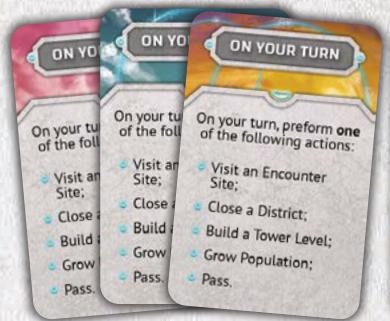
4 Player Aids

eec
RULE BOOK COLOR CODING EXPLANATION
SPECIAL NOTES
Blue notes are used for rules and special notes of exceptionally high importance, which may otherwise be overlooked.
EXPLANATIONS
Gray notes explain or develop on concepts introduced in the text right above them and provide notes on specific rules.
EXAMPLES
Purple notes are examples.
GAME SETUP
-
Place the Main board in the middle of the table.
-
Place all Resources (Gold, Wisdom, Food, and Stone) next to the Main board to form a common stock (2A). For a game of 2/3/4 players, leave 2/1/0 Citizen dice of each color in the game box. Place the remaining Citizen dice next to the Main board 2B
-
Shuffle the Bonus Action tiles, and place one at random under each Encounter Site on the Main board 3

Bonus tiles randomly placed on the Encounter Sites.
- Place one plastic Mothership (matching its color with the color of the Bonus Action tile), set to a value of 1, on each Encounter space 4

To set a Mothership to a given value, set it so that the arrow indicates a value on the ring. To change the value, rotate the Mothership until the arrow indicates the desired value.

- Shuffle all Zodiac cards. Randomly draw and place one Zodiac card face up over each Temple track. Once you have placed the cards, mark each of the Temple tracks with the matching Zodiac tile (5]. Return all unused Zodiac cards and Zodiac tiles back to the game box.

Zodiac cards placed on the Temple area of the main board. Each track is marked with the matching Zodiac tile.
- Shuffle the Building tiles into five face-down stacks, separated by color, and place them in the Building stack spaces on the Main board (6
Draw the top tile of each stack. Then, shuffle these 5 Building tiles, and place 1 face-up Building tile on each of the spaces of the Building Market 7on the Main board. Reveal the top Building tile of each stack (by flipping it face up).

In the main image: Building tiles randomly placed in the Building Market [7A); stacks of Building tiles placed on the far left of the Main board with the top tile revealed 7B.
Take 1 Citizen die of each color (total of 5), and roll them, re-rolling any sixes until each Citizen die has a value between 1 and 5. Add the rolled Citizen dice to the Citizen offer, starting with the lowest number on the leftmost space and continuing to fill spaces with dice of ascending values. In case of a tie, break ties in favor of the die whose matching color is furthest down on the Building Market, placing the winning die further to the left.
When determining the order of tied Citizen dice, the die that is placed first is the one which shares its color with a Building tile placed farther down on the Building Market. In the case of this set of dice:

The blue die will be placed on the leftmost position. To break the tie between orange, red and yellow, compare the positions of Buildings of their color on the Building Market 8
Since the red Building tile is farther down, the tie is broken in the red die's favor. Between the

yellow die and the orange die, the tie is broken in the orange Citizen die's favor. The yellow Citizen die is placed on the next position, and the purple Citizen die is placed in the rightmost space of the Citizen offer, creating the following situation in the Citizen offer 8:

- Roll 2/3/4 white Speaker dice for a game of 2/3/4 players. Place these dice in the Speaker offer on the Main board. Return any unused Speaker dice to the game box.
For a 3-player game, 3 Speaker dice are rolled and placed on the Speaker offer on the Main board9
- Shuffle the District cards, and draw 4/5/6 Districts for a game of 2/3/4 players. Place the drawn District cards face up next to the Main board, and place 2 Gold above each District card. Return the unused District cards to the game box.

In a 3-player game, 5 District cards are drawn and placed face up next to the Main board 10.
-
Take 1 Tower disk of each color, and place them in the matching spaces of the Tower disk stock on the Main board [11
-
For each tower shown on a District card, add 1 additional Tower disk in the matching color to the Tower disk stock 12

The Tower disk stock starts with 1 Tower disk of each color:

Then, for each tower printed on a District card, 1 Tower disk of the matching color is added to the stock:

The final Tower disk stock thus comprises the following Tower disks:

-
Give each player 1 unused Tower disk of each color 13
-
Return any remaining unused Tower disks to the game box.
-
Give each player a Player board, all Player bases, and the Archon miniature in their chosen color 15
-
Each player also receives 1 Player Aid, 1 Resource of each type (1 Gold, 1 Stone, 1 Food, and 1 Wisdom), 1 Agora tile, and 1 Palace tile 16
-
Each player should place their Player bases and disks on the following spaces:
1 Population base on each space of their Population track on their Player board17A
2 Population bases next to their Player board 17B

The green player places 1 of their Population bases on each Population space on their Player board, and 2 Population bases next to it.
1 Military Strength disk on their starting spaces of the Military track on the Main board 17c,

Military Strength disks in their starting positions on the Main board.
1 Zodiac disk on the starting space of each Zodiac Temple track 17D, and

Zodiac disks in their starting positions on the Main board.
要 1 Victory Point disk on the “0” space of the Main board's Victory Point track [17E].
- Each player should now place their Agora tile and Palace tile next to their Player board, with the Agora tile above the Palace tile.
When placing these tiles next to your Player board, leave ample space around them, as you will be adding Building tiles during the game.
- Each player now places their Tower disks: 1 on each corresponding space on their Palace tile.

Tower disks placed on the Palace tile at the start of the game.
-
Randomly determine the First Player, and give them the Bulwark marker.
-
Take 2 Citizen dice of each color (2 red, 2 purple, 2 blue, 2 yellow, and 2 orange), and roll them. Reroll any sixes until each die has a value between 1-5.
-
Starting with the First Player and going clockwise around the table, each player chooses and takes exactly 1 Citizen die.
-
After each player has taken 1 Citizen die, starting with the last player (the player sitting to the immediate right of the First Player) and going counter-clockwise around the table, each player takes 1 additional Citizen die.
-
Each player places both of their Citizen dice on top of their 2 starting Population bases; these are now Freemen.

Citizen dice placed on the green player's starting Population bases, making them Freeman dice.
You are now ready to play Origins: First Builders!

KEY CONCEPTS
There are a number of key concepts around which the game revolves. These concepts are explained below.
BASIC RESOURCES AND GOLD
There are three Basic Resources in the game: Stone, Food, and Wisdom. As a wild Resource, Gold can be spent in place of any other Resource. Each leftover Gold is also worth 1 Victory Point at the end of the game.
Note: Resources are not meant to be limited. Should you ever run out, use any reasonable substitute.

This symbol references any Basic Resource (Stone, Food, or Wisdom). When paying a cost denoted by this symbol, you may use any combination of Basic Resources and Gold. When receiving Resources denoted by this symbol, for each Resource gained this way, you may choose to receive Stone, Food, or Wisdom–never Gold.

EXPANDING YOUR CITY
Every player starts the game with a City consisting of just two Building tiles: the Agora tile and the Palace tile. As the game develops, your City will grow in both size and strength as you add new Building tiles. You can gain new Building tiles via the Build a Building action on the Main board or through card or Building effects. New Buildings are immediately placed in your City and have a special ability that triggers both when they are first added and when closing a District (see page 18).
Anatomy of a Building tile
Most Building tiles have 4 distinct features:
1 Building name.
2 Building color (red, blue, purple, yellow, or orange). Your and your opponents' starting Building tiles (Agora and Palace) are gray.
3 Building cost (1-3 Stone). Your starting Building tiles (Agora and Palace) do not have a cost.
4 Building's special ability. Your Palace does not have an ability; instead, it comes with spaces for Towers.
Once your Buildings make a two-by-two block (a District), you can perform the Close a District action and place one of your available Citizen dice on the center of the block, called a Seat of Power. This lets you activate the special abilities of the adjacent Buildings that match the die's color. If the pattern of the Buildings in a District matches one of the available District cards, you can gain additional Victory Points. At the end of the game, you will also gain Victory Points equal to the value of the dice in your Seats of Power multiplied by the heights of their matching Towers in your Palace.

A Palace tile with Towers 1. In the image above, the orange Tower has a height of 3, and the purple Tower has a height of 2. The other Towers have a height of 1.
A District card consists of two main parts. The top part2is used to determine the number of Towers added to the stock during setup. The bottom part 3of the card shows a pattern of Building tiles that-when replicated in your City-may score you points.

A District is a cluster of exactly 4 Building tiles that completely enclose a square space between them. Such a space (marked with a blue square in the image above) is called a Seat of Power. All 4 surrounding Buildings are considered adjacent to the Seat of Power space.
THE MILITARY TRACK
Located in the center of the Main board, the Military track measures the strength of arms of each player. Different gaming effects may allow a player to Move up on the Military track or to Attack other players. Moving up on the Military track improves the rewards you receive when you attack and increases your chances of becoming First Player. Attacking, on the other hand, gives you the bonus printed next to the space your Military disk occupies and Victory Points both for each other player you are further along than on the track and for each boundary your disk has passed.
The Military track consists of a number of elements:

1Military Strength disk starting space. Each of these disks is considered to be in the same position (none is ahead of any other).
2Military track boundaries
3 Military track final space
Each area between two boundaries is divided into 3 single spaces. Each space (apart from the starting space, the first space, and the final space) comes with its own bonus, printed next to it.

The final space of the Military track 3 is unique. When your Military Strength disk enters it, you immediately receive 9 Victory
Points. From this moment on, your Military Strength disk may no longer move in any direction, regardless of whether you still have moves allowed.
YOUR WORKERS
To perform a significant portion of the actions available in the game, you use your workers. All workers in the game fall under one of three categories.
FREEMEN
A Freeman consists of a Citizen die and a Population base in your color. You start the game with 2 Freemen (2 Citizen dice placed on two of your Population bases).

Each Freeman has a value (from 1 to 6) and a color (red, purple, blue, orange, or yellow).
Whenever you perform any actions with a Freeman, you move the Citizen die and the Population base together. If an action or effect refers specifically to a Citizen die, then only the Citizen die (and not the Population base) is used. You can gain more Citizen dice from the Citizen offer or a Building ability, and you can gain a Population base by Growing your Population (see page 19).
Whenever you gain a Citizen die, you must have a free Population base (a Population base with no Citizen die on top). If you do not, you may not receive a new Citizen die.

SPEAKERS
Speakers are temporary workers which you can take under your control through a Bonus Action. A Speaker remains under your control until you perform an action using that Speaker. Speakers are never placed on Population bases, nor do they have a color-only a value.
iili ARCHONS
Unlike Freemen or Speakers, an Archon does not have a value and ignores any restrictions based on dice values. An Archon also does not have a color (but may gain one or more colors during the game, as explained on page 20).
INCREASING FREEMAN AND SPEAKER VALUE
Values of Freemen and Speakers increase during the game. If the value of a Freeman or Speaker should increase from 6 or 5, respectively,
a Citizen die becomes an Advisor (explained on page 20), and
a Speaker die is rerolled and placed back in the Speaker offer on the Main board.

ZODIAC CARDS AND TEMPLES
The Temple area of the Main board is divided into three tracks, each belonging to a specific Temple: the Forest Temple, the Mountain Temple, and the Sea Temple. These tracks can grant you Victory Points at the end of the game, but only your two lowest tracks will ultimately count for points.
During setup, a Zodiac card and its corresponding Zodiac tile is randomly assigned to each Temple. A Zodiac card offers its unique ability to the player holding it.

The Temple area of the board features three Temple Tracks: the Forest Temple1, the Mountain Temple2 and the Sea Temple3 During setup, Zodiac cards are placed in card spaces4and respective Zodiac tiles are placed above, in the tile spaces 5
Zodiac card abilities often contradict other game rules. In such a case, the Zodiac card ability always takes precedence.

PLAYING THE GAME
Origins: First Builders is played over a number of rounds until game end conditions are triggered. During a round, beginning with the First Player and going clockwise around the table, players take turns performing actions (detailed in the next section). When all players have Passed, the round ends; if the game end conditions have not yet been triggered, the game continues with the next round. At the end of the game, the player with the most Victory Points wins.
PLAYER ACTIONS
On your turn, you must perform one of the following actions:
Visit an Encounter Site,
Close a District,
Build a Tower Level,
Grow your Population, or
Pass.
In order to perform this action, select one of your Freemen, your Archon, or a Speaker die under your control, and place it at an Encounter Site on the Main board. If you select one of your Freemen, its Citizen die is moved together with its Population base.
幸 If the value of your die is equal to or exceeds the value of the Encounter Site, you can proceed to performing the action.
Once moved, compare the value of your die with the value of the Encounter Site:
VISIT AN ENCOUNTER SITE
If you placed your Archon, you disregard the value of the Encounter Site.
If the value on your die is lower than the value of the Encounter Site, you must pay the difference in Wisdom. If you do not want to or cannot pay the difference, you may not perform this action.
Visiting Encounter Sites with your workers allows you to gain Resources and additional Citizen or Speaker dice, advance on the Zodiac Temple tracks (and potentially gain Zodiac cards), and advance and perform shows of strength on the Military track.
Once you have placed your Archon, Freeman, or Speaker (and have paid any possible Wisdom costs), add 1 to the value of the Encounter Site. When adding to an Encounter Site with a value of 6, it becomes a 1.
Encounter Sites have unlimited space for placing workers. Players may always place workers on an Encounter Site, regardless of how many workers have already been placed there.
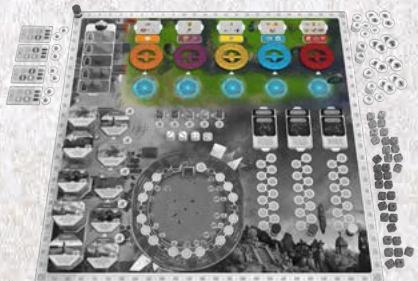
EXAMPLE:
As the green player,you place your value 2 blue Freeman (consisting of the Citizen die and the Population base) on an Encounter Site (1). Since the value of the Encounter Site is 3 2, you must immediately pay 1 Wisdom 3 in order to perform the action.

After you pay the Wisdom cost, immediately add 1 to the value of the Encounter Site 4
Next, you must select one of the actions available in the Encounter Site (either the top or bottom one) and perform it. If the color of your die matches the color of the Bonus Action tile, you may also optionally perform its action. This bonus action may be resolved before or after the main action.
Note: Speaker dice do not have a color, so they are never eligible for bonus actions. Your Archon initially also does not have a color; however, it may gain colors and trigger Bonus Actions as the game progresses (see page 20).
VALUE 6 FREEMEN
Your value 6 Freemen have a special power: when you send them to an Encounter Site, you are allowed to perform both of the main actions (in any order you choose-you are also allowed to ignore one of them). If you also receive the bonus action, you may resolve it before, after, or between the two main actions.
ENCOUNTER SITE MAIN ACTIONS
Gain Resources

Receive 3 of the depicted Resources. Resources are not meant to be limited, so if there is ever not enough in the supply to complete this action, use any reasonable substitute.
Gain 1 Food/Stone/Wisdom plus 1 Gold.
Gain 1 Stone, 1 Wisdom, and 1 Food.

Move on the Military track
Whenever an effect allows you to move up on the Military track, move your Military Strength disk the number of spaces equal to the number of moves allowed.
When you move on the Military track, you may pass opponent Military Strength disks or even share a space with them. Whenever you land on a space already occupied by other Military Strength disks, place your disk on top. All disks sharing a space are considered to have equal strength, regardless of where they fall in the stack of disks; however, the order in the stack does matter when determining player order in each round (see page 21). Whenever you pass a boundary, immediately receive a Superiority token; you can use a Superiority token once per turn to perform an additional action (see page 20).
EXAMPLE:
As the green player, you are allowed to move up two spaces on the Military track.

Your Military Strength disk moves over the blue disk and lands on the space already occupied by the brown player. You place your Military Strength disk on top of the brown Military Strength disk 1and take a Superiority token 2for passing a single boundary3

6

Make an Attack
Whenever an effect allows you to make an Attack, follow the steps below:
- Receive the bonus printed next to the space that your Military Strength disk is occupying.

Spend 1 Basic Resource (Stone, Food, or Wisdom) to receive 1 Gold.
Receive 1 Stone.
Receive 1 Food.

Receive 1 Wisdom.

Receive 1 or 2 Gold, respectively.


Receive 1 Basic Resource of your choice (Stone, Food, or Wisdom) in addition to the Resource depicted (Stone, Food, Wisdom, or Gold, respectively).
No additional benefit.
- Receive 1 Victory Point for each Military Strength disk that is lower on the Military track and 1 Victory Point for each boundary that your Military Strength disk has already crossed.
EXAMPLE:
As the green player, you Attack. You immediately receive 1 Wisdom (the benefit printed next to the space that your Military Strength disk is occupying 1) and a total of 3 Victory Points:
2 Victory Points for the two boundaries crossed 2
1 Victory Point for being ahead of the blue Military Strength disk3
Note that you do not receive any Victory Points for the brown Military Strength disk, as it occupies the same space as your (green) Military Strength disk.

O+X
When the game allows you to both Move on the Military track and Attack ( + ), you can do these in any order OR choose to do only one of the two options.

Purchase a Building
A Building tile is normally purchased from the Building Market situated on the Main board. Whenever an action or any game effect allows you to purchase a Building tile:
-
Select a Building tile from the Building Market.
-
Pay the Wisdom cost printed next to the selected Building tile.
-
Pay the Stone cost printed on the Building tile.
-
Take the Building tile, and-without rotating it-add it to your City (see the Adding Buildings to Your City section below for details).
-
Slide the remaining Building tiles up on the Building Market spaces until the bottom space is empty.
-
Take the top Building tile from the stack matching the color of the Building just bought, and place it in the empty space of the Building Market. Flip the top Building tile of that stack face up.
EXAMPLE:
You want to purchase the orange Building tile 1. You pay the Wisdom cost (2 Wisdom)2 and the cost of the Building (2 Stone) 3. After removing the Building tile from the Building Market, you slide the red and purple Building tiles up until the bottom space of the Building Market is empty 4. The empty space is now refilled with a face-up Building tile from the orange Building
tile stack (5,
and the new top orange Building tile is flipped face up 6.


Adding Buildings to Your City
Whenever you receive a new Building tile, you must immediately add it to your City. Your City starts with two Building tiles: the Agora tile and the Palace tile. In order to add a Building tile to your City, you must place it in such a way that the new Building tile is 1) adjacent to at least one Building tile already in your City (sharing a horizontal or vertical border) and 2) does not overlap any Building tiles already in your City.

Two Building tiles are considered adjacent if they share a horizontal or vertical border. In the image above, both gray Building tiles are adjacent1. In fact, the top gray Building tile is also adjacent to the red Building tile2. The red Building tile is adjacent to the top gray Building tile2and to the purple Building tile 3. The purple Building tile is adjacent to the red Building tile 3and the yellow Building tile4 . The yellow Building tile is only adjacent to the purple Building tile.
Only horizontal and vertical sides of the Building tiles may ever touch other Building tiles! Furthermore, you cannot rotate your Building tiles!
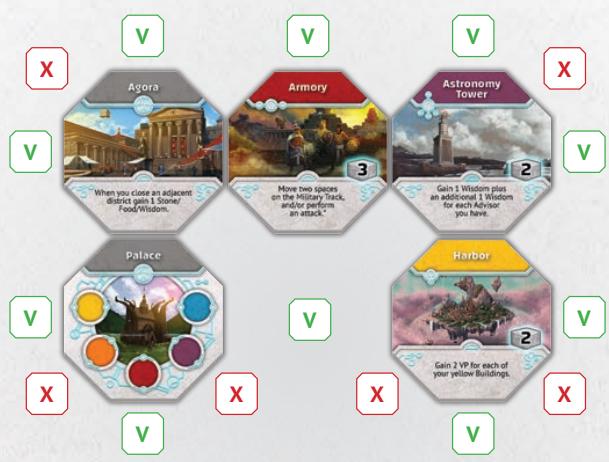
In the image above, all suitable sites for a new Building tile are marked in green (v).A new Building tile may not be added to the City in sites marked with red x, as those sides are not vertical or horizontal.
After adding a new Building tile to your City, you may optionally resolve its Building ability. Unless specifically stated on the tile, a Building tile ability can be only resolved a) immediately after that Building tile has been paid for and placed and b) immediately after closing a District with a Citizen die matching the color of the Building tile present in the District (see page 18).
If a Building tile ability contradicts any of the above rules, the Building tile ability takes precedence.
Building a Farm
Whenever you would build a new Building tile, you may choose to build a Farm instead. To build a Farm, follow the normal building procedure with these exceptions:
-
Do not pay any costs of the chosen Building tile. Purchasing a Farm always costs 0 Wisdom and 0 Stone.
-
The Building tile you add to your City is flipped face down. It is considered to have no color and no abilities of its own.
While Farms have no abilities and no color, some abilities of other Building tiles or Zodiac cards may interact with Farms in your City.

EXAMPLE:
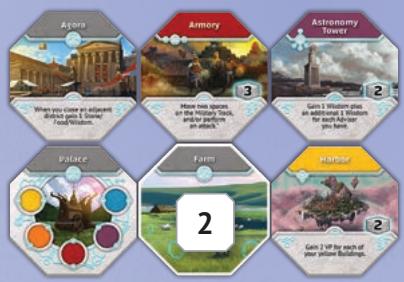
You want to purchase the orange Building tile 1and build it as a Farm. You do not pay the Wisdom cost (2 Wisdom) or the cost of the Building (2 Stone). Instead,you take the tile and flip it face down before adding it to your City2.

1>2
Advance on a Temple Track
Pay 1 Stone to move one of your Zodiac disks up two spaces on its track and immediately gain that Temple's Zodiac card. This cannot be split between two different Zodiac disks, even if your first move reaches the top of a Temple's track.
You take the Zodiac card of that Temple regardless of your position on that Temple, even if your disk is lower than another player's disk.
Gain a Citizen Die
Take a Citizen Die from the Citizen offer, paying any necessary Wisdom costs. Whenever gaining a Citizen die:
-
Select a Citizen die from the Citizen offer.
-
Pay the Wisdom cost printed under the selected Citizen die.
-
Take the Citizen die and-without changing its value-place it on one of your free Population bases.
-
Slide the remaining Citizen dice to the left until the rightmost space is empty.
-
From the common stock, take a new Citizen die matching the color of the Citizen die just gained, roll it (rerolling value 6), and place it in the empty space of the Citizen offer.
If you do notw have any free Population bases, then you may not take a Citizen die.
Pay Food to Increase a Freeman's Value or Move on the Military track
Pay 1-3 Food. For each Food you spend, choose one of the following options:
Increase the value of one of your unused Freemen by 1.
Move one space on the Military track.
BONUS ACTION TILES
Whenever you place a Freeman that matches the color of the Bonus Action tile, you may also perform its bonus action.
1>1
Pay 1 Stone to move up one space on a Temple track. Unlike the main Temple action, you do not gain the Zodiac card.

Pay 1 Food to perform the Purchase a Building action. Complete the action as usual, including paying all costs.

Pay 1 Wisdom to either:
Move on the Military track.
Attack.
Resolve whichever action you choose following the usual rules.
If there are any Speakers available in the Speaker offer, take one. Remember that Speakers do not go on your Population bases.

Receive 1 Basic Resource (Stone, Food, or Wisdom).
CLOSE A DISTRICT
As an action, you may Close a District in your City. Closing a District allows you to gain Victory Points (and possibly Gold) for matching a District card's Building pattern, gain additional bonuses based on the Buildings you activate, and gain additional Victory Points at the end of the game based on the value of the Citizen die you use to Close the District and its color in relation to the size of its respective Tower.
To Close a District:
-
Select a Freeman in your player area. (You may not select an Archon, a Speaker die, or a Citizen die already on an Encounter Site or in a Seat of Power.)
-
Place the Citizen die in a Seat of Power space.
-
Check available District cards for extra bonuses.
-
Activate all Buildings that are both 1) adjacent to the recently filled Seat of Power space and 2) share a color with the Citizen die you have placed there (including the Agora, if applicable).

A District may yield extra rewards if it matches one of the District cards on display. To match, three Buildings in the District1have to match the pattern depicted on a District card2. The depicted empty Building 3may be represented by any Building tile in your District (including a gray Starting Building or a Farm).

In order to make a match, you may rotate4 and/or mirror the pattern on the District card.
Whenever you match 1 or more District cards on display, immediately select 1 of these matching cards and receive the Victory Points printed on it. It does not matter how many times other players have matched the same District card. If there is Gold placed above the card, take all of it, and add it to your Resources. Throughout the game, you may match a District card's pattern multiple times; the first time you do so, receive the higher number of Victory Points printed on the card, and each subsequent time, receive the lower number.
EXAMPLE:
As the green player, you are about to Close a District. There are 2 Districts in your City: one marked in white 1and one marked in black 2. Each of these Districts has an available Seat of Power (marked with a pink square 3).

After choosing one of the two available Seats of Power, you place a red Citizen die from your player area into your City 4, thus closing the District. Since none of the District cards on display (not shown) match the District you have just closed, you don't receive Victory Points (nor gold) and simply proceed to activate the red Building (use its ability).
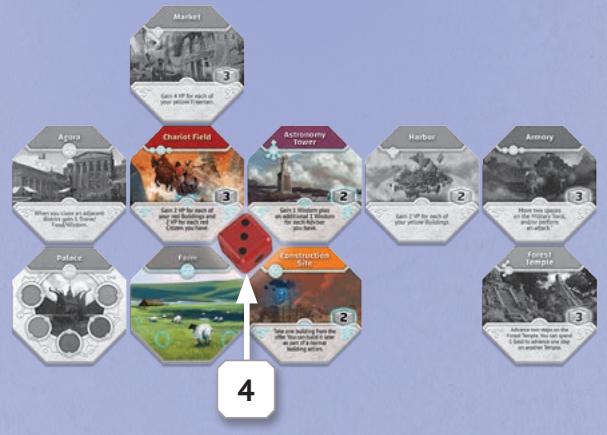
A Citizen die in a Seat of Power can no longer be manipulated or counted among your Citizen dice. Therefore, unless a Building ability or Zodiac card states otherwise, any text that refers to Citizen dice (or Freemen) does not affect dice in Seats of Power.
BUILD A TOWER LEVEL
Towers score you additional Victory Points at the end of the game based on their heights and the matching color dice in Seats of Power. To build a Tower level, select one of the Tower disks still available in the stock, and pay an amount of Gold equal to the current level of the Tower you are expanding. Then, place the new Tower disk on your Palace tile, on top of any existing Tower disks of the matching color.
EXAMPLE:
As an action, you build a Tower level. You choose the orange Tower, which is already 3 levels high (it consists of 3 orange Tower disks1). You pay 3 Gold 2and add the 4th Tower level on top of the 3 levels on your Palace tile 3.


GROW YOUR POPULATION
As explained in the “Your Workers” section (on page 11), if you want to expand your workforce with new Freemen, you need to be able to pair Citizen dice with Population bases. With the exception of a Population base becoming available after its value 6 Citizen returns from the Main board (see page 20) or after a Citizen is moved to a Seat of Power in your City, making a new Population base available requires you to pay Food equal to the amount shown above the leftmost Population base on your Player board.Immediately after you acquire your last Population base, you receive 10 Victory Points.
You start each game with 2 Population bases 1 which you pair with Citizen dice during setup. To acquire your 3rd Population base 2, you must pay 2 Food3

Acquiring your last Population base costs 8 Food (the highest Food cost on your Player board4 but immediately scores you 10 Victory Points, as printed on your Player board 5

PASS
When you are unable or unwilling to perform any other action during the current round, you must Pass. Passing means that you forfeit the rest of your current turn (i.e. you cannot spend a Superiority token) and will not be able to perform any more actions this round. When you Pass, take back-one-by-one-all of your Freemen from the Main board. Each Freeman with a value of 1-5 increases its value by 1. Each Freeman that should increase its value from 6 becomes an Advisor instead.
ADVISORS
Whenever a value 6 Elder Freeman has to increase its value further, the Citizen die becomes an Advisor and the Population base remains in your player area to accept another Citizen die later. Advisors can give you points immediately and at the end of the game.
When a Citizen die becomes an Advisor, place it on the leftmost empty space of your Advisor track 1(located on your Player board).

The first Citizen die that becomes an Advisor will always be placed on your Advisor track 2

Whenever a Citizen die becomes an Advisor afterwards, you place it on the leftmost empty space of the Advisor track only if its color does not match any Citizen dice already present there. If there is a color match3, instead of placing a die x, you receive a number of Victory Points printed beside the rightmost occupied space of the Advisor track 4. The would-be new Advisor die is returned to the stock.
ARCHON SPECIAL ABILITY
i1ll
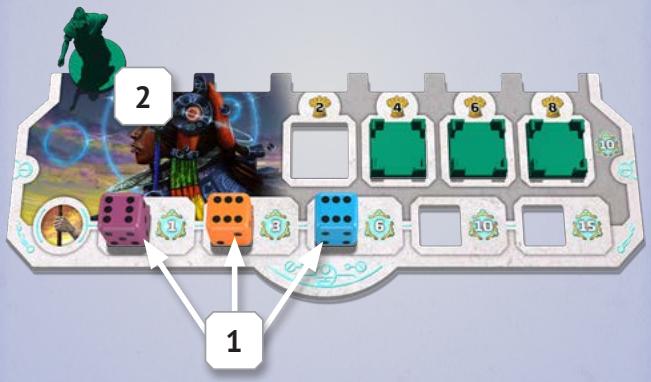
At the start of the game, your Archon is treated as colorless. However, each Advisor on your Player board adds its own color to your Archon, thus allowing you to perform the actions of Bonus Action tiles.
With these Citizen dice on your Advisor track1, your Archon 2 is treated as if it is purple, orange or blue for the purposes of resolving bonus actions.
SPENDING SUPERIORITY TOKENS
After performing an action other than passing, you may immediately spend a Superiority token to perform another action, even if you just gained the Superiority token in the same turn.
You can spend no more than one Superiority token per turn, and you may spend a Superiority token to Pass immediately after performing another action.
END OF THE ROUND
Once all players have Passed, the current round ends. To end the round:
-
Return all Speaker dice on the Main board to the Speaker offer. Every Speaker that has performed an action adds 1 to its value (in the case of a value 5 Speaker, simply reroll it.
-
The player furthest on the Military track receives the Bulwark marker. In case of a tie, the tied player whose Military Strength disk is at the bottom of the stack receives the Bulwark marker.
-
All Military Strength disks on the Military track are moved back to become adjacent to the nearest boundary that is lower than them, starting with the Military Strength disk that is closest to the start of the track. If a space contains more than 1 Military Strength disk, move them together, keeping their stacking order. If moving would result in disks sharing a space, place subsequently moved Military Strength disks under previously moved disks.
EXAMPLE:
It is the end of the round. The brown player has just received the Bulwark marker1). Now, Military Strength disks are moved to the nearest border behind them. The black Military Strength disk does not move, as it is already next to the nearest boundary that is still behind it 2.

The blue Military Strength disk moves next3followed by green 4and brown 5. They are all moved to the nearest border behind them 6. To keep the same order of disks, the green disk should go directly below the blue disk, and the brown disk goes on the very bottom.

- Starting with the Forest Temple and proceeding to the right, give each corresponding Zodiac card to the player with the Zodiac disk on the highest position on its Temple track. In the case of a tie, the tied player whose Zodiac disk is on the bottom of the stack receives the card.
EXAMPLE:
The Aquarius Zodiac card from the Mountain Temple must go to a player. Black and brown are tied for the highest position on the Temple track, but the black Zodiac disk is at the bottom of the stack, so the black player gains the card.

- Check the game-ending conditions (listed on page 22). If at least one was triggered, the game ends immediately. Otherwise, proceed to the next round, starting with the player with the Bulwark marker.

END OF THE GAME AND SCORING
The game finishes at the end of the round when one or more of the following conditions have been met:
A single player has moved all three of their Zodiac disks to the top space of each Temple track.
There is no more Gold above any District cards.
There are 3 or fewer colors of Tower disks remaining in the stock.
There is no available Citizen die of a color that needs to be added to the Citizen offer.
Announcing the End
This is more of a guideline than an actual rule, but we have found it in good taste to announce the game-ending trigger the moment that it happens, rather than at the end of the round. It promotes a more friendly style of play. However, you may also play these rules exactly as written.
FINAL SCORING
Once the last round has ended, each player receives Victory Points accordingly:
Receive 1 Victory Point for each leftover Gold you have.
帝 Receive the number of Victory Points equal to the printed value beside the rightmost Citizen die on your Advisor track.
Compare the position of your Zodiac disks on Temple tracks; ignore the highest disk and add the Victory Point values of the two remaining disks.
安 For each Citizen die in a Seat of Power, receive a number of Victory Points equal to the value of the die times the height of the Tower (placed on your Palace tile) of the same color.
The player with the most Victory Points is the winner. In case of a tie, the tied player with the most Building tiles in their city wins. If still tied, the tied players share victory.
EXTENDED SCORING EXAMPLE:
At the end of the game, you receive:

1 +4 Victory Points for your Gold (1 per each of the 4 Gold you have).
2 +6 Victory Points for your Advisor track (for the value printed beside the blue Citizen die).

3 +47 Victory Points for the Temple tracks (ignore the 16 VP from the highest marker disk(x)and add the VP values of the remaining two together: 31 and 16).
EXTENDED SCORING EXAMPLE continuation:

4 +12 Victory Points for the orange Citizen die in a Seat of Power in your City (the value of 6 times 2 orange Tower disks on your Palace tile).
5 +3 Victory Points for the red Citizen die in a Seat of Power in your City (the value of 3 times 1 red Tower disk on your Palace tile).
The total Victory Points you score (and add to any Victory Points received during the game) is 72.
SOLO TRAINING MODE
To play alone, set up the game normally, with the following changes:
You only need player components of one color (yours), plus one other player disk that you place on the beginning of the Military track.
Place 3 District cards on display (with 2 gold each), and use these to set up the Tower offer.
Instead of drafting starting dice (step 21-23 of main setup), simply roll one of each color (rerolling sixes), discard the 2 highest rolled dice (your choice if tied), and then pick 2 from the remaining 3.
You take every turn. When you Visit an Encounter Site, you must also increase the value of another Encounter Site, either its left or right neighbor.
The leftmost and the rightmost Encounter site have only 1 neighbor each.
You may not select a neighboring Encounter Site that already shows a 6 (to “increase” it to 1). If all neighbors show 6, do not increase either.
You may spend a Superiority token to not increase any Encounter sites during your turn (including the one you activate). This replaces the usual usage of Superiority tokens.
Play 5 rounds, no other endgame triggers apply.
At the beginning of the second round, move the "other" Military disc to the last space before the second Superiority token. At the beginning of the third round, move it to the last space before the third Superiority token, and so on. During your attacks compare against this disk, as if it was a 2 player game.
At the end of each round, randomly return all but one of your Zodiac bonus cards to the board. You only receive Zodiac cards when using the relevant action.
Check the following conditions:
» The red bonus tile is in the first Encounter Site.
» The purple bonus tile is in the second Encounter Site.
» The blue bonus tile is in the third Encounter Site.
» The orange bonus tile is in the fourth Encounter Site.
You win if at the end of the fifth round you have at least 180 points, plus 20 more for each of the above conditions met.
Once you complete the Training Mode, you can challenge the mighty Ufobot crafted by Dávid Turczi. Download the pdf necessary to play from our website (www.boardanddice.com).
APPENDIX
In this section of the rules, you will find detailed explanations of all Zodiac cards and Buildings.
ZODIAC CARDS
| Zodiac card name | Card text Additional information | |
| SAGITTARIUS | Every time you take a new Citizen die or Speaker die,you may add 1 to its value, up to a maximum of 6 or5, respectively. | A value 6 Citizen die or a value 5 Speaker die cannotbe increased. |
| PISCES | You can treat each Bonus Action as if its effect was"Gain 1 Gold." | You still need a Freeman with the Citizen die of theappropriate color or an Archon with an Advisor of theappropriate color in order to receive the Bonus Action. |
| CAPRICORN | Every time you build a Tower, you may add 2 to thevalue of one of your Citizen dice, up to a maximumof 6. | A value 6 die cannot be increased. A value 5 die simplybecomes a value 6 die. As stated on page 18, dice inSeats of Power cannot be manipulated. |
| AQUARIUS | Every time you advance two steps on one Temple,you may pay 1 Gold to advance on another Temple. | Only the two-step advancement Main Action ora Temple Building may trigger the effect of this card. |
| TAURUS | Pay 1 Wisdom fewer for Buildings and Citizen dicefrom the stock. | This cannot reduce the cost below zero. This cardeffect can be used in combination with Libra's cardeffect. |
| CANCER | When Passing, if you have a free Population base,take a Citizen die from the offer for free. | This effect activates immediately upon Passing,before any Citizen dice are retired as Advisors. Thismeans that a player needs a free Population base atthe moment of Passing to benefit from this ability. |
| LIBRA | Every time you Close a District, you may takea Citizen die from the offer, paying its Wisdom costs. | This effect activates only after you have resolvedyour Close a District action (the District is closed andscored and any Buildings have been activated). |
| ARIES | Every time you Attack, gain 1 VP for each of your redCitizen dice (Freemen and red Seat of Power dice). | This includes both your unused Freemen as well asFreemen on the Main board. Ignore a red Advisor, ifyou have it. |
| LEO | Every time you Close a District, add 2 to its Seat ofPower die, up to a maximum of 6. | A value 6 die cannot be increased. A value 5 die simplybecomes a value 6 die. |
| GEMINI | When Passing, gain 1 Basic Resource for each spaceyou must move back on the Military Track. | If you move once before stopping next to a boundary,receive any 1 Basic Resource. If you move twice, youcan take any 2 Basic Resources. These can be the sameor different Resources. |
| VIRGO | Every time you build, you may place the new Buildingtile over a Farm in your City. If you do, do not pay anyWisdom and Stone. | Remove the Farm tile and place it face down at thebottom of its stack on the Main board. |
| SCORPIO | Every time you Close a District or have to add 1 toa value 6 Citizen die, gain 1 Wisdom. | This ability specifically activates when a value6 Citizen die retires to become an Advisor. It does notactivate if one of your dice is the target of an effectthat could potentially raise its value above 6. |
BUILDING TILES
 Granary | |||
| Name | Building ability and notes | ||
| Gain 1 Food plus 1 Food for each Farm. | |||
| Harbor | Gain 2 VP for each of your yellow Buildings. | ||
| Market | Gain 4 VP for each of your yellow Freemen. | ||
| Mint | Gain 1 Gold. | ||
| Quarry | Gain 1 Stone plus 1 Stone for each empty adjacent space. | ||
| Workshop | Gain 1 Basic Resource (Food, Stone, or Wisdom). | ||
Name  | Building ability and notes |
| Armory | Move two spaces on the Military Track, and/or perform an attack. Notes: You may Attack before or after gaining Military Strength. |
| Chariot Field | Gain 2 VP for each of your red Buildings and 2 VP for each red Freeman you have. |
| Outpost | Move one space on the Military Track, or perform an attack. |
| Riding Grounds | Move two spaces on the Military Track, and gain 1 Stone/Food for each player with lower Military Strength. |
| Stronghold | Move one space on the Military Track for each of your red Buildings. |
| Veteran Settlement | Choose 1 of your unused red Freemen, and gain VP equal to its value. Afterwards, reduce its value by 1. |
Name | Building ability and notes | |
| Castle | Gain 1 VP plus 3 VP for each closed District in your City. | |
| Construction Site | Take one Building from the offer.You can build it later as part of a normal Building action. | |
| Court of Law | Change the color of one of your unused dice replacing it with one from the stock. Keep its value. | |
| Estate | Take 1 Citizen for free from the Citizen offer. | |
| Forum | Take 1 Speaker for free. | |
| Stone Circle | Gain 0/1/3/6/10 VP for having 1/2/3/4/5 Buildings in different colors. | |
 Forest Temple | |||
| Name | Building ability and notes | ||
| Advance two steps on the Forest Temple. You may spend 1 Gold to advance one step on anotherTemple. | |||
| Mountain Temple | Advance two steps on the Mountain Temple. You may spend 1 Gold to advance one step on anotherTemple. | ||
| Obelisk | Gain 1/2/4/7 VP for having 1/2/3/4 Obelisks in your City (including the one being built). | ||
| Sacred Place | Gain 3/6/10 VP for having 1/2/3 Zodiac cards. | ||
| Sea Temple | Advance two steps on the Sea Temple. You may spend 1 Gold to advance one step on another Temple. | ||
| Advance one step on a Temple track of your choice. | |||
eOe:
Name Artists' Parlor | ||
| Building ability and notes | ||
| Gain 3 VP for each color among your Freemen. | ||
| Astronomy Tower | Gain 1 Wisdom plus an additional 1 Wisdom for each Advisor you have. | |
| Fountain of Wisdom | Take 1 Wisdom and set any Mothership to “1.” | |
| Gate of Passage | Add up to 2 to the value of any one of your unused Freemen. | |
| Healers'Mansion | Gain 1 VP plus an additional 1 VP for each Freeman you have. | |
| Mage's Tower | Use an ability of an adjacent Building. | |
MAIN BOARD ACTIONS
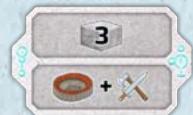
Receive 3 Stone.
Move on the Military Track and/or Attack, in any order.

Receive 3 Food.
Purchase a Building.
Receive 3 Wisdom.
1>2
Pay 1 Stone to move up to two steps on a single Temple track and gain its Zodiac card.

Receive any Basic Resource (Stone, Food, or Wisdom) plus 1 Gold.
Gain a Citizen die.
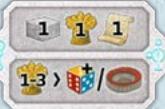
Receive 1 Stone, 1 Wisdom, and 1 Food.
Spend 1-3 Food. For each Food; either increase an unused Freeman by 1 or Move on the Military Track.
BONUS ACTION TILES
| 11 | Pay 1 Stone to move one step on a single Temple track, without gaining its Zodiac card. | |
| Pay 1 Food to Purchase a Building. | ||
| DOX | Pay 1 Wisdom to either Move on the Military Track or Attack. | |
| Receive 1 Speaker. | ||
| Receive 1 Basic Resource (Stone, Food, or Wisdom). | ||
CREDITS
Origins: First Builders
Game Design: Adam Kwapiński
Game Development: Andrei Novac, Błażej Kubacki,
Dávid Turczi, Małgorzata Mitura, Rainer Åhlfors
Training Solo Mode: Dávid Turczi
Illustrators: Aleksander Zawada, Zbigniew Umgelter
Graphic design and DTP: Zbigniew Umgelter
Rule Book DTP: Agnieszka Kopera
Rule Book: Błażej Kubacki
Rule Book Editing: Emanuela and Robert Pratt
Designer's note:
Just like many other games, Origins is a result of hard work of many people, thanks to whom this game ended up in your hands. Most of the credit for it goes naturally to the publishing team. I am truly grateful to the entire Board&Dice crew - for the work and heart they put into this project, especially that it was my chat with Andrei Novac and Kuba Polkowski that was a direct inspiration for this game.
Board game creators society is rather small and our work relationships are often interwoven with personal ones. That is why, even though I have already mentioned him before, I would like to mention Kuba Polkowski once again. This time not as a publishing house employee, but as a person who has supported me for years in my professional endeavors. Moreover, or maybe even more importantly, he has been a partner for countless talks and an opponent in many various board games. Kuba, thank you for this and see you soon at my gaming table!
The designers and Board & Dice would like to thank for playtesting, advice, and feedback:
Borys Bielaś, Małgorzata Boryczka, Joanna Gleń, Maciej "mat eyo" Matejko, Karolina Potakiewicz, Jakub Wasilewski, Daniel Dubel, Dave Haeze, Grzesiek Łuszczek, Michał Mazurek, Konrad Sulżycki, Łukasz Juras, Przemysław Golus, Weronika Nogaś, Wiktoria Matyja, Youry Ivanov, Anna Czarnacka, Dariusz Szypuła, Dominik “Vykk" Pańczyk, Emilia Kozarska, Rafał Stefaniak, Iwona Jaworowska, Jan Skornowicz, Janusz Smoła, Julia Gauza, Krzysztof Widera, Ludwika Majchrzak, Maciej Prostak, Marcin Bernaciak, Marcin Magdziarz, Marek Mańko, Maria Jóźwik, Marta Szpaderska, Mateusz Myrcha, Michał Cieślikowski, Michał Górecki, Patryk Olbert, Rafał Szymaszek, Sebastian Borowczyk, Noralie Lubbers, Daniele Tascini.
Board&Dice
Executive Manager: Andrei Novac Operations Manager: Aleksandra Menio Head of Marketing: Filip Głowacz Head of Sales: Ireneusz Huszcza Art Directon: Kuba Polkowki Development Lead: Błażej Kubacki
Missing or damaged components:
Although we take a lot of care to make sure that your game is complete, manufacturing mistakes can still leave you with a missing or damaged component. If that happens, please contact us to receive replacements swiftly, and with our sincere apologies. Customer support: https://boardanddice.com/customer-support/

