rules_en_flow-of-history_434141.md
来源类型:纯文本规则(非 PDF 源,早期抓取/转换产物)
说明:原文未改动,仅调整存放位置与文件名;非 PDF 扫描件,无对应原书 PDF
The Flow of History Rulebook | RulesPalRulesPalChatRulebookThe Flow of HistoryThe Flow of History Rulebook Table of Contents Table of Contents Components
Card Overview Production Icons
Investor Bonuses
Card Type
Card Stacking
Effect Timing Instant effects
Attack effects
Attack All effects
Permanent effects
Turn Action effects
End Game Scoring effects
Game Setup
Turn Overview Phase I: Action Phase Invest
Complete
Snipe
Activate
Harvest
Phase II: Cleanup Phase
End of Game
2 Player Variant Changes to Setup
Completion Bonus
Sniping the Banker
Changes to Cleanup Phase
Card Glossary A
B
C
D
E
F
G
H
I
J
K
L
M
N
P
R
S
T
W
Credits
Reference Card Summary Phase I: Action Phase
Phase II: Cleanup Phase
End of Game
Effect Timing
Components
67 x Civilization cards
72 x Resource tokens
5 x Reference cards
5 x Player markers
Card Overview
Each Civilization card shows: the age of the card; the card type symbol; an investor bonus indicator; the effect timing icon; an obsolete icon (the effect of this card is deactivated at the end of the game, when present); card effect iconography; flavor text; a production stripe (the production icons provided by this card when it is placed in your Nation); and a different card back for each age.
Production Icons
There are 7 different production icons in The Flow of History: Attack, Culture, Defense, Harvest, Industry, Science, and Trade.
Production icons will be provided by cards in your Nation; they will be converted to points at the end of the game, and will contribute to a significant portion of your score.
Some actions and card effects will also depend on the amount of certain production icons in your Nation.
Investor Bonuses
During the game you will invest in cards, and then later complete that investment to acquire the card. When you acquire a card in this way, you will gain an investor bonus (in resource tokens) based on the icon shown in the magnifying glass on the card. The icon in the magnifying glass is not a production icon itself, it only indicates which production icons it is looking for when determining an investor bonus. All cards of the same type will have the same investor bonus indicator.
Investor bonus indicators shown: Culture check, Industry check, Science check.
Card Type
There are six types of Civilization cards with different colors: Construction, Government, Knowledge, Military, Leader, and Wonder.
Card Stacking
Place the newest card on top - only the top card's effect will be shown and available for use. All cards underneath will have their effect covered, but will be showing the production stripes. The production icons will be counted towards your Nation's total.
Card Stacking Example I: You gained Lighthouse, which is a Construction card.
A. You already have a Construction card, Barracks, in your Nation, so you must stack Lighthouse on top of it, showing only the production stripe.
B. You lose the Defense icon provided to you by the Permanent effect of Barracks since it has been covered.
C. The Attack icon shown on Barracks production stripe is still available and will be counted towards your total.
You can only have 1 Leader card in your Nation. When you gain a new Leader card, discard your previous Leader, returning it to the box.
Wonder cards are not stacked. When you gain a new Wonder card, just put it next to the other cards in front of you. Thus the effects and icons on Wonder cards will not be covered by newer cards.
If the top card of a stack is removed, the effect of the card below will be revealed and available (excluding Instant, Attack and Attack All effects). Please refer to the Effect Timing section for detailed descriptions on card effects.
Card Stacking Example II: This is Alexander's Nation, currently he has:
5 Culture (4 from production stripes, 1 from Monastery's effect)
6 Defense (3 from production stripes, 3 from Frigate's effect)
0 Industry
3 Trade
2 Harvest
5 Attack
1 Science
Note: There can only be one Leader card in Alexander's Nation. Monastery and Frigate have Permanent effects that will provide these icons to him. Great Wall and Great Mosque are Wonder cards, so they do not stack. Both have End Game Scoring effects that are applied at the end of the game, so those culture icons are not counted now.
Effect Timing
Every Civilization card (excluding starting cards) will have an effect, and there will be an icon on the lower left side of the card indicating the timing of the effect: Instant effect, Attack effect, Attack All effect, Permanent effect, Turn Action effect, End Game Scoring effect.
Instant effects
When you first gain an Instant effect card, you must activate it after you place it on the stack of its color. This card may be gained by choosing the action Complete or Snipe, or from other card effects.
Since a card is placed on the stack before the effect is activated, the icons gained by a new card are counted along with the production icons below. However, all effects on the previous cards of this stack will be covered, so any icons provided by effects underneath will not be counted.
Each Instant effect can only be used once per game; it will only be activated the first time you gain it. It will not be activated when it is revealed by removing cards on top of it.
Attack effects
This type of effect is activated just like Instant effects, and subject to the same limitations. They can only be used once per game.
When you activate an Attack effect after you place it into your Nation, first you count the number of Attack icons in your Nation, which will be your military strength (Attack only).
Each of your opponents will then count the number of Attack and Defense icons in their own Nation, the total of which will be their military strength (Attack + Defense).
Attack Effect Example: In the previous example, Alexander has 5 Attack icons and 6 Defense icons. When he activates an attack, Alexander's military strength will be 5. However, when other players attack Alexander, he will have a total of 5 + 6 = 11 military strength.
Finally, you choose one opponent who has a lower military strength than you, and apply the effect of the card to them. If a decision needs to be made, the attacker will choose the target of the effect.
Remember, the Attack icons provided by this card will be counted toward your military strength.
Attack All effects
This type of effect is basically the same as Attack effects, but all opponents with a lower military strength than you will be affected by this effect. If a decision needs to be made, the attacker will choose the target of the effect separately for each opponent.
Permanent effects
As long as a Permanent effect is not covered by another card, the effect shown will be applied to your Nation.
However, if the obsolete icon is present on this card, the effect will be deactivated at the end of the game, thus the bonuses will not be counted toward your score.
Turn Action effects
During your turn, you may choose to activate this type of card as your action for the turn. You cannot activate this type of effect when you gain it. Since you only get one action per turn, you would have already done an action to gain this card in this turn.
You can activate a Turn Action effect multiple times over separate turns as long as it is not covered by another card or removed from your Nation.
End Game Scoring effects
This type of effect will only be applied at the end of the game. It will not have any effect during normal play. See End of Game for details.
Full Nation Example: This is Alexander's Nation:
A. Astronomy has an Instant effect, Napoleon Bonaparte has an Attack All effect. Both have already been activated, and cannot be used again in this game.
B. Bureaucracy is a Turn Action effect. Alexander may choose to use it as his action for a turn.
C. Monastery and Frigate are Permanent effects. They will be applied as long as they are not covered, but note that the effect of Frigate will become obsolete at the end of the game.
D. Wonders do not stack, and the End Game Scoring effects of The Great Wall and The Great Mosque are only applied at the end of the game.
Game Setup
Separate the civilization cards according to the age indicated on the grey stripe in the center of the card back. Take all five cards from age A and place them face up in the center of the table to form the "Market".
Randomly deal one age S card face up to each player. This will be the starting card (Government) of each player's Nation. Unused cards from age S are returned to the box.
Take the card titled The Future, place it on the table, then place the card titled The Internet on top of it. Shuffle the remaining cards from each age in individual stacks, so that there is one stack for each age. Place the stack of cards from age V face down on top of The Internet, then each stack from age IV, III, II, and I face down in descending order, so that cards from age I are on top, age II are underneath them, and so on. This will be the "Civilization deck"; place it beside the Market. In a 5 player game, reveal an age I card from the top of the Civilization deck and add it to the Market so there are a total of 6 cards.
Each player takes the following items: a player marker, a reference card of the same color, and 4 resource tokens. These are placed in front of you and are called your Nation. Your Nation develops in front of you, this is where your cards are placed. All cards and resource tokens in your Nation are open information and can be freely inspected by all players.
All remaining resource tokens are placed to the side to form the Reserve. They are not part of the Supply, but will be added in later. The Supply starts with zero resource tokens.
Randomly determine the starting player; the turn order will be clockwise.
You may now start playing!
Turn Overview
Beginning clockwise from the starting player, each player will take a turn consisting of two phases: the Action Phase and the Cleanup Phase.
You will perform one action to gain new cards or resources in the action phase, then you will replenish the Market and check if the game ends in the Cleanup Phase.
Phase I: Action Phase
There are 5 actions in this game. Perform one action of your choice and then proceed to the cleanup phase.
Invest in a card in the Market
Complete a card you have already invested in
Snipe a card an opponent is invested in
Activate a Turn Action effect on one of your cards
Harvest resources from the Supply
Invest
Note: You cannot choose this action if you have already invested in another card, or if you have no resource tokens.
Choose a card in the Market that no player has invested in.
Place your player marker on the card, then place any amount of resource tokens underneath the card to invest in it.
Invest Example: You decide to invest in Monastery, so you place your player marker on the card, then place 4 resource tokens from your Nation underneath Monastery.
Complete
Note: You cannot choose this action if you haven't already invested in a card in the Market.
If you have previously invested in a card in the Market, you may choose to Complete it and might earn an investor bonus. You don't have to Complete a card immediately on the turn after you Invest in it.
Move all resource tokens from your invested card to the Supply.
Check the investor bonus indicator on the middle right side of the card.
Count the amount of indicated production icons in your Nation (not counting this card), and take that many resources from the Supply.
You gain the completed card and place it in your Nation. The new card must be stacked together with cards of the same color type; place it covering the effect but showing the production stripes of the cards beneath. See Card Stacking for details.
If the timing of the effect is Instant, Attack, or Attack All, you must activate it now. If it is a Permanent effect, it will be applied starting from now. Turn Action effects may be activated on subsequent turns. See Effect Timing for details.
Note: Only the production icons provided by Permanent effects and on the production stripe of your cards will be counted. The icon shown on the investor bonus indicator is not counted.
Complete Example: You decide to complete the Monastery card you invested in during a previous turn. The 4 resource tokens you placed underneath the card are added to the Supply.
Complete Example, continued: The investor bonus of Monastery checks the amount of Industry icons you have. You have a total of 2 Industry icons, so you take 2 resource tokens from the Supply and return your player marker to your Nation.
You take Monastery from the Market, and since you already have a stack of Construction cards in your Nation, you must stack Monastery on top of them, so that only the production stripes of cards underneath are visible.
"Monastery" has a Permanent effect (it provides 1 culture icon) and will be applied to your Nation now.
Remember: You will only get the investor bonus when you take an invested card with the "Complete" action.
Snipe
If your opponent has invested in a card in the Market that you want, you may choose to Snipe it from their grasp.
Note: You cannot choose a card if you have less resource tokens than the amount placed underneath it. If you don't have enough resource tokens to choose any invested card, you cannot choose to do this action.
Choose a card an opponent has invested in and count the resource tokens below it, then pay the same amount directly to the investor.
Move all resource tokens from below the invested card to the Supply.
The previous investor counts the amount of Trade icons in their Nation, and takes that many resources from the Supply. This amount may be zero.
The previous investor counts the amount of resource tokens in the Supply, and takes 1/2, rounded down.
You take the card and stack it into your Nation according to color type. See Card Stacking for details.
If the timing of the effect is Instant, Attack or Attack All, you must activate it now. If it is a Permanent effect, it will be applied starting from now. See Effect Timing for details.
Note: Nobody receives an investor bonus when a card is Sniped from the Market.
Snipe Example: You decide to snipe Irrigation, which Alexander invested 4 resource tokens in. Currently the Supply has 2 resource tokens. You pay 4 resource tokens to Alexander, who returns his player marker to his Nation. The 4 resource tokens placed underneath Irrigation are added to the Supply, so now there is a total of 6.
Snipe Example, continued: Alexander has 1 Trade icon, so first he takes 1 resource token from the Supply. Then he gets to take half the resource tokens from the supply, rounded down. Since there are 5 left, Alexander takes another 2 from the Supply.
You take Irrigation and place it in your Nation. It has an Instant effect (take 1 resource token from the Reserve for each harvest icon you have), and it will be activated now. Including Irrigation, you now have a total of 2 Harvest icons, so you take 2 resource tokens from the Reserve.
Activate
If you have a card with a Turn Action effect, you may choose to Activate it as your action for this turn.
Remember: You can only do one action per turn.
If you gained a card through this action, take the card and stack it into your Nation according to color type. If the timing of the effect of any card acquired is Instant, Attack or Attack All, you must activate it now.
Activate Example I: You decide to activate the Turn Action effect of Ramesses II for your action this turn. There are 2 Wonders, The Pyramids and The Great Wall, in the Market. However, Alexander has invested in The Pyramids.
You remove Ramesses II from the game, and take The Great Wall from the Market and add it to your Nation.
Activate Example II: You decide to activate the Turn Action effect of Christopher Columbus for your action this turn. You remove Christopher Columbus from the game and reveal the top card of the Civilization deck.
The revealed card is the Fighter Jet. You will activate its Attack All effect immediately after it is added to your Nation.
Harvest
If the Supply is plentiful, you might want to Harvest it to enrich your Nation.
Count the amount of Harvest icons in your Nation, and take that many resource tokens from the Reserve and add them to the Supply.
Count the amount of resource tokens in the Supply, and you take 1/2, rounded down.
If the amount of resource tokens in your Nation is less than the Current Age, take more resource tokens from the Supply until you have the same amount. If there are not enough resource tokens in the Supply, then you take resource tokens directly from the Reserve.
Note: The Current Age is the highest age card that is in the Market or owned by a player.
Harvest Example I: There are 5 resource tokens in the Supply, and you decide to harvest it. Since you have a total of 2 Harvest icons, first you take 2 resource tokens from the Reserve and add them to the Supply.
Now there are 7 resource tokens in the Supply, and you will receive 1/2 rounded down, so you take 3 resource tokens from the Supply and add them to your Nation.
Harvest Example II: There are 3 resource tokens in the Supply, and you have 1 resource token. Since the current age is V (5), you decide to harvest. You have 0 Harvest icons, so you don't get to add resource tokens from the Reserve to the Supply.
Now you have 2 resource tokens, which is less than 5, so you take 2 resource tokens from the Supply.
But you are still short 1 resource token, so you then take 1 additional resource token from the Reserve and add it to your Nation.
Phase II: Cleanup Phase
Your turn ends after you have taken one action in the action phase. Refill the market following these steps:
Replenish the Market: Reveal cards from the civilization deck to refill the Market back to five cards for a 3- or 4-player game, or six cards for a 5-player game.
Age Check: Discard all non-invested cards in the Market that are 2 ages older than the current age, then replenish again. The discarded cards are removed from the game. All cards in a player's Nation are unaffected.
Check for End of Game: Check if the game end conditions detailed below are met. If not, then the next clockwise player begins their turn.
Cleanup Example: An age II card is placed in the Market, thus all non-invested age A cards will be removed from the Market.
There are 2 age A cards in the Market, Ramesses II, which Alexander has invested in, and Warriors, which has not been invested in by any player.
Discard Warriors and reveal another card to the Market.
End of Game
When The Future card is added to the Market, or is directly gained by a player, the game ends after the current player's turn is finished. Players count their victory point (VP) total using the following steps:
All effects with the obsolete icon are deactivated, but the card's production icons will remain.
Each Culture icon is worth 1 VP.
Count the total number of other production icons. Every 2 icons are worth 1 VP (1/2 combined total rounded down).
Activate all effects with the End Game Scoring effect timing; each Culture icon gained is worth 1 VP. The player with the most VP wins the game!
In case of a tie, the player with more cards in their Nation wins. If there is still a tie, the player with more resource tokens wins.
End Game Scoring Example: This is your Nation at the end of the game:
A. Since Military Academy has the obsolete icon, its effect "Provide 1 Defense icon for each Government card you have" is no longer applied, but the production icons will remain.
B. From all production icons on cards, you have 7 Culture icons (including 3 provided by Democracy) which gives you 7 VP, and a combined total of 23 other icons, which will give you 11 VP.
C. You have 2 Knowledge cards, so Albert Einstein will give you 2 VP.
D. You have 4 Government cards, so The Great Mosque will give you 4 VP.
E. You have 3 Defense icons, however The Great Wall needs 2 Defense icons for each VP so you get 1 VP.
Thus your total score is 7 + 11 + 2 + 4 + 1 = 25 VP.
2 Player Variant
The differences when playing Flow of History with 2 players are listed below.
Note: This 2 player variant is only recommended for advanced players who are already very familiar with the 3-5 player game.
Changes to Setup
Form the Market with all the cards from age A as usual. The Market is made up of five cards in a 2 player game.
Return the Agrarian Tribe and Military Caste cards to the box, they are not used in a 2 player game. Deal 2 of the remaining age S cards to each player. Each player should select one of their dealt cards to begin the game with, then return the rest to the box.
Form the Civilization deck as normal.
After each player forms their Nation, select one of the unused player markers to represent unforeseen forces affecting the Market. This will be the "Banker"; place it on the Warriors card. The Banker Invests 2 resource tokens in that card.
The Supply begins the game with 2 resource tokens.
Completion Bonus
After performing a Complete action and resolving all effects from the acquired card, you may immediately take a bonus Invest or Snipe action.
Sniping the Banker
When performing a Snipe action, you may choose the card the Banker has invested in. The resource tokens you pay for the Banker's card, as well as those below the card, are moved to the Supply.
Changes to Cleanup Phase
At the beginning of the Cleanup Phase, before replenishing the Market, discard any card in which the Banker is currently invested (if applicable). Return the resource tokens below the discarded card to the Supply.
After the Age Check, you must select a new card in the Market for the Banker to invest in. The Banker will invest half the current resource tokens from the supply in this card, rounded down. (For example, if there are 7 resource tokens in the supply, the Banker will invest 3 of it on the chosen card). If the Banker would invest less resource tokens than the current age number, increase the investment to the current age number, taking the additional resource tokens from the reserve.
Card Glossary
A
Agrarian Tribe (S) — Starting card - no effect
Albert Einstein (IV) — End Game Scoring: Gain 1 Culture icon for each Knowledge card you have.
Angkor Wat (II) — End Game Scoring: Gain 1 Culture icon for each Harvest icon you have.
Apollo Program (V) — End Game Scoring: Gain 1 Culture icon for each Science icon you have.
Archers (I) — Permanent: Provides 2 Defense icons
Aristocracy (S) — Starting card - no effect
Aristotle (I) — Instant: Gain 1 non-invested Knowledge card from the Market.
Astronomy (II) — Instant: Gain the top card of the Civilization deck.
B
Barracks (A) — Permanent: Provides 1 Defense icon.
Bureaucracy (II) — Turn Action: Gain 1 non-invested Government card from the Market.
C
Cannon (III) — Attack: Choose and discard the top Knowledge or Construction card from an opponent with less military strength than you.
Capitalism (V) — End Game Scoring: Gain 1 Culture icon for each Trade icon you have.
Castle (II) — Permanent: Provides 1 Attack icon for each Military card you have. (Deactivated during scoring.)
Christopher Columbus (III) — Turn Action: Remove this card from the game, you gain the top card of the Civilization deck.
Communism (IV) — Instant: All players return all their resource tokens to the Supply, then divide the Supply equally among all players. Any remainder stays in the Supply.
Computers (IV) — Instant: Add 2 resource tokens from the Supply to your nation for each Knowledge card you have.
Confucius (I) — Turn Action: Gain 1 non-invested Leader card from the Market.
Constitutional Monarchy (III) — Permanent: Provides 3 Industry icons.
Craftisan Tribe (S) — Starting card - no effect
Crossbowmen (II) — Permanent: Provides 2 Defense icons.
D
Democracy (IV) — Permanent: Provides 3 Culture icons.
E
Eiffel Tower (IV) — End Game Scoring: Gain 1 Culture icon for every 2 Industry icons you have.
F
Factory (IV) — Permanent: Provides 3 Attack icon.
Feudalism (II) — Permanent: Provides 1 Defense icon for each Harvest icon you have. (Deactivated during scoring.)
Fighter Jet (V) — Attack All: Discard the top Knowledge and Construction cards from all opponents with less military strength than you.
Frigate (III) — Permanent: Provides 1 Defense icon for each Trade icon you have. (Deactivated during scoring.)
The Future — When this card enters the Market or is gained by a player, the game ends immediately.
G
Genghis Khan (II) — Permanent: Each time you activate Attack or Attack All effects, take 2 resource tokens from the Supply regardless of result.
The Great Mosque (II) — End Game Scoring: Gain 1 Culture icon for each Government card you have.
The Great Wall (I) — End Game Scoring: Gain 1 Culture icon for every 2 Defense icons you have.
H
The Hanging Gardens (I) — End Game Scoring: Gain 1 Culture icon for each Construction card you have.
Himeji Castle (III) — End Game Scoring: Gain 1 Culture icon for each Military card you have.
I
The Internet (V) — End Game Scoring: Gain 4 Science icons.
Iron Works (I) — Instant: Gain 1 non-invested Military card from the Market.
Irrigation (II) — Instant: Add 2 resource tokens from the Reserve to your nation for each Harvest icon you have.
J
John Lennon (V) — Turn Action: Discard your top Military card to gain any 1 non-invested card from the Market.
Justinian I (II) — Instant: Gain 1 non-invested Knowledge, Construction, or Government card from the Market.
K
Knights (II) — Attack: Choose and discard the top Knowledge or Construction card from an opponent with less military strength than you.
L
Lighthouse (I) — Permanent: Provides 1 Science icon and 1 Industry icon.
M
Mahatma Gandhi (IV) — Permanent: You will not activate Attack or Attack All effects when you gain them. You will not be affected by any Attack or Attack All effects.
Manhattan Project (IV) — Attack All: All opponents with less military strength than you discard a Wonder of your choice from their nation. Remove these cards from the game.
Mechanized Farming (IV) — Instant: Add 1 resource token from the Reserve to your nation for each Harvest icon you have.
Mercantilism (III) — Permanent: Provides 3 Trade icons.
Military Academy (III) — Permanent: Provides 1 Defense icon for each Government card you have. (Deactivated during scoring.)
Military Caste (S) — Starting card - no effect
Monastery (II) — Permanent: Provides 1 Culture icon.
N
Napoleon Bonaparte (III) — Attack All: Discard the top Government card from all opponents with less military strength than you.
Nuclear Power Plant (V) — Permanent: Provides 4 Science icons.
P
Philosophy (I) — Turn Action: Pay 3 resource tokens to gain 1 non-invested Knowledge card from the Market.
Printing Press (III) — Instant: Add 1 resource token from the Supply to your nation for each Science icon you have.
The Pyramids (A) — End Game Scoring: Gain 1 Culture icon for each Wonder card you have.
R
Ramesses II (A) — Turn Action: Remove this card from the game to gain 1 non-invested Wonder card from the Market.
Religious Tribe (S) — Starting card - no effect
Republic (I) — Permanent: Provides 2 Trade icons.
S
Satellites (V) — Instant: Gain the top card of the Civilization deck.
Seafaring Traders (S) — Starting card - no effect
Seaport (III) — Permanent: Provides 1 Science icon, 1 Industry icon, and 1 culture icon.
Steam Power (III) — Instant: Add 1 resource token from the Supply to your nation for each Industry icon you have.
Stock Exchange (IV) — Permanent: Provides 2 Science icons and 2 Industry icons.
Swordsmen (I) — Attack: Choose and discard the top Government card from an opponent with less military strength than you.
T
The Taj Mahal (III) — End Game Scoring: Gain 2 Culture icons for each set of Knowledge, Construction, Military, and Government cards you have.
Tank (IV) — Attack: Choose and discard 1 Wonder card from an opponent with less military strength than you.
Temple (I) — Permanent: Provides 2 Culture icons.
Theocracy (I) — Permanent: Provides 2 Attack icons for each Wonder card you have.
W
Warplane (IV) — Attack All: Choose and discard the top Knowledge or Construction card from all opponents with less military strength than you.
Warriors (A) — Attack: Choose and take 2 resource tokens from an opponent with less military strength than you.
Working Animal (A) — Instant: Gain the top card of the Civilization deck.
Credits
Game Designer Jesse Li
Game Developer AFONG and Desnet Amane
English Translation Desnet Amane
2 Player Variant Daniel Hadlock & Michael Mindes
Graphic Design & Artwork Adam P. McIver (after original version by keykid, Desnet Amane, Steve Tse, LEO, and SY Li)
Special Thanks Beta_Bear, Chen Chih Fan, Chu-Lan Kao, GxAllen, Helge Landmesser, Jogkong, Smoox Chen, Stefan Zlatintsis, Vincent van Doorn, Wu Po-yang
Playtesters Atlas Chen, Boy Lin, CaCa Chen, Chiao-Yu Cheng, Chinyi Lee, Chu-Lan Kan, Clark Lee, Clement Wang, DaChun Lin, Eros Lin, Felix Yeh, Frank Liu, Godzlla, Hung Chien Chuan, Ikyo Kyo, Ilopca Alice, Jerry Lee, Jhou Hong, Johnny Liu, Kai-li Hsueh, KAP, Kevin Chang, Kida Kida, Kuraki Mura, Kyle Huang, Lin-Tzu-Chun (Jim Lin), Mark Li, Mike Yuan, Min-An Chan, Nachimu Lin, Po Jen, Po-jung Huang, Rachel Chen, RD, Riccardo Cocchi, Robert Yang, Shadow, Shih Hong-Yee, Stacy, Szu-Wei Chen, Teferi Kuo, Tsai Huei Chiang, Tsai-Jin-Ren (William Tsai), Vini Chen, Wang Po Chou, Wei Tzu Chiang, Wen Zhoen, WuWu, Yang James, Yang Lionel, Yangtze Lue, Ying-Tan Liu, Yow Lian Chu, Yu Jie Yan, Yu-Chen Tseng, 七喜, 大砲, 小豪, 吳俊澤, 周位昌, 杰克, 林明貴, 林煜庭, 阿飛, 阿格, 洪立, 迪魯, 徐風, 軒轅氏, 馬恭宏, 張智清, 陳佳琳, 陳冠霖, 硬客, 馮秋人, 黃宥舜, 楊宗樺, 煜祺, 夏藍月, 蒼蠅, 譚裔繽, 蘇令杰
Reference Card Summary
The following summary appears on the player reference cards included in the box.
Phase I: Action Phase
Perform 1 of the following 5 actions:
Invest — Choose a card in the Market no player has invested in. Place your player marker and any amount of resource tokens below it.
Complete — Move all resource tokens below your invested card to Supply. Gain resource tokens based on investor bonus. Gain card. Activate its effect if it has an Instant, Attack, or Attack All effect.
Snipe — Choose a card an opponent has invested in. Pay amount invested to investor. Move all resource tokens below card to Supply. Investor takes resource tokens equal to their Trade icons in their Nation from Supply, then 1/2 of Supply. Gain card. Activate its effect if it has an Instant, Attack, or Attack All effect.
Activate — Activate a card in your Nation with a Turn Action effect. If you gained a card, activate its effect if it has an Instant, Attack, or Attack All effect.
Harvest — Take resource tokens from Reserve equal to your Harvest icons in your Nation, add them to Supply. Take 1/2 of Supply. If you have fewer resource tokens than the current Age, take from Supply, then Reserve if short.
Phase II: Cleanup Phase
Replenish the Market
Age Check
Check for End of Game
End of Game
When The Future card is added to the Market or gained by a player, the game ends at the end of turn. Players count VP using the following steps:
Deactivate all obsolete-marked effects.
Each Culture icon in your Nation = 1 VP.
Other icons = 1/2 VP (round down).
Activate all End Game Scoring effects.
Effect Timing
Instant Effect — Must be activated after being placed in your nation. Will not be activated if it is revealed again.
Attack Effect — Attack one opponent with military strength (Attack + Defense) lower than your military strength (Attack only).
Attack All Effect — Same as above, but attack applies to all opponents with lower military strength than you.
Permanent Effect — Will be active as long as the effect is not covered by another card. The obsolete icon means it is deactivated during scoring.
Turn Action Effect — You may choose to activate the effect as your one action for the turn.
End Game Scoring Effect — This effect will only be applied at the end of the game and has no effect during normal gameplay.
下载 MarkdownFlow_rules_EN.md
RULEBOOK
“Flow” is a cooperative game inspired by the hit animated film that plunges you into an exciting adventure of real-time action, massive waves, and split-second decisions. Collectively, you and your friends try to help the cat and his unlikely companions get back on the boat. There is water everywhere and it's rising fast. The only chance of survival for the animals is to find a safe path to swim. However, time is running out, and the giant waves keep washing everything away. Now, only your team's quick thinking and decision-making skills can save the animals and help them continue their boat journey before they run out of strength.

COMPONENTS
1 game board

2 Giant Wave dice:
1 black and 1 white

3 Bird tokens


26 cards:
11 Scenario cards
15 Action cards



51 tiles:
42 Map tiles:
without obstacles

×8

×9


×7
with obstacles

×3

×2

×3

×3
1 Boat tile

8 Scenario tiles with obstacles


You need to provide a 1-minute timer to play the game. Use a phone or scan this QR code:


GAME OVERVIEW
“Flow” is a cooperative game where players work together to connect four animal spaces to the Boat tile in the center of the board before they run out of tiles.

1 Place the game board in the center of the table.
2 Put the Boat tile with the 4 open paths facing up on the center of the game board.
Leave the 11 Scenario cards and 8 Scenario tiles with obstacles in the box (they are used when playing with scenarios).
4 Shuffle the 42 Map tiles and place them face down in many draw piles next to the game board within easy reach for all players.
5 Place the 3 Bird tokens and 2 Giant Wave dice nearby within easy reach for all players.
6 Shuffle the Action cards and deal a number of them to each player based on the number of players:
| 1 player: | 3 cards |
| 2 players: | 2 cards each |
| 3–6 players: | 1 card each |
Place the remaining Action cards face down on the table to form a draw pile within reach.
7 The player who most recently watched the film “Flow” goes first and sets a 1-minute timer. If nobody watched the film, then the player who most recently went swimming goes first.
HOW TO PLAY
To start the first round, the first player starts the l-minute timer and then takes their turn.
On their turn, the player must perform one of the following actions:
• Draw a tile.
• Play an Action card.
After completing the action, the turn passes to the next player in clockwise order.
Draw a Tile
The player draws a tile from any face-down pile and places it on an empty space on the board. This creates a safe swimming path to the boat for the animals.
If the drawn tile is a, , ortile, instead of placing it on the board, the player may choose to discard it and draw an Action card into their hand. They cannot do this if the Action card draw pile is empty.
Tile placement rules
The tile must be placed next to an animal space or at least one other tile on the board, connected horizontally or vertically.
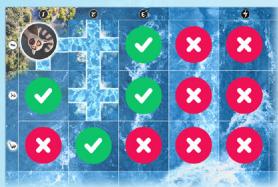
Example: The new tile must be placed on any of the 4 marked spaces connected to the tiles or animal spaces on the board.
② The tiles must create an uninterrupted path of water from at least one animal space to the newly placed tile.

Example: Although they would be connected to the tiles on the board, the new tiles may not be placed on any of the marked spaces, because, they would not form an uninterrupted path from an animal space.
3 The tile's edges must match the edges of all the tiles it touches – an edge with an open path must touch an edge with an open path. An edge without an open path must touch another edge without an open path.


Example: The new tile in this particular orientation may not be placed on any of the three shown spaces, because at least one of the edges would not match the edge it touches.
Any tile edges may touch the edges of the board.

Example: Tiles may be placed with either edge (open path or no path) pointing to the edge of the board.
The player must discard any tile with obstacles without drawing an Action card if:
• there is no valid space to place it on, or
• the only valid placement would lead to both paths of an animal space being completely blocked, making an uninterrupted path to the boat impossible.
After removing one or more tiles from the board (e.g. Giant Wave phase, card effects), all other tiles stay on the board, even if they do not have an uninterrupted path to an animal space.
Important: A player may only draw a tile after the previous player has fully completed their turn.
Play an Action card
The player plays an Action card from their hand and performs its effect. Then, they discard the card face up, except for the “Calm Waters” card, which gets discarded after next Giant Wave phase.
Unless stated otherwise, players can always share information about the cards in their hand.
Giant Wave phase
Players must always keep an eye on the timer.
When the l-minute timer runs out, the round is over and the game pauses. If the current player has already drawn a tile, then they must first finish their action as usual.
Then, the current player rolls both of the Giant Wave dice and removes all of the tiles from the rows that match the number and color of the dice by discarding them face-up.


Example: A player rolls 3 on the white die and 2 on the black die. All tiles from the white row number 3 and the black row number 2 must be removed.
Giant Waves do not remove a tile with a Bird token on it. If a tile with a Bird token is about to be removed, remove the Bird token instead. However, if the tile with a Bird token is targeted by both Giant Wave dice (at the intersection of the rolls), both the Bird token and the tile are removed (see Action Cards on page 9).
Once the tiles are removed and discarded face-up, restart the timer and start a new round. The turn passes over to the next player in clockwise order.
END OF THE GAME
Winning condition: Players win when all animal spaces are connected to the Boat tile by one or more uninterrupted paths of water by the end of a player's turn.
Losing condition: Players lose when, at the start of a player's turn, there are no tiles left to draw and no Action cards to play.
ACTION CARDS
Support (*3): Remove and discard any tile, except for the Boat tile, from the board.

Bird (x3): Put a Bird token on any tile, except for the Boat tile, on the board. If a Giant Wave hits a tile with a Bird token on it, then remove the Bird token instead of the tile. A tile can only have one Bird token on it.

Current (×3): Take any tile from the board, except for the Boat tile, and place it on a new empty space. The tile must be placed according to the tile placement rules, except it does not need to create an uninterrupted path to an animal space.

Fishing (×2): Flip over 2 tiles from the draw piles. In future turns, players may choose to draw 1 of these revealed tiles instead of drawing from a draw pile.

Calm Waters (×2): In the next Giant Wave phase, roll only 1 die instead of 2. The player rolling the die chooses which die to roll.
Note: Only one "Calm Waters” card can be played during a l-minute round.

Return (*2): Choose any of the previously discarded tiles and place it on the board according to the tile placement rules. You cannot play this card if there are no discarded tiles.
PLAYING WITH SCENARIO CARDS
Scenario cards are a key element of the game that add variety, depth and exciting surprises for you and your friends. Some cards introduce Scenario tiles with obstacles on the board, while others impose restrictions, making the game more engaging and challenging. We recommend that your group start using Scenario cards after your first playthrough.
Additional Setup
After setting up the game, carry out these additional setup steps:
-
Place the 8 Scenario tiles with obstacles within reach. They are only used for certain Scenario cards.
-
Shuffle the 11 Scenario cards and place them next to the game board as a face-down draw pile.
-
Agree on a difficulty level and draw the number of Scenario cards as shown below:
| Very Easy | 1 Scenario card |
| Easy | 2 Scenario cards |
| Medium | 3 Scenario cards |
| Hard | 4 Scenario cards |
| Very Hard | 5 Scenario cards |
| Inconceivable! | 6 Scenario cards |
- Place the drawn Scenario card(s) face up near the game board. Continue playing as usual, following the rules of each Scenario card.
SCENARIO CARDS

Scenario obstacles (*4): Take 2 Scenario tiles with obstacles. For each of those tiles, roll the 2 Giant Wave dice to determine their position. For example, if the roll indicates the intersection between the white row number 3 and the black row number 4, place the Scenario tile with obstacles there.

Reroll the dice, if the rolled space:
• is already occupied, or
• is an animal space (, 】, 图, 田图), or
• makes reaching the Boat tile with an uninterrupted path impossible.
Important: Scenario tiles with obstacles are different from regular Map tiles. When placing a tile next to a Scenario tile with obstacles, any of its edges (with or without open paths) may touch the Scenario tile with obstacles.

No Communication (×2): Players cannot
communicate, except during the Giant Wave phase. If you draw both “No Communication” cards, discard one and draw a new Scenario card.

One Action Card per Round (x1): The group can play only one Action card per round.

No New Cards (*1): Players cannot discard Map tiles to draw new Action cards during the entire game.

No “Support” or “Current” Cards for obstacles (×1):
“Support” or “Current” Action cards cannot move or remove any tile with obstacles. They can still be used on other tiles.

Single Path Boat Tile (×1): After setup (and potentially after placing Scenario tiles with obstacles), flip the Boat tile so that it shows the side with only one open path. You may choose the side of the board that the open path faces.

Obstacles remain after Giant Wave (×1): Obstacles cannot be destroyed by Giant Waves. They will remain on the board.
Note: If the restrictions on Scenario cards conflict with the standard game rules, follow the restrictions provided by the Scenario cards.
CREDITS
Game design: Dmitrijus Babičius, Tadas Kastanauskas, Justina Lapinskienė, Marijus Lapinskas
Illustrations: Gints Zilbalodis, Reinis Pētersons
Game development: Egils Grasmanis, Jānis Grunte
Graphic design and layout: Reinis Pētersons, Jānis Upītis, Māris Jansons
Rulebook editing: Lines J. Hutter
English proofreading: Karl Erik Saks
Playtesting: leva Nedzinskaitė, Ignas Veršinskas, “Prototipas” Guild, Lithuanian Game Development Association, Global GameJam Event, Andrius Granickas, Inesa Granickienė, Andrius Marcinkevičius, Dominic Hoffmann, Rita, Kovas, Vainius, Gabija, Adelė, Ažuolas, Upė, Üdrys, Saulė, J, P, Mindaugas Šukys, Edgaras Zujus, Jens Grabowski, Barduchi, Brigita, Rūta, Dārta
下载 Markdown