
推理事件簿Chronicles of Crime
一句话概览
推理事件簿 是一款已收录于村了吗规则库的桌游,支持 1–4 人,原名 Chronicles of Crime。
本页内容:一句话概览 · 游戏概述 · 1. 游戏组件 · 2. 游戏设置 · 3. 游戏流程 · 4. 扫描卡牌 · 5. 发现地点、角色与特殊物品 · 6. 搜证 · 7. 时间流逝与特殊事件 · 8. 结案 · 9. 扫描故障排除 · 关键规则与常见问题 · 常见问题
推理事件簿 规则速览
以下规则速览由本站整理,与官方规则书表述不同,仅供快速上手参考。
游戏概述
推理事件簿(Chronicles of Crime)是一款合作类警察调查桌游,融合实体版图与配套手机应用,支持可选的"虚拟现实"模式。每位场景提供一起独立的刑事调查案件,玩家合作搜集证据、审讯嫌疑人,当准备好结案时返回警局回答一系列问题,根据回答获得团队评分。
核心机制: 扫描二维码、场景搜证、审讯问答、时间管理
1. 游戏组件
| 组件 | 数量 |
|---|---|
| 证据板(Evidence Board) | 1块 |
| 地点板(Location Board) | 12块 |
| 法医联络板(Forensic Contact Board) | 4块 |
| 角色卡(Character Card) | 40张 |
| 证据类别与特殊物品卡(Evidence Category & Special Item Card) | 40张 |
| 免费配套手机应用 | 1个(iOS / Android) |
2. 游戏设置
2.1 板块与卡牌摆放
- 地点板: 放置在证据板旁边的区域
- 角色卡与特殊物品卡: 翻面朝下放在板旁
- 证据类别卡: 始终在游戏中,分发给各玩家
- 法医联络板: 始终在游戏中,分发给各玩家
- 起始地点: 将警局(带房屋图标)放在证据板底部
2.2 证据板布局
- 20个证据槽位: 用于放置关键证据卡
- 6个地点槽位: 位于证据板两侧,用于放置新发现的地点
- 3个未定位角色槽位: 位于证据板底部,用于放置尚未确定所在地点的角色
2.3 地点板上的角色槽
- 每块地点板包含3个角色槽位,用于放置位于该地点的角色
2.4 启动应用
- 启动配套应用,选择要游玩的场景与章节
- 建议先游玩教学场景熟悉游戏流程
3. 游戏流程
玩家通过扫描地点、角色和证据类别卡推进游戏。扫描窗口出现后,将手机对准卡牌或版图上的二维码,等待二维码变绿后点击屏幕触发扫描。
重要: 小组应共同讨论决定扫描哪张卡牌。
4. 扫描卡牌
4.1 扫描地点卡
- 允许玩家移动到该地点
4.2 扫描角色卡
- 允许玩家审讯该角色
- 审讯中,角色会回答关于其他角色或证据的问题——扫描相关卡牌即可
- 按"再见"按钮退出审讯模式
4.3 扫描证据类别卡
- 允许玩家拾取已发现的线索
- 应用会显示额外信息,若为关键证据则提示将该卡放到证据板上
4.4 扫描法医联络板
- 允许玩家呼叫法医联络人
- 呼叫期间扫描其他卡牌,联络人会针对该主题发表看法
- 按"再见"按钮退出通话
5. 发现地点、角色与特殊物品
地点、角色和特殊物品卡应保持翻面朝下,直到应用明确提到它们。游戏中部分卡牌会被揭示,每张卡牌带有符号和编号:
| 卡牌类型 | 符号 |
|---|---|
| 角色卡 | 人物符号 |
| 地点卡 | 地图标记符号 |
| 特殊物品卡 | 星形符号 |
5.1 揭示卡牌的摆放规则
- 新地点: 放在证据板侧面6个地点槽位之一
- 新角色: 放在指示地点的角色槽位之一;若不确定角色所在地点,先放在证据板底部的未定位角色槽位,查明后再移至对应地点
- 证据类别卡: 在搜证过程中发现,仅关键线索移到证据板上
- 特殊物品卡: 揭示后立即放到证据板上,应用会通知何时进入游戏
6. 搜证
部分地点(如犯罪现场)允许搜证,点击"搜索场景"按钮进入搜索模式。
6.1 搜索方式
- 3D模式: 将VR眼镜放在屏幕中央的黄线上
- 全景模式: 无需额外设备,在屏幕上左右滑动或转身360°观察场景
6.2 搜索流程
- 使用应用的玩家有40秒观察场景并向其他玩家描述所见
- 其他玩家根据描述寻找匹配的证据类别卡,确保这些卡面朝上且可供查看
- 时间到后可选择让另一位玩家继续搜索,或停止搜索(额外搜索会消耗更多游戏内时间)
- 最后扫描所有拾取的证据类别卡,应用会判断是否有卡为关键线索需要放到证据板上
7. 时间流逝与特殊事件
游戏内时间显示在屏幕右上方。
| 行为 | 消耗时间 |
|---|---|
| 扫描物品、审讯嫌疑人、观察场景 | 5分钟 |
| 从一个地点移动到另一个地点 | 20分钟 |
- 游戏内时间流逝影响最终评分——越快破案,分数越高
- 部分场景中时间流逝意味着情况可能发生变化,时间不总是玩家的朋友
8. 结案
当玩家认为已破案时,返回起始地点(警局),点击"破案"按钮。
- 应用会提出一系列问题
- 扫描支持推理结论的卡牌来回答问题
- 最终得分取决于回答的正确程度
9. 扫描故障排除
扫描偶尔可能失败,原因包括:
- 室内光线: 避免强烈阴影
- 卡牌保护套: 会产生反光
- 手机摄像头: 镜头污渍等
确保二维码位于提示框内,保持手机稳定以便对焦。
关键规则与常见问题
易错规则
- 扫描任意物品、审讯或观察场景均消耗5分钟游戏内时间
- 移动到另一地点消耗20分钟游戏内时间,比扫描动作多4倍
- 地点、角色和特殊物品卡必须保持朝下,直到应用明确提到才可揭示
- 新角色若不确定位置,先放未定位角色槽位,查明后必须移至正确地点
- 搜证时使用3D模式需VR眼镜,全景模式无需额外设备
- 每次额外搜索会消耗更多游戏内时间,影响评分
- 结案前需返回警局(起始地点)才能触发破案问答
- 特殊物品卡揭示后立即放到证据板,无需等待指示
- 证据类别卡中只有关键线索放到证据板,非所有搜到的卡
常见问题
-
Q:需要几台设备?
A:仅需1部手机或平板安装配套应用即可,无需联网 -
Q:可以不带VR眼镜游玩吗?
A:可以,选择全景模式即可,支持360°转身或滑动屏幕观察 -
Q:审讯时如何让角色谈论特定话题?
A:在审讯模式中扫描其他角色或证据卡,角色会针对该卡发表看法 -
Q:时间用完了会怎样?
A:时间不设硬性上限,但流逝越多最终评分越低,部分场景中还会触发剧情变化 -
Q:搜证描述不准确怎么办?
A:其他玩家根据描述找卡,时间到后可让不同玩家重新搜索(但消耗额外时间)
常见问题(FAQ)
以下 1 条问答中 0 条来自站内玩家的真实提问,其余 1 条为本站整理的常见疑问;答复内容保持原样。
推理事件簿支持几个人玩?
1–4 人。
去哪查完整规则
想核对具体规则细节、卡牌效果或某个回合的结算方式,可以在村了吗里选中这款游戏后直接提问。
同类桌游
规则原文(Markdown)
本站收录这款游戏的规则原文 2 个文件,此处内联渲染 2 个,可直接展开阅读或下载。
chronicles-of-crime-noir-rules-en.md8.7 KB
RULEBOOK
You are Sam Spader, a private eye who will find the truth... for whoever is paying your fee. But Los Angeles right after the second World War is not a friendly place. In the bright California sun, the shadows will reveal Hollywood scandals, corrupted cops, merciless gangsters, blackmail and murders. Watch your back, detective!
STÉPHANE ANQUETIL
DAVID CICUREL
GAME COMPONENTS
15 Location Boards
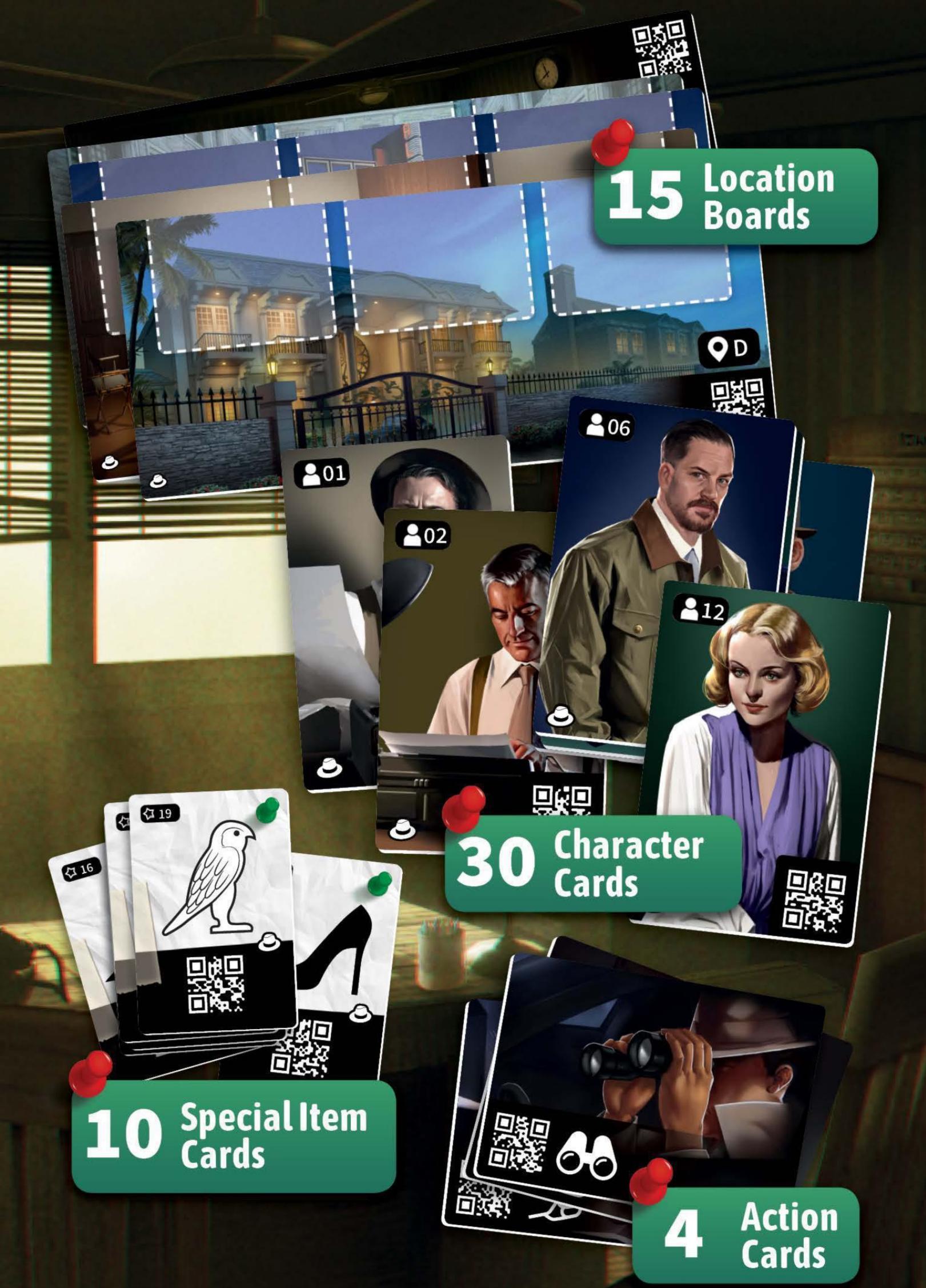
10 Special Item Cards
4 Action Cards

Free Application
GET IT ON
Google Play
Download on the App Store
Chronicles of Crime requires a free app, which you can download from Apple’s App Store or Google Play (currently requires Android 4.4 or newer, iOS 8.0 or newer, this may change in the future). You only need to have the app installed on one phone or tablet to play. It’s impossible to play without the app. Once downloaded, the app doesn’t require any internet connection during gameplay. The language can be changed within the application.
SETUP
Noir is an expansion of Chronicles of Crime. You will need the base game to play it.
Set up the game like the base game, with the following changes:
1 Location boards, Special Items cards, Character cards and Action cards are specific to Noir. You can easily spot the Noir Cards with the hat icon 📐. You need the Evidence Category cards, Evidence board and some Special Items cards from the base game to play.
2 Split the four Action cards equally amongst players.
ALLIES
AND HOME LOCATION
You are going to be playing a private detective. You do not belong to any Police department.
Hopefully, you will have allies or informants who can help you through the cases: a journalist, a coroner or your secretary. Those allies will depend on each scenario.
You can give them a phone call from your detective office location. But beware, as in the Noir literature and movie genre, allies and friends can disappear, betray you or even get killed.
SETTINGS AND HISTORY
Noir is happening in the aftermath of World War II in Los Angeles and Hollywood. It was a time when women and men, different races and social groups, did not have equal rights. All efforts have been made to include some diversity among the characters. Under an expert eye, the Noir Character cards will reveal a sample of famous, forgotten stars and actors of that time. But some characters and situations may express an opinion which, of course, is not that of the authors or editor, just to reflect the mentality of the time and the story plot. The ways of the fifties were different from today.
For more information about the context of Noir, please refer to the last page of this rulebook.

ACTION CARDS NEW MECHANISM
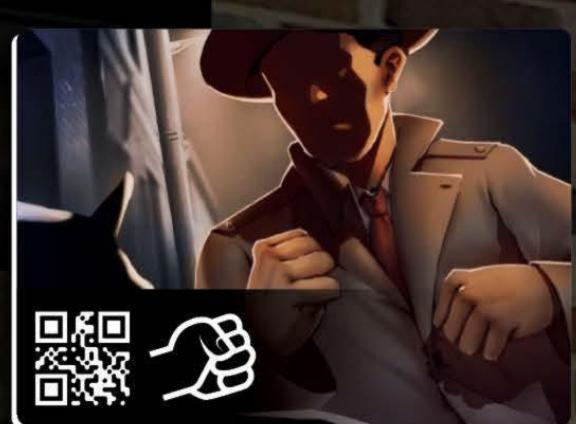
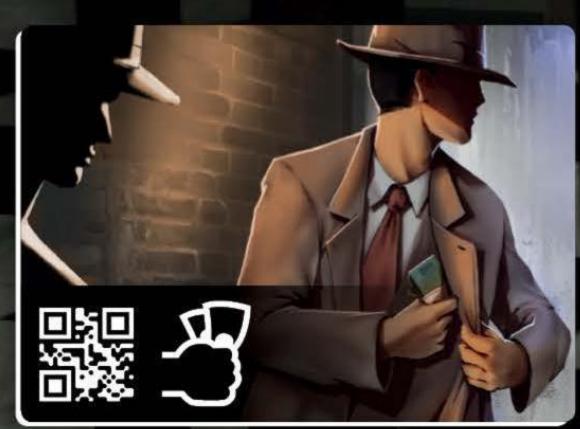
4 new different ways of inquiring are available in the Noir expansion. When you want to use an Action card, scan it. Keep in mind that using Action cards in the wrong situations may have a negative outcome!
[QR Code Icon]


Intimidation: While interrogating a suspect, you can play it hard and start pressing for information (scan the Intimidation card during the interrogation mode).
Downside: Some suspects react very badly to intimidation. They can seek revenge, or even attack you!
Break in: Sometimes you don’t want to, or can’t enter a place by the front door. You can decide to break in illegally (scan the Break in card at location you can not enter).
Downside: If you spend time in a location illegally, you can get caught and thrown into jail or even killed.
Shadowing: Suspects often lie, but their actions never do! You can spy on a suspect and find out what they are doing when you are not interrogating them. Scan the Shadowing card while you are in the same location as a suspect, you will be asked to confirm who you want to follow.
Downside: Shadowing takes time. Lots of time...
Corruption: You can corrupt or bribe a character to make them talk or give you some item (scan the Corruption card during the interrogation mode).
Downside: Money is rare, and each time you use the Corruption card, you lose 20\$.
The app tracks the amount of money you currently have. When you run out of cash, you can not corrupt anyone anymore until you earn some money.
THE PASSING
OF TIME
In the world of Noir, time is very important. Shops, bars and public places have opening and closing times. Witnesses have their own agendas. Police officers or bad guys can come back to the crime scene and arrest or kill you.
In most scenarios, you have a limited amount of time to solve the case. If you haven’t fully unraveled the mystery, it might be a good idea not to solve the case, but to try and play again from the beginning.
SPECIAL EVENTS
Your in-game actions are not just gimmicks. Your behavior may have consequences.
An evil guy knowing you carry evidence against him. A witness who isn’t afraid to speak anymore and collaborates with you. A suspect who becomes an ally because you’re offering him the item he wants. Whatever Noir action you do, whatever item or evidence you show (or give) to a character may affect their reactions or change the course of events in the game.
When you lose or give a card to a character, you can keep this card as evidence. For example: if you give an important item to someone, you still can ask another character about this clue.
ENDING
In Noir, you may have a client, but you don’t have a boss. The cases are usually closed when you meet with your client in your detective office to close the case and answer some questions.
Press
SOLVE THE CASE
Noir stories reward you for all the story plots you find. Making money is a bonus. So if you need one more hour to understand a secondary plot or earn some cash, it might be a good idea not to rush.

WHAT IS NOIR?
The term “film noir” is French. Nino Franck, a French critic, invented it in 1946. It defines stylish black and white Hollywood crime drama, with an emphasis on cynical attitudes and hidden motivations.
Visually, Noir has roots in German Expressionism. The genre includes black and white movies from the 1940s to the late 1950s. Famous noir movies are “The Maltese Falcon” by John Huston, “Double Indemnity”, “The Lady of Shangai” and “Touch of Evil” by Orson Welles.
Some of them were “B-pictures”, with low budgets, and had to comply with the 1934 Motion Picture Production Code, known as the Hays Code, and later, McCarthyism. All theses constraints forced writers and directors to be more creative. That’s why this theme fits well with game design, which is always a compromise between creativity and technical specifications.
LITERARY INFLUENCE
Hardboiled crime fiction writers, such as Dashiell Hammett, James M. Cain, Raymond Chandler and William Irish, inspired or wrote movies in that era.
NOIR LEGACY
Blade Runner, Dark City, Chinatown movies all follow the rules of Noir. Hollywood came back to that genre with the movies adapted from James Ellroy's novels (L.A.Confidential, Black Dahlia) or Kiss Kiss Bang Bang.
A WORD FROM THE AUTHORS
Noir is all about private eye, femme fatale, mafia guys, corrupt police but features a cynical and pessimistic point of view typical of post-WWII America. Everything is not as it seems in Noir. What is success? It could be solving the crime, earning money, defending a just cause or just surviving...
It is never easy to write complex psychological stories with real moral choices for the player. Chronicles of Crime game system makes it possible. We hope you will enjoy this new and thrilling atmosphere for the game.
CREDITS:
Authors: Stéphane Anquetil, David Cicurel
Illustration: Singhooi Lim, Huang Lei

Art Direction: Mateusz Komada
Graphic Design: Katarzyna Kosobucka
Producing: Vincent Vergonjeanne
Production: Przemek Dołęgowski
Programming: Marcin Musiał
Translation: Armelle Rapin
Proofreading: Seth Johnson
Development: Filip Miłuński
Playtesting: Michał Gołębiowski, Wojciech Grajkowski, Ludovic Chatillon, Kevin6Vies, Loïc « Cyol » Plateaux
Special Thanks to:
Blog @DeTuilesEtDeDes
and LYDLJ association
239188_chronicles-of-crime-rules.md8.2 KB
Chronicles of Crime
Table of Contents
- Game Content
-
The Free Application
-
Game Objective
-
Setup
-
How to Play
-
Scanning cards
-
Scanning warnings
-
Discovering Locations, Characters or Special Items
-
Search for Evidence
-
Time Passing and Special Events
-
Ending — Solve the Case
- Credits
Game Content
- 1 Evidence Board
-
12 Location Boards
-
4 Forensic Contact Boards
-
40 Character Cards
-
40 Evidence Category & Special Item Cards
- Free companion application (mobile app)
Chronicles of Crime is a cooperative game of police investigation. It mixes a board game with a companion application and an optional "Virtual Reality" mode.
The Free Application
Chronicles of Crime requires a free app, which you can download from Apple's App Store or Google Play. You only need the app installed on one phone or tablet to play. It is impossible to play without the app. Once downloaded, the app does not require any internet connection during gameplay. The language can be changed within the application.
The game uses "Scan & Play" technology: each component (locations, characters, items, boards, etc.) has a unique QR code which, depending on the scenario selected, activates and triggers different clues and stories.
Game Objective
Each scenario offers a unique criminal investigation. The game is fully cooperative and all players work together to solve the mystery.
The story develops as you collect evidence and interrogate suspects. When you feel you are ready to close the case, go back to the Police Station and answer a series of questions that determine your score as a team.
The base game comes with several scenarios (a tutorial plus a set of full investigations).
Setup
- Location Boards: Place the Location Boards to the side of the Evidence Board.
-
Character & Special Item Cards: Place the Character Cards and Special Item Cards face down to the side of the board.
-
Evidence Category Cards: All Evidence Category Cards are always in play. Split these up amongst the players.
-
Forensic Contacts: All Forensic Contact boards are always in play. Split these up amongst the players.
-
Home Location: Set the Home Location (the Police Station, marked with the house symbol) at the bottom of the board.
Notice that the Evidence Board has:
- 20 Evidence slots
-
6 Location slots (on the sides of the board)
-
3 Unlocated Characters slots (at the bottom of the board)
Each Location Board contains 3 character slots.
How to Play
Once the game is set, launch the app and select the scenario and episode you want to play.
Tip: Try the short tutorial investigation first to get familiar with the game. Instructions are explained within that scenario to show how the game works.
You progress in Chronicles of Crime by scanning Locations, Characters and Evidence Category cards. When the scan window is displayed, point the phone at any QR code on a card or board. Wait for the code to become green, then tap anywhere to trigger the scan.
The group should discuss together which card should be scanned.
Scanning cards
- Scan a Location card: Allows you to move to this location.
-
Scan a Character card: Allows you to interrogate the character. Once scanned, the character will answer questions about any other characters or evidence — simply scan those cards and the character will speak about them. You can exit interrogation mode by pressing the "goodbye" button.
-
Scan an Evidence Category card: Allows you to pick up a clue that you have spotted. Extra details become available and, if it is important, the app indicates that you should put the card on the Evidence Board.
- Scan a Forensic Contact: Allows you to call your contact. When calling your contact, every other scan will make your contact speak about that topic. You can exit the call by pressing the "goodbye" button.
Scanning warnings
In some rare cases, scanning may not work because of:
- The light in the room (avoid sharp shadows).
-
Sleeved cards (they produce reflection).
-
The camera of the phone (dirt on the camera lens, etc.).
Make sure the QR code is inside the indicated square and hold the phone still so the camera can focus.
Discovering Locations, Characters or Special Items
Locations, Characters and Special Item cards should stay face down until they are explicitly named by the application. During the game some of these cards will be revealed. These cards carry a symbol and a number or letter:
- Character Cards — person symbol.
-
Location Cards — map-pin symbol.
-
Special Item Cards — star symbol.
Rules for revealed cards:
- New Locations should be placed on one of the 6 Location slots on the side of the board.
-
New Characters should be placed on one of the 3 character slots at the location indicated. If you are unsure where a character is located, place the card on an Unlocated Characters slot on the main board. Remember to move it once you find out where the character is.
-
Evidence Category cards are found while searching the scene for clues. Only cards that are clues are moved to the Evidence Board, and these are essential to completing the case. (See "Search for Evidence" for how to find Evidence Category cards.)
- Special Item cards immediately go on the Evidence Board when revealed. The app notifies you if and when these come into play — search the face-down stack, then place the card face up on the Evidence Board.
Example: You scan Location F and read the screen. It says you arrive on the scene and the neighbor (character 33) is next to the body; he gives you a piece of paper with an address in Kensington (Location D). Based on this text, you should look for character 33 and place it on one of the character slots at Location F, and search for Location D and put it next to the board on one of the 6 Location slots.
Search for Evidence
Some Locations (like crime scenes) allow you to search for Evidence. Press the Search the Scene button to enter search mode.
You can search for Evidence in one of two ways:
- In 3D: Place the VR glasses in the middle of the screen over the yellow line on the phone.
- In panoramic view: Select this to experience the crime scene without extra devices.
Important: If you experience the game without the VR glasses, turn around to check the place in 360°. Alternatively, you can observe the scene by swiping left or right on the screen.
How searching works:
- You have 40 seconds to look at the scene and describe what you see to the other players.
-
Other players need to search for matching Evidence Category cards corresponding to what you describe. Make sure these cards are face up and available to all players who are not using the app to search.
-
When the time runs out, you can choose to have another player search for clues, or you can stop. Note that an extra search will take more in-game time.
- Finally, scan all the Evidence Category cards you picked. The phone will tell you if any of the cards are clues to place on the Evidence Board.
Time Passing and Special Events
In the world of Chronicles of Crime, time is very important. You can see the current time on the top right of the screen.
- Each time you scan an item, interrogate a suspect, or observe a scene, 5 minutes of in-game time passes.
- Each time you travel from one place to another, 20 minutes of in-game time passes.
The in-game time that passes has an influence on the final scoring. The quicker you solve the case, the better score you will earn. In some scenarios, time passing in-game also means the situation can change. Time is not always your friend.
Ending — Solve the Case
When you believe you have solved the case, you can give your report to your superior.
Go back to the Home location and press the Solve the Case button. A series of questions will be asked. To answer them, scan the cards that support your deductions. Your score will depend on your answers.
Good luck, team!
Credits
- Game Design: David Cicurel
-
Illustration: Matijos Gebreselassie
-
Art Direction: Mateusz Komada
-
Graphic Design: Katarzyna Kosobucka
-
Producing: Vincent Vergonjeanne
-
Production: Dawid Cichy
-
Programming: Marcin Musiał
- Proofreading: Chris Backe, Mary Petrie
Published by Lucky Duck Games.
下载 Markdown原文为社区整理/出版社公开资料,版权归原作者,仅供个人学习查阅。