
Life Of The Amazonia
At a glance
Rules, cards and Q&A (Chinese)
The rules, card data and player questions for this game are written in Chinese. Open the Chinese page to read them.
Where to find full rules
Full rules and card lookup are available in the cunlema app at cunlema.cn — pick this game and ask about any rule, card or turn you are unsure about.
Related games
Rulebook text (Markdown)
This game has 1 rulebook Markdown file(s) in our library; 1 rendered inline below — expand to read or download.
Life of the Amazonia_Base Game Rulebook_online.md107.6 KB
LIFEOFTHE AMAZONIA
Game Designer JAMIE BLOOM
Artist SOPHIA KANG
Director GUNHO KIM
Art Director HANI CHANG
Editor LUCYA LEE
Special Thanks To OUR KS BACKERS
BRAD TAYLOR, BRETT THOMASON, BRIAN SYMINGTON, GREG SHERMAN & ALLIE PROSKOVEC, H.C. HARRINGTON, JAN ADAM JEN KOBRICK, LOLA & SEAN O'BRIEN, MATT HILLMAN & HP GAMING, MATT NIMMERVOLL, ROBERT POLLOCK, ROBERTO MORENO
1. INTRODUCTION
WELCOME TO THE AMAZON
The Amazon Rainforest makes up more than half the Earth's remaining rainforests and is mother to the wild. Possessing one of the world's richest and most biodiverse ecosystems, the Amazon Rainforest is home to 10% of Earth's known species. To further enrich our precious Amazon, the world's largest and most prestigious non-profit scientific organization, the Good Comet Society, has gathered you into the lush jungles of the Amazon Rainforest. Be prepared to run your very own conservation organization to make the jungles of the Amazon flourish! Restore the rainforest, plant trees and aquatic flowers, and help the environment thrive. Depending on your choices, your jungle can become a biome where various animals live in harmony, or it may develop communities where specific species thrive. Succeed in cultivating the most prosperous jungle and be rewarded the Good Comet Society's Grand Prize. Now, let's get to work!
COMPONENTS

5 Jaguars

5 Giant Otters
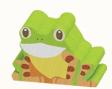
12 Leaf Frogs


6 Macaws
12 Tamarins
6 Caimans


12 Woodpeckers
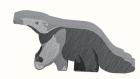
8 Toucans
1 Anteater
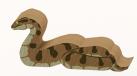
1 Anaconda

1 Amazon River Dolphin
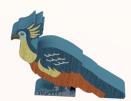
1 Hoatzin


1 Sloth
1 River Turtle
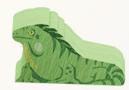
1 Armadillo


1 Iguana
16 Player Markers
21 Special Terrain Tiles
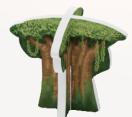

4 Resource Bags
42 Trees
4 Starting Terrain Tiles
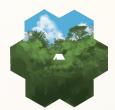


42 Aquatic Flowers

36 Terrain Tiles
16 Seeds
8“1 Leaf Tokens"



5 Complete Tokens
12 “1 Currency Tokens"
8 “1 Water Tokens”


8“Automa Tokens”

1 End Game Bonus Token

14“2 Leaf Tokens”

20.“2 Currency Tokens”

14“2 Water Tokens”

18 “2 Fruit Tokens”

12“3 Currency Tokens”
12 “3 Leaf Tokens”

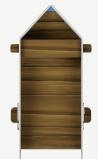
4 Discard Pile Boats


12“3 Water Tokens”
12 “3 Fruit Tokens”

10 “4 Leaf Tokens”

8“4 Currency Tokens”

10 “4 Water Tokens”

10 “4 Fruit Tokens”
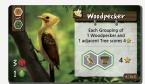
16 Base Animal Cards
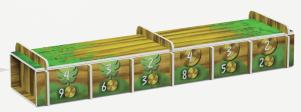
2 Token Vaults

8 Unique Animal Cards
1 Automa Card

48 Insect Cards
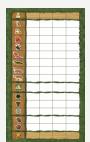
4 Player Aids
1 Scorepad
1 Rulebook

42 Scenery Cards
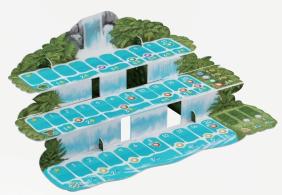
1 Waterfall of Life
1. INTRODUCTION
ASSEMBLY INSTRUCTIONS
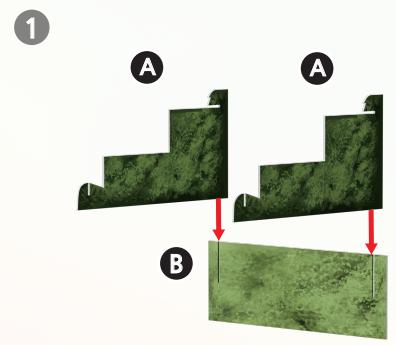
Connect 2 Side Supports to Back Support B.
Waterfall of Life Assembly

After carefully punching out the Waterfall, fold inwards and outwards along the cut-line to create a staircase shape.
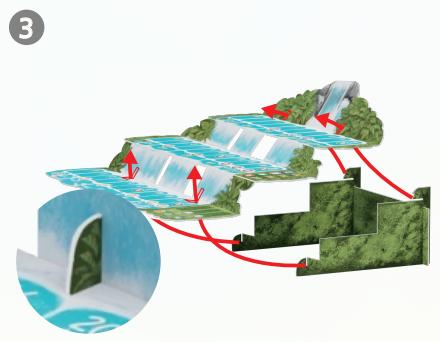
Align the hooks on Support1 with the 4 holes on the Waterfall and secure.
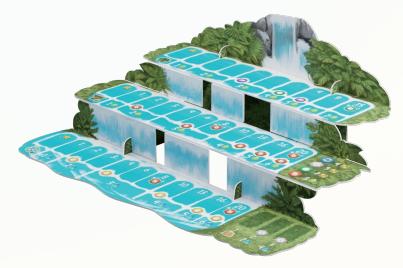
Complete!
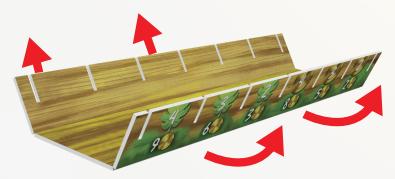
Fold the 2 sides of the Token Vault up as depicted.
Token Vault Assembly
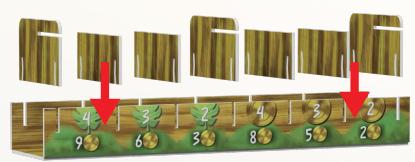
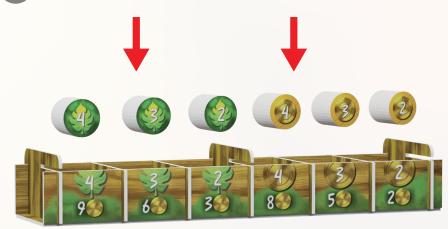
Insert the 3 Large Walls on the
outermost sides and the very middle
cutout. Insert the Small Walls into the remaining 4 cutouts.
Place and organize the Resource Tokens in each slot as indicated on the face of the Token Vaults.
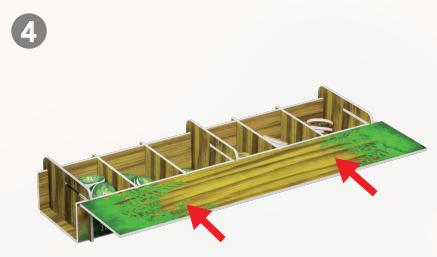
When storing in the game box, secure the contents by closing the vault with the included cover. Remove the cover before use.
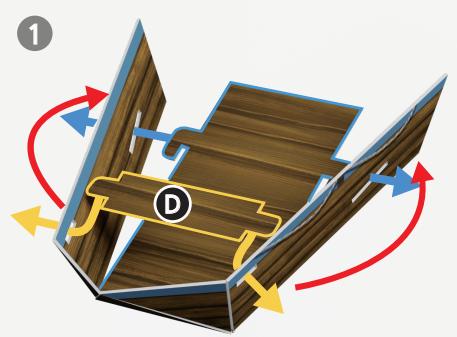
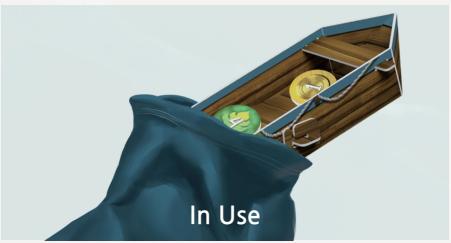
Fold the Boat so that the rope is shown on the outside. Insert Support through the 2 front holes of the Boat and secure. Insert the hooks on the Boat floor through the 2 back holes.
Discard Pile Boat Assembly

Secure the back hooks with the Rings . Insert the Rings vertically then turn the Rings downwards to fully secure.



1. INTRODUCTION
GAME SETUP
(Example of 2 Player Setup)


Place the Waterfall of Life where it is visible to all Players.
2 Place 2 Token Vaults within reach of all Players. Make sure that all the tokens are correctly placed into their corresponding sections.
③Lay out the Animal Refuge where it is visible to all Players.
Base Animal Card: Choose a set of Base Animal Cards to play among the 4 sets, A/B/C/D. You can find the set type in the lower right-hand corner of the Base Animal Cards. Place all 8 Base Animal Cards of the selected set where all Players can clearly see them. Put the remaining Base Animal Cards back into the game box.
· If you are new to this game, we recommend starting with the A-set.
· If you've played through the sets thoroughly, try making a random set of your own. Choose one Base Animal Card for each of the 8 Animal Types.
NOTE If playing with a random combination of Animals, more than 60,000 combinations are possible. Therefore, keep in mind that the game may go in a direction the Game Designer did not intend.
Animal Meeple: Depending on the quantity written on the lower right-hand corner of the Base Animal Card, take the corresponding amount of Animal Meeples out of the box and place them near the Base Animal Card. The number of Animal Meeples used depends on the number of Players in the game. The remaining Animal Meeples are not used in the game, so return them back to the box.
| No ofPlayers8 | XWood-pecker | LeafFrog | Tamarin | Toucan | eMacaw | TCaiman | 4Otter | WJaguar |
| 3x8 | 2x8 | 8+2 | 8+1 | |||||
| 1-2p | 6 ea | 4 ea | 4 ea | 3 ea | ||||
| 3p | 9 ea | 6 ea | 5 ea | 4 ea | ||||
| 4p | 12 ea | 8 ea | 6 ea | 5 ea | ||||
NOTE For those interested in a shorter version of the game, see pg.18 for more details on Lightning Mode (great for beginners and/or younger players).
Complete Tokens: Place the Complete Tokens near the Animal Cards.
End Game Bonus Token: Place the End Game Bonus Token near the Animal Cards.
4Arrange the Terrain Tiles as directed below.
Terrain Tile Deck: Shuffle all the Terrain Tiles (excluding the Starting Terrain Tiles) and place them face down.

Starting Terrain Tiles

Terrain Tiles
Terrain Tile Pool: Draw 3 Terrain Tiles from the Terrain Tile Deck and place them face-up.
Place the Seeds, Trees, Aquatic Flowers, and Special Terrain Tiles within reach. This area is called the Supply.
Seeds

Aquatic Flowers
Special Terrain Tiles

Set up the Nature Cards as shown.
Insect Card Deck: Shuffle all Insect Cards and place them face-down.
Insect Card Pool: Draw 3 Cards from the Insect Card Deck and place them face-up.
Insect Card Discard Pile: Leave space for discarded Insect Cards.
Scenery Card Deck: Shuffle all Scenery Cards and place them face-down.
o Scenery Card Pool: Draw 3 cards from the Scenery Card Deck and place them face-up.
Scenery Card Discard Pile: Leave space for discarded Scenery Cards.
⑦ Each Player prepares their space by following the directions below.
Starting Terrain Tile: Each Player takes a random Starting Terrain Tile and places it in front of them. The remaining Starting Terrain Tiles are returned to the box.
NOTE As the game progresses, additional Terrain Tiles will connect to the Starting Terrain Tile. Therefore, make sure each Player has plenty of space to spread out.
Resource Bag: Each Player chooses a color, takes a Resource Bag and places it in front of them. All Players start the game with 10 Resource Tokens. Place the following 10 Resource Tokens in each Resource Bag.


1-Currency Token

2-Currency Token
1-Leaf Token


1-Water Token
2-Fruit Token
Discard Pile Boat: Each Player takes a Discard Pile Boat that is the same color as their Resource Bag and places it in front of them.
4 Player Markers: Collect 4 Player Markers that are the same color as the Player's Resource Bag and place them on the first (leftmost) space of each of the 4 Tracks on the Waterfall of Life.
Unique Animal Card: Deal out 2 Unique Animal Cards to each Player. Players choose 1 of the 2 cards that are dealt and places it face-up in front of them. If the card chosen displays a Starting Seed, collect a Seed immediately (see page 11 for more details). Unused Unique Animal Cards are returned to the box.
Unique Animal Meeple: Take the Meeple that corresponds to the selected Unique Animal Card and place it on the card.
The Player who most recently watched a nature documentary becomes the First Player. The game proceeds in a clockwise direction, starting with the First Player.
In a 3-4 player game, the Player(s) whose turn comes third or later additionally receives a Seed before the game begins.
10 Each Player draws 5 Resource Tokens from their Resource Bag and places the drawn tokens in front of them. The place where each Player draws and places their Resource Tokens is called the Play Area. Now we're ready to begin!
I1. OVERVIEW
GOAL OF THE GAME
The goal of ≤Life of the Amazonia> is to be the Player with the highest Environmental Score at the end of the game, which is represented by the ⭐icon.
JUNGLE BUILDING
To achieve a high Environmental Score, Players need to create the most ecologically rich Jungle. To do this, Players will need to place various Animals in their Jungle. Since each Animal has its own unique scoring method, it is important to place Animals where they can best synergize with each other. It is also important to be mindful of placing Trees and Aquatic Flowers, along with acquiring the most suitable Nature Cards.

Jungle: The Terrain Tiles placed in front of each Player along with the various components placed within the tiles, are collectively referred to as the Player's “Jungle”.
BAG BUILDING
In order to restore the Amazon to become the most ecologically rich Jungle, it is very important to develop the Resource Bag to fit the strategy. Players will need to pay Resource Tokens to perform the various Actions to restore the Amazon. These Resource Tokens are stored in the Resource Bags. Players begin the game with a relatively weak Resource Bag that, through purchases, they will gradually develop over the course of the game.

Resource Tokens
: Resource Tokens are stored in each Player's Resource Bag. Additional Tokens are available for purchase from the Token Vaults through the “Purchase a Resource Token”Action (see page 8).
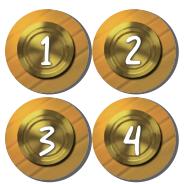
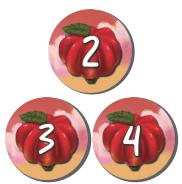
. There are 4 types of Resource Tokens: Currency, Leaf, Water, and Fruit. The Tokens are marked from 1 to 4. The larger the value, the more valuable the Token is.
Currency Tokens

Leaf Tokens

Water Tokens
Fruit Tokens
GAME STRUCTURE
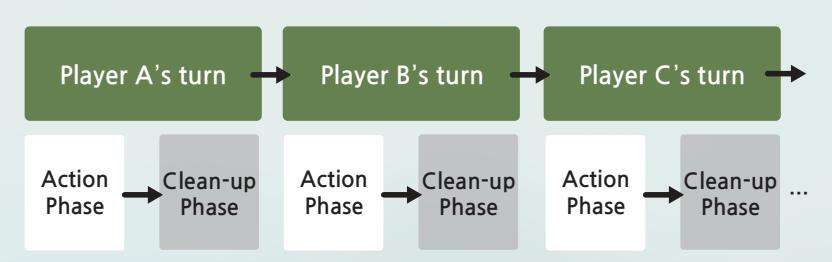
· Players take turns in a clockwise direction until the “End of the Game” conditions are met (see page 14).
· Each turn consists of an Action Phase and a Clean-up Phase.
: Action Phase (See pages 7\~13): Pay the required amount of Resource Tokens to perform the desired Actions. There are a total of 8 Actions that can be performed in the Action Phase.
-
Purchase a Resource Token
-
Place a Terrain Tile
-
Place an Aquatic Flower
-
Place an Animal
-
Purchase a Nature Card
-
Place a Tree
-
Expand Storage
-
Purchase a Bonus
. Clean-up Phase (See page 14): Resource Tokens left unused during the Action Phase can be saved in the Play Area or discarded into the Discard Pile Boat. After this, 5 new Resource Tokens are drawn from the Resource Bag into the Play Area in preparation for the next turn.
· When 5 of the 8 Base Animal Cards have been depleted, the remaining Players, excluding the Player who depleted the last of the 5 Base Animals, play 1 more turn each, then the game ends (see page 14).
· Each Player counts the Environmental Score collected, and the Player with the highest score wins (see pages 14\~17).
NOTE At the end of the game, each Player's Jungle will vary in shapes and sizes, all taking on a different form. Explore each other's Jungle and discuss the strategies each of you came up with!
ACTION PHASE
· In the Action Phase, Players use Resource Tokens to perform desired Actions.
· As long as the Player can pay the required amount for the desired Actions, Players are able to take as many Actions, one after the other. Even if this means repeating the same Action.
. To perform an Action, Players pay by discarding their Resource Tokens from their “Play Area” to their “Discard Pile Boat”.
: Resource Bag: A pouch that stores Resource Tokens.
: Play Area: An area where Resource Tokens drawn from the Resource Bag are placed. Resource Tokens drawn by each Player are shared information; open for all Players.
· Discard Pile Boat: When the Resource Tokens from the Play Area are spent, they move on to the Discard Pile Boat. When there are no more tokens left to be drawn from the Bag when new tokens need to be drawn, the Resource Tokens from the Discard Pile Boat are returned back to the Resource Bag. This is called Bag Reset (see page 8).

You are about to play the “Place an Animal” Action. To place a Tamarin in the Jungle, you need 5 Fruits.
You pay 1 “3 Fruit Token” and 1 “2 Fruit Token” from your Play Area to the Discard Pile Boat.
You can now place the Tamarin in your Jungle.
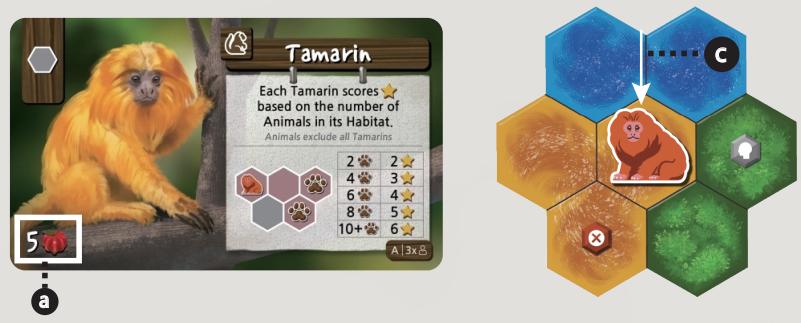
· If there are no more Actions a Player can or would like to perform, the Player wraps up their Action Phase and begins their Clean-up Phase. (See page 14).
5 RULES REGARDING ACTIONS
① A Player can use multiple Resource Tokens to perform an Action(s).
2 If a Player pays with more Resource Tokens than required for the Action(s), the excess is not refunded. Remaining resources dissipate immediately.
3 Whether a Player uses 1 token or multiple, only 1 type of Action can be performed with a single payment. Players CANNOT separate the amount of a single Resource Token to perform more than 1 TYPE of Action. However, with a single payment, Players are able to perform that 1 TYPE of Action as many times as that payment allows.
[Example]
Let's say for example, you would like to perform the “Place an Aquatic Flower” Action twice in a row. The cost of placing the 1st Flower is 1 and the 2nd 2. You can pay a “4 Water Token" to consecutively perform the “Place an Aquatic Flower” Action twice . Even though you

paid 4for a total 3Actions, the remaining balance is not refunded and the extra 1dissipates.
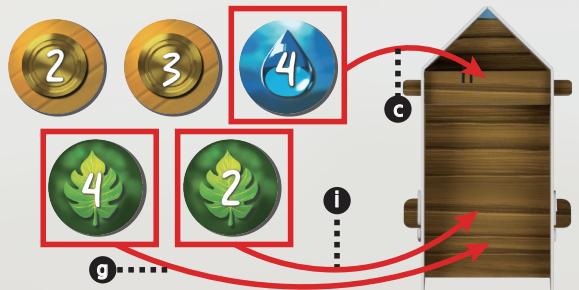
To give another example, let's say you would like to perform the “Place a Terrain Tile” Action that costs 2 and the “Place a Tree' Action that costs 2. You cannot perform both Actions by paying 1 “4 Plant Token” because you can only perform one type of Action with one payment. So, you pay a “4 Plant Token” to perform the “Place a Terrain Tile” Action, and a “2 Plant Token” to perform the “Place a Tree” Action. The remaining 2 dissipates after performing the "Place a Terrain Tile" Action.

When repeatedly performing the same Action multiple times with a SINGLE PAYMENT, the full cost of the Actions must be paid all at once. Afterwards, the Actions are executed in succession.
111. GAMEPLAY
When paying for the cost of an Action, ANY 2 Resource Tokens can take place as any ONE 1-value Resource. The value shown on the 2 Resource Tokens being traded does not matter. There is no limit to the number of times this form of payment can be made.
[Example]
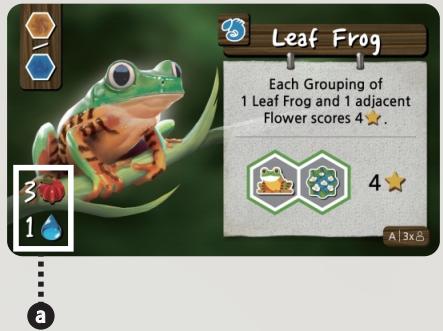
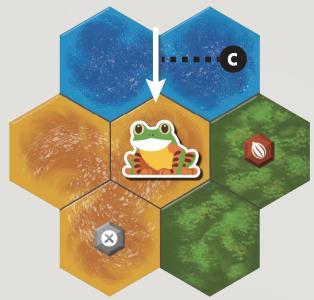
To place a Leaf Frog, a Payment of 3and 1is needed.
The needed amount of Fruit Tokens is already in the Play Area, but there are no Water Tokens.
Because you can pay any 2 Resource Tokens in place of a Resource worth 1 in value, you pay the “1 Currency Token” and “2 Currency Token” in place of 1 to be able to complete the Action.
You can now place the Leaf Frog in your Jungle.
Play Area
Discard Pile Boat


Play Area
Discard Pile Boat
8 TYPES OF ACTIONS
1. PURCHASE A RESOURCE TOKEN
Players will need to develop their Resource Bags by purchasing more effective tokens in order to restore the Jungle more efficiently.
Payment: Pay the directed amount of Resources and gain the desired Resource Token from the Token Vault.
Token Vault
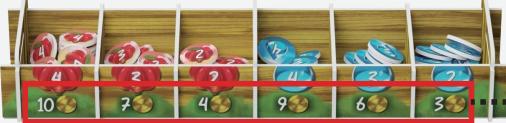
· If there are no more tokens left in the Token Vault, those tokens can no longer be purchased.
· Players can always view their tokens in their Discard Pile Boat and/or their Resource Bag, except when they are drawing Resource Tokens.
2 Obtain: Place the newly purchased Resource Token in the Discard Pile Boat for future use. As the game progresses and the Player resets their Resource Bag, the newly purchased Resource Tokens can then be used.
[Example]
You would like to purchase the "2 Fruit Token" that cost 4.
You pay a “1 Currency Token” and a “3 Currency Token” from the Play Area to the Discard Pile Boat.
Then you take the purchased “2 Fruit Token” from the Token Vault and add it to the Discard Pile Boat for future use.

Token Vault
Bag Reset
Bag Reset: If there are no more Resource Tokens left in the Resource Bag when the new Resource Tokens must be drawn, return all Resource Tokens from the Discard Pile Boat to the Resource Bag and draw out the tokens yet to be drawn. This means that the Resource Tokens discarded are used to continually replenish the Resource Bag.
. Do not perform Bag Reset immediately after the Bag has been emptied. Only perform “Bag Reset” when there is a NEED to draw new Resource Tokens and the Bag is empty.
. When in very rare cases, both the Discard Pile Boat and the Resource Bag are empty, no new Resource Tokens can be drawn.
2. PLACE A TERRAIN TILE
Take a new Terrain Tile from the Terrain Tile Pool and place it in the Jungle.
To restore the life of the Jungle, placing Terrain Tiles must be a priority.
Payment: Move the Player Marker to the right on the Terrain Tile Track, and pay the directed amount. If there is a Bonus on the Track, collect the Bonus immediately (see page 13). The Terrain Tile Track is located at the top level on the Waterfall of Life.
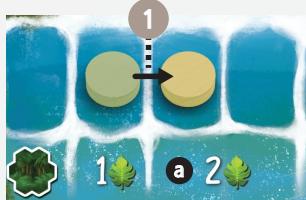
Placement: Take any tile of the 3 face-up Terrain Tiles from the Terrain Tile Pool and place it in the Jungle.
· The Terrain Tile chosen can be rotated freely.
· Terrain Tiles cannot be placed on top of other Terrain Tiles.
· A new Terrain Tile must be connected to the Jungle by at least 2 Hexes.
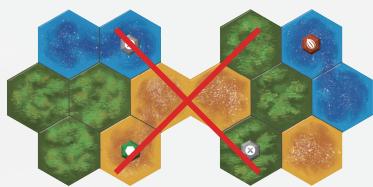
Refill: Draw a new Terrain Tile from the Terrain Tile Deck to place face-up to fill the Terrain Tile Pool.
Waterfall of Life
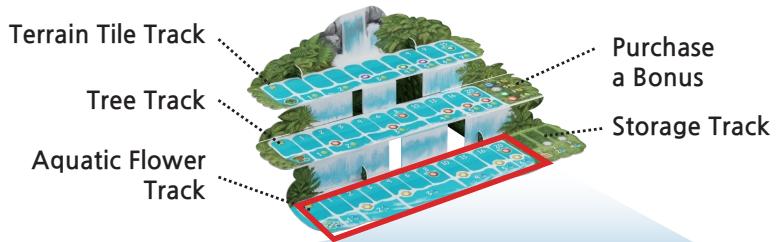

Cost: In order to move the Player Markers on the Track, Players must pay the directed amount.
Track Bonus: These Bonuses are located below the track space. If a Bonus is present where the Player Marker is placed, the Player gains this Bonus immediately. For details on the types of Bonuses refer to page 13.
Limited Track Bonus: These Bonuses are marked with a sparkling border and are displayed within the track space. The first Player to move to the space marked with the Limited Track Bonus will be the only one to receive the Bonus. In a 4 player game, the first 2 Players will receive the Limited Track Bonus.

Environmental Points: When the game ends, each Track provides Environmental Points depending on the position of the Player Marker.
· Multiple Player's Player Markers can be placed in the same space on the Track at the same time.
· If there are no more spaces to the right, this Action can no longer be performed.
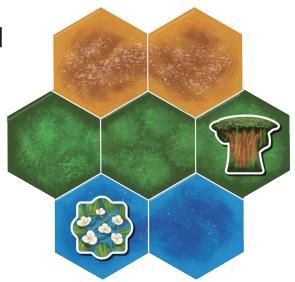
Terrain Tile Terms

- Hex: A Terrain Tile is made up of 7 small hexagons. Each of these hexagons is called a Hex.
· Each Hex can only hold one Life so 2 Lives cannot be placed on 1 Hex. Life or Lives refer to all placements that can be placed on the Terrain Tiles. This includes Base/Unique Animals, Trees, and Flowers. . There are 3 types of Terrain: Forest, River, and Marsh.

-
Placement Bonus: Terrain Tiles contain Hexes with a Placement Bonus. If a Player places a Life on a Hex with a Placement Bonus, gain that Bonus immediately upon placement (see page 13).
-
Habitat: A Habitat is a group of adjacent Hexes of the same Terrain. The Habitats are divided into Forest, River, and Marsh depending on the Terrain. When counting the size of a Habitat, count the number of Hexes that make up the Habitat. Single Hex Habitats are possible.
E.g., in the example above, there are a total of 14 Hexes, divided into 5 different Habitats.is a 5 Hex Forest Habitat and cannot be recognized as 2 different Habitats by arbitrarily dividing the area into 2 Forest Habitats which are 2 Hexes/3 Hexes each.andare both River Habitats but they are not connected, so these two Habitats are perceived as two different River Habitats.
- Animal's Habitat: Refers to the Habitat the Animals are placed. 1 Hex Small Animals inhabit 1 Habitat and 2 Hex Large Animals can inhabit 1 or 2 Habitats (see page 11).
E.g., in the example above, the Frog's Habitat is a 3 Hex River Habitat . The Macaw on the other hand, inhabits both the 5 Hex Forest Habitatand the 3 Hex River Habitat.
111. GAMEPLAY
3. PLACE A TREE / 4. PLACE AN AQUATIC FLOWER
These 2 Actions are separate Actions. However, given their similarity in details, they will be explained as one.
Take a Tree or Aquatic Flower from the Supply and place it on an unoccupied Hex in the Jungle. Trees and Aquatic Flowers provide Environmental Points on their own, but they can also be combined with other Animals and Scenery Cards to collect even bigger Environmental Points.
Payment: Move the Player Marker one space to the right on the Tree/Aquatic Flower Track, and pay the directed amount. If there is a Bonus on the Track, collect the Bonus.
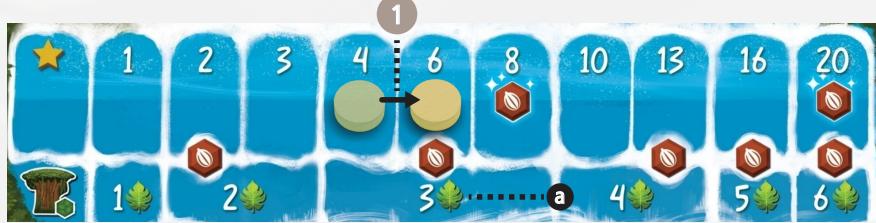
· The Aquatic Flower Track and Tree Track are located on the lower Floor and middle Floor of the Waterfall of Life respectively.
Tree Track..
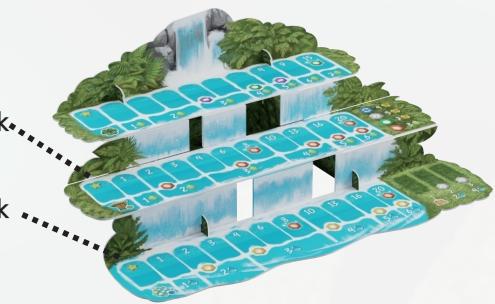
Aquatic Flower Track
Placement: Players will take a Tree from the Supply for the “Place a Tree” Action and an Aquatic Flower from the Supply for the “Place an Aquatic Flower” Action, then proceed to place it in their Jungle.
Terrain Conditions for the Tree/Aquatic Flower
: Trees can only be placed on an unoccupied Forest Terrain Hex.
: Aquatic Flowers can only be placed on an unoccupied River Terrain Hex.
· If there isn't a suitable Terrain to place a Tree or Flower in the Jungle, the Action cannot be performed.
NOTE For convenience, Aquatic Flowers will sometimes be shortened and referred to as “Flowers".
5. PLACE AN ANIMAL
Take a Base Animal from the Animal Refuge or take a Unique Animal from the Unique Animal Card and place it in the Jungle. When the game ends, Players collect Environmental Points from the Animals in their Jungle.
Select an Animal: Choose an Animal from the Base Animals or a Unique Animal.
· Base Animals: 8 types of Animals in the Animal Refuge. All Players are able to place these Animals.
· Unique Animals: Animals that can only be placed by the Player who has selected the corresponding Unique Animal Card. 1 Unique Animal per Player.
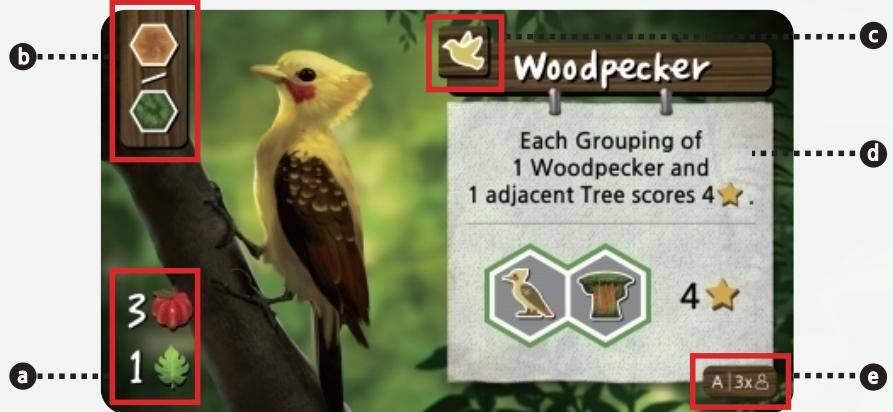
Payment: Pay the cost shown in the lower left-hand corner on the Animal Card of the Animal the Player would like to place.
3 Placement: Take the corresponding Animal meeple from the Animal Refuge or Unique Animal Card and place it in the Jungle. Terrain Conditions of the Animals must be satisfied upon placement.
Animal Cards
Cost: Resources required to place the Animal in the Jungle.
Terrain Conditions: Terrain Conditions that must be met to place the Animals in the Jungle.
· There is no direction distinction in the Terrain Conditions. Players are able to freely rotate and place the Animals in whichever direction.
· Even with the same Animal, Terrain Conditions may change depending on the Animal Card set used.
: Animals can only be placed in unoccupied Hexes, and no two Lives can be placed on a single Hex at the same time.
. Depending on their size, Animals are divided into Small Animals with a Terrain Condition of 1 Hex and Large Animals with a Terrain Condition of 2 Hexes.
Complete Token
 | Must be placed on a Hex of a matchingTerrain. In this case, on a River Hex. | SmallAnimals |
 | Must be placed on a Hex that matches eitherTerrain. In this case, either a Marsh or RiverHex. | |
 | Can be placed on ANY of the 3 Terrain Hexes:Forest, River, or Marsh. | |
 | Must be placed on Hexes of 2 specificTerrains. In this case, it should be placedacross 2 River Terrain Hexes. | LargeAnimals |
 | Must be placed on 1 specific Terrain and 1Terrain of ANY type. In this case, it should beplaced across 1 River and 1 Hex of any Terrain. | |
 | Can be placed on any Terrain, but must beplaced across 2 Hexes of the SAME Terrain. |
Classes: All Animals are classified into 3 different Classes: Birds, Mammals, and Herptiles.

Birds

Mammals

Herptiles
INFO· Herptiles refers to both Amphibians and Reptiles.
· In this game, Insect Cards do not count as Animals. Therefore, Insects are NOT categorized into these classifications.
0 Animal Abilities: All Animals have their own way of collecting Environmental Points after the end of the game. Refer to pages 14-17 to learn how to collect points with Animal Cards.
Game Setup: The Animal set and the quantity of Animal Meeples needed in-game. Used during Game Setup (see page 5).
NOTE For Lightning Mode, please refer to the quantities on page 18, NOT the quantities marked on the cards.
Animal Complete
· When a Base Animal Card from the Animal Refuge has fully been depleted, place a
"Complete Token" on the corresponding Animal Card. Depleted Animals can no longer be placed.
. When 5 Base Animal Cards have been depleted and 5 Complete Tokens have been placed in the Animal Refuge, the remaining Players, excluding the Player who depleted the last of the 5 Base Animals, play 1 turn each, then the game ends.

TIP The number of Base Animals available is limited, so if there are Animals you would like to place, it is important to place them before they run out.
Unique Animals
A Unique Animal is chosen at the start of the game and can only be used by the Player who selected the Animal. Unlike Base Animals, as long as the Terrain and Unique Placement Conditions are met, Unique Animals can be placed in the Jungle at any time during the Player's turn without cost.
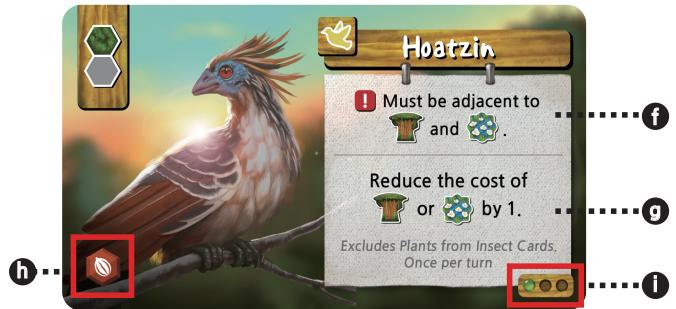
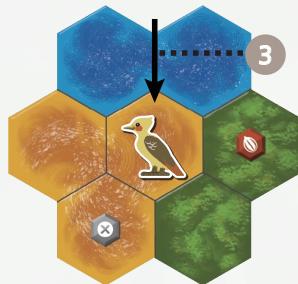
Unique Placement Conditions: Unique Animals can only be placed in Hexes that satisfy their Unique Placement Conditions in addition to their Terrain Conditions. Unique Placement Conditions are indicated with a9.
· For some placement conditions, the description of “at least 1” has been omitted. The Hoatzin, for example, can be placed in the Jungle if it is placed adjacent to at least 1 Tree and 1 Flower.
. Once a Unique Animal is placed, Players do not need to sustain the placement conditions. The Hoatzin's ability can be continually applied even if the adjacent Tree and/or Flower is relocated and the Hoatzin's placement condition is no longer met.
. Once placed in the Jungle, Unique Animals cannot be moved through the “Relocate" Bonus (see page 13).
Abilities: Each Unique Animal has its own special ability that wil assist in restoring the Jungle more efficiently (see page 26).
. Only when the Unique Animal is placed in the Jungle, Players are able to use the abilities of the Unique Animal.
· All Unique Animal abilities can only be used once per turn. Take the Hoatzin for example, if both a Tree and a Flower are placed in a single turn, only 1 of those Actions can be discounted with the Hoatzin's ability. In this case, the Player is free to decide which Action to apply the ability to.
TIP Develop a strategy to make optimal use of your Unique Animal, and place Plants and Base Animals in accordance with that strategy.
Starting Seed: Some Unique Animals provide a Starting Seed at the start of the game. When a Player selects these Unique Animals during the game setup, the Player immediately collects 1 Seed. If there is nothing in the bottom left corner, this means this Unique Animal does not provide a Starting Seed.
Difficulty: Unique Animals are divided into 3 difficulty levels in accordance with their abilities. Difficulty 1() is the easiest and Difficulty 3() is the hardest.
TIP Unique Animals with high difficulty levels may not be suitable for beginners. It is recommended that Players not yet familiar with the game refrain from using such Animals.
111. GAMEPLAY
6. PURCHASE A NATURE CARD
Take a Nature Card from the pool. Nature Cards help Players obtain an even higher Environmental Score or a one-time reward.
0Nature Cards
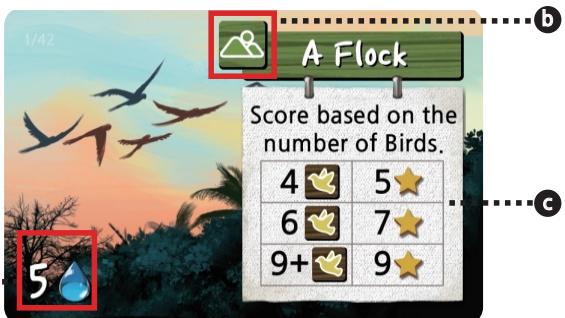
Cost: Resources required to obtain the Nature Card.
Types: Nature Cards are divided into the 2 types below.

Scenery Cards: Environmental Points can be obtained with these cards after the game concludes.
. Players can have up to 4 Scenery Cards.
· If a Player has reached their Scenery Card limit, one of the cards in the collection must be discarded in order to obtain a new card.

W Insect Cards: One-time use cards that are used directly after purchase and discarded into the Insect Card Discard Pile.
: Insect Cards are not collected so they can be purchased and used even after the Scenery Card limit has been filled.
: Even if the effects of the Insect Card cannot be applied, Players are still able to purchase the cards.
NOTE To represent the biodiversity of the Amazon, Insect Cards also feature spiders and centipedes which are formally classified as arthropods, not insects.
Nature Card Abilities: All Nature Card descriptions are based on the Player's individual Jungle. Refer to pages 27-28 for more details regarding Nature Card abilities.
Select a card: Choose a card from the 6 cards in the Scenery/Insect Card Pool.
NOTE Purchasing a Scenery Card and Purchasing an Insect Card are the same Action, therefore, Players are able to mix and match multiple cards with a single payment.
Payment: Pay the cost shown in the lower left-hand corner of the Nature Card the Player would like to obtain.
Obtain: If a Scenery Card has been selected, the card is placed in front for final scoring at the end of the game. If an Insect Card has been selected, the abilities are applied immediately and the card is discarded into the Insect Card Discard Pile.
Refill: Refill the pool from the corresponding deck. When all cards in the deck are exhausted, the Discard Pile is shuffled to form a new deck.
7. EXPAND STORAGE
This Action increases the number of Resource Tokens that can be stored in the Play Area during the Clean-up Phase. By expanding the Storage, Players can reduce wasted Resource Tokens and utilize the resources more efficiently.
Payment: Move the Player Marker to the right on the Storage Track, and pay the directed amount. If there is a Bonus on the Track, collect the Bonus immediately.
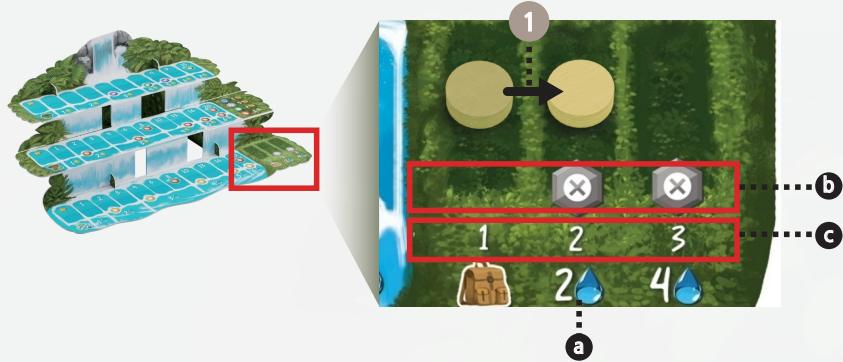
· The Storage Track is located in the lower level of the Waterfall of Life.
· refers to the number of Resource Tokens that can be stored in the Play Area during the Clean-up Phase (see page 14).
· In the beginning, each Player can store up to 1 Resource Token in the Play Area. The “Expand Storage” Action gives Players the chance to store up to 3 Resource Tokens at a time in the Play Area.
8. PURCHASE A BONUS
Players can purchase a Bonus by paying the amount directed on the middle floor of the Waterfall of Life.

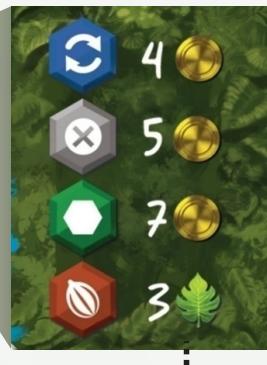
Cost
① Payment: Pay the directed amount of Resources and gain the Bonus.
· Each type of Bonus can only be purchased once per turn.
· For example, a Player can purchase a Relocate Bonus and a Compost Bonus with a single payment of 9. However, purchasing 2 Relocate Bonuses with a single payment of 8is not possible.
Bonuses
· As the game progresses, Players will receive a number of Bonuses that will assist in a smoother Jungle restoration process. Bonuses can be earned through Placement Bonuses, Track Bonuses, Limited Track Bonuses, “Purchase a Bonus"Actions, Insect Cards, and some Unique Animal Cards.
: Bonuses are only received after the full cost of the Action that generates the Bonus has been paid.
. If multiple Bonuses are to be collected with a single Action, the order in which they are collected is determined by the Player.
: Players can choose not to receive the Bonus if they wish.
. Players cannot choose to receive the Bonus at a later time.

1. Relocate: Choose a Life in the Jungle and move it to a different location.
: Relocated Lives can only be moved to spaces that meet their Terrain Conditions.
. Terrain Tiles and Special Terrain Tiles cannot be relocated.
. Unique Animals cannot be relocated.
· Relocating a Life is a different concept than placing a Life. Therefore, Placement Bonuses cannot be obtained through Relocate, and Unique Animal abilities that apply in relation to placing an Animal cannot be applied.
. The Placement Bonus that may reappear after relocating a Life can be obtained again through placing another Life.
NOTEThis Bonus does not swap the positions of 2 Lives.

2. Compost: Choose a Resource Token from the Discard Pile Boat or Play Area and immediately remove it from the game. This Resource Token is returned to the Token Vault. (1-value Tokens are returned back to the box.)
. By doing so, this ensures that unwanted Resource Tokens are no longer drawn from the Resource Bag.
: Resource Tokens in the Resource Bag cannot be composted unless specified otherwise.
TIP For an efficient Resource Bag, it is important that low-value Resource Tokens are properly composted.

3. Place a Special Terrain Tile: Players take a Special Terrain Tile of their choosing from the Supply and place it immediately. The Special Terrain Tile can be used to change the Terrain of an existing Hex or to expand the Jungle.

Special Terrain Tile
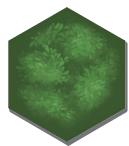
· Special Terrain Tiles CANNOT be placed on top of an occupied Hex.
· If the Player places a Special Terrain Tile on an unoccupied Hex with a Placement Bonus, they DO NOT receive the Bonus.
NOTE Placement Bonuses are only obtained when a Life has been placed in the corresponding Hex.
· Special Terrain Tiles can also be placed to expand the Jungle without having to cover an existing Hex. In this case, it must be adjacent to an existing tile by at least 2 Hexes just like Terrain Tiles.
· If a Player needs to place a Special Terrain Tile on top of another Special Terrain Tile, return the previous tile back to the Supply then continue to place the new tile.
· In rare instances, where there are no tiles left in the Supply, a Player is unable to take any more tiles from this Bonus.

4. Gain a Seed: Obtain a Seed from the Supply immediately.

Seed
. Seed: When paying for an Action, a Player can pay a Seed in place of any resource, worth 1 in value.
. Seeds are one-time use. After it has been used, the Seed is placed back into the Supply, not the Discard Pile Boat.
. Seeds are not Resource Tokens, therefore, they do not count towards the Storage Track Storage Limit.
: Each Player is allowed to have up to 4 Seeds at a time, If a Player with 4 Seeds is to gain another, this Seed cannot be awarded.
: A Player is allowed to use more than 1 Seed per payment.

5. Draw: Draw a Resource Token from the Resource Bag and add it to the Play Area.

6. Renew: Choose up to 2 cards and/or tiles from the Insect/Scenery/Terrain pool(s) and discard. Refill the pool(s) by drawing new ones from the deck(s).
· For Terrain Tiles, discard them by placing them face-down at the bottom of the deck.
. Players may choose to renew just 1 card/tile from any of the pools or choose not to receive the bonus at all.
E.g., a Player can renew 1 Insect Card and 1 Terrain Tile.
CLEAN-UP PHASE
If a Player has no more Actions they would like to perform, or no Actions they can perform, the Player then ends the Action Phase and begins the Clean-up Phase in the following order.
1 Store unused Resource Tokens in the Play Area.
· If all the tokens in the Play Area are not used or cannot be used in the Action Phase, Players are able to store tokens up to the number marked in their Storage Track on the Waterfall of Life.
· Any unused Resource Tokens that cannot be stored are discarded into the Discard Pile Boat.
· If the Player has used up all their tokens in the Play Area during the Action Phase, skip this step.
Draw 5 new Resource Tokens from the Resource Bag and place them in the Play Area.
· Depending on the number of tokens stored in Step 1, there may be a maximum of 8 Resource Tokens available in the Play Area during the Clean-up Phase.
· These tokens are what will be used in the next Action Phase.
When the Clean-up phase has been completed, the next Player begins their Action Phase.
NOT: If or when all Players are familiar with the gameplay, during the Clean-up phase the next Player in turn can begin their Action Phase.
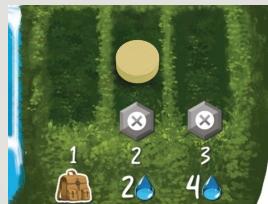
E.g., if your Player Marker is on the 2nd space on the Storage Track, you can store up to 2 Resource Tokens in the Play Area. If you have 3 unused tokens left from the Action Phase, you will need to choose 1 of the 3 tokens to discard into the Discard Pile Boat and 2 to keep in the Play Area. Then you will draw 5 tokens from the Bag and end your turn. During your next turn, you will have a total of 7 Resource Tokens to use from the Play Area.
END OF THE GAME
As soon as 5 (of the 8) Animal Cards in play are depleted of all Animal Meeples, the game ends in the following order.
The Player who depletes the 5th Base Animal becomes the “Final Player" and takes the End Game Bonus Token. The End Game Bonus Token awards the Final Player with 5 Environmental points.
When the Final Player finishes their turn, all Players excluding the Final Player takes one last turn. After that, the game ends.
NOTE The Final Player placing the last meeple does not end the Final Player's Action Phase. If there are resources left to spend after placing the last of the 5th Base Animal, the Player is free to perform as many Actions as desired then proceed to end their Action Phase.
Each Player calculates their Environmental Scores collected, and the Player with the highest Environmental Score WINS!
· In the event of a tie, the Player with more Animals placed in their Jungle wins. If this proves another tie, the Players share the win.
CALCULATING YOUR SCORE
Environmental Points can be obtained through 7 different methods. Players record points earned on the Scorepad in the following order.
-
Base Animals placed in the Player's Jungle.
-
Purchased Scenery Cards.
-
Player's Player Marker standing on the Terrain Tile Track.
-
Player's Player Marker standing on the Tree Track.
-
Player's Player Marker standing on the Aquatic Flower Track.
6.1 point for each unused Seed.
- 5 Points awarded to the Final Player.
BASE ANIMAL SCORE CALCULATION
Base Animal placement is the most important method of scoring points in this game. All Base Animals have their own scoring conditions, and depending on the set used, the same Animal will have different scoring conditions. This section will explain the concepts and icons a Player needs to know to score points with Base Animals.
SCORING CRITERIA FOR BASE ANIMALS
Base Animals have 4 scoring criteria: “Each Animal”, “Each Grouping”, “Each Community”, and “The Jungle”. The scoring criteria for each Animal are indicated at the beginning of the Base Animals description.
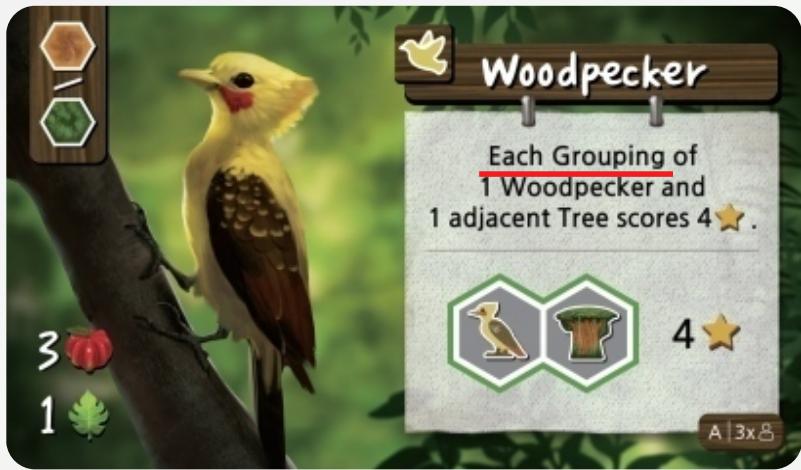
. Each Animal: According to the scoring conditions written on the card, each corresponding Animal collects the points. If multiple identical Animals are placed, multiple sets of points are awarded according to the scoring condition.
· Each Grouping: The designated “Grouping" collects points according to the scoring conditions on the card.
· Each Community: The designated “Community" collects points according to the scoring conditions on the card.
· The Jungle: Points are collected based on the Animals arranged throughout the Jungle.
111. GAMEPLAY
0 Icons

Animals: Refers to Animals, both Base and Unique.

Life(Lives): All Animals, Trees and Aquatic Flowers.

Plants: Trees and Aquatic Flowers.

Placement Bonus: Refers to any Placement Bonus displayed on a Terrain Tile.

Immediate Effect: If an Animal Card is marked with a, the Animal's ability takes place immediately after placing the Animal in the Jungle. Theability is only collected upon placement and cannot be collected again even if the Animal switches positions and is relocated to a new Hex.
GROUPING
A Grouping is a combination of specific Lives placed in certain formations as indicated by the card. Some Base Animals provide points based on the shape of the Grouping. Groupings on Animal Cards are represented with Green Colored borders.

The shape of a Grouping refers to the line connecting the edges of the Lives that makes up the Grouping.
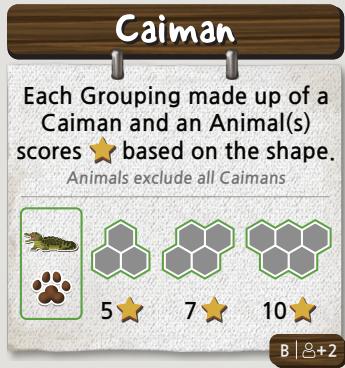
E.g., in the example below, Grouping (the Caiman, Toucans, and Woodpecker) is arranged in the 3rd shape shown on the card and collects 10 points. The shape made by the Caiman and 2 Otters to the right does not appear on the card, therefore, does not collect any points. However, Grouping (Caiman and Otter) is arranged in the same as the 2nd shape, therefore, Grouping collects 7 points.
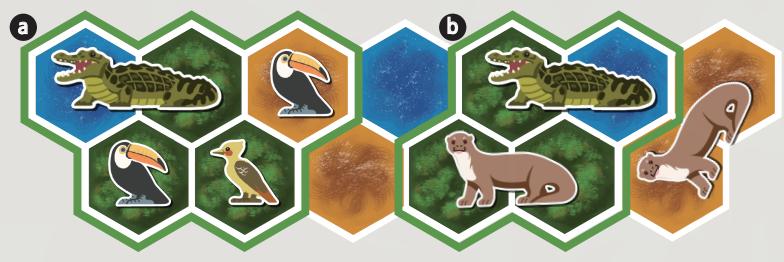
The shape can be rotated or reversed. The order in which the Lives are placed is up to the Player.
A Grouping in which 2 or more different Lives need to be present, each Grouping must be comprised of at least 1 of each Life.
E.g., In the example below, Grouping (the Caiman, Toucans and Woodpecker) is arranged in the 3rd shape on the card, therefore, 10 Points are awarded for this Grouping. However, take for example, there are 2 Otters and 1 Woodpecker that form the 3rd shape shown on the card, but does not score points because it is missing the main element for the Grouping, the Caiman.
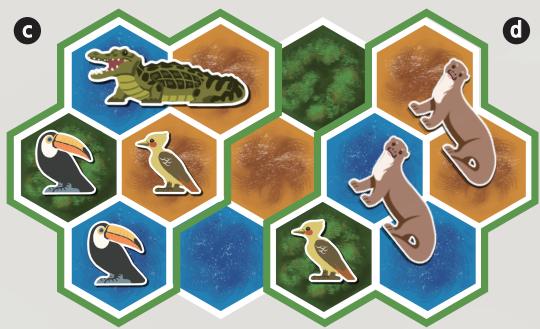
4 One Life CANNOT be counted multiple times and belong to more than 1 Grouping when calculating for a single Animal Card. However, the count resets when moving on to scoring for a different Animal Card. Players are free to decide how to Group their components.
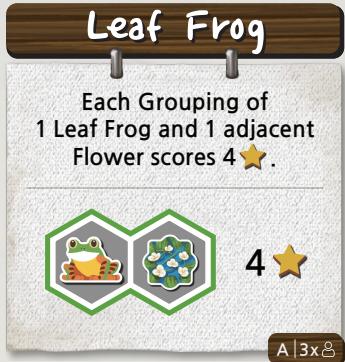
E.g., An arrangement of 1 Leaf Frog with an adjacent Flower is designated as a Grouping and each Grouping collects 4 points. In the example below to the left, because the Flower and Frog are placed adjacent to each other, Grouping collects 4 points. In the example below to the right, 1 Flower is adjacent to 2 Frogs. In this case, the 1 Flower cannot be used to fulfill a Grouping for both Frogs to collect 8 points. Each Life can only
count for 1 Grouping per Animal Card. Therefore, the example below to the right also collects 4 points for 1 Grouping . The Player is free to choose whether the Flower will group together with the Frog on the right or the Frog on the left. Both Frogs and Flowers counted for the Leaf Frog Card, can be counted for other Animal Cards scoring. Therefore, the Frog in example with the Caiman to the right scores 5 points following the Caiman's Grouping conditions.


COMMUNITY
A Community refers to a gathering of adjacent Lives as indicated on the cards. Unlike Groupings, the shape does not matter for Communities.
Macaw
E.g., this Macaw Card refers to a
Each Macaw scoresbased on the number of Plants in its Community of a Macaw(s) and Plants.
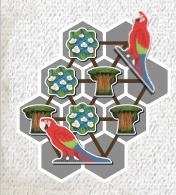
Community of one or more Macaws with at least 2 Plants. The example below shows 2 different Communities, and . Because Communities and are not adjacent, they are recognized as separate Communities. A Player cannot decide to recognize Communityas 2 separate Communities. Community consists of a total of 1 Macaw and 4 Plants. Therefore, the Macaw that makes up Community collects 7 points for the 4 Plants.
D|8+2

Community consists of 1 Macaw and 1 Tree, therefore, the Macaw in Community does not collect any points for its Community.

If an additional Flower is placed in Hex , Communities and become adjacent and merge into 1 large Community . In Community there are a total of 6 Plants, so each Macaw in the same Community would collect 8 points each. Therefore, through 2 Macaws a total of 16 points were collected.
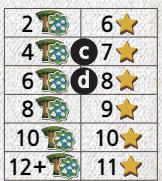
0 Tables

The left side of the table refers to the number of Lives or Hexes that are the criteria for the points awarded. Given the example table to the left,
. 0are awarded if there are less than 2 Plants.
· 6are awarded if there are 2\~3 Plants.
· 7 are awarded if there are 4\~5 Plants.
· 11are awarded if there are 12 or more Plants.
SCORE CALCULATION EXAMPLES
Specific examples will be used to explain how to calculate the Environmental Score. Let's assume that the Player has built the following Jungle at the end of the game using the Base Animal Set A with the Iguana as the Unique Animal.

① Base Animal Points
· Woodpeckers: 8 Points
There are 2 Groupings from the Woodpecker Card displayed in the Jungle, totaling 8 points collected from Woodpeckers.
Each Grouping of 1 Woodpecker and 1 adjacent Tree scores 4★.
NOTETree is adjacent to 2 Woodpeckers, but can only form a Grouping with just 1 of them. So while there are a total of 3 Woodpeckers in the Jungle, there are only 2 Groupings of a Woodpecker and Tree that can score points.

· Tamarins: 12 Points
All 3 Tamarins live in the same Habitat, and excluding the Tamarins there are 6 Animals in the same Habitat. In this case, the Player collects 4 points for each Tamarin, for a total of 12 points. Large Animals that are partially placed in the Marsh, such as the Macaw , are also counted.
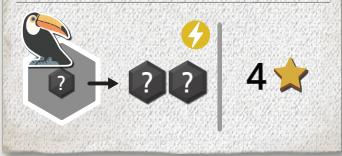
There are a total of 2 Toucans placed in the Jungle. Toucans collect 4 points each, totaling 8 points collected by the Toucans.
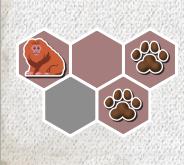
Each Tamarin scores based on the number of Animals in its Habitat. Animals exclude all Tamarins
· Toucans: 8 Points
NOTEIn addition to the collecting scores at the end of the game, the Toucan also has aability that is immediately acquired once the Toucan is placed in the Jungle.
2 2
4 3
6 4
8 5
10+ 6
Each Toucan scores 4 If placed on a Placement Bonus Hex, gain the Bonus once more.
111. GAMEPLAY
· Macaws: 10 Points
2 Macaws inhabit the same Forest Habitat with a total of 5 Trees. In this case, each Macaw collects 5 points for 5 Trees, for a total of 10 points.
NOTETree was also used to score for the Woodpecker as well as the Macaws. As such, Lives can be used multiple times to score for different Animal Cards.
· Otters: 18 Points
Both Otters in this example live in the same Forest Habitat. The size of the Forest is 13 Hexes. Each Otter collects 9 points, for a total of 18 points collected by the Otters.
Each Macaw scores
based on the number of Trees in the same Forest Habitat.

· Jaguars: 24 Points
Each Otter scoresbased on the numbe
Content is long; only the first part is inlined. Download the file or open the rules page for the full text.
Download MarkdownTexts are community-compiled or publicly released by publishers; copyright remains with the original authors. For personal reference only.