
Rocketmen
At a glance
Rules, cards and Q&A (Chinese)
The rules, card data and player questions for this game are written in Chinese. Open the Chinese page to read them.
Where to find full rules
Full rules and card lookup are available in the cunlema app at cunlema.cn — pick this game and ask about any rule, card or turn you are unsure about.
Related games
Rulebook text (Markdown)
This game has 1 rulebook Markdown file(s) in our library; 1 rendered inline below — expand to read or download.
Rocketmen - Rulebook.md37.6 KB
ROCKETMEN Martin Wallace
A fast-paced deck-building tabletop game of modern space exploration.
Immerse yourself in a fast-paced race to thefinal frontier - space. A deck-building confrontation of swift decision-making and tactical choices - Rocketmen gives you the feel of taking a front seat in a technologically wonderful spectacle of space exploration. It's up to your predictive abilities and resource management skills to determine what kind of endeavor will be most suitable for paving the way to Earth's celestial neighbors.
Players gain Victory Points by successfully launching various space missions with main objectives to explore three celestial destinations: Earth orbit, the Moon and Mars. Every successful mission gives players considerable perks: additional Rocket points, extra cash, increased Hand size, and supplementary resources. These, in turn, help them prepare more easily for their future missions.
COMPONENTS
Boards
1 game board
4 player boards in 4 different colors (white, red, yellow and blue)
Pieces
24 mission tokens in 4 different colors (6 per player)

4 victory point tokens

12 two-sided achievement Rocket point tokens (ongoing benefits) in 4 different colors (3 per player)

24 two-sided achievement tokens (ongoing benefits) in 4 different colors (6 per player)


1st Player token /AI Rocket token

Rocket token

Moon token

Mars token
Cards Action cards:
• 48 Mission cards in 4 different colors (12 per player)
• 23 Asset (teal) and 20 Asset (pink) cards
• 15 Engine cards (5 each of 3 types)
• 12 Threat cards (4 each of 3 types)

18 Mission Success cards
12 Personal Goal cards


10 Game Variant cards
7 Solitaire cards
SETUP
For players who are new to deck building games, we recommend playing a simplified variant of the game which is called The Battle for Earth. The rules for this variant are on page 15.

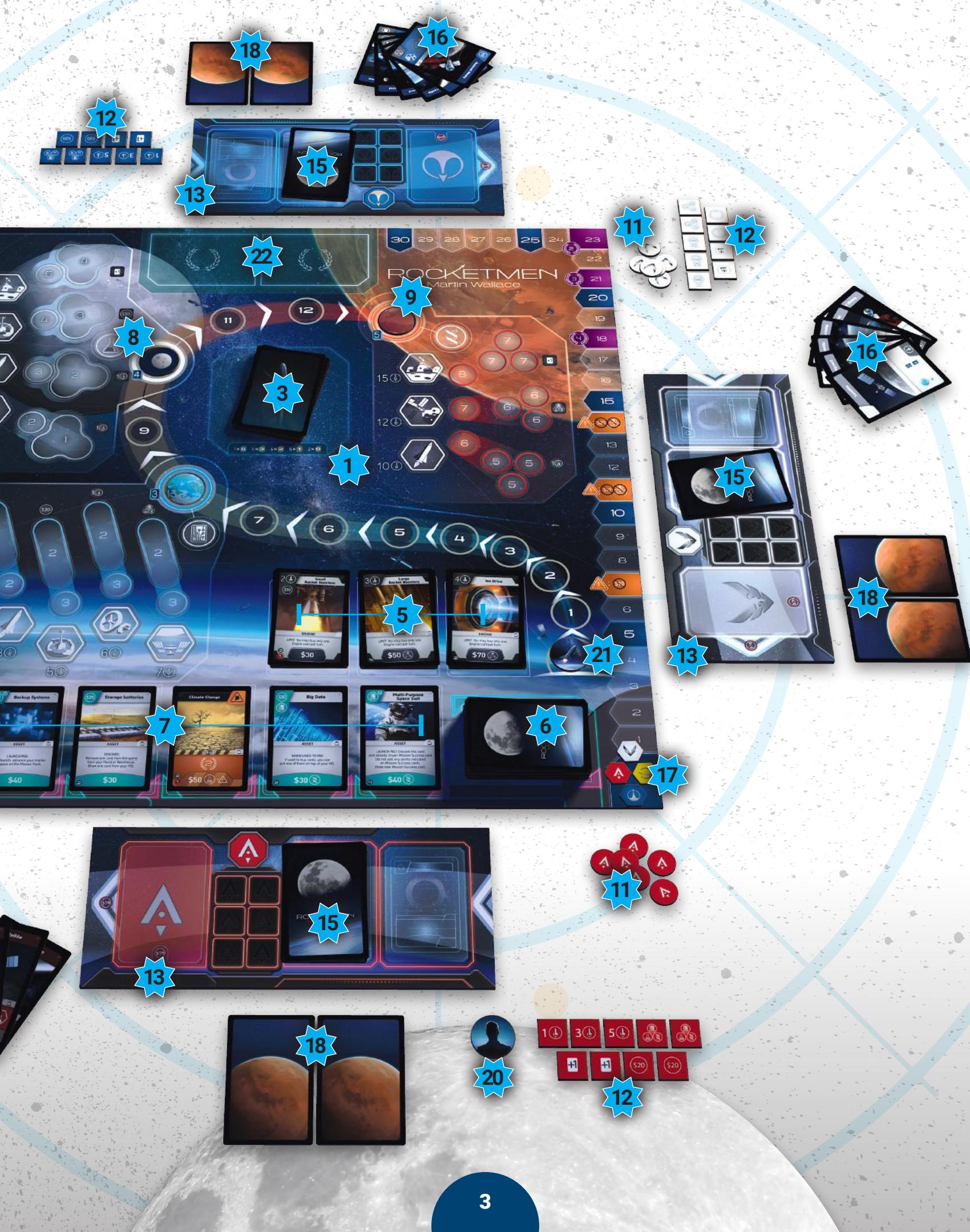
Place the game board in the middle of the table.
2 In a 4-player game, use all cards; in a 3-player game, remove all cards with; in a 2-player game, remove all cards with and. Solitaire rules are on page 13. The counts are shown in the bottom left corner on the front of the cards: 2
3 Place the Mission Success cards on the game board, face down.
4Separate the Action cards into the following decks:

Sort the Engine cards by type into (2, 3,4),
Divide the Asset cards into two decks, teal and pink. Put all Threat cards with into the teal deck, and put the rest into the pink deck. Shuffle both decks. Place the teal deck on top of the pink deck on the game board, face down.

7Draw the top six cards from this deck and place themonto the display.
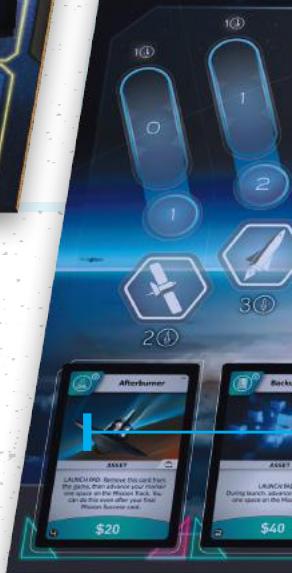
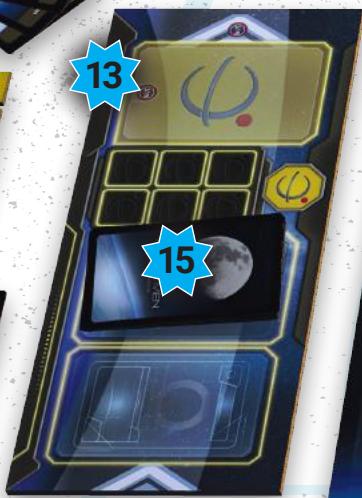
8Place the Moon token onto the Moon symbol and9the Mars token onto the Mars symbol. 10 Each plaver: select a set of twelve Mission cards,11mission tokens, 12Achievement tokens and a 13 player board in one of the four colors (red, blue, white or yellow).
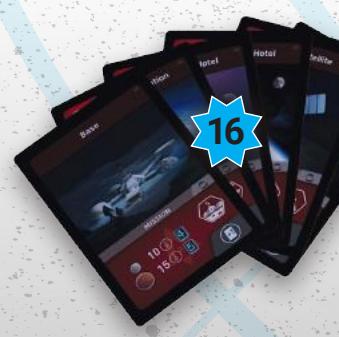
14Shuffle your twelve starting cards and place them on the 15HQ space on your player board, face down.16Draw six cards to form your starting Hand.
7 Place your Victory token on the "0" space of the victory track on the game board.
Shuffle Personal Goal cards and give each player two cards, without showing them to other players.19Put the remaining cards in the box without examining them; they will not be used during this game.
Randomly determine the starting player, and give the First Player token to that person.
The starting player does not change during the game and has no special role.
Place the Rocket token on the "0" space of the Mission Track.
Place the Variant (page 4) or Solitaire (page 13) cards.
Now you are ready to start the race to the stars!
CARDS and ACTIONS
Action cards
Each Action card has three pieces of information near the top: item1, card name2, and card type3 Items are used to pay for new cards and to boost your rocket attempts. Item types are Monetary value (sio) \$2o (\$30) Rocket points (), Computers (), Composite materials (), Biotechnology (), Science ().
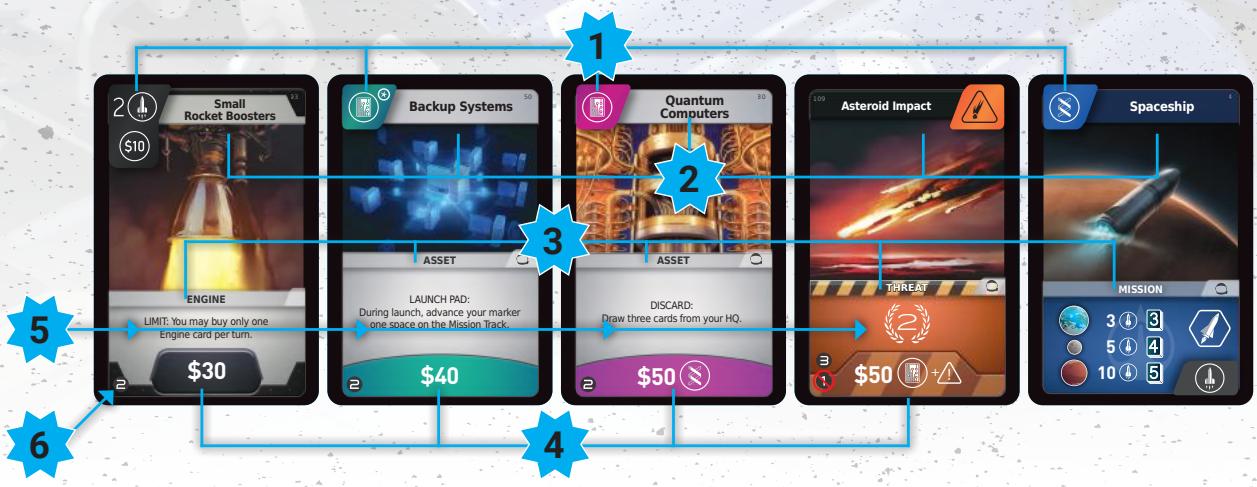
Asset, Engine and Threat cards have three additional pieces of information near the bottom: card cost 4, card effect 5, and number of players6. A card's cost indicates money and items that must be spent to buy the card from the display.
An Asset card's effect may describe various possible actions: DISCARD: Either play this card as an item or money, or play it to use its ability. Either way, play it as part of a Discard cards action.
LAUNCH PAD: You can use the ability of this card only when it is on your Launch Pad. In other situations, you can play this card as an item or money. - this icon denotes cards with Launch Pad efekt. It helps you find them more easily during your launch attempt.
WHEN USED TO PAY: You can use this card's ability when you use it to pay to buy a new card (as part of a Buy cards from the dísplay action) or to place a card on your Launch Pad or Mission Plan (as a part of a Place cards on the Launch Pad and/or Mission Plan action). You can use an item or money from this card as well as the effect from this card.
Some cards say "Permanent"; you don't have to discard these cards from your Launch Pad at any time.
Threat
These cards represent the threats we face as humanity: Pandemic,Climate Change, andAsteroid Impact. It's not cheap to fight them, but each threat card gives you 2 Victory Points at the end of the game. Their top icons are not items; they are the type of Threat.
A Threat card's price rises during the game, for each player individually, as shown by a player's current location on the victory track. To remind you about that there is an $+ \triangle$ next to the cost of the Threat card. The $\bigtriangleup$ on the victory track are not cumulative; use only the highestwhich you have reached.
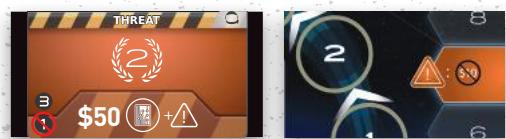
Example: For a player with 7 VP, each Threat card costs \$10 more. Engine
LIMIT: Each Engine card has a text reminder that you can buy ONLY ONE Engine card per turn.
Golden rule
If the text on any card directly conflicts with the rules in this book, the card text takes precedence.
Game Variant cards
Once you are familiar with the game, you can use Variant cards to add some variety. These modify the game rules in various ways or add new options to score additional VPs (in case of a tie for additional scoring, all tying players get the full amount of additional VPs). If you wish to use them, shuffle them, draw two cards and place them on their location on the game board. Remove the remaining ones from the game.
Destination and Location
In Rocketmen, there are three Destinations: Earth orbit Moonand Mars . Each destination has several different Locations. There are seven types of location: Satellite , Spaceship, Space Hotel, Orbital Shipyard Space StationAsteroidMiningandBase Some types of location appear at more than one destination.
There are twelve locations in total: five in Earth orbit, four on the Moon, and three on Mars.
Face up and Face down cards
Wherever cards are face up, you may look through them at any time (including your opponents' cards) Wherever cards are face down, you cannot look through them at any time.
Player board
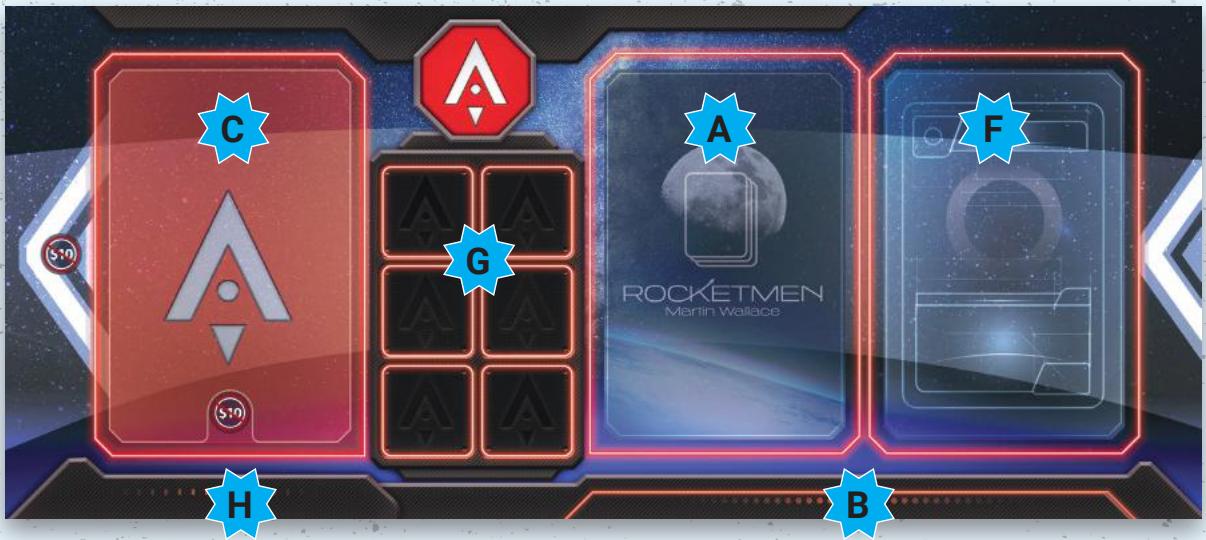
Your player board is your main area of play. It has several places:
HQ – Draw cards from here. Cards here are face down.
BHand – This is your Hand of cards. You begin the game with a maximum Hand size of six cards, but it can be modified during the game.
cMission Plan – This is the place for one of your Mission cards. Pay \$10 to place a card here. A card here is face up.
Launch Pad – This is where you construct your rocket. Pay \$10 to place a card here. Cards here are face up.
Playing Area – Your played and discarded cards go here. When you play a card from your Hand it immediately goes to your Playing Area. When you discard a card from your Hand, Launch Pad, Mission Plan or any other place, it always goes to your Playing Area. Cards here are face up. At the end of your turn, move all cards from your Playing Area to your Warehouse (never do it earlier during your turn).
Warehouse – Your used cards are stored here.
Cards here are face up.
G Achievements (tokens) – You gain achievements from successful missions, as indicated on the bottom right corner of Mission cards. They are stored here and provide ongoing benefits.

Rocket points and Hand size +1 are both cumulative.

Monetary value gives \$20 and Science gives an item ( oror ); each of these tokens can be used once per turn (after use, token must be flipped face down
H Junkyard – This is where you put your cards which you remove from the game. Each player has their own Junkyard. Some cards in your Junkyard may still have game effects and may score points. Your junkyard does not have any specific place; you ċan put it wherever you want, but keep its cards separate from the rest of your cards. (You can put it atH , but this is not obligatory).

PLAYING THE GAME
Players take turns in clockwise order around the table. The active player may do as many actions as they wish, in any order.
Available actions are:
Buy cards from the display
Place cards on the Launch Pad and/or Mission Plan
Discard cards
Launching a mission
When you finish all your actions, you can (but do not have to) launch a mission. You can do it only once per turn, and it ends your turn regardless of the result.
End of a player's turn
Move all cards from your Playing Area to your Warehouse. If you have more cards than your Hand size, then discard excess cards to your Warehouse. Draw cards from your HQ to refill your Hand back to your Hand limit (which starts at six, but can be modified).
If there are not enough cards in your HQ, then draw as many as you can, and then shuffle your Warehouse to form a new face-down HQ deck, and draw the rest of the cards to your Hand limit. If there are still not enough cards, you do not draw any additional ones.
Flip all your used achievement tokens back to their color side.
ENDING THE GAME
The game ends if:
A player has achieved the threshold score shown on the victory track (18 VPs for 4 players, 21 VPs for 3 players, and 23 VPs for 2 players), or
A player has placed all six of their mission tokens on mission spaces, and on each Destination ( is at least one mission token (not necessarily of that player), or
All players have placed all their mission tokens on mission spaces.
This round is played to completion, i.e. until the last player (just before the player with the First Player marker) finishes their turn, and then the game ends.
At the end of the game add additional VPs from any: Bought cards that give you VPs, e.g. Threat - each is worth 2 VPs. If you removed a Threat card to your Junkyard, you still gain its VPs at the end of the game.
tokens (one VP for each token).
One of your Personal Goals. You can score VPs from only one of your Personal Goal cards; choose one and forfeit the other one.
Variant Cards (as stated on each particular card; items on cards in your Junkyard count for this purpose).
The player with the highest score is the winner.
If there is a tie, the tying player whose mission is the farthest and on the place with the highest VP award for the first mission there wins (Mars Base > Orbital Mining > Mars Spaceship > Moon Base > and so on). If there is still a tie, the one who completed more missions wins. In the rare case that there is still a tie, the tied players share the victory.
ACTIONS
Buying cards from the display
Select one or more cards from the display to purchase1 Pay the indicated total cost with items listed on cards from your Hand2and achievement tokens you have on your player board. If you use a card or the achievement token with Science ()then you can use it as any one item indicated on it ( or () or()). If a card's cost has then you can pay for it with any one of these 3 items ( or or (). If you use ( or tokens, flip them face down, so you cannot use them in this turn anymore (do not discard them).
Place your newly purchased cards along with cards you used as payment into your Playing Area3. If a card has more than one item on it, then both items can be used together to buy cards. If you buy more than one card, you can pay their total price with a combination of cards from your Hand and achievement tokens. You do not receive change for overspending.
If you buy cards or place cards on Mission Plan and/or Launch Pad by paying with a card with the text 'WHEN USED TO PAY', you do not have to use the card's effect immediately; you can resolve the card's effect at any time before you end your turn. Using the effect is optional. Place this card prominently in your Playing Area as a reminder.
For each card you buy from the display, immediately draw a new card to replace it. You can buy as many cards as you wish.
You can buy only one Engine card (regardless of type) during your turn.
You cannot divide the money from a card or achievement token between buying cards and placing cards on your Launch Pad and/or Mission Plan. Buying cards and placing cards on your Launch Pad and/or Mission Plan are separate actions.

Example:
The Red player decides to buy Big Data 1. Big data costs \$30 (paid with Asteroid Mining, Satellite and Space Hotel) and Biotechnology (paid with Spaceship)2. All the cards go into the Playing Area 3 and a new Asset card is revealed and placed on the display.
Placing cards on the Mission Plan and/or Launch Pad
You can place one Mission card onto the Mission Plan1 on your player board. There can be only one card on your Mission Plan at a time.
IMPORTANT: If you do not have a Mission card on your Mission Plan, you cannot place cards on your Launch Pad.
Mission cards
Each player has twelve Mission cards in their player color.
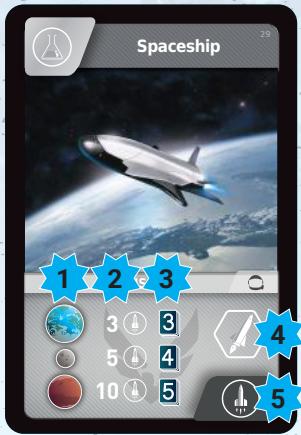
Each Mission card has information where you can send this particular mission 1, how many Rocket points2you'll need to launch this mission, and how many Mission Success cards you can draw during a launch attempt 3. Each card has its own symbol 4with a matching symbol on the game board. The bottom right corner has a symbol5showing an ongoing benefit, received after this mission succeeds.
The cost to put a card on your Mission Plan or Launch Pad is \$10 per card.
IMPORTANT: Cards with a monetary value can pay to put themselves as well as other cards.
You can pay for multiple placements with a single card or an achievement token if necessary (including the initial Mission card). When you place a Mission card, you do not need to state its intended destination. You can have only one active mission at a time. The card on your Mission Plan does not contribute its item to the booster value; only cards on your Launch Pad can.
If you have a Mission card on your Mission Plan, you can place cards on your Launch Pad2to meet the mission requirements. Cards on your Launch Pad with an item matching the destination give you a boost during the start of your rocket:

There are some cards which you cannot place on your Launch Pad:
You cannot place any card that does not have an item (e.g.
Threat cards or cards that only have monetary value).
You cannot place more than one Asset card with the same card name on your Launch Pad.
There is no upper limit to the number of cards that can be placed on your Launch Pad.
Card art on Mission cards is purely ornamental and does not oblige you to choose a particular destination.
Discarding cards
You can discard one or more cards to your Playing Area. You can discard from your Hand and from your Launch Pad. You can also discard your Mission card from your Mission Plan, but then you must also discard all cards from your Launch Pad.
Example:
The Red player decided to send a Satellite into space, so she places this mission on her Mission Plan (as the Satellite card has \$10 it paid for itself)1 next she places
likewise the Big Data (which also pays for itself)2. She wants to place a Base card withon her Launch Pad, but this card has no monetary value, so she pays for it by spending money from Space Hotel3

LAUNCHING A MISSION
Make your launch attempt by going through the following steps in order:
-
Declare your launch attempt and make sure that the Rocket token is on "0" on the Mission Track.
-
Choose your destination and place your mission token onthatdestinationontheMissionTrack( The track shows how many snaces you need to advance to fulfill the mission:=8, =10, =13 (any excess does not matter).
IMPORTANT: You can send only one mission to each specific location in space. E.g. you want to send a Satellite mission to Earth orbit, but you already have a mission token on Earth's orbit on a Satellite slot, so you cannot send it there; you could send it to the Moon, instead.
You cannot play cards from your Hand during launch; you can only use cards which are on your Launch Pad.
- Count the Rocket points from cards on your Launch Pad plus Rocket points from your achievement tokens. You may apply any of the during launch effect from cards in your Launch Pad. The sum must be equal to or greater than the value of Rocket points needed to send a specific mission (these numbers are on the Mission card1and the game board - different for each Location); otherwise the mission
cannot be launched at all and your turn ends immediately.

Example:
A Satellite needs 2 Rocket points to reach Earth orbit and 3 Rocket points to reach the Moon.
-
Initially advance the Rocket token along the mission track as many spaces as the number of item symbols matching your mission destination from cards on your Launch Pad and achievement tokens on your player board. Advance one space for each when you fly to when you fly to, and when you fly to Moreover you can advance one space for every unused Science token. You may apply any of the during launch effects from cards in your Launch Pad. If a card has an item that boosts your launch attempt and a launch effect if you discard it, then you may first advance the Rocket token for the card's item and then discard the card to apply its effect, i.e. you keep the advance gained from the item. 5. Shuffle the Mission Success deck.
-
Draw Mission Success cards one at a time and advance the Rocket token forward as many spaces as each drawn card indicates2. You may use effects from the cards on your Launch Pad, e.g. Multi-Purpose Space Suit. There are 18 Mission Success cards in the deck, with this distribution: 1x[4], 4x[3], 6x[2], 5x[1], 2x[0] Your Mission cards show how many cards you can draw during the launch attempt.3 Depending on your destination, you draw a different number of Mission Success cards:
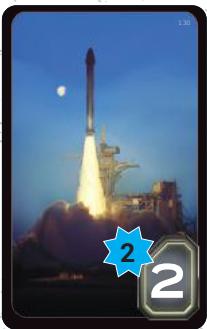
3 4 5
Earth
Moon
Mars
A mission may end in one of three ways:
After drawing each Mission Success card, but before drawing the last card, you can abort the mission. If you do so, then discard cards (of your choice) from your Launch Pad equal to the number of Mission Success cards you have drawn minus one. (E.g. if you fly to Earth orbit and you've already drawn two cards, but you abort the Mission, then you discard one card from your Launch Pad.)
If you draw all Mission Success cards and fail, then you must discard all cards from your Launch Pad. You can leave your Mission card on the Mission Plan if you wish, or discard it as well.
If you reach the target number of spaces, the Mission is successful. Remove the Mission card to your Junkyard and gain the achievement indicated on the bottom right corner of the Mission card. Place the achievement token on the Achievement area of your player board. Discard all cards from your Launch Pad. Put your mission token on the corresponding mission space on the game board and add your VPs on the victory track. Each mission gives more VPs to the first player to fulfill it.
TIP: After you abort/fail/success and you have to discard any cards from Launch Pad and/or Mission Plan you may place them directly on your Warehouse to speed up your cleaning process. Formally, discarded cards are placed into Playing Area, and at the end of your turn they are moved into the Warehouse.
In addition, whoever fulfills a mission first at a given location (Moon or Mars) takes the Moon or Mars token from the game board; these tokens each give 1 VP at the end of the game.
- Your turn ends immediately. Return the Rocket token to the "0" space on the Mission Track. Refill your Hand.
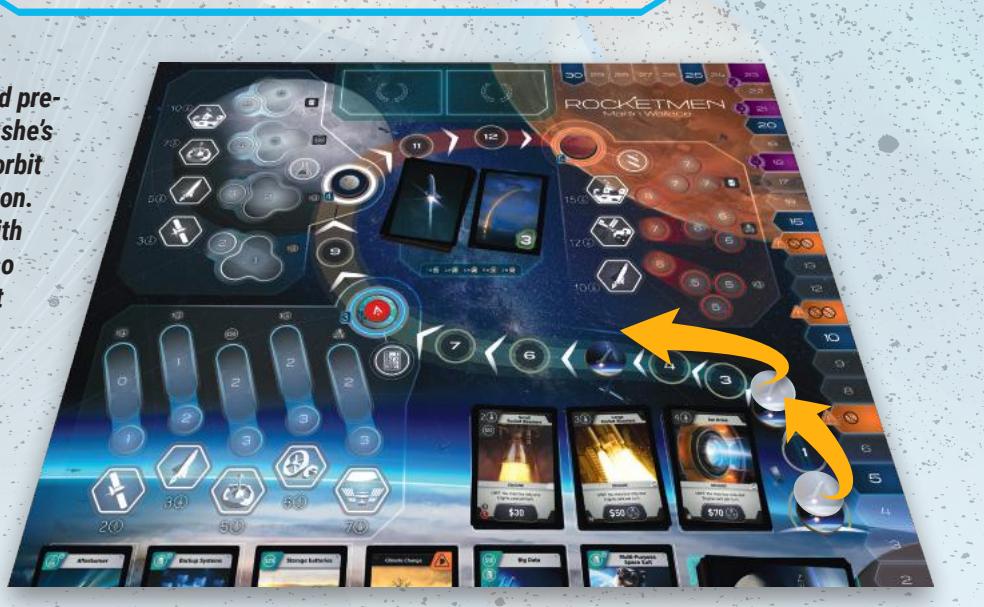
During a few turns, Red pre
pared her rocket and now she's ready to launch - Éarth orbit Satellite is her destination. Shehas two cards with on her Launch Pad, so
she advances the Rocket
token two spaces on the
Mission Track. Next, the first Mission Success card drawn is 3
the Rocket advances 3 spaces.
With only 3 spaces
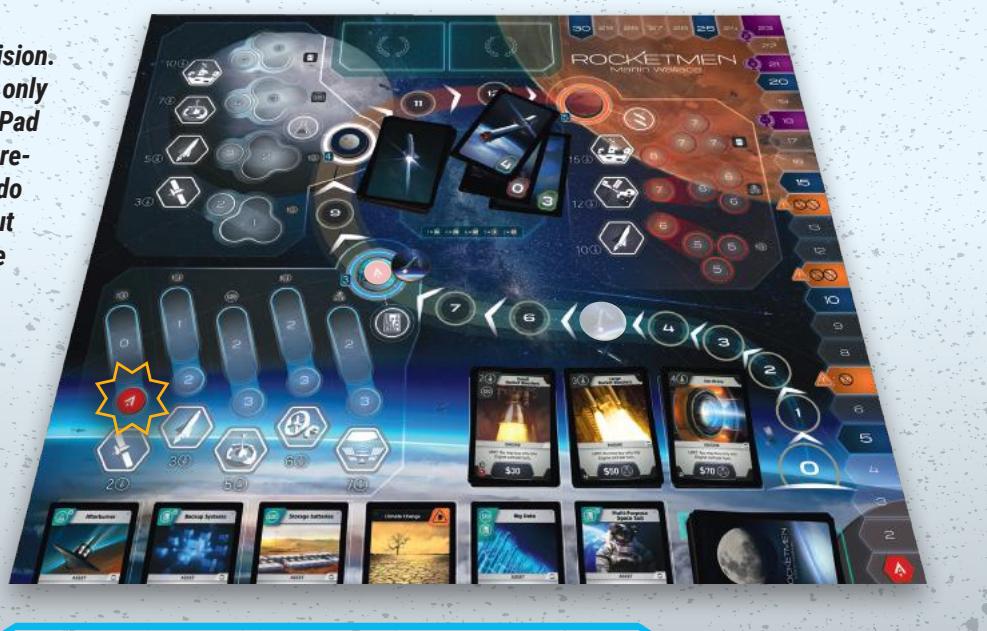
needed to reach the Earth orbit, Red decides to continue the mission and draws another Mission Šuccess card. Unfortunately it is O, so the Rocket does not move. Now Red has a hard decision.
If the mission is aborted, only
one card from the Launch Pad will be moved to the Warehouse and she could redo the mission next turn. But Red decides to take the risk and draws the final card. Fortunately, it is 4, so she places a Red token on the "1" space of the Éarth
orbit Satellite location , and gains 1 VP on the VP track.

CARD CLARIFICATION
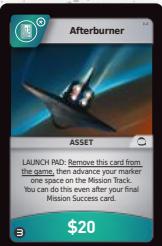
Afterburner: You can use the effect of this card at any time during your launch attempt. Moreover you can use it even after you draw your last Mission Success card (normally after that you cannot play any effects from the cards).
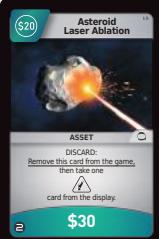
Asteroid Laser Ablation: During your turn, if you have this card in your Hand and there is an Asteroid Impact Threat card on display, you can remove Asteroid Laser Ablation to your Junkyard, take Asteroid Impact from the display for free and place it into your Playing Area.
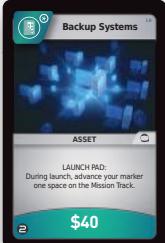
Backup Systems: If the Backup System's item matches your Destination's symbol, advance your Rocket one space on Mission Track in addition to Backup Systems effect.
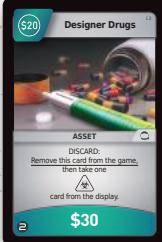
Designer Drugs: During your turn, if you have this card in your Hand and there is a Pandemic Threat card on display, you can remove Designer Drugs to your Junkyard, take Pandemic from the display for free and place it into your Playing Area.

Detailed Planning: In step 6 of your launch attempt, you may discard this card, draw the top three cards from Mission Success deck, and reveal them. Choose one of the revealed cards and put the rest aside (do not shuffle them into the Success Deck during this launch attempt). Play the chosen card as your first card during this
launch attempt (advance your Rocket as many spaces on Mission Track as is indicated on this card.) If your launch attempt is successful, remove the Detailed Planning to your Junkyard.

Depot: Cards on Depot do not contribute their items to boost your launch attempt, and you can't use their effects, however you may count Rocket point from Depot during your launch attempt.
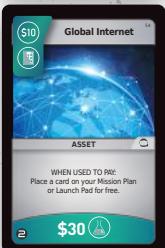
Global Internet: The effect of this card applies when you use it to buy another card, or to place another card (or Global Internet itself) onto your Launch Pad. You can place another card from your Hand onto Mission Plan and/or Launch Pad for free in all these cases.

Government Contract: If you do not have any fulfilled missions this card is worthless and has no monetary value.
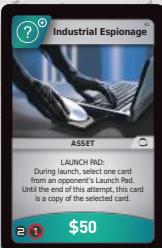
Industrial Espionage: This card becomes an exact copy of chosen card i.e. you can use items from it and any card effect, however if the copied card's effect forces it to be discarded or removed, then you must instead discard or remove Industrial Espionage.
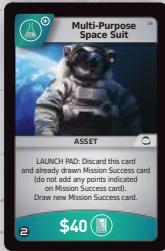
Multi-Purpose Space Suit: During your launch attempt, after you draw any Mission Success card, you may immediately discard Multi-Purpose Space Suit to set aside and ignore the just-drawn Mission Success card (do not advance your Rocket any spaces indicated on this card) and draw a replacement. The ignored Mission
Success card does not count toward your maximum number of Mission Success cards you draw during this launch.
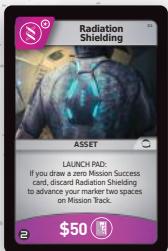
Radiation Shielding: During your launch attempt, if you draw a Mission Success card with 0, you can treat it as if you you drew a card with 2]; if you do, discard Radiation Shielding.


Solar Energy: During your turn, if you have this card in your Hand and there is a Climate Change Threat card on the display, you can remove Solar Energy to your Junkyard, take Climate Change from the display for free and place it into your Playing Area.
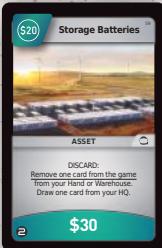
Storage Batteries: First you have to remove another card to your Junkyard and only then you can draw another card from your HQ.
Super Capacitors: You draw one card for Super Capacitors as well.
SOLITAIRE RULES
In solitaire Rocketmen, you compete against an Artificial Intelligence. Select a player color for your Al opponent (take six mission tokens and one VP marker of that color). Set up the game normally with the following exceptions and the numbers below refer to the setup on page 2):
2 Remove from the game all cards with and Divide the Asset cards into two decks, teal and pink. Shuffle Threat cards with into the pink deck. Remove all other Threat cards from the game. Shuffle both decks. Place the teal deck on the top of the pink deck on the game board, face down.
8 and9 Remove and tokens from the game.
18 Remove the Personal Goal card withfrom the game, shuffle the rest and randomly draw one card from them. This is your mandatory goal for this game. If you do not fulfill all the tasks from the card drawn, you will lose the game. IMPORTANT: You do not get any additional VPs from this card at the end of the game.
Remove Variant cards from the game.
23 Shuffle all Solo cards and place them near the game board.
24 Choose a difficulty level - Easy Normal Hard .You cannot change the difficulty level during the game. The difficulty level determines which row you read on solo cards.
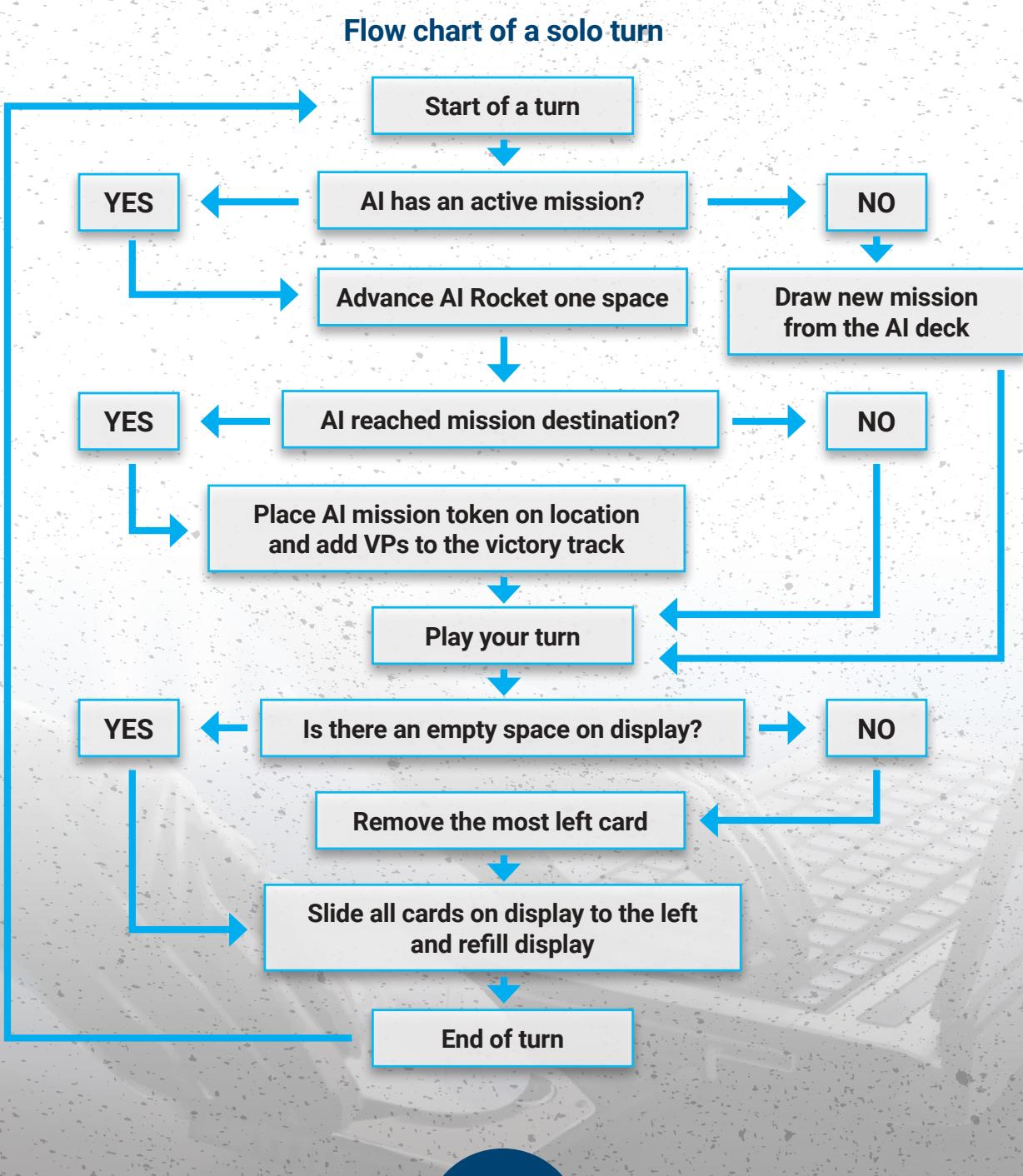
Play the game as usual, except for these new rules: 1. At the beginning of your turn, if the Al does not have a active mission do these steps:
a) Draw one card from the solo deck and place it on the left side of the Variant card spot on the game board 1. The row with the difficulty level tells the Al's destination2
b) If the Al already has its mission tokens on all locations at this destination (e.g. the card says Mars, but the Al already has tokens on Mars on Spaceship, Asteroid Mining and Base) then draw a new card, until you get a valid Al destination (discard previous cards).
c) Place an Al mission token2 on this location on the game board (at Earth, Moon, or Mars) to remember where the Al is going.
d) Place the Al Rocket token (it is the other side of the 1st Player marker) on the Mission Track. The solo card's row with the difficulty level tells on which numbered space3(e.g. on Easy, place the Al Rocket on space 2 on the Mission Track.)
e) Draw another card from the solo deck and place it to the right of the first card - this tells which type of mission the Al will fulfill4
f) Like in step b), if the mission is not valid (the destination does not have that type of mission, or the Al already fulfilled that mission at this destination), then draw a new card, until you get a valid mission type (discard previous cards).
g)Advance the Al Rocket by the number indicated on the bottom of this card5
h) If you need to draw a solo card but the solo deck is empty, shuffle all discarded solo cards (except an active destination card) to make a new solo deck.

-
At the beginning of your turn, if the Al has an active mission, advance the Al Rocket one space toward its destination. If the Al Rocket reaches its destination, move the Al mission token from the destination to the indicated location and add the earned mission VPs to the Al on the victory track.
-
Play your turn as usual, but if you buy any card from the display do NOT refill it now. If you buy any Threat card, gain its VPs now.
-
Once per turn, you can remove any one card from the display (place it in the Al scoring area), but you must then advance the Al Rocket one space toward its destination on the Mission Track. Do NOT refill the display now.
-
At the end of your turn, if you bought or removed any card from the display, move all cards on the display to the left and refill the display. If you cannot add any new card to the display because it is full, then remove the leftmost card from the display, move all cards to the left, and refill the display. If there are no more cards to refill the display you do not add any. If you remove a Threat card this way, add its VPs immediately to the Al on the victory track.
-
The game ends if there are no cards on the display, or if there are twelve mission tokens on mission spaces, or if you or the Al place your sixth token on the game board and each location (Earth, Moon, Mars) has at least one token (regardless of player color).
-
If you and Al have equal scores, then the Al wins.


Game Variant - The Battle for Earth
Set up the game as usual ( and the numbers below refer to the setup on page 2), except:
The game ends when any of the players puts their fourth mission token on the game board.
8and9
Remove game.
tokens from the
The round is completed, through the last player's turn, and then the game ends.
Separate the Asset cards into two decks, teal and pink. Remove the pink deck from the game. Take Threat cards with and put them into the teal deck. Remove the rest of the Threat cards from the game. Place the teal deck on the board, face down.
The other rules are the same as in the standard game.
Remove Personal Goal cards from the game. In this variant, each player can fulfill only four missions during the game, and those missions can be sent only to the Earth orbit.
Credits
Game: Martin Wallace
Creative Director: Jaro Andruszkiewicz
Development: Mariusz Rosik
Graphic Design and Art: Bartłomiej Jędrzejewski, Jakub Fajtanowski, Miłosz Wojtasik
Rules Editing and Proofreading: Waldemar Gumienny, Russ Williams
Production: Michał Ozon, Agata Jurczyszyn
DTP: Krzysztof Klemiński
Playtesters: Joanna Rosik, Agnieszka Jakubowska, Bernard Grzybowski, Klaudia Szymańska,
Bartosz Rudkowski, Leszek W. Kowalski, Wojciech Sieroń, Sebastian Adamiak, Steve Deng, Stephen Hurn, Jason Kotzur, Brendan Evans, Michael Mclntyre, Chris East, Rob Mulholland, Members of the League of Extraordinary Gamers.

PHALANX
PHALANX CO. LTD
Craven House, 40-44 Uxbridge Road,
London, W5 2BS, United Kingdom
www.phalanxgames.co.uk

SUMMARY
ACHIEVEMENTS: All tokens you will acquire during the game from your fulfilled missions:
60
Rocket points
+
+
+1 your max Hand size
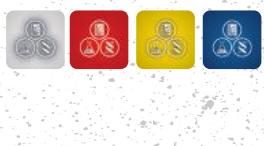
(oror) you can use once per turn (do not discard it after use, flip it)

\$20 you can use once per turn (do not discard it after use, flip it)
ACTION CARDS: All cards you can use during your turn.
They have a few types: Mission, Asset, Engine, Threat.
DESTINATION: One of three places on the game board where you can send your mission shown on each Mission card:

ITEMS: Icon on the top left corner of the card:

10/20/30

Computer


Composite Materials
Biotechnology
Rocket points

Science (0/0/))
LIMIT: You can't buy more than one card with "LIMIT" during your turn.
Available actions are:
Buy cards from the display
Place cards on the Launch Pad and/or Mission Plan
Discard cards
LOCATION: Each of the 3 destinations (Earth orbit, Moon, Mars) has several specific locations, of 7 possible types:
Satellite


Spaceship

Space Hotel
Orbital Shipyard
Space Station

Asteroid Mining

Base
MAXIMUM HAND SIZE: The maximum number of cards you start the game with is six. During the game can be modified.
MISSION CARDS: The only cards that can be placed on your Mission Plan. Used to send a mission.
MISSION REQUIREMENTS: Number of Rocket points needed on your Launch Pad to launch a mission to a Destination.
NUMBER OF CARDS DRAWN DURING LAUNCH
ATTEMPT: Maximum number of Mission Success cards you may draw when you perform a launch attempt:

PERMANENT: You don't have to discard cards with "Permanent" from your Launch Pad.
THREAT CARDS: Threats give no benefit except 2 VPs at the end of the game.
LAUNCH attempt summary:
-
Declare your launch attempt.
-
Choose your destination.
-
Count the Rocket points (apply during launch effects).
-
Advance the Rocket token (apply during launch effects).
-
Shuffle the Mission Success deck.
-
Draw Mission Success cards: Abort/Failure/Success.
-
End of your turn.
Texts are community-compiled or publicly released by publishers; copyright remains with the original authors. For personal reference only.