
太阳之外Beyond the Sun
一句话概览
太阳之外 是一款已收录于村了吗规则库的桌游,支持 2–4 人,原名 Beyond the Sun。
本页内容:一句话概览 · 游戏概述 · 1. 游戏组件 · 2. 游戏设置 · 3. 游戏流程 · 4. 行动阶段详解 · 5. 生产阶段详解 · 6. 成就阶段 · 7. 科技研发详解 · 8. 生产自动化 · 9. 建造飞船与升级 · 10. 超空间跳跃详解 · 11. 殖民星系详解 · 12. 游戏结束与计分 · 13. 2-3人游戏变化 · 14. 进阶阵营面板 · 15. 专家变体:科技牌桌 · 关键规则与常见问题 · 常见问题
太阳之外 规则速览
以下规则速览由本站整理,与官方规则书表述不同,仅供快速上手参考。
游戏概述
在第一次热核战争后,地球面临灭亡,人类于2240年签署《科学交换条约》合力走向太空。玩家扮演不同阵营,在科技板上放置工人研发技术、建造飞船探索银河系、控制和殖民星系,积累经济与军事实力,最终以最高胜利点数(VP)获胜。核心机制: 工人放置、科技树解锁、资源管理、太空探索与殖民。
1. 游戏组件
| 组件 | 数量/说明 |
|---|---|
| 科技板 | 1块(中央主板,含基础太空科技栏与4级科技树) |
| 科技卡 | 46张(4级,含科学、经济、军事、商业4种类型) |
| 事件卡 | 20张(二级和三级各10张) |
| 探索板 | 1块(双面:4人/2-3人,含太阳系、可殖民星系、船坞星系、深空) |
| 星系卡 | 24张(A组和B组各12张) |
| 成就卡 | 10张(A组和B组各4张 + 2张基础成就) |
| 玩家面板 | 4块(基础面和进阶面各一) |
| 资源方块 | 每阵营20个(六面:人口、补给、1-4级飞船) |
| 矿石水晶 | 60颗 |
| 木制圆片 | 每阵营24个(8食物产量、8矿石产量、8成就/替代标记) |
| 行动棋子 | 每阵营1个 |
| 基础太空科技替换板块 | 2块(2-3人游戏用) |
| 科技牌桌条 | 2块(专家变体用) |
| 公会盖板 | 4块 |
| 起始玩家标记 | 1个 |
2. 游戏设置
2.1 科技板设置
- 将科技板放在桌子中央
- 科技卡按背面分为一级、二级、三级、四级各堆洗匀
- 随机将4张一级科技卡面朝上放置在科技板对应位置
2.2 事件卡设置
- 二级事件卡:2张浅色边框固定卡 + 4张随机二级事件卡,洗匀后面朝下放在二级科技栏位上
- 三级事件卡:2张浅色边框固定卡 + 4张随机三级事件卡,洗匀后面朝下放在三级科技栏位上
- 未使用的事件卡放回盒子,本局不使用
2.3 探索板设置
- 4人游戏使用正面(标有4人图标)
- 将星系卡分为A组和B组
- 从A组找到4张标有红色"start"的起始星系,随机选2张放在探索板的"A"位置,其余2张洗回A组
- B组洗匀,放2张面朝上到"B"位置
- A、B两组分开放在探索板旁
2.4 成就卡设置
- 取出2张浅色边框基础成就(超验与帝国),每局必用
- A组和B组剩余成就卡分别洗匀,各抽1张
- 4张成就卡面朝上放在科技板旁
- 新手推荐组合:超验、帝国、军阀、技术专家
2.5 公会与标记设置
- 4块公会盖板放在科技板上基础太空科技栏下方对应位置
- 矿石水晶放在所有玩家方便取用处
- 起始玩家标记给最近去过太空的玩家(平局则随机)
2.6 玩家个人设置
- 每位玩家选择或随机抽取1块基础玩家面板,选1种颜色取全套组件
- 行动棋子放在科技板上基础太空科技栏旁
- 人口产量轨道的8个圆形槽各放1个食物产量圆片
- 矿石产量轨道的8个圆形槽各放1个矿石产量圆片
- 成就/替代标记圆片放在面板旁
- 用资源方块填满补给栏(补给面朝上),剩余方块放在一旁
- 取2个人口方块(人口面朝上)放在面板上或旁边
- 取1个一级飞船方块放在探索板的太阳(Sol)位置
- 按座位顺序:第1、2位玩家各获得1矿石,第3、4位玩家各获得2矿石
3. 游戏流程
3.1 回合结构
玩家按顺时针轮流行动,直到触发游戏结束条件。每位玩家的回合包含三个阶段:
1. 行动阶段 — 移动行动棋子到新的行动格,执行对应行动
2. 生产阶段 — 选择人口增长、矿石生产或资源交易之一
3. 成就阶段 — 最多领取1个成就
完成后轮到左手边的玩家。
3.2 游戏结束触发
- 当成就卡上总共放置4个成就圆片时(不分颜色和卡片),触发游戏结束
- 完成当前回合(到起始玩家右手边的玩家为止),然后进行完整的最后一轮
- 之后计算所有玩家的胜利点数,最高者获胜
4. 行动阶段详解
4.1 移动行动棋子
将行动棋子从当前位置移到科技板上一个新的行动格,执行该行动格右侧的效果。
规则与限制:
- 不能移到已被其他阵营行动棋子占据的格子
- 必须移动,不能留在原地(但可以移到同一张科技卡上的另一个空格)
- 必须已研发该科技(科技卡左侧有己方人口方块),科技板上直接印刷的行动格无需研发
- 不能执行无法完成或无法支付费用的行动
- 基础太空科技栏中有2个行动格需额外支付1矿石
- 游戏开始时行动棋子在板外,不占据任何格子
4.2 行动格式
行动格式为:[费用 :] 效果。费用必须在效果执行前全额支付。
4.3 基础太空科技栏行动
| 行动 | 效果 |
|---|---|
| 研发一级科技 | 消耗1个人口方块,研发一张一级科技 |
| 研发二级科技(支付2矿石) | 消耗1个人口方块,研发一张符合条件的二级科技 |
| 建造飞船然后跳跃2 | 可选:将1个人口方块转为一级飞船放在太阳或己方控制的船坞;然后执行最多2次跳跃 |
| 补给 + 获得1矿石 | 从最左补给栏取1个补给方块(无视食物产量圆片),然后获得1矿石 |
5. 生产阶段详解
每回合选择以下三项之一执行(不是行动,不使用行动棋子):
5.1 人口增长
- 检查人口增长轨道上未被食物产量圆片覆盖的 ☉ 符号
- 对每个可见的 ☉ 符号,从对应字母的补给栏取1个补给方块,翻到人口面放在面板上
- 若某补给栏已空,则该栏不产出人口
5.2 矿石生产
- 检查矿石产量轨道上未被矿石产量圆片覆盖的 ☉ 符号
- 获得等于可见 ☉ 数量的矿石,放在面板上
5.3 资源交易
不产生新资源,但可无限次交换:
- 矿石换人口: 支付3矿石,从最左有方块的补给栏取1个补给方块翻到人口面
- 拆解飞船: 支付1矿石,将己方任意飞船变回人口方块
- 人口换矿石: 将1个人口方块翻回补给面放回最右有空位的补给栏,获得1矿石
> 人口增长和矿石生产时,必须尽可能多获取资源(不能少拿)。资源交易无视食物产量圆片,即使某补给栏已满仍可通过交易获取人口。
6. 成就阶段
- 每回合最多领取1个成就
- 满足条件后宣布并放圆片到成就卡对应槽位(从左到右,高分到低分)
- 每个成就每阵营只能领取一次
- 每个槽位只能放1个圆片,成就卡满后不可再领取
- 圆片一旦放置,即使条件不再满足也不移除
- 必须领取:满足条件时不能跳过以延迟游戏结束
- 成就圆片供应不限
7. 科技研发详解
研发科技的5个步骤:
7.1 选择科技槽位
- 科技分为4级,从左到右排列
- 必须满足前置条件:已研发该槽位左侧蓝色连线连接的所有科技
- 一级科技无前置条件
- 若图标含眼睛,只能选择已翻开(被发现)的科技
7.2 放置人口方块
将所需人口方块放在科技槽位左侧的矩形空间。其他阵营的方块不阻挡放置。这些方块永久留在科技板上,不会归还。
7.3 触发事件(未发现的二级/三级科技)
翻开覆盖该槽位的事件卡,执行效果(除非另有说明,事件卡执行后弃掉)。
7.4 选择科技卡(未发现的科技)
- 确定科技类型: 查看前置科技卡右下角的小三角确定类型。若有2种前置,可选择其中一种
- 翻开科技卡: 从对应等级的科技堆翻牌,直到找到2张匹配所选类型的卡(大三角匹配,双色三角为混合科技)
- 选择科技卡: 选1张放在槽位上,未选的和不匹配的放回该科技堆底部(不洗牌)
4种科技类型特点:
- 科学(蓝):矿石产量自动化、研发行动、矿石加成
- 经济(绿):食物产量自动化、人口收集、矿石收集
- 军事(红):造船、移动、升级
- 商业(黄):殖民行动、飞船移动、灵活行动
7.5 获得即时奖励
若科技卡上有"即时"(IMMEDIATE)框,研发后立即获得一次性奖励。该奖励对所有研发该科技的玩家都有效(不仅限于首次发现者)。
8. 生产自动化
消耗1个食物或矿石产量圆片放到自动化轨道(从左开始)。若无产量圆片可移,则用成就/替代标记圆片代替(不算成就)。自动化轨道第7级之后每级额外提供1个胜利点。
9. 建造飞船与升级
- 将资源方块转为指定等级(1-4级)的飞船面,放在太阳或己方控制的船坞星系
- 升级飞船:旋转方块到新等级,最高4级
- 船坞星系有 🚀 图标的位置才能建造
10. 超空间跳跃详解
10.1 移动
- 跳跃点数可分配给任意己方飞船(可集中或分散)
- 每点允许1艘飞船移动1条连接线段
- 所有移动视为同时执行
- 不必用完所有跳跃点,但不能保留
10.2 检查星系控制与建造前哨
- 有控制图标的星系可被控制
- 无船星系: 第一个到达并留船的阵营获得控制权
- 有船星系: 军事力量(飞船等级总和)严格高于当前控制者才能夺权
- 若控制者离开且多人力量平局,控制者失去控制,无人获得
- 若控制者离开且无其他船,控制者保留控制权
- 获得控制时,从对应产量轨道取最左圆片放在星系卡上作为前哨
- 失去控制时,前哨圆片归还到产量轨道最右空位
- 太阳和深空不可控制
- 游戏结束时,探索板上每个前哨圆片值1个胜利点
10.3 检查星系奖励
- 获得控制奖励: 首次控制有该效果的星系时立即获得(殖民时不重复触发)
- 多个星系同时获得控制时,可自选奖励执行顺序
11. 殖民星系详解
只有星系卡(有 🏠 图标)可殖民,船坞星系、太阳、深空不可殖民。
11.1 确认资格
- 必须控制该星系(有前哨圆片)
- 该星系上己方飞船军事力量之和 ≥ 卡上要求
11.2 安置飞船
将总力量 ≥ 要求的飞船翻到补给面归还到补给栏(从右到左填满)。可以超过要求值,但多出的部分没有"找零"。归还的飞船补充补给栏,使人口可以再次产出和使用。
11.3 放逐剩余飞船
殖民星系上所有剩余飞船(包括己方和其他阵营)移到深空。
11.4 取走星系卡并发现新星系
取走星系卡和前哨圆片放在面板旁。从对应星系组抽1张新卡填补空位,向所有玩家朗读新卡。若某组牌用完则从另一组抽;若都用完则留空。
11.5 放置额外产量圆片
在星系卡上再放1个匹配特产的产量圆片(共2个叠放)。第二个圆片不必与第一个类型相同。
11.6 获得殖民奖励
立即获得星系卡底部描述的奖励(必须完全执行)。
12. 游戏结束与计分
12.1 计分项目
| 项目 | 分值 |
|---|---|
| 一级科技 | 每张1 VP |
| 二级科技 | 每张2 VP |
| 三级科技 | 每张3 VP |
| 四级科技 | 每张4 VP |
| 私人科技(卡牌奖励) | 二级2 VP,三级3 VP |
| 四级科技上标注的VP | 按卡面 |
| 自动化轨道 | 累加已达到等级的VP数,7级后每级1 VP |
| 已殖民星系 | 按星系卡底部标注 |
| 未殖民前哨圆片 | 每个1 VP |
| 太阳和深空 | 军事力量最高者各1 VP(平局共享) |
| 事件卡VP | 按卡面 |
| 成就VP | 按成就卡标注 |
12.2 胜负判定
- VP最高者获胜
- 平局1: 面板上剩余食物和矿石产量圆片最少者(即综合产量最高)胜
- 平局2: 剩余人人口方块最多者胜
- 平局3: 剩余矿石水晶最多者胜
- 若仍平局,共同统治银河系
13. 2-3人游戏变化
3人游戏
- 用3人替换板块覆盖基础太空科技栏
- 第1、2位玩家各获1矿石,第3位玩家获2矿石
- 成就卡A的第2个槽位不可用
- 触发游戏结束改为3个成就圆片
2人游戏
- 用2人替换板块覆盖基础太空科技栏
- 双方各获1矿石
- 使用探索板的2人面,只从A组翻1张起始星系
- 宇宙神殿门徒阵营不可选
- 成就卡A的第2个槽位不可用
- 触发游戏结束改为3个成就圆片
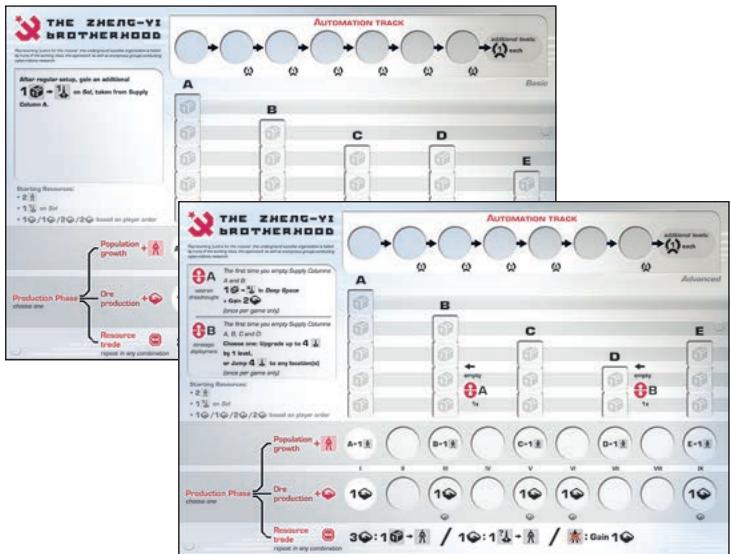
14. 进阶阵营面板
所有玩家熟悉机制后可选用进阶面板。所有玩家必须使用同一套面板。逆座位顺序选面板。
- 每块面板有2个独特"革新"(Innovation),激活条件见面板标注
- 革新可为一次性触发或需维持最低产量等级
- 补给栏和矿石产量轨道配置各不相同
15. 专家变体:科技牌桌
设置变化
- 在游戏区预留3行×4列的科技牌桌
- 四级行:翻开科技堆直到每列找到匹配类型的卡放置
- 三级和四级行暂不翻开
游戏变化
- 发现新科技时,可从牌桌对应行4张中选1张,或从堆顶随机抽1张
- 每回合结束补充空位
- 解锁三级/四级研发行动时,才设置对应行
- 某级所有科技槽填满后,清除该行并洗牌
关键规则与常见问题
易错规则
- 行动棋子必须移动: 不能留在原地,但可移到同一科技卡的另一个空格
- 不能执行无法完成的行动: 若无法支付费用或执行效果,不能选择该行动
- 人口方块研发后永不归还: 科技越多,需要食物产量越高
- 补给方块从左到右取用: 先清空左侧栏再取右侧栏
- 归还方块从右到左: 先填满右侧栏再填左侧栏
- 星系控制看力量总和而非船数: 等级2+2 > 等级1+1+1+1
- 殖民时所有剩余飞船(含己方)都去深空
- 殖民奖励必须完全执行
- 获得控制奖励在殖民时不重复触发
- 每回合只能领1个成就,满足条件必须领
- 人口增长/矿石生产必须尽可能多拿
- 资源交易无视食物产量圆片
- 自动化圆片不可移除,与前哨圆片不同
- 开始时行动棋子在板外,不阻挡任何格子
- 若无产量圆片可自动化,用成就/替代标记圆片代替(不算成就)
常见问题
-
Q:可以执行纯移动(跳跃)而不做其他事吗?
A:不可以。不能执行不改变游戏状态的行动。但若行动包含"获得X + 跳跃",可只拿资源不跳跃。 -
Q:研发科技时其他玩家的方块会阻挡吗?
A:不会。所有阵营可研发相同科技。 -
Q:飞船可以超过4级吗?
A:不可以,最高4级。 -
Q:殖民时可以多交飞船吗?
A:可以,但多余部分没有补偿。 -
Q:前哨圆片提供军事力量吗?
A:不提供,前哨仅标记控制权。 -
Q:深空和太阳的控制权如何判定?
A:不可控制,游戏结束时军事力量最高者各得1 VP。 -
Q:生产阶段可以跳过吗?
A:不可以,三项中必须选一项执行。 -
Q:事件卡何时触发?
A:研发未发现的二级或三级科技时翻开对应事件卡,执行效果(通常弃掉)。 -
Q:科技堆用完了怎么办?
A:事件卡或科技卡用完则留空或按规则从另一组抽。 -
Q:补给栏满了还能归还方块吗?
A:可以,继续放在A栏上方扩展。
常见问题(FAQ)
以下 1 条问答中 0 条来自站内玩家的真实提问,其余 1 条为本站整理的常见疑问;答复内容保持原样。
太阳之外支持几个人玩?
2–4 人。
去哪查完整规则
想核对具体规则细节、卡牌效果或某个回合的结算方式,可以在村了吗里选中这款游戏后直接提问。
同类桌游
- 卡坦岛德式
- 工业革命:伯明翰德式
- 勃艮第城堡:特别典藏版德式
- 方舟动物园德式
- 重塑宇宙德式
- 埃多拉的德鲁伊德式
- 1817 (2020)德式
- 甜蜜国度德式
- 卡里普索德式
- 铁路环游德式
规则原文(Markdown)
本站收录这款游戏的规则原文 3 个文件,此处内联渲染 3 个,可直接展开阅读或下载。
rules_zh_太阳之外_3434.md52.3 KB
οEIκ. C3EYON⊃)THE·SUN超越太阳系
翻译&排版:陈斌华
故事
第一次热核战争对地球并不友好。在过去的两个世纪里,内乱和气候变化继续肆虐全球每个地区。农作物产量暴跌,资源枯竭,贫穷和犯罪猖獗。人类正面临灭绝。
答案似乎很清楚:抛弃地球,在星空中找到新的家园。面对着毁灭的前景,地球上剩下的派系走到了一起。在2240年除夕,《科学交流条约》在华盛顿林肯纪念堂旧址签署。世界资源被用于航天研究,所有的发现都在一个全球分布的网络上共享。在历史上,人类第一次成为一体。
在短短的六年时间里,第一艘超级航天器由西田奥斯特戈德公司的工程师在EdmundSaito博士的领导下建造,并与世界其他国家分享了这项技术。人类终于进入了航天时代。
在这一重要发现之后不久,其他派别也研究了原始的地形形成技术、抗辐射作物、小行星采矿以及太阳系外人类生存的其他关键要素。每个月都有无数的外行星探险活动开始。既然已经找到了解决办法,各派别的权力和控制野心就再度抬头。
游戏目标
“超越太阳系”是一款太空文明游戏,玩家们在“太空时代”的黎明共同决定人类的技术进步,同时相互竞争成为经济发展、科学和银河系影响力的领头羊。
这个游戏在不同的回合中进行,直到游戏结束,玩家们集体宣称他们的成就。胜利者是拥有最多胜利点的派系,这些胜利点是通过研究技术、改善他们的经济、控制和殖民系统以及通过游戏中的各种成就和事件获得的。
游戏配件

科技版图
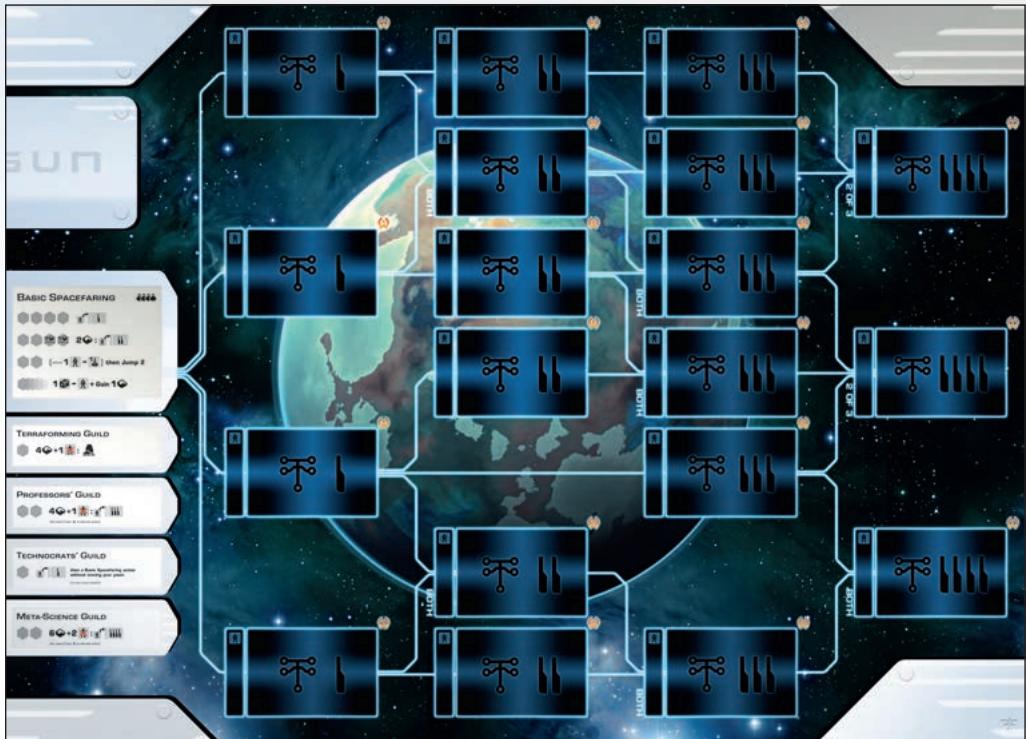
这是游戏版图的中心,这里是玩家每回合放置工人来执行行动的地方。它代表了四个层次的科技树,从左边的基本航天科技方框开始,到最右边的3级科技结束。玩家必须先研究较低层次的科技,才能在技术树上爬上去。

46张科技卡
科技卡代表玩家在游戏过程中可能发现的科学进步。它们包含新的和越来越强大的行动和/或立即给予研究它们的派系奖励。每张新科技卡都由第一个研究它的派系所选择,之后该科技卡成为对其他派系可用研究的科技。每局游戏的科技树配置将会各不相同,需要每次运用新的策略。技术树的发展由4种技术类型引导:科学、经济、军事和商业。在游戏开始时,只有1级和2级科技可以被研究。为了达到更高等级,玩家需要通过事件找到提升研究或解锁研究引导的行动。
Chooseor Each Faction may gain a ship of that power fromand place it in Deep Space.
You may additio afterwards.
KC-24X, FiRST ANDROID GovERNOR
Remove a Tier 2 Guild tile below the Basic Spacefaring bus. Each Faction can now access the uncovered Guild action
Keep this Event card in frunt of you for (
20张事件卡:2级和3级各10张
人类文明的未来进程不时会发生影响到每一个派别的事件。这些都是由事件卡来表示的,在游戏开始时,事件卡会覆盖空置技术槽位。当一项新技术首次被发现时,事件卡就会显示出来,应用其效果。事件可能会以意想不到的方式改变游戏。有些可能在游戏结束时提供额外的胜利点数。

双面探索版图
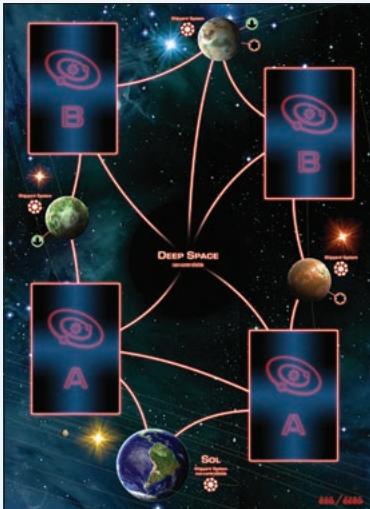
这个版图代表了银河系的简化导航图,包含了太阳系【SOL】,可殖民的可居住星系,可以建造宇宙飞船的船坞星系以及外太空。每个地区都用表示超空间跳跃路线的线段连接到其邻居。飞船穿越每个线段需要一次“跳越”(移动点)。
除了太阳系和外太空之外,地区都由一个派系所控制——由一个前哨圆片所标记,对应于该地区上的特定星系或—为控制它的派系提供生产进步。

24 张星系卡:A 和 B 类型各12 张
星系卡描述了可居住的系外行星星系,这些星系可以被殖民以获得胜利点数,以及独特的奖励。每个星系都有一个数字,表示殖民地的最小军事势力。离太阳系较近的两个星系都填满了从A组星系中抓取的卡牌。他们的军事势力要求较低,价值较少的胜利点数。来自B组星系的卡牌用于距离Sol较远的空间(用匹配的字母“B”标记)。这些系统更强大,但提供更好的回报。


一旦殖民,从探索版图抓取星系卡并放置在派系前面作为他们的永久领土。由于强大的胜利点提升和他们提供的特殊效果,选择正确的殖民星系对确保一个派系的成功至关重要。
在《超越太阳系》中,所有的星系卡都是根据从地球观测到的真实恒星星系命名的!

10张成就卡:A和B类型各4张,加上2张基础成就卡
成就是人类进步的文明里程碑。两张基本的和两张随机抽取的成就卡出现在每一局游戏中。他们提供额外的胜利点提升,一些成就卡具有有限的槽位可以获取。当放置一定数量的成就圆片时,触发游戏的最后一轮。




起始玩家标记
起始玩家标记被用于记录哪位玩家开始游戏以便确保回合数相同。这个标记在游戏中不会易手。
60 个矿石水晶

4 块引导覆盖板块
BASIC SPACEFARING 11) 1-流+0m1
2 块航天替代板块(用于2至3人游戏)
2 条科技场景条(用于专家模式变体)
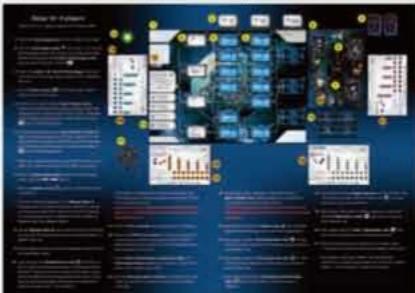
1 张设置表
4 个派系分别拥有的配件

2张派系面板(基础和进阶)
每位玩家各拥有一张派系面板来管理和记录他们的经济。游戏中有2种主要资源类型:居民代表派系的劳动力,以及矿石代表货币。派系面板的主要区域包括供应列和2种资源的生产轨道,以及它们之间的贸易比率。顶部的是自动化轨道,这代表派系生产的科技进步。游戏中有2组派系面板。基础组面板对于每种派系来说都具有相同的生产轨道并且只有微小的设置差异,而进阶组面板则含有各不相同的生产轨道以及在游戏中可以获得的特殊能力。

20颗6面资源方块
资源方块被用于各种用途并且具有6种不同面值:居民,供应以及太空飞船的等级,4,和。

24 个木质圆片
(8个食物生产,8个矿石生产,8个成就/占位者)

行动棋子


回合概述
在超越太阳系中,玩家们按照顺时针方向进行回合直到游戏结束条件被触发。之后,统计所有胜利点,然后确定胜利者。
玩家的回合由3个阶段:
-
行动阶段——移动行动棋子到一个新的行动区域,然后执行对应行动
-
生产阶段——选择生产增长,矿石生产或资源交易
-
成就阶段——获取一个成就
在这些阶段都完成后,轮到左手边下一位玩家的回合。
1. 行动阶段
为了执行行动,玩家移动他的行动棋子并将其放到科技版图的一个行动区域。之后玩家执行印在行动区域右边的行动。
-
所选行动区域不能是任何其他派系行动棋子占据的区域。
-
行动棋子必须移动并且不能留在当前所在相同区域上。然而该棋子允许移动到另一个相同科技卡的开放行动区域(如果科技卡上有多个行动区域),或是重复相同行动(如果同一种行动有多个区域)。这条规定也应用于基础航天科技方框(最后一个行动区域可以被玩家重复执行多次)。
3.玩家必须已研究过行动区域所在的科技。这是由科技卡左边派系的居民方块指示的。(直接印在科技版图上的行动区域无需研究)。
4.玩家无法执行他不能够执行或者无法支付费用的行动。
-
基础航天科技方框内的2 个行动区域需要支付额外1 矿石来执行行动。
-
在游戏开始时,行动棋子被放在版图外并且不会阻碍任何区域。
行动区域通常出现在科技卡以及印在科技版图上的基础航天科技方框内。
一个行动通常的形式是:
【费用:】效果
行动的大多数费用和效果都使用图标来代表,而大多数独特的效果会用句子来解释。
从第13页开始的效果词汇表进一步解释了不同类型的符号和效果。
·玩家在执行科技的其中一个行动之前通常必须检查是否已经研究了科技。
·如果相同行动有第二个开放的行动区域,则玩家允许重复执行相同行动。
·如果行动有费用的话,玩家必须在执行效果之前支付该费用。

现在是 Annie的回合。她的行动棋子当前正在“研究1级科技”的其中一个行动区域上。她必须移动她的棋子。此时她可以移动到基础航天方框上的任一未被占据的区域(包括再次研究1 级科技),或者 Narrow Beam Lasers 科技卡上的开放区域。她不能执行“建造一艘飞船然后跳跃2”行动(第3 基础航天行动),因为这2个区域都被其他玩家占据。她不能执行Terraforming 科技卡上的任何行动,因为她还未研究该科技(在该科技卡左侧还未有蓝色方块)。她不能选择使用Advanced Genetics 科技卡,因为那里没有行动区域—这张科技卡提供即时奖励,而非额外行动。
2. 生产阶段
在生产阶段中,玩家必须选择以下其中一个选项:
·生产增长
·矿石生产
·交易资源
这不是一种行动并且无需使用行动棋子。
生产增长+
-
玩家检查各自派系面板上的居民增长轨道。
-
玩家查看未被食物生产圆片覆盖的符号,包括最左边的圆圈。
-
每有一个这样的符号,就从其上面的对应字母供应列拿取1供应方块(所在列的位置无关紧要)。将其翻面到居民面,然后放到派系面板上。
用于移除食物(和矿石)生产圆片的机制将在后面的规则中解释。

之前一共有5个食物生产圆片在 Brian 的派系面板上被移除,所以有3符号( A,B,C)可见。如果 Brian 选择居民增长,他从Β列拿取1方块并从C列拿取1方块,然后将它们翻面到面。A列用光了方块,所以不会生产任何居民。
从匹配字母所在符号列拿取1个也只能拿取1个方块。如果在供应列没有多余的方块,该列不能生产居民。
矿石生产+:
-
玩家检查其派系面板上的矿石生产轨道。
-
玩家查看未被矿石生产圆片覆盖的符号,包括最左边的圆圈。
3.玩家从供应堆获得等同于所展示符号数量的矿石。将矿石放到派系面板上。
3.

之前一共有 4 矿石生产圆片从Cindy的派系面板上被拿走,所以有3符号可见。如果Cindy 选择生产矿石,她将获得来自供应堆的 3 矿石。
资源交易:
-
这个选项允许玩家交换资源但不会产生任何新资源。当玩家拥有一种类型的很多资源而其他类型的生产能力不足时是非常有用的。
-
玩家可以进行任意次和任意组合形式的交易:
a. 矿石换居民:
玩家支付3矿石,然后从含有供应方块的供应列最左边拿取1供应方块,然后将其翻面到居民面A。派系面板上的食物生产圆片数量不会应用在这个情况内。
b. 退役一艘飞船:
玩家支付1矿石,然后拿取任意位置的1艘自己的飞船,将其转变成1居民方块。
C. 居民换矿石:
玩家返还居民到至少有1个可放置方块的空置区域的供应列最右边(面朝上)然后获得1矿石。
3.如果玩家的供应方块被用光(非常少见的情况),该玩家不能再交易居民。
·玩家在每个生产阶段的回合中只能选择一个选项(居民增长,矿石生产或资源交易)而不是全部选项。这个选择对于为下一轮准备正确的资源至关重要。
·当生产居民或矿石时,如有可能,必须获得全部数量。玩家不能自行选择拿取比生产将要提供数量更少的资源。
·由于交易忽略食物生产圆片,这是玩家获得新居民的一种方式,即使在一些供应列耗尽的情况下。
·如果所有玩家都同意的话,回合顺位下一位的玩家可以在当前玩家考虑生产什么时就开始其回合。
3. 成就阶段
成就会在游戏结束时提供胜利点并且可以在每位玩家回合的最后阶段中获取。无论玩家满足了多少条件,每回合只有1个成就可以被获取。
·为了获取1个成就,玩家宣告其满足的条件,然将成就圆片放置对应成就卡上的一个开放槽位上,从左到右填充(从较高到较低胜利点)。
·每个成就槽位只能被一个单独圆片所占据。当成就卡被填满时,该成就不能再被获取。
·每个成就只能被每个派系获取一次。举例,如果玩家已经殖民了8个星系,则他无法再获取帝国成就。
•一旦一个成就被获取,即使出现不满足条件的情况,该圆片也会在剩余游戏过程中一直留在那里。
·如果有资格的话,玩家必须获得一个成就。他们不能主动跳过这一阶段来推迟游戏的结束。
·玩家的成就圆片供应没有数量限制(如果有需要,请使用替代标记)。
·即使成就的条件被其他玩家满足,此时该成就也只能被当前进行其回合的玩家获取。
游戏结束触发和计分
触发游戏结束
在超越太阳系中,没有固定数量的轮次来完结游戏。取而代之的是最后一轮会在全部4个成就圆片都被放在成就卡时触发。这与哪张成就卡上或成就圆片是什么颜色都无关。
一旦4个成就被获取,完成当前轮(结束于起始玩家右手边玩家),然后再进行一个额外完整的最后一轮游戏。在游戏结束条件被触发后依旧能获取成就,结果就是在成就卡上会有一共超过4个以上的圆片。在最后一轮,玩家们统计各自分数,拥有最多胜利点的玩家获胜。
当有人开始宣称获取成就时,玩家们应该特别注意,因为最后一轮可能会很快被触发。然而由于每回合只能获取一个成就,玩家不能通过一次性获取多个成就来“冲刺”游戏结束条件。换句话说,玩家也不能通过不获取成就来“拖延”游戏结束条件。如果在满足成就的条件时,玩家必须获取该成就;然而如果同时满足多个成就条件,他只能选择获取其中一个。
当前玩家每回合只能获取一个成就!
平均来说,一局游戏大约有15轮,包括最后一轮。然而,这可能会因玩家的决定和科技树如何展开而有所不同。

Annie ,Brian,Cindy,和 Derek正在进行《超越太阳系》的游戏,Annie 是起始派系,Cindy(第3位玩家)计划获取第4个成就,这会触发游戏结束。为了确保回合数相同,Derek(第 4 位玩家)在Cindy 后进行其回合,然后所有人(包括 Derek)进行额外一回合。玩家们依旧允许在最后一回合获取一个成就,即使版图上已有成就圆片。如果Derek不是触发游戏结束的玩家,在Derek回合后会立即开始最后轮。所有玩家(包括Derek)将进行额外一回合。
计分
按照以下步骤对每个派系的胜利点计分。这也印在玩家提示卡的背面。
1.每个派系因为各自的每个1级科技而获得1。
2.每个派系因为各自的每个2级科技而获得2。
3.每个派系因为各自的每个3级科技而获得3。
4.玩家因为“私人科技”(来自卡牌奖励)根据等级(2级或3级)而获得2或3。
5.每个派系获得各自3级科技上特定的。
6.每个派系获得各自自动化轨道上特定的(统计所有展示的,至所抵达的等级)。在7级之后,每个额外等级价值1。
7.每个派系获得各自每个殖民星系的,如同星系卡底部指示的那样。
8.每个派系因为每个未殖民的前哨圆片而获得1(在星系卡或船坞星系上)。
9.每个未被控制的地区(太阳系或外太空)中最高军事势力的派系获得1(并列玩家获得相同的)。
10.每个派系因为每张事件卡提供的而获得。它们通常出现在成就卡附近,或者它们可以附加在特定地区或派系。
11.每个派系获得各自每个成就的。
拥有最多胜利点的派系获胜。如果出现平局,平局派系中拥有剩余最少食物和矿石生产圆片在其派系面板的派系(换句话说就是最高组合生产等级)获胜。如果再出现平局,拥有剩余居民方块最多的玩家获胜,其次是剩余矿石水晶最多数量的玩家获胜。如果还出现平局,多个派系将共同统治银河系。


基础行动
在超越太阳系游戏中,图标被用于描述行动的费用和效果,以及在游戏中它们可能给予的其他奖励。作为起始例子(尤其是当玩家是第一次玩游戏的时候),以下表格介绍了在基础航天科技方框内的行动,在“描述”列中用简单的句子解释,然后在“引用效果”列中分解为单个组件效果。
下一页将列出所有引用效果的完整词汇表。
| 基础航天行动 | 描述 | 引用效果 |
| R | 使用1居民方块来研究一个1级 科技。 | ·使用1个居民方块 ·研究1个科技 |
| 20:1 | 支付2矿石来使用1居民方块以 此来研究1个该玩家有资格获得 的未被发现或存在的2级科技。 | ·支付/获得矿石 ·使用1个居民方块 ·研究1个科技 ·可选效果 |
| 可选:1→4 然后跳跃2 | 玩家可以选择转换1居民方块 为1艘宇宙飞船并将其放到太阳 系或任意一个玩家控制的船坞星 系。然后玩家执行至多2次跳跃。 | ·使用1个居民方块 ·建造1艘宇宙飞船 ·超空间跳跃 |
| 1→穴+获得1Q | 创造1个来自最左边可用供应方 块的居民方块,忽略食物生产圆 片,然后获得1矿石。 | ·直接使用1供应方块 ·支付/获得矿石 |
基础航天
888

[可选:1 → ]然后跳跃 2
1→R+获得1Q
效果词汇表获得/支付矿石
X):效果
获得X
支付X给一位对手
游戏中很多行动需要支付矿石来执行,有些行动允许获得供应堆的矿石。
·如果一个行动或效果需要矿石作为费用,玩家需要在执行效果之前完全支付其费用到供应堆(或给予目标对手)。
如果一个效果允许玩家获得矿石,玩家从供应拿取完全数量的矿石并将矿石水晶放置其派系面板上。矿石水晶的供应是无限的(如果有需要请使用替代标记)。
使用居民方块
1 →效果, $\overrightarrow { x }$ 效果
在研究新科技和建造宇宙飞船方面,一个派系的活跃劳动力是至关重要的。食物生产和居民利用的谨慎平衡是确保一个派别经济可持续增长的必要条件。
为了使用居民方块,玩家必须拥有所要求数量的居民方块在其派系面板上。大多数效果只需要1居民方块。使用一个居民方块需要将其移动到版图上,并可能将其旋转到另一面。(例如,将其移动到科技槽位或将其变成宇宙飞船)。
直接使用供应方块
1→效果
先进的人工智能和安卓技术的发明使得派系能够在最少的人工参与下提高运作效率。这导致了自动化飞船和原始感知工人的引入,但也引发了社会上如何对待机器和机器人的伦理问题。
玩家从左到右拿取来自派系面板供应列指定数量的供应方块。玩家必须先从一列中取出所有方块,然后才能开始从下一列获取方块。派系面板上的食物生产圆片数量在此效果中无关紧要。如果供应区域内没有更多的供应方块,可以改为使用居民方块,但这不是必须的。
这个效果允许玩家无视生产增长轨道而直接从供应区域拿取方块。当玩家在努力满足食物需求时,它是非常有用的。
返还/过度劳役居民
1→效果
为了返还居民作为效果的费用,玩家必须在其派系面板上拥有所需数量的居民方块。返还居民方块意味着将其翻面到供应面并将其放回到至少含有一个空置区域放置方块的最右边供应列上。玩家必须在放置下一个列之前完全填满一列。如果有多列被填满,玩家继续放置方块到供应列A,即使那里已经没有空间了。
一些效果需要居民方块作为费用和效果本身。举例:2:这需要一共3 居民方块。
除非另有说明,否则玩家将始终从左到右取出供应方块,并从右到左将其返回到空置槽位中。
研究科技
1666
研究在推动派系的能力和经济发展中起着至关重要的作用。随着科技树的展开,各派系控制着人类文明的进程,并释放出越来越强大的行动和效果。
研究一个科技需要以下步骤:
-
选择科技槽位
-
放置居民方块
-
触发事件(只有未发现的 2 级和 3 级科技)
-
选择科技卡(只有未发现的科技)
-
获得即时奖励
1. 选择科技槽位
这里有4种等级的科技,从左到右陈列在科技版图上的4列。图标中的符号(I/II/I/II)指示了玩家正在研究的是哪个级别的科技。
正在研究的玩家可以选择满足以下条件的级别的任意科技槽位:
a. 他还未研究过的科技。
b. 他们拥有科技的先决条件
为了确定是否已经研究了给定槽位的先决科技,玩家必须已经研究了通过蓝线直接连接到其左侧的所有科技。
1级科技不具备先决条件,因为每个派系都是以基本的航天科技开始游戏的。
更高级别的科技需要1到2个先决条件。一些4 级技术只需要3 个先决条件中的2个。
如果符号包含眼睛,玩家只能选择一个已经发现的(正面朝上)科技。
2. 放置居民方块
玩家放置所需的居民方块到科技槽位左侧的矩形区域上。
其他玩家的方块不会阻碍这个放置。派系允许研究相同的科技。
这些居民方块代表了该派系致力于科学技术的劳动力的一部分。
这些方块永远不会回到派系面板上,所以随着游戏中一个派系的科技进步,他们需要更多的食物来满足需求。
3. 触发事件(仅限于未发现的 2 级或 3 级技术)
如果这是一个未被发现的二级或三级技术槽位,玩家会翻开覆盖槽位的事件卡,读取事件,并根据指令结算它。除非另有规定,否则将丢弃事件卡。
4. 选择科技卡(只有未发现的科技)
如果这是一个未被发现的科技,研究玩家有机会从牌堆中选择一张新科技卡放在版图上解锁新的行动和能力:
a. 决定科技类型
·玩家检查每个先决条件科技的类型/颜色左边一级科技,在先决条件卡的右侧用一个小三角形表示。如果只有一个先决条件(或两个先决条件属于同一类型),则为新发现科技的类型。如果有一个以上的先决条件类型,玩家选择这两个类型中的哪一个是下一步之前的新科技。
b. 展示科技卡
·玩家从相应级别的科技牌堆中展示卡牌,直到翻出2张与所选类型/颜色匹配的科技卡,使用卡片左侧的大三角形查找匹配项。如果大三角形被分成2种类型/颜色,则该卡表示一种混合科技,可与任一类型匹配。将不匹配的牌暂时放在一边。
C. 选择科技卡
·玩家选择1张匹配的卡牌并将其放到所选科技槽位上。将未被选择的卡牌和未匹配的科技卡随机顺序正面朝下放置相同科技牌库的底部。不要洗混牌库。
这4种科技具有不同的特点,总结如下。混合动力技术通常包含两种类型的特性。
·科学 矿石生产自动化,研究行动和矿石奖励
·经济——食物生产自动化,居民收集和矿石收集
·军事 飞船建造,移动和升级
·商业 殖民行动,飞船移动和可变动行动
5. 获得即时奖励
如果科技卡上有一个标有“立即”的方框,玩家在研究科技后立即获得方框内描述的一次性奖励。这个奖励不受限于第一位发现该科技的玩家。如果其他派系在游戏之后研究了相同的科技,他也将获得奖励。在方框外面的任何其他效果都不会执行——这些是新的行动区域或者已经研究该科技玩家的永久性能力。

Derek执行基础航天科技方框内列举的“研究2级科技”行动。他被允许研究槽位A,B或C 的科技(他拥有先决条件 Narrow Beam Lasers 和/或 Terraforming),但不能研究槽位 D,E或F(他没有先决条件 Advanced Genetics 和/或 Advanced Robotics)。他选择槽位B 并发现那里的新科技。他支付2矿石,将居民放到放在槽位B的左边区域上,并翻开那里的事件卡。
因为这里有2先决条件连接着槽位B,他可以决定研究军事或商业科技。他选择军事,所以他翻开来自 2 级科技牌库的卡牌直到他找到2 张军事 2 级科技卡 Human Experiments和 Plasma Cannon。他选择Plasma Cannon科技卡并将其放在槽位B 获得卡牌上的即时奖励。Plasma Cannon科技卡上的新行动区域将在他下回合开始时成为可用;其他玩家还不能使用它直到它们也研究了 Plasma Cannon 科技卡。
自动化食物或矿石生产
自动化 1
自动化1
对一个派系来说,自动化生产是增加矿石和人口增长的一种方法。
为了自动化食物生产或矿石生产,玩家从其派系面板对应生产轨道上拿取最左边生产圆片,然后将其放到上方的自动化轨道上,从左边开始放置。如果没有该类型的生产圆片玩家必须放置一个圆片(作为占位者,此时它不是成就)。如果所有的7个自动化等级都被填满,玩家将额外圆片放置自动化轨道的右边。
一些自动化等级在游戏结束时提供了额外胜利点,在自动化轨道上有描述。每个超过7级的等级提供1胜利点。
当控制或殖民一个星系时,不要将这种效果与将生产圆片放在星系卡上(如前哨站/殖民地)混淆(参见超空间跳跃和殖民星系)。与星系卡上的前哨圆片不同,自动化轨道上的圆片永远无法移除。
建造一艘宇宙飞船
→4 →24
→4 →4
为了组建一支探索和开拓银河系的舰队,各派系使用在21世纪中期第二次太空竞赛中设计的大型模块化轨道船坞建造宇宙飞船。
为了建造一艘宇宙飞船,玩家拿取所需资源方块并转到指定飞船等级(1至4)宇宙飞船符号面。新的宇宙飞船可以在被玩家控制(控制是由玩家的前哨圆片在该地区上的存在来决定的)的太阳系或者任意船坞星系上建造。所有可以建造飞船的地区都在探索版图上标记着一个图标。如果多艘飞船被建造,它们可以被放在分开的地区。
当一艘新飞船出现在玩家尚未控制的地区时(从某些卡牌奖励中),星系控制权可能会改变,效果可能会触发(见超空间跳跃)。
升级一艘宇宙飞船
升级 1艘X级
升级至多 X艘X级
为了升级一艘宇宙飞船,玩家只需将所选宇宙飞船方块转动新等级面。一艘宇宙飞船的等级不能超过4级。玩家只能升级自己的宇宙飞船。
超空间跳跃
跳跃X
超光速飞行技术是一项关键性的发现,它使人类能够超越太阳系系探索银河系。由于其不稳定的性质和高昂的能源成本,每次跳跃的距离和船队规模都是有限的。
一次超空间跳跃效果包括以下步骤:
-
移动
-
检查星系控制权并建造前哨站
-
检查星系奖励
1. 移动
跳跃效果指定的数值就是玩家可以在飞船上支付的移动点数数量:
·移动点可以在可用的飞船之间以任何方式分配(即多个移动点可以在一艘飞船上花费,或者多个船舶可以分配这些移动点)。
·所有移动被视为是同时进行的——只有在移动结束时才结算下一步骤。
·玩家们无需使用所有移动点,但他不能保留到之后使用。
2. 检查星系控制权和建造前哨站
在探索版图上有/符号附加的地区是在游戏中可以被控制的星系。拥有一个星系中最强大舰队的派系在那里建立了一个前哨站,并从改进的生产中获益。
每当星系在探索版图上有任何变动,星系的控制权都可能升级,即使此时是回合之外。然而,控制权不会在移动之中进行检查。
为了决定一个星系的控制权:
·如果行星当前没有飞船,移动1艘或多艘飞船到那里并留下至少1艘飞船在星系上的派系获得该星系的控制权。
·否则,一个派系需要有比当前控制派系拥有更高的军事势力来获得控制权。在一个地区的派系舰队势力等同于其在该地区的所有宇宙飞船的等级(而不是宇宙飞船方块数量)。前哨站不会增加控制星系派系的任何势力。
·如果一些或所有控制派系的宇宙飞船离开一个星系并且另一个派系此时在此地区拥有最高势力,则离开的派系失去该星系的控制权。该派系将其前哨站圆片放回其派系面板,此时另一个派系控制该星系。
·如果所有控制派系的宇宙飞船离开该星系并且没有其他飞船在此星系,则派系保留其控制权。
当一位玩家获得一个星系的控制权时,他必须立即通过拿取生产轨道上对应该星系的特性(/)的最左边生产圆片来建造一个前哨站并将其放到该地区上。如果星系拥有多种特性,玩家自行选择哪个圆片来放置。如果玩家没有匹配类型的生产圆片,他必须放置一个圆片到星系上作为占位者。这个圆片不视为一个成就。
当玩家失去星系的控制权时,他将其前哨站圆片放到对应生产轨道上最右边的空置槽位。之后新控制的派系(如果适用的话)将他的一个圆片放到其槽位内。如果一个派系从另一个派系那里获得多种特性星系的控制权,控制新派系的玩家无需选择相同类型的前哨站。
前哨站作为一个指标,表明哪个派系控制着一个星系,这是造船和殖民所必需的。
3. 检查星系奖励
一些星系在派系访问它们时会提供额外效果。
获得控制权——当玩家获得一个具有获得控制权效果的星系的控制权(比如放置一个圆片到上面),他会立即获得这个奖励。这与之前是否空置或被占据没有任何关系。这个奖励也会在另一个派系的回合被触发(举例,如果飞船移动离开)。然而奖励在星系被殖民时不会再次生效。
其他效果—偶尔也有一些与星系相关的特殊规则。这些规则在卡牌上有解释。如果玩家同时获得多个星系的控制权,他可以按他想要的任意顺序结算这些奖励。在游戏结束时,在探索版图上每个前哨站圆片价值1胜利点。

Ellen█执行一次“跳跃 4”效果。她从 Barnard's Star 移动一艘 2 级宇宙飞船到右边的船坞星系(1 移动点),然后从 Sirius 移动一艘 3 级宇宙飞船到 Tau Ceti(2 移动点)。她选择不使用最后的移动点。
船坞星系的控制没有改变(军事势力与█打出平手),但她现在获得了 Tau Ceti的控制权【VS】。这是个多种特性的星系,所以她选择并放置她派系面板的食物生产圆片到Tau Ceti卡上并返还已存在圆片给Frank,他将该圆片放回到他面板上的生产轨道的最右边空置区域。Ellen 获得了 Tau Ceti 上的获得控制权奖励(移动1 供应方块到供应列 A)。
在 Sirius 星系,Ellen 将控制权让给了 Geoff □,所以她将其矿石生产圆片放回她矿石生产轨道的最右边区域。Geoff之后将他的一个生产圆片放到Sirius 并获得那里的获得控制权奖励(获得1矿石)。
Ellen 保留她的前哨站圆片在 Barnard's Star,因为那里没有其他玩家拥有飞船在上面。
殖民一个星系

殖民地
有了足够的资源和军事势力,一个派系控制下的星系可以被殖民地化,成为该派系的永久领土。这使得派系可以进一步提高其产量,并获得星系提供的独特优势。
只有星系卡(含有符号)可以被殖民化。船坞星系,太阳系和外太空不能被殖民化。
一个殖民效果涉及多个步骤。这些步骤也列举在每张玩家提示卡背面。
-
确定资格
-
安置所需势力或更多的宇宙飞船
-
放置其他宇宙飞船到外太空
-
拿取星系卡和发现新星系
-
放置额外生产圆片
-
获得殖民奖励
1. 确定资格
殖民地化需要强大的军事存在,以便建立一个稳定和可持续的社区,并确保定居者的安全。
除非另有规定,玩家必须具备以下条件,才有资格殖民一个星系:
·拥有星系的控制权(在星系卡上有一个前哨站圆片)
·在该星系上拥有最低军事势力要求。势力要求都印在星系卡上的符号内。对手在该星系的飞船势力不会影响殖民。
2. 安置所需势力或更多的宇宙飞船
玩家必须一定数量的宇宙飞船到星系内来增加所需军事势力或更多。他们成为新殖民地的定居者,并将返回派系面板。此时允许瓦加返还比所需要求更多的势力,要么是出于选择,要么是因为星系中没有任何组合的宇宙飞船完全等于所需的势力。然而,他们没有得到任何“变化”的差异。
将所选宇宙飞船的面朝上从右到左放回派系面板的供应列内的空置槽位上。如果所有槽位都被填满,继续放置在供应列A,即使那里没有留下任何空置区域。
殖民地化的一个经常被忽视的好处是,它重新填充了供应列,使更多的居民得以生产和再利用,而不必提高食物产量。返还的宇宙飞船并没有被牺牲或毁灭——他们只是在新世界建立了一个共同体!
3. 放逐其他宇宙飞船到外太空
一旦一个星系被一个派系殖民地化,剩余的宇宙飞船必须离开并继续探索银河系其他地方。玩家将该星系内所有剩余宇宙飞船(包括他自己的飞船)移到外太空区域。
4. 拿取星系卡和发现新星系
玩家拿取星系卡以及上面的前哨站圆片,然后将其放在其派系面板旁边。然后他从对应星系牌库抓取顶部的星系卡并用该卡填充空置槽位。玩家须向其他玩家大声朗读新卡牌,以便他们知道星系提供什么奖励。很少情况下星系牌库会被用光,此时改为从另一个牌库抓牌。如果没有任何星系卡在2个牌库,则让槽位保持空置。
5. 放置额外生产圆片
前哨发展成为一个殖民地,为执政派系提供了额外的生产推进。
玩家将另一个匹配星系特性的圆片放到星系卡上,以一堆2个生产圆片终结。如果星系具有多种特性,玩家可以选择其中一个。新的圆片无需与原前哨站的类型相同。如果玩家没有匹配类型的生产圆片,将1个★圆片作为占位者放置。这不视为一个成就。
6.获得殖民奖励
玩家立即获得星系卡底部描述的奖励。奖励效果必须完全执行除非另有特殊情况。
由于新星系卡已经在上个步骤中被抓取,关于跳跃效果的殖民奖励可以允许宇宙飞船立即进入(就像控制)新抓取的星系卡。
游戏结束时,每个殖民的星系的胜利点等同于卡牌底部指定的数值。
见下一页关于殖民的例子。
可选效果
【可选:效果】
效果【可选】
你可以...
跳跃X
在游戏过程中,除非有特别说明,否则所有费用和效果都是强制性并且所有数量必须完全支付或获得。不过,这条规则也有一些例外:
·指定为“可选”、“如果可能”、“你可以”或具有“最多”规则文本的任何效果
· 在跳跃效果内的移动点
·在升级宇宙飞船时没有足够飞船用于升级(或者如果所有飞船都已经是4级)
·当玩家用光供应方块,一个效果将供应方块转换成其他东西,玩家可以用居民方块来代替部分或全部缺失的数量,或者只是跳过这个效果。

Heidi█正在执行“殖民一个星系”行动。尽管有军队存在,她不允许殖民 Barnard's
Star(因为她不能控制它)和Lalande21185(因为她没有足够的军事势力)。她只能选择Kapteyn' s Star。
Kapteyn's Star需要4势力来殖民。她拿取2艘2级宇宙飞船并将它们翻到面,然后返还它们到她的派系面板的供应列。她放置1方块到供应链B的最后一个空置槽位上并将1个方块放到供应列A的一个空置槽位上。剩余的2艘宇宙飞船(和)被移到外太空。
她拿取 Kapteyn's Star 连同存在的前哨站并将其放到派系面板旁。她从星系牌库 B 抓取另一张卡牌填充空置槽位并向所有玩家朗读。Kapteyn’sStar是一个具有多种特性的星系,所以她选择并放置一个额外食物生产圆片到上面,将2圆片堆成一堆。
最后她获得 Kapteyn's Star 的殖民奖励——从她供应放置一艘宇宙飞船到外太空。
规则和卡牌解释
·当一个行动完成时,玩家不能故意执行一个不会改变游戏状态的行动。
·举例,玩家不能执行“跳跃4”行动而不执行任何跳跃,但他可以执行“获得2矿石+ 跳跃2”行动来获得 2 矿石而不执行任何跳跃。
·Modular Fleet(2 级科技)- 由于所有 3 个造船效果都是可选的,玩家可以执行这个行动只是为了跳跃3。
·Quantum Data Exchange (3 级科技), Technocrats' Guild—所选行动可以是被另一位玩家占据的行动区域。
·Ministry of Colonies (4 级科技)——在极少数情况下,星系牌组 A 用完,从牌组 B 中抓取其余的牌。
·Lalande 21185(星系 A)——殖民奖励必须按这个顺序执行:生产食物,生产矿石,然后交易。
·Ross154(星系B)—为了使用这个能力,玩家移动已存在一旁的行动棋子并如常占据行动槽位。
·Museumof RetiredSpacecraft(事件3)—这张卡牌上的飞船是游戏之外的并且不能被移动,升级或指定为目标。
·Dyson Sphere, Mk.I(事件3)—附加星系卡不是地区并且不能抵达或指定为目标。为了执行这个行动,玩家拿取星系卡并将其放到其派系面板旁,类似于常规的殖民。玩家从卡片收集描述的任何殖民奖励但不放置任何生产圆片。之后弃掉事件卡,然后将行动棋子放到基础航天方框旁边以便下回合再次移动。
·Specialization(事件B)——这个视为已经印在星系的特定图标,没有圆片的放置。
船坞星系也计入这个总数中。
• “升级然后跳跃”【例如:Supply Outpost(2 级科技)Hyperdrive Boosters(3 级科技)等等】——升级后解决任何星系控制权的更改,然后在跳跃后再次解决。
·从另一列拿取供应方块【例如:United Nations(基础),Android RightsMovement(3级科技)等等】—下一次由于任何原因将方块返回供应时,必须首先填充最右边的区域。
• "Private Technology” 【(Procyon(星系 A), WISE 0855-0714(星系 B)】
·这项研究不需要居民方块。只需将科技卡放在派系面板旁边。
·研究玩家获得即时研究奖励,并且只有他能适应这个行动。
·确保游戏结束时计算它们的胜利点。
·它们视为在游戏外并且不能被研究,复制或被其他派系指定为目标。
·如果玩家用光了生产圆片并且使用圆片作为占位者(例如:当自动化/控制/殖民时),并且之后有一个实际的生产圆片成为可用(例如:失去一个星系的控制权),玩家不能用生产圆片替换占位者。注意★圆片的供应是没有限制的(如果有需要请使用替代标记)。
·如果资源方块被返还到玩家的供应堆并且任何供应列都没有剩余的空置槽位,则将其放到供应列A上方来扩展该列。
·如果由于任何原因,一个★圆片作为占位者返还给玩家,则将其放到玩家派系面板旁并且它能够再次被使用。
·当研究一个需要3个先决条件之中的2个条件的4级科技时,研究玩家只能从他已经研究的先决条件中选择科技类型。
· 科技场景专家变体:
·Mass Enlightenment(事件3)——这张卡不会触发4级行的展示。
·Spacetime Anomaly Studies(2级科技)—这张卡不会触发 3 级行的展示。
•Planetary-scale Research(3级科技)——根据需要展示新行。
策略和常规提示
·由于由于技术树的可变性,玩家应该根据游戏中出现的科技调整策略。游戏可以侧重研究战略、侧重殖民战略,或两者兼而有之。
·当选择一个新科技时,确保它同时满足短期需求(通过即时奖励)和长期目标(通过新的行动)。
·殖民一个星系似乎是一项艰巨的任务,因为它涉及到移动、控制和返回宇宙飞船,但它可能是一个成功战略的关键部分,不应忽视。
·如果对星系控制权的竞争看起来很激烈,那么在这段时间里专注于研究往往会有所帮助。
当对手因为殖民化而开始削减兵力时,现在是时候廉价地控制星系了。
·居民方块可能会被科技或者拥有一个太大的舰队而“锁定”。为了释放居民方块,要么增加食物产量,殖民星系以取回方块,要么执行直接使用供应方块的行动。
特别感谢
Benjamin Jones, Sam Backwell, Jan Horjus, Yue Shing, Jared Rubinstein, Jared Miller, Jason Kovacs, Phil Amylon,Peter Harvey, Ankit Shah, Seth Meyer, Nathaniel Speer, Chris Rollins, Mike Erickson, Brian Gow, Carol Carveth, Jeff Grove,Jam Murphy, Elise Spencer, Adam Eastwood, Zoltan Perko, Janet Guo, Colin Goldberg, Eric J. Francis, Joey Chan,Kin Cheung, Christopher Rivera, Chris Bryant, Kevin Monahan, Ken Hill, Robin Hill, Mike Zehnal, Lyle Rhodebeck,Peter "The Red Menace" Stein, Scott Tepper, Tom Lehmann, Ray Pfieffer, Scott Russell, Tadd Colver, Roy Colver,Franz Vohwinkel, Game Makers Guild Boston, Boston Festival of Indie Games

Dennis K. Chan
是一位生活在波士顿的游戏设计师。他从香港移居美国,就读于卫斯理大学,在那里他获得了物理学学位。当他不设计游戏的时候,他是一个软件工程师,喜欢骑自行车,做饭,玩桌游,演奏管风琴。
Game Design: Dennis K. Chan Artwork: Franz Vohwinkel Production Management and Development: Ken Hill
2 至 3 人游戏
3人游戏的改动:
·使用3人游戏替换板块覆盖基础航天科技方框。
·第一位和第二位玩家在游戏开始时各拥有1矿石;第三位玩家拥有2矿石。
· 成就卡A的第二个槽位不可用。
·只需3成就圆片就会触发游戏的最后一轮。
2人游戏的改动:
·使用2人游戏替换板块覆盖基础航天科技方框。
·双方玩家在游戏开始时各拥有1矿石。
·探索版图的2 人游戏面被使用并且牌库A 只有一张起始行星卡会被展示。
·成就卡 A的第二个槽位不可用。
·只需3成就圆片就会触发游戏的最后一轮。
进阶派系面板
一旦玩家熟悉了游戏的机制,所有玩家都可以同意使用进阶派系面板来启用独特的派系异能。基础或进阶派系面板的使用必须在设置前确定,所有玩家必须使用同一套。1. 设置变动:
在科技版图,探索版图和成就卡都设置后,每位玩家按照玩家顺位的反方向选择一个派系面板;然后如常完成派系的剩余设置。
- 进阶派系面板拥有的能力对于每个派系来说都是独一无二的:
a.2个独特“发明”可以在游戏过程中被研究
·这些发明的激活条件在派系名称下面有描述,并且在派系面板上用图标表示。
·有些发明在实现时只激活一次,而其他发明在达到一定的最低生产等级时生效。
如果生产等级低于此最小值,则该能力将失效,直到生产再次达到所需等级。
b. 供应列和矿石生产贵的的配置对于每个派系来说也是各不相同的。
专家变体:科技场景
对于有经验的玩家,他们更喜欢战略性的游戏,超越太阳系可以使用一个科技场景来进行游戏而不是从牌库顶部抓取2张卡牌。变化如下:
设置变动

·在游戏区域通过放置包含硬纸板条顶部展示的4种科技以及条幅左侧展示的等级//来保留一个3排4列的“网格”科技卡场景。
·穿过等级行,在每一列下面,翻开2级科技牌堆中的牌,直到在卡牌左侧三角形上有一张与该列的类型/颜色相匹配的科技卡。有两种类型的卡都算作两种类型的匹配。把丢弃的卡牌放在底部,然后转到下一列。
·不要为3级和4级翻开任何科技卡。
·洗混并放置2级,3级和4级科技牌库到该场景的左侧,放置各科技卡行旁边。
游戏流程变动
·当发现一张新科技卡时,玩家必须从对应等级行的4张展示卡牌中选择其中一张,或者从牌库随机抓取一张卡牌。
·类型要求相同。例如,从军事/红色先决条件中,玩家可以从左三角形上含有军事/红色的行中选择任意一张牌。当有两个不同类型的先决条件时,可以选择其中一种类型。4列设置确保每种类型至少有一张卡(但是有些类型可能只有一个选择!)。
·在每回合结束时,通过从对应牌库一直翻开卡牌来补充任何空置槽位直到找到一张匹配类型/颜色列的卡牌为止。很少情况下会没有匹配类型的卡牌,此时随机抓取一张。
·一旦一个允许研究3级科技的行动区域被解锁,就使用上文设置的相同方法来设置3级行。这同样应用于第一个允许研究4级科技的行动区域。
·当科技版图上用于常规科技等级的所有区域都被填满,从这个场景清理该等级行并洗混牌库。以后可能还需要牌库来用于其他效果。

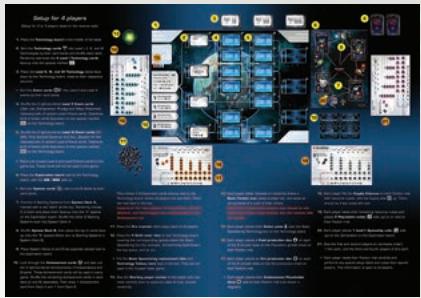
4 人游戏设置
(背面列举了2 至 3 名玩家的设置)
-
将科技版图放在桌子中间。
-
将科技卡按照卡牌背面分类为1,2,3,4级科技并洗混每堆牌库。随机将4张一级科技卡正面朝上分发到标记的区域。
-
将 2,3,4 级科技牌库正面朝下放置科技版图上靠近它们对应的列。·将事件卡按照卡牌背面分类为2级和3级事件。
-
将 2 张浅色边框的 2 级事件卡(TylerLee, Entrepreneur Prodigy and MayaChaturvedi,Visionary)与4 张随机 2级事件卡洗混。将这所有的6张卡牌正面朝下放在科技版图上标记着的位置。
5.将 2 张浅色边框的 3 级事件卡(KC-24X, First Android Governor ànd Onu,Speaker for the Colonies)与4 张随机3级事件卡洗混。将这所有的6张卡牌正面朝下放在科技版图上标记着的位置。·将所有未被使用的2级和3级事件卡放回游戏盒子里。这些卡牌不会在这局游戏中被使用。
-
将探索版图的8/面朝上放在科技版图旁。·将星系卡牌按照卡牌背面分类为A和B。
-
从星系牌库 A 找出 4 张顶部标记着红色start”的起始星系卡。从中随机选择2张并将其正面朝上放在探索版图上的“A”区域。将其他2张起始星系洗回星系牌库A。
-
洗混星系牌库 B,然后将牌库顶部 2 张卡牌正面朝上放“B”区域上(这不是星系牌库B的起始星系)。
-
将星系牌库 A 和 B(各自牌库)放在探索版图旁。
-
翻阅成就卡并拿取2 张浅色边框成就卡(Transcendence and Empire)这些成就卡将用于每局游戏。分别洗混剩余成就卡(A 和B)。然后从牌库 A和牌库B分别抓取1张成就卡。将这4张成就卡正面朝上放在科技版图旁以便所有玩家查看它们。将剩余卡牌
放回游戏盒子里。
重要提示!对于新玩家来说,建议使用成就组 Transcendence, Empire,Warlord,and Technologist.
-
将矿石水晶放置所有玩家方便拿取的位置。
-
将 4 工会覆盖板块放在科技版图上覆盖基础航天方框下方的对应区域(例如,Terraforming Guild 覆盖顶部区域其他以此类推)。
·将基础航天替换板块和科技场景条放回盒子里。它们不会在4人基础游戏中使用。
- 将起始玩家标记给予最近去过太空的玩家)如果出现并列,随机选择一位玩家)。

19
-
每位玩家将其行动棋子放在科技版图的基础航天科技方框旁。
-
每位玩家在其派系面板的居民增长轨道上的8个圆形槽位各放置1个食物生产圆片。
-
每位玩家选择或随机抓取一块基础派系面板,拿取一张玩家提示卡并拿取所选颜色的所有配件。重要提示!有经验的玩家可以改为选择使用进阶派系面板。见背面的详细说明。
17.每位玩家在其派系面板的矿石增长轨道上的8个圆形槽位各放置1个矿石生产圆片。
·每位玩家放置各自的成就/占位者圆片在其派系面板旁(图中未显示)。

-
每位玩家使用资源方块的供应面朝上填充各自派系面板上的供应列。此时会留下少量方块。
-
每位玩家拿取剩余资源方块并将2 居民方块(面朝上)放在其派系面板上或旁边。
-
每位玩家放置1张1级宇宙飞船方块(面朝上)在探索版图的太阳系地区。
-
给予第一位和第二位玩家(顺时针方向)各1个矿石,然后给予第三位和第四位玩家各2个矿石。
·每位玩家仔细阅读派系面板并执行列举的特殊设置操作并留意其特殊能力。这个信息对所有玩家来说都是公开的。
下载 Markdown54-beyond-the-sun-rulebook.md63.0 KB
CHAN 3EYOND)THESUN
RIO GRANDE GAMES
The Story
The First Thermonuclear War was not kind to the Earth. Over the last two centuries, civil unrest and climate change continued to ravage every region of the globe. Crop yields were plunging, resources were depleting, and poverty and crime were rampant. Humanity was facing extinction.
The solution seemed clear: abandon Earth and find a new home among the stars. Faced with the prospect of annihilation, the remaining factions on Earth came together. On New Year's Eve 2240, the Treaty of Scientific Exchange was signed at the old site of the Lincoln Memorial in Washington, D.C. The world's resources were poured into spacefaring research, and all discoveries were shared on a globally distributed network. For the first time in history, humanity acted as one.
In only six short years, the first hyper-spacecraft was built by the engineers of the Nishida-Østergaard Corporation under the leadership of Dr. Edmund Saito, and the technology was shared with the rest of the world. Humanity had finally entered the Spacefaring Era.
Soon after this keystone discovery, other factions also researched primitive terraforming techniques, radiation-resistant crops, asteroid mining, and other key components for human survival outside the solar system. Countless exoplanet expeditions were initiated every month. Now that a solution has been found, ambition for power and control stirred in each faction once again...
The Goal of the Game
Beyond the Sun is a space civilization game where players collectively decide the technological progress of humankind at the dawn of the Spacefaring Era, while competing against each other to be the leading faction in economic development, science, and galactic influence.
The game is played over a variable number of rounds until a number of game-end achievements are collectively claimed by the players. The winner is the faction with the most Victory Points , which are obtained by researching technologies, improving their economy, controlling and colonizing systems, and through various achievements and events throughout the game.
Components
Technology board
This is the central board of the game, where players place their workers to take Actions each turn. It represents a Technology tree of four levels, starting with the Basic Spacefaring Technology box on the left, and ending with the Level IIII Technologies on the far right. Players must work their way up the Technology tree by researching lower-level Technologies first.
46 Technology cards

Technology cards represent possible scientific advances players can discover during the course of the game. They contain new and increasingly powerful Actions and/or grant immediate bonuses to the Faction researching them. Each new Technology is chosen by the first Faction that researches it, after which it becomes available for others to research. The configuration of the Technology tree will be different every game, requiring a new strategy each time. The progression of the Technology tree is guided by 4 Technology types: Scientific , Economic , Military , and Commercial . At the beginning of the game, only Level I and II technologies can be researched. In order to reach higher levels, players need to find Actions that enable advanced research or unlock research Guilds via Events.
Chooseor Each Faction may gain a ship of that power from and place it in Deep Space.
You may addition
BTS NEWS
KC-24X, FiRST ANDRoID GovERNOR
Remove a Tier 2 Guild tile below the Basic Spacefaring box. Each Faction can now access the uncovered Guild action.
Keep this Event card in front of you for (1).


20 Event cards: 10 each of Level Il and III
The future course of human civilization is punctuated by events that affect every Faction. These are represented by Event cards that cover the empty Technology slots at the beginning of the game. When a new Technology is first discovered, the Event card is revealed, and its effects are applied. Events may change the game in unexpected ways. Some may also provide additional Victory Points at the end of the game.
2-sided Exploration board
This board represents a simplified navigational map of the Milky Way galaxy, containing the solar system (Sol), habitable systems that can be colonized, shipyard systems where Spaceships can be built, and Deep Space. Each location is connected to neighboring ones with line segments representing hyperspace jump routes. Each line segment requires one “Jump” (movement point) for a Spaceship to travel across it.
Except for Sol and Deep Space, locations can be controlled by a Faction — marked with an Outpost disc corresponding to the System specialtyor on the location — providing a production improvement for the Faction that controls it.

24 System cards: 12 each of type A and B
System cards describe habitable exoplanetary Systems that can be colonized to gain Victory Points, as well as unique bonuses. Each System has a number denoting the minimum military power to colonize it. The two Systems closer to Sol are filled with cards drawn from System Deck A. They have lower military power requirements and are worth fewer Victory Points. The cards from System Deck B are used for the spaces that are farther away from So/ (marked with the matching letter “B”). These Systems are stronger but provide better rewards.
Once colonized, the System card is taken from the Exploration board and placed in front of the Faction as their permanent territory. Due to the powerful Victory Point boost and special effects they provide, choosing the right Systems to colonize can be crucial in ensuring a Faction's success.


In Beyond the Sun, all System cards are named according to real star systems observable from Earth!

10 Achievement cards: 4 each of type A and B, plus 2 basic Achievements
Achievements are civilization milestones that mark the progress of humanity. Two basic and two randomly drawn Achievement cards are present in every game. They provide additional Victory Point boosts, and some Achievement cards have a limited number of slots that can be claimed. When a certain number of Achievement discs are placed, the last round of the game is triggered.




Starting player marker
The Starting player marker is used to track who started the game to ensure equal turns. It does not change hands during the game.
4 Guild cover tiles
60 Ore crystals
2 Basic Spacefaring replacement tiles [for 2 and 3-player games]
2 Technology Tableau bars (for the Expert Variant]
Components for Each of the 4 Factions
2 Faction mats (Basic and Advanced)
Each player has a Faction mat to manage and track their economy. There are two main resource types in this game: Population , representing the Factions' workforce, and Ore , representing currency. The main area of the Faction mat contains Supply Columns and production tracks for both resources, as well as the trade ratios between them. At the top is the Automation track, which represents technological advances of the Faction's production. There are 2 sets of Faction mats. The Basic set has the same production tracks for every Faction and contains only minor setup differences, while the Advanced set contains varied production tracks and special powers that can be gained during the game.

20 6-sided resource cubes
The resource cubes are used for multiple purposes and have six different sides: Population , Supply and Spaceships of level, 24,3, and4

24 wooden discs [8 Food production, 8 Ore production, 8 Achievement/placeholder]

Action pawn
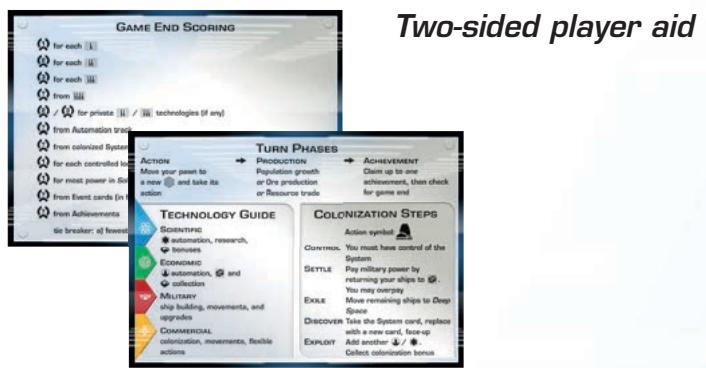
Turn Overview
In Beyond the Sun, players take turns, going clockwise, until the game end condition is triggered. After that, all Victory Points are tallied, and the winner is determined.
A player's turn consists of three phases:
-
Action phase — Move the Action pawn to a new Action space, and take its corresponding Action
-
Production phase — Choose either Population growth, Ore production, or Resource trade
-
Achievement phase — Claim up to one Achievement
After these phases have been completed, the turn passes to the left.
1. Action Phase

To take an Action, the player moves their Action pawn and places it on an Action spaceon the Technology board.
They then take the Action printed to the right of that Action space.
-
The chosen Action space cannot be occupied by any other Faction's Action pawn.
-
The Action pawn must move and cannot stay on the same space it is currently on. However, it is allowed to move to another open Action space on the same Technology card (if there are multiple Action spaces on a Technology card), or even to repeat the same Action (if there is more than one space for the same Action). This rule also applies to spaces in the Basic Spacefaring Technology box (with the exception of the last Action space, which can be repeated as many times as the player wishes).
-
The player must have already researched the Technology the Action space is on. This is indicated by the presence of the Faction's Population cube to the left of the Technology card. (Action spaces printed directly on the Technology board do not require research).
-
A player may not take an Action that they are unable to perform or pay the cost for.
-
Two of the Action spaces in the Basic Spacefaring Technology box require paying an additional Ore for the Action.
-
At the beginning of the game, the Action pawns are placed off the board and do not block any spaces.
Action spaces are usually found on Technology cards and in the Basic Spacefaring Technology box printed on the Technology board.
An Action always has the format:

[cost :] effect
Most of the costs and effects of an Action are represented using icons, while more unique effects are explained in sentences.
The Glossary of Effects beginning on page 13 provides further explanation of different types of symbols and effects.
Players should always check whether they have researched the Technology before taking one of its actions!
• Players are allowed to repeat the same Action if there is a second, open Action space for it.
The cost, if any, must be paid in full before an effect takes place.

It is now Annie's turn. Her Action pawn is currently on one of the Action spaces for “Research a Level I Technology” . She must move her pawn. She is allowed to move it to any unoccupied space on the Basic Spacefaring box (including researching a Level I Technology again), or the open space on the Narrow Beam Lasers Technology card.
She cannot take the “Build a Spaceship then Jump 2” Action (third Basic Spacefaring Action) because both spaces are occupied by other players. She cannot take any actions on the Terraforming Technology card because she has not researched that Technology (no blue cube to the left of that Technology card). She cannot choose to use the Advanced Genetics Technology card because it has no Action spaces — it is a Technology that provides an immediate benefit, but no additional actions.

2. Production Phase
During the production phase, the player must choose one of the following options:
• Population growth
• Ore production
• Trade resources
This is not an Action and does not require the use of the Action pawn.

Population growth +
-
The player examines the Population growth track on their Faction mat.
-
They look at the $\textcircled { 7 + 1 8 }$ symbols that are not covered by Food production discs $\blacktriangle$ , including the leftmost circle.
-
For each $( 7 - 1 1 8 )$ symbol that is showing, take one Supply cube from the corresponding lettered Supply Column above it (position within the column doesn't matter), flip it to the Population side $\hat { \pmb { \Lambda } }$ , and place it on the Faction mat.
The mechanisms used to remove Food (and Ore) production discs are explained later in the rules.
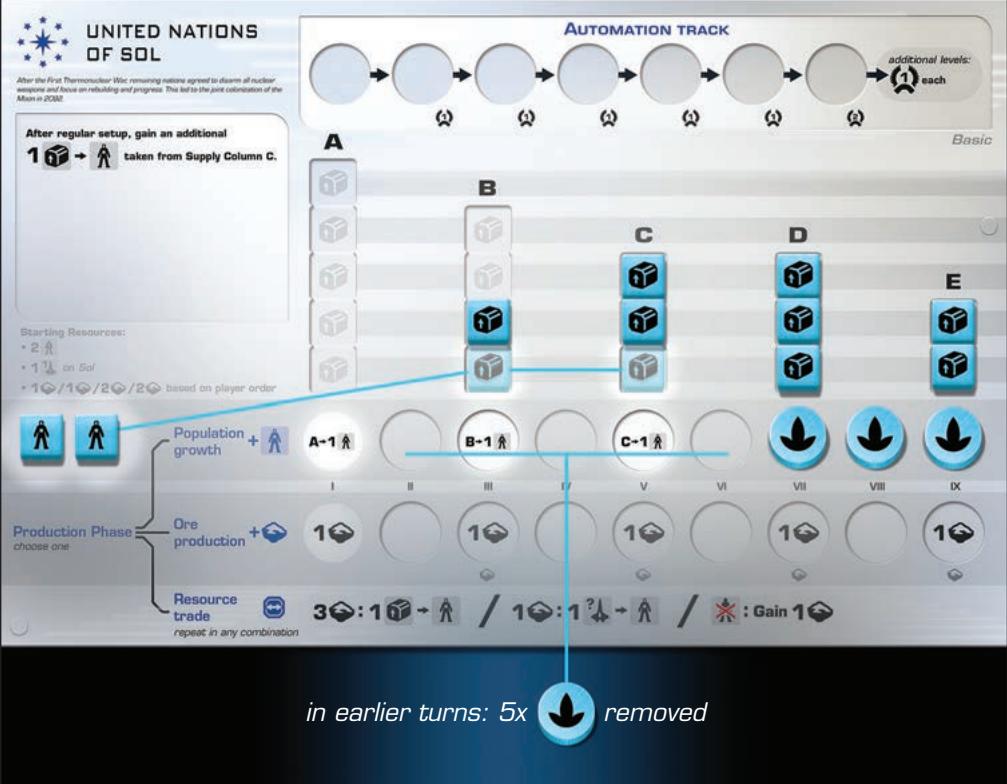
A total of 5 Food production discs were previously removed from Brian's Faction mat, so 3 $\textcircled { 7 - 1 8 }$ symbols (A, B, C) are visible. If Brian chooses Population growth, he takes 1 cube from Column B and 1 cube from Column C and flips them to theside. Column A is out of cubes, so it does not produce any Population.
Take one and only one Supply cube from the column matching the letter on the $\textcircled { 7 - 1 1 }$ symbol. If there are no more cubes in a Supply Column, that column cannot produce Population.

Ore production +:
-
The player examines the Ore production track on their Faction mat.
-
They look at the $\textcircled { 1 }$ symbols that are not covered by Ore production discs, including the leftmost circle.

- They gain Ore from the supply equal to the number of $\textcircled{1}$ that is showing. This Ore is placed on the Faction mat.

A total of 4 Ore production discs were previously taken off Cindy's Faction mat, so 3 10 are visible. If Cindy chooses to produce Ore, she will receive 3 Ore from the supply.
Resource trade

-
This option allows the player to exchange resources but does not generate any new ones. It is useful when a player has many resources of one type and insufficient production capability of another type.
-
Players may make as many trades as they wish and in any combination:
a. Ore to Population:
The player pays 3 Ore, then takes a Supply cube from the leftmost Supply Column that has Supply cubes, and flips it to the Population side . The number of Food production discs on the Faction mat does not apply in this situation.
b. Decommission a Spaceship:
The player pays 1 Ore, then takes 1 of their Spaceships from anywhere, and turns it into a Population cube.
c. Population to Ore:
The player returns a Population to the rightmost Supply Column with at least one empty space for a cube (side up) and gains 1 Ore.
- If a player's Supply cubes run out (very rare), that player may not trade for any more Population.
A player can only choose one option (Population growth, Ore production, or Resource trade) during each production phase on a given turn, not all of them. This choice can be critical to prepare the right resources for the next turn.
When producing Population or Ore, the quantities must be gained in full if possible. A player cannot voluntarily choose to take fewer resources than the production would provide.
Since Trade ignores Food production discs, it is a way for players to get new Population even when some Supply Columns are depleted.
If all of the players agree, the next player in turn order can start their turn while the current player decides what to produce.
3. Achievement Phase
Achievements provide Victory Points at the end of the game and can be claimed during the last phase of each player's turn. Only one Achievement can be claimed per turn, no matter how many conditions have been satisfied.
To claim an Achievement, the player announces the condition that they have satisfied, then places an Achievement discon an open slot on the corresponding Achievement card, filling from left to right (higher to lower Victory Points).
Each Achievement slot can only be occupied by a single disc. When an Achievement card is full, that Achievement can no longer be claimed.
Each Achievement can only be claimed by each Faction once. For example, if a player has colonized 8 Systems, they cannot claim the Empire Achievement again.
Once an Achievement is claimed, the disc stays there for the rest of the game, even if the condition stops being satisfied.
• Players must claim an Achievement if they qualify to do so. They may not voluntarily skip this phase to delay the end of the game.
• The players' supply of Achievement discs is not limited (use substitute markers if necessary).
Achievements can only be claimed by the player who is currently taking their turn, even if the condition is met by another player.
Game End Triggers and Scoring
Triggering the End of the Game
In Beyond the Sun, there is not a set number of rounds to finish the game. Instead, the last round is triggered when 4 total Achievement discs have been placed on Achievement cards. It does not matter which Achievement cards they are on or which colors the Achievement discs are.
Once 4 Achievements are claimed, finish the current round (ending with the player to the right of the starting player), then play one full, final round of the game. Achievements can still be claimed after the game end is triggered, resulting in more than 4 total discs on Achievement cards. After the final round, players calculate their scores, and the winner is the player with the most Victory Points.
Players should pay special attention when Achievements are starting to be claimed, as the last round can be triggered rather quickly afterward. However, since only one Achievement can be claimed per turn, a player cannot “rush” the end by claiming multiple Achievements at once. On the other hand, a player also cannot “delay” the end by not claiming an Achievement when they can. If a given Achievement condition is fulfilled, a player must claim the Achievement; however, if they fulfill multiple Achievements at once, they can choose which one to claim.
The active player may claim only one Achievement each turn!
On average, there are about 15 rounds in a game, including the final round. However, this can vary based on players' decisions and how the Technology tree unfolds.


Annie , Brian■, Cindy■, and Derek■are playing a game of Beyond the Sun, and Annie was the starting Faction. Cindy (3rd player) managed to claim the 4th Achievement, which triggered the end of the game. To ensure equal turns, Derek [(4th player) gets to take his turn after Cindy, then everyone (including Derek) gets exactly one more turn. Players are still allowed to claim an Achievement on their final turn, even though 4 Achievement discs are already on the board.
If Derek was the one who triggered the end of the game, the final round would begin immediately after Derek's turn. All players (including Derek) will get exactly one more turn.
Scoring
Follow the steps below to score each Faction's Victory Points. This is also printed on the back of the player aid.
-
Each Faction scores 1for each of their Level I Technologies
-
Each Faction scores 2for each of their LevelIl Technologies
-
Each Faction scores 3for each of their LevelIll Technologies
-
"Private Technologies” (from card bonuses) are worth 2 or 3based on their level (Level Il or Ill respectively).
-
Each Faction scoresspecified on their Level III Technologies
-
Each Faction scoresspecified on their Automation track (add allshowing, up to the level reached). After level 7, each additional level is 1each.
-
Each Faction scoresfor each of their colonized Systems, as indicated at the bottom of the System card.
-
Each Faction scores 1for each of their uncolonized Outpost discs (on System cards or Shipyard Systems).
-
Each non-controllable location (Sol and Deep Space) scores 1for the Faction(s) with the highest military power (tied players get the same).
-
Each Faction scoresfor each Event card that provides. They are usually found near the Achievement cards, or they can be attached to certain locations or Factions.

- Each Faction scoresfor each of their Achievements.
The Faction with the most Victory Points is the winner. In case of a tie, the tied Faction with the fewest remaining Food and Ore production discs on their Faction mat (in other words, the highest combined production level) wins. The second tiebreaker is the highest number of remaining Population cubes , and the third tiebreaker is the highest number of remaining Ore crystals. If there is still a tie, multiple Factions will jointly rule the galaxy.


Basic Actions
In Beyond the Sun, icons are used to describe Action costs and their effects, as well as other bonuses that may be gained during the game. As starting examples (especially if players are playing the game for the first time), the following table introduces the actions in the Basic Spacefaring Technology box, explained in plain sentences in the Description column, then broken down into individual component effects in the Referenced Effects column.
A complete glossary of all referenced effects is listed from the next page onward.
| Basic Spacefaring Action | Description | Referenced Effects |
 | Use 1 Population cube to research a Level I Technology. | • Use a Population cube • Research a Technology |
| 20 :R | Pay 2 Ore to use 1 Population cube to research an undiscovered or existing Level Il Technology for which the player is eligible. | • Pay/Gain Ore • Use a Population cube • Research a Technology |
| [optional: 1 穴 then Jump 2 | The player may optionally transform 1 Population cube to a level 1 Spaceship and place it on So/ or any Shipyard System that the player controls. Then the player may perform up to 2 Jumps. | • Optional effects • Use a Population cube • Build a Spaceship • Hyperspace Jump |
| 穴 + Gain 1 | Create 1 Population cube from the leftmost Supply cube available, ignoring Food production discs, and then gain 1 Ore. | • Use a Supply cube directly • Pay/Gain Ore |
BASIC SPACEFARING


[aptionat1→ then Jump 2

1→+ Gain 1

Glossary of Effects
Gain/Pay Ore
X : effect
Gain X
Pay X to an opponent
Many actions in the game cost Ore to execute, and some allow players to gain Ore from the supply.
If an Action or effect requires Ore in its cost, the full amount must be paid to the supply (or to the target opponent) before executing the effect.
If an effect allows the player to gain Ore, the player takes the full amount from the supply and puts the Ore crystals on their Faction mat. The supply of Ore crystals is not limited (use substitute markers if necessary).
Use a Population Cube
1→ effect, effect
A Faction's active workforce is crucial in researching new Technologies and constructing Spaceships. Careful balancing of food production and population utilization is necessary to ensure sustainable growth of a Faction's economy.
To use Population cubes , the player must have the required number of Population cubes on their Faction mat.
Most effects only require 1 Population cube. Using a Population cube involves moving it to the board and possibly rotating the cube to a different side (e.g., moving it to a Technology slot or turning it into a Spaceship).
Use a Supply Cube Directly

→ effect
The invention of advanced Al and android technologies allow Factions to increase their operational efficiency with minimal human involvement. This leads to the introduction of autonomous ships and proto-sentient workers, but also raises ethical issues regarding how machines and androids should be treated in society.
The player takes the indicated number of Supply cubes from the Supply Columns of their Faction mat, starting from left to right. The player must take all cubes from a column before they start taking from the next column. The number of Food production discs on the Faction mat does not matter for this effect. If there are no more Supply cubes left in the Supply area, Population cubes may be used instead, but it is not required.
This effect allows players to take cubes directly from their Supply area regardless of the Population growth track. It can be very useful when a player is struggling to keep up with food demand.
Returning/Overworking Population
1 effect
To return Population as a cost of an effect, the player must have the required number of Population cubes on their Faction mat. Returning a Population cube means flipping it to the Supply side and placing it back on the rightmost Supply Column with at least one empty space for a cube. The player must fill a column completely before placing it in the next. If all columns are filled, the player continues placing cubes on Supply Column A, even though there are no spaces left there.
Some effects require Population cubes both as a cost and in the effect itself. For example: 2: requires a total of 3 Population cubes.
Unless otherwise specified, players will always take Supply cubes from left to right and return them to empty slots from right to left.
Research a Technology



Research plays an essential role in advancing a Faction's power and economy. As the Technology tree unfolds, Factions steer the course of human civilization and unlock increasingly powerful actions and effects.
Researching a Technology involves the following steps:
-
Choose Technology slot
-
Place Population cube
-
Trigger Event (undiscovered Level Il or Ill Technologies only)
-
Choose Technology card (undiscovered Technologies only]
-
Gain immediate bonus
1. Choose Technology slot
There are 4 levels of Technologies, laid out in 4 columns on the Technology board, going from left to right. The symbol I / II / Ill / IlIl ) in the icon specifies which Technology level the player is researching.
The researching player can choose any Technology slot on that level that satisfies the following conditions:
a. they have not already researched the Technology
b. they have the prerequisites for the Technology
To determine if the prerequisite Technologies have been researched for a given slot, the player must have already researched all the technologies connected directly to the left of it via the blue line(s).
Level I Technologies do not have prerequisites, since every Faction starts the game with the Basic Spacefaring Technology.


Higher-level Technologies require 1 or 2 prerequisites. Some Level IlIl Technologies only require 2 out of 3 prerequisites.
If the symbol contains an eye $\chi ^ { \star } \mid \mid \mid ^ { \Phi }$ , the player can only pick an already discovered (face-up) Technology.
2. Place Population cube
The player places their required Population cube onto the rectangular space to the left of the Technology slot.
Other players' cubes do not block this placement. Factions are allowed to research the same Technologies.
These Population cubes represent part of the Faction's workforce dedicated to science and technology. These cubes will never be returned to the Faction mat, so as a Faction's technology advances throughout the game, they will need more Food production to keep up with the demand.
3. Trigger Event (undiscovered Level Il or III Technologies only)
If this is an undiscovered Level Il or Ill Technology slot, the player reveals the Event card covering the slot, reads the Event, and resolves it according to the instructions. The Event card is then discarded unless specified otherwise.
4. Choose Technology card (undiscovered Technologies only)
If this is an undiscovered Technology, the researching player has the opportunity to choose a new Technology card from the deck to place on the board, unlocking new actions and abilities:
a. Determine Technology type
The player examines the type/color of each prerequisite Technology one level to the left, which is indicated with a small triangle on the right side of the prerequisite card. If there is only 1 prerequisite (or both prerequisites are of the same type), that will be the type of the newly discovered Technology. If there is more than 1 prerequisite type, the player chooses which of those 2 types the new Technology will be before the next step.
b. Reveal Technology cards
The player reveals cards from the Technology deck of the appropriate level until 2 Technology cards matching the chosen type/color are revealed, using the large triangle on the left side of the card to find a match. If the large triangle is split into 2 types/colors, the card represents a hybrid Technology that matches either type. Cards that do not match are placed to the side for now.
c. Choose Technology card
The player chooses 1 of the matching cards and places it on the chosen Technology slot. The card that was not chosen and unmatching Technology cards are placed face-down on the bottom of the same Technology deck in random order. The deck is not shuffled.
The 4 types of Technologies have different characteristics, summarized below. A hybrid Technology generally contains characteristics of both of its types.
•Scientific— Ore production automation, research actions, and Ore bonuses
• Economic — Food production automation, Population collection, and Ore collection
• Military — Shipbuilding, movements, and upgrades
• Commercial — Colonization actions, ship movements, and flexible actions
5. Gain immediate bonus
If there is a box labeled “IMMEDIATE” on the Technology card, the player receives a one-time bonus described in the box immediately after researching the Technology. This bonus is not limited to the first player to discover the Technology. If other Factions research the same Technology later in the game, they will also get the bonus. Any other effects that are shown outside this box are not executed — they are either new Action space(s) or a permanent power for the players who have researched the Technology.

Derektakes the “Research a Level ll Technology” Action listed in the Basic Spacefaring Technology box. He is allowed to research the Technology at slot A, B, or C (he has the prerequisites, Narrow Beam Lasers and/or Terraforming), but not slot D, E, or F (he does not have the prerequisites, Advanced Genetics and/or Advanced Robotics). He chooses slot B and will discover a new Technology there. He pays 2 Ore, places a Population cube on the space to the left of slot B, and resolves the Event card there.
Since there are 2 prerequisites connected to slot B, he can decide to search for either a Military or Commercial Technology. He chooses Military, so he reveals cards from the Level Il Technology deck until he finds 2 Military Level Il Technology cards: Human Experiments and Plasma Cannon. He chooses the Plasma Cannon Technology card, places it on slot B, and receives the IMMEDIATE bonus on the card. The new Action space on the Plasma Cannon Technology card will be available to him starting on his next turn; no other player can use it until they also research the Plasma Cannon Technology.

Automate Food or Ore Production
Automate 1
Automate 1
Automating production is one way to increase Ore and Population growth for a Faction.
To automate Food production or Ore production , the player takes the leftmost production disc from the corresponding production track on the Faction mat and places it on the Automation track above, starting from the left. If there are no more production discs of that type, the player must place a disc (as a placeholder; it is not an Achievement). If all 7 Automation levels are filled, the player places additional discs to the right of the Automation track.
Some automation levels provide additional Victory Points at the end of the game, as indicated on the Automation track. Each level beyond 7 provides 1 Victory Point.
Do not confuse this effect with placing production discs on System cards (as outposts/colonies) when controlling or colonizing a System (see Hyperspace Jump and Colonize a System). Unlike Outpost discs on System cards, discs on the Automation track can never be removed.
Build a Spaceship

To amass a fleet for exploration and colonization of the galaxy, Factions build spaceships using the massive Modular Orbital Shipyards engineered during the Second Space Race of the mid-2100s
To build a Spaceship, the player takes the required resource cube and rotates it to the side with the Spaceship symbol ? of the indicated ship level (1 to 4). New Spaceships can be built either on Sol or on any Shipyard System that the player controls (control is determined by the presence of the player's Outpost disc on that location). All locations where ships can be built are marked with a icon on the Exploration board. If multiple ships are built, they can be placed on separate locations.
In the rare occurrence that a new Spaceship appears on a location the player does not already control (from certain card bonuses), System control may change, and effects may trigger (see Hyperspace Jump).
Upgrade a Spaceship

Upgrade 1by X level(s)

Upgrade up to x by X level(s)
To upgrade a Spaceship, the player simply rotates the selected Spaceship cube to the new level. A Spaceship cannot exceed level 4. Players may only upgrade their own Spaceships.
Hyperspace Jump
Jump X
Hyperdrive technology was the keystone discovery that enabled humans to go beyond Sol to explore the galaxy. Due to its unstable nature and high energy cost, the distance and fleet size of each jump is limited.
A hyperspace jump effect involves the following steps:
-
Move
-
Check System control and build outposts
-
Check System bonuses
1. Move
The number indicated in the Jump effect is the number of movement points that the player may spend on ships:
One movement point allows one Spaceship cube to move one line segment connecting two locations on the Exploration board.
Movement points can be allocated in any way among available ships (i.e., multiple movement points can be spent on one ship or multiple ships can split the points).
• All movements are considered simultaneous — only resolve the next steps after movement is done.
• Players are not required to use all movement points, but they cannot be saved for later.
2. Check System control and build outposts
Locations on the Exploration board with/symbols attached are Systems that can be controlled during the game.
The Faction with the most powerful fleet in a System builds an outpost there and benefits from the improved production.
System cards and Shipyard Systems on the board are controllable, while Sol and Deep Space are not controllable.
System control is updated whenever there is any change on the Exploration board, even when it is out of turn. However, control is not checked in the middle of a movement.
To determine control of a System:
• If the System currently has no ships, the Faction that moves one or more ships there and leaves at least one ship on the System gains control of the System.
Otherwise, a Faction needs to have a strictly higher military power than the current controlling Faction to take control. The power of a Faction's fleet at a location is equal to the sum of all their Spaceships' levels there (not the number of Spaceship cubes). Outposts do not add any power to the Faction that owns them.
If some or all of the controlling Faction's Spaceships leave a System and another Faction now has the strictly highest power there, that Faction takes control
If some or all of the controlling Faction's Spaceships leave a System and multiple remaining Factions tie for the highest power, the Faction that is leaving loses control of the System. That Faction returns the Outpost disc to their Faction mat, and no other Faction takes control.
If all of the controlling Faction's Spaceships leave a System and no other ships are there, the Faction retains control of the System.
When a player gains control of a System, they must immediately build an outpost on it by taking the leftmost production disc from the production track corresponding to the System's specialty (/) and placing it on the location. If a System has multiple specialties, the player chooses which disc to place there. If the player has no more production discs of a matching type, they must place a disc on the System as a placeholder. This is not considered an Achievement.
When a player loses control of a System, they return their Outpost disc to the rightmost empty slot on the corresponding production track. The new controlling Faction (if applicable) then places one of their discs in its spot. If one Faction takes control of a multi-specialty System from another, the player who controls the new Faction does not have to choose the same type of outpost.
An outpost serves as an indicator of which Faction controls a System, which is required for shipbuilding and colonization
3. Check System bonuses
Some Systems provide additional effects when Factions visit them.
Gain control — When a player gains control of (i.e., places an disc on) a System with a gain control effect, they gain this bonus immediately. It does not matter whether it was previously empty or occupied. This bonus can also be triggered on another Faction's turn (for example, if ships move away). However, the bonus is not applied again when the System is colonized.
Other effects — There are occasionally other special rules related to a System. These rules are explained on the card.
If a player gains control of multiple Systems at the same time, they may apply their bonuses in any order they wish.
At the end of the game, each Outpost disc on the Exploration Board is worth 1 Victory Point.
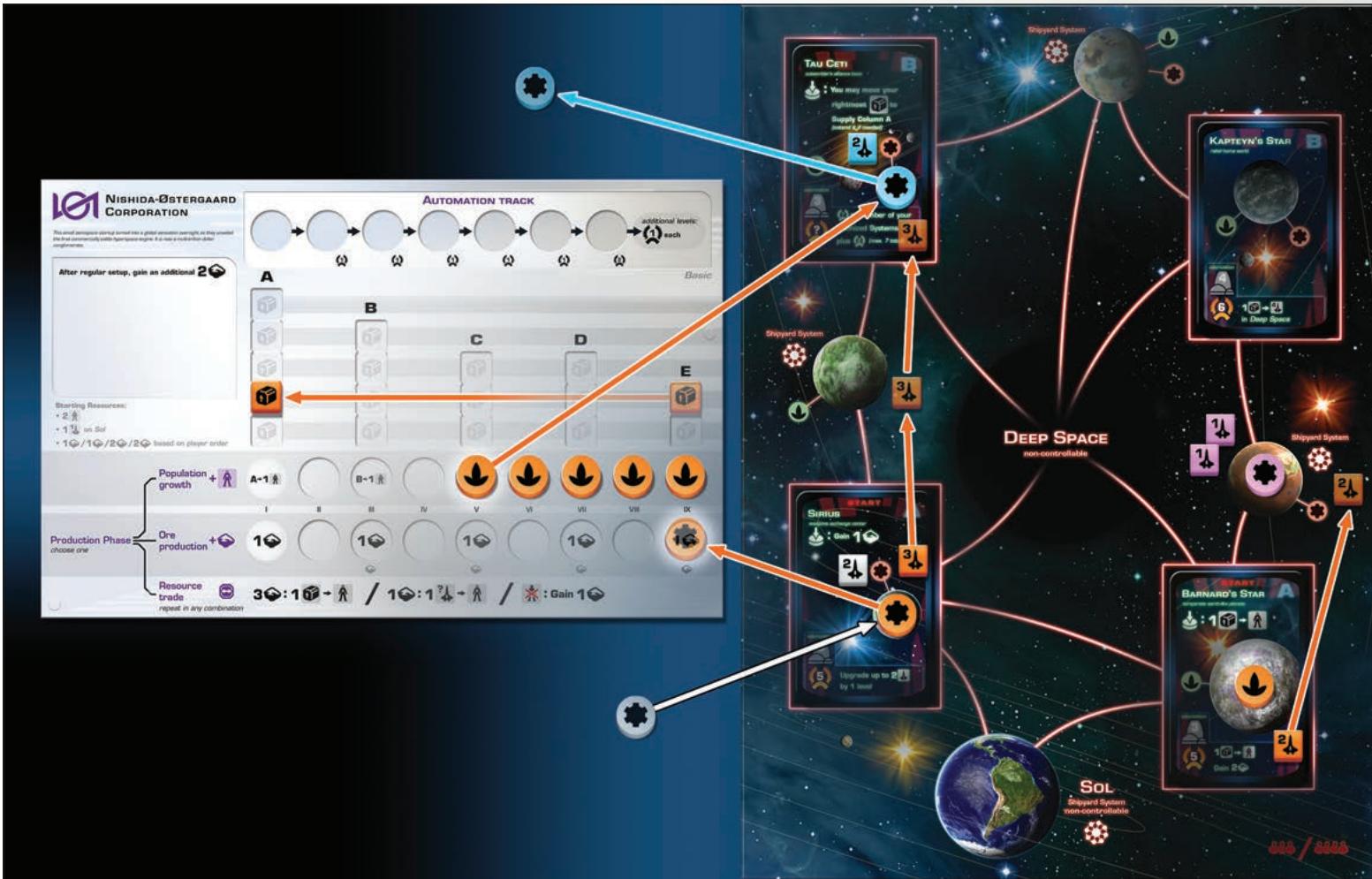
Ellenis executing a “Jump 4” effect. She moves a level 2 Spaceship from Barnard's Star to the Shipyard System on the right (1 movement point), and a level 3 Spaceship from Sirius to Tau Ceti (2 movement points). She chooses not to use the last movement point.
Control does not change on the Shipyard System (military power tied with), but she now gains control of Tau Ceti (vs ). It is a System with multiple specialties, so she chooses and places a Food production disc from her Faction mat onto the Tau Ceti card and returns the existing disc to Frank, who places it in the rightmost empty space of the Ore production track on his mat. Ellen receives the Gain control bonus on Tau Ceti (moving 1 Supply cube to Supply Column A).
At Sirius, Ellen lost control to Geoff , so she places her Ore production disc back to the rightmost space on her Ore production track. Geoff then places one of his production discs on Sirius and receives the Gain control bonus there (gaining 1 Ore).
Ellen keeps her Outpost disc on Barnard's Star since no other players have ships on it.

Colonize a System
(Colonize)
With sufficient resources and military power, a System under a Faction's control can be colonized to become that Faction's permanent territory. This allows the Faction to further improve its production and receive unique benefits the System offers. Only System cards (with a symbol) are colonizable. Shipyard Systems, Sol, and Deep Space cannot be colonized.

A colonization effect involves multiple steps. These steps are also listed on each player aid.
-
Determine eligibility
-
Settle Spaceships of required power or more
-
Exile other Spaceships to Deep Space
-
Take System card and discover new System
-
Place additional production disc
-
Gain colonization bonus
1. Determine eligibility
Colonization requires a strong military presence in order to establish a stable and sustainable community, as well as to ensure the safety of the settlers.
Unless otherwise specified, to be eligible to colonize a System, a player must have:
• control of the System (an Outpost disc on the System card)
the minimum required military power on that System. The power requirement is printed inside the symbol on the System card. The power of opponents' ships at that System does not matter for colonization.

2. Settle Spaceships of required power or more
The player must return a number of Spaceships in the System that add up to the required military power or more. They become settlers on the new colony and will be returned to the Faction mat. The player is allowed to return more power than required, either by choice or because no combination of Spaceships on the System is exactly equal to the required power. However, they do not get any “change” for the difference.
Place the selected Spaceships, side up, back on the empty slots in the Supply Columns of the Faction mat, starting from right to left. If all slots are filled, continue placing cubes on Supply Column A, even though there are no spaces left there.
An often overlooked benefit of colonization is that it refills Supply Columns, allowing more Population to be produced and used again without having to improve Food production. The returned Spaceships are not sacrificed or destroyed — they are merely starting a community in the new world!
3. Exile other Spaceships to Deep Space
Once a System is colonized by a Faction, the remaining Spaceships must leave and continue to explore the rest of the galaxy.
The player moves all remaining Spaceships in that System (including their own ships) to the Deep Space location.
4. Take System card and discover new System
The player takes the System card, along with the Outpost disc on it, and places it next to their Faction mat. They then draw the top System card from the corresponding System Deck and refill the empty slot with that card. The player should read the new card out loud to the other players, so they know what bonuses the new System has to offer. In the rare case where one of the System Decks runs out, draw from the other deck instead. If no System cards remain in either deck, leave the slot empty.
5. Place additional production disc
The outpost flourishes into a colony, providing additional production boosts for the governing Faction.
The player places another production disc matching the System's specialty on the System card, ending with a stack of 2 production discs. If the System has multiple specialties, the player may choose one. This new disc does not have to be the same type as the original outpost. If the player has no more production discs of a matching type, place a disc as a placeholder. This is not considered an Achievement.
6. Gain colonization bonus
The player gains the bonus described at the bottom of the System card immediately. Bonus effects must be executed in full unless specified otherwise.
Since a new System card was already drawn in the previous step, a colonization bonus that involves a Jump effect may allow Spaceships to immediately enter (and likely control) the newly drawn System.
At the end of the game, each colonized System is worth Victory Points equal to the value indicated at the bottom of the card.
See the next page for a detailed example of colonization.
Optional Effects
(optional: Effect)
Effect (optional)
You may...
Jump X
Throughout the game, unless specified otherwise, all costs and effects are mandatory and all quantities must be paid or gained in full. There are, however, a few exceptions to this rule:
• Any effects that are specified “optional”, “if possible”, “you may”, or has “up to” rules text
• Movement points in a Jump effect
• Upgrading Spaceships when there are not enough to upgrade (or if all of them are already at level 4)
When a player runs out of Supply cubes, and an effect converts Supply cubes to something else, the player may instead use Population cubes for some or all of the missing quantities or just pass on that effect.

Heidiis taking a “Colonize a System” Action. Despite having a military presence, she is not allowed to colonize Barnard's Star (because she does not control it) or Lalande 21185 (because she does not have enough military power). Her only choice is Kapteyn’s Star.
Kapteyn's Star requires 4 power to colonize. She takes 2 level-2 Spaceships there, flips them to theside, and returns them to her Faction mat's Supply Columns. She places 1 cube on the last empty slot on Supply Column B and 1 cube on an empty slot on Supply Column A. The remaining 2 Spaceships (and ) are moved to Deep Space.

She takes the Kapteyn's Star card along with the existing outpost and places it next to her Faction mat. She refills the empty slot with another card from System Deck B and reads it to all players. Kapteyn's Star is a System with multiple specialties, so she chooses and places an additional Food production disc on it, making a stack of 2 discs.
Finally, she gains Kapteyn's Star's colonization bonus of placing a Spaceship in Deep Space from her supply.
Rule and Card Clarifications
• A player may not deliberately take an Action that causes no change in the game state when the Action is complete.
● For example, a player may not take a “Jump 4” Action and not perform any Jumps, but they may take a “Gain 2 Ore + Jump 2” Action to take 2 Ore and not perform any Jumps.
Modular Fleet (tech ll) — since all 3 shipbuilding effects are optional, players are allowed to take this Action just to Jump 3.
• Quantum Data Exchange (tech Ill), Technocrats' Guild — the chosen Action can be occupied by another player.
Ministry of Colonies (tech I/l) — in the extremely rare case that System Deck A runs out, draw the rest of the cards from Deck B.
Lalande 21185 (system A) — the colonization bonus must be carried out in order: produce Food, produce Ore, then Trade.
Ross 154 (system B) — to use its power, the player moves the existing Action pawn aside and occupies the Action slot normally.
Museum of Retired Spacecraft (event Ill — ships on this card are out of the game and cannot be moved, upgraded, or targeted.
Dyson Sphere, Mk. I (event Ill) — the attached System card is not a location and cannot be reached or targeted. To execute this Action, the player takes the System card and places it next to their Faction mat, similar to regular colonization. The player collects any colonization bonuses described on the card but does not place any production discs. The Event card is then discarded, and the Action pawn is placed near the Basic Spacefaring box to be moved again next turn.
Specialization (achievement B) — this counts the printed System specialty icons, not the discs placed. Shipyard Systems also count toward this total.
“Upgrade then Jump” (e.g., Supply Outpost (tech II), Hyperdrive Boosters (tech IIl), etc.) — resolve any System control changes after upgrade, then resolve again after Jumps.
Taking Supply cubes from other columns (e.g., United Nations (basic), Android Rights Movement (tech Ill), etc.) — the next time cubes are returned to the supply for any reason, the rightmost spaces must still be filled first.
• “Private Technology” (Procyon (system A), WISE 0855-0714 (system B))
• No Population cube is needed for this research. Simply put the Technology card near the Faction mat.
• The researching player gets the immediate research bonus, and only they can use its Action(s).
• Make sure to score Victory Points for them at the end of the game.
• They are considered out of the game and cannot be researched, copied, or targeted by other Factions.
If a player runs out of production discs and is usingdiscs as a placeholder (e.g., when automating/controlling/ colonizing), and if an actual production disc becomes available later (e.g., losing control of a System), the player does not get to replace the placeholder with it. Note that the supply of discs is not limited (use substitute markers if necessary).
If a resource cube is returned to a player's supply and there are no empty slots left in any Supply Columns, place it above Supply Column A to extend that column.
• If adisc that is used as a placeholder is returned to the player for any reason, return it next to the player's Faction mat and it can be reused again.
•When researching a Level IlII Technology that requires “2 out of 3” prerequisites, the researching player may only choose a Technology type from prerequisites that they have researched.
• Technology Tableau Expert Variant:
• Mass Enlightenment (event IIIl — this card does not trigger the revealing of the Level IIIl row.
• Spacetime Anomaly Studies (tech Il) — this card will trigger the revealing of the Level Ill row.
• Planetary-scale Research (tech III) — reveal new rows as needed.
Strategy and General Tips
Due to the variability of the Technology tree, players should adapt their strategy to what Technologies come out in the game. The game can favor a research-heavy strategy, a colonization-heavy strategy, or a mixture of both.
When selecting a new Technology, make sure it serves both short-term needs (via immediate bonuses) and long-term goals (via new actions).
Colonizing a System seems like a daunting task, as it involves movement, taking control, and returning Spaceships, but it can be a crucial part of a winning strategy and should not be ignored.
If competition for control of Systems seems vicious, it often helps to focus on research during that time.
When opponents start thinning out their military due to colonization, it is time to take control of Systems cheaply.
Population cubes can get “locked up” by Technologies or having a fleet that is too big. To free up Population cubes, either increase Food production, colonize Systems to get cubes back, or take actions that use Supply cubes directly.
Special Thanks
Benjamin Jones, Sam Backwell, Jan Horjus, Yue Shing, Jared Rubinstein, Jared Miller, Jason Kovacs, Phil Amylon, Peter Harvey, Ankit Shah, Seth Meyer, Nathaniel Speer, Chris Rollins, Mike Erickson, Brian Gow, Carol Carveth, Jeff Grove, Jam Murphy, Elise Spencer, Adam Eastwood, Zoltan Perko, Janet Guo, Colin Goldberg, Eric J. Francis, Joey Chan, Kin Cheung, Christopher Rivera, Chris Bryant, Kevin Monahan, Ken Hill, Robin Hill, Mike Zehnal, Lyle Rhodebeck, Peter "The Red Menace” Stein, Scott Tepper, Tom Lehmann, Ray Pfieffer, Scott Russell, Tadd Colver, Roy Colver, Franz Vohwinkel, Game Makers Guild Boston, Boston Festival of Indie Games

Dennis K. Chan
is a game designer living in Boston. Originally from Hong Kong, he moved to the United States to attend Wesleyan University, where he graduated with a degree in Physics. When not designing games, he is a software engineer who enjoys biking, cooking, playing board games, and rocking out on the pipe organ.
© 2020 Rio Grande Games All Rights Reserved
Setup for 2 to 3 players
Changes for 3 players
• Cover the Basic Spacefaring Technology box with the replacement tile for 3 players.
• The first and second player each begin the game with 1 Ore; and the third player 2 Ore.
• The second slot on Achievement Card A is not available.
• Only 3 Achievement discs are needed to trigger the last round of the game.
Changes for 2 players
• Cover the Basic Spacefaring Technology box with the replacement tile for 2 players.
• Both players begin the game with 1 Ore.
• The 2-player side of the Exploration board is used and only one Starting System from Deck A is revealed.
• The Disciples of the Cosmic Tabernacle Faction mats are returned to the box and cannot be chosen.
• The second slot on Achievement Card A is not available.
• Only 3 Achievement discs are needed to trigger the last round of the game.
Advanced Faction Mats
Once players are familiar with the mechanisms of the game, all players can agree to use the Advanced Faction mats to enable unique Faction powers. The use of either Basic or Advanced Faction mats must be determined before setup, and all of the players must use the same set.
- Setup changes:
After the Technology board, Exploration board, and Achievement cards are set up, each player selects a Faction board in reverse player order, then finish the rest of the Faction setup as usual.
- The Advanced Faction mats have powers that are unique to each Faction:
a. Two unique “Innovations” that can be reached during the game
The activation conditions for these Innovations are described below the Faction name, and also indicated with a icon on the Faction mat itself.
Some Innovations are activated just once when achieved, while others are in effect while a certain minimum production level is available. If the production level goes below this minimum, the ability is lost until production reaches the required level again.
b. The configuration of Supply Columns and Ore production tracks are also different for every Faction.
Expert Variant: Technology Tableau
For experienced players who prefer more strategic gameplay, Beyond the Sun can be played with a tableau of Technology cards instead of drawing 2 from the top of the deck. The changes are as follows:
Setup changes
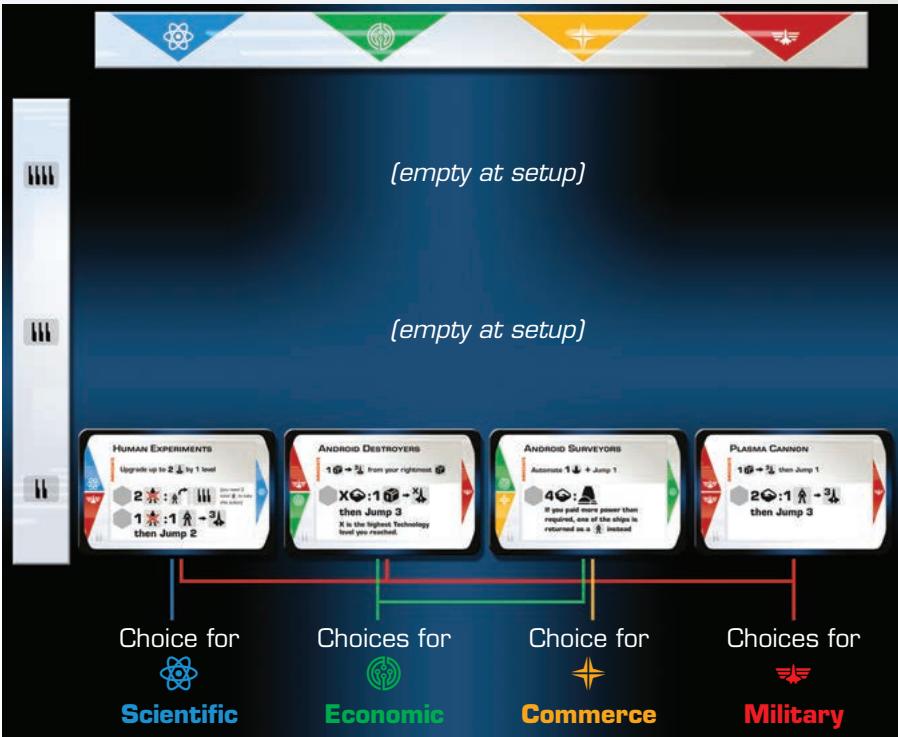
• Reserve a 3-row-by-4-column “grid” of Technology card tableau on the play area, by placing the included cardboard bar showing the 4 Technology types on top, and the bar showing Level //to the left.
• Across the Level row, under each column, reveal cards from the Level Il Technology deck until there is a Technology card that matches the column's type/color on the left triangle of the card. Cards with 2 types count as a match for either type. Place the discarded cards on the bottom, then move on to the next column.
• Do not reveal any Technology cards for Level III and IIII yet.
• Shuffle and place the Level II, IlI, and III Technology decks to the left of the tableau, next to their respective rows.
Gameplay changes
When discovering a new Technology, players may select 1 of the 4 revealed cards of the corresponding Level row, or draw a random one from the deck:
The type requirement is the same. For example, from a military/red prerequisite, the player can pick any card from the row that has military/red on the left triangle. When there are 2 prerequisites of different types, either type can be chosen. The 4-column setup ensures there is at least one card of each type (but it is possible that some types only have one choice!).
At the end of each turn, refill any empty slots by revealing cards from the corresponding deck until a card matching the type/color of the column is found. In the rare case where there are no more cards of a matching type, draw a random one.
If a player does not like the face-up choices, they may instead draw from the top of the deck until a card of the matching type is found. They must use that card as the new Technology. Place the discarded cards on the bottom of the deck as usual.
• As soon as an Action space that allows research of Level IIl Technologies is unlocked, set up the Level Ill row using the same method as the setup section above. The same applies to the first Action space that allows research of Level IIl Technologies.
When all spaces on the Technology board for a particular Technology Level have been filled, clear that level's row from this tableau and shuffle the deck. The decks may still be needed for other effects later.

Setup for 4 players (Setup for 2 to 3 players listed on the reverse side)
-
Place the Technology board in the middle of the table.
-
Sort the Technology cards into Level I,IIII, and III Technologies by their card backs and shuffle each deck. Randomly distribute the 4 Level I Technology cards face-up onto the spaces marked
-
Place the Level II, III, and IIII Technology decks facedown by the Technology board, close to their respective columns.
Sort the Event cards into Level Il and Level III events by their card backs.
- Shuffle the 2 light-bordered Level Il Event cards (Tyler Lee, Entrepreneur Prodi
内容过长,此处只内联前一部分;完整内容请下载或到规则页阅读。
下载 Markdownbeyond-the-sun-leaders-of-the-new-dawn-rulebook-english.md29.3 KB
Beyond the Sun: Leaders of the New Dawn
D E N N I S K . C H A N & J O S E P H S U M M A
Rules LotND 2.3.indd 1
Rules LotND 2.3.indd 1
Following the discovery of hyperspace travel in the year 2246, a renewed sense
of unity and purpose ripples across the whole solar system. The factions in
power need to position themselves quickly to seize this golden opportunity, and
strong leadership is necessary to get ahead in the race to colonize the galaxy.
Thanks to the Omniweb Engine, a data-mining network that covers the entire
population of the solar system, each faction can search with pinpoint precision
for candidates with the exact skills and traits they need, both domestically and
militarily. Can your faction find and groom leaders with the perfect combination of
internal ingenuity and external prowess to rise above the others?
List of Components
All cards from this expansion are marked with the * symbol for easy identification. The replacement Technology cards
are an exception to this. They are marked instead with a £ to identify them as replacement cards for the original base
game.
20 Leader cards:
10 each of Domestic and
Military Leaders
3 Android-Omniweb Hivemind Prediction cards
(used with the Android-Omniweb Hivemind Faction mat)
1 Credit token
(used with the “Investor” Leader card)
1 +1 Military Power token
(used with the
“Guerrilla Tactician”
Leader card)
8 +1 Military Power tokens
(used with the
“Orbital Defense Expert”
Leader card)
5 +1 VP tokens
(used with the “Android-Omniweb Hivemind” Faction mat)
Rules LotND 2.3.indd 2
Rules LotND 2.3.indd 2
Before playing this expansion…
Beyond the Sun: Leaders of the New Dawn expansion contains 4 replacement Technology cards for the base game. Whether
you are playing the base game or any of the expansion modules, find and replace the 4 Technology cards in the appropriate
decks in the base game: Mass Cloning (tech II), Modular Fleet (tech II), Spacetime Anomaly Studies (tech II), and Stealth
Terraformers (tech III). The obsolete cards should be removed permanently from the game.
Solo game rules booklet
Overview
This Beyond the Sun expansion contains new cards that may be used to expand the original base game. Any of these
components and modules (with the exception of the replacement Technology cards listed above) can be independently added
to the game, in any combination. The setup and rules for different modules are described below.
Players are welcome to mix and match these modules as they wish, but for the full experience, we recommend using all of the
expansion components when playing with the Leaders Module. However, the Advanced Factions are always considered to be
optional.
16 Anarchist Action cards:
4 Level I, 6 each of Level II and III
12 Anarchist Event cards:
6 each of Level II and III
1 Doomsday Tracker board
Other components to expand the Beyond the Sun base game
8 Technology cards
4 replacement Technology cards (marked with £ for identification)
4 Event cards: 2 each of Level II and III
12 System cards: 8 type A Systems and 4 type B Systems
2 Faction mats (Android-Omniweb Hivemind, Space Privateers’ Collective)
Components for the solo game
Rules LotND 2.3.indd 3
Rules LotND 2.3.indd 3
Leader Abilities
The abilities granted by a Leader card will fall into one or more of the following categories:
1. Setup Powers
a. These powers are triggered at the beginning of the game, and this part of the card has no effect for the rest of the
game.
b. Cards list: Astrobotanist, Astrochemist, Completionist, Investor, Overachiever, Savant, Fleet Dispatcher, Guerrilla
Tactician, Master Engineer, Ethical Smuggler, Military Industrialist
2. Passive Abilities
a. No Action is required to use these abilities. They are triggered due to certain conditions or have permanent effects
that apply during the game.
b. Cards list: Investor, Overachiever, Guildmaster, Guerrilla Tactician, Ethical Smuggler, Military Industrialist, Master
Engineer, Orbital Defense Expert
3. Reusable Actions
a. A reusable Action is represented by an W Action space on the card, which does not have a a space. The player
can take the Action according to the normal Action rules (i.e., the Action space must be open, and the Action pawn
must move every turn). The Action is “private” to the owning player and cannot be targeted or copied by any abilities in
the game.
b. Cards list: Completionist, Innovator, Logistician
I. Leaders Module
In the Leaders Module, Factions recruit a Domestic Leader and a Military Leader at the start of the game. These Leaders
have abilities that grant some mixture of setup bonuses, private action spaces, limited-use abilities, and ongoing benefits.
Setup Changes
Follow the steps below after the rest of the game is already set up and the starting player has been determined.
1. Separate the Leader cards into two decks, sorting them according to their card backs. There will be one deck for
Domestic Leaders (the blue A deck) and another for Military Leaders (the red B deck). Shuffle each deck separately.
2. Deal out a row of blue Domestic Leader cards face-up on the table, equal to the number of players plus two.
3. Repeat this process for red Military Leader cards by creating a second row with the same number of cards.
4. Return all other Leader cards to the game box. These cards are not used in this game.
5. Beginning with the last player and in reverse player order, each player takes either a blue Domestic Leader or a red
Military Leader card and places it face-up in front of them.
6. Then, in regular player order, starting with the first player, each player takes another Leader card of the opposite type of
the first card they took and places it face-up in front of them. (The starting player will therefore take two cards in a row.)
In the end, each player should have exactly one blue Domestic and one red Military Leader card face-up in front of them.
7. Return the unselected Leader cards to the game box.
8. In player order, players perform any additional setup steps specified in the SETUP section of their drafted Leader cards
(and their Faction mat, if it contains a setup section). If multiple cards have SETUP sections, the active player chooses
the order of execution.
9. If any Leader card has a a space on it, the player also places the indicated number of their g discs on it right now.
10. Tokens are included in the game to help players keep track of some of the bonus powers. If a Leader in the game
requires tokens, be sure to distribute the appropriate tokens as part of setup.
I. Leaders Module
In the Leaders Module, Factions recruit a Domestic Leader and a Military Leader at the start of the game. These Leaders
have abilities that grant some mixture of setup bonuses, private action spaces, limited-use abilities, and ongoing benefits.
Setup Changes
Follow the steps below after the rest of the game is already set up and the starting player has been determined.
1. Separate the Leader cards into two decks, sorting them according to their card backs. There will be one deck for
Domestic Leaders (the blue A deck) and another for Military Leaders (the red B deck). Shuffle each deck separately.
2. Deal out a row of blue Domestic Leader cards face-up on the table, equal to the number of players plus two.
3. Repeat this process for red Military Leader cards by creating a second row with the same number of cards.
4. Return all other Leader cards to the game box. These cards are not used in this game.
5. Beginning with the last player and in reverse player order, each player takes either a blue Domestic Leader or a red
Military Leader card and places it face-up in front of them.
6. Then, in regular player order, starting with the first player, each player takes another Leader card of the opposite type of
the first card they took and places it face-up in front of them. (The starting player will therefore take two cards in a row.)
In the end, each player should have exactly one blue Domestic and one red Military Leader card face-up in front of them.
7. Return the unselected Leader cards to the game box.
8. In player order, players perform any additional setup steps specified in the SETUP section of their drafted Leader cards
(and their Faction mat, if it contains a setup section). If multiple cards have SETUP sections, the active player chooses
the order of execution.
9. If any Leader card has a a space on it, the player also places the indicated number of their a discs on it right now.
10. Tokens are included in the game to help players keep track of some of the bonus powers. If a Leader in the game
requires tokens, be sure to distribute the appropriate tokens as part of setup.
Rules LotND 2.3.indd 4
Rules LotND 2.3.indd 4
II. New Faction Mats
There are no “basic” versions for these new Factions, so players must agree to play with the Advanced Faction mats in order
to include them. During setup, all 6 Advanced Faction mats are available to be chosen, in reverse player order.
III. New Technology Cards
The new Technologies in this expansion have single prerequisite types (the left triangles are of the same color). Simply shuffle
the new Technology cards into their respective decks.
IV. New Event Cards
During setup, shuffle the new Event cards into their respective decks. The 4 “Guild” Event cards from the base game
(light-bordered, 2 cards per level) must still be included when randomizing the Events that will be in the game.
V. New System Cards
When playing with the new System cards, follow these steps during setup:
1. Shuffle the 2 new Starting Systems with the 4 Starting Systems from the base game and randomly choose 2 to place
onto the “A” spaces on the Exploration board.
2. Then, shuffle all unselected Starting Systems as well as new System cards into their respective System decks.
Example:
Frank has the following Leader cards: Opportunist (Domestic Leader), which has a limited-use
ability, and Celebrity Terraformer (Military Leader), which has a passive ability. The Opportunist
has two g discs remaining on the card. Frank has two colonized Systems, so the Celebrity
Terraformer is currently granting 4 at the end of the game.
On his turn, Frank takes the “Research a Level II Technology” dnB Action and researches the Android
Surveyors Technology. As part of its IMMEDIATE bonus, Frank automates one g and Jumps 1, allowing
him to take control of CD-69 2001. He then receives its Gain control bonus of “Research a discovered
Level II technology” dnBNand places a g on CD-69 2001. He chooses to research Terranova Cruisers.
His Action phase is now complete.
Before his Production phase, Frank decides to use his Opportunist by removing a g on it. He then moves his
Action pawn to the W on Android Surveyors to take its Action (he still has to pay 4 Ore for the Action). He could
have instead chosen to use the Action space on Terranova Cruisers if it was open. He decides to colonize TZ
Arietis, which he currently controls. Doing so will increase the bonus from Celebrity Terraformer to its maximum
of 6 at the end of the game.
With one g on Opportunist remaining, Frank will be able to use this ability one more time during the game.
4. Limited-Use Abilities
a. These abilities are represented by a a space on the card and either an W Action space or a triggered effect that
contains the ! icon. At the start of the game, g discs are placed on the Leader card. A g is removed from the card
when the player uses the Action or trigger. If the ability runs out of g discs, it cannot be used again in this game.
b. Cards list: Savant, Opportunist, Fleet Dispatcher, Hyperlane Navigator, Prototype Engineer, Ruthless Colonizer
5. Game End Bonuses
a. An game end bonus (in the form of fixed or conditional Victory Points 0) is indicated on the text of the card. The icon
shown on the card is for reference only (e.g., Astrobotanist is worth 2 points at the end of the game, not 4).
b. Cards list: Astrobotanist, Astrochemist, Logistician, Overachiever, and Celebrity Terraformer
Example:
Frank has the following Leader cards: Opportunist (Domestic Leader), which has a limited-use
ability, and Celebrity Terraformer (Military Leader), which has a passive ability. The Opportunist
has two a discs remaining on the card. Frank has two colonized Systems, so the Celebrity
Terraformer is currently granting 4 at the end of the game.
On his turn, Frank takes the “Research a Level II Technology” pnx Action and researches the Android
Surveyors Technology. As part of its IMMEDIATE bonus, Frank automates one f and Jumps 1, allowing
him to take control of CD-69 2001. He then receives its Gain control bonus of “Research a discovered
Level II technology” pnxNand places a a on CD-69 2001. He chooses to research Terranova Cruisers.
His Action phase is now complete.
Before his Production phase, Frank decides to use his Opportunist by removing a a on it. He then moves his
Action pawn to the W on Android Surveyors to take its Action (he still has to pay 4 Ore for the Action). He could
have instead chosen to use the Action space on Terranova Cruisers if it was open. He decides to colonize TZ
Arietis, which he currently controls. Doing so will increase the bonus from Celebrity Terraformer to its maximum
of 6 at the end of the game.
With one a on Opportunist remaining, Frank will be able to use this ability one more time during the game.
4. Limited-Use Abilities
a. These abilities are represented by a a space on the card and either an W Action space or a triggered effect that
contains the ! icon. At the start of the game, a discs are placed on the Leader card. A a is removed from the card
when the player uses the Action or trigger. If the ability runs out of a discs, it cannot be used again in this game.
b. Cards list: Savant, Opportunist, Fleet Dispatcher, Hyperlane Navigator, Prototype Engineer, Ruthless Colonizer
5. Game End Bonuses
a. An game end bonus (in the form of fixed or conditional Victory Points 0) is indicated on the text of the card. The icon
shown on the card is for reference only (e.g., Astrobotanist is worth 2 points at the end of the game, not 4).
b. Cards list: Astrobotanist, Astrochemist, Logistician, Overachiever, and Celebrity Terraformer
Rules LotND 2.3.indd 5
Rules LotND 2.3.indd 5
Rule and Card Clarifications
g disc usage
This expansion uses g discs as markers for many abilities. Unless otherwise specified, these markers do not count as
Achievements and do not contribute to the game end trigger. In the unlikely event that a player runs out of g discs, feel free
to use any reasonable substitute.
Keyword: “Build”
The keyword “Build” appears in a few expansion cards and effects. It means placing a d cube on the Exploration board, at
any time, for any reason. This keyword can include Actions, bonuses, Leader and Faction powers, etc. If the effect specifies
“on your turn”, it only applies on the player’s turn.
Leader Module
Ethical Smuggler
The private System still counts as part of the Exploration board for the purposes of Spaceship movement and
placement, System control, and effects that check the Exploration board during game end scoring. However, no Event
can target it, and no opponents can bring Spaceships to it through any method.
Fleet Dispatcher
This power can be used when it is not your turn (e.g., if you get Jumps on an opponent’s turn).
Guerrilla Tactician
You count the extra power on the Spaceship during both the “Determine eligibility” and “Settle Spaceships of required
power” steps of colonization.
The extra power counts toward any game end bonuses, such as Interstellar Arms Race (event III), Megafleet
Construction (tech IIII), etc.
It cannot be used for the event Museum of Retired Spacecraft (event III).
If you have no Spaceships on the Exploration board, the token is returned to you. Place it underneath the next ship you
build.
Hyperlane Navigator
Any System control changes due to this special placement are resolved immediately, before any subsequent effects
(such as Jumps) are carried out.
Example: The active player builds a d using the Action on Narrow Beam Lasers and decides to remove a g from
Hyperlane Navigator to put the d directly on Groombridge 34, where an opponent only has a d. The active
player immediately gains control of Groombridge 34 and may use the Gain control bonus specified on the
System to build another Spaceship. While building this bonus Spaceship, the active player removes another
g from Hyperlane Navigator to place this new ship on another location, possibly causing another control
change. After all the above is resolved, the active player will return to the rest of the action text on Narrow
Beam Lasers (i.e., Jump 3).
Innovator
If both production tracks are out of discs, you may automate a g and choose either bonus.
Master Engineer
Any System control changes due to use of this power are resolved immediately, before any subsequent effects (such as
Jumps) are carried out.
Rule and Card Clarifications
a disc usage
This expansion uses a discs as markers for many abilities. Unless otherwise specified, these markers do not count as
Achievements and do not contribute to the game end trigger. In the unlikely event that a player runs out of a discs, feel free
to use any reasonable substitute.
Keyword: “Build”
The keyword “Build” appears in a few expansion cards and effects. It means placing a s cube on the Exploration board, at
any time, for any reason. This keyword can include Actions, bonuses, Leader and Faction powers, etc. If the effect specifies
“on your turn”, it only applies on the player’s turn.
Leader Module
Ethical Smuggler
The private System still counts as part of the Exploration board for the purposes of Spaceship movement and
placement, System control, and effects that check the Exploration board during game end scoring. However, no Event
can target it, and no opponents can bring Spaceships to it through any method.
Fleet Dispatcher
This power can be used when it is not your turn (e.g., if you get Jumps on an opponent’s turn).
Guerrilla Tactician
You count the extra power on the Spaceship during both the “Determine eligibility” and “Settle Spaceships of required
power” steps of colonization.
The extra power counts toward any game end bonuses, such as Interstellar Arms Race (event III), Megafleet
Construction (tech IIII), etc.
It cannot be used for the event Museum of Retired Spacecraft (event III).
If you have no Spaceships on the Exploration board, the token is returned to you. Place it underneath the next ship you
build.
Hyperlane Navigator
Any System control changes due to this special placement are resolved immediately, before any subsequent effects
(such as Jumps) are carried out.
Example: The active player builds a G using the Action on Narrow Beam Lasers and decides to remove a a from
Hyperlane Navigator to put the G directly on Groombridge 34, where an opponent only has a F. The active
player immediately gains control of Groombridge 34 and may use the Gain control bonus specified on the
System to build another Spaceship. While building this bonus Spaceship, the active player removes another
a from Hyperlane Navigator to place this new ship on another location, possibly causing another control
change. After all the above is resolved, the active player will return to the rest of the action text on Narrow
Beam Lasers (i.e., Jump 3).
Innovator
If both production tracks are out of discs, you may automate a a and choose either bonus.
Master Engineer
Any System control changes due to use of this power are resolved immediately, before any subsequent effects (such as
Jumps) are carried out.
Rules LotND 2.3.indd 6
Rules LotND 2.3.indd 6
Opportunist
You must still pay any costs for the bonus Action.
The bonus Action still qualifies as an Action, and its cost can be reduced or modified by other abilities.
Orbital Defense Expert
You may not count the extra power from the Outpost disc toward the minimum power requirement of a colonization
effect, nor can it be spent as part of the cost for the colonization.
You may only apply the extra power after you have successfully taken control of a System. This power cannot be used
as part of the calculation while you are trying to take control. In other words, this extra power is useful for “defending”
your Systems only.
The extra power counts toward any game end bonuses, such as Interstellar Arms Race (event III), Megafleet
Construction (tech IIII), etc.
Overachiever
The extra d placed on Sol does not count as a “starting d” and cannot be the target of other setup abilities, e.g.,
Master Engineer.
This extra Achievement, including its “additional 1”, is included in the scoring for Parallel Universe Generator (tech IIII).
In other words, a total of 4 can be potentially doubled by Parallel Universe Generator.
Savant
If the chosen Level I Technology creates a new Spaceship as an IMMEDIATE research bonus, that ship does not count
as a “starting d” and cannot be the target of other setup abilities, e.g., Master Engineer.
Advanced Factions
Space Privateers’ Collective
Innovation A
The bonus d is placed before any Jump effects are applied. In other words, you may apply the Jumps to the bonus
Spaceship.
Innovation B
You do not have to commit to either ability until you decide to use the benefit of one. At that point, a g is placed, and
the other text is no longer applicable.
Even after an ability is chosen, you must still satisfy the requirement of the ability every time you use its benefit.
Android-Omniweb Hivemind
Innovation A
If Leader cards are also in play, the setup for this Faction will be done at the same time as the setup for the player’s
Leader cards.
Innovation B
You gain the bonus resources before the Event card is resolved but after paying for the Action space used.
Technology cards
Energized Railguns (tech II)
“Upgrade” and “Jump” are two separate effects, so System control is evaluated twice—immediately after the upgrade,
then again after the jump.
Opportunist
You must still pay any costs for the bonus Action.
The bonus Action still qualifies as an Action, and its cost can be reduced or modified by other abilities.
Orbital Defense Expert
You may not count the extra power from the Outpost disc toward the minimum power requirement of a colonization
effect, nor can it be spent as part of the cost for the colonization.
You may only apply the extra power after you have successfully taken control of a System. This power cannot be used
as part of the calculation while you are trying to take control. In other words, this extra power is useful for “defending”
your Systems only.
The extra power counts toward any game end bonuses, such as Interstellar Arms Race (event III), Megafleet
Construction (tech IIII), etc.
Overachiever
The extra G placed on Sol does not count as a “starting s” and cannot be the target of other setup abilities, e.g.,
Master Engineer.
This extra Achievement, including its “additional 1”, is included in the scoring for Parallel Universe Generator (tech IIII).
In other words, a total of 4 can be potentially doubled by Parallel Universe Generator.
Savant
If the chosen Level I Technology creates a new Spaceship as an IMMEDIATE research bonus, that ship does not count
as a “starting s” and cannot be the target of other setup abilities, e.g., Master Engineer.
Advanced Factions
Space Privateers’ Collective
Innovation A
The bonus F is placed before any Jump effects are applied. In other words, you may apply the Jumps to the bonus
Spaceship.
Innovation B
You do not have to commit to either ability until you decide to use the benefit of one. At that point, a a is placed, and
the other text is no longer applicable.
Even after an ability is chosen, you must still satisfy the requirement of the ability every time you use its benefit.
Android-Omniweb Hivemind
Innovation A
If Leader cards are also in play, the setup for this Faction will be done at the same time as the setup for the player’s
Leader cards.
Innovation B
You gain the bonus resources before the Event card is resolved but after paying for the Action space used.
Technology cards
Energized Railguns (tech II)
“Upgrade” and “Jump” are two separate effects, so System control is evaluated twice—immediately after the upgrade,
then again after the jump.
Rules LotND 2.3.indd 7
Rules LotND 2.3.indd 7
Game Design: Dennis K. Chan &
Joseph Summa
Artwork: Franz Vohwinkel
© 2022 Rio Grande Games
All Rights Reserved.
Rio Grande Games, PO Box 1033
Placitas, NM 87043, USA
RioGames@aol.com
www.riograndegames.com
Playtesters and Credits
Dave Perkins, Will Sullivan, Andrew Shih, Tom Helmuth, Tyler Chamberlin, Anthony Clark, Bharath “hellfirebam” Murthy, David Shewan, Radu
Stanculescu, Cluj Napoca, nmego, Ross Jacobs, Mark Gillham, Chester Yannatone, Deanna Summa, Jordan Hummel, James Stafford, Lyle
Rhodebeck, Jeff Horger, Richard Cox, Alex Box, Walker Yeatman, Matthew Hamill, Ryan Flaherty, Matthew Salvitti, Erik Lundblad, Matthew
Yee, Jim Nally, Peter Harvey, P. Shannon Pendergras, Mike Zehnal, Peter Stein, Valerie & Eric Matthews, Leo Tischer, Joe Huber, Mary
Prasad, Scott Tepper, Cato Marchetti, Terrence Tong
Event cards
Mega-Corp Sponsorship (event II)
The second slot on the Achievement card is only available in a 4-player game, just like regular Achievements.
This extra Achievement is included in the scoring for Parallel Universe Generator (tech IIII).
Outer Sector Leaders Summit (event II)
Players may target an uncolonized System revealed by an Event card, including Dimensional Rift (event II), Dyson
Sphere, Mk. I (event III), and Space Station Phoenix (event III).
Players may not target the private System from Ethical Smuggler (Leader card).
System cards
CD-69 2001 (system B)
The placed g discs do not represent control and must be kept separate from Outpost discs.
Any IMMEDIATE research bonuses granted by the chosen Technology are resolved first before the rest of the turn is
carried out.
You must have researched all prerequisite Technologies according to regular research rules.
HD 49995 (system B)
This counts the number of Spaceship cubes, not their power.
Any extensions to the Exploration board count toward this total (e.g., Dimensional Rift (event II) ), but Spaceships that
are removed from the game do not (e.g., Museum of Retired Spacecraft (event III), Sagittarius A* (promo card) ).
The private System from Ethical Smuggler (Leader card) does count toward this total.
LHS 292 (system A)
This “Jump 1“ bonus is granted after all the initial Jumps are finished and all System control is determined. The player
who gains this bonus then executes this single “Jump 1”, potentially causing System control to change again. This
can cause a chain of control exchanges (e.g., if the active player loses control of LHS 292 and another player gains
control of it).
LP 944-020 (system A)
“Colonize-type actions” means that a colonization effect is in the Action text itself (or in the text of a copied Action). If
there are choices or optional effects in the Action text, colonization must be chosen and executed in order to qualify.
Event cards
Mega-Corp Sponsorship (event II)
The second slot on the Achievement card is only available in a 4-player game, just like regular Achievements.
This extra Achievement is included in the scoring for Parallel Universe Generator (tech IIII).
Outer Sector Leaders Summit (event II)
Players may target an uncolonized System revealed by an Event card, including Dimensional Rift (event II), Dyson
Sphere, Mk. I (event III), and Space Station Phoenix (event III).
Players may not target the private System from Ethical Smuggler (Leader card).
System cards
CD-69 2001 (system B)
The placed a discs do not represent control and must be kept separate from Outpost discs.
Any IMMEDIATE research bonuses granted by the chosen Technology are resolved first before the rest of the turn is
carried out.
You must have researched all prerequisite Technologies according to regular research rules.
HD 49995 (system B)
This counts the number of Spaceship cubes, not their power.
Any extensions to the Exploration board count toward this total (e.g., Dimensional Rift (event II) ), but Spaceships that
are removed from the game do not (e.g., Museum of Retired Spacecraft (event III), Sagittarius A* (promo card) ).
The private System from Ethical Smuggler (Leader card) does count toward this total.
LHS 292 (system A)
This “Jump 1“ bonus is granted after all the initial Jumps are finished and all System control is determined. The player
who gains this bonus then executes this single “Jump 1”, potentially causing System control to change again. This
can cause a chain of control exchanges (e.g., if the active player loses control of LHS 292 and another player gains
control of it).
LP 944-020 (system A)
“Colonize-type actions” means that a colonization effect is in the Action text itself (or in the text of a copied Action). If
there are choices or optional effects in the Action text, colonization must be chosen and executed in order to qualify.
Rules LotND 2.3.indd 8
Rules LotND 2.3.indd 8
原文为社区整理/出版社公开资料,版权归原作者,仅供个人学习查阅。