
银河漫游Galactic Cruise
一句话概览
银河漫游 是一款已收录于村了吗规则库的桌游,支持 1–4 人,原名 Galactic Cruise。
本页内容:一句话概览 · 游戏概述 · 1. 游戏组件 · 2. 游戏设置 · 3. 游戏流程 / 回合结构 · 4. 行动详解 · 5. 进度追踪与游戏结束 · 6. 关键规则与常见问题 · 7. 2人规则 · 常见问题
银河漫游 规则速览
本页收录规则速览的前 8 节(篇幅所限省略了后 3 节),完整规则速览与卡牌可在村了吗查询。
游戏概述
在太空豪华邮轮公司竞争CEO职位,玩家扮演主管,通过建造飞船、开发科技、招揽旅客来积累胜利点数(VP)。游戏进行3年(可变回合数),每年举行年度股东大会(AGM)评估进展,终局VP最多者获胜。
核心流程: 每回合推进太空中的飞船→分配工人执行行动或发射飞船→检查公司目标。
核心机制: 工人放置、工人碰撞(Worker Bumping)、飞船建造与发射、资源管理、声望系统、议程卡
1. 游戏组件
| 组件 | 数量/说明 |
|---|---|
| 主板 | 1块(入门面/标准面) |
| 营销板(Marketing Board) | 1块 |
| 玩家板 | 每人1块 |
| 驾驶舱(Cockpit) | 含起始+备用 |
| 引擎(Engine) | 含起始+备用 |
| 蓝图板块(Blueprint) | 翻面即为飞船段(Ship Segment) |
| 议程卡(Agenda Cards) | 牌堆+展示区4张 |
| 科技板块(Technology) | 4张(标准游戏) |
| 工人(Worker) | 每人2个 |
| 专家工人(Expert Worker) | 每人2个+主板展示区1个 |
| 发展标记(Development) | 每人9个 |
| 升级代币(Upgrade Token) | 每人8个(4棕+4灰) |
| 进度方块(Progress Cube) | 按玩家人数配置 |
| 资源追踪器(Large Resource Tracker) | Food/Oxygen/Fuel各1个 |
| 金钱(Money) | 供应 |
| 广告标记(Ad) | 供应 |
| 声望追踪器(Reputation Tracker) | 每人1个 |
| VP追踪器 | 每人1个(+100/200 VP代币) |
| 邮轮板块(Cruise) | 含星号入门邮轮+标准邮轮 |
| 宾客(Guest) | 按目的地类型 |
| 宾客奖励代币(Guest Bonus Token) | 3个位置 |
| 营销覆盖板(Marketing Overlay) | 依人数1-2块 |
| 公司目标追踪器(Company Goal) | 3个 |
| 进度轨板块(Progress Track) | 按人数配置 |
| 邮轮顾问(Cruise Consultant) | 1个 |
| 议程卡展示区 | 主板上4张 |
| 首玩家标记 | 1个 |
2. 游戏设置
2.1 主板设置(标准游戏)
- 使用标准面(standard side up)
- 议程卡:洗混后面朝下放主板旁;翻出4张面朝上放在主板指定位置(从下到上)
- 进度轨板块:按玩家人数(4/3/2/1人)选择对应标记的进度轨板块放主板匹配位置;每个进度轨板块左下角放1个中性方块(neutral cube)
- 专家工人:洗混后随机1个面朝上放主板指定位置;其余放回盒子
- 公司目标:洗混后随机1个面朝上放主板指定位置;3个Company Goal tracker放在底部3个位置(2人用中间位置)
- 科技板块:洗混后随机4个面朝上放主板Technology区域;另随机1个面朝下放主板旁(步骤10用);其余放回盒子(1-2人游戏其余面朝下放在旁边)
- 中性发展标记:面朝下科技板块上的图示标明放置位置(按玩家人数),覆盖Reputation图标
- 金钱与广告:放在玩家可及范围内形成供应
- 蓝图/驾驶舱/引擎托盘:洗混后各取4-5张面朝上放主板指定位置(从下到上);从托盘后方拉取,游戏中从前方抽取
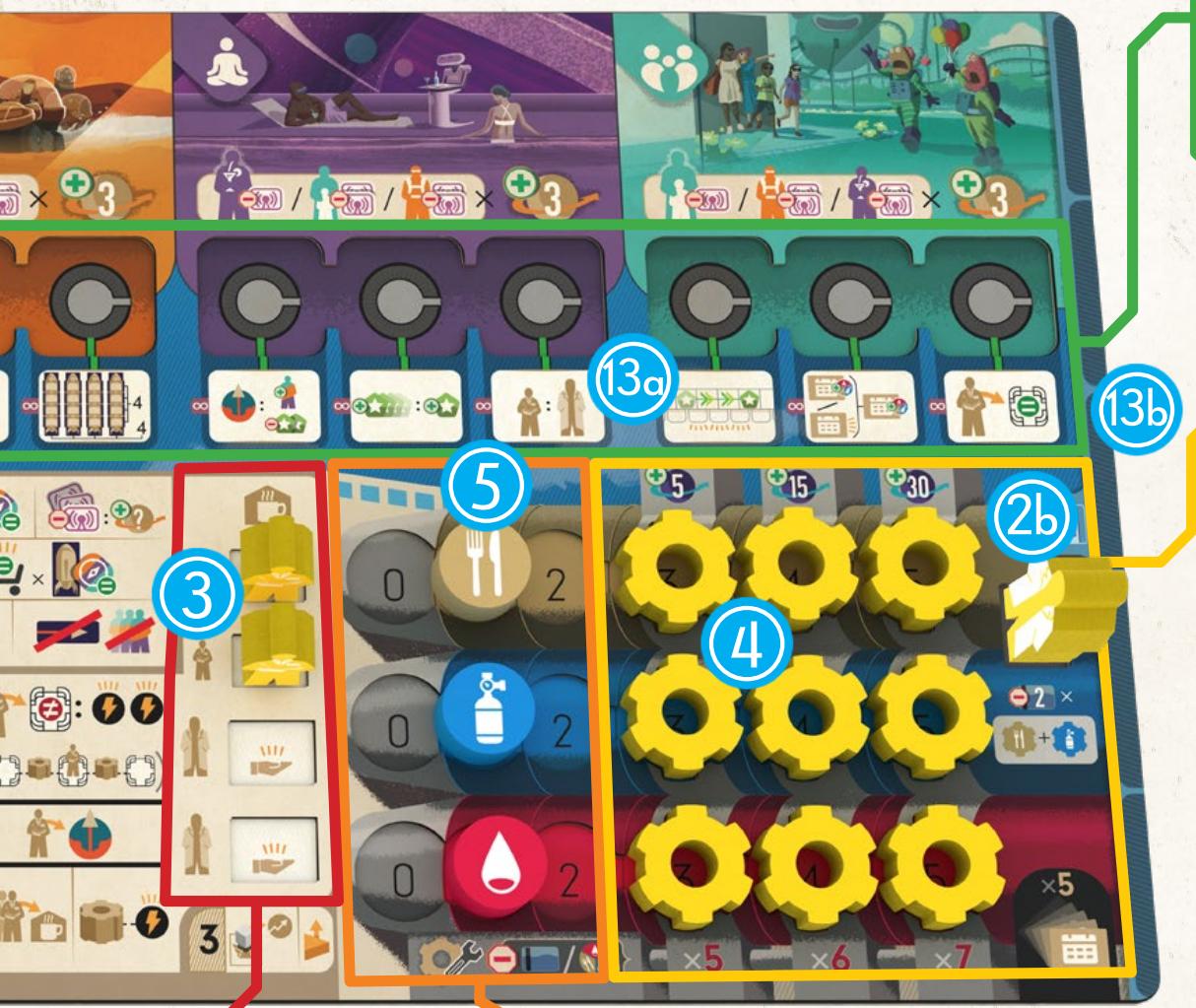
- 仓储筒仓:每种类型Small Resource tracker放在主板"2"空间
2.2 营销板设置
- 宾客奖励代币:洗混后随机1个面朝上放营销板3个指定位置;其余放回盒子
- 营销覆盖板:覆盖底部1或2个空间(3人游戏1个overlay,1-2人游戏2个overlay)
- 邮轮:洗混后随机抽取填满空位(1-2人4张/3人5张/4人6张)
- 宾客设置:从供应中为每个面朝上邮轮列出的目的地取对应宾客;若不足7/9/11个(1-2/3/4人游戏),每种颜色各加1个宾客(重复直到满足);随机放入Queue的3个区域(从下到上循环放置)
2.3 玩家个人设置
- 取玩家板、Employee Handbook(玩家辅助卡)、玩家tray(自选颜色组件)
- 取起始驾驶舱和引擎(带星号标记),正确面朝上放玩家板左侧
- 2个专家工人放入指定位置;2个普通工人放入Break Room(休息室)
- 9个发展标记放入指定位置
- 3个大型资源追踪器放在"1"空间(每种类型各1个)
- 升级代币:4个棕色带Funding Bonus图标的放Launch Tower顶部4个空间(匹配bonus类型);剩余4个灰色放底部任意配置
- 从供应取起始10 Money和2 Ads
- 3个进度方块放公司目标板块上方(匹配玩家颜色位置),不放最左列
- VP Tracker放"5",Reputation Tracker放"0";100/200 VP token放玩家板旁
- 邮轮顾问放营销板指定位置
- 最近坐过邮轮/度假的玩家为先手,拿First Player token
- 从先手开始顺时针,每人从议程卡牌堆顶抽1张卡;设置起始声望:先手0,第二位1,第三位2,第四位3
3. 游戏流程 / 回合结构
每回合执行3个步骤:
步骤1:推进飞船(Advance Ships)
若回合开始时有飞船在太空中,自动推进到下一个Stop。多艘飞船可按任意顺序推进,每艘完全完成一个Stop后再推进下一艘。
Stop类型:
- 目的地(Destination):
- 可选择放置升级代币:若Engine上有Upgrade Token,可放在当前目的地的某个Upgrade上解锁;可等到同Cruise的下一个目的地再放置;单个目的地最多放3个Upgrade Token,超出则丢弃
-
计分宾客:为船上每位宾客支付Ad费用计分
- 目的地匹配宾客:支付1 Ad
- 目的地不匹配宾客:支付2 Ad
- 每位宾客在每个目的地只能计分1次
- VP = 3 VP + 该目的地上每个Upgrade Token各加1 VP
-
太空日(Day in Space):根据宾客及其匹配的Segment图标获得奖励。每位Guest为每个匹配图标获得对应奖励(奖励由营销板上的bonus token决定)
-
返回地球(Return to Earth):飞船、宾客和工人返回地球;Worker放回Break Room获得1个Funding Bonus;邮轮丢弃到营销板旁的面朝堆;所有宾客归还供应;返回的飞船可再次发射或继续添加Segments
步骤2:选择以下之一
(a) 分配工人(Assign a Worker)
从Break Room取1个Worker放到Network 6个位置之一(不能放在已有自己Worker的位置)。放置后可执行最多2个行动(从该Worker有权访问的行动中选择)。必须完成一个行动的所有步骤后才能进行下一个行动。
工人访问范围:
- Worker始终可访问所在位置的2个行动
- 若有Development连接到相邻位置,也可访问该相邻位置的行动
- 可免费使用自己的Developments;使用其他玩家的Developments需付费(见声望)
工人碰撞(Worker Bumping):
- 可将Worker放在空位或有其他玩家Worker的位置
- 若有其他玩家Worker,该Worker被bump回该玩家Break Room
- 被bump的玩家立即获得Funding Bonus
- 不能bump自己的Worker
Funding Bonus:
- Worker放回Break Room并覆盖Funding Bonus图标时触发
- Launch Tower顶部有4种不同Funding Bonus选项(1 Money / 1 Ad / 1 VP / 1 Resource)
- 从可用选项中选择1个
- 同时获得多个Funding Bonus时可重复选择同一bonus
- 获得Funding Bonus不会移除或翻转Launch Tower上的tokens
声望(Reputation)用途:
- 使用其他玩家Developments:支付Money给拥有该Development的所有其他玩家(中性Development付给供应)
| 声望 | 0-6 | 7-14 | 15+ |
|---|---|---|---|
| 费用 | 2 Money | 1 Money | 0 Money |
付费后该Development可在整个回合使用
- 用声望换bonus:每回合最多1次,任何时候可执行。将Reputation Tracker向左移动任意距离,获得经过的所有同类型bonus(只能选择1种类型),经过的其他类型bonus被忽略
(b) 发射飞船(Launch a Ship)
前置条件:
1. 邮轮已安排
2. 有可用飞船且至少1个客舱
3. 有足够资源发射
4. 宾客已预售票或做Last-Minute Sale
发射时将工人从休息室放入发射电梯底部,不执行主板行动。发射有6个步骤(T-Minus 5到T-Minus 0):
- T-Minus 5:分配与登船(Assign and Board)
- 选一艘有至少1个客舱且未在巡航中的飞船
- 将已安排的邮轮放到该飞船上方;邮轮顾问归回营销板
- 宾客放入客舱(每舱最多1位),至少放1位
- 宾客来源:邮轮旁预售票宾客免费登船;队列Last-Minute Sale支付Ad费用;供应堆每位4 Ads
-
空间不足:预售票宾客不登船则扣2 Reputation,该宾客移到队列顶部(3 Ads区)
-
T-Minus 4:放置进度方块 - 从供应中取1个进度方块放在进度追踪器下一个可用位
-
T-Minus 3:支付资源
- Food:每位宾客1 Food + 1 Food(给飞行员)
- Oxygen:每段飞船分段1 Oxygen
- Fuel:邮轮牌上燃料图标数量 × 1 Fuel
-
资源可来自玩家板、议程卡、花费Reputation,可任意顺序任意组合支付
-
T-Minus 2:驾驶舱计分 - 按驾驶舱上的标准计分;若是该飞船首次发射,翻转驾驶舱移除惩罚标记(游戏结束未发射扣5 VP)
-
T-Minus 1:装载 - 将安排邮轮时翻转的升级代币移除放到正在发射的飞船引擎上
-
T-Minus 0:升空! - 将工人(现为飞行员)放入驾驶舱;添加新邮轮到营销板
添加新邮轮:
- 从托盘取新邮轮面朝上放到营销板空位;无剩余则洗弃牌堆放回托盘
- 对新邮轮上每个目的地:队列中所有匹配宾客下移一区(已在最底区不动)
- 根据新邮轮添加等量新宾客(从供应堆)到队列顶部;按目的地从左到右匹配宾客类型,不足则循环
(c) 召集会议(Call a Meeting)
- Step 2开始时若休息室无工人,必须召集会议
- 召回网络中所有工人(不包括在太空驾驶飞船的工人),获得各覆盖位的Funding Bonus
- 之后可从有至少1个自己的Development连接的地点执行1个行动(不放工人,不可付费使用他人Development)
步骤3:完成公司目标(Accomplish Company Goal)
检查是否达到目标要求。完成后移除该目标上方的进度方块放到进度追踪器下一可用位,揭示一个翅膀图标;然后将该目标的追踪器上移一格(提高其他玩家门槛)。已在最高位则不动。每个目标每局只能完成1次。
4. 行动详解
4.1 建造发展标记(Build a Development)
- 选择玩家板上任何Resource行最左边的Development
- 支付底部列标注的费用(可用Money和/或该行对应的Resource任意组合支付)
- 移除后放置到Network或Technology下方
- 若是该区域第一个Development,覆盖Reputation图标,获得1 Reputation
- 不能在已有自己Development的区域建造
- 移除Development增加对应Resource的存储上限1点
Network Developments: 提供更多行动访问;可在建造后立即使用(第一行动建造相邻Development,第二行动通过它访问相邻位置)
Technology Developments: 立即提供持续至游戏结束的收益。首次在Technology下方放置Development时,该Technology被"Invented"(发明),所有玩家可使用(有Development的玩家免费,无Development的玩家需付费给有Development的玩家)
Neutral Developments: 功能与玩家Developments相同,但使用时付给供应而非其他玩家
4.2 雇佣专家工人(Hire an Expert Worker)
- 支付费用,将Expert移到Break Room,获得1 Funding Bonus
- 左边Expert费用:3 Money × Launch Tower底部剩余Upgrade Token数
- 右边Expert费用:2 Money × Food和Oxygen行剩余Development数
- Expert Workers与普通Workers相同,但拥有特殊能力(每局游戏中所有玩家的Expert共享同一能力)
4.3 购买补给(Purchase Supplies)
- 支付1 Money获得2个自选Resources,和/或
- 支付1 Money获得2个Ads
- 作为单次行动,两个选项各最多执行1次
- 无法存储的Resources丢失
4.4 获取蓝图(Acquire Blueprints)
- 最多取2张Blueprint tiles(从主板展示区面朝上的Blueprint中选择)
- 无费用
- 放在玩家板右侧
- 行动结束后展示区Blueprints向下填补空位,从tray从下到上补充
- 最多持有5张Blueprints(回合中可超出,回合结束必须弃至5张)
4.5 刷新蓝图展示(Refresh Blueprint Display)
- 随时可花费1 Reputation丢弃展示区任意数量Blueprints
- 从tray补充空位(不向下填补)
- 无需行动,可在放置Worker前执行
- 可重复支付1 Reputation执行
4.6 建造飞船段(Build Ship Segments)
- 最多建造2个Ship Segments
- Blueprint的另一面是Segment,建造时翻面
- 建造来源:
1. 玩家板旁:支付Blueprint左侧标注的费用
2. 主板Blueprint展示区:支付Blueprint标注费用 + 额外Reputation和Money(展示区旁标注的金额) - 费用可通过Agenda Cards、Technologies等减少到0,但不能低于0
- 建造后将Segment放在任意Ship的Cockpit和Engine之间,遵循建造限制
- 一次建造2个Segment可放入同一Ship或多艘Ship
- Segment上的VP在游戏结束时计分
建造限制:
- Segment必须建入Ship
- 每艘Ship最多含3个Segment
- 不能在正在执行Cruise的Ship中建造Segment
- Segment建造后不能移动或替换
客舱(Cabins): Segment上下各有一半Cabin;两个Segment在同一Ship中形成完整Cabin,可容纳1位Guest。每增加1个Segment增加1个Cabin。示例:含1个Segment的Ship可容纳1位Guest;含3个Segment的Ship可容纳2位Guest
4.7 获取新飞船(Acquire New Ship)
- 从主板展示区选一对驾驶舱+引擎,放在玩家板旁,立即获得引擎上的即时奖励,然后翻面
- 最多同时拥有3艘飞船
- 驾驶舱和引擎不算飞船分段(Ship Segments)
- 展示区补满:从托盘取新的填入空位,不滑动
- 驾驶舱有惩罚:游戏结束时若该飞船未发射,扣5 VP
4.8 获取资源(Gain Resources)
- 从仓储筒仓取最多3个资源(任意组合,须可用)
- 只能取能存储的资源(不被Development阻挡)
- 只有带筒仓图标的才是从筒仓取的;其他途径获得的资源不来自筒仓
4.9 补充仓储筒仓(Refill Storage Silo)
- 弃掉1张Agenda Card,选一种资源将筒仓中该资源追踪器升至最大值5
- 获得提升步数 × 1 Money,再获得1 Reputation
- Agenda Card上的资源类型不需要与被补充的资源匹配,卡牌能力被忽略
4.10 安排邮轮(Schedule a Cruise)
- 同一时间只能安排1艘邮轮,安排后不可更换
- 将邮轮顾问从营销板移到未被安排的邮轮旁
- 选择发射塔中1个升级代币(Upgrade Token),获得其打印奖励并翻面
- 翻面后该代币不能再作为资金奖励(Funding Bonus)使用,直到发射飞船时移除
- 上排4个代币:小一次性奖励;移除后资金奖励从1变为2
- 下排4个代币:大一次性奖励;移除后最左Expert Worker更便宜
- 代币在发射飞船时移除
4.11 邮轮宣传(Advertise for a Cruise)
- 选择有1或2个空宾客位的邮轮(可以是自己的、也可以是未安排的;不能为其他玩家安排的邮轮宣传)
- 为1或2位宾客做广告:
- 从队列取:按所在区域支付广告费(1/2/3 Ads)
- 从供应堆取:每位宾客4 Ads
- 每放置1位宾客,获得该宾客产生的Money和/或Reputation(取决于宾客类型和目的地偏好)
- 邮轮最多预卖2张票,超出部分需在发射时做Last-Minute Sale
4.12 抽取议程卡(Draw Agenda Cards)
- 最多抽2张
- 可从展示区抽取,或花1 Reputation从弃牌堆顶抽
- 不能从牌库正面抽,不能抽本回合刚打出的弃牌堆顶卡
- 弃牌堆公开信息,可随时查看(不可重排)
- 展示区不自动补充(需通过Refill Agenda Cards行动)
4.13 打出议程卡(Playing Agenda Cards)
两种用法:
1. 文字能力:在卡牌右上角限定的行动/步骤中打出,获得效果
2. 资源:随时打出获得资源;若资源立即花费则不需在板上有空间
- 打出后面朝上放弃牌堆顶
- 卡牌编号和标题仅用于标识,无其他效果;风味文字无游戏效果
- 资源用法:你的回合随时可打,不算行动
- 文字能力:只能在卡牌右上图标所示的行动/步骤中打出
- 无限制的卡可在回合随时打出,不算行动
- 某些卡可在其他玩家回合打出(如Helping Hand)
- 多张卡可同时打出,只要都满足限制条件
- 效果与其他加成叠加;费用可减至0但不能低于0
- 手牌上限5张(回合结束时检查,超出须弃至5张,弃牌时获得资源能力照触发)
- 议程卡优先于常规规则
4.14 补充议程卡(Refill Agenda Cards)
- 先获得展示区各空位对应的奖励(Reputation、Ad、Resource等)
- 然后弃掉所有剩余展示卡,从牌库底到顶补充4张新卡
- 牌库耗尽时洗弃牌堆形成新牌库
5. 进度追踪与游戏结束
5.1 进度轨结构
- 进度方块按顺序从Section 1→2→3填充(最底空位优先)
- Section 1或2最后一个方块放完时:该回合结束时触发AGM(年度股东大会)进行进度计分
- Section 3最后一个方块放完时:触发游戏结束
5.2 AGM A/B:进度计分
- 每位玩家得分 = 该区域进度方块数 × 已揭示翅膀数
- 初始1个翅膀,每完成1个公司目标揭示1个
- 当前最高Reputation的玩家被视为额外多1个方块(不实际添加);平局则所有并列玩家都获得
- 计分Section 2和3时只计该区域方块,但翅膀乘数保持全游戏
5.3 最终回合
- 游戏结束触发后:当前回合完成(所有人平等回合数)
- 最终回合前:所有人同时召回网络工人到休息室(获得Funding Bonus,这不是召集会议,不执行行动)
- 轮流执行最后一次正常回合
- 轮流将所有在巡航中的飞船推进到最后一个停靠点,完成该停靠点步骤
- 然后进行AGM C(最终计分)
5.4 AGM C:最终计分
每位玩家计分项:
1. 驾驶舱(Cockpits):按各驾驶舱标准计分(未发射的-5 VP)
2. 飞船段(Ship Segments):每个Segment上的蓝色VP图标
3. 进度计分(Progress Scoring):Section 3(包含溢出区域),按AGM A/B方式计分
4. 声望(Reputation):按声望追踪器最高VP阈值
5. 发展标记(Developments):玩家板发展区域最右空列的VP值
6. 物资(Supplies):每3个剩余物资(任意组合:资源、Money、Ads、议程卡、蓝图)得1 VP
最高VP者获胜。 平局打破顺序:进度方块数 → Reputation → 驾驶舱VP → 更后顺位。
6. 关键规则与常见问题
易错规则
- 发射时Food费用包含飞行员:每位宾客1 Food + 额外1 Food给飞行员
- 使用他人Development的费用取决于声望区间:0-6为2 Money,7-14为1 Money,15+为0 Money
- 声望换bonus每回合限1次:可选任意距离移动,但只选1种类型
- 建造Development只能选最左边的:不能跳过左边直接造右边的
- 不能在已有自己Development的区域建造
- 每回合最多2个行动(分配工人后)
- 召集会议是强制的:当Break Room无工人时必须执行
- 召集会议时只能从有自己Development连接的地点行动,不可付费使用他人Development
- 蓝图持有上限5张:回合中可超出,回合结束必须弃至5张
- 飞船段不能在正在巡航的飞船中建造
- 预售票宾客不登船每人扣2 Reputation
- 声望在18时再获得得1 VP,在0时再失去扣1 VP
- 0 VP和0 Reputation时不能执行会扣Reputation的行动
- 议程卡优先于常规规则
- 购买补给作为单次行动,每个选项各最多执行1次
常见问题
-
Q:召集会议时所有工人在太空怎么办?
A:无Funding Bonus,仍可执行1个有自己Development连接的地点行动。若也无Development则不执行行动。 -
Q:何时可花费Reputation获得追踪器奖励?
A:回合任何时候(每回合限1次),包括行动中。 -
Q:何时可付费使用他人Development?
A:回合任何时候。付过后该回合剩余时间都有使用权。 -
Q:Last-Minute Sale可以代替预售票宾客吗?
A:可以,但未登船的预售票宾客每人扣2 Reputation并移到队列顶部。 -
Q:游戏结束时可以完成公司目标吗?
A:可以在最终步骤中访问目的地后完成。 -
Q:"Board Game Cruise"议程卡如何使用?
A:将1个客舱容量提升至3(最多仍只能预售2张票,Last-Minute Sale需照常付费)。 -
Q:组件耗尽怎么办?
A:驾驶舱/引擎不够补满展示区则留空;蓝图不够只填能填的;升级代币全移除后仍可安排邮轮和发射;Money/Ads不应耗尽,可用替代品。 -
Q:Reputation费用表的准确区间?
A:0-6支付2 Money,7-14支付1 Money,15+免费。
7. 2人规则
2人设置
正常设置后额外步骤:
- 取6个Development、2 Worker、2 Expert Worker(非玩家颜色NPC)
- 2个NPC工人放在主板上,从中性Development旁顺时针各一个地点
- Development和Expert Worker放一旁备用
- 公司目标追踪器放在中间位(非底部)
- 进度追踪器只放1个中性方块(入门局)
- 未用的科技板块放一旁
- 使用两块营销覆盖板
NPC工人碰撞
- 你的工人放到NPC工人所在地点:NPC顺时针移到下一地点
- 下一地点空:NPC留在那
- 下一地点有对手工人:NPC碰撞对手工人,对手回休息室(获得Funding Bonus)
- 下一地点有NPC工人:NPC跳过继续顺时针
- 下一地点有你自己的工人:NPC不碰撞你,跳过继续
NPC Expert碰撞
NPC Expert被碰撞时跳过所有空地点(除非无其他可去地点)
AGM A/B附加步骤
进度计分后额外执行:
1. 建造NPC Developments:洗未用科技板块,揭示1块,按图示为NPC放Development(覆盖Reputation图标),已有的跳过并弃掉
2. 雇佣NPC Expert:AGM A后替换最靠近顶部中间位置顺时针的NPC Worker为Expert;AGM B后替换另一个
常见问题(FAQ)
以下 1 条问答中 0 条来自站内玩家的真实提问,其余 1 条为本站整理的常见疑问;答复内容保持原样。
银河漫游支持几个人玩?
1–4 人。
去哪查完整规则
想核对具体规则细节、卡牌效果或某个回合的结算方式,可以在村了吗里选中这款游戏后直接提问。
同类桌游
- 卡坦岛德式
- 工业革命:伯明翰德式
- 勃艮第城堡:特别典藏版德式
- 方舟动物园德式
- 重塑宇宙德式
- 埃多拉的德鲁伊德式
- 1817 (2020)德式
- 甜蜜国度德式
- 卡里普索德式
- 铁路环游德式
规则原文(Markdown)
本站收录这款游戏的规则原文 1 个文件,此处内联渲染 1 个,可直接展开阅读或下载。
Galactic Cruise Rulebook v26.md157.0 KB
GALACTIC CUMENTATION MPLOYEE
TABLE OF CONTENTS
Welcome to Galactic Cruise..
How to Use This Manual.
Components.
Campus Tour.
Intro Game Setup
Standard Game Setup…
Player Board Anatomy and Setup…
Turn Structure.
Advance Ships.
Assign a Worker and Actions
Launch a Ship
Call a Meeting
Accomplish Company Goal.3
Progess rack and Game Ed..
Final Scoring — AGM C..
Clarifications and Edge ases
2-Player Rules
Solo Rules
Expansion: Advancements …
Expansion: Accommodations …



Scan here to access Galactic Cruise online resources, including the Employee Onboarding video.
WELCOME TO GALACTIC CRUISE!
Hello, and welcome to Galactic Cruise! Here, we offer our guests something special: the comfort of a luxury cruise with the innovation of space travel.
As the first company to offer extended-stay space vacations, we are excited to have you joining our workforce as a supervisor of the company. As I’m sure you already know, our founder and CEO, Travis E. Preston, will be stepping down in three years' time, and the Board of Directors is looking for his replacement.
As a supervisor, you will earn Victory Points (VP) for constructing ships, satisfying guests, and further developing our company—but you will also need to ensure that you impress the Board of Directors if you want to earn the coveted title of CEO.
Each year, the Board of Directors
will conduct an Annual
General Meeting
(AGM) to

assess your progress, and at the end of three years, the supervisor who has earned the most VP will become the new CEO of Galactic Cruise and win the game.
Hey, everyone! I'm Zoë, and I'm in charge of onboarding new employees at Galactic Cruise. I hope you enjoyed your Welcome Pack with Mr. Preston's letter, workstation organization tips, and your employee badge.
To ensure that you have a quality experience, I want to give you some pointers on how to navigate your Training Manual.
Generally speaking, you will find detailed rules of play on the lefthand side of each page with examples listed on the righthand side.
Additionally, you will encounter some other colored boxes throughout the manual, so I've made a nifty "What Does That Mean?" section to help make sense of it all.


P.S. If you see these symbols, they tell you the page in this manual where you can find more information about the topic.
E: WHAT DOES THAT MEAN?
=--0-0.
Whenever you see these symbols, pay attention to the rules for the player count of the current game.

KEY CONCEPT
Key Concepts are written by our founder, Travis E. Preston, himself. These boxes detail fundamentals of your day-to-day responsibilities here at Galactic Cruise. Be sure to read each and every one of these concepts as you encounter them in your Training Manual.

These are examples to help clarify things if you have any questions about the rules. Reading them is not required to learn the game.

These are notes left by me, your resident genius and employee onboarding expert. They are very helpful reminders—especially for new supervisors.

While the heart of Galactic Cruise is in the manufacturing of ships and the satisfaction of guests, we also have a full staff of copywriting experts who have written riveting flavor texts throughout all our works. While they are entertaining to read, they are not necessary to your position at the company.

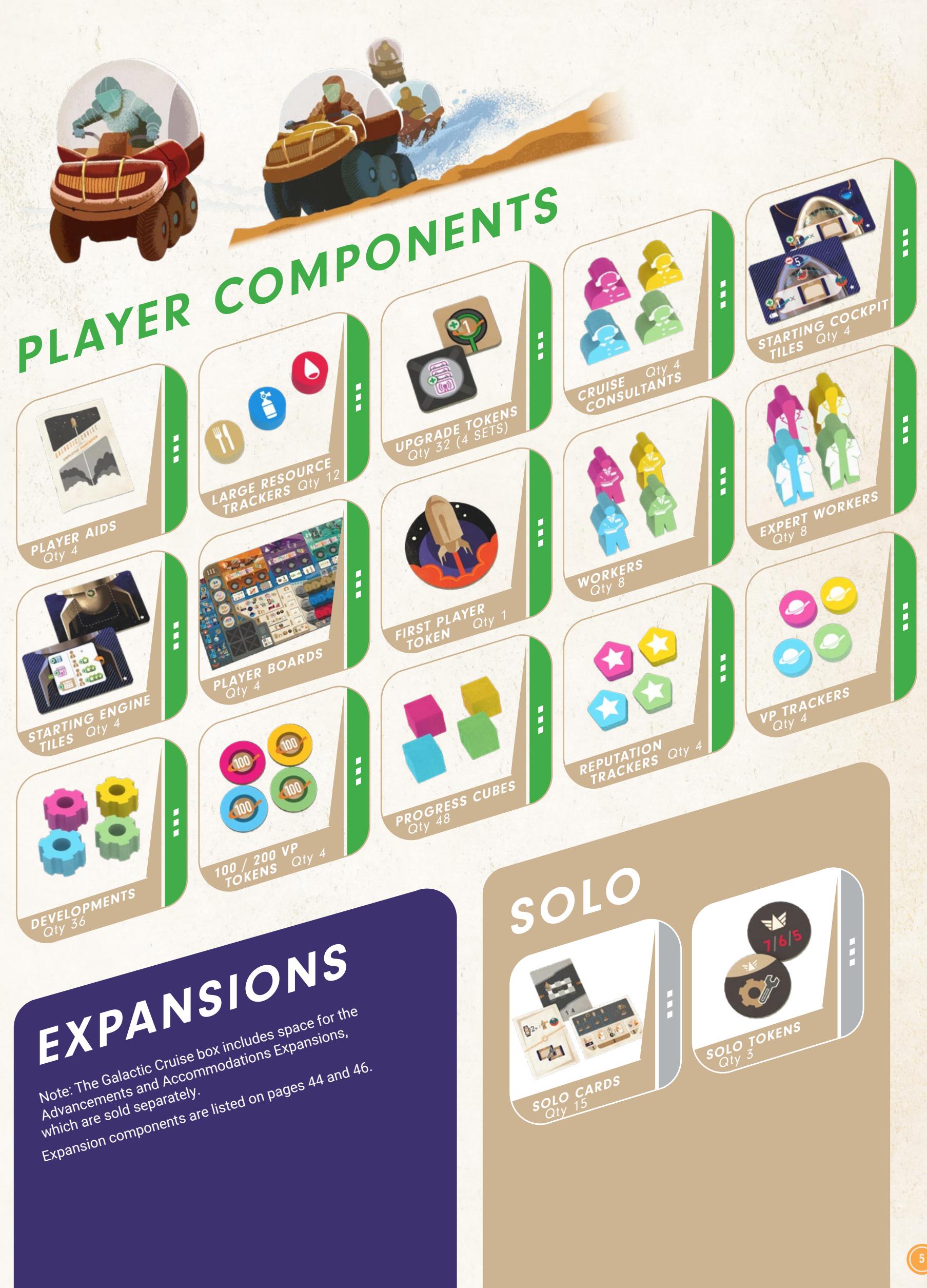
CAMPUS TOUR

Before you dive into your Training Manual, I'll be giving you a tour of our campus today.
A lot goes on around here; I want to make sure you understand how each department works so you can succeed in your role as supervisor here at Galactic Cruise.
Let's get started!
1.AGENDAS
This building is where our Board of Directors have their regular meetings.
Here, the Board of Directors will provide you with some detailed agendas and some sound advice on how to do your job more efficiently. They always have an ear out for fresh ideas, too, so if you have some agendas of your own, you just may be rewarded for them.
A word to the wise: flattering the Board of Directors will take you far.
2. PROGRESS TRACK & GOALS
As you can see, this is where the Board of Directors will be tracking your progress over the next three years. As you might expect, they are always interested in launching ships and sending guests on amazing cruises, but they also have several other projects prioritized for you to focus on.
It goes without saying that you should do your best to line up your own vision with that of the Board of Directors. Please don't be caught slacking off, as every supervisor's progress is broadcasted here for all to see.
3. TECHNOLOGIES
On the north side of the campus, you will find our technology center, where you will be working side-by-side with our elite team of scientists to develop new, cutting-edge technologies that will benefit thewhole company.
These technologies may result in more efficient launches, new innovations that make installations cheaper, or perhaps even the ability for the ship to fly itself!
E:4. THE NETWORK
In this central area of the campus, you'll see there are six large buildings with walkways between them. We call this part of the company the Network, and this is where the workers under your purview will be spending a great deal of their time.
These offices are dedicated to hiring new workers, drawing up blueprints, constructing those blueprints and installing them into ships, acquiring new ships, etc. You can even stand to make a little extra money for your team... if you play your cards right.
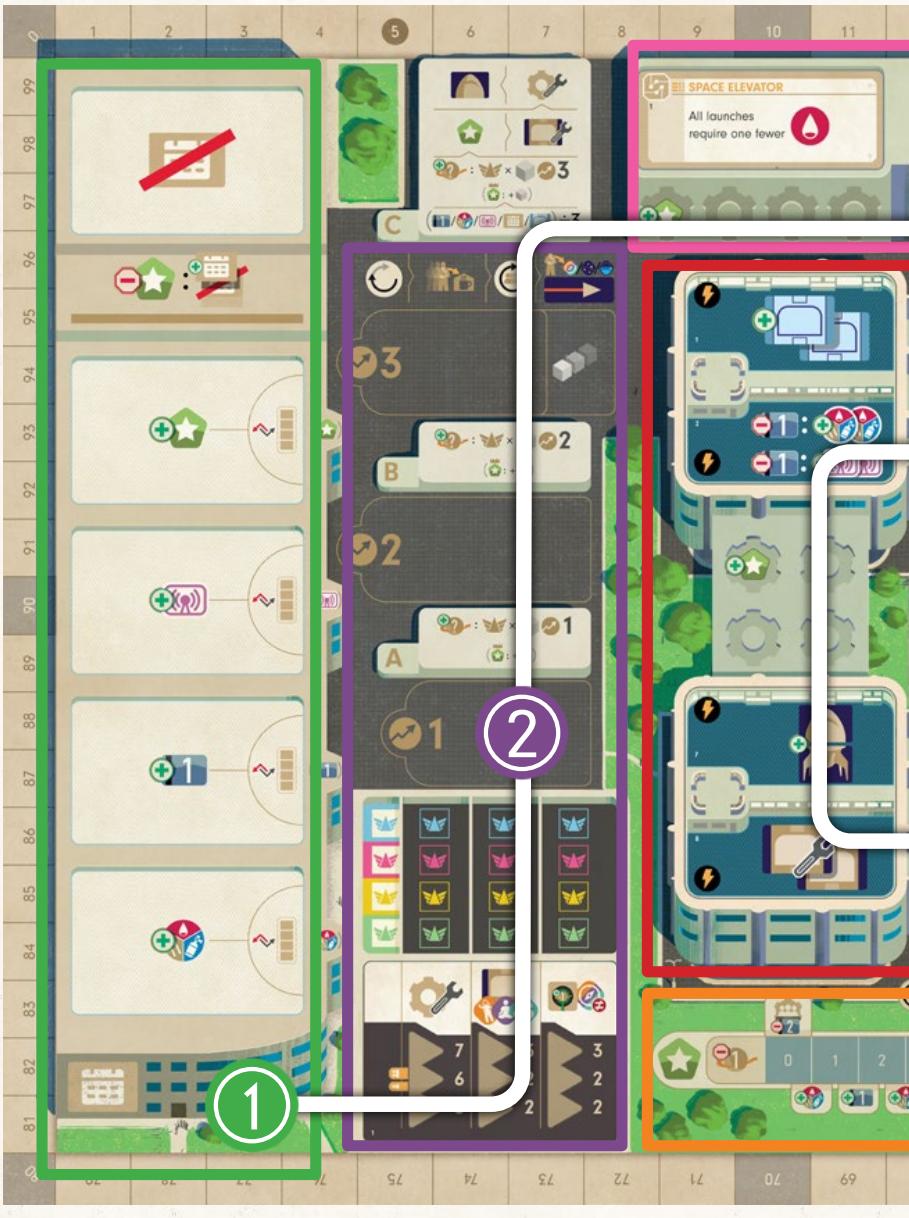
5.REPUTATION
As you're working here at Galactic Cruise, be sure to be cordial with your fellow colleagues. You may all be vying for the same position of CEO, but you're still co-workers and can all benefit from your collective efforts. Having a good reputation among your peers will get you more than a few favors along the way.
6.STORAGESILO
Just outside the Network, you will see our storage silo. Here, you will be able to take the resources that you will need to launch your ships. You can also refill those resources when they get low or are depleted altogether; the Board of Directors loves acts of selflessness, and they will reward you accordingly.


E: 7. BLUEPRINTS
In our manufacturing department, you'll find that our architects are hard at work drafting blueprints, and our master craftspeople are transforming metal and glass into something truly extraordinary for our guests, whether they are looking for family fun, adrenaline-fueled adventure, or good old-fashioned rest and relaxation.
#8.SHIPS
A ship can only be built so big, so you'll also want to see the new ships being constructed. Each cockpit and engine is unique to fit the varied styles of the supervisors who use them.
Be sure to launch all the ships you build, though, as the Board of Directors does not approve of wasting company resources.
:9. MARKETING
Now, over here is our marketing department-where the magic happens. This is where we broadcast upcoming cruises and sell tickets to our valued guests.
As you'll soon see, there will be a queue forming outside. And guess what? That line will never die down. As soon as one cruise departs, another gets announced, and the people will just keep flocking to us.
Some of these folks will take a little more convincing than others, but they're all very excited to fly with us, and it's an honor to accommodate them.

Heck of a whirlwind tour, isn't it? As a reminder, you'll need to use your badge to access these secure areas in the future.
I'm sure you still have many questions. Luckily for you, you have this Training Manual and your Employee Handbook to peruse.
Take your time, but don't dawdle too long. The stars wait for no one, and there's lots of work to be done.


INTRO GAME SETUP
The Intro Game is highly recommended for your first game. It's easier to learn and set up and will be a slightly shorter game.

Use the intro side of the board with the tiles preprinted on it as pictured below. On the standard side of the board, these areas are blank.

Additional setup for a 1- or 2-player game can be found on page 34.

INITIAL TRAY SETUP
These instructions assume you have already set up your trays based on the instructions in the "Your Workstation and You" brochure found in the Welcome Pack. If you have not done this yet, stop here, and return once you have completed your initial tray setup.

MAIN BOARD SETUP

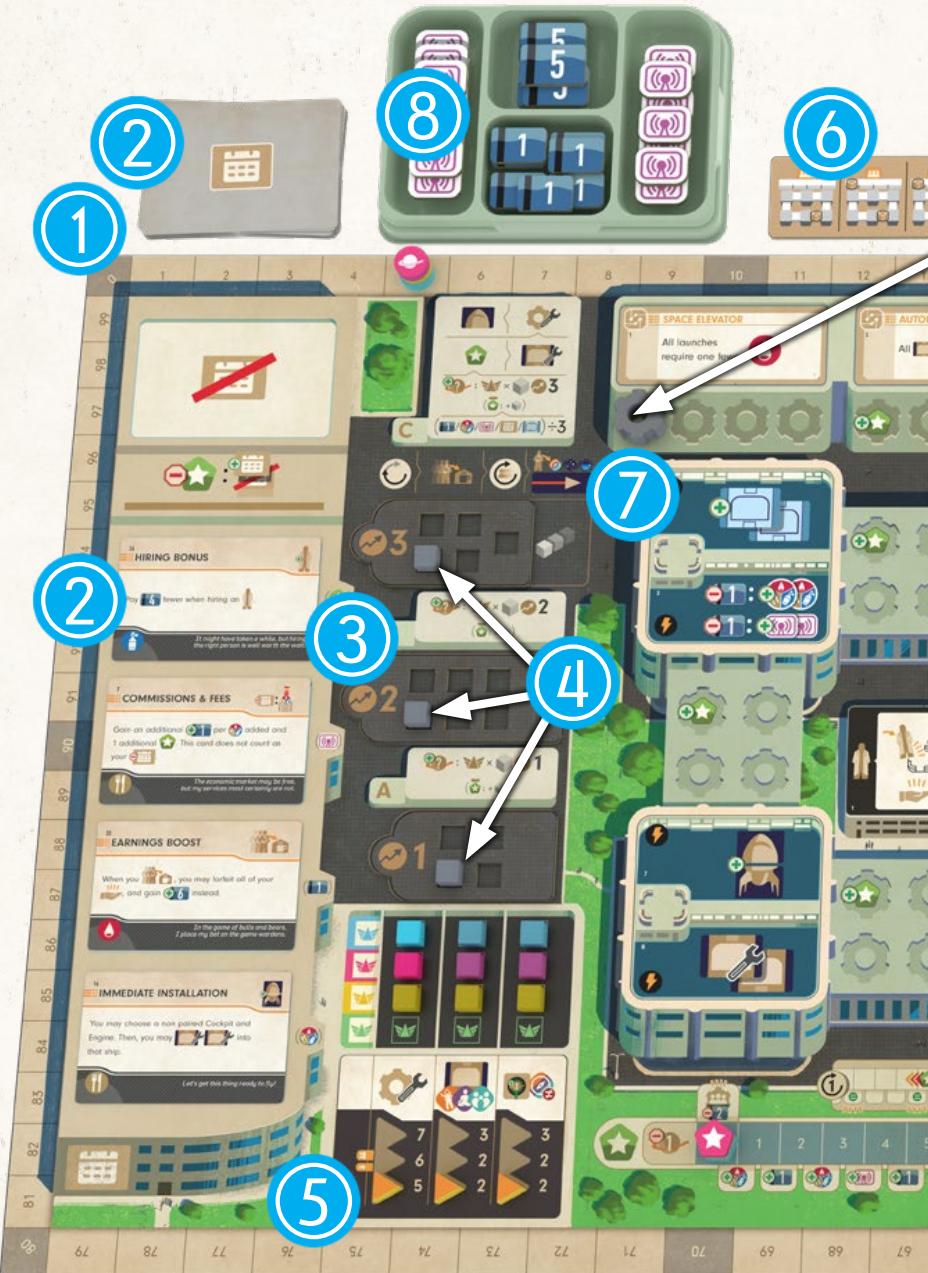
Place the Main Board in the center of the playing area (intro side up) and the Marketing Board to the right of it.

Shuffle the Agenda Cards, and place them facedown beside the Main Board. Then reveal 4 cards from the top of the deck, and place them faceup on the indicated spaces on the Main Board from bottom to top.

Place the Progress Track tiles, labeled with the correct player count (4-player/3-player /2-player /01-player), on the matching indicated spaces (1/2/ 3) on the Main Board. Return the rest to the box.

Place a neutral cube in the bottom left space of each Progress Track tile.

Nre

Place a Company Goal tracker in each of the 3 bottom spaces of the Company Goal area.

Use the middle spaces instead.

Place a Technology tile at random facedown next to the Main Board to be used in Step 7. Return the rest to the box.


Leave the rest facedown nearby instead.
Refer to the printed graphic on the facedown Technology to see where to place the neutral Development(s) depending on the player count. Place a neutral Development in each depicted area for the corresponding player count, covering the Reputation icon Once the neutral Development(s) are placed, return that Technology tile and any unused neutral Developments to the box.
Place the Money and Ad trays within reach of the players, creating the supply of Money and Ads.

When drawing Blueprint/Cockpit/Engine tiles in the next few steps, pull them from the back of the tray. Then, during gameplay, draw them from the front, which will give them a slight tilt and make them easier to draw.

Place the Blueprint tray next to the Main Board. Shuffle the Blueprint tiles, and return them to the Blueprint tray. Take 5 Blueprints from the tray, and place them Blueprint side up on the indicated spaces on the Main Board from bottom to top.


Place a Small Resource tracker of each type into the Storage Silo on the “2” space on the Main Board.
Place the Cockpit and Engine trays next to the Main Board. Shuffle the Cockpit tiles, and return them to the tray. Take 4 Cockpits, and place them with the side up on the indicated spaces on the Main Board from bottom to top.
Shuffle the Engine tiles, and return them to the tray. Take 4 Engines, and place them Bonus +2 side up on the indicated spaces on the Main Board from bottom to top.
E MARKETING BOARD SETUP

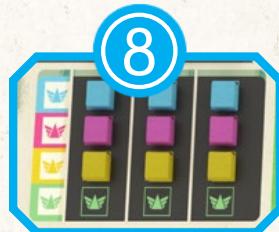
Shuffle the Guest Bonus tokens, and randomly place one of them faceup onto each of the 3 indicated spaces on the Marketing Board. Return the rest to the box.

-0-8

Use the Marketing Board overlays to cover the bottom one or two spaces of the Marketing Board. Use one overlay in a 3-player game and two overlays in a 1- or 2-player game.

Place the Marketing tray next to the Marketing Board, creating the supply of Guests and Cruise tiles.

Fill the top 3 spaces of the Marketing Board with the Cruises marked with a star on the front of the tile.

Shuffle the remaining Cruises, and return them to the Marketing tray. Fill the empty spaces on the Marketing Board with faceup Cruises (4/5/6 tiles in total for 1-2/3/4 players).

From the supply, take a matching Guest for each Destination listed on the faceup Cruises, and set them aside to be used in Step 19. If the number of set-aside Guests is fewer than 7/9/11 for a 1-2/3/4 player game, add in one Guest of each color (repeat if necessary).


Randomly place all of these set-aside Guests, one at a time, in the Queue next to the Marketing Board, placing one in each of the 3 sections bottom to top (, ), then repeating until all set-aside Guests are placed.
All 3 sections of the Queue are used regardless of the number of players.

E.g. i-layer
game shown, there
are 7 Destinations
across all 5 Cruise
tiles. 3 Relaxing,
2 Adventurous, and 2 Family Guests were set aside. This did
not meet the
threshold of 9 Guests in a 3-player game,
so one Guest of each color was added to
make 10 Guests
total.



STANDARD GAME SETUP

Additional setup for a 1- or 2-player game can be found on page 34.


MAIN BOARD SETUP

Place the Main Board in the center of the playing area (standard side up) and the Marketing Board to the right of it.

Shuffle the Agenda Cards, and place them facedown beside the Main Board. Then reveal 4 cards from the top of the deck, and place them faceup on the indicated spaces on the Main Board from bottom to top.
3 Place the Progress Track tiles, labeled with the correct player count (4-player /3-player /2-player /01-player), on the matching indicated spaces (1/2/ 3) on the Main Board. Return the rest to the box.

indicated spaces on the Main Board, 2 at each location.

Shuffle the Expert Worker tiles, and place one of them at random faceup on the indicated space on the Main Board. Return the rest to the box.

Shuffle the Company Goal tiles, and place one of them at random faceup onto the indicated space on the Main Board. Return the rest to the box.

Place a Company Goal tracker into each of the 3 bottom spaces of the Company Goal tile.

Use the middle spaces instead.
Shuffle the Technology tiles, and place 4 of them at random faceup onto the Technology tile spaces on the Main Board.

Place one Technology tile at random facedown next to the Main Board to be used in Step 10. Return the rest to the box.

Leave the rest facedown nearby instead.


Refer to the printed graphic on the facedown Technology to see where to place the neutral Development(s) depending on the player count. Place a neutral Development in each depicted area for the corresponding player count, covering the Reputation icon . Once the neutral Development(s) are placed, return that Technology tile and any unused neutral Developments to the box.
①Pla wn c of te players, creating the supply of Money and Ads.

When drawing Blueprint/Cockpit/Engine tiles in the next few steps, pull them from the back of the tray. Then, during gameplay, draw them from the front, which will give them a slight tilt and make them easier to draw.

Place the Blueprint tray next to the Main Board. Shuffle the Blueprint tiles, and return them to the Blueprint tray. Take 5 Blueprints from the tray, and place them Blueprint side up on the indicated spaces on the Main Board from bottom to top.

Place a Small Resource tracker of each type into the Storage Silo on the “2” space on the Main Board.
Place the Cockpit and Engine trays next to the Main Board. Shuffle the Cockpit tiles, and return them to the tray. Take 4 Cockpits, and place them with the side up on the indicated spaces on the Main Board from bottom to top.

Shuffle the Engine tiles, and return them to the tray. Take 4 Engines, and place them Bonus 2 side up on the indicated spaces on the Main Board from bottom to top.


MARKETING BOARD SETUP
Shuffle the Guest Bonus tokens, and randomly place one of them faceup onto each of the 3 indicated spaces on the Marketing Board. Return the rest to the box.

-0-0

Use the Marketing Board overlays to cover the bottom one or two spaces of the Marketing Board. Use one overlay in a 3-player game and two overlays in a 1- or 2-player game.

Place the Marketing tray next to the Marketing Board, creating the supply of Guests and Cruise tiles.
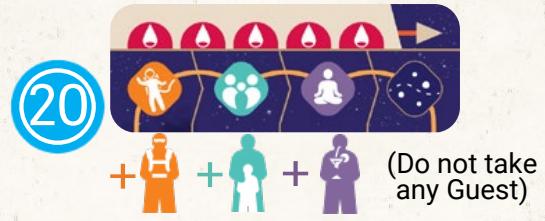
Shuffle the Cruises, and return them to the Marketing tray. Fill the empty spaces on the Marketing Board with faceup Cruises (4/5/6 tiles in total for 1-2/3/4 players).
From the supply, take a matching Guest for each Destination listed on the faceup Cruises, and set them aside to be used in Step 21. If the number of set-aside Guests is fewer than 7/9/11 for a 1-2/3/4 player game, add in one Guest of each color (repeat if necessary).

Randomly place all of these set-aside Guests, one at a time, in the Queue next to the Marketing Board, placing one in each of the 3 sections bottom to top (, ( ), then repeating until all set-aside Guests are placed.

All 3 sections of the Queue are used regardless of the number of players.

E.g. i-layer
game shown in the image below, there are 10 Destinations across all 5 Cruise tiles. 4 Relaxing, 4 Adventurous, and 2 Family Guests were set aside. This meets the threshold of 9 Guests in a 3-player game, so no additional Guests are added.

PLAYER BOARD ANATOMY AND SETUP

PLAYER SETUP
Each player takes a Player Board, an Employee Handbook (Player Aid), and a player tray (with the components in the color of their choice) and then does the following:

Take your Starting Cockpit and Engine tiles, marked with a star, and place them to the left of your Player Board with the correct sides faceup as shown.


Place your 2 Expert Workers into the spaces shown.


Place your 2 Workers in your Break Room.


Place your 9 Developments into the spaces shown.


Place your 3 Large Resource trackers on the “1” spaces (one of each type ①. . )

Place the 4 brown Upgrade Tokens with the Funding Bonus icon on the top 4 spaces of your Launch Tower6a matching the bonus type. Place the remaining4 gray Upgrade Tokens into the bottom in any configuration



Take your starting 10 Money and 2 Ads from the supply. These are listed on the back of your starting Engine tile as a reminder. (Reputation and Agenda Cards will be gained in Step 12.)
Place 3 of your Progress Cubes above the Company Goal tile in the spaces matching your player color on the Main Board; see image to the right. Do not place any cubes in the leftmost column. Place the remaining cubes near your Player Board.

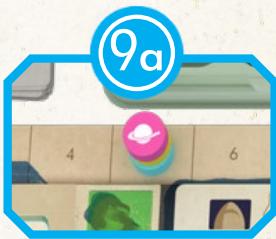
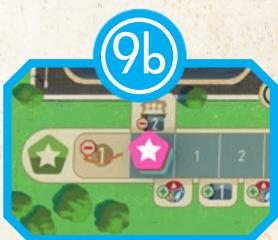
Place your VP Tracker at “5” and your Reputation Tracker at "0" on their respective tracks on the Main Board. Place your 100 VP/200 VP token beside your Player Board

Place your Cruise Consultant on the Marketing Board as shown.

The player who most recently went on a cruise (or vacation) will be the first player and takes the First Player token.

In clockwise order starting with the first player, draw one Agenda Card from the top of the Agenda Card deck, and set your starting Reputation:
The first player stays at 0 Reputation, the second player starts at 1 Reputation, the third player starts at 2 Reputation, and the fourth player starts at 3 Reputation.

UPGRADES98
DEVELOPMENTS
Developments are kept here until built. They limit how many Resources can be stored on your Player Board.
RESOURCES
Across the top of the Player Board are the 3 different Destinations: the Adventurous destination, the Relaxation destination, and the Family destination. Each destination has 3 different Upgrades that can be unlocked throughout the game by visiting it.

Food, Oxygen, and Fuel are stored here, and you will track the amount of each using Large Resource trackers. As you gain and spend these Resources, you will move the trackers right and left accordingly.


In reverse turn order, you will do both and
Place one Development (at no cost) from the left column of Developments on your Player Board into the Network (see right) in an area where no Development is currently present. You will cover a Reputation icon and gain 1 Reputation.

This Development cannot be placed below a Technology.

After all players have taken a Blueprint, slide all remaining Blueprints to the bottommost available spaces, then refill from bottom to top from the Blueprint tray.
3 Take a Blueprint tile from the Main Board, and place it to the right of your Player Board in one of the indicated spaces. You do not pay when taking Blueprints, only when building them into your Ships. Do not refill the Blueprints until Step 14.
Don't overthink it: this is a learning experience, and any area will be valuable throughout the game.

MAIN BOARD

MARKETING BOARD

THE NETWORK
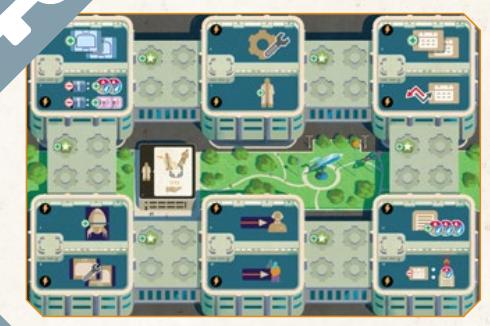
The Network is the area on the Main Board comprising the 6 locations and the connections between them.
TURN STRUCTURE
Galactic Cruise is played over a variable number of rounds. Starting with the first player, each player will take a turn, followed by the next player in clockwise order. Play continues around the table until the game end is triggered.
On your turn, you will do the following:
-
Advance Ships;
-
(a) Assign a Worker, OR (b) Launch a Ship, OR (c) Call a Meeting;
-
Accomplish Company Goal.

Each player will usually get about 20 turns.

#1. ADVANCE SHIPS

Throughout the game, you will be launching Ships that will advance to different Stops until they return back to Earth. If, at the start of your turn you have a Ship in space, it will automatically advance to its next Stop, where you may gain bonuses, unlock Upgrades, and/or score points.

E: 2A. ASSIGN A WORKER

The majority of your turns will be spent assigning a Worker to one of the 6 locations in the Network where you will be taking actions to construct Ships, schedule Cruises, gather Resources, etc.

Before moving on, read the Key Concept boxes to the right!

E: 2B. LAUNCHA SHIP

When you've completed the steps in your Preflight Checklist, you're ready to launch! Instead of assigning a Worker in the Network to take actions, you will be sending a Worker from your Break Room into your Launch Elevator to initiate the launch countdown sequence.

#2C. CALLA MEETING
A30
Out of Workers? Call a Meeting to recall your Workers from the Network, and place them back into your Break Room. Then take one action at a location that has at least one of your Developments connected to it.

E: 3.ACCOMPLISHCOMPANYGOAL
30
For the final step of your turn, check to see if you have accomplished one of the 3 Company Goals. These are goals you have been tasked with that may increase in difficulty as players accomplish them.

WORKER BUMPING
When assigning your Worker, you may place it on an empty location or a location containing another player's Worker.
If the location contains another player's Worker, that Worker is bumped (removed) from the location and returned to that player's Break Room. The player whose Worker is bumped immediately gains a Funding Bonus.
You cannot bump your own Worker.

FUNDING BONUS
A Funding Bonus is gained any time you place a Worker into the Break Room on your Player Board and cover the Funding Bonus icon:
There are 4 different Funding Bonus options, shown in the top area of the Launch Tower on your Player Board. See example to the right.
When gaining a Funding Bonus, you choose one of your available options. You might gain more than one Funding Bonus at the same time. When this occurs, you may choose the same bonus more than once.

ACTION SELECTION
After placing a Worker on a location, you may take up to 2 actionswith that Worker, choosing from all actions that Worker has access to.
A Worker always has access to the 2 actions at the location where it is placed. If there is at least one Development connecting them to an adjacent location, the Worker may also access the actions at that location. Your Worker may use your Developments for free, or, if you do not own one, you may pay to use other players' Developments; see Reputation below.
Actions may be repeated and may be taken in any order.

REPUTATION
Throughout the game, you will gain Reputation and may use it during your turn in two ways:
- You may pay to use other players' Developments in the Network or below a Technology. The Development(s) are usable for your entire turn.
To do this, you must pay Money to every other player (or the supply for neutral Developments) that has a Development in that area. The amount paid is based on your Reputation.

| Reputation | 0-6 | 7-14 | 15+ |
| Cost (X) | 2 | 1 | 0 |
- Once per turn, at any time, you may use your Reputation to gain one bonus type depicted below the Reputation Track.
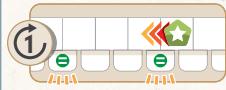
To do this, reduce your Reputation Tracker as far as you would like in order to gain all bonuses of one type that you pass over.
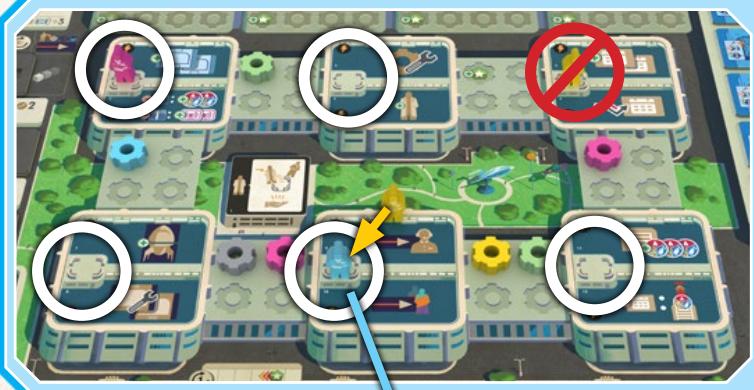


They decide to place their Worker on the bottom middle location. B already has a Worker there, so that Worker is bumped, and Bətakes it back and places it in their Break Room.
This triggers a Funding Bonus, which Bluə can take while Yellow finishes their turn.

Bəreturns their Worker to their Break Room and covers a which triggers a Funding Bonus.
Bə chooses from any of the four visible funding icons in their Launch Tower:
Gain 1 Money
BGain 1 Ad
©Gain 1 VP
Gain 1 Resource

Gaining a Funding Bonus does not remove or flip tokens from the Launch Tower; you simply gain a visible bonus for each Worker returned.

Yellow can freely access the actions at the location where they have placed their Worker as well the adjacent location to the right that is connected through Yellow Development. It does not matter that Green also has a Development here.

Yellow may choose to use the connection to the left but must pay all players with a Development there. In this example, if Yellow wants access to the actions at the location to the left, Yellow must pay Pink and the supply to borrow the Pinkand Neutral (gray) Developments for this turn. For their first action, Yelow could Refill Storage Silo①to gain some Money which Yelow would use to pay Pk and the supply to use their Developments, and then perform the Build Ship Segments②action. Note: Yellow does not have to perform any actions where they placed their Worker.

The cost to pay Pink (and the
A 02 B 0 5 8 9 10 11 12 13 14 15 16 17 18 3 +1 + 1 X + X +1 +X
supply) is based on Yeow current Reputation. Yow currently has 6 Reputation which isn't quite enough to reach the next threshold, so Ylow would need to pay both the supply and Pink2 Money eachto use those Developments for the turn.
YTow decides not to use the Developments right away and instead takes their first action, Refill Storage Silo, (on the example above) which will give Yellow 1 Reputation. Now Yellow only needs to pay the supply and Pink 1 Money each as they have reached the next thresholdβ Yellow pays Pinkand the supply 1 Money each and takes their second action, Build Ship Segments (②on
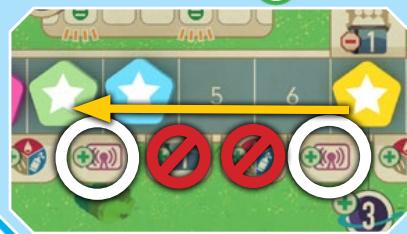
the example above), using the Developments.
Finally, before ending their turn, Yw decides to use their Reputation to gain Ads that they will need on their next turn. They drop their Reputation from 7 to 3 and collect 2 Ads. They are only allowed to gain the bonuses of one type so they ignore the other two icons passed.
They can only do this once per turn.
ADVANCE SHIPS

I recommend skipping this section for now. Come back after you’ve learned how to Launch a Ship.

Every cruise has an exciting itinerary to follow. Our guests will get to experience our state-of-the-art galactic destinations and resorts, and they’'ll also have ample opportunities to enjoy the many amenities aboard the ship as you navigate them from destination to destination.
Step 1 of your turn is Advance Ships. Before placing/recalling Workers in Step 2, if you have a Ship on a Cruise, advance it to the next Stop by moving the Pilot (the Worker piloting the Ship) one space forward on the Cruise. If you have more than one Ship in space at the same time, you may advance the Ships in any order, completing each Stop fully before moving on to the next.

There are 3 types of Stops: Destination, Day in Space, andReturning to Earth.

#DESTINATION

Lifting off was just the beginning. Our luxurious cruises are full of “out of this world” excursions, artfully crafted to satisfy our guests. Ensure that you advertise properly at the debarkation doors so that the guests are well aware of all the things we offer! The company is always upgrading the array of features, and we don’t want our guests to miss out.
When your Pilot lands on a Destination, you may choose an Upgrade and/or score Guests.
1. CHOOSEAN UPGRADE

If you have an Upgrade Token on the Engine, you may place it onto one of the Upgrades on the Destination your Pilot is currently on, unlocking that specific Upgrade. See page 7 of your Employee Handbook for a list of the Upgrades. If there is another Destination on the same Cruise, you may wait until you arrive at that Destination to drop off the Upgrade Token.
You cannot have more than 3 Upgrade Tokens on a single Destination. If a Destination already has 3 Upgrade Tokens on it, and you don't have another Destination on the Cruise, discard the Upgrade Token instead of placing it.
2. SCORE THE GUESTS

You may score each Guest on board your Ship (once per Destination) by paying the Guest's associated Ad cost.
If the Destination matches the Guest, you pay 1 Ad to score that Guest.
If the Destination does not match, you pay 2 Ads to score that Guest.
Any number of Guests on board the Ship may be scored, but each Guest may only be scored once per Destination.
The amount of VP each Guest scores is equal to 3 VP plus 1 VP for each Upgrade Tokenon that Destination.

E.g.

It is Pinks turn. They launched a Ship last turn. Before taking their normal actions (Step 2) they will first advance all Ships they have on a Cruise.
The Pilot moves forward one space to the next Cruise Stop.

The Cruise arrives at the Adventurous Destination.
First, Pmust decide if they want to drop off their Upgrade Token now or later on in the Cruise when they arrive at the Family Destination.
They decide to drop it off now and unlock one of the Upgrades at the Adventurous Destination.
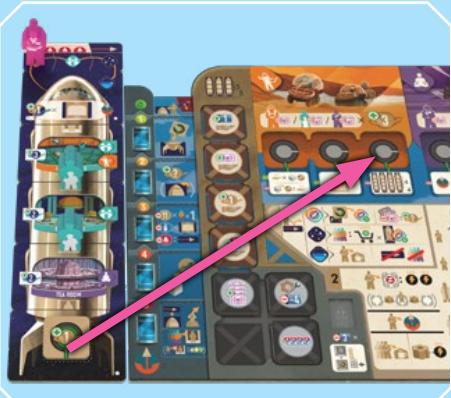
Pink may choose any of the 3 Upgrades shown on their Player Board at the matching Destination.
Pinkplaces their Upgrade Token on the third Upgrade space, unlocking
the ability to increase their maximum Ship size from 3 to 4 Segments and their maximum number of Ships from 3 to 4!

Now Pinkmay score each Guest on board their Ship. Since they have two Family Guests and they do not match the current Destination, they will need to spend 2 Ads for each Guest.
Pinkonly has enough Ads to score one of their Guests. They spend 2 Ads and score 4 VP (3 VP base value +1 VP for the Upgrade just dropped off). If Phad 2 more Ads to spend they'd be able to score an additional 4 VP for the second guest.

When the Cruise reaches the Family Destination they will go through this same process again, although they will skip the Upgrade step since they have already dropped off the Upgrade Token.
Once at the Family Destination, Pik will be able to score 3 VP per Guest by spending 1 Ad per Guest. Pshould make sure to grab a few more Ads before then!
#DAYINSPACE

In between destinations, you may have one or more days in space. This is a great time for our honored guests to explore the ship and enjoy all the amenities it has to offer. And remember: the more favorable the experience is for your guests in space, the more favorable the outcome will be for you here on earth.
When a Pilot lands on a Day in Space, you will gain bonuses based on the Guests and their matching Segment icon.
For each Guest, gain their bonus (listed on the Marketing Board) for each matching icon in the Ship.

In the setup pictured above:
• each Adventurous Guest will give you 1 Money for every Adventurous icon in your Ship.
• each Relaxing Guest will give you 1 Resource for every Relaxing icon in your Ship.
• each Family Guest will give you 1 Ad for every Family icon in your Ship.

Don't forget: The bonus tokens are placed randomly during setup, so the Guests will reward you differently each game.

E: RETURNING TO EARTH

Due to rapid-rejuvenation technology (RRT), our pilots are able to get back to work as soon as the ship returns. Also, the invention of preservation-coating means that ships won't burn as they re-enter the atmosphere, so your ship is ready to launch again as soon as you’d like!
When a Pilot lands on the last Stop of a Cruise, the Ship, the Guests, and the Worker return to Earth.
Place your Worker back into your Break Room, gaining one Funding Bonus as usual.
Then discard the Cruise to a facedown stack next to the Marketing tray, and return all Guests from the Ship to the supply.
Once a Ship has returned, it may be launched again, or more Segments may be built into it (following normal building restrictions).


Pinks Cruise now advances to the Day In Space during Step 1 of their turn.

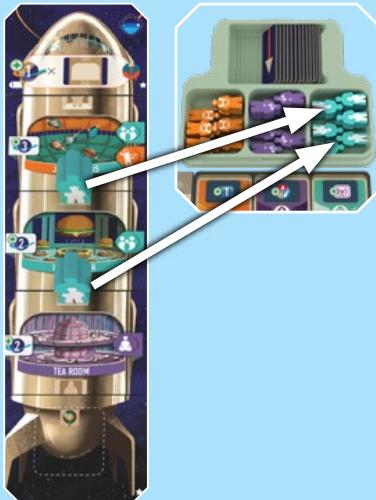
Pink has 2 Family Guests on board the Ship and 2 Family icons.
Pink consults the Marketing Board and sees that each Family Guest will give them 1 Ad for every Family icon on the Ship.
Pink collects 4 Ads from the Supply (2 Guests x 2 Ads each).
Those Guests are having such a great time, they’ve told everyone they know about it! Word-of-mouth advertising is extremely effective.



A turn later, Pink advances
the Cruise to its last Stop.
It's time to Return to Earth.

Pinkreturns their Worker back to their Break Room and gains 1 Funding Bonus as usual.
Pink then discards the Cruise and returns the 2 Family Guests to the supply.
Another successful cruise!
Pinks Ship is now available to be launched again, or they can build another Segment into it (since they took the Upgrade that increased their Ship size limit to 4 Segments).
ASSIGN A WORKER AND ACTIONS
On Step 2 of your turn, you may choose to Assign a Worker.
Take one of the Workers from the Break Room on your Player Board, and place it onto 1 of the 6 locations in the Network on the Main Board (except where you already have a Worker). Then take up to 2 actions you have access to14.
You must always complete all steps of an action before moving on to your next action.
An explanation of each action and its corresponding icon follows.

BUILD A DEVELOPMENT

The value of synergies cannot be overstated. It's paramount to make connections between the various departments to make everyone’s job run more smoothly. It’s also very important to not find yourself left behind in the swarm of new innovations, so investing in new technologies is vital.
This action allows you to build one Development. Choose one of the leftmost Developments from any Resource row on your Player Board, and pay the cost listed at the bottom of the columnA from which it was taken.
This cost may be paid in either Money and/or the Resource associated with the row the Development was on, in any combination ③

After paying the cost for that Development, remove the Development from your Player Board, and place it in the Network or below a Technology. If it is the first Development placed in a given area, it is placed on the Reputation icon, and you gain 1 Reputation.
You may never build a Development in an area where you already have one.
Removing a Development also increases the amount of the associated Resource that can be stored on your Player Board by one.
NETWORKDEVELOPMENTS
Network Developments give you more access to actions [14]. You may use your Developments immediately after building them (i.e., you may build a Development adjacent to your Worker for your first action and then use it to connect to an adjacent location to take your second action).
TECHNOLOGYDEVELOPMENTS

Technology Developments immediately give you ongoing benefits for the remainder of the game.
The first time a Development is placed below a Technology, that Technology is considered Invented. This means that Technology can now be used by all players (for free by players who have a Development below it, or by paying the players who do).
NEUTRAL DEVELOPMENTS

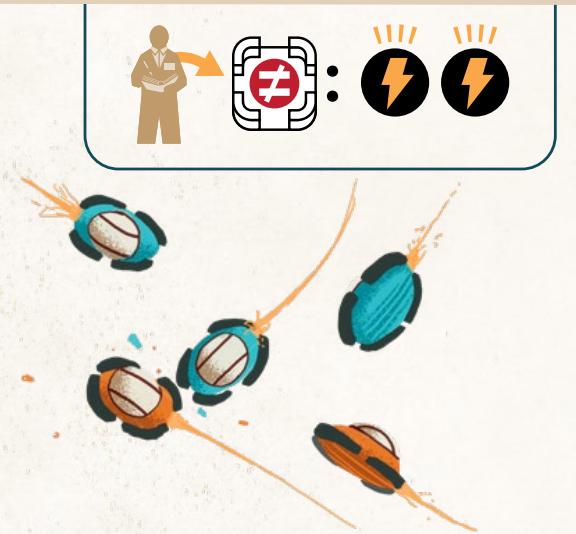
Neutral Developments function identically to player Developments, except that you pay the supply to use them instead of another player.

Pkis building a Development. They want to build their second Development from the Food row. Ppays the cost of 6 (shown at the bottom of the column) by paying 1 Food and 5 Money.


Premoves the Development from their Player Board (increasing their Food storage capacity to 4) and places it under the Space Elevator Technology.
This is the first time a Development was placed here which triggers two effects:
-
The Technology is now Invented and P can take advantage of its effects for the rest of the game. Other players may also use this Technology by either building their own Development here or by paying Pkand anyone else with a Development under this Technology.
-
P covered a Reputation icon, which increases their Reputation by 1.


E HIRE AN EXPERT WORKER
As your workload grows, so must your workforce, and there is no shortage of excellent candidates to choose from. You will find that having an extra pair of hands around will be helpful. You’ll also quickly learn that these new workers are experts in their field, and they are anxious to show you what they can do!
This action allows you to hire one of your Expert Workers. Pay the cost associated with the Expert you are hiring, and then move it to your Break Room, gaining 1 Funding Bonus as usual. This Expert is now available for you to use for the rest of the game.
The cost to hire the rightmost Expert is 2 Money per Development remaining in the Food and Oxygen rows on your Player Board.

The cost to hire the leftmost Expert is 3 Money per Upgrade Token remaining (whether it is faceup or flipped) in the bottom 4 spaces of the Launch Tower on your Player Board.

Expert Workers function just like your other Workers, except they gain a special ability that normal Workers do not have. Each game, there is an Expert Worker ability assigned during Setup. This ability applies to all players' Expert Workers for that game. See page 5 of the Company Records book for a list of all the Expert abilities.
This Expert Worker ability is used in the Intro Game:
Gain a Funding Bonus when your Expert bumps a Worker (Regular or Expert) back to their Break Room.


PURCHASE SUPPLIES

Ships can't fly without the proper resources, and there's no use in flying them if there aren’t people to fill the rooms. Luckily, there’s a place for you to purchase the necessary resources, as well as pay for advertisements, so that nothing stands in your way when you're ready to blast off.
This action allows you to purchase Resources and/or Ads.
You may:
• pay 1 Money to gain 2 Resources of your choice and/or
• pay 1 Money to gain 2 Ads.
As a single action, you may do one or both of these options once.
Any Resources you purchase but cannot store are lost.
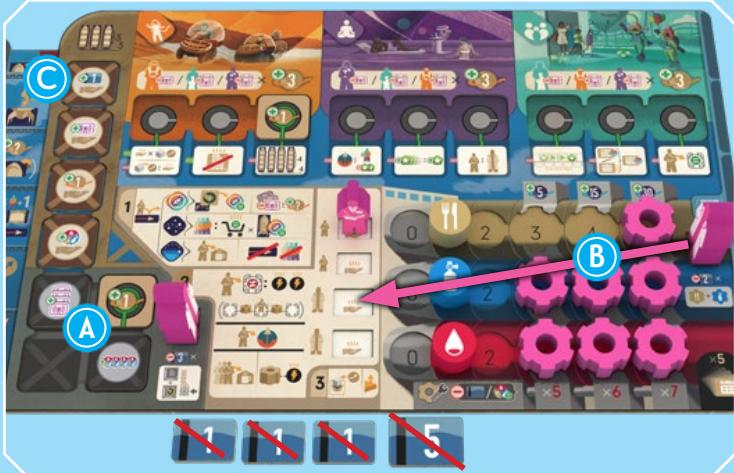

E.g. Pkwants to hire an Expert Worker. This will give them an additional Worker with a special ability to use for the rest of the game. P can
hire either Expert from their Player Board.
The leftmost Expert's cost is 3 Money per Upgrade Token in the bottom of the Launch Tower . Pkremoved one of these tokens when they launched their first Ship. That leaves 3 Tokens remaining for a total cost of 9 Money.
The rightmost Expert's cost is 2 Money per Development remaining in the Food and Oxygen rows . Pnkhas previously built 2 Developments from the Food row. That leaves 4 Developments remaining for a total cost of 8 Money.
Phas just enough Money left to hire the Expert on the right. They spend 8 Money and move the Expert to their Break Room, gaining a Funding Bonus. They take 1 Money back from the supply
Pcan hire their leftmost Expert by taking this action again in the future. Perhaps they will do so after launching their next Ship, which will remove the flipped Upgrade Token, reducing the Expert's cost to 6 Money.
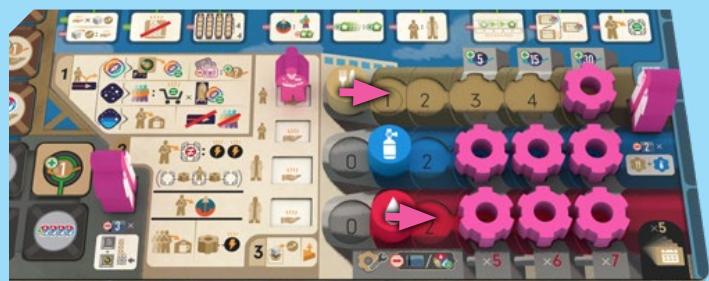
I1NN5

Pnktakes the Purchase Supplies action and spends 1 Money to gain 1 Food and 1 Fuel. Pk would like to purchase 2 more Resources but
they can only do this once per action. They decide to make the most of this action and also spend 1 Money to purchase 2 Ads.

E: ACQUIRE BLUEPRINTS

Our architects are continuously outdoing themselves. Whether you’re seeking to cater to our more adventurous guests—or those who prefer to just relax—they will draw up just what you need.
This action allows you to take up to 2 Blueprint tiles. You may choose any of the faceup Blueprints in the display on the Main Board. There is no cost associated with this action. Place the chosen Blueprints to the right of your Player Board.
At the end of the action, slide all remaining Blueprints down in the display, filling any empty spaces. Then add new ones from the Blueprint tray to fill the empty spaces from bottom to top.
You can hold a maximum of 5 Blueprints beside your Player Board. You may exceed this limit during your turn, but you must discard down to 5 at the end of your turn.
REFRESH BLUEPRINT DISPLAY

At any time on your turn, you may spend 1 Reputation to discard any number of Blueprints from the display. Refill the empty spaces from the Blueprint tray, but do not slide the remaining Blueprints down. No action is required, and this may even be done before placing a Worker.
You may repeat this by paying 1 Reputation each time.
DISCARDED BLUEPRINTS
Discarded Blueprints are placed in a pile next to the Blueprint tray. If you ever run out of Blueprints, shuffle the discard pile, and add them back to the Blueprint tray.
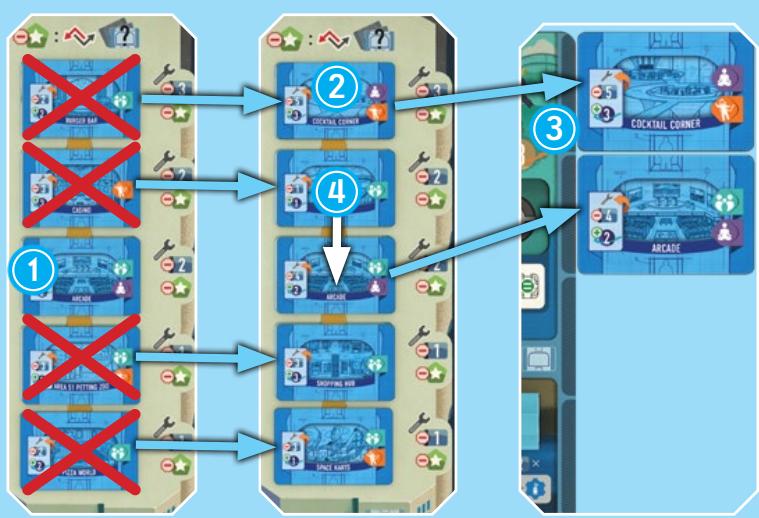
E.g. Bə wants 2 Blueprints with the purple Relaxing icon.
Right now the display only has one Blueprint that matches, Arcade①.
Bəreduces their Reputation by 1 to discard the other 4 Blueprints and refills the display. The Arcade Blueprint does not slide down.
Success! One of the new tiles added is Cocktail Corner②.
Bə takes the Acquire Blueprints action, chooses the Arcade and Cocktail Corner Blueprints, and places them next to their Player Boardin the designated area.
At the end of the action, Fun Park slides down, and two new Blueprints are added to fill the empty spaces.
BLUEPRINT / SHIP SEGMENT ANATOMY

BUILD SHIP SEGMENTS

Blueprints are like ideas—they are useless unless they’re further implemented. Typically, the segments you install will be constructed from blueprints in your inventory. However, you may also implore the manufacturing department for a rush job. Just be prepared to pay a little extra for the trouble....
This action allows you to build up to 2 Ship Segments (also referred to as Segments). The other side of a Blueprint is a Segment. A Blueprint becomes a Segment when it is built into a Ship and flipped over.
Segments can be built from two areas:
-
Beside your Player Board: You must pay the cost listed on the left side of the Blueprint.
-
The Blueprint display on the Main Board: You must pay the listed cost on the Blueprint ANDpay the ADDITIONAL Reputation and Money cost listed beside the Blueprint.
Costs can be reduced to 0, but not below 0, by playing Agenda Cards, using Technologies, etc.

After paying the cost, flip the Blueprint over to its built side, and place it between the Cockpit and Engine of any Ship you have beside your Player Board, following the building restrictions listed below.
When building 2 Segments, you may build them into the same Ship or multiple Ships.
Reminder: The VP on the Segments is scored at the end of the game.
BUILDING RESTRICTIONS
• A Segment must be built into a Ship.
• Each Ship may only contain up to 3 Segments.
• You may not build Segments into Ships that are currently on a Cruise.
• Once a Segment is built, it cannot be moved or replaced.
CABINS
The top and bottom of a Segment has half of a Cabin on it. When two Segments are built into the same Ship it forms a complete Cabin which can hold one Guest during a Cruise.
Each Segment added after the first will add one additional Cabin.
The Ship pictured to the right can hold a total of one Guest. If a third Segment was built into it, it could hold a total of two Guests.
REFILL BLUEPRINT DISPLAY
At the end of the action, if Segments were built directly from the Blueprint display, the remaining Blueprints slide down and are replaced from the Blueprint tray as usual.


Blə is Building Ship Segments.
![](images/e30901a7731d26
内容过长,此处只内联前一部分;完整内容请下载或到规则页阅读。
下载 Markdown原文为社区整理/出版社公开资料,版权归原作者,仅供个人学习查阅。