
拼词Scrabble
一句话概览
拼词 是一款已收录于村了吗规则库的桌游,支持 2–4 人,原名 Scrabble。
本页内容:一句话概览 · 游戏概述 · 1. 游戏组件 · 2. 游戏设置 · 3. 游戏流程 · 4. 放置单词 · 5. 空白牌规则 · 6. 换牌 · 7. 跳过 · 8. 计分规则 · 9. 五十分奖励(Bingo) · 10. 游戏结束 · 11. 单词合法性 · 关键规则与常见问题 · 常见问题
拼词 规则速览
以下规则速览由本站整理,与官方规则书表述不同,仅供快速上手参考。
游戏概述
玩家通过在 15×15 的棋盘上交叉放置字母牌组成英文单词来争夺最高分。利用棋盘上的彩色奖励格(双倍/三倍字母分、双倍/三倍单词分)最大化每回合得分,率先用光手牌或棋盘无合法走法时分数最高者获胜。
核心机制: 字母组合、手牌管理、棋盘奖励格利用、词库知识
1. 游戏组件
| 组件 | 数量/说明 |
|---|---|
| 游戏板 | 1 块(15×15 格,含彩色奖励格) |
| 字母牌 | 98 块(每块印有字母及分值) |
| 空白牌 | 2 块(可代表任意字母,分值为 0) |
| 牌架 | 4 个 |
| 牌袋 | 1 个 |
字母牌分布与分值(英文版)
| 字母 | 数量 | 分值 | 字母 | 数量 | 分值 |
|---|---|---|---|---|---|
| A | 9 | 1 | N | 6 | 1 |
| B | 2 | 3 | O | 8 | 1 |
| C | 2 | 3 | P | 2 | 3 |
| D | 4 | 2 | Q | 1 | 10 |
| E | 12 | 1 | R | 6 | 1 |
| F | 2 | 4 | S | 4 | 1 |
| G | 3 | 2 | T | 6 | 1 |
| H | 2 | 4 | U | 4 | 1 |
| I | 9 | 1 | V | 2 | 4 |
| J | 1 | 8 | W | 2 | 4 |
| K | 1 | 5 | X | 1 | 8 |
| L | 4 | 1 | Y | 2 | 4 |
| M | 2 | 3 | Z | 1 | 10 |
| 空白 | 2 | 0 |
2. 游戏设置
- 将所有字母牌面朝下(或放入牌袋)洗匀。
- 每位玩家抽取 1 块字母牌,字母最接近 A 的玩家先手(空白牌视为比 A 更优先)。将抽出的牌放回并重新洗匀。
- 每位玩家抽取 7 块字母牌放在自己的牌架上,对其他玩家隐藏。
3. 游戏流程
回合按顺序向左传递。每位玩家在自己的回合从以下三种行动中选择其一执行:
- 放置单词
- 换牌
- 跳过
执行行动后,从牌袋中补牌,使牌架上的牌回到 7 块(牌袋中仍有剩余时)。
4. 放置单词
4.1 首个单词
- 必须覆盖棋盘正中央星号格。
- 至少 2 个字母。
- 只能横向(从左到右)或纵向(从上到下)放置,不可斜向。
4.2 后续单词
每个新单词必须与棋盘上已有的牌连接。连接方式包括:
- 在已有单词的前端和/或后端添加字母。
- 与已有单词垂直交叉,利用其中一块已有字母作为交叉点。
- 与已有单词平行放置,使相邻的字母也组成合法单词。
4.3 合法性要求
- 一行中打出的所有字母必须组成一个完整单词。
- 新放的牌所产生的每一个交叉序列也必须是合法单词。
5. 空白牌规则
- 空白牌可代表任意字母。
- 放置时须声明它代表哪个字母,此后该牌在整个游戏中固定为该字母。
- 空白牌的分值为 0,即使放在字母奖励格上也不获得加成。
- 但单词奖励格仍然适用于该单词的其余字母。
6. 换牌
- 不放置单词时,可将手中任意数量的字母牌面朝下弃置,从牌袋中抽取相同数量的新牌。
- 弃置的牌放回牌袋。
- 换牌行动消耗整个回合,不得分。
- 仅当牌袋中剩余 7 块以上字母牌时才可执行换牌。
7. 跳过
- 放弃回合,不得分。
- 若所有玩家连续两次跳过(每人各跳过两次无分回合),游戏结束。
8. 计分规则
8.1 基础计分
将本回合所组成的单词中每个字母的分值相加,并应用奖励格效果:
| 奖励格类型 | 效果 |
|---|---|
| 双倍字母分(Double Letter) | 该字母的分值 ×2 |
| 三倍字母分(Triple Letter) | 该字母的分值 ×3 |
| 双倍单词分(Double Word) | 整个单词的总分 ×2 |
| 三倍单词分(Triple Word) | 整个单词的总分 ×3 |
8.2 奖励格使用规则
- 字母奖励先于单词奖励计算。若单词覆盖两个单词奖励格,则连续相乘(例如两个双倍单词格 = 整个单词 ×4)。
- 奖励格仅在首次放置牌时生效。后续回合中已有牌覆盖的奖励格按牌面分值计算,不再触发加成。
- 同一回合内组成多个单词(主词加交叉词)时,分别计算每个单词的分数。共享字母(及其新覆盖的奖励格)在每个使用它的单词中都计算在内。
9. 五十分奖励(Bingo)
若玩家在一个回合内打出全部 7 块手牌,在单词总分之外额外获得 50 分奖励。
10. 游戏结束
满足以下任一条件时游戏结束:
- 牌袋已空且任一玩家用光手中所有牌。
- 所有可能的走法已穷尽(所有玩家连续两次跳过)。
最终计分调整
- 每位玩家减去自己牌架上剩余字母牌的分值总和。
- 若某玩家用光了所有牌("清空"),该玩家加上其他玩家手中剩余牌的分值总和。
最终得分最高者获胜。 若平局,在调整前得分最高者胜出(或保持平局)。
11. 单词合法性
以下类型的词不允许使用:
- 始终需要大写的词
- 缩写
- 单独使用的前缀或后缀
- 需要撇号或连字符的词
任何标准词典中收录的单词均合法。
质疑规则
- 可在下一位玩家行动之前对上一个单词提出质疑。
- 若该词不合法,打出该词的玩家收回字母牌,该回合不得分。
- 若该词合法,质疑者失去下一个回合(具体规则可能因家庭/锦标赛惯例而异)。
关键规则与常见问题
易错规则
- 首词必须覆盖中心星号格,且至少 2 个字母
- 单词只能横向或纵向放置,不可斜向
- 所有新交叉序列必须是合法单词,缺一不可
- 空白牌分值为 0,即使放在字母奖励格上也不得分
- 奖励格仅首次放置时生效,已有牌覆盖的奖励格不再触发
- 换牌仅在牌袋剩余 7 块以上时允许
- Bingo 奖励 50 分需在单回合打出全部 7 块手牌
- 游戏结束时每人减去剩余牌分值,清空者额外加上其他玩家剩余牌分值
- 质疑规则中,若词合法则质疑者失去下一回合
常见问题
-
Q:空白牌放在奖励格上怎么算分?
A:空白牌本身分值为 0,字母奖励格对其无效;但单词奖励格照常应用于整个单词的其余部分。 -
Q:可以同时换牌和放词吗?
A:不可以,每回合只能从三种行动(放词、换牌、跳过)中选择一种。 -
Q:牌袋不足 7 块时还能换牌吗?
A:不可以,换牌要求牌袋中至少剩余 7 块牌。 -
Q:Bingo 奖励的 50 分算在单词分里吗?
A:不算在单词分里,而是在单词分计算完毕后额外加上 50 分。 -
Q:平行放置单词时需要检查什么?
A:除了主词本身,每个相邻接触的交叉序列都必须构成合法单词。
常见问题(FAQ)
以下 1 条问答中 0 条来自站内玩家的真实提问,其余 1 条为本站整理的常见疑问;答复内容保持原样。
拼词支持几个人玩?
2–4 人。
去哪查完整规则
想核对具体规则细节、卡牌效果或某个回合的结算方式,可以在村了吗里选中这款游戏后直接提问。
同类桌游
规则原文(Markdown)
本站收录这款游戏的规则原文 2 个文件,此处内联渲染 2 个,可直接展开阅读或下载。
rules_zh_拼词_578.md8.3 KB
来源类型:markdown 文本(非 PDF 源)
说明:原文未改动,仅调整存放位置与文件名;非 PDF 扫描件,无对应原书 PDF
PATCHWORK
拼布對決中文規則書翻譯/排版:小柴
IXIXIXIXIXIXIXIXIXIXIXIXIXIXIXIXIXIXIXT
拼布是縫紉的一種形式,它包含把布塊縫在一塊,形成一件更大的設計。在過去,它是一個使用剩餘布料創造服裝和棉被的一種方法。如今,拼布是一種藝術形式,設計師使用珍貴的布料創作美麗的紡織品。
不均勻的布塊使用特別能夠造就真正的傑作,因此大量的織品藝術家都在嘗試拼布。然而,為了創作美麗的拼布,需要的是精力和時間,但是現有的布塊却無法拼在一起。所以,謹慎的挑選你的布塊,並且持續提供健全的紐扣,這不僅可以完成你的拼布,也可以使它更棒,比你對手的拼布更美。
遊戲配件

1個中央時間圖板
(雙面;這兩面只有美術不同,挑一個你比較喜歡的)

2個拼布圖板
(每个玩家1个)

1個中立指示物
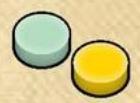
时間指示物(萊姆綠和黃色)

5个特殊布塊(皮革布塊)

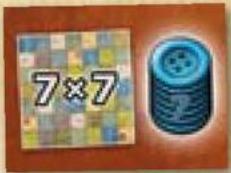
1個特殊板塊
33个拼布



鈕扣板塊
32個「1個扣子」板塊
12個「5個扣子」板塊
5個「10個扣子」板塊
1個「20個扣子」板塊


每個玩家拿取一個拼布圖板、一個時間指示物,以及5個鈕扣(當作貨幣)。把剩餘的鈕扣放在一旁。
把你的時間指示物放在時間圖板的起點。
最近有縫紉的玩家為起始玩家。
把(一般)拼布排列成一個圓圈,或者繞著時間圖板排成橢圓。
把中央時間圖板放在場中央現在可以開始遊戲了!

把特殊拼布放在時間圖板上標記的區域。

找到最小的拼布(也就是1X2大小)位置,並在這個拼布及順时針方向上下一个拼布之間放上中立指示物。
展示特殊板塊。

遊戲進行
在這款遊戲中,玩家不以輪流回合的方式進行。時間圖板上時間指示物落後的玩家進行他的回合。這可能會導致某個玩家在輪到對手的回合前,進行他的回合多次。
如果兩個時間指示物都在同一格,則由指示物疊在上方的玩家進行他的回合。

現在輪到萊姆綠玩家的回合。除非他的時間指示物往前移動超過3格,他還可以再立刻進行自己的回合。
輪到你的回合時,執行以下其中一個行動:
A、推進並獲得鈕扣
或
B、拿取並放置一個拼布
A、推進並獲得鈕扣
在時間圖板上把你的時間指示物直接移動到你對手時間指示物所在位置的下一格。你時間指示物每移動一格,你就獲得1個鈕扣(也就是數值為1的鈕扣板塊)。

萊姆綠玩家往前移動他的指示物4格,所以目前在黃色時間指示物的下一格,他並因此獲得4個鈕扣。
B、拿取並放置一個拼布
這個行動包含5個步驟,需按照特定順序執行:
1、选择一个布块
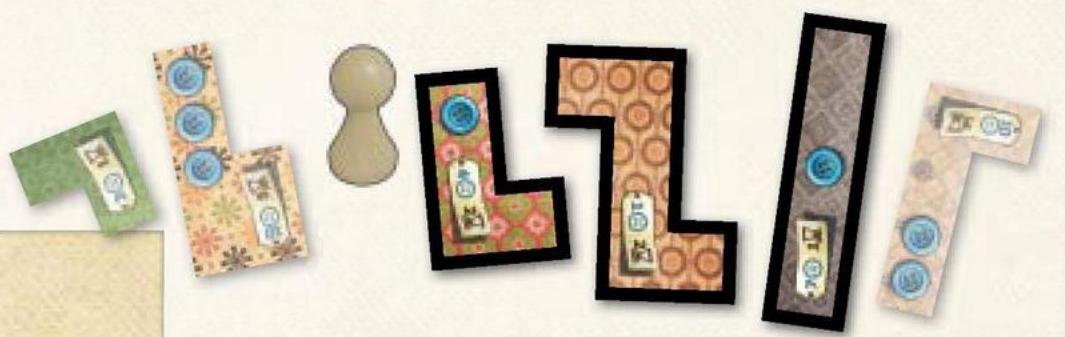
你可以從中立指示物前面(順時針方向)的三個布塊中進行挑選。
在這個範例中,你可以從圖中3個標黑框的布塊挑選。其它的布塊現在不能挑選。
2、移動中立指示物
把中立指示物放到挑選的布塊旁。
3、支付拼布费用
支付布塊上顯示的鈕扣数量,並放到一般供應區。

示布鈕 顯拼的 籤個付 個取要數 這拿需扣

4、把布塊放到你的拼布圖板上
放在你拼布圖板上的布塊不能彼此重疊。把布塊放在你的拼布圖板之前,你可以按你的喜好隨意旋轉布塊。
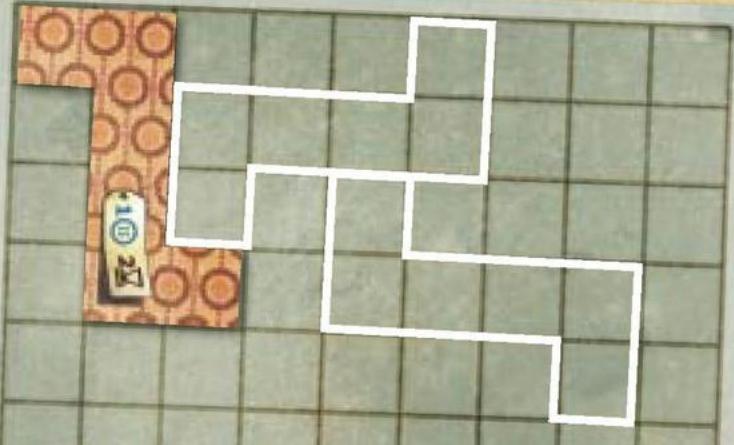

5、移動你的時間指示物
跟據標籤上顯示的時間數量,移動你時間圖板上的時間指示物。如果你的時間指示物最終位置和對手的時間指示物在同一格,則把你的指示物疊在他的指示物上方。
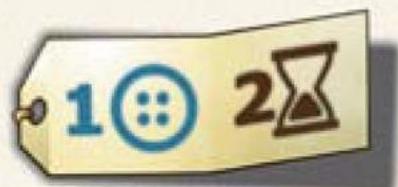
這個布塊讓你往前移動你的時間指示物2格。
時間圖板

無論你執行哪一個行動,你總是會移動你的時間指示物。時間圖板上某些區域有些特別的標記,每當你移動進入或經過其中一個這樣的區域,結算對應的事件:
特殊布塊:

拿取特殊布塊,並立刻把它放到你的拼布圖板上。特殊布塊是唯一能在你的拼布圖板上「拼放」單格的布塊。
鈕扣收入:
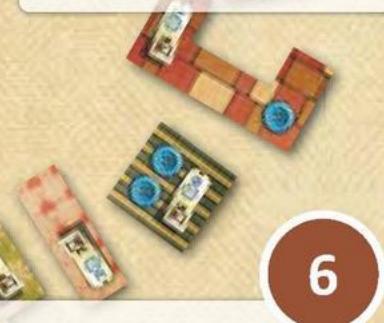
根據你拼布圖板上的布塊,獲得一定數量的鈕扣。
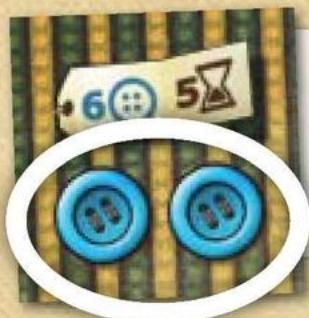
每次你進行鈕扣收入時,這個布塊會讓你獲得2個鈕扣的收
特殊板塊
第一个完整填满自己7X7大小拼布圖板的玩家获得特殊板塊,這個板塊值7分。

遊戲結束
遊戲在兩个時間指示物都抵達時間圖板上最後一格時結束。如果一個時間指示物移動後將會超過最後一格,只需要把它停放在最後一格即可。如果是執行行動A碰到這種狀況,你只會獲得和你實際移動過的格子相等數量的鈕扣。
計分
計算你剩餘多少鈕扣,每個鈕扣可以獲得1分,然後把特殊板塊的分數加上去,如果有的話。此外,你的拼布圖板上每有一個空格就扣2分。
最高分的玩家獲勝,如果平手,則先抵達時間圖板的玩家獲勝。
範例:
多利思及安德亞正在進行遊戲。遊戲結東時,多利思還剩/4個鈕扣,他還有獲得特殊板塊。他的拼布圖板上有5個空格,所以他的最終分數是//分。(14+7-/0(5x2)=11)
安德亞還剩/8個鈕扣,而且他的拼布圖板上有2個空格,所以他的分數是/4分,安德亞獲勝。
遊戲設計:Uwe Rosenberg
編輯: Stefan Stadler & Rolf Raupach
圖像設計:Klemens Franz|atelier198
英文翻譯:Grzegorz Kobiela
中文翻譯:小柴

© 2014 Lookout GmbH Hiddigwarder Straße 37, D- 27804 Berne, Germany.

MAYFAIR GAMES www.mayfairgames.com
Mayfair Games, Inc
8060 St. Louis Ave.
Skokie, IL 60076
下载 Markdownscrabble-rulebook-en.md14.8 KB
Scrabble — Official Rules
You may play another human player head-to-head. You will need two game.com or
game.com.pocket pro units and a compete.com cable.
1. First, connect the compete.com cable to the com.port of your game.com or
Pocket Pro.
2. Next, connect the other end of the cable to your opponent's game.com
or Pocket Pro
3. Make sure you both have the SCRABBLE cartridge inserted into your
game.com or Pocket Pro units.
4. Turn both units ON.
5. Each player should select the cartridge icon on the main menu screen.
6. When the PLAYERS screen appears, select HUMAN for player 2,
and the icon showing two connected game.coms or Pocket Pros.
7. Press "OK?".
After choosing your opponents, you will then be asked to enter
your name. To do so, touch the left or right arrows or use the
directional pad to rotate the letter ring and cycle through the
letters and symbols. When the character you want is on top,
choose it by touching it or pressing the A button. The letter
or symbol will appear in the first box. You may choose up to
five letters or symbols. When you are finished, choose "end."
Continue this process with each human player.
The SCRABBLE board will appear with the word "Ready?" on the screen. The players' names
and scores will be to the right of the board. Seven letter tiles will appear on your rack, and
your play timer will start.
MODEL 71-754
INTRODUCTION
Welcome to SCRABBLE, the world's best-loved crossword game! Test your spelling and
vocabulary skills as you use strategy to block opponents, rack up points and win the game!
OBJECT
The object of SCRABBLE is to score the most points. You score points by your placement
of tiles in the form of words on the SCRABBLE board. Certain letters and squares on the
board will help increase your score.
Note that in any game played against a computer opponent, the computer is the final authority
concerning whether or not a word you place is acceptable or unacceptable. The computer
has its own extensive dictionary. If you see the computer place an unusual word (such as
"FIAR," "PADI," or "UDO"), look them up in a complete dictionary - you'll find that such
words do exist! Note that the following types of words will not be accepted by the computer:
Proper nouns or names
Foreign (non English) words
Profanity
Ethnic or religious slurs
Word requiring a hyphen
Abbreviations
STARTING THE GAME
To play the game, make sure your game.com or Pocket Pro system is OFF. Insert the SCRABBLE
cartridge. Turn on your game.com or Pocket Pro and touch the CARTRIDGE icon on the
main menu.
After a brief animation, you'll see the main SCRABBLE screen.
You may choose to START the game or open the OPTIONS
screen. To select, use the touch screen, or move the directional
pad and press the A button.
PLAYING THE GAME
To play the game, choose START at the main screen. The PLAYERS screen will appear. You
may choose between two to four players.
To choose a human opponent or opponents, use the touch screen or the A button to cycle
through to "human." To play a human opponent or opponents on the same game.com or
Pocket Pro, choose the icon with one game.com unit by touching it. To play via the compete.com
cable (two game.com or Pocket Pro units required), choose the icon with two connected
game.com or Pocket Pro units (two-player only, see COMPETE.COM MODE).
To play a computer opponent or opponents, choose "computer." You may then choose from
three difficulty levels: novice, intermediate, and advanced. (novice is the easiest). To leave a
player slot empty, choose "none." You must play with at least two players.
When you are finished, touch the "ok?" button.
Playing Against the Computer
The board appears with the word "READY" on the screen. Use
the touch screen to touch "READY" or press the A button to
begin placing letter tiles. Press "Enter" when you
have completed placing a word. The word "CONTINUE?" will
now appear. Touch "CONTINUE?" when you are finished studying
the tiles in your rack. Once the word "CONTINUE?" is pressed,
your tiles will be hidden and the word "READY" will appear. The
computer player will not place letter tiles until the "READY"
button is pressed by the human player.
COMPETE.COM MODE
7175401IWTI-01
OPTIONS
All options may be selected by either using the touch screen or by cycling through with the
directional pad and pressing the A button.
Timer
25 minute tournament timer: You have 25 minutes to place tiles without penalty.
Penalty - 10 pts. per minute over 25: Penalizes you 10 points for each minute over 25 minutes
you spend placing tiles.
Rack order
Controls how your letter tiles are organized, as follows:
Alphabetically
- tiles are placed in alphabetical order.
Ascending value - tiles are placed from lowest to highest value.
Vowel/consonant - tiles are placed with vowels first.
Free (default)
- tiles are placed in random order.
Exit
Exits the options screen.
Your play begins by placing two or more of your tiles on the board to form a word. To place
tiles, you must zoom in on the board by touching the "zoom in" icon (the magnifying glass)
in the upper right corner. To zoom in even closer, touch the magnifying glass with the
plus sign again.
Use the touch screen to select a tile.
To place your word, choose a letter from your rack that you want to place. Then choose the
square on which you want to place the tile. The tile will transfer to the board. If you wish
to move the letter, choose it again and move it to another square. Continue this process with
at least one other tile until you have finished placing your word. The tiles must connect, and
must be placed either vertically or horizontally. Diagonal words are not allowed. Note: the
first word placed in a game MUST cross the star in the center of the board. The star counts as a
double word score premium square (see PREMIUM SQUARES for scoring). To scroll to other
areas of the board while in "zoom" mode, use the arrows located outside the board screen.
NOTE: You cannot place tiles on the board when you are in the fully zoomed out mode.
Zoom in to one of the 2 closer views in order to place tiles on the board.
When you are finished placing your word, choose ENTER.
If your word is accepted and not challenged, the total points (main score) will appear directly
under your name (see SCORING). If you placed a tile on a premium square, including the
center star square, your score will reflect it. The total points for each individual turn will
appear under your main score. The tiles you placed on the board will be replaced on your
rack. Once letters are played on the Scrabble board, they may not be moved.
LCD Backlight
Indicator
Speaker
Screen
Directional
Pad
On/Off button
Menu button
Pause button
B button
C button
D button
Backlight
Button
A button
RACK AREA
LAST PLAYED SCORE
ZOOM MODE
SCORE
SCROLL ARROWS
NOTE: a blank tile can be used as any letter. When you place a
blank tile, you will be asked to enter the letter it represents. It
will remain this letter throughout the game. Blank tiles have no
point value.
The next player will take his turn. A new word or words are
formed in one of three ways:
1. Adding one or more letters to a word or letters already on
the board.
2. Placing a word at right angles to a word already on the board.
The new word must use one of the letters already on the board
or must add a letter to it.
3. Placing a complete word parallel to a word already on the
board.
DEFECTIVE CARTS
If you find that your new SCRABBLE game.com cartridge is damaged or non-functional, DO NOT RETURN
THE GAME TO THE STORE. The store will not have replacement cartridges. Instead write to us at:
Tiger Repair Department
1000 N. Butterfield Road, Unit 1023
Vernon Hills, IL 60061 U.S.A.
Please include a note with your return explaining the problem along with a sales slip, date, place of purchase
and price paid. We will do our best to repair or replace your cart promptly.
90 DAY LIMITED WARRANTY
ENDING THE GAME
CHALLENGING
Once you place a word, another player may challenge it. This means that either a human or
computer player does not think you have played a valid word. (Note: the computer always
challenges words not in its dictionary.) The screen will show the name of the person challenging.
The screen will then read, "challenge sustained! Over rule, yes/no." If you choose "yes," your
word will stand unchallenged. If you choose "no," your word is invalid and you lose your turn.
You have the option to challenge other players' words, too. (NOTE : However, that you cannot
challenge a comoputer player) To do so, choose CHALLENGE by touching the arrows below
or above the ENTER bar until the word CHALLENGE appears. If your challenge is not
sustained, the player's word stands and you lose your turn.
PASSING AND EXCHANGING
If you cannot form a word with the letters on your rack, you may cycle to PASS or EXCHANGE
by touching the arrows below or above the ENTER bar. Choosing PASS will forfeit your turn
and retain your letters. Choosing EXCHANGE will bring up a screen asking you to choose
which tiles you want to exchange. Select the tiles and press OK when you are finished. Your
exchanged letters will be replaced, and you lose your turn. If there are no available tiles left
with which to exchange, the original tiles will remain in your rack.
SCORING
Each player's score is entered after a word is placed and the turn is finished. The score for
the turn is calculated by the total value of the letters used, plus any additional points for using
a premium square or squares.
When two or more words are formed in the same play, each is scored. The common letter
is counted (with full premium value, if any) for each word.
PREMIUM SQUARES
The shaded squares on the SCRABBLE board represent "premium" squares. (To get a close-
up view of these tiles on the board, touch the "zoom in" icon twice.) If a letter tile of a word
is placed on one of these squares, the score will be altered as follows:
Double Letter Score – Receive twice the value of the letter on the square.
Triple Letter Score
– Receive three times the value of the letter on the square.
Double Word Score – Receive twice the value of the entire word.
Triple Word Score
– Receive three times the value of the entire word.
If a word is formed that covers two premium word squares, the score is adjusted accordingly
depending upon which squares are covered.
Letter and word premiums count only in the turn in which they are played. On later turns,
letters already played on premium squares count at face value.
When a blank tile is placed on a premium word square, the value of the word is doubled or
tripled, even though the blank has no score value. The value of the individual tile, however,
remains 0.
BINGO
If any player uses all seven letters from their rack to form a word, he or she will get a "bingo"
bonus of 50 points. When this happens, the word BINGO will appear on the screen.
TILE VALUES
© 1999 HASBRO. All Rights Reserved.
SCRABBLE® is a trademark of HASBRO in the United States and Canada.
®, TM & © 1999 Tiger Electronics, Ltd. All rights reserved.
TIGER ELECTRONICS, LTD.
980 Woodlands Parkway
Vernon Hills, Illinois 60061, USA
1-888-TIGR-SOS
www.game.com
www.tigertoys.com
© 1999 TIGER ELECTRONICS (UK) LTD.
Belvedere House, Victoria Avenue
Harrogate, North Yorkshire HG1 1EL, England.
Tiger Electronics, Ltd. (Tiger) warrants to the original consumer purchaser of this product that the product
will be free from defects in materials or workmanship for 90 days from the date of original purchase. This
warranty does not cover damages resulting from accident, negligence, improper service or use or other
causes not arising out of defects in materials or workmanship.
During this 90-day warranty period, the product will either be repaired or replaced (at Tiger’s option)
without charge to the purchaser, when returned with proof of the date of purchase to either the dealer
or to Tiger.
Product returned to Tiger without proof of the date of purchase or after the 90-day warranty period has
expired, but prior to one year from the original date of purchase, will be repaired or replaced (at Tiger’s
option) for a service fee of U.S.$12. Payments must be by check or money order payable to Tiger
Electronics, Ltd.
The foregoing states the purchaser’s sole and exclusive remedy for any breach of warranty
with respect to the product.
All product returned must be shipped prepaid and insured for loss or damage to:
Tiger Repair Department
1000 N. Butterfield Road, Unit 1023
Vernon Hills, IL 60061 U.S.A.
The product should be carefully packed in the original box or other packing materials sufficient to avoid
damage during shipment. Include a complete written description of the defect, a check if product is beyond
the 90-day warranty period, and your printed name, address and telephone number.
THIS WARRANTY IS IN LIEU OF ALL OTHER WARRANTIES AND NO OTHER
REPRESENTATIONS OR CLAIMS OF ANY NATURE SHALL BE BINDING ON OR OBLIGATE
TIGER IN ANY WAY. ANY IMPLIED WARRANTIES APPLICABLE TO THIS PRODUCT,
INCLUDING WARRANTIES OF MERCHANTABILITY AND FITNESS FOR A PARTICULAR
PURPOSE, ARE LIMITED TO THE NINETY (90) DAY PERIOD DESCRIBED ABOVE. IN NO
EVENT WILL TIGER BE LIABLE FOR ANY SPECIAL, INCIDENTAL, OR CONSEQUENTIAL
DAMAGES RESULTING FROM POSSESSION, USE, OR MALFUNCTION OF THIS TIGER
PRODUCT.
Some states do not allow limitations as to how long an implied warranty lasts and/or exclusions or
limitations of incidental or consequential damages, so the above limitations and/or exclusions of liability
may not apply to you. This warranty gives you specific rights, and you may also have other rights which
vary from state to state.
If your product is not working properly, or if you have any questions and/or comments, please call us toll-
free at 1-888-TIGR-SOS, and a service representative will be happy to help you.
The game ends when all the letters have been drawn and one player uses his or her last letter,
or when no more legal words can be made (all players PASS in a single round). The player
with the highest final score wins the game. Each player's score is reduced by the sum of his
or her unplayed letters. In addition, if a player used all letters, the sum of the other players'
unplayed letters is added to that player's score. In case of a tie, the player with the highest
score before adding or deducting unplayed letters wins.
There are 100 SCRABBLE tiles, with the following frequency and tile point value:
Letter
Number
Value
A
B
D
E
F
G
H
J
K
M
N
Letter
Number
Value
O
P
Q
R
S
T
U
W
Y
Z
Blank
原文为社区整理/出版社公开资料,版权归原作者,仅供个人学习查阅。