
Age of Rail: South AfricaAge Of Rail South Africa
一句话概览
Age of Rail: South Africa 是一款已收录于村了吗规则库的桌游,支持 3–6 人,原名 Age Of Rail South Africa。
本页内容:一句话概览 · 常见问题
这游戏怎么玩
- 本站已收录这款游戏的规则资料,可以在对话里直接提问规则细节。
常见问题(FAQ)
以下 1 条问答中 0 条来自站内玩家的真实提问,其余 1 条为本站整理的常见疑问;答复内容保持原样。
Age of Rail: South Africa支持几个人玩?
3–6 人。
去哪查完整规则
想核对具体规则细节、卡牌效果或某个回合的结算方式,可以在村了吗里选中这款游戏后直接提问。
同类桌游
- 卡坦岛德式
- 工业革命:伯明翰德式
- 勃艮第城堡:特别典藏版德式
- 方舟动物园德式
- 卡卡颂抽象
- 瘟疫危机传承:第一季美式
- 阿瑞迪亚:勇踏征途美式
- 重塑宇宙德式
- 幽港迷城美式
- 埃多拉的德鲁伊德式
规则原文(Markdown)
本站收录这款游戏的规则原文 1 个文件,此处内联渲染 1 个,可直接展开阅读或下载。
Age-of-Rail-rules.md22.9 KB
AGE OF RAIL SOUTH AFRICA
RULES OF PLAY
COMPONENTS
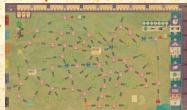
1 Game Board
144 Locomotives: (24 each)
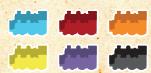
12 Railroad Income disks (2 each)

30
Development
cubes
6 Player markers

SETTING UP
Place the game bóard in the center of the table.
Place the Round marker on the starting space “0” of the Round Track.
Place the Time marker on the topmost starting space of the Time track.
Each player starts with money depending on the number of players: 3-players: £80 each; 4-players: £70 each; 5-players: £60 each; 6-players: £50 each. Place the remaining money sorted nearby to create a bank.
Each player chooses a Player marker and places it into the Build Track Action, in the Work space, showing this icon
Sort the Railroad Stock Certificates and Locomotives by color and place them next to their correśponding positions on the edge of the board. Place the Currency cards in stacks within easy reach of all players.


Place l of each color Railroad Income disk next to the Income Track. Place the rest aside for now.
Place the 30 Development cubes near the game board.
Initial Offering
One Stock of each of the five starting railroads is auctioned off and iņitial track is built. Initial Stocks are auctioned off one at a time, in the following order: Red CdFM, blue CSAR, orange NRC, yellow CTR&D, and then purple CMRC. The black ZASM railroad is not opened at the beginning of the game.
The starting bidder for the red CdFM·stock is chosen randomly. Then, the winner of each auction becomes the starting bidder for the next auction.
For each Initial Offering: Beginning with the starting bidder, and continuing clockwise, players bid on the Stock up for auction. The minimum bid in the Initial Offering is £0. If a player chooses not to bid higher than a previous bid or passes, they may not reenter the bidding. If the starting bidder passes, along with every other player, the starting bidder gets the Stock for free. You can never bid more money than you have in your personal supply. When all but one player has dropped out of the bidding, that player wins the auction.
The winner of each Initial Offering does the following:
-
Pays the winning bid into the railroad's Treasury (next to the railroad's locomotives and shares by the game board) using money from their from their personal supply.
-
Takes 1 share of the railroad and places it in front of them.
-
Builds 1 track, at no cost, by placing 1 of the railroad's Locomotiveş on any Track Link adjacent to the railroad's base location.


NRC's baseis Ladysmith
CdFM's base is Maputo
CSAR's base is Aliwal North

CMRC's base is Norvalspont
- Places the railroad's Income disk on space 4 of the Railroad Income Track. For this initial track placement, all railroads start on space 4 of the Income Track, with one possible exception for the yəllòw CTR&D. ·If CTR&D builds their track on the Kimberley – Bloemfontein link, it will start on space 6. of the Income Track (seeBuild Track’ for details on how this is calculated).
3-6 players, about an hour
30· Ralroad Stock Certificates (5 of each Railroad)
150 Currency cards (pounds)


1 Time marker
1 Round marker


The black ZASM railroad is not opened at the beginning of the game.
Now that the five starting railroads are established, the game proceeds using the Sequence of Play. The first player is the player who owns the purple CMRC stock, then play continues clockwise around the table until the end of the game.
Core Concepts
Before explainng the actions of the game, it is important to know about a few core concepts:
■ Track Links

Track Links are the grey rectangles showing a silhouette of a locomotive on the main board. They represent the tracks that can be built throughout the game. Placing à locomotive onto a Track Link means that the track has been built and will earn income. Each Track Link can only hold 1 Locomotive.
■ Locations
A Location is a space on the map that represents an area of commerce or industry. There are two types of Lócations:
LOCATIONS
A Settlement is any square space, regardless of color or icon.
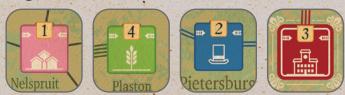
These are all examplés of Settlements
A Metro Area is a larger space, with an illustration.


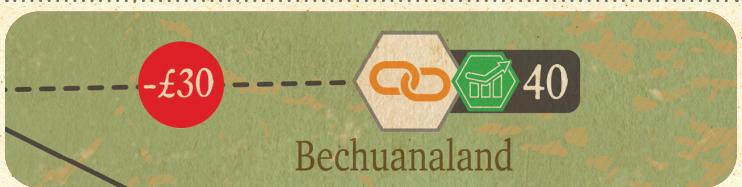
External Connections represent building track to international, interstate, or otherwise remote locations.
| Railroad Income
A railroad's Income will determine how much dividend is paid to each shareholder of that railroad's stock. A railroad's Income will only ever increase during the game, it will never decrease. There are two things that will increase a Railroad's Income:
The railroad's locomotive is placed on a Track Link. Each Track Link also has an Income amount in a green box. When a railroad's locomotive is placed onto a Track Link, advance that railroad's Income marker by the amount shown.
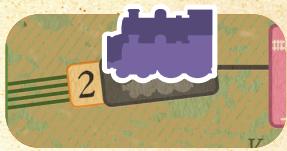
Example: Placing the purple CMRC locomotive on this Track Link would increase the Purple CMRC railroad's income by 2, so its Income marker is advanced from.6 to 8.

Some Track Links show a plus after the Income amount. This is because they are connected to a Metro Area, and the Income amount of Metro Areas can increase throughout the game. When placing a locomotive on a Track Link connected to a Metro Area, add the current Income amouņt of the Metro Area to the Income amount shown on the Track Link.

Example: The Blue CSAR's locomotive is placed on a Track Link that connects to Bloemfontein. The current Income amount of Bloemfontein is 5, which is added to the Track Link's Income amount of 1. In total, the Blue CSAR's Income marker is advanced 6 spaces on the Income track.
In addition, also advance the railroad's Income marker by the Income amount shown on any Developed Locations that the new Track Link connects to. Only Locations with a Development cube already placed on them count. If you cannot read the Income amount on the Location because it is obscured by a Development cube, you can tell the amount by counting the number of track lines that eminate from the Location.

Example: A yellow CTR&D locomotive is placed on a Track Link as shown. First, advance the yellow CTR&D Income marker 2 spaces for the amount shown on the Track Link itself. Then, advance one additional space becauseNelspruit has a Development cube, and four additional spaces because Plaston also has a development cube. Note that Plastón has four rail lines connecting it to the Track Link to denote the Income amount it provides.
(See “Action: Build Track”, right, for more details on how to place locomotives on Track Links.)
- A Location is Developed that has one or more of the railroad's Track Links connected to it: When a Development cube is placed onto a Location (either a Settlement or a Metro Area), any railroad that has one or more Track Links connected to that Location will advance their Income marker by the Income amount (shown in the green square) on that Location for each connected Track Link they occupy.

Example: Placing a Development cube on Nelspruit will increase the Purple CMRC railroad's Income by two (one for each of the connected purple Track Links), and the Blue CSAR railroad's income by one. Alternatively, placing a Development cube on Plaston will increase the Purple CMRC railroad's Income by four.
(See “Action: Develop Locations” on the next page for more details on how to place Development cubes.):
Note: Railroad Income is adjusted anytime a locomotive is placed on a Track Link or a Development cube is placed. You can always count up each Railway's current Income by examining the Income amounts shown on their Track Links as well as those shown on Developed Locations they are connected to (remiembering to add this amount for each connected Track Link of that railroad). It doesn't matter in which order pieces were placed, the Income is a running total.
■Exceeding 50 Income
If any railroad's Income marker advances past the rightmost space on the Income track (50), return that Income marker to the first space on the Income Track and continue advancing from there. Additionally, plaċe the Railroad's second Income Marker on the 50 space of the overflow Income track. If the railroad's Income marker reaches the end of the Income track a second time, simply advance the Income marker in the overflow Income track to the 100 space, and so on.
When calculating Dividends or Income for a railroad that has a marker on the overflow Income track, simply add the values of each Income marker together.
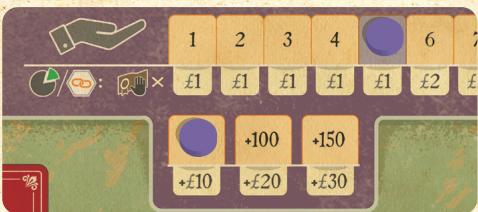
Example: The Income for Purple CMRC shown here is 55, and the Dividends payout is £11.
■Railroad Value

A railroad's Value will deterine the minimum bid cost of a share of that railroad's stock. A railroad's Value is determined by the amount of track it has built, including External Connections.
Each Track Link adds £5 to the Railroad's value. Each External Connection adds the value printed next to it on the game board. There is a reminder about how to calculate à railroad's Value on the game boárd, shown right.

For an example of how a railroad's Value is calculated, see the example under Final Payoff, on the last page.
SEQUENCE OF PLAY
The game is played over 6 rounds.
On your turn, you must select one of the four Actions on the right of the game board and place your Player marker into one of its unoccupied Work spaces (see diagram). If-all of an Action's Work spaces are already occupied, you must select a different Action.
Immediately move the Time marker down the Time track by a number of spaces indicated at the top of the Action. If the Pay Dividends action was selected, the Time marker is returned to the topmost starting space of the Time track, indicated byt
When you choose an action, if your Action marker is currently on a Work space with an arrow, you must choose a different Action this round.
Action anatomy

Move the Time marker down the Time track by this amount of spaces.
The action is described here in icons.
Work spaces.
Each of these spaces can hold
one player's Action marker. If the Action space has an arrow, you must move your Action marker to a different action box on your next turn.
After the action has been completed, check to see if the black ZASM railroad opens (see ‘ZASM Opens’), and if Dividends are paid (see Pay Dividends’).
Play then passes to the player on the left.
Action: Build Track
The Build Track Action is unlike the others, because its Work space is unlimited, and players can activate it multiple turns in a row. This action moves the Time marker down by 3 spaces.
If able, the player selecting this action must build track for one of the railroads in which they have the most, or are tied for the most Stock. This is referred to as having Control.
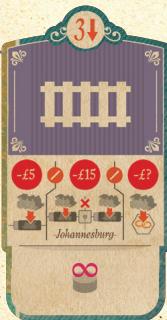
Every section of track costs money to build. The money is paid by the railroad from its Treasury to the Bank. If à railroad does not have enough money in its Treasury, it is underfinanced and thus cannot build track. Therefore, another railroad must be chosen by the player' to build track.
If the player doesn't Control a railroad, or only Controls underfinanced railroads, they must still choose a,railroad that is not underfinanced, even if they do not own any stock. In this case, the player who Controls the selected railroad chooses where the new track(s) will be built. In the case of a tie for Control, the player invoking the Build Track action picks which of the Controlling players gets to choose. After the track is built, play returns to the player invoking the Build Track action, whose turn immediately ends.
If every railroad is underfinanced, no action takes place and the turn is over.
The Action Point Marker-is still advanced 3 spaces.
When you build a Track Link, place one of the railroad's locomotives onto an unoccupied gray Track Link, as shown right. It must be connected (through Locations) to the railroad's existing network ofTrack Links.

When building track, all costs are paid from the railroad's Treasury to the bank.
When taking the Build Track Action, there are three options:
■Build option 1: Build a Single Track Link
A single Track. Link can be built for £5. This will increase the railroad's Income (see “Railroad Income”, left).
■Build option 2: Build a Double Track Link
Two Track Links çan be built for £15. This will increase the railroad's Income (see “Railroad Income”, left). However, there arè some restrictions:
• Both Track Links must be consecutive, not a fork or two disconnected sections.
• Both Track Links must be built through and to Settlements or Metro Areas that it has not previously connected to.
• Finally, a railroad may not build a double Track Link going into and out of Johannesburg or to an External Connection.
■Build option 3: Build an External Connection
At the western and northern edges of the map are External Connections. If a railroad had built track to the Settlement next to an unoccupied External Connection in a prior turn, that railroad may choose to construct the External Connèction.
To do so, pay the connection fee, (the amount shown in the red circle) and place one of the railroad's locomotives onto the External Connection space as shown.

Railroads building an External Connection immediately pay a Connection Bonus to the stockholders of that railroad. This pays the value shown directly beneath the railroad's position on the Income Track (at the top of the board) per share to all players that own that railroad's Stock.
1 2 3 4 5 6 8 9 10 11 12 CC £1 £1 £1 £1 £1 £2 £2 £2 £2 £2 £3 £3
Example: the Purple Railroad will pay £2 per Stock to all stockholders.
Building External Connections will increase the railroad's Value () by the amout shown, which will benefit the Stockholders at the end of the game (see “Railroad Value”, previous page).
ZASM Opens
When a railroad reaches Johannesburg, the black ZASM railroad opens and a share of ZASM stock is immediately put up for auction, following the rules for Initial Offering. The first bid is offered by the player whose turn has made the connection. Once a player has won the bid, paid the Treasury, and taken their share of ZASM stock, they must build, at no cost, óne Track Link from Johannesbrg. The ZASM's Income disk is also updated on the Railroad Income Track.
After the Build Track action is completed, please remember to update the railroad's Income on the Railroad Income Track!
Action: Develop Locations
The Develop Locátions action box can only hold two Player Action markers. If two Player Action markers are already in the Develop Locations box, this action cannot be selected. If the active player's Action Marker is in the Develop Locations box, they must choose another áction. This action moves the Time marker down by 5 spaces.
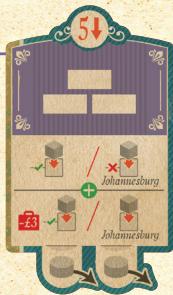
The player selecting this action must Develop at least one Location (a Settlement or a Metro Area). Both
may only be dveloped if a railroad connects to them. Johannesburg is the exception: it may be developed even if a railroad has not yet reached Johannesburg.
Up to two Locations may be eveloped. The first development is free. The second development costs £3 from the player's personal money supply and is paid to the bank. If the player chooses not to develop a second time, then Johannesburg is automatically developed. The player does not pay £3 for this automatic Joannesburg development.
Settlements may be developed only once each. To develop one of these Settlements, place a Development cube on the chosen Settlement.
Metro Areas may be developed more than once. The first time a Metro Area is developed, place a Development cube in the lowest value box. Bloemfontein starts the game with an Income amount of 3, it may be developed up to three times with a resulting income of 6. Johannesburg starts the game with an Income amount of 2, it may be developed up to eight times with a resulting income of 10.
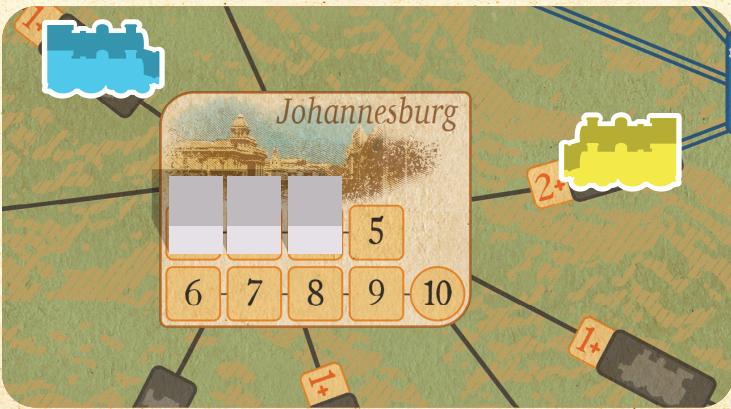
Example: Johannesburg's Income amount is currently 5. It can be developed 5 more times before it reaches its maximum Income amount of 10. Each time a Development cube is placed, the Blue and Yellow railroads will advance their Income markers one space (for each connected Track Link).
After the Develop Locations action is completed, please remember to update all of the affected railroad Incomes on the Railroad Income Track!
Action: Offer Stock
The Offer Stock action box can only hold three Player Action markers (or only two in a 3-player game). If three Player Action markers are-already in the Offer Stock box (or two in a 3-player game), this action cannot be selected. If the activeplayér's.Action Marker is in the Offer Stock box, they must chooseanother action. This action moves the Time marker down by 4 spaces.

The player selecting this action must offer a share of any railroad stock on the open market, as long as there exists an unowned share of that railroad's stock and the railroad is open (Note: the ZASM will not be available until a railroad connects to Johannesburg). Alternatively, the player mày offer one of their own stocks up for auction! If a player puts one of their own stocks úp·for auction, they may not bid for thė stock: Once offered for sale, a stock may not be withdrawn in favor of another.
The minimum bid for the stock is one-fifth of the railroad's Value. The player executing this action is not required to make an opening bid. The bidding commences with thè player ęxecuting the action and proceeds clockwise around the table. If the player chooses not tobid higher than a previous bid or passes, they may not reenter the bidding. When all but one player has. dropped out of the bidding, that player wins the auction.
If the opening bidder passes, along with every other player, the stock is not purchased and the turn is over. Ifthere are no unsold-stocks available and the player does not wish to offer one of their stocks for sale, no stock is offered and the turn is over.'In either case, the Time marker is still moved 4 spaces.
Action: Pay Dividends
The Pay Dividends action box can only hold one Player Action marker. If a Player Action marker is already in the Pay Dividends box, this action cannot be selected. If the active player's Action Marker is in the Pay Dividends box, they must choose another action.
When the Time track eaches the last space of the Time třack (35), or when a player chooses the Pay Dividends action, it is timę to Pay Dividends!

-
Return the Time marker to the topmost starting space of the Time track.
-
Advance the Rouņd marker one space to the right on the Round track. If the Round marker is now on spaces 1 through 5 of the Round track, see End of Round Dividends below. If the Round Marker is now on space 6 of the Round track, skip to the Final Payoff.
■End of Round Dividends
The dividend paid for each share of railroad stock is shown directly beneath the railroad's position on the Income Track (at the top of the board). Dividends are only paid to sold shares held by the players; never to a railroad's Treasury. All dividends are paid from the bank. Each railroad will pay dividends.
After all railroad dividends are paid, play resumes with the next player.
Final Payoff
Each railroad will conduct a Final Payoff for, its Stock. The Final Payoff is based on railroad Income, railroad Value, and the number of Stocks owned by the players. The Final Payoff for each of a railroad's Stock is calculated as follows: Add the railroad's Value to its Income amount. Then divide the sum value by the number of Stocks sold in that railroad. When dividing, always round up.
Any money in a railroad treasury is returned to the bank.

Example: Yellow CTR&D's nal payoffis calculated like this:
$I n c o m e = \mathcal { E } 2 I$
$V a l u e = E 7 0$
(6 x £5 = £30 for locomotives, plus £40 for the External Connection)
$\mathcal { E } 7 0 + \mathcal { E } 2 \boldsymbol { l } = \mathcal { E } 9 \boldsymbol { l }$
• £91 ÷ 4 Stocks sold during game = £23 (round up always)
Yellow CTR&D's final payoff is £23 per Stock.
ENDING THE GAME
The game ends after the Final Payoff for each railroad is issued. The player with the most money wins the game. Ties are possible.
Credits
Design: John Bohrer
下载 Markdown原文为社区整理/出版社公开资料,版权归原作者,仅供个人学习查阅。