
奇境幻旅Altered
一句话概览
奇境幻旅 是一款已收录于村了吗规则库的桌游,支持 2 人,原名 Altered。
本页内容:一句话概览 · 常见问题
这游戏怎么玩
- 本站已收录这款游戏的规则资料,可以在对话里直接提问规则细节。
常见问题(FAQ)
以下 1 条问答中 0 条来自站内玩家的真实提问,其余 1 条为本站整理的常见疑问;答复内容保持原样。
奇境幻旅支持几个人玩?
2 人。
去哪查完整规则
想核对具体规则细节、卡牌效果或某个回合的结算方式,可以在村了吗里选中这款游戏后直接提问。
同类桌游
- 卡坦岛德式
- 工业革命:伯明翰德式
- 勃艮第城堡:特别典藏版德式
- 方舟动物园德式
- 卡卡颂抽象
- 瘟疫危机传承:第一季美式
- 阿瑞迪亚:勇踏征途美式
- 重塑宇宙德式
- 幽港迷城美式
- 埃多拉的德鲁伊德式
规则原文(Markdown)
本站收录这款游戏的规则原文 7 个文件,此处内联渲染 3 个,可直接展开阅读或下载。
2024_Altered_TCG_Quick_Rules_1.0_EN.md17.2 KB


Centuries ago, life on Earth changed forever: a cataclysm brought beings from the world of stories and dreams to our reality. We formed new alliances with them, and together we rebuilt a civilization in the haven of Asgartha. It is now finally time to leave the safety of our walls and explore the altered world. Are you ready to discover what lies Beyond the Gates?
SETUP
Take a set of three Tumult cards, shuffle them and place them as shown, face-down in a line between the two players.
l t d ofthe 2 other end.
Each player places their Hero Expedition marker on the Hero region card, and their Companion Expedition marker on the Companion region card.
Set up the two playmats facing each other on either side of the Tumult.
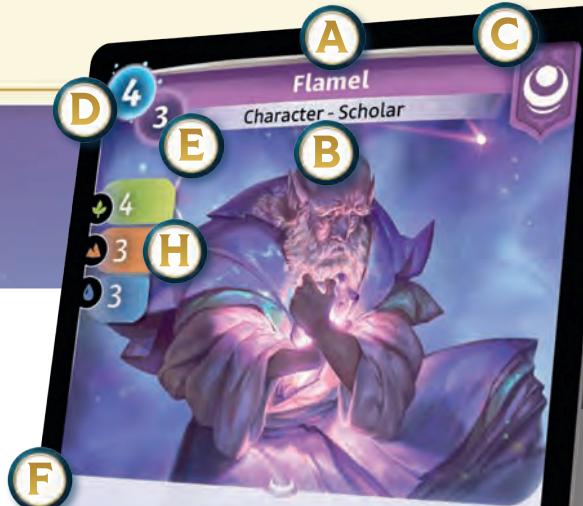
PARTS OF A CARD
In Altered, there are 4 types of cards: Heroes, Characters, Spells, and Permanents. See “Other Card Types” for more details.

On all cards:
Name

Type and sub-type(s).
Game Overview

Faction: this banner indicates the card's faction.

Hand Cost: the card's mana cost when it is played from your hand.

Reserve Cost: the card's mana cost when it is played from Reserve.

Abilities: the card's special rules.

Support ability: an additional ability that some cards have.
Presentation
In Altered, you'll lead two Expeditions as they discover and explore the land surrounding your native peninsula of Asgartha.
Altered is a two-player trading card game in which each player brings a deck led by a Hero card. This starter deck is ready to play as-is, but you can customize it or create new decks from scratch.
-
Change the owner of the First Player marker.
-
Ready your Mana Orbs and exhausted cards.
One ofyour Expeditions will be led by your Hero, represented by the Hero Expedition marker, and the other one is led by their Companion, represented by the Companion Expedition marker. Your Expeditions will progress towards each other as the game goes on, and your goal is to be the first to have them meet up.
- Draw two cards from your deck.
You may return a Spell from your Reserve to
- Starting with the First Player, each player chooses if they want to place a card from their hand into their Mana zone.

less. (Discard me fro he next Spell you play this turn costs

The Axiom (brown) Expedition markers have reached each other: the Axiom player wins!
PHASE 2: NOON
Activate any card with an “At Noon” trigger.
Not all starter decks have cards with “At Noon" triggers.
If it's the first Day of the game, go straight to the next phase (Noon). Otherwise, follow these steps:

A DAY OF EXPLORATION
A game of Altered is played over several rounds called Days. Each Day is composed of five phases: Morning, Noon, Afternoon, Dusk and Night.
PHASE 1: MORNING
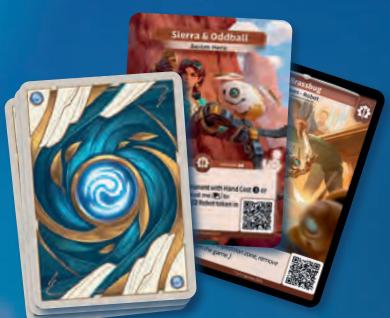
39 Card deck + 1 Hero card + 6 Token cards
Material
1 Playmat

As soon as one player plays a card, the other player starts their turn. They continue back and forth in this way until the end of the Afternoon.
PHASE 3: AFTERNOON
Starting with the First Player, players take turns in this phase, during which they each play one card at a time.

On Character cards only:

Characters have statistics corresponding to the three region types: Forest, Mountainand Water
Triggers:

Cards have different effects, called triggers, depending on where they are played from:
: This trigger activates when the card is played from Reserve.
: This trigger activates when the card is played from your hand.
: This trigger activates regardless of where the card is played from.
Adventure cards:
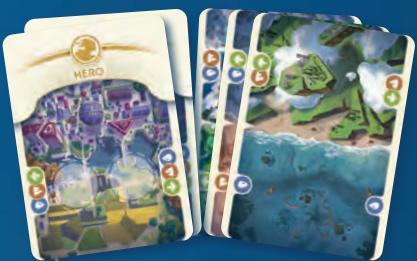
1 Hero Region card
1 Companion Region card / Arena card
1 Set of 3 Tumult cards
6 Expedition markers (Hero & Companion)
3 Boost, 2 Fleeting,
2 Anchored and 1 Asleep markers
1 First Player marker
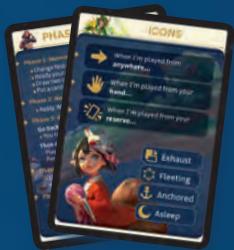
2 Rules reminders

1. Take as many Quick Actions as you want. 2. Then, play a card OR Pass.
QUICK ACTIONS
Turn structure
There are two kinds of quick actions:

Before playing a card, you may take as many quick actions as you wish. You can take one or more quick actions before choosing to Pass.
Exhaust abilities: These are present on certain Permanent and Hero cards. Exhaust (l ) the card to activate its effect. Support abilities: A card's support ability is only usable if it is in your Reserve. To activate it, discard () the card from your Reserve. (See “The Reserve”.)
Remember, taking a quick action doesn't count as playing a card, and doesn't end your turn.

1 Warning Card + 1 Common foiler
Each player places their Hero card in the Hero card zone of the playmat.
Randomly determine the starting player (you can flip the First Player marker to do so), and place the First Player marker on their Hero card.
Each player removes all the token cards from their
deck, then shuffles the remaining cards and places
them face down in the “Deck" zone of the Playmat. (Tokens have a different design on the back compared to normal playing cards.)
Keep the rules reminder cards and the rest of the markers close at hand, and you're ready to start playing!
Starting Hand
Draw 6 cards from your deck, then choose 3 of them to put in your Mana zone, face-down and ready (see illustration below). The three other cards will form your starting hand.
Mana Orbs
Cards in your Mana zone are always face down, and are called Mana Orbs. Each Mana Orb gives you 1 Mana when you exhaust it. Ready all of your Mana Orbs during the Morning phase.
A card that is face-down in your Mana zone stays there for the rest of the game.

Ready
Exhausted
PLAYING A CARD
To play a card, you must exhaust the number of Mana Orbs corresponding to its cost.
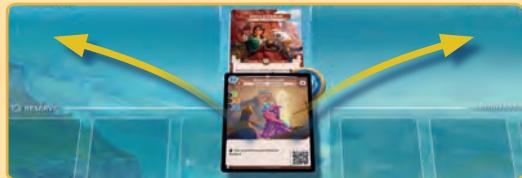
Playing a Character: When you play a Character, you decide which Expedition to place it in (Hero or Companion).
Playing a card from Reserve: See “The Reserve”.
Playing a Spell or a Landmark: See “Other Card Types”.
PASS
If you cannot play a card or no longer wish to do so, you may end your turn by passing. This means that you won't be able to take any more turns until the next Afternoon phase.
Once a player has passed, the remaining player can continue taking turns. Once both players have passed, move on to the Dusk phase.
PHASE 4: DUSK
During Dusk, players compare the statistics of the Characters in play to determine which Expedition markers can move forward, and which ones cannot.
Starting with one Expedition (Hero or Companion), do the following steps:
To make sure you understand this section, refer to the face-up side of the Tumult cards.
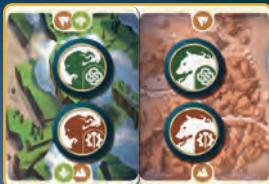
Check the region type(s) (,, of the region where your Expedition marker is currently located.
BFor each of these region types, add up the statistics of the Characters in that Expedition. If at least one of your totals (for the region type(s) your Expedition is in) is strictly higher than your opponent's, your Expedition marker moves forward.
Otherwise, your Expedition stays where it is.
Next, do the same for the remaining Expedition (Hero or Companion).
Your total must be higher than 0 in order to move forward.
Each Expedition can only move forward once per Dusk phase.
When an Expedition would move to a face-down Tumult card, flip it face-up.
You always compare your Hero Expedition with your opponent's Hero Expedition, even if the two markers are not in the same region. The same goes for the Companion Expeditions.

Example
Mike's Hero Expedition marker is on a region card which has all three region types: ( In order to move forward, Mike's Expedition total needs to be higher than Ella’s Expedition total in at least one of those region types.
Since his Expedition total in is higher than Ella's Expedition total in Mike's Expedition marker moves forward.
Ella's Hero Expedition marker is in a region with and region types. In order to move forward, Ella's Expedition total needs to be higher than Mike's Expedition total in at least one of those region types.
Since her Expedition total in beats Mike's Expedition total in ( Ella's Expedition marker also moves forward.

PHASE 5: NIGHT
REST
Send all Characters in your Expeditions to your Reserve.
If they are Fleeting , discard them instead (see “The Reserve”).
CLEANUP
If you have 3 or more cards in your Reserve, you must discard the excess so that only 2 cards remain. Do the same for your Landmarks (see “Other Card Types”).

During the other phases of the Day, there is no limit to the number of cards in your Reserve and Landmark zone.

YOU HAVE NOW REACHED THE END OF THIS DAY. BEGIN A NEW DAY, STARTING WITH THE MORNING PHASE.
The Reserve
The Reserve is a face-up zone which acts similarly to a second hand of cards.
Other Card types
PLAYING A CARD FROM RESERVE
Cards in Reserve can be played as if they were in your hand. However:
Pay its Reserve Cost instead of its Hand Cost. A card played from Reserve gains Fleeting (unless it's a Landmark).
Fleeting means: If a Fleeting card would be sent to Reserve, discard it instead.
For Characters: Place a Fleeting marker () on the Character to remind you to discard it the next time it would go to Reserve.
Cards in Reserve are not “controlled”. This means that their abilities don't apply, and they cannot be affected by an ability that doesn’t specifically mention the Reserve. A card that says “Discard target Character” cannot discard a Character in Reserve, but a card that says “Discard target card in a Reserve” can.


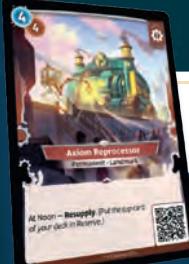
Heroes
You play as a Hero, teaming up with their Companion. Each Hero belongs to a faction and has a unique ability. Your Hero will shape your strategy, and using their ability wisely is essential to winning the game.
Spells
When you play a spell, resolve all of the card's effects, then send it immediately to your Reserve. If you play a spell from your Reserve, it gains Fleeting: discard it once you’ve resolved its abilities.
(Some spells are automatically Fleeting. This means that they are directly discarded after their abilities resolve).
Permanents - Landmarks
When you play a Landmark, put it directly in your Landmark zone.
Not all starter decks have Landmarks in them.
If a card's abilities contradict the normal rules of the game, follow what the card says.
Card abilities can only target cards that are controlled. Characters that are in an Expedition, or Landmarks that are in the Landmark zone are “controlled”.
Cards in Reserve are not “controlled”. This means they can only be targeted by an ability that explicitly mentions the Reserve.
CARD ABILITIES
RUNNING OUT OF CARDS IN YOUR DECK
If your deck is empty and you need to draw one or more cards, shuffle your discard pile, which then becomes your new deck. After that, finish drawing cards.
ADDITIONAL RULES
TARGETING
PLAYING A PERMANENT FROM RESERVE
If you play a Permanent from Reserve, use its Reserve Cost to play it in your Landmark zone. It does not gain Fleeting.
OTHER INFORMATION
“AT NOON”, “AT DUSK” AND “AT NIGHT”
These abilities trigger at the beginningof their respective phases. (The First Player triggers them first and resolves them in the order of their choice).
Ending the game
The first player to have their Hero and Companion Expedition meet up in the same Region wins the game.

Tokens are Characters that aren't included in your deck, but are created by other cards. When a token leaves the Expedition zone, it is always instantly removed from the game, even if a card tells you to do something else with it!

TOKEN CARDS
TIEBREAKER
If both player's markers meet during the same Dusk Phase, first check if any player moved forward further than necessary to win the game. If one player did and the other did not, the player who did wins the game.
Example
During Dusk, both of Ella's Expeditions move forward, while only Mike's Companion Expedition does. Ella progressed further than necessary, and therefore wins the game.
Ella's and Mike's Expeditions are both on adjacent regions to one another.

MARKERS
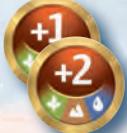
Use these counters when a Character gains boosts.

Use this marker when a Character gains Anchored.
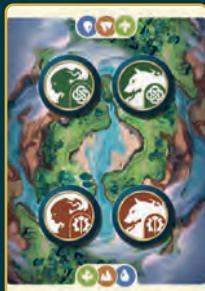

Otherwise, players play a tiebreaker Day in the Arena. The Arena is on the back of the Companion region card; place it in the center of the table and put both players' Expedition markers on it.
Use this marker when a Character gains Asleep.
SUPPORT ABILITY (QUICK ACTION)
A support ability is only triggered when you discard the card as a Quick Action. Do not trigger the ability if it's discarded for any other reason, such as having too many cards in your Reserve during the Night phase, for example.
“I” IN CARD ABILITIES
Cards use "I" to refer to themselves. For example, "I gain 2 boosts." should be understood as "this card gains two boosts." EE
Then play out a normal Day, with the following extra rules:
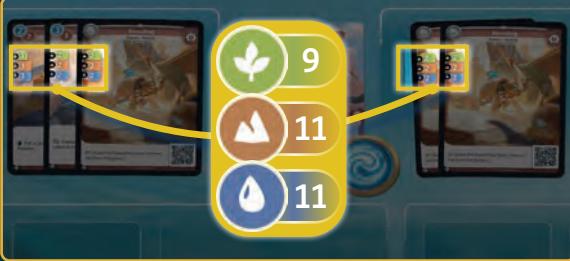
Card abilities that make Expeditions move forward or backwards have no effect. At Dusk, for each region type in the Arena ) add up the total statistics of your Čharacters in both of your Expeditions. Compare all three types with your opponent: the player who wins in the highest number of types wins the game.
In the unlikely situation that you both win one type each and tie the third type, or if you tie in all three types, restart a new Day in the Arena.
DECKBUILDING
After discovering the starter decks, the next step in your Altered journey is to build your own deck! Your deck must include exactly one Hero card and a minimum of 39 other cards of the same faction. You must also follow these rules:
No more than 3 copies of a card with the same name, regardless of rarity
No more than 15 rare cards
No more than 3 unique cards.
When building your deck, make sure you have enough cards that cost between 1 and 3 mana, to avoid falling too far behind during the first few Days of the game.
Check out our application to discover more deckbuilding hints, more information about available cards, and the marketplace!

05.md33.2 KB
Vocabulary
Symbols
Trigger Symbols
7.1.1.a The Enter Play icon means "When I enter play —" (see Section 7.3.10).
7.1.1.b The Hand icon means "When I am played from Hand —".
7.1.1.c The Reserve icon means "When I am played from Reserve —".
Remark. If an object enters play without being played (either because it is a token or as a result of an effect), its Enter Play abilities are activated, but not its Hand abilities, nor Reserve abilities.
Terrains and Statistics
7.1.2.a A terrain is a sub-type of a region.
Remark. In previous versions of this document, as well as on older printings of some cards, terrains are called "region types".
7.1.2.b A statistic is the influence of a Character in a given terrain.
7.1.2.c The Forest symbol represents the Forest terrain and statistic.
7.1.2.d The Mountain symbol represents the Mountain terrain and statistic.
7.1.2.e The Water symbol represents the Water terrain and statistic.
Faction Symbol
7.1.3.a The Axiom symbol represents the Axiom faction.
7.1.3.b The Bravos symbol represents the Bravos faction.
7.1.3.c The Lyra symbol represents the Lyra faction.
7.1.3.d The Muna symbol represents the Muna faction.
7.1.3.e The Ordis symbol represents the Ordis faction.
7.1.3.f The Yzmir symbol represents the Yzmir faction.
Cost Symbols
7.1.4.a The Exhaust icon means "Exhaust me".
7.1.4.b The Discard icon means "Discard me from the Reserve".
7.1.4.c In a cost, the symbols "1, 2, ..., X" mean "Pay 1, 2, ..., X mana", respectively.
Clarification Symbols
7.1.5.a The support icon is used to clarify that a support ability is not a quick action but either a Reaction ability or a passive ability.
Pronouns
I
7.2.1.a When an ability uses the first person, it refers to the object bearing it.
7.2.1.b When a Spell's effect uses the first person, it usually refers to the Spell in Limbo that is currently resolving. It may also refer to the object that Spell card becomes once it moves to the Reserve or the Discard pile after its resolution.
7.2.1.c When a quick action's effect uses the first person, it refers to the object bearing that quick action. If that object changes zones during that effect, the first person may also refer to the new object represented by the same card through the moves.
7.2.1.d When an emblem uses the first person (e.g. "I" or "my"), it refers to the object which created that emblem.
Example. Ratatoskr has the ability "Reserve — I gain 2 boosts". When that Reaction resolves, Ratatoskr gains 2 boosts.
We
7.2.2.a When an ability refers to the object bearing it ("I") and another object.
You
7.2.3.a When an ability uses the second person, it refers to its controller.
Example. Charge! has the effect "Enter Play — Characters you control gain 1 boost". When Charge! resolves, the Characters controlled by Charge!'s controller gain 1 boost.
They
7.2.4.a Altered uses the singular "they" for players.
It
7.2.5.a Altered uses the neutral third person for objects and cards.
Keywords Actions
Activate
7.3.1.a An "event activates [a reaction]" if this event matches that Reaction's trigger (resulting in the creation of an Emblem-Reaction with that Reaction's effect). A Reaction must exist to be activated (either before or after the event, depending on the kind of Reaction, see Rules 6.3.e and 6.3.f).
7.3.1.b Some steps say "Activate [a reaction]". When that step occurs, the resulting event activates the Reaction, even though it does not (usually) match the trigger of that Reaction. This is an exception to Rules 6.3.e and 6.3.f.
7.3.1.c Some earlier printings have effects that say "Activate [a trigger]" instead of "Activate [a reaction]". This means "activate a Reaction with [that trigger]".
7.3.1.d If an ability of an object activates a Reaction of another object, the Reaction is created by the second object, not the first.
Example. Brassbug Hub has the Reaction "Enter Play — I gain three Kelon counters" and Dr. Frankenstein has the Reaction "Reserve — You may activate the Enter Play abilities of target Permanent you control". If Brassbug Hub is chosen as the target of Dr. Frankenstein's Reaction, Brassbug Hub gains three Kelon counters, not Dr. Frankenstein.
7.3.1.e Some abilities say that [a trigger] "cannot activate". Reactions containing this trigger cannot activate, either naturally or through another effect that would activate them.
Example. The Council has the ability "The Enter Play, Hand, and Reserve triggers of Characters facing me don't activate" and Hua Mulan has the ability "Reserve — I lose Fleeting." If Hua Mulan is played from Reserve in the Expedition facing The Council, it does not lose Fleeting.
After You
7.3.2.a "After you" means "End the turn once there are no Reactions in Limbo".
7.3.2.b "After you" is not passing.
Example. Alice has the support ability "Discard from Reserve: After You". If a player plays this action, the next player in initiative order gets the initiative as soon as there are no Reactions in Limbo. Alice's owner has not passed, and they will be able to play actions and cards in this Afternoon.
Ascend
7.3.3.a If an Expedition "ascends", it means that it gains the "Ascended" status.
Augment
7.3.4.a To "augment" a card or an object means having it gain one more of a (single) counter it already has.
Remark. Boosts are also counters.
Create
7.3.5.a To create a token is to put a new token Character in the Expedition zone.
7.3.5.b Costs and effects that create tokens use the following template: "create a [name] [x/y/z] [sub-types] token with [abilities] in [expedition]".
Example. Open the Gates (common) has the ability "Create two Ordis Recruit 1/1/1 Soldier tokens in each of your Expeditions". When Open the Games resolves, four tokens are created. They all have the name "Ordis Recruit", the type "Character", the sub-type "Soldier", all three statistics equal to 1, and no abilities.
Defect
7.3.6.a When an object in an Expedition "defects", it means that it is moved to the Expedition facing it.
Remark. The interaction between Gigantic and Defect is covered in Rule 7.4.4.i.
Discard
7.3.7.a To "discard" an [object or card] is to move this object or that card from its current zone to the Discard pile.
Double (counters)
7.3.8.a To "double the [name] counters" of an object means having that object gain the same number of that counter it already had.
7.3.8.b It is impossible to double 0 counters.
Draw
7.3.9.a To "draw X cards" is to move the top X cards of one's Deck to their Hand.
7.3.9.b "Draw a card" means "draw 1 card".
7.3.9.c If at any time during Morning a player would draw N cards while they have M cards in their Deck (M < N), they first draw M cards. Then, they decide if they want to shuffle their Discard pile back into their Deck. If they do, they draw the other N − M cards (or all the remaining cards if there are less than N − M cards in the Deck after shuffling). In any case, all the cards are considered to be drawn simultaneously. This is an exception to Rule 3.2.2.e.
Enter Play
7.3.10.a A card or object enters play when it joins the union of the Expedition zone and the Landmark zone.
Remark. This can be understood as the card or object joining the Expedition zone while it did not come from the Landmark zone or it joining the Landmark zone while it did not come from the Expedition zone.
Exchange (boosts)
7.3.11.a To "exchange the boosts" of two characters means having each of them simultaneously gain or lose the difference in their number of boosts (the one with the most boosts loses it, the one with the least boosts gains it).
7.3.11.b If the two characters have the same number of boosts, nothing happens.
Exchange (objects or cards)
7.3.12.a To exchange two objects or cards is to move each of them to the other's zone.
7.3.12.b If one or both of the objects cannot be determined, the exchange cannot happen.
Example. Lithium plays Sleight of Hand, whose effect reads "Exchange target card in your Reserve with a card from your Hand". If Lithium's Hand and/or Reserve is empty, nothing happens as Sleight of Hand resolves.
Exhaust
7.3.13.a To "exhaust" an object means have it gain the status exhausted.
7.3.13.b The Exhaust icon in the cost of a quick action means "exhaust me".
Exhausted Resupply
7.3.14.a When a player performs "Exhausted Resupply", they Resupply, then they exhaust the resupplied card.
Remark. If a modifier affects Resupply, it also affects Exhausted Resupply. Likewise, if a Reaction triggers off Resupply, it also triggers off Exhausted Resupply; however, such a Reaction cannot be played before the resupplied card is exhausted.
Gain (counters)
7.3.15.a When an object "gains X [name] counters", X [name] counters are put on that object.
7.3.15.b Counters with the same name on the same object are fungible: they do not need to be distinguished from one another.
Gain (status)
7.3.16.a When an object "gains a status", it has that status from that point onwards.
7.3.16.b An object with a given status cannot gain that status again. In particular, it is impossible to exhaust an exhausted object.
Give (boost)
7.3.17.a Giving one or more boosts to a Character is equivalent to that Character gaining that many boosts.
Have (object) do
7.3.18.a Some effects state that a player may have an object do something. If the player decides to have the object do that thing, it is equivalent to the object itself doing it.
Example. Lyra Cloth Dancer has the ability "Hand — You may have target Character gain Fleeting". If the player decides to have a Character gain Fleeting that way, then it is equivalent to resolving the effect "Target Character gains Fleeting".
Ignore
7.3.19.a Some passive abilities state that some abilities should be ignored during a given period.
7.3.19.b During that period, these abilities exist, but they have no effect: passive abilities do not modify events, quick actions may not be played, and Reactions do not activate.
Remark. An ability that would ignore itself works normally.
Leave Play
7.3.20.a A card or object leaves play when it leaves the union of the Expedition zone and the Landmark zone.
Remark. This can be understood as the card or object leaving the Expedition zone while not going to the Landmark zone or leaving the Landmark zone while not going to the Expedition zone.
Lose (status)
7.3.21.a When an object "loses a status", it ceases to have that status from that point onward.
7.3.21.b An object without a given status cannot lose that status.
Make a Gift
7.3.22.a A player makes a Gift when, during their turn, another player receives a Gift (see Section 7.3.29).
Move (Terrain Marker)
7.3.23.a When a Terrain Marker is moved, it may be moved to the region it is already in (unless stated otherwise).
7.3.23.b When a Terrain Marker is moved, it becomes a new object (including if it is moved to the region it is already in).
Remark. As it becomes a new object, it also gets a new timestamp. This means that its passive abilities are applied after those of other Terrain Markers already present in its new region.
Move Backwards
7.3.24.a To move [an expedition] backward means "to move the corresponding counter from its current region to the next region in the direction whence it came (toward the Hero region for the hero Expedition and towards the Companion region for the companion Expedition)".
7.3.24.b If an Expedition in its region of origin would move backwards, nothing happens.
7.3.24.c If an Expedition would move backwards farther than its region of origin but is not yet in that region, it moves backwards the number of regions needed to reach it instead.
7.3.24.d If an Expedition in the Arena would move backward, nothing happens.
Move Forward
7.3.25.a To move [an expedition] forward means "to move the corresponding counter from its current region to the next region in the direction it is going (towards the Companion region for the hero Expedition and towards the Hero region for the companion Expedition)".
7.3.25.b If an Expedition would move forward N regions, moving into or passing a region represented by half a face-down Tumult card, instead this Tumult card is flipped face-up and the Expedition moves forward N regions.
7.3.25.c If an Expedition in the region opposite to its region of origin would move forward, nothing happens.
7.3.25.d If an Expedition would move forward farther than the region opposite to its region of origin but is not yet in that region, it moves forward the number of regions needed to reach it instead.
7.3.25.e If an Expedition in the Arena would move forward, nothing happens.
Play For Free
7.3.26.a To "play a card or quick action for free" means to play that card or quick action while skipping:
the declaration of how costs will be paid during the declaration of intent (Rule 5.1.2.c);
the payment of costs (Rules 5.1.2.a and 5.1.2.b).
Put
7.3.27.a To put [an object] or [a card] in [a zone] means "to move [that object or that card] to [that zone]".
7.3.27.b "Put", "return", and "send" are synonyms rules-wise.
Ready
7.3.28.a To ready [an object] means that [that object] loses the status Exhausted.
7.3.28.b An object that is not exhausted cannot be readied.
Receive a Gift
7.3.29.a A player receives a Gift when, during another player's turn:
They draw a card;
They Resupply (including Exhausted Resupply);
They receive a token (see Section 7.3.30).
Remark. If a player draws or resupplies multiple cards or receives multiple tokens at once, each card or token constitutes its own Gift.
7.3.29.b When a player A "also receives a Gift" received by another player B, what happens depends on what the Gift consisted of:
If Player B drew a card, Player A also draws a card.
If Player B Resupplied (excluding Exhausted Resupplies), Player A also Resupplies.
If Player B Exhausted Resupplied, Player A also Exhausted Resupplies.
If Player B received a token, Player A also creates the same token in the same zone on their side of the board.
Remark. Constraints (other than zones for tokens) contained in the effect making Player B receive a Gift do not carry over when Player A also receives that Gift.
Example. Woolly Woolly Field has the ability "Create a Woollyback 1/1/1 Animal token in target opponent's Companion Expedition (...)". Turuun & Benih has the ability "When you make a Gift — You may exhaust me to also receive it". If during her turn Mirjam plays Woolly Woolly Field and activates the ability of Turuun & Benih, she creates the Woollyback token in the Expedition of her choice, not necessarily in the Companion Expedition.
Receive a Token
7.3.30.a A player receives a token when a token joins their Expeditions, Landmarks or Reserve.
Resupply
7.3.31.a To "Resupply" is to put the top card of one's Deck into one's Reserve.
7.3.31.b If at any time during Morning a player would Resupply N cards while they have M cards in their Deck (M < N), they first Resupply M cards. Then, they decide if they want to shuffle their Discard pile back into their Deck. If they do, they Resupply the other N − M cards (or all the remaining cards if there are less than N − M cards in the Deck after shuffling). In any case, all the cards are considered to be resupplied simultaneously. This is an exception to Rule 3.2.2.e.
7.3.31.c If a player with an empty Deck would resupply, they shuffle their Discard pile into their Deck before putting the top card into the Reserve. If the Deck is still empty at that point, Resupply does nothing.
Return
7.3.32.a To return [an object] to [a zone] means "to move [that object] to [that zone]".
7.3.32.b It does not matter whether the object ever was in that zone earlier.
7.3.32.c "Put", "return", and "send" are synonyms rules-wise.
Roll a Die
7.3.33.a To "roll a die" is to roll a fair six-sided die and to note the result.
7.3.33.b Effects that have "roll a die" as one of their steps have a subsequent step that uses the result of that roll.
7.3.33.c Some passive abilities allow a player to roll multiple dice and choose one of them or give them the option to modify a roll. A player who benefits from one of these abilities may look at the result of the rolled dice before deciding which die and which modifiers to use.
Rush
7.3.34.a To "Rush" means to "play a card immediately".
7.3.34.b In effects stating that the player may Rush to do something, they may only do that thing if they actually played a card due to Rush.
Remark. See Rule 5.2.b about playing a card thanks to an effect.
Sabotage
7.3.35.a To "sabotage" means to discard up to one target card in a Reserve.
Remark. A player may Sabotage a card from their own Reserve.
Sacrifice
7.3.36.a When a player has to "sacrifice" [an object], they have to discard an object in play they control.
7.3.36.b Even if the discard atomic action is modified, it is still considered a sacrifice.
Remark. In particular, when sacrificing a token, the discard atomic action is modified by Rule 2.1.e but it is still considered a sacrifice.
Send
7.3.37.a To send [an object] to [a zone] means "to move [that object] to [that zone]".
7.3.37.b "Put", "return", and "send" are synonyms rules-wise.
Spend (counters)
7.3.38.a When an object "spends X of its [name] counters", X [name] counters that were on that object are removed from it.
7.3.38.b An object cannot spend more counters with a given name than it has on it.
Switch Expeditions
7.3.39.a To "switch expeditions" means to send an object from one Expedition to the other of the same player.
7.3.39.b A Character that switches Expeditions leaves its former Expedition and joins its new Expedition. It neither leaves nor joins the Expedition zone.
Take Control
7.3.40.a For a player A to "take control of [another player B's object]" in the Expedition zone means for Player A "to move [that object] to one of their Expeditions" (they choose which one, unless stated otherwise by an effect).
7.3.40.b For a player A to "take control of [another player B's object]" in the Landmark zone means for Player A "to move [that object] to their Landmarks".
Remark. The Enter Play abilities of an object are not activated when a player takes control of that object, as it does not enter play.
7.3.40.c A player may not take control of an object which is not in the Expedition zone or the Landmark zone, unless stated otherwise by an effect.
7.3.40.d A player may not take control of an object they already control.
Keyword Abilities
Cooldown
7.4.1.a Cooldown is a passive ability that appears on Spells.
7.4.1.b A Spell with Cooldown that goes to the Reserve after its resolution becomes exhausted.
7.4.1.c In itself, Cooldown does nothing. Instead, Rule 5.2.4.b has an extra step for Spells with Cooldown.
Defender
7.4.2.a Defender is a passive ability that appears on Characters.
7.4.2.b An expedition containing a Character with Defender cannot move forward during Dusk.
7.4.2.c Defender applies to any reason why an Expedition might move forward during Dusk, not just the Progress daily effect.
Eternal
7.4.3.a Eternal is a passive ability that appears on Characters.
7.4.3.b An Eternal Character is not sent to the Reserve during Rest.
Gigantic
7.4.4.a Gigantic is a passive ability that appears on Characters.
7.4.4.b A Gigantic object is present in both Expeditions of its controller.
7.4.4.c When a player plays a card with Gigantic or creates a token with Gigantic, they play it or create it in a specific Expedition. They do not put two cards or two tokens in play. The card is played or the token created in a single Expedition but joins both Expeditions.
7.4.4.d When a Gigantic object enters the Expedition zone, its Enter Play, Hand, and Reserve triggers only trigger once.
7.4.4.e A Gigantic Character's statistics are counted in each of its controller's Expeditions.
7.4.4.f If an effect refers to a Gigantic Character's Expedition, it refers to both of its controller's Expeditions.
Remark. On a Character that is Gigantic because of an effect, "my Expedition" can be understood as "your Expeditions".
7.4.4.g If an effect refers to the Expedition facing a Gigantic Character, it refers to the Expeditions facing each of its controller's Expeditions.
Remark. On a Character that is Gigantic because of an effect, "the Expedition facing me" can always be understood as "the Expeditions facing me". In a 2-player game only, it can be understood as "your opponent's Expeditions".
7.4.4.h If an effect originally refers to a single Expedition when stating where a Character should be played, a token should be created or an object or card should be moved, but refers to multiple Expeditions due to a Gigantic Character, these Expeditions are not considered separately but as a single subset of the Expedition zone. Therefore, for each object or card, the player performing the action must pick an Expedition where to place it.
Example. During limited play, Anna only has one card in her Hero Expedition: Eat Me Energy Bars, which has the ability "If there is only one Character in my Expedition, it is Gigantic". She then plays Ratatoskr from Reserve, which has the ability "Reserve — Create two Ordis Recruit 1/1/1 Soldier tokens in my Expedition", also in her Hero Expedition. Resolving the effect of Ratatoskr, which is Gigantic because of Eat Me Energy Bars, she creates two token Characters. She may create them both in her Hero Expedition, both in her Companion Expedition, or one in each of them.
7.4.4.i If a Gigantic Character defects, the physical Altered card representing that Character is moved to the Expedition facing the one in which it currently is. This is an exception to Rule 7.4.4.h.
7.4.4.j If a trigger originally refers to a single Expedition that a card must join or leave, but refers to multiple Expeditions due to a Gigantic Character, these Expeditions are not considered separately but as a single subset of the Expedition zone.
Example. A player has Amarok which has the ability "When another Character joins my Expedition — Sacrifice it" in their Hero Expedition. They also have Eat Me Energy Bars, in their Hero Expedition, making Amarok Gigantic. If a Character is moved from their Companion Expedition to their Hero Expedition, it does not get sacrificed. This is not because Amarok loses Gigantic, as the Reaction ability only needs to exist before the event (see Rule 6.3.f), but because the Character did not join the subset of the Expedition zone consisting of "Amarok's Expeditions", as it was already in it.
7.4.4.k If an effect or a trigger originally refers to a single Expedition when stating a condition that must be met by this Expedition for something to happen but refers to multiple Expeditions due to a Gigantic Character, these Expeditions must all satisfy that condition, and the effect is resolved only once.
Example. If Ordis Overseer is Gigantic when resolving her ability "Enter Play — If my Expedition is behind, create an Ordis Recruit 1/1/1 Soldier token in my Expedition.", both Expeditions must be behind and only one token is created.
7.4.4.l If an effect refers to the other Expedition of a Gigantic Character's controller, or the Expedition facing it, this effect refers to no Expeditions. If a step of such an effect would move a card or an object to or create a token in that Expedition, it is impossible and therefore does not happen.
7.4.4.m During tiebreakers, a Gigantic Character's statistics are counted twice for their controller's total statistics.
7.4.4.n If a Gigantic Character would switch Expeditions, the card representing it switches Expeditions. As long as it remains Gigantic, the Character itself does not leave nor join either Expedition.
7.4.4.o If a non-Gigantic Character would gain Gigantic, it remains in the Expedition containing the card that represents it and joins the other Expedition of its controller.
7.4.4.p If a Gigantic Character would lose Gigantic, it remains in the Expedition that contains the card that represents it and leaves the other Expedition of its controller.
Scout X
7.4.5.a Scout is a passive ability that appears on Character or Permanent cards.
7.4.5.b This passive ability works while the card is in Hand.
7.4.5.c When a player plays a card with "Scout X" from Hand, during the declaration of intent (Rule 5.1.2.c) they may decide to pay X mana as an alternative cost instead of the normal Hand cost. If they do, as the card enters the Expedition zone or the Landmark zone, it simultaneously gains the ability: "Hand — Send me to Reserve".
Remark. The ability sending the card to Reserve is a Reaction ability. Hence, as usual, other Reactions might be resolved before the card goes to Reserve. Also, other Reactions created as a result of the card entering play do not disappear when it goes to Reserve.
Example. Max plays Aby, Sap Courier, which is Scout 1. It also has the ability "Enter Play — You may Augment target card in play or in Reserve". Max may either start by augmenting a card or by sending Aby, Sap Courier to Reserve, but both effects will resolve in either case.
7.4.5.d Cost alterations also apply when playing a card with a Scout ability.
Remark. While not a cost alteration, it is also possible to play a card "for free" with Scout. This is a direct consequence of Rule 7.3.26.a, which does not skip the choice of alternative costs in the declaration of intent (Rule 5.1.2.c).
7.4.5.e Reactions of a Character triggered by playing that Character from Hand with Scout can find the Character in Reserve, even if it is not the object from which the Reaction originates. This is an exception to Rule 6.3.j.
Example. Daedalus has "Scout 1" and the reaction ability "Enter Play — Target another Character in play or in Reserve. Then roll a die: On a 4+, we both gain 1 boost / On a 1-3, it gains 1 boost". If Daedalus is played with Scout and its owner decides to first move it to Reserve and then rolls a 4+, then Daedalus will get a boost, even if it is in Reserve and is therefore not the object from which the Reaction originates. However, note that if the player first rolls a 4+ and then moves Daedalus to Reserve, it will lose its boost as it is not Seasoned.
Seasoned
7.4.6.a Seasoned is a passive ability that appears on Characters.
7.4.6.b If an object with Seasoned would move from the Expedition zone to the Reserve, it keeps its boosts as it moves.
Remark. In order to keep its boosts, the former object in the Expedition zone needs to have Seasoned; the new object in Reserve does not need to have it.
7.4.6.c Seasoned applies to any move from the Expedition zone to the Reserve, including but not limited to the Rest daily effect at Dusk.
Tough
7.4.7.a Tough is a passive ability that appears on Characters and Permanents.
7.4.7.b Tough is always followed by a number.
7.4.7.c Tough X means "In order to choose me as a target of an effect they control, your opponent must also pay X".
7.4.7.d A player is never forced to pay a Tough cost, even if all potential targets have Tough.
7.4.7.e The choice to pay X is part of the decisions a player makes before resolving a step.
7.4.7.f The Tough cost is paid only once per effect, regardless of how many times the object is chosen as target.
Remark. Previous versions of the rules stated that if a Spell or quick action was played for free, its controller could choose Tough targets without paying Tough costs while resolving that Spell or quick action. This is no longer the case as of version 2.0.
Keyword Descriptors
Enter Play, Hand, and Reserve Abilities
7.5.1.a An "Enter Play ability" (resp. "Hand ability", "Reserve ability") is a Reaction whose trigger includes the Enter Play icon (resp. Hand icon, Reserve icon).
7.5.1.b Earlier printings refer to "Enter Play, Hand, Reserve triggers" instead of Enter Play, Hand, Reserve abilities.
Ahead, Behind, Tied
7.5.2.a An Expedition is ahead if it is further away from its starting region than the Expedition facing it.
7.5.2.b An Expedition is behind if it is closer to its starting region than the Expedition facing it.
7.5.2.c An Expedition is tied if it is at the same distance from its starting region as the Expedition facing it.
7.5.2.d During tiebreakers, all Expeditions are tied.
Attempt To
7.5.3.a An object "attempts to" do something if an effect, during its resolution, states that that object should do that thing but it cannot be done due to an effect or a rule of the game.
Example. Mandjet has the ability "If one of your Ascended Expeditions would attempt to Ascend again, Resupply instead". If a player controls Mandjet and plays from Hand Gargoyle, which has the ability "Hand — Target Expedition Ascends", targeting an Ascended Expedition, that player resupplies.
Remark. An object does not attempt to do something if the step or atomic action responsible for that thing was modified by a replacing modifier, unless it is still part of the modified step or atomic action.
Become
7.5.4.a An object "becomes" a status if it did not have that status before the event and it has the status after the event.
Remark. If an object moved to a new zone with a status, or was created with a status, it "became" that status.
Control
7.5.5.a A player "controls" their Expeditions, their Landmarks, and their Hero zone (and not the other zones).
7.5.5.b A player "controls" an object if it is in a zone or sub-zone they control.
7.5.5.c A player "controls" the abilities of the objects they control as well as the effects of these abilities.
Do
7.5.6.a Some triggers and passive abilities look at which player did a specific action. When that action happens as part of an event, look at the first matching criteria to determine who did that action:
7.5.6.b Some effects specify which player does the action.
7.5.6.c The controller of the effect is the one who does the action.
7.5.6.d The controller of the affected object is the one who does the action.
7.5.6.e Neither player did the action.
Fails to Move Forward
7.5.7.a An Expedition "fails to move forward" if it does not move forward during Progress, unless tiebreakers have started.
In
7.5.8.a An Expedition is in a region if its Expedition counter is on that region.
7.5.8.b An Expedition is in a [terrain] if it is in a region that has this [terrain].
7.5.8.c A Character or Gear is in a [terrain] if at least one of its Expeditions is in that [terrain].
In Contact
7.5.9.a An Expedition is In Contact if it is in the same region as at least one Expedition of another player.
7.5.9.b A Character or Gear is In Contact if at least one of its Expeditions is In Contact.
Join
7.5.10.a An object "joins" a zone or an Expedition during an event if it was not in that zone or Expedition before the event and is in that zone or Expedition after the event.
7.5.10.b A token created in the Expedition zone joins the Expedition zone and the Expedition in which it was created.
7.5.10.c A Character that switches Expeditions joins its new Expedition, but not the Expedition zone.
Leave
7.5.11.a An object "leaves" a zone or Expedition during an event if it was in that zone or Expedition before the event and is somewhere else after.
7.5.11.b A token in the Expedition zone that ceases to exist because it would move to another zone leaves the Expedition zone.
7.5.11.c A Character that switches Expeditions leaves its former Expedition, but not the Expedition zone.
Play
7.5.12.a A card "is played" when it leaves Limbo during its resolution.
Remark. Characters and Expedition Permanents gain Fleeting right after they are played (in a different step, see Rules 5.2.1.c and 5.2.2.c).
下载 Markdown02.md28.3 KB
Objects
General
2.1.a Objects exist in every visible zone. Each object belongs to a single zone at any given time.
2.1.b Objects can be represented in different ways: Altered cards, token cards, Adventure cards, halves of Tumult cards, and emblems.
2.1.c Objects never change zones. However, many rules and effects are worded as if they did.
2.1.d When a cost or an effect "moves" an object to a different zone, it moves the item representing that object, which becomes a new object with a new timestamp if it ends up in a visible zone. Nothing relating to the old object applies to the new one, except for the exceptions listed in Rule 2.1.f. The old object is considered to not exist from that point, except for Reactions that may reference it.
Example. Lithium has Haven, Bravos Bastion and plays Kuwat, the Dissenter from Reserve. This triggers the two Reactions of Kuwat, its native "Enter Play — Sacrifice a Character" and the one granted by Haven "Reserve — I gain 1 boost". If Lithium decides to play the Enter Play Reaction first and to sacrifice Kuwat, then the Reserve Reaction will not boost Kuwat in the Discard pile as it is not the same object as Kuwat in the Expedition zone which triggered the Reserve reaction.
2.1.e If a token would leave the Expedition zone and join another zone, it does not join its new zone and simultaneously ceases to exist instead (it still leaves the Expedition zone).
2.1.f If an ability refers to a card or an object moving from any zone to a visible zone (as part of a cost, a trigger, or an effect), that ability can find the new object in its destination zone. This is an exception to Rule 2.1.d.
Example. Moonlight Jellyfish has the Reaction "When I am sacrificed, if I was not Fleeting — Put me in Reserve". If Moonlight Jellyfish is sacrificed, its Reaction triggers and is able to find the Moonlight Jellyfish in the Discard pile even though it is a different object than the one whose Reaction just triggered.
2.1.g Rule 2.1.f can apply through more than one zone change, as long as they all come from the ability itself.
Example. Coppélia has the Reaction "When I go to Reserve from your Hand — You may play me for free and I gain Asleep". Coppélia in Reserve, Coppélia in Limbo, and Coppélia in the Expedition zone are three different objects, but the effect of Coppélia's reaction in Reserve can act on the two other Coppélias as it is that effect that moved the card from Reserve to Limbo and to the Expedition zone.
2.1.h In some cases, an effect may be asking for information about an object that does not exist anymore. Such effects use the information that was true about that object just before it ceased to exist.
Remark. A Character which moved from one Expedition to another did not leave the Expedition zone. If an effect asks for information about such a Character, it uses the current information of that Character in its new Expedition.
2.1.i An object that does not exist anymore cannot move to a new zone or Expeditions.
2.1.j Cards in hidden zones are not objects.
2.1.k Zones are not objects: they are sets of objects or cards.
2.1.l Counters are not objects: they are markers placed on objects.
Characteristics
2.2.a A card object represented by a card has the base characteristics written on the card. Some cards may have received errata since their publication.
2.2.b An object represented by a token has the base characteristics described by the event that created the token.
2.2.c An object may be missing one or more characteristics.
2.2.d If an object does not have a characteristic, this characteristic cannot be modified.
2.2.e If an object does not have a characteristic, this characteristic can be gained.
2.2.f If an event looks for the value of an absent characteristic, it uses zero for numeric characteristics and the empty set for other characteristics.
Type
2.2.1.a A type is one of the following: Character, Emblem, Hero, Mana Orb, Permanent, Region, Spell.
2.2.1.b Each object has a single type.
2.2.1.c The type of an Altered card is written on the type line, just below the name of the card. It is the first word of the type line, before the dash.
2.2.1.d The type of a token card is Character, unless another type is specified in the text of the effect creating it.
Remark. The tokens printed by Equinox have the word "Token" in their type line. This is for clarity and has no rules implications.
2.2.1.e The type of an object represented by an Adventure card or half a Tumult card is Region.
2.2.1.f The type of an object represented by a face-down card in the Mana zone is Mana Orb.
2.2.1.g The type of an emblem is Emblem.
Remark. The type Emblem does not appear on cards. It is reserved for temporary objects in Limbo created by Reactions or effects whose impact on the game lasts longer than their own resolution.
2.2.1.h When a cost or an effect refers to "a [type]", it refers to an object in play with the appropriate type, unless it specifies a specific zone.
Example. Banishing Gate has the effect "Discard target Character or Permanent". When that Spell is played, its controller must choose a Character or Permanent in play. They cannot choose a Character or Permanent from another zone, such as the Reserve.
2.2.1.i When a cost or an effect checks whether a specific card or object is "a [type]", it checks whether that card or that object has the appropriate type, regardless of its location.
Example. Ada Lovelace has the Reaction "Reserve — You may put a card from your hand in Reserve. If it's a Permanent, draw a card". If a player chooses to put a Permanent card in Reserve during the resolution of this Reaction, they draw a card.
Sub-types
2.2.2.a Characters, Spells, Permanents, Regions, and Emblems may have sub-types.
2.2.2.b Heroes have no sub-types.
2.2.2.c An object may have any number of sub-types.
2.2.2.d The list of Character sub-types is: Adventurer, Animal, Apprentice, Artist, Bureaucrat, Citizen, Companion, Deity, Dragon, Druid, Elemental, Engineer, Fairy, Illusion, Leviathan, Mage, Merchant, Messenger, Noble, Plant, Robot, Rogue, Scholar, Scientist, Soldier, Spirit, Titan, Trainer.
2.2.2.e The list of Permanent sub-types is: Construction, Gear, Ore, Sap, Site.
2.2.2.f The list of region sub-types is: Forest, Mountain, Water.
2.2.2.g The list of spell sub-types is: Boon, Conjuration, Disruption, Maneuver, Song.
2.2.2.h The list of emblem sub-types is: Reaction, Ongoing.
2.2.2.i The sub-types of an Altered card are written on the type line, just below the name of the card. They are to the right of the dash; if there is more than one sub-type, they are separated by commas.
2.2.2.j The sub-types of a token are defined by the effect that creates it. They are written after the statistics of the token, separated by commas.
Example. Foundry Armorer has the Reserve ability "Create a Brassbug 2/2/2 Robot token in target Expedition". The sub-type of the token created when this reaction resolves is "Robot".
2.2.2.k The sub-types of the Hero region, Companion region, and the arena are Forest, Mountain, and Water.
Remark. Regions represented by face-down Tumult cards have no sub-types.
2.2.2.l The sub-types of regions represented by face-up Tumult cards are described by symbols on the side of the regions.
2.2.2.m The sub-type of an emblem created as a Reaction triggers is Reaction. The sub-type of an emblem created by an effect that lasts longer than its own resolution is Ongoing.
Example. Aloe Vera has the reaction "At Noon — Resupply". As the Noon phase begins, Aloe Vera's controller creates an Emblem-Reaction in Limbo with the text "Resupply". When that Reaction is played, its effect resolves, then it ceases to exist.
Example. Celebration Day has the effect "Expeditions can't move forward this Day". When that effect resolves, an Emblem-Ongoing is created in Limbo with the passive ability "Expeditions can't move forward" and the duration "this Day".
2.2.2.n When a cost or an effect refers to "a sub-type", it refers to an object in play with the appropriate sub-type.
2.2.2.o When a cost or an effect checks whether a specific card or object is "a [sub-type]", it checks whether that card or that object has the appropriate sub-type, regardless of its location.
Zone Type
2.2.3.a Permanents have a zone type.
2.2.3.b A zone type is either Expedition or Landmark.
2.2.3.c The zone type of a Permanent is written on the type line, just below the name of the card, before the "Permanent" type.
2.2.3.d When an Expedition Permanent card resolves, it joins one of the Expeditions of its controller.
2.2.3.e When a Landmark Permanent card resolves, it joins the Landmark zone of its controller.
Name
2.2.4.a The name of an object is a series of words and symbols.
2.2.4.b An object has only one name, even if it contains several words.
2.2.4.c The name of an object is its English name, even if it is represented by a card printed in a different language.
Example. Fée Clochette is the French version of Tinker Bell. The name of an object represented by that card is Tinker Bell.
2.2.4.d The name of an object represented by a Permanent card is written in the middle of the card, below the rarity gem and above the type line.
2.2.4.e The name of an object represented by a non-Permanent card is written on the top of the card, below the rarity gem.
Remark. Cards with the same name may have different characteristics, if they have different rarities, different factions, or they are unique.
2.2.4.f The name of a token is defined by the effect that creates it. It is composed of the words written before its statistics.
Example. Ordis Cadets has the reaction "Enter Play — Create an Ordis Recruit 1/1/1 Soldier token in my Expedition". The name of the token created when this Reaction resolves is "Ordis Recruit".
2.2.4.g Emblems have no name.
Rarity
2.2.5.a The rarity of an object is one of the following: common, rare, exalted, or unique.
2.2.5.b The rarity of a card is indicated by a gem just above the card's name. A gray gem indicates a common card; a blue gem indicates a rare card (out-of-faction cards are considered rare); an orange gem indicates an exalted card and a yellow gem indicates a unique card. It is also written as a letter (C for common, R for rare, F for out-of-faction rare, E for exalted, or U for unique) on the legal line at the bottom of the card.
2.2.5.c Heroes, regions, tokens, and emblems have no rarity.
Version
2.2.6.a The version of an object is a code of the form: LLL-NNN-L(-NNNNN), where the L's are letters and the N's are numbers.
2.2.6.b The letters before the first dash correspond to the set release.
Example. The three letters BTG stand for the set "Beyond the Gates".
2.2.6.c The next three numbers are the number of the card in the set.
2.2.6.d The single letter is the rarity of the card, which can be C for common, R for rare, F for "out of faction" rare, E for exalted, or U for unique.
2.2.6.e Unique cards have an extra number at the end of their version.
2.2.6.f Each unique card has a different version.
2.2.6.g In the Beyond the Gates set, different cards may share the same number if one comes from the Kickstarter release and the other one from the Retail release. They may be distinguished by a stylized A on the bottom left of the card.
Hand Cost
2.2.7.a The Hand Cost of an object is a number.
2.2.7.b The Hand Cost of an Altered card is written as a number in a circle on the top left of the card, just above and to the left of the Reserve Cost.
2.2.7.c Tokens have a hand cost of 0.
2.2.7.d Emblems have no hand cost.
Reserve Cost
2.2.8.a The Reserve Cost of an object is a number.
2.2.8.b The Reserve Cost of an Altered card is written as a number in a circle on the top left of the card, just below and to the right of the Hand Cost.
2.2.8.c Tokens have a reserve cost of 0.
2.2.8.d Emblems have no reserve cost.
Base Cost
2.2.9.a The Base Cost of an object is a number.
2.2.9.b The Base Cost of an object is:
its Reserve Cost if at least one of the following is true: it is Fleeting,
it is in Reserve,
it represents a card in Limbo in the process of playing that card from Reserve;
its Hand Cost otherwise.
Faction
2.2.10.a A faction is one of the following: Axiom, Bravos, Lyra, Muna, Ordis, Yzmir.
2.2.10.b Some objects have no faction. They are called neutral.
2.2.10.c The faction of an object represented by a card is defined by its faction symbol and its background color.
Axiom: brown
Bravos: red
Lyra: pink
Muna: green
Ordis: blue
Yzmir: purple
2.2.10.d Tokens and Emblems have no faction.
Remark. The token cards printed by Equinox have a background color and a faction symbol. This is purely for aesthetic reasons and has no rules implications.
Statistics
2.2.11.a Statistics are numbers.
2.2.11.b There are three statistics: Forest, Mountain, and Water.
2.2.11.c Only Characters have statistics.
2.2.11.d The statistics of a Character card are represented on the left of the card, with Forest on top and in green, Mountain in the middle and in orange, and Water on the bottom and in blue.
2.2.11.e The statistics of a token are defined by the effect that creates it. They are written between the name and the sub-types of the token, separated by forward slashes, with the Forest statistic first, the Mountain statistic second, and the Water statistic third.
Example. Kojo & Booda has the reaction "At Noon, if you are the first player — Create a Booda 2/2/2 Companion token in your companion Expedition". The statistics of this token are 2, 2, and 2.
Abilities
2.2.12.a Abilities are either quick actions, Reactions, passive abilities, or effects.
2.2.12.b The abilities of an object represented by an Altered card are written in the ability box, below the illustration.
2.2.12.c Text in italics in the ability box has no existence rules-wise.
2.2.12.d Some abilities are written in a box inside the ability box with a colored background and white or yellow text. Such abilities are support abilities.
Example. The textbox of Haven Trainee has the following text: "Reserve — I gain two boosts." "All right, lad, show me what you've learned." "Discard from Reserve: The next Character you play this turn gains 1 boost." Haven Trainee (rare) has two abilities: "Reserve — I gain two boosts." and "Discard from Reserve: The next Character you play this turn gains 1 boost.". The first one is an in-play ability and the second one is a support ability. "All right, lad, show me what you've learned." is flavor text and "(Discard me from Reserve to do this.)" is reminder text.
2.2.12.e Support abilities which are Reactions or passive abilities are preceded by the support icon.
2.2.12.f The abilities of a Character represented by a token are defined by the effect that creates it. They are written between quotation marks and preceded by "with", after the location in which the token is created.
Example. Lindiwe & Maw has the quick action "Exhaust: Create a Maw 0/0/0 Companion token in your companion Expedition with "When you sacrifice a Character — I gain two boosts". This action costs 1 more mana if you are not the first player". The token created by this quick action has the Reaction "When you sacrifice a Character — I gain two boosts".
2.2.12.g Unless otherwise specified, the abilities of an object only work while this object is in play.
2.2.12.h Abilities of Heroes only work in the Hero zone.
2.2.12.i Support abilities only work in Reserve.
2.2.12.j Exhausted objects in Reserve have no support abilities.
2.2.12.k Quick actions are written "Cost: Effect".
Remark. Some quick actions use symbols as part of their costs: the Exhaust icon means "Exhaust me" and the Discard icon means "Discard me from Reserve". See 7.1.4 "Cost symbols".
2.2.12.l Reactions are written "Trigger — Effect".
Remark. Some reactions use symbols as triggers: the Enter Play icon means "When I enter play —" (see Section 7.3.10); the Hand icon means "When I am played from Hand —"; the Reserve icon means "When I am played from Reserve —". See 7.1.1 "Trigger symbols".
2.2.12.m Passive abilities are written as statements. They may create or alter rules, change the characteristics of objects, or modify the way costs and effects affect the game.
2.2.12.n Effects are written as instructions to change the game state.
Reserve Limit
2.2.13.a The reserve limit is a number.
2.2.13.b Only Heroes have a reserve limit.
2.2.13.c The reserve limit of a Hero is represented by a number of rectangles on a line below the illustration and above the ability box, to the left of that Hero's faction symbol.
Remark. If a player does not have a Hero, the default reserve limit is 2 (see Rule 3.2.10.b).
Landmark Limit
2.2.14.a The landmark limit is a number.
2.2.14.b Only Heroes have a landmark limit.
2.2.14.c The landmark limit of a Hero is represented by a number of rectangles on a line below the illustration and above the ability box, to the right of that Hero's faction symbol.
Remark. If a player does not have a Hero, the default landmark limit is 2 (see Rule 3.2.7.c).
Duration
2.2.15.a A duration is either "this turn", "this Afternoon", or "this Day".
2.2.15.b Only Ongoing Emblems have a duration.
2.2.15.c The duration of an Ongoing Emblem is defined by the event that created it.
Example. Twinkle Twinkle has the support ability "Discard from Reserve: The next card you play this turn costs 1 less". When its effect resolves, its controller creates an Ongoing Emblem in Limbo with the passive ability "The next card you play costs 1 less" and the duration "this turn". When the current turn ends, this Ongoing Emblem ceases to exist, whether its controller has played a card or not.
2.2.15.d An Emblem with a duration of "this turn" can only be created during a turn.
2.2.15.e An Emblem with a duration of "this Afternoon" can only be created during Morning, Noon, or Afternoon. If it is created during Morning or Noon, it will expire at the end of that day's Afternoon.
Timestamp
2.2.16.a A timestamp is a number.
2.2.16.b Whenever an object enters a new zone or is created in a zone, it receives a new timestamp.
2.2.16.c Each timestamp is greater than all previous timestamps.
2.2.16.d If multiple objects would receive timestamps at the same time, the first player in initiative order first chooses the relative order of the timestamps for their objects, then their opponent does the same.
Applying Passive Abilities
Effect on Characteristics
2.3.1.a Some passive abilities modify the characteristics of objects.
2.3.1.b These abilities only affect objects in play.
2.3.1.c Passive abilities apply continuously.
2.3.1.d An object's characteristics are its base characteristics, modified by all applicable passive abilities.
2.3.1.e What passive abilities do and what they apply to are re-evaluated after each event.
2.3.1.f When (re-)evaluating what passive abilities do, we consider that none of them apply and (re-)apply the passive abilities one at a time.
Remark. Considering that passive abilities do not apply during re-evaluation is limited to this process. Outside of the re-evaluation process, only the final result, once all passive abilities have been re-evaluated in order, should be considered.
Example. Atlas, which has the passive ability "Gigantic", is in the Hero Expedition of a player. Amarok, which has the reaction ability "When another Character joins my Expedition — Sacrifice it" is in the Companion Expedition of that player. During the re-evaluation of passive abilities, we consider for a moment that "Gigantic" does not apply anymore. However, because at the end of the re-evaluation process "Gigantic" applies again, Atlas has not left nor joined again the companion Expedition and must therefore not be sacrificed.
2.3.1.g In order to determine the order in which passive abilities are applied, Altered uses timestamps and dependency.
Dependency
2.3.2.a Dependency is a relation between two passive abilities.
2.3.2.b Dependency is defined through the notion of direct dependency.
2.3.2.c A passive ability [A] directly depends on another passive ability [B] if either:
2.3.2.d Applying [B] would remove the existence of [A].
Example. Character [B] has "All other characters lose their abilities". Character [A] has "All regions are Forests". Applying [B] removes [A]'s ability. Therefore, [A] directly depends on [B].
2.3.2.e Applying [B] changes what [A] applies to.
Example. Character A has "All Elementals have Gigantic". Character B has "All Characters are Elementals". Character C is not an Elemental. Applying [B] makes [A] apply to [C]. Therefore, [A] directly depends on [B].
2.3.2.f Applying [B] changes what [A] does.
Example. Character [A] has "If I am in Forest, I am Gigantic". Character [B] has "All regions are Forests". Therefore, [A] directly depends on [B].
2.3.2.g Dependency is the transitive closure of direct dependency:
if [A] depends directly on [B], then [A] depends on [B];
if [A] depends on [B] and [B] depends on [C], then [A] depends on [C].
Order of Application
2.3.3.a An ability [A] is free from dependency if either:
there is no unapplied ability [B] such that [A] depends on [B]; or
for each unapplied ability [B], if [A] depends on [B], then [B] depends on [A].
2.3.3.b The next ability that is applied is the one with the smallest timestamp that is free from dependency.
2.3.3.c Once an altering ability has been applied, dependencies are re-evaluated to determine the next ability to apply.
Statuses
General
2.4.1.a A status is one of the following: Anchored, Ascended, Asleep, Boosted, exhausted, Fleeting.
2.4.1.b Objects in Adventure, Expedition zone, Hero zone, Landmark zone, Limbo, Mana zone, and Reserve, as well as Expeditions, may have one or several statuses.
2.4.1.c Objects in Discard pile and cards in Deck or Hand cannot have or gain statuses.
2.4.1.d An object entering a new zone has no status until specified otherwise.
2.4.1.e An object's statuses do not change unless an effect causes them to change.
2.4.1.f An object that already has a status cannot gain that status.
2.4.1.g Some objects have passive abilities that state that they can gain a status that it already has. This is an exception to Rule 2.4.1.f. If an effect grants a status to an object that already has that status, nothing happens, but that effect can be modified and it can trigger Reactions.
Remark. Ninette has Arcolano Milk ("When a Character joins my Expedition — It gains 1 boost and Fleeting") and Technical Boots ("When my Expedition moves forward — Target Character in my Expedition loses Fleeting") in her Hero Expedition and she plays Gericht, Revered Duelist from her Reserve in her Hero Expedition. Gericht's Reaction activates twice: one from it entering Fleeting, and once from Arcolano Milk's Reaction giving it Fleeting again. If Gericht's Expedition progresses and Ninette uses the Reaction from Technical Boots to have Gericht lose Fleeting, Gericht does not keep an "instance" of Fleeting: it will go to Reserve during Rest.
2.4.1.h An object that does not have a status cannot lose that status.
Anchored
During Rest, an Anchored Character is not sent to Reserve.
During Rest, an Anchored object loses Anchored.
Ascended
During Progress, an Ascended Expedition may move forward if it is tied with the Expedition facing it on a statistic of one of its terrains.
During Rest, an Ascended Expedition loses Ascended.
Asleep
During Progress, an Asleep Character's statistics are not counted in their expedition's statistics.
During Rest, an Asleep Character is not sent to Reserve.
During Rest, an Asleep object loses Asleep.
Remark. If a Character is both Anchored and Asleep at Rest, it loses both statuses.
Boosted
2.4.5.a An object is Boosted if it has at least one boost on it.
2.4.5.b Objects never directly gain or lose Boosted. This status changes when boosts are added or removed from an object.
Remark. Characters keep their boost when they change zones, except when they leave the Expedition or join the Discard pile, so if a player plays a Boosted Character card from their Reserve, that Character enters the Expedition zone Boosted.
Exhausted
2.4.6.a Some costs and effects make an object exhausted.
Remark. The Exhaust icon in the cost of a quick action means "exhaust me" (see Rule 7.1.4.a). That cost cannot be paid if the object bearing that quick action is already exhausted.
2.4.6.b An object that is not exhausted is ready.
2.4.6.c Exhausted cards in Reserve cannot be played.
2.4.6.d Some passive abilities state that a player may play Exhausted cards in Reserve. This passive ability is an exception to Rule 2.4.6.c. It does not circumvent other restrictions.
2.4.6.e Exhausted cards in Reserve have no support abilities.
Fleeting
2.4.7.a When a card is played from Reserve, it gains Fleeting as it enters Limbo.
2.4.7.b Some spells have Fleeting as a passive ability. When such a spell is played from anywhere, it gains the status Fleeting as it enters Limbo.
Remark. Landmark Permanents cannot have or gain Fleeting in any zone.
2.4.7.c When a Fleeting Character or Expedition Permanent in Limbo resolves, it gains Fleeting as it enters the Expedition zone.
2.4.7.d If a Fleeting Character or Expedition Permanent would go to the Reserve from the Expedition zone, it is discarded instead.
2.4.7.e When a Fleeting Spell in Limbo is done resolving, it is discarded instead of going to Reserve.
Counters
2.5.a Objects in Adventure, Expedition zone, Hero zone, Landmark zone, Limbo, Mana zone, and Reserve may have counters on them.
2.5.b Objects in Discard pile and cards in Deck or Hand cannot have or gain counters.
2.5.c Counters have names.
2.5.d Counters with the same name on the same object are indistinguishable.
2.5.e Some Heroes start the game with counters. Such counters are on the Hero from the moment it is flipped face-up and placed in the Hero zone.
2.5.f Some steps have an object "gain [X] [name] counters". After the resolution of such a step, that object has [X] more [name] counters than before.
2.5.g Some steps "remove [X] [name] counters" from an object. After the resolution of such a step, if that object had [X] or less [name] counters, it has now zero [name] counters; if it had more than [X] [name] counters, that object has now [X] less [name] counters than before.
2.5.h Some objects have quick actions whose costs include "spending [X] of their [name] counters". In order to pay such costs, the object in question must have at least [X] [name] counters. Once the cost is paid, it has [X] less [name] counters.
2.5.i Most counters have no intrinsic impact on the game.
2.5.j When an object leaves play, it loses all its counters.
Remark. Leaving play is defined in Section 7.3.20.
2.5.k When an object moves from the Expedition zone to the Landmark zone or from the Landmark zone to the Expedition zone, it keeps its counters.
2.5.l When an object moves from the Reserve or the Limbo to another visible zone, it keeps its counters (except if it goes to the Discard pile, in which case it loses all its counters).
Boost Counters
2.5.1.a Boost counters, also called +1/+1/+1 counters, are a specific type of counters.
2.5.1.b If a Character has boost counters, each of them adds 1 to each of its statistics.
下载 Markdown原文为社区整理/出版社公开资料,版权归原作者,仅供个人学习查阅。