
Cape MayCape May
一句话概览
Cape May 是一款已收录于村了吗规则库的桌游,支持 1–4 人,原名 Cape May。
本页内容:一句话概览 · 常见问题
这游戏怎么玩
- 本站已收录这款游戏的规则资料,可以在对话里直接提问规则细节。
常见问题(FAQ)
以下 1 条问答中 0 条来自站内玩家的真实提问,其余 1 条为本站整理的常见疑问;答复内容保持原样。
Cape May支持几个人玩?
1–4 人。
去哪查完整规则
想核对具体规则细节、卡牌效果或某个回合的结算方式,可以在村了吗里选中这款游戏后直接提问。
同类桌游
- 卡坦岛德式
- 工业革命:伯明翰德式
- 勃艮第城堡:特别典藏版德式
- 方舟动物园德式
- 卡卡颂抽象
- 瘟疫危机传承:第一季美式
- 阿瑞迪亚:勇踏征途美式
- 重塑宇宙德式
- 幽港迷城美式
- 埃多拉的德鲁伊德式
规则原文(Markdown)
本站收录这款游戏的规则原文 1 个文件,此处内联渲染 1 个,可直接展开阅读或下载。
Cape_May.capemay-mm-rulebook-22-small.en.md31.9 KB


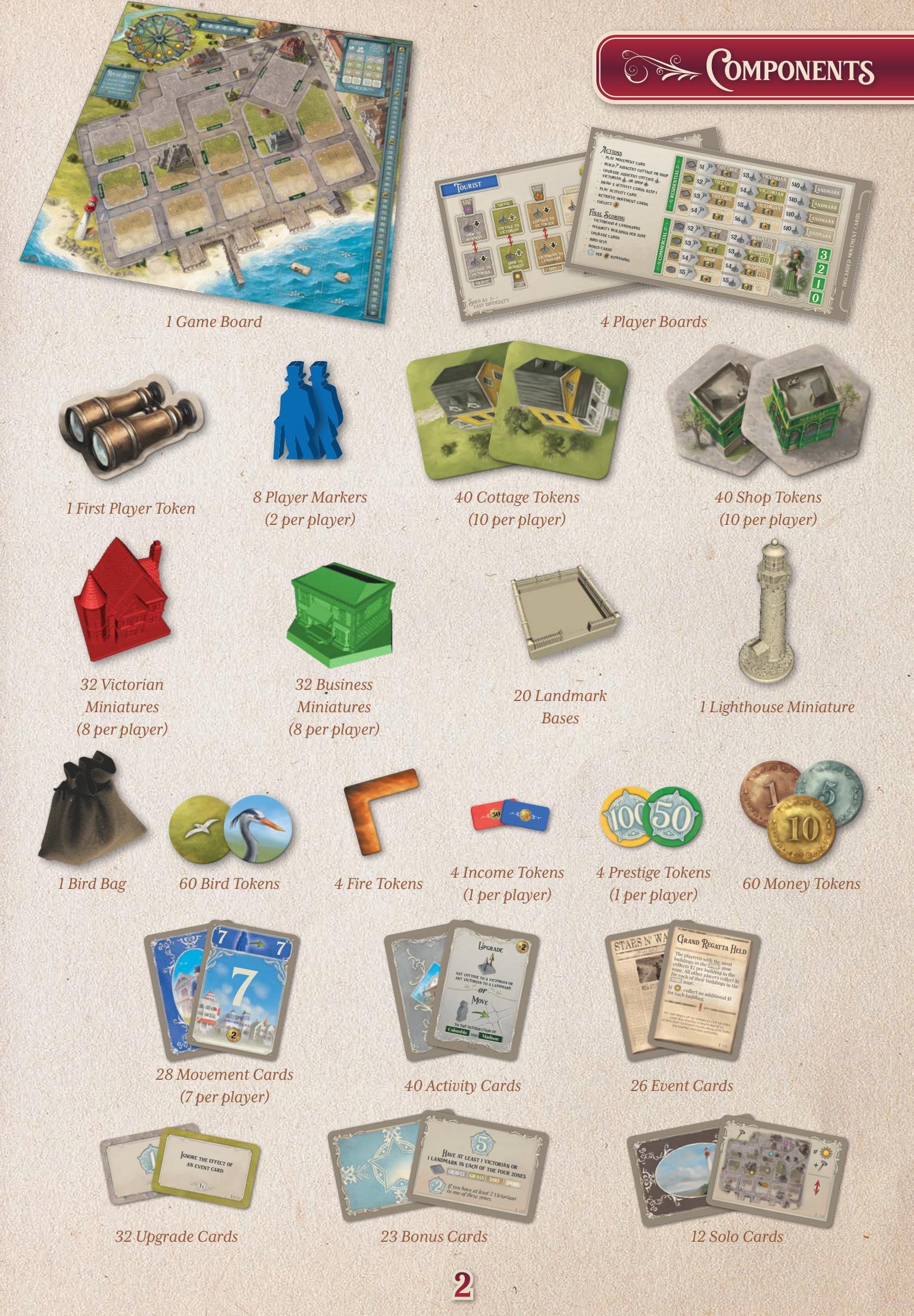
America's oldest seaside resort, Cape May, New Jersey, has been a popular getaway for families from New York City, Philadelphia, and Washington, D.C. since the late 1700s. But Cape May was never immune to hardship. Wracked by devastating fires, extreme beach erosion, swarms of mosquitoes, and intense competition from surrounding areas, the town and its residents struggled their way through the 19th and 20th centuries.
During this turbulent time, players attempt to develop Cape May into the "Queen of the Seaside Resorts.
OBJECTIVE
In Cape May, players traverse the city streets as entrepreneurs, developing property while building wealth over four seasons to earn prestige. The player with the most prestige wins the game!
Build cottages, develop them into Victorian homes, and upgrade them into historic landmarks. Establish shops and grow them into profitable businesses: Carefully move around the city, and make strategic use of activity cards. Complete bonus goals, then take some time to relax and spot wildlife in the best place for birdwatching in the Northeastern United States.
Whoever best balances their income, development, movement, and personal goals will go down in history as the most successful developer of Cape May!
GAME SETUP
- Set the game board in the middle of the table. Make sure to use the correct side for the number of players.

- Place the lighthouse miniature on the top most spring icon of the round wheel on the game board.

-
Shuffle the deck of event cards. Place the deck face down on the event deck space on the game board.
-
Give each player the following components in a single player color:
| 1 Player Board 2 Player | 10 Cottage Tokens |
| Markers | 10 Shop Tokens |
| 1 Prestige Token | 8 Victorian |
| 1 Income Token | Miniatures |
| 7 Movement | 8 Business |
| Cards | Miniatures |
-
Each player forms a hand of their seven movement cards.
-
Each player places their income token on the 0 space of the income track.
Each player places one of their player markers on the starting space on the game board indicated by a compass and places the other on the 0 space of the action track on their player board.
-
Set all other player components near their player board.
-
Give each player \$20 worth of money tokens and place the remaining tokens in a supply near the game board.
-
Shuffle the deck of activity cards and place the deck face down near the game board leaving space for an activity card discard pile. Deal two cards face down to each player.
-
Shuffle the deck of bonus cards and deal four cards to each player. Each player secretly selects two bonus cards to keep. Return the remaining bonus cards to the game box. Keep bonus cards hidden until the end of the game.
-
Separate the upgrade cards by zone and shuffle each deck. Place the decks face down near the game board, revealing the top card of each and placing it face up next to its deck.
-
Fill the bird bag with the bird tokens and place it near the game board.
-
Create a supply of landmark bases and fire tokens near the game board.
-
Give the first player token to the player who most recently visited a beach.

The Four Zones of Cape May
GRAVEL
GRASS
DIRT
SAND
How To PLaY
A game of Cape May is played over four seasons, each of which is made up of three rounds, for a total of twelve. During each round, the following steps are performed in order:
Round Steps
I. Reveal Event Card
II. Take Actions
III. Advance Lighthouse
: Receive Income
I. Reveal Event Card
The first player reveals the top card from the event deck, reads it aloud and places it in the event discard.
NOTE: This step is skipped during the first round of the game.
There are two types of event cards: Immediate and Active.
Immediate Events
The effects of these events are carried out once when the card is revealed.

Active Event
These events are in effect until the start of the next round.
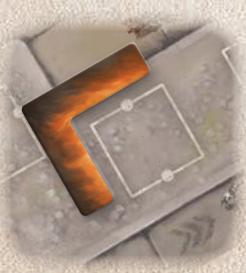
NOTE: If an event card indicates that part
of the city is affected by fire, use the fire tokens to designate that area on the game board,
Some events require players to pay a penalty. If a player does not have enough money to pay the penalty, the player must pay as much as they can. For each \$l they are unable to pay, they must randomly discard a movement card. After discarding movement cards if the player hasn't paid the penalty completely, ignore the remaining penalty.
Example: An event card penalizes Anne \$6. Since she only has \$4, she returns all \$4 to the supply. Anne satisfies the remaining \$2 penalty by discarding two random movement cards.
If an event card requires a player to discard more movement cards than they have in hand, they discard as many as possible.
II. Take Actions
Starting with the first player and moving clockwise around the table, each player takes three actions on their turn. A player may perform an action multiple times. Move the player marker one space on their action track each time an action is taken to remind the player how many actions have been taken.
Actions
· Play Movement Card
·Build
· Upgrade
· Draw Activity Cards
· Play Activity Card
· Retrieve Movement Cards
· Collect Money
ACTION: PLRDMOVEMENT
Take this action to move a player's
marker on the game board. Play a
movement card to move the marker
the indicated number of spaces. Some movement cards require the player to pay money to the supply as shown on the bottom of the card to
play it.
• A player must move the full amount shown on the card.
• A player marker cannot move through a space more than once and cannot return to the space they started on.
• Spaces with arrows must be observed during movement.
A player on a one-way arrow road space (before and during movement) must make their next move in the direction of the arrow.

· A player marker on a space without an arrow may move in any direction.
· Spaces may be shared by any number of players.
· After completing the movement action, discard the card to the player's discard pile.
Example: Dave plays a card that lets him move seven spaces. He advances his player marker one space on his player board, pays \$2 to the supply, and moves his player marker on the game board seven spaces. Dave now has two remaining actions this round.
Special Spaces
Some spaces have effects indicated by special icons. After playing a movement card and moving their player marker the indicated number of spaces, if the final space has a special icon, the player may take the corresponding free action.
Bird Space
Randomly draw a number of bird tokens from the

bird bag matching the number of bird icons pictured on the space. Examine the drawn tokens and place them face down near the player's board.
There is no limit to the number of bird tokens a player may have, though bird tokens are limited by the number in the bag.
Lighthouse Space
Pay \$5 to build a cottage or a shop on any empty lot on the game board, instead of its normal cost.

Pier Space
Draw three activity cards. Keep two and discard one.


Take this action to build cottages and shops, paying the cost shown on the player board. Pay the build cost to either:
· Add a cottage token to a square lot adjacent to the player's marker, or
· Add a shop token to a hexagonal lot adjacent to the player's marker.
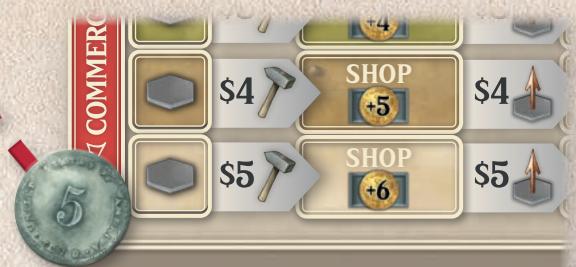
Increase the player's income based on the building type and zone of the new building. The cost to build a cottage or shop and the income increase awarded are both listed on the player board based on which zone the building is built.
NOTE: Adjacent lots are indicated by a white dot along the edge of the lot.
Example: Ben begins his turn adjacent to an empty commercial lot (hexagon) in the sand zone. He decides to build a shop. Checking his player board, he sees that the cost to build a shop in the sand zone is \$5, which he pays to the supply. He then places one of his shop tokens on the lot, and increases his income by \$6.

Notes on Adjacency
Adjacent
Spaces that are adjacent to lots are indicated by white dots on the lot border pointing toward the adjacent space.
Diagonally Adjacent
For a space to be diagonally adjacent to a lot, it must directly border a space that is adjacent to that lot.
Adjacent Lots
Several bonus cards reference having buildings adjacent to one another. Lots and/or buildings are adjacent to one another when they are next to each other and not separated by a road space.
Take this action to upgrade buildings on the game board. Pay the upgrade cost to either:
· Replace one of the player's cottage tokens on an adjacent lot with a Victorian mini in the player's color, or
· Add a landmark base underneath one of the player's Victorian minis on an adjacent lot, or
• Replace one of the player's shop tokens on an adjacent lot with a business mini in the player's color, and then take an upgrade card (see "Upgrade Cards" for more details).
Increase the player's income based on the upgrade type and zone of the upgraded building. The cost to upgrade a shop/cottage/Victorian and the income increase awarded are both listed on the player board based on which zone the building is built.
NOTE: Upgrading a Victorian to a landmark always costs \$10 no matter the zone and does not increase the player's income.
Example: Al is adjacent to a Victorian he built on a previous turn. He spends an action to upgrade the Victorian to a landmark. After paying \$10 to the supply, he places a landmark base underneath his Victorian to show that it is now a landmark.
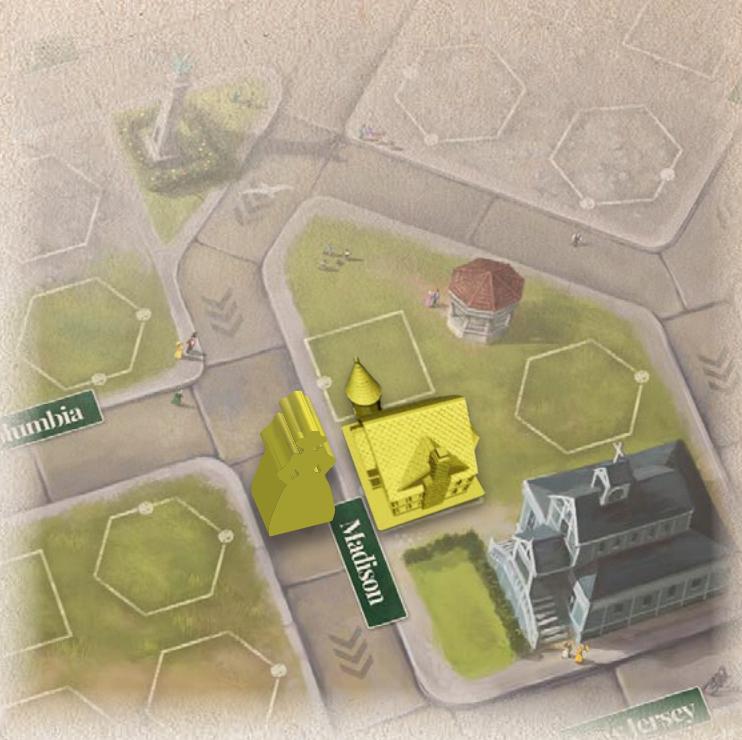
VICTORIAN VICTORIAN
\$10
\$10
\$10 4
ANDMARK
ANDMARK
ANDMARK

ACTION: DRAWACTIVITY CARDS
Take this action to draw two cards from the activity deck. Keep one and discard the other face up to the activity discard pile. If the activity deck is ever depleted, shuffle its discard pile and place it face down to make a new activity deck. There is no limit to the number of aċtivity cards a player can have.
ACTION: PLAYACTIVITY CARD
Play an activity card face up next to the activity deck to take an action listed on the card. The player must pay the cost to complete a build or upgrade action, though many activity cards offer a discount to the action indicated. If the activity card has separate actions available, choose one and disregard the other (see “Activity Cards" for more details).

ACTION: RETRIEVE MOVEMENTCARDS
Pick up all discarded movement cards from the player's discard pile and return them to the player's hand. These cards are immediately available for play.
Example: On Amy's first action, she plays her Move 5 card, moving her player marker five spaces on the game board and then places the card face up in her personal discard pile. For her second action, she retrieves all of her movement cards (even though she has a few remaining in her hand). For her third action, she plays her Move 5 card again.

ACTION: COLLECTMONEY
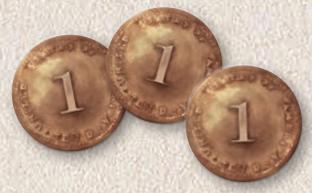
Collect \$3 from the supply. Players may make change with the supply as needed at any time.
III. Advance Lighthouse
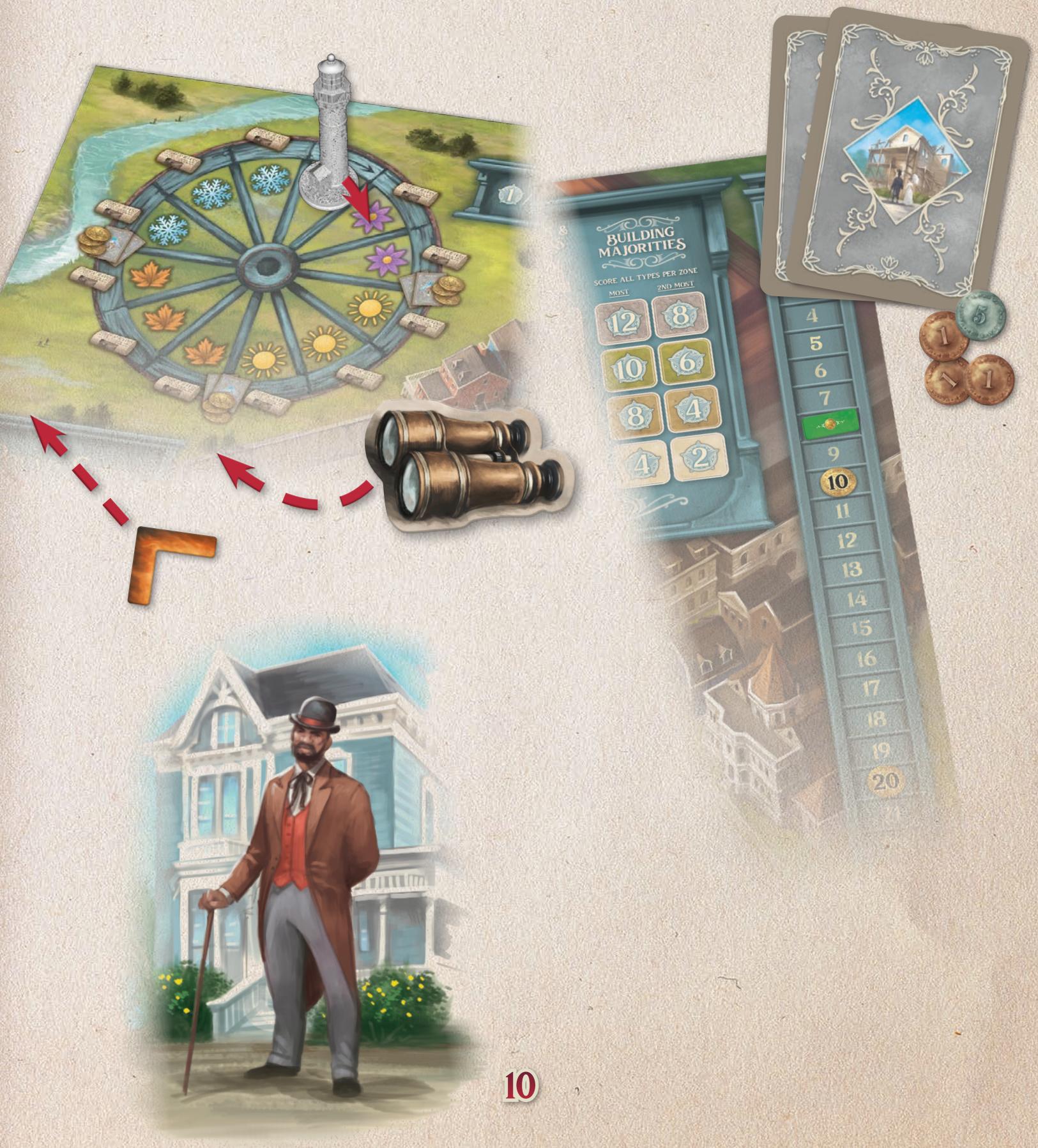
If twelve rounds have been completed, proceed to “Game End". Otherwise, remove any fire tokens from the game board, advance the lighthouse mini one space clockwise on the round wheel, and give the first player token to the next clockwise player.
Receive Income
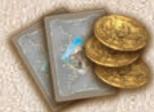
At the end of spring (round 3), summer (round 6), and fall (round 9), each player draws two cards from the activity deck and gains money equal to the position of their income token on the income track. Ignore this step at the end of all other rounds.
ACTIVITY CARDS
Activity cards may be played as an action during the Take Actions step and offer the players advantages during gameplay.
Activity Card Actions

Build
Pay to place a cottage token or shop token on the game board.
Upgrade
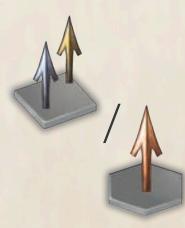
Pay to upgrade a cottage token, shop token, or Victorian mini to another building type.
Build and/or Upgrade
Pay to build or upgrade a building.
Move

Move a player's marker on the game board.
Activity cards that let a player move a certain number of spaces are still subject to the normal movement rules, including one-way roads. Other cards that move the player to a specific space (e.g. “Move to the nearest bird space") ignore these rules.
Activity Card Icons/Keywords
Some activity cards include keywords or icons.
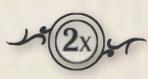
The player may take the indicated action twice, performing each action on the same or different lots/buildings.
ANY


The player may take the
indicated action on any
eligible lot/building,
including those that are not adjacent to the
player's marker.
Apply the discount shown to the build or upgrade action on the card. The player can combine this discount with other discounts, such as those from upgrade cards or active events. Discounts can never reduce the cost of an action below \$0.


Whenever a player takes an action to upgrade a shop token to a business mini, the player also gains an upgrade card that matches the zone in which the upgrade took place. They may either take the face-up upgrade card or draw two upgrade cards from the deck, keeping one and placing the other face down at the bottom of the deck. If a player takes a face-up card, replace it with the top card of the matching deck.
PGRADE CARDS
Example: Chris spends an action to upgrade his shop in the sand zone to a business, paying \$5 to the supply and increasing his income marker by \$2. Chris is not interested in the face-up sand zone card, so he draws two cards from the sand zone upgrade deck. He keeps one, and returns the other to the bottom of the sand zone upgrade deck.
Upgrade Card Types
Immediate
Upon gaining an Immediate upgrade card, complete the action listed and remove the card from the game.
One-Time Use
After gaining a One-Time Use upgrade card, add it to the player's area. It may be played on the player's current Take Actions step or any subsequent ones as a free action. When played, complete the action listed and remove the card from the game.
Once Per Round
) After gaining a Once Per Round upgrade card, add it to the player's area. The player may use the ability on the card once during their Take Actions step and once on each future Take Actions step.
Ongoing
After gaining an Ongoing upgrade card, add it to the player's area. The ability on the card is always active during the player's Take Actions step as a free action.

End of Game
After gaining an End of Game upgrade card, add it face down to the player's area. At the end of the game, the player will score prestige based on the card's ability.
GAME FND
The game ends when the twelfth round is complete. All players reveal their bonus cards and any bird tokens they have collected. They then take their player marker from their player board and place it on the 0 space of the income track to count their prestige.
FINAL SCORING
Award prestige to each player for each of the following six categories:
Victorians: Score prestige for each Victorian owned based on which zone it is built. A Victorian that has been upgraded to a landmark does not score as a Victorian.
| GRAVEL | each |
| GRASS | each |
| DIRT | each |
| SAND | each |
- Landmarks: Score prestige for each landmark owned based on which zone it is built.
| GRAVEL | each |
| GRASS | each |
| DIRT | each |
| SAND | each |
Example: Nick ends the game with 2 Victorians in the dirt zone and 3 Victorians in the gravel zone, scoring a total of 9 prestige. Nick also has 3 landmarks in the sand zone and gains an additional 33 points.
- Majorities: Score prestige for the most and second most buildings per zone.
| Most | SecondMost | |
| GRAVEL | 12 | 8 |
| GRASS | 10 | 6 |
| DIRT | 8 | 4 |
| SAND | 4 | 2 |
If two or more players tie for most, the tied players split the sum of the most and second most awards equally, rounded down. In this case, no prestige is awarded for second most
If there is no tie for most, yet two or more players tie for second most, the tied players split the second most award equally, rounded down.
NOTE: In a 2-player game, award prestige using the chart below. Do not award prestige for having the second most in each zone.
| GRAVEL | |
| GRASS | 6 |
| DIRT | 4 |
| SAND | 2 |
- Upgrade Cards: Score prestige for each End of Game upgrade card.
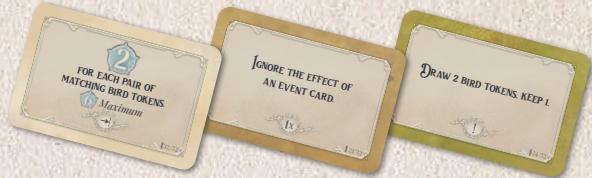
- Bird Collections: Score prestige for each player's collections of bird tokens. A collection is any number of non-matching bird tokens up to seven. Players may have multiple collections and may organize them however they wish to maximize the prestige awarded, though each token may only be assigned to one collection.
| 1 | ||||||
| 2 | 3 | 4 | 5 | 6 | 7 | |
| 12 | 5 | 7 | 10 | 5 | 2 | 1 |
Special Bird Token Types

Passenger Pigeon May be used in any collection as a “wild” bird token.

Hot Air Balloon 2 prestige. This token cannot be included in a collection.

Hindenburg
3 prestige. This token cannot be included in a collection.
NOTE: The Hindenburg took multiple trips from Frankfurt, Germany to nearby Lakehurst, New Jersey, where it crashed on May 6, 1937.
- Bonus Cards: Score prestige based on the goals of each player's bonus cards. If they have met the criteria, award the indicated prestige.
• All bonus cards feature an additional prestige award if a player has met the criteria. In order to qualify for the bonus prestige, the player must also have completed the primary bonus.
• Players do not lose prestige for failing to complete a goal on a bonus card.
• If a goal requires the player to have the most of something, and players are tied, score half the indicated bonus.
• Players do not score prestige from another player's bonus card.
- Money: Score l prestige for every \$10 remaining in hand.
NOTE: If a player reaches 50 prestige, place the player's prestige token next to the income track with the 50 side face up and continue tracking their prestige from the 0 space. If a player reaches 100 prestige, flip their prestige token over to the 100 side.
The player with the most prestige is the winner! In the case of a tie, the tied player who collected the most bird tokens wins. If there is still a tie, the tied player with the highest income wins. Otherwise, the players share the victory.

In solo play, you will be competing to develop Cape May against an automated opponent named Ava that will do her best to thwart your plans. Earn more prestige than Ava to win the game!
Solo Play - Setup
Follow the setup steps for a 2-player game, with the following changes:
Before choosing a player color, select which difficulty level you wish to play —Tourist (Easy), Citizen (Normal), Pioneer (Hard), or Founder (Challenging). Find the matching solo board on the back side of the player boards and place it near your area.
- Gather the pieces that match the color of Ava's solo board: player markers, cottage tokens, shop tokens, business minis, Victorian minis, and the prestige token.
NOTE: Ava does not use the income token, movement cards, or money tokens, nor is the first player token used in solo play.
-
Place one of Ava's player markers on the spring season start space on the upgrade track and the other on the start space of the bird track of the solo board.
-
Return activity card 22 to the game box before creating the activity deck.
-
Shuffle the deck of solo cards and place them face down near the solo board.

Solo Play – How to Play
Follow these steps during solo play:
I. Reveal Event Card (skip round 1):
Draw and resolve an event card. If an event requires counting another player's buildings, count Ava's buildings. Ava does not receive rewards or penalties as the result of event cards.
II. Take Actions:
Complete Ava's actions by drawing and resolving solo cards from the solo deck:
• Draw one solo card from the solo deck. If Ava's player marker is on a season start space on the solo board and there is a icon shown, draw an additional solo card.
· Fully resolve and discard each card in the order they were drawn.
Example: Isaac is in round 7 (fall) and is playing on Pioneer (Hard) difficulty. Ava's marker is on the season start space. He draws two solo cards since the fall season start space shows a + icon. Isaac then resolves and discards the two solo cards in the order they were drawn.
See “Solo Card Actions" for more detail on how to resolve solo cards.
• Once Ava's actions are complete, take three actions, as described in the multiplayer game.
III. Advance Lighthouse:
After the end of the twelfth round, proceed to "Solo Final Scoring." If it is the end of round 3, 6, or 9, move Ava's player marker to the start space of the next season on the upgrade track.
Advance the lighthouse one space clockwise on the round wheel.

Receive Income:
As in the multiplayer game, if it is the end of round 3, 6, or 9 draw two activity cards and gain money based on the position of your income token. Ava does not collect or track income.
Solo Card Actions
To resolve a solo card, follow these steps:
Build

On the solo card, find the season symbol(s) that match the current season. Ava takes a build action on each indicated
lot for the current season, placing either a cottage or shop token
as appropriate.
If there is already a building on an indicated lot, build on a lot with the season symbol for the next season instead. This continues until you are able to build, or have exhausted all possible lots (in which case, nothing is built).
The sequence of season icons loops, meaning that if the location indicated by the winter icon is already built, you would look to the spring location next.
Example: It is spring, and the first card drawn shows a spring symbol along Washington near the top of the game board, but there is already a building at that location. Going in season order, Isaac sees that the indicated summer lot in the sand zone is empty, so he places a shop tile in the empty lot in Ava's color, completing the build portion of the solo card.

If a card depicts multiple lots to build for a single season, as long as you can build at least once, you do not need to check any additional season symbols.

Some solo cards instruct the player to build an additional time, depending on the current season. To do this,
follow the build rules on the current card a second time.
Increase Bird Track

If the solo card shows a bird icon, advance Ava's marker one space on the bird track for each bird icon.
Advance Upgrade Track

For each advance icon on a solo card, move Ava's marker to the next space on the upgrade track, completing the upgrade, if possible. If the
marker is on a season start space, move the marker to the connected upgrade track space. If it is already on an upgrade space, move it to the adjoining upgrade space. The marker will often move back and forth between two upgrade spaces within a single season.

When Ava's marker advances on the upgrade track, check for eligible upgrades in the zone matching the zone depicted on the space.
Example: It is summer and the solo card shows an advance upgrade track symbol. Ava's player marker is on the Summer start space, so Isaac advances it to the first upgrade space in summer. Isaac then determines that there is an eligible shop in the grass zone to upgrade to a business.
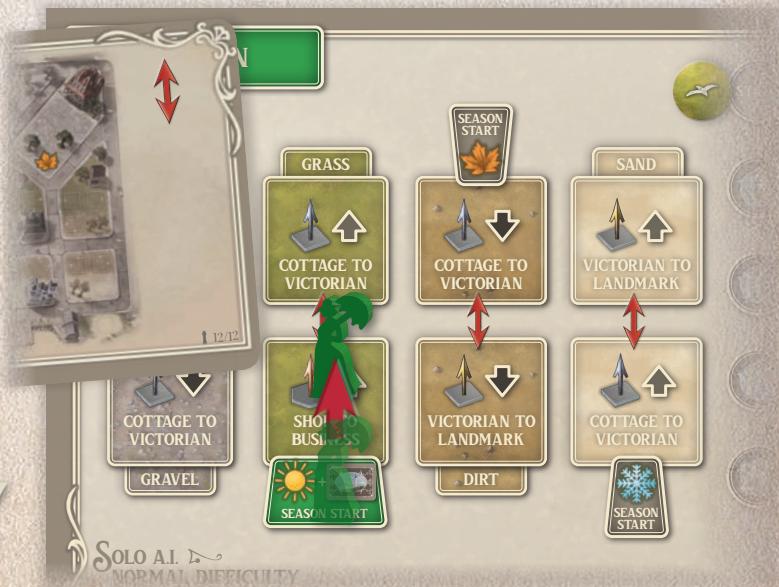

If there is no eligible building in the indicated zone, work your way up or down the game board to the next zone based on the direction of the arrow inside the box. Upgrade the first eligible building to ORIAN TO the type indicated. If you reach the top or bottom of the board, continue looking for the first eligible property by looping around the board until you've either completed the upgrade or checked every zone.
It is possible that there is no eligible building to upgrade. If multiple buildings in a zone are both eligible to upgrade, upgrade the building of your choice in that zone.
Move Ava's player marker from the upgrade track to the 0 space of the income track along with your own player marker. Perform final.scoring for Ava as in the multiplayer game with the following changes:
· Instead of scoring prestige based on bird collections, Ava earns prestige based on the position of her marker on the bird track.
· When scoring upgrade cards, award Ava 3 prestige for each card collected.
• Ava does not earn prestige for bonus cards or money.
To upgrade, use the corresponding game pieces matching Ava's color.
When upgrading one of Ava's shops to a business, take the face-up upgrade card matching the zone and place it on the right side of the solo board. Draw and place a replacement card from the upgrade deck and place it face up next to the deck.
Shuffle

If a solo card shows a shuffle icon, discard it after resolving the card. Then shuffle the discarded solo
cards with the solo deck and place it face down to create a new solo deck before resolving any additional solo cards.
SOLo FINAL SCORING
If you have more prestige than Ava, you are the winner! Otherwise, Ava wins and you have lost. In the case of a tie, Ava wins.
For more information or support, please visit us at www.thunderworksgames.com.
© 2021 Thunderworks Games. All Rights Reserved.
CREDITS
Game Design: Eric Mosso
Solo Game Design: Scott Bogen
Development: Scott Bogen and Keith Matejka
Illustration: Michael Menzel
Graphic Design: Stephen Kerr
Miniature Sculpting: Ryan Butts
Editing: Sam Hillier, Luke Muench, and James Ryan
Special Thanks: Brennan Aldridge, Allan Bishell, Amy Bishell, Anne Bogen, Ava Bogen, John Brieger, Jason Brooks, Jonathan Cox, Dan Cunningham, Kirk Dennison, Stephan Esser, Daniel Ferraro, Al Grogan, Patrick Grogan, Sue Grogan, Jeremy Haack, Jim Halberg, Chris Hindle, Wayne Humfleet, Jason Kelley, Stephen Kerr, Stan Kordonskiy, Kirk Kowalkowski, Daniel Moreland, Dan McNeal, Nick Meyer, Gary Mosso, Mark Mosso, Nicholas Mosso, Olivia O'Connor, Ben Petrus, Nathan Revere, Nick Ryan, James Ryan, David Schneider, Roy Schrag, Jeff Shook, Dag Smalling, Tim Virnig, and Cody Woodside.
Game Board Reference

Start Space


One-way Arrow
Churches and Adjacent Spaces

Bird Space
Draw a bird token from the bird bag.
Pier Space
Draw 3 Activity cards; keep 2, discard 1.
Pay \$5 to build a shop or cottage on any empty lot.
Lighthouse Space
Residential Buildings

Cottage
Victorian
Landmark
Commercial Buildings

Shop
Business
原文为社区整理/出版社公开资料,版权归原作者,仅供个人学习查阅。