
巧克力工厂Chocolate Factory
一句话概览
巧克力工厂 是一款已收录于村了吗规则库的桌游,支持 1–4 人,原名 Chocolate Factory。
本页内容:一句话概览 · 常见问题
这游戏怎么玩
- 本站已收录这款游戏的规则资料,可以在对话里直接提问规则细节。
常见问题(FAQ)
以下 1 条问答中 0 条来自站内玩家的真实提问,其余 1 条为本站整理的常见疑问;答复内容保持原样。
巧克力工厂支持几个人玩?
1–4 人。
去哪查完整规则
想核对具体规则细节、卡牌效果或某个回合的结算方式,可以在村了吗里选中这款游戏后直接提问。
同类桌游
- 卡坦岛德式
- 工业革命:伯明翰德式
- 勃艮第城堡:特别典藏版德式
- 方舟动物园德式
- 卡卡颂抽象
- 瘟疫危机传承:第一季美式
- 阿瑞迪亚:勇踏征途美式
- 重塑宇宙德式
- 幽港迷城美式
- 埃多拉的德鲁伊德式
规则原文(Markdown)
本站收录这款游戏的规则原文 1 个文件,此处内联渲染 1 个,可直接展开阅读或下载。
CF_rulebook_Final.md48.7 KB
Matthew Dunstan Brett J. Gilbert
late FACTORY
Rulebook
Introduction
Take on the role of a master chocolatier and ambitious entrepreneur in the Golden Age of Chocolate, competing to build the best factory and fulfil the most-valuable orders at the local corner shops and big department stores. The player who earns the most money wins.
Components

1 Bookkeeping board

30 Factory Part cards (tiles in deluxe edition)

4 Factory boards

54 Corner Shop Order cards

5 Department Store Order cards


26 Factory Manager cards (for use in the solo game only)
35 Employee cards


4 Player Reference cards
4 Store Room & Coal Bunker cards (double sided)
124 wooden chocolate pieces:

24 Beans
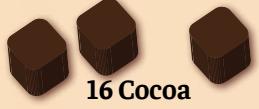
40 Bars


32 Wrapped

16 Caramel

20 Chunks
16 Nuts
20 Fingers


12 Boxes
36 Player markers: 9 discs in each of 4 player colours

1 Day marker (wooden marker in deluxe edition)

1 Start Player marker (wooden marker in deluxe edition)
30 Conveyor tiles


18 ‘£50'coins
40 Coal tokens: 30 × 1 coal', 10 × ‘3 coal' (30x small (1x) and 10x large (3x) (acrylic gems in the deluxe edition)
Solo game & mini-expansion
Rules for the Factory Manager solo game are on page 12.
If your game includes the Master Chocolatier mini-expansion, the additional rules and explanations are on page 14.
Setup
Bookkeeping board
Place the Bookkeeping board in the middle of the table.
Place the Day marker on the Monday' space of the week track.
Put the £50 coins in the marked space.
3 Sort the Factory Parts into two decks (A and B) and shuffle each deck separately. Place the B deck face down on the marked space, and stack the A deck face down on top of the B deck.

4 Sort the Corner Shop Order cards into three decks (Small, Medium, and Large as shown on the back of the card) and shuffle each deck separately. Place the decks face down on the marked spaces.
Lay the Department Store orders below the Bookkeeping board, in the corresponding positions along the bottom edge. If this is your first game, turn each to its A side. In later games, select any combination of A and B sides, or choose them at random.
Sort the Employee cards cards into five decks (The Palace Boutique, Fresh Fancies, Salter's Emporium, House of Luxury, and Dunstan & Gilbert's) and shuffle each deck separately. Place the decks face down above the Bookkeeping board. Each deck corresponds to one of the Department Stores below the board.
Factory boards
Each player takes 1 Factory board, 7 Conveyor tiles, 1 Store Room & Coal Bunker card, 1 Reference card, and 9 Player markers of their chosen colour.
Place your Factory board in front of you, with the pre-printed Factory Parts in the top left. Lay 4 Conveyor tiles into the channel of your Factory, and put the other 3 Conveyor tiles beside your Factory, on the left.
Place your Store Room & Coal Bunker card and Reference card, beside your Factory on the right, ensuring it is not on the “Factory manager only"side.
Each player draws one Corner Shop Order card from each of the three decks (one Small, one Medium, and one Large order). Lay your three Corner Shop Order cards face up above your Factory.
Place your Player markers as follows:
Place one beside each of your Corner Shop Order card.
One beside each Department Store Order card.
Place one on the Bookkeeping board, on the 'O' space of the money track.
Supply
Make a common supply beside the play area containing all the chocolate and coal, and one spare Conveyor tile. Put any unused Factory boards, Conveyor tiles, and Player markers back in the box.
Each small Coal token is worth 1 coal, and each larger token is worth 3 coal. The supply of chocolates and coal is not intended to be limited. In the rare case that you run out, substitute with any suitable replacement.
Start player
Give the Start Player marker to the player who most recently ate chocolate.
Store Room & Coal Bunker card
Space for Employee card

Factory entrance
Corner Shop order cards

Facderyy

Conweyor tiles

Reference card
About your Factory
Chocolates & conveyor tiles
The Conveyor tiles carry Chocolate pieces through your Factory, and the Factory Parts allow you to work on those products.
The raw input for your factory are Beans (black). These can be first roasted to make Cocoa (brown squares), then formed into chocolate Bars moulded into Chunks or Fingers (brown bars), and then made into Wrapped chocolates with either added Caramel (yellow) or Nuts (red), before finally becoming premium Boxed chocolates (blue)

All of these pieces, including Beans and Cocoa, are called ‘Chocolate pieces' or just 'chocolates'. Bars, Wrapped, and Boxed chocolates are called 'refined chocolates'.
Factory Parts
Each Factory Part will allow you to process the Chocolate pieces on the Conveyor tile immediately above or below it. You will need to use coal every time you operate a Factory Part.
The furnace icon on the Factory Part tells you how much coal it takes to operate it once.
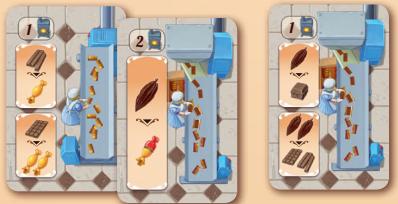
Employees
Each day you will choose one Employee to hire to help with that day's production. Each Employee gives you a special gift, benefit, or action, and tells you which of the five Department Store Order cards you have the opportunity to fulfil at the end of the day. You will discard the Employee at the end of the day, and choose a new one on the following day.


Fulfilling orders
At the end of each day you can use the chocolate pieces in your store room to fulfil your own personal Corner Shop order cards, and one of the competitive Department Store Order cards. If this is your first game, refer to the Fulfil orders' and End of the game' sections to make sure you understand how fulfilling Corner Shop and Department Store Order cards will earn money.
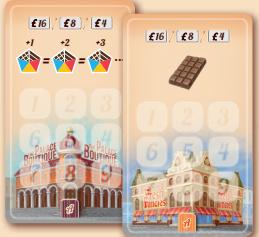
Department Stores

Corner Shop Order Stores
Aim of the game
Over the course of six days, compete to build the best and most efficient factory, hire the best employees, and earn the most money by satisfying the many different orders at local corner shops and big department stores.
The player who earns the most money wins.
How to play
The game is played over six days. Each day is played over five phases, carried out in the following order:

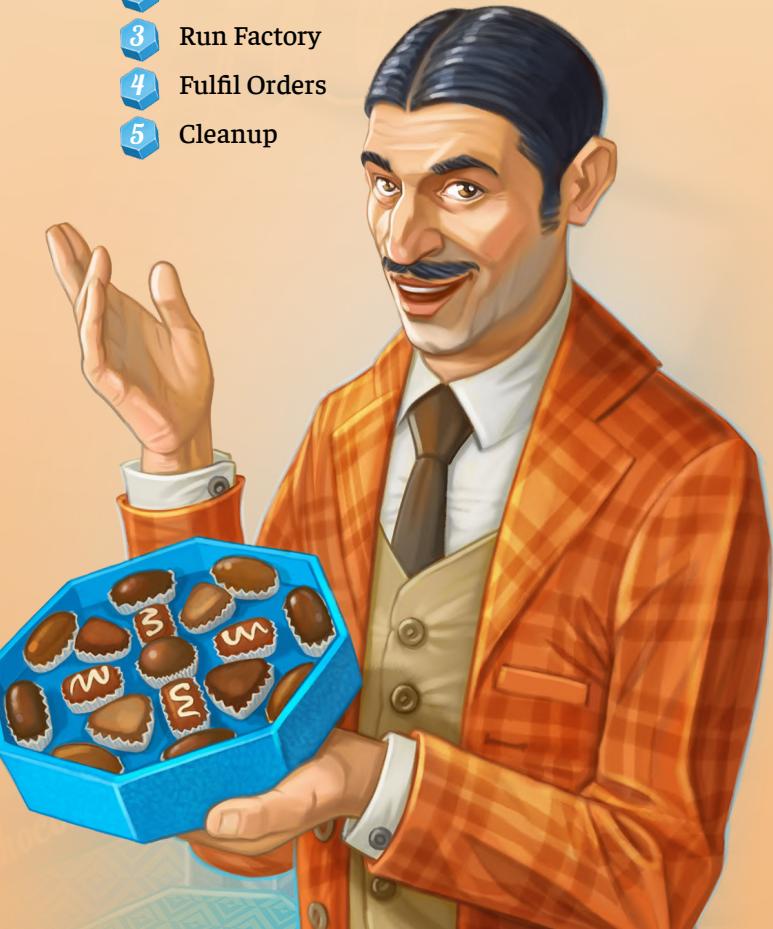
Expand & Recruit
Prepare
1. Prepare
Receive coal
Give each player the amount of coal shown on the current day space on the Bookkeeping board: 5 coal on Monday, 6 coal on Tuesday, and so on. Keep the coal you receive in your coal bunker (the upper half of your Store Room & Coal Bunker card), along with any coal you did not use during previous days.
Create display
Draw 5 Factory Parts from the top of the deck and lay them face up in the middle of the play area. Make a number of packets' equal to the number of players as follows:
2 players: Make 2 packets: one of 3 Parts, and one of 2 Parts.
3 players: Make 3 packets: two of 2 Parts, and one of 1 Part.
4 players: Make 4 packets: one of 2 Parts, and three of 1 Part each.
Draw the Factory Parts one by one, and lay them into packets in order. (For example, in a 2-player game, lay the first three Parts together to make the first packet, and then lay the next two Parts together to make the second packet.) Make sure the Parts are split into packets randomly.
Now draw 5 Employees: take 1 Employee from each of the 5 Employee decks. Shuffle these Employees and then lay them face up in the middle of the play area, grouping them into a number of packets equal to the number of players, just as you did for the Factory Parts.
Make sure that all the Parts and Employees can be easily seen by everyone. We recommend that the player who lays out the Employees reads out the text on each card, and announces with which of the Department Stores each Employee is associated.





An example display for 3 players.

2. Expand & Recruit
The player with the Start Player Marker goes first. Players then take turns in a clockwise order. On your turn, choose either one packet of Factory Parts, or one packet of Employees.
If you choose a packet of more than one Part or Employee, immediately choose one to keep, and discard the others, removing them from game.
The last player to choose, going clockwise from the start player, chooses both a packet of Factory Parts and a packet of Employees. Then, going anticlockwise back towards the start player, each player chooses a second packet of the other type, so that everyone gains exactly one new Factory Part and one new Employee.
Factory Part
Choose a position in your Factory for your new Factory Part.
You may cover up an existing Part, including all three of the original Parts printed on your Factory board. You cannot move Parts around in your Factory, and if you cover a Part, you receive no compensation.
Employee
Place your new Employee face up beside your Factory. Each Employee grants you a Gift, Benefit, or Action that you can use during the current day.
Gift: Immediately take the gift specified from the supply.
Benefit: You gain a bonus that you can use one or more times during the day.
Action: Unless otherwise stated, you gain a special action that you can take once during the day. To indicate that your action has been completed, rotate the card sideways.
3. Run Factory
In turn order, everyone runs their own Factory. Each day, you will run three Shifts, using the Conveyor tiles beside your Factory one by one, and spending your coal to operate the Parts in your Factory in any combination and order you choose.
Note: If everyone agrees, players can choose to run their Factories simultaneously.
Running a Shift
When you run a Shift in your Factory, do the following things in order:
Q Load
Place a conveyor tile at the entrance on the left-hand side of your Factory, and load it with 1 Bean, taken from the supply. This represents the raw material entering your Factory from which you will make your chocolates. It does not cost coal to load the conveyor.
②Push
Push the tile into the channel, moving the other four tiles sideways. Make only one push during each shift. This push moves all the Conveyor tiles and the chocolates on them one position to the right, and pushes the tile at the right-hand end out of your Factory exit. If there are any chocolates on the tile then place them on your Store Room card.
③Operate
You may now operate any combination of parts in your factory, in any order, provided you have enough coal to do so. You may also choose not to operate any Parts.
You may only operate each single Factory Part exactly once during a Shift. You cannot spend more coal to operate it repeatedly.
The amount of coal required to operate a Part is shown beside the furnace icon. When you operate a Part, take that amount of coal from your own coal bunker and place it onto the Part itself. This keeps track of which Parts you have operated during each Shift.
Each Factory Part can only process chocolates on the conveyor tile immediately above or below it.
The function of each Factory Parts is explained below.
Important! During each Shift, you cannot operate any Parts until you have pushed a new conveyor tile into your Factory. You must take the Load, Push, and Operate steps in order.
Clear
To complete the Shift, remove all the coal you placed on Factory Parts during the Operate step and return it to the supply.
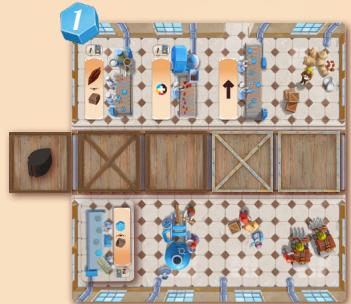


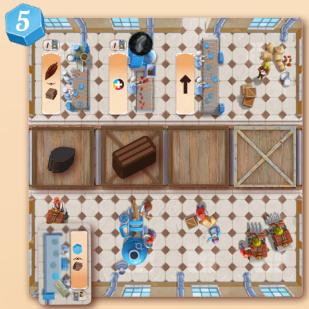

In this example, it shows two shifts to completion. Step 1:“Load”. Step 2:“Push”. Step 3:“Operate”. Step 4:“Clear, Load and Push”. Step 5: Operate.
Important! If you still have one or more Conveyor tiles remaining beside the entrance to your Factory, you must immediately begin another Shift by returning to step 1 above.
Basic Factory Parts
Everyone has the same three basic Factory Parts printed on their board.
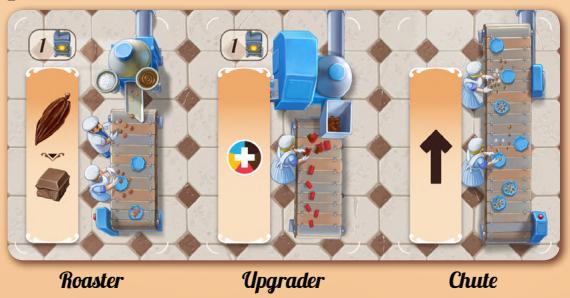
Roaster
For the cost of 1 coal, you can convert 1 Bean on the conveyor tile below the Roaster into 1 Cocoa. Place 1 coal onto the Part, return a Bean on the Conveyor tile to the supply, and place 1 Cocoa taken from the supply on the Conveyor tile to replace the Bean.
Upgrader
For 1 coal, you can perform the upgrade' action once on a single piece of chocolate on the conveyor tile below the Upgrader.
Return 1 chocolate of your choice on the Conveyor tile to the supply, and replace it with an upgraded chocolate taken from the supply as follows:
1 Bean can be upgraded into 1 Cocoa.
1 Cocoa can be upgraded into 1 Bar (either Chunks or Fingers).
1 Bar (either Chunks or Fingers) can be upgraded into 1 Wrapped chocolate (either Caramel or Nuts).
1 Wrapped chocolate (either Caramel or Nuts) can be upgraded into 1 Boxed chocolate.
This chain of possible upgrades is summarised on the Bookkeeping board.
Chute
The Chute is a unique part of your Factory. When you operate it, you may remove one or more of the chocolates on the Conveyor tile below the Chute and put them into your store room (the lower half of your Store Room & Coal Bunker card). Unlike all other Factory Parts, operating the Chute is free and does not require coal, and you may operate it more than once during any Shift.
Other Factory Parts
Every Factory Part shows a combination of icons that represents the Part's function, and shows you which chocolates the Part allows you to process. Each icon on a Factory Part relates to a single Chocolate piece, not all pieces of that type on the conveyor. The majority of Parts can only operate on a single piece of chocolate during a single Shift.


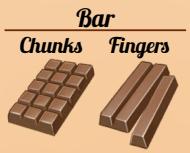

Bar
Wrapped
Boxed

Upgrade any 1 chocolate


Duplicate any 1'chocolate


Converters
Most Factory Parts are converters, and operate like the basic Roaster.
Each converter operates on a piece of chocolate on the conveyor, and allows you to convert that piece into one or more other pieces. Each conversion, may only happen once per shift.

Example: For 2 coal, this Part lets you convert 1 Cocoa into 1 Boxed chocolate.
Some converters allow you to choose which chocolates you receive as the result of the conversion.
First example: For 2 coal, you can convert 1 Fingers into 2 Wrapped chocolates ofyour choice (either Caramel or Nuts), which may be the same or different.

Second example: For 4 coal, you can convert 1 Bean into any 2 chocolates ofyour choice, which may be the same or different.

Some converters allow you to choose which chocolates you convert.
First example: For 2 coal, you can convert 1 Bar of your choice (either Chunks or Fingers) into 2 Boxed chocolates.

Second example: For 3 coal, you can convert any 1 refined chocolate ofyour choice (Bar, Wrapped or Boxed), into any 2 chocolates of your choice, which may be the same or different.

Some converters give you two options, each of which operates on a different chocolate. Each time you operate one of these Parts, you can only choose one of these options.
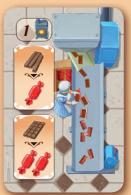
Example: For1 coal, you can either convert 1 Fingers into 1 Nuts, or convert 1 Chunks into 2 Nuts. You cannot do both conversions in a single Shift.
Some Parts require you to operate on 2 chocolates at once. To use these functions, both chocolates must be present on the conveyor tile at the same time.
First example: For 1 coal, you can either convert 1 Bean into 1 Cocoa, or convert 2 Beans into 1 Chunks and 1 Fingers. You cannot do both conversions in a single Shift.

Second example: For 4 coal, you can convert any 2 refined chocolates of your choice (Bar, Wrapped or Boxed, in any combination), into 1 Chunks, 1 Fingers, 1 Caramel, 1 Nuts, and 1 Boxed chocolate.
Upgraders
Two Factory Parts (one in the A deck, one in the B deck) are more powerful versions of the basic Upgrader, and allow you to take the upgrade action more than once during a single Shift. Each time you take an upgrade action, you can choose to upgrade any 1 chocolate on the conveyor tile above or below the Part.
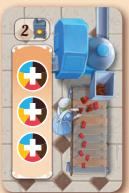
First example: You could use 2 actions to upgrade one chocolate twice, and then use a remaining action to upgrade a different chocolate.
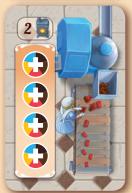
Repeater
Two Factory Parts (one in the A deck, one in the B deck) are Repeaters, that either duplicate or triplicate a single Chocolate piece on the conveyor.
If you duplicate a piece, choose any 1 Chocolate piece on the conveyor immediately above or below the Part and add take an exact copy of that piece from the supply and place it on the same conveyor tile.
If you triplicate a piece, take two copies of the piece from the supply and place them on the same Conveyor tile.
Moving chocolates to your store room
Each time you push a Conveyor tile into your Factory, you will also push another tile out at the other end. Immediately remove all chocolates on this Conveyor tile and place them into your store room (the lower half of your Store Room & Coal Bunker card). Leave the Conveyor tile beside the exit to your Factory.
In addition, at any time during an ‘Operate' step, you may choose to move one or more of the chocolates on the Conveyor tile below your Chute into your store room.
Moving chocolates into your store room, either when they are pushed out on the conveyor or you use the Chute, is a free action and does not cost coal.
Once a chocolate is in your store room, you cannot return it to your Factory.
If you cover up the Chute with another Factory Part, you can no longer choose to remove chocolates from this position on the conveyor and must wait for them to be pushed out.
Keeping chocolates in your Factory
At the end of each of the first five days (Monday– Friday), any chocolates on your conveyor remain in place in your Factory. You can only move chocolates into your store room when they are pushed out on the conveyor or if you use the Chute.
However, after running your factory on the sixth day (Saturday), move all of the Chocolate pieces anywhere in your Factory into your store room, before you fulfil orders for the final time.
Trading chocolates for coal
While running your Factory, you may always trade one or more of the chocolates already in your store room for an equal amount of coal. You can trade any type of chocolate in any combination, including Beans and Cocoa.
If you trade chocolates, return them to the supply and take 1 coal for each chocolate returned. You can do this at any time, and may use the coal you receive immediately or keep it for later.
Using an Employee
At any time, you may choose to use the action or benefit of your Employee if it applies during the Run Factory phase.
4. Fulfil Orders
In turn order, use the chocolate in your store room to fulfil any combination of your current Corner Shop Order cards and the one Department Store Order card associated with your current Employee.
If everyone agrees, players can choose to fulfil their orders simultaneously.
Remember! Before you fulfil orders on Saturday, move all of the chocolates in your Factory into your store room.
Corner Shop Orders
Each Corner Shop Order is made up of 1, 2, or 3 stages, each worth an increasing amount of money, and requiring a specific number of Refined Chocolates (Bars, Wrapped, or Boxed) You may fulfil several stages of a single order all at once but you must fulfil them in sequence, starting with the least-valuable stage first. To fulfil a stage, take from your store room all of the chocolates shown in the stage, and return them to the supply. When you do this:
Record the money earned by moving your Player marker on the money track on the Bookkeeping board. Each time you move your marker onto or past the ‘O' space, take a £50 coin.
Slide your Player marker on the Corner Shop Order card upwards, onto the stage you just fulfilled.
Completed Corner Shop Orders
If you complete the final stage of a Corner Shop Order, remove your Player marker and place the completed order face down above your Factory board. You will choose a new order to replace it during the Cleanup phase.
Note: At the end of the game, the player or play ers who have the most completed face-down Corner Shop orders will earn £12. The number of orders you have completed is not secret.


In one round, Christina produced one nut, one caramel and three fingers chocolate pieces. She uses the nut and caramel chocolate pieces to complete her Small Corner Shop Order Store and the three fingers to complete the second and final stage of the medium Corner Shop Order Store. That round, Christina gains £14 from Corner Shop Order Stores.
Department Store Orders
The Employee you recruited at the start of the day shows which of the five Department Store Orders you now have the opportunity to fulfil using the chocolates in your store room.
Each Department Store Order defines the types of chocolates you must supply, and how many spaces you can move your Player marker along the track on the Department Store Order card. If you move your marker onto a space with another player's marker, place your marker on top.
Each track has 9 spaces. This is the maximum number of spaces that you can move your marker on each Department Store track. Any additional movement is lost. At the top of each Department Store Order card is the amount of money players will earn at the end of the game depending on the order and position of their Player markers on the card.
The Palace Boutique
A side
Supply refined chocolates of your choice, all of the same type (Chunks, Fingers, Caramel, Nuts, or Boxed), and move 1 space along the track for each chocolate supplied.

B side
Supply refined chocolates of your choice, each of a different type (Chunks, Fingers, Caramel, Nuts, or Boxed), and move 1 space along the track for each chocolate supplied.

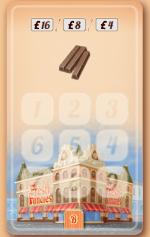
Fresh Fancies
A side
Supply Chunks chocolates, and move 1 space along the track for each chocolate supplied.

B side
Supply Fingers chocolates, and move 1 space along the track for each chocolate supplied.
Salter's Emporium
A side
Supply Caramel chocolates, and move 1 space along the track for each chocolate supplied.
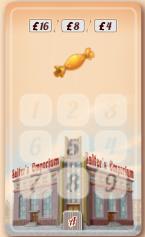
B side
Supply Nuts chocolates, and move 1 space along the track for each chocolate supplied.

House of Luxury
A side
Supply Boxed chocolates, and move 1 space along the track for each chocolate supplied.
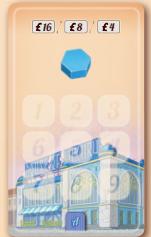
B side
Supply Bar chocolates in any combination, and move 1 space along the track for every two chocolates supplied.

Dunstan & Gilbert's
A side
Supply Wrapped or Boxed chocolates in any combination, and move 1 space along the track for every two chocolates supplied.

B side
Supply exactly two refined chocolates only. If both of the chocolates you supply are Bars (in any combination), move 2 spaces along the track. If both chocolates are Wrapped (in any combination), move 3 spaces along the track. If both are Boxed, move 4 spaces. You cannot supply more than 2 refined chocolates per turn or supply them in any other combination than those listed above.

5. Cleanup
The game lasts 6 days, Monday–Saturday. At the end of the first five days, get ready for the next day as follows. At the end of Saturday, skip this phase and proceed to ‘End of the Game'.
Store chocolates and coal
At the end of each day you may keep up to 2 chocolates in your store room for the next day. You must trade any excess chocolates that you cannot keep, including Beans and Cocoa, for 1 coal each. You may keep any amount of coal in your coal bunker for use during the next day.
Reset conveyor tiles
Put the Conveyor tiles that you pushed out of your Factory back beside the entrance. If your Employee gave you an additional Conveyor tile, return it to the supply.
Discard Employee
Discard the Employee you recruited at the start of the day.
Replace completed Corner Shop orders
For each Corner Shop Order you completed, choose a new one to replace it as follows. Draw one Corner Shop Order from the each of the three decks (Small, Medium, and Large) and place one of these three orders above your Factory. You do not have to choose an order of the same type (e.g a medium for another medium). Put the orders you didn't choose face down on the bottom of their respective decks.
Move day and start player markers
Move the Day marker one space along the week track. Pass the Start Player marker clockwise. Now return to 'Phase 1. Prepare' to continue the game and play another day.

End of the game
At the end of the sixth day, players may earn money for the Department Store Orders they fulfilled and for any remaining chocolates and coal.
There is no penalty for stages of your current Corner Shop Orders that you did not fulfil.
Remember! Before you fulfil orders on Saturday, move all of the chocolates in your Factory into your store room.
Corner Shop orders
Count up the number of Corner Shop Orders of any size that you completed. Ignore any incomplete orders still face up above your Factory.
The player who completed the most orders earns £12. (Count the number of completed cards, not the number of completed stages.) If two or more players are tied with the most orders, all tied players earn £12 each.
Department Store orders
Look at each Department Store in turn. Rank the players first, second, and third, based on the position of their markers on the track. If players are tied, break the tie in favour of the tied player who fulfilled orders earlier, and whose player marker is therefore underneath other Player markers on the same space.
The player in first place earns £16.
The player in second place earns £8, but only if their marker is at least half (rounded up) as far along the track as the player in first place.
The player in third place earns £4, but only if their marker is at least half (rounded up) as far along the track as the player in second place. If second place receives no points due to not being half as far along as first place, neither second nor third place receives any points regardless of how far along third place is.

Christina has sold 7 caramel, Simon (blue) and Matt (green), 6 Caramel, and Brett, 2 Caramel. Christina receives £16, Simon receives £8, Matt receives £4. Brett receives nothing.

Christina has sold 8 caramel, Matt, 5 Caramel, and Brett, 2 Caramel. Christina, Matt and Brett receive £16, £8 and £0 respectively.
Department Store order bonuses
In addition, for each player count the number of different Department Stores at which they fulfilled at least one order.
If you fulfilled orders at 3 different Stores, earn £6.
If you fulfilled orders at 4 different Stores, earn £12.
If you fulfilled orders at all 5 Stores, earn £24.
Remaining chocolates and coal
Every chocolate and coal you have remaining at the end of the game earns you £1.
Winning the game
The player who has earned the most money wins. In the case of a tie, the tied player who played later in the turn order during the final day is the winner.
Factory Manager solo game
In Factory Manager, you will take on the role of the production manager in the chocolate factory. You will only be concerned with completing all the work necessary to meet the demands of the owner and their customers.
Setup
Set up the game exactly as described in the main rules, with the following changes.
Factory Manager cards
Find the 26 Factory Manager cards. Separate them into two face down decks of Weekly Targets and Demands. Shuffle each deck separately.
Randomly choose 1 Weekly Target and place it face up in front of you. If the Target has a 'Special Orders' panel at the top, refer to the rule below.
Deal 1 Demand face up beside the Weekly Target: this is your Initial Demand.
Then deal 5 Demands face down in a line beside your Initial Demand: these are your Daily Demands.
Put the remaining Factory Manager cards back in the box.
Place the Store Room & Coal Bunker card on the “Factory manager only” side face up.
Special Orders
If you receive a Weekly Target with a 'Special Orders’ panel, deal the indicated number of Corner
Shop orders and lay them face up beside the Weekly Target. These orders are not replaced when you complete them. Keep these orders separate from your three regular Corner Shop orders.

Adjusting the difficulty
The solo game has been designed to be an achievable challenge for experienced players.
In later games, if you wish to increase the difficulty, deal one or more additional face-up Initial Demands beside your Weekly Target. Always deal 5 face-down Daily Demands.
Aim of the game
You win the game if you have satisfied your Weekly Target and all of your Initial and Daily Demands by the end of the game. You lose if you fail to satisfy one or more of these objectives.
How to play
The game is played over six days as described in the main rules, with the following changes:

Prepare
At the start of each day, flip the next Daily Demand face up. There are 5 Daily Demands, and you will reveal them one by one on each of the first five days, Monday–Friday. There is no new Daily Demand on Saturday.
Draw 1 Employee from each deck as normal and lay them face up in a line. Do not group them into packets
Then deal 5 Factory Parts, laying each one face up on a different Employee, starting with the left-hand Employee and placing one Part with each Employee, going left to right.

Setup at the beginning of each day in Factory Manager mode.
On each of the first five days, discard the Employee associated with the following Department Store, and the random Factory Part that was laid with it:
Monday: Dunstan & Gilbert's
Tuesday: House of Luxury
Wednesday: Salter's Emporium
Thursday: Fresh Fancies
Friday: The Palace Boutique
On Saturday, do not discard anything.
②Expand & recruit
You may choose any 1 Employee and any 1 Factory Part. Although you laid the Employee and Factory Parts in pairs, you do not need to choose both from the same pair.
③Run Factory
Run your Factory just as in the main game.
4Fulfil orders
There is no change to how you fulfil Corner Shop or Department Store orders.
Cleanup
There is no change to how to replace your regular Corner Shop orders when you complete them. However, if you received any Special Orders because of your Weekly Target, these orders are not replaced once they are completed.
In the solo game, you may store up to 6 chocolates in your store room for the next day.
Satisfying your Weekly Target and Demands
Each Weekly Target and Demand requires you to achieve one or more of the following:
Department Store order target: At the end of the week, you must move one or more of your markers back a specific number of steps along Department Store tracks. Although there is no 'O' space on the tracks, the marker can be moved back to O'.
If a card shows a single box, you satisfy this by moving one marker back that number of steps on a single track.
If a card shows two or more boxes, you satisfy this by moving a number of markers equal to the number of boxes back that number of steps on multiple tracks.
Money target: By the end of the week, you must have made at least this much money from completed Corner Shop orders. You earn no money from the Department Store orders.
Corner Shop order target: At the end of the week, you must discard a number of completed orders of a specific size or combination of sizes.
Chocolate order: At any time during the week, you must supply a number of chocolates of a particular mix of types. To satisfy an order, you must supply all the chocolates at the time by returning them from your storeroom to the supply.


Department Store order target & Money target
Corner Shop order target

Chocolate order
Example Department Store order targets
These three cards have the following requirements:
At the end of the week, you must simultaneously move the markers on all five Department Stores, moving each marker back one step.
B At the end of the week, you must simultaneously move the markers on two Department Stores of your choice, moving each marker back two steps.
At the end of the week, you must move the markers on one Department Store of your choice, moving the marker back three steps.

If you have multiple cards with Department Store targets, their requirements are cumulative and to win the game you must be able to satisfy all of them independently, one after the other.
Example Demands
These four Demands have the following requirements:
You must move your marker two steps back along the track on Dunstan & Gilbert's.
B You must supply three refined chocolates, each of a different type (Chunks, Fingers, Caramel, Nuts or Boxed).
You must supply four refined chocolates of the same type (Chunks, Fingers, Caramel, Nuts or Boxed).
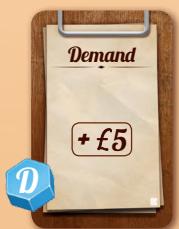
D You must add £5 to the money target on your Weekly Target.


End of the game
You win the game if you have satisfied your Weekly Target and all of your Demands after 6 days.
Master Chocolatier mini-expansion
The Master Chocolatier mini-expansion is part of the Kickstarter edition, and includes 4 new Factory Parts, 5 new Department Stores, and 6 new Employees.
These cards are compatible with the Factory Manager solo game.
Factory Parts
During setup, shuffle the new Parts into their respective Factory Part deck (A or B). Randomly remove 2 Parts from each deck before you stack the two decks of Parts face down on the Bookkeeping board. Put the removed cards back in the box.
Move any 1 chocolate

The new Parts introduce a new action. When you use this function, you may move any one chocolate on the conveyor tile immediately above or below this Part to any other conveyor tile in your Factory.
Department Stores
During setup, include one or more of the new Department Stores with either its C or D side face up, each time replacing one of the existing Stores. We recommend you include no more than two of the new C Department Stores in any game. You are also free to randomly choose any combination of the (original) Stores and new Stores, or choose your own combination.
C sides
Each of these allow you to move your marker along the Department Store track based only on the amount of money you earned from Corner Shop orders during the current day. Divide that total amount by the value shown on the Department Store (rounding down), and move that many spaces along the track.
For example, at Fresh Fancies move 1 space for each £9 earned. Ifyou had earn £25 from Corner Shop orders, move up 2 spaces.
D sides
The Palace Boutique
Each time you supply The Palace Boutique, choose any one of the other Stores in play. Supply chocolates as if The Palace Boutique had the order requirements of the other Store.

Fresh Fancies
Supply exactly one, three or five refined chocolates of your choice, in any combination, and move a number of spaces up the track equal to the number of chocolates supplied.
Salter's Emporium
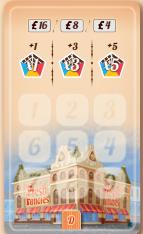
Supply up to five different refined chocolates in the following order: Chunks, Fingers, Caramel, Nuts, or Boxed. If you supply 1, 2, 3, 4, or 5 chocolates, move 0, 1, 2, 4, or 9 spaces along the track respectively. You cannot supply any other combination of chocolates.

House of Luxury
Supply two or more refined chocolates. Move 1 space along the track for each set of 1 Chunks and 1 Fingers you supply, and 2 spaces along the track for each set of 1 Caramel and 1 Nuts. You cannot supply any other combination of chocolates.

Dunstan & Gilbert’s
Supply one or more matching pairs of refined chocolates, each of a different type (2 Fingers, 2 Chunks, 2 Caramel, 2 Nuts or 2 Boxed), and move 1 space along the track for each pair supplied.

Employees
The 6 new Employees cards comprise two copies of each of three new Employees: The Owner, The Helpers, and The Prodigy. Each gives you a special action or benefit, but does not give you an opportunity to fulfil a Department Store order. During setup, shuffle the 6 new Employees and place them in a face-down deck beside the Bookkeeping board, separate from the other Employee decks.
At the start of each day, when you draw Employee cards to create the display, draw 1 card from the extra deck of Employees and shuffle this card with the 5 Employee cards drawn from the regular decks. Lay out the Employees to make packets as follows:
Factory Manager (solo game): Add the new Employees to the available employees but do not draw an extra factory part.
2 players: Make 2 packets, each of 3 Employees.
3 players: Make 3 packets, each of 2 Employees.
4 players: Make 4 packets, two of 2 Employees, and two of 1 Employee each.
Frequently Asked Questions
Is there a limit to the number of chocolate pieces I can make?
No, but at the end of a day you can only store a maximum of 2 chocolate pieces in your store room (6 in Factory Manager). The chocolate pieces are not intended to be limited. If you temporarily run out, keep track of any extra pieces you have made.
What happens to the chocolate pieces that get pushed out of my Factory?
Each time you push chocolate pieces out of your Factory on a conveyor tile, immediately move all these chocolates onto your store room card.
What happens to the chocolate pieces left on my Factory board at the end of the game?
You shouldn't have any! After you run your Factory on the sixth day (Saturday), remember to move all of the chocolates, anywhere in your Factory, into your store room, before you fulfil orders for the final time. You can't do this on the first five days (Monday–Friday).
Can I operate an individual Factory Part more than once during a single Shift?
No, definitely not!
How do I know which Factory Parts I have operated during a Shift?
Each time you operate a Factory Part, place the necessary coal tokens onto the Part itself. Only remove them at the end of the Shift.
During a Shift, can I change the order of the Load, Push, and Operate steps?
No! You must always load a new conveyor tile first, push it into your Factory and then operate your Factory Parts. You cannot operate any Parts before you push the conveyor tile.
Can I use a Factory Part and the Factory Part directly opposite it during the same Shift?
Yes. You must always operate Factory Parts one after another, but you can operate any of your Parts in any order you choose during a Shift, provided you have the necessary coal.
How do I get more coal?
You receive coal at the start of each day, or when you recruit some Employees. You can also, at any time, trade any number of chocolates in your store room for the same amount of coal. You can't get more coal in any other way.
Can I cover up the Chute on my Factory board with another Part?
Yes, but you won't be able to use the Chute for the rest of the game. If you cover up or replace a Factory Part, you can't change your mind later in the game.
How many new Factory Parts and Employees do I get during each day?
You get exactly one new Factory Part and one new Employee. If you choose a packet' of Parts (or Employees), you must immediately choose one of those Parts (or Employees) and discard the others.
How do I arrange the packets of Factory Parts and Employees for different numbers of players?
At the start of each day, you must create the display of Parts and Employees. Always draw 5 new Parts from the top of the Parts deck, and 1 Employee from the top of each of the five different Employee decks. The display needs to contain one packet of Parts and one packet of Employees for each player. For example: in a 3-player game, there must be 6 packets in total: 3 packets of Parts (containing 2 Parts, 2 Parts, and 1 Part respectively), and 3 packets of Employees (containing 2 Employees, 2 Employees, and 1 Employee respectively).
Why do Employees have Department Store names on them?
Each Employee is associated with one of the five Department Stores. During each day, you can only fulfil the Department Store order at the specific Department Store named on the Employee that you recruited at the start of the day.
When can I take the Gift, Benefit, or Action of my Employee?
If the Employee gives you a Gift, take it immediately. If you receive a Benefit, you gain the bonus automatically during the day each time you do what the card says. If you gain an Action, you may take this action when you choose, but only once during the day (unless the card says otherwise).
Can I save the Gift, Benefit, or Action of my Employee for a later day?
No. You recruit a new Employee at the start of each day, and lose the Employee and all its effects at the end of the day, whether or not you choose to use them.
Do I have to use the Gift, Benefit, or Action of my Employee?
No. You do not have to use your Employee's effect if you don't want to.
Game designers: Matthew Dunstan and Brett J.Gilbert Solo game co-designer: David Digby
Credits
Illustrator: Denis Martynets
Graphic designers: Sebastian Koziner, Pawel Nizolek and Zak Eidsvoog Logo design: Andreas Resch
Lead developer: Caezar Al-Jassar
Assistant editors: Bez Shahriari and Simon Milburn
Rulebook editor: Brett J. Gilbert
Rulebookproofreaders: Paul Grogan, David Digby, Phillip Pettifer, Katharina Schrempf, Carla Dionne Johnson, Stan Hilinski, Erwin Brandt, Julien Bello, Ryver Otter, David Hooker, Phil Campbell, Graham Charlton and Carla Johnson
Playtesters: Playtesters at Playtest UK Cambridge and London meetups, playtesters at the UK Games Expo, playtesters at Alley Cat Con and Mike Nudd

原文为社区整理/出版社公开资料,版权归原作者,仅供个人学习查阅。