
禁闭群星Forbidden Stars
一句话概览
禁闭群星 是一款已收录于村了吗规则库的桌游,支持 2–4 人,原名 Forbidden Stars。
本页内容:一句话概览 · 游戏概述 · 1. 游戏组件 · 2. 游戏设置 · 3. 游戏流程 · 4. 四种指令详解 · 5. 战斗系统 · 6. 胜利条件 · 7. 构建版图(进阶设置) · 关键规则与常见问题 · 常见问题
禁闭群星 规则速览
以下规则速览由本站整理,与官方规则书表述不同,仅供快速上手参考。
游戏概述
在战锤四万(Warhammer 40,000)宇宙中,亚空间风暴退去后,失落的赫拉肯星区重现于世。2–4名玩家分别扮演星际战士(Ultramarines)、混沌星际战士(World Eaters)、灵族(Craftworld Iyanden)或欧克兽人(Evil Sunz),通过收割资源、升级武力、争夺星区中的失落圣物来取得胜利。
核心机制: 暗置指令竞速、资源管理与生产、骰子+卡牌战斗、亚空间风暴动态版图
核心流程: 每回合依次执行「计划阶段(暗放指令)→执行阶段(翻指令行动)→刷新阶段(收获+事件)」,最先集齐等于玩家数的胜利目标标记即获胜。
1. 游戏组件
| 组件 | 数量 |
|---|---|
| 规则参考手册 | 1本 |
| 战斗卡(每阵营28张) | 112张 |
| 事件卡(每阵营8张) | 32张 |
| 指令升级卡(每阵营5张) | 20张 |
| 胜利目标标记(每阵营6个) | 24个 |
| 建筑控制标记(每阵营9个) | 36个 |
| 指令标记(每阵营8个) | 32张 |
| 参考卡 | 4张 |
| 回合轨道及回合标记 | 各1个 |
| 先手标记 | 1个 |
| 资产标记(锻造/仓库/增援各12个) | 36个 |
| 双面星系板块 | 12块 |
| 定制骰子 | 16颗 |
| 战斗标记(正面/反面) | 12个 |
| 物资转盘 | 4个 |
| 阵营面板 | 4块 |
| 亚空间风暴标记 | 4个 |
| 塑料建筑(工厂10个、城市15个、堡垒10个) | 35个 |
| 塑料单位(星际战士27、灵族24、欧克27、混沌战士27)及底座 | 105个+27个底座 |
2. 游戏设置
2.1 选择阵营
每位玩家选择一个阵营,收集对应阵营面板、标记、事件卡、升级卡、战斗卡和单位。首局建议:2人排除欧克和灵族,3人排除灵族。
2.2 获取起始组件
- 拿取阵营面板背面「初始军力」栏列出的所有组件,翻正面放在面板上
- 取一个物资转盘,初始值设为 6
2.3 决定先手
将每位玩家的一枚建筑控制标记放入盒盖中,随机抽取一枚,该玩家获得先手标记。
2.4 构建游戏版图
- 首局使用说明书中的「入门版图」示意图排列星系板块
- 放置单位、建筑、建筑控制标记、胜利目标标记和亚空间风暴标记
- 先手玩家的增援标记不放在版图上,留在阵营面板旁待用
2.5 创建卡组
- 事件卡组: 每位玩家洗匀自己的事件卡,面朝下放在游戏区
- 战斗卡组: 找出10张左上角印有阵营符号的战斗卡,洗匀形成战斗卡组
- 升级卡组: 用所有指令升级卡和剩余战斗卡组成两个升级卡堆,面朝上放在阵营面板旁(不需洗匀)
2.6 准备回合轨道
将回合轨道放在版图旁,回合标记放在轨道起始位置。
2.7 创建公共供应区
将增援标记、仓库标记、锻造标记、骰子和塑料建筑分类摆放。
3. 游戏流程
游戏进行若干回合,每回合按以下顺序依次执行三个阶段:
3.1 计划阶段(Planning Phase)
玩家轮流在星系板块上暗放指令标记,每人共放 4枚。从先手玩家开始顺时针轮流放置。
- 指令标记面朝下放在板块的指令格上
- 同一板块可叠放多个标记(后放的在最上面)
- 限制: 只能在己方单位或建筑所在或相邻的板块上放置(相邻指共边,仅共角不算相邻)
3.2 执行阶段(Operations Phase)
从先手玩家开始顺时针轮流,每人选择版图上某个指令叠最上面的一枚己方指令标记翻开并执行,然后移出游戏。
- 翻开时可选择不执行而是面朝上放在事件卡组顶部(刷新阶段可多抽事件卡)
- 若某玩家所有指令叠最上面都不是自己的标记,则跳过本轮
3.3 刷新阶段(Refresh Phase)
按以下步骤顺序执行:
- 收集胜利目标: 在友好世界上(仅含己方单位/建筑)收集己方目标标记,放在阵营面板上
- 收集物资: 每个友好世界提供等于其物资值的物资(增加转盘数值)
- 重整溃退单位: 所有溃退(routed)单位恢复为正常状态(立起)
- 抽事件卡并移动亚空间风暴: 每张事件卡组顶部的指令标记允许抽1张事件卡。先手玩家起每人选1张事件卡打出(战术卡打完洗回牌组,阴谋卡留在面板旁可后续使用),然后按事件卡上的图标移动一个亚空间风暴。未选的事件卡洗回牌组
- 回合结束: 先手标记传给左手玩家,回合标记前进一格。若回合标记超过第8格,游戏结束
4. 四种指令详解
4.1 部署指令(Deploy)
在拥有工厂的板块执行:
1. 购买单位: 消耗物资(数值见阵营面板),在工厂所在世界或板块内无主区域放置新单位。每次最多购买数 = 工厂所在世界的单位容量(骷髅图标数)
2. 购买建筑: 消耗物资,在板块内任一友好世界上放置一个建筑(该世界不能已有建筑)
命令等级限制: 命令等级 = 己方控制的城市数量。只能购买命令等级需求 ≤ 当前等级的单位和升级卡。消耗一个锻造标记可将单位的命令等级需求降低1。
单位放置规则: 地面单位只能放在世界上,舰船只能放在虚空(void)上。
4.2 支配指令(Dominate)
- 获取资产: 从板块内每个友好世界获得其标注的资产
- 使用阵营能力: 可执行阵营面板上的特殊能力
四种资产:
| 资产 | 效果 |
|------|------|
| 锻造标记 | 购买某些单位的必须消耗品;或使用时降低该单位命令等级需求1 |
| 仓库标记 | 购买单位或建筑时消耗,减少2点物资费用 |
| 增援标记 | 战斗增援阶段放置,视为命令等级0的对应单位,战斗结束丢弃 |
| 繁荣 | 获得任意一种资产标记 |
4.3 策略指令(Strategize)
若板块内有己方单位或建筑,可查看升级卡组:
- 购买最多1张指令升级卡(消耗物资,满足命令等级)
- 购买最多1张战斗升级卡(成对获得2张,需从战斗卡组移除2张旧卡替换)
执行后,将该指令标记放在事件卡组顶部(刷新时多抽1张事件卡)。
4.4 进军指令(Advance)
按以下步骤顺序执行:
1. 移动舰船: 可将板块内及一个相邻板块内的己方舰船移入板块内任意虚空(舰船可直接从一个虚空移至板块内另一个虚空,不要求相邻)
2. 移动地面单位: 可将板块内及一个相邻板块内的己方地面单位沿路径移入板块内任意世界。路径由连续的非对角线友好区域组成(可含虚空)。相邻世界的地面单位无需舰船也可直接移动
3. 解决战斗或轨道打击: 若存在争议区域(同时含友方和敌方单位/建筑)则必须战斗;否则可选择执行轨道打击
重要限制:
- 单位不能穿越亚空间风暴
- 每次进军只能造成最多1个争议区域
- 一个区域内最多容纳5个己方单位
- 虚空容量3,世界容量见骷髅图标数
5. 战斗系统
5.1 战斗准备
- 投骰: 攻防双方同时投掷己方未溃退单位战斗值之和的骰子(每人最多8颗)
- 抽战斗卡: 各抽5张战斗卡
- 增援阶段: 先攻方后守方,可放置等于己方参战单位数的增援标记
5.2 执行回合(最多3轮)
每轮:
1. 攻防各暗选1张战斗卡翻开
2. 先解析通用能力(绿框),再解析单位能力(棕框,需拥有指定未溃退单位)
3. 伤害结算: 先攻方后守方,各自承受对方攻击图标总数 - 己方防御图标总数点伤害
战斗卡图标: 可提供攻击/防御/士气图标以及额外骰子(至多8颗)和战斗标记(回合结束丢弃)。
5.3 承受伤害
- 选择一个未溃退己方单位(若无未溃退单位则选已溃退的)
- 伤害 ≥ 生命值 → 单位被摧毁移出游戏
- 伤害 < 生命值 → 单位变为溃退状态
- 超出部分继续分配给下一个单位
轨道打击特别规则: 未被摧毁的单位不会溃退。
5.4 堡垒特殊规则
堡垒不是单位,但在战斗中贡献骰子和士气值。堡垒可被指定承受伤害,但不会溃退。含堡垒的世界不能被轨道打击。
5.5 战斗结果
- 3轮执行后(或一方全灭后),士气总值最高者获胜(平局守方胜)
- 士气 = 骰子+战斗卡上的士气图标 + 阵营面板上各参战单位/堡垒的士气值
- 败方必须撤退:攻方撤回出发区域,守方可撤至板块内/相邻板块的友好或无主区域(优先撤至友好区域)
- 撤退单位变为溃退状态
- 攻方获胜则夺取世界上所有建筑的控制权
6. 胜利条件
- 率先收集等于玩家数的己方胜利目标标记即获胜(如2人游戏需2个)
- 第8回合结束仍无人达标,拥有最多目标标记者获胜
7. 构建版图(进阶设置)
入门局后可使用此规则:
- 分配星系板块: 每人拿自己阵营板块;无阵营符号的板块随机洗匀,每人分2块
- 分配目标标记: 每人将自己2个目标标记交给其他玩家,剩余放回盒中
- 轮流放置板块: 先手起顺时针,每人每次放置1块星系板块(须与已有板块相邻),然后:
- 在板块上放置「初始军力」中的单位和建筑
- 在板块目标格上放对手的目标标记(不能同一阵营放2个;若某阵营标记多于另一阵营则必须优先放置少的) - 放亚空间风暴: 从最后放板块的玩家逆时针,每人沿星系板块边缘放1个亚空间风暴
版图尺寸限制: 2人3×2、3人3×3、4人3×4(单位为板块数)。
关键规则与常见问题
易错规则
- 指令标记暗放,执行时翻出才能选择不执行(放事件卡组顶部代替行动)
- 进军必须先移舰船再移地面单位;舰船和地面单位必须来自同一相邻板块或板块内
- 每次进军最多创造1个争议区域,最多战斗1次
- 战斗骰子每人上限8颗
- 被溃退的单位不能贡献骰子、士气,也不能被指定承受伤害(除非所有单位都已溃退)
- 堡垒不被轨道打击、不溃退,但可被战斗摧毁
- 部署指令的购买上限 = 工厂所在世界的单位容量(非板块总容量)
- 命令等级 = 控制的城市数,升级卡和单位都有命令等级门槛
- 亚空间风暴不能重叠移动,必须保证移动发生(若可能)
- 撤退时所有单位必须撤往同一区域
FAQ
Q:战斗中可以不打战斗卡吗?
A:不可以,每轮执行回合双方必须各出1张战斗卡。
Q:增援标记能被攻击吗?
A:可以。增援标记在战斗期间视为命令等级0的对应单位,遵循所有单位规则,战斗结束后丢弃。
Q:轨道打击会令单位溃退吗?
A:不会。轨道打击中未被摧毁的单位不溃退。
Q:抽到事件卡但不想使用怎么办?
A:可以选择不使用事件卡效果,但仍需按事件卡上的图标移动亚空间风暴。
Q:没有事件卡也要移动亚空间风暴吗?
A:是的。翻开事件卡组顶部卡牌移动亚空间风暴,然后洗回牌组。
Q:已在战场的单位能被战役打出的战斗卡效果影响吗?
A:单位能力需在战斗中的指定单位未溃退时才可使用。
常见问题(FAQ)
以下 1 条问答中 0 条来自站内玩家的真实提问,其余 1 条为本站整理的常见疑问;答复内容保持原样。
禁闭群星支持几个人玩?
2–4 人。
去哪查完整规则
想核对具体规则细节、卡牌效果或某个回合的结算方式,可以在村了吗里选中这款游戏后直接提问。
同类桌游
规则原文(Markdown)
本站收录这款游戏的规则原文 1 个文件,此处内联渲染 1 个,可直接展开阅读或下载。
0b-forbidden-stars-rulebook.md52.0 KB
WARHAMMER
FORBIDDEN STARS
LEARN TO PLAY
NO PEACE AMONG THE STARS
Distant stars and lost planets seemed to hang motionless in the void before Ulixes Ithanos, but he knew better. The machinery of the galaxy churned ever onward, inexorable and eternal. In his mind’s eye, the Rogue Trader could see the expanse before him filled with barges bursting with conscripted labourers, shrineships gilded with icons of the Imperial Creed, and grand cruisers of the naval battle fleets.
Now that the Warp Storms had abated, the sector populations and resources were to be returned to their rightful service of the Imperium-inevitably that would mean conflict.
Ulixes knew that, surely, word of this long-forgotten sector would soon reach xenos and heretics alike, if it had not reached them already. Horrors would descend upon the realm, each sowing only death and destruction in their wake, each seeking to turn the benighted worlds to their own ends. War was coming to the oncelost Herakon Cluster, and Ulixes Ithanos knew that the price for these forbidden stars would be paid in blood.
GAME OVERVIEW
Forbidden Stars is a game of galactic warfare set in the Warhammer 4o,ooo universe. Two to four players command the Space Marines, Orks, Eldar, or Chaos Space Marines. Each faction seeks to reclaim lost relics and sites of power that are vital to their survival. To accomplish this, they must harvest resources, upgrade their forces, and conquer the worlds of the long-lost Herakon Cluster.
USING THIS BOOKLET
This Learn to Play booklet is designed to teach new players how to play Forbidden Stars. In an effort to teach the game quickly and simply, this booklet omits many rules exceptions and complex game interactions due to the wealth of unit types and combat cards. Players should use the included Rules Reference to resolve these situations.

FACTIONS
Four of the main factions from the Warhammer 40,ooo universe are represented in Forbidden Stars. Each faction has faction-specific components that are distinguished by their colour or their faction symbol. Players use these colours and faction symbols to identify which components belong to which players.

The UItramarines: The Space Marines of the Adeptus Astartes are the finest soldiers ever created by mankind. Each is a genehanced post-human clad in ceramite and adamantium power armour and wielding the most advanced weapons produced by the Adeptus Mechanicus. They are the Angels of Death, and they know no fear. The Ultramarines, the Space Marines who owe their genetic heritage to Primarch Roboute Guilleman, are known throughout the galaxy for their loyalty, their honour, and their unwavering dedication to their duty to safeguard the Imperium of Mankind.

World Eaters Chaos Space Marines: Tenthousand years ago, during the darkness of the Horus Heresy, half of the Space Marine legions turned their backs on the Imperium of Man, profaned their oaths to the Emperor of Mankind, and joined the vile gods of Chaos. These traitorous Space Marines nearly brought the Imperium to its knees, and have spent the millennia since that dark time plaguing humanity, seeking the ruination of all that has been built in the name of the God-Emperor. The warriors of the World Eaters Chaos Space Marines are bloodthirsty berserkers, even by the standards of their foul brethren, having submitted themselves to the murderous urges inspired by Khorne, the Blood God.

Craftworld Iyanden Eldar: The Eldar are cunning and mysterious beings, xenos who ruled the stars since before mankind could comprehend its own existence. They
are seers and warriors, mystics and patient hunters who combated the horrors of the galaxy for aeons without end. Their methods are inscrutable and their goals are unknowable. The ghost warriors of lyanden know well the price of hubris and have suffered much for it, yet they fight on, plying the stars aboard their massive Craftworld.

Evil Sunz Orks: The savage green-skinned xenos known as the Orks are a species of brutish, barbaric warriors whose only desire is the thrill of battle. Gathering together in teeming hordes with numbers beyond
counting, the greenskins work themselves into frenzies of savage violence and unquenchable rage, boiling from one planet to the next across the galaxy in a green tide of war, or “Waaagh!” as the Orks call it. The Orks of the Evil Sunz howl “Waaagh!” from the seats of smoke-belching bikes or packed into ramshackle trukks, their love of bloodshed surpassed only by their lust for break-neck speed.
COMPONENT LIST
FORBIDDEN STARSEN

1 Rules Reference
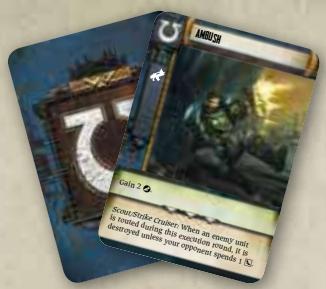
112 Combat Cards(28 per faction)

32 Event Cards (8 per faction)

20 Order Upgrade Cards (5 per faction)

24 Objective Tokens (6 per faction)

36 Structure Control Tokens (9 per faction)

32 Order Tokens (8 per faction)



4 Reference Cards
1 Round Track and 1 Round Marker
1 First Player Token
36 Asset Tokens (12 of each)


12 Double-Sided System Tiles
16 Custom Dice
12 Combat Tokens ( front, back)
4 Materiel Dials

4 Faction Sheets
4 Warp Storm Tokens

35 Plastic Structures (10 Factories, 15 Cities, and 10 Bastions)
DIAL ASSEMBLY
Before playing Forbidden Stars for the first time, carefully assemble the four materiel dials as shown below.


105 Plastic Units (27 Space Marine, 24 Eldar, 27 Ork, 27 Chaos Space Marine), and 27 Plastic Stands
SHIP ASSEMBLY
Before playing Forbidden Stars, carefully insert a plastic stand into each ship as shown to the right.

SETUP
Before starting a game of Forbidden Stars, players must perform the following setup steps:
- Choose Factions: Each player chooses one faction and gathers that faction's corresponding faction sheet, tokens, event cards, upgrade cards, combat cards, and units.
For the first game only, if playing with fewer than four players, exclude the Orks and Eldar factions from a twoplayer game, and Eldar from a three-player game.
- Claim Starting Components: Each player claims all components listed in the “Initial Forces” box on the back of his faction sheet. Then, he flips his faction sheet faceup and places these claimed components on top of it.
Finally, he claims a materiel dial and sets the number at “6”—this value is also listed in the “Initial Forces” box on the back of his faction sheet.
-
Determine First Player: Mix one of each player's structure control markers in the box lid and draw one randomly. That player is assigned the first player token.
-
Construct Game Board: For the first game, arrange the necessary system tiles in the centre of the play area as depicted in the “Introductory Setup” diagram below— when playing with fewer than four players, part of the game board is excluded.
Then, place the units, structures, structure control tokens, objective tokens, and Warp Storm tokens on the game board as indicated in the diagram. Do not place the tokens or units of the unused factions. The reinforcement token listed in the Ork's “Initial Forces” are not placed on the game board but remain near his faction sheet until used.
INTRODUCTORY SETUP
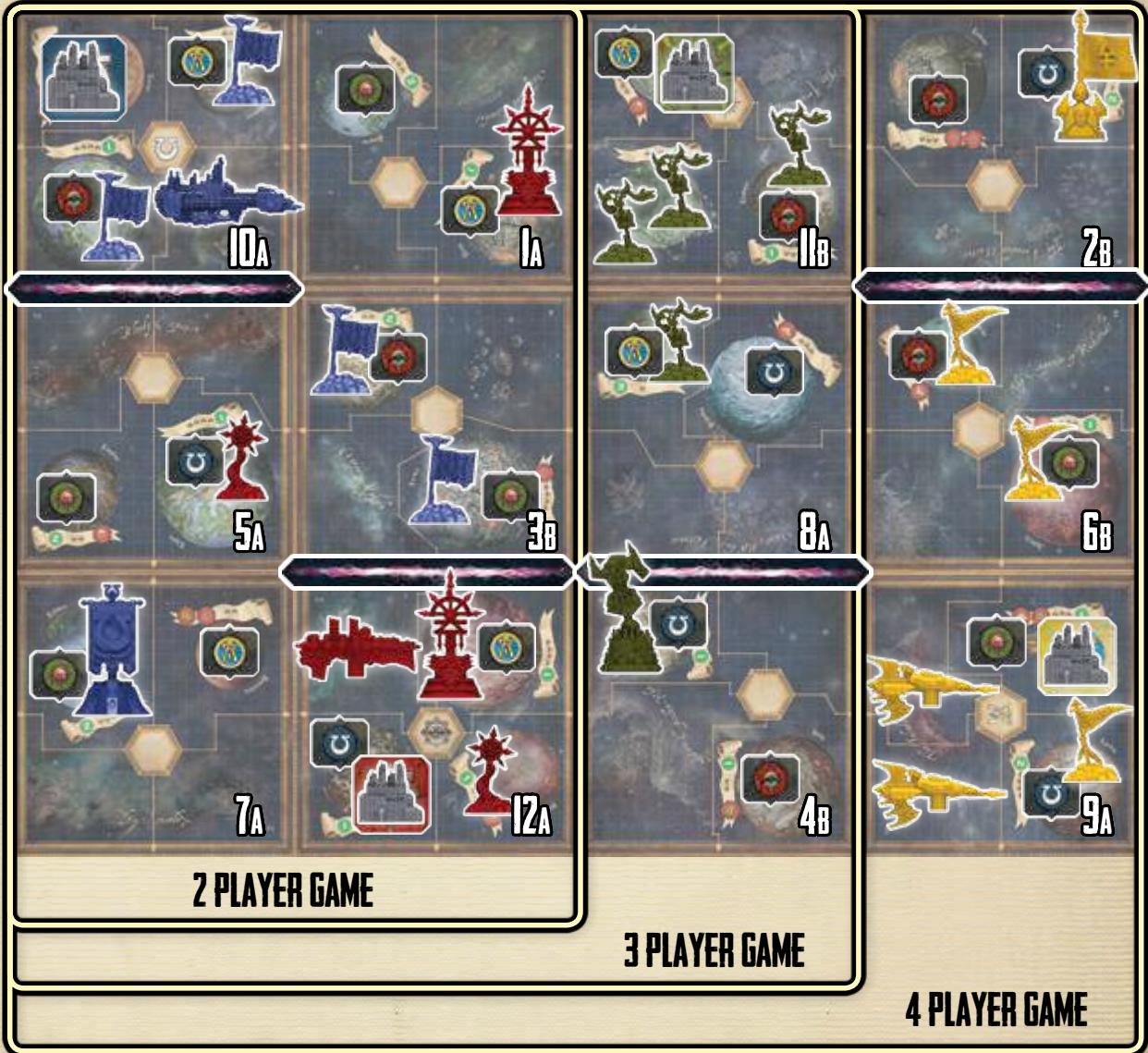
Note: After playing one game using the "Introductory Setup” diagram, players can set up a game using the “Constructing the Game Board” rules on page 16. Those rules allow players to create a unique game board for each game by choosing where to place system tiles, units, objective tokens, and Warp Storms.
- Create Event, Combat, and Upgrade Decks: Each player shuffles his event cards and places them in a facedown deck in his play area.
Then, each player finds the ten combat cards with his faction symbol printed on the upper-left corner and shuffles them to form his combat deck.

Faction Symbol on a Combat Card
Finally, each player forms two upgrade decks using all of his faction's order upgrade cards and his remaining combat cards; these decks do not need shuffling. He places them faceup next to his faction sheet making sure not to mix them with his combat deck.
-
Prepare Round Track: Place the round track near the game board, and place the round marker on the space on the track.
-
Create Supply: Separate all reinforcement tokens, cache tokens, forge tokens, dice, and plastic structures in piles and place them near the game board where all players can reach them.
After completing the setup steps, each player's components should be in his play area as displayed below. Then, players are ready to begin the first round of the game.

PLAYING THE GAME
Forbidden Stars is played over a series of game rounds. Each game round consists of three phases resolved in the following order:
-
Planning Phase: During this phase, players take turns placing order tokens on the game board.
-
Operations Phase: During this phase, players take turns resolving the order tokens they placed on the game board.
-
Refresh Phase: During this phase, players collect objectives, collect materiel, rally their routed units, move Warp Storms, and resolve event cards. Then, the first player passes the first player token and advances the round marker on the round track.
After resolving the Refresh Phase, players begin a new round starting with a new Planning Phase. They continue resolving game rounds until a player has won the game by collecting enough objective tokens (explained in detail later).
PHASE I: PLANNING PHASE
During the Planning Phase, players take turns placing order tokens facedown on the game board. Players reveal these tokens and resolve their effects during the Operations Phase.
To start the Planning Phase, the first player places one of his order tokens facedown on the order token box of a SYSTEM TILE. Then, proceeding clockwise, each other player places one order token on any system tile. Players repeat this process until each player has placed four order tokens on the game board.
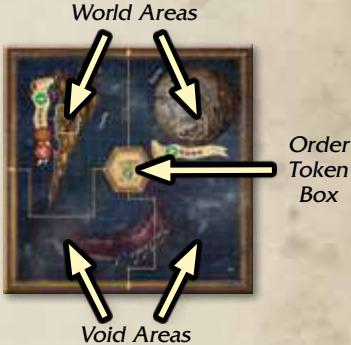
Players place order tokens facedown so the type of order is hidden from other players. If a system already contains one or more order tokens, the player places his order token on top of the stack of existing order tokens. The order token on the top of the stack is always the order token that was placed in that system most recently.

Order tokens are placed facedown on the order token box.

Multiple order tokens can be placed on top of each other to form a stack.
Important: A player cannot place an order token in a system if he does not have a unit or structure either in or adjacent to that system. Each system is adjacent to the systems with which it shares an edge. If two systems share only a corner and not an edge, they are not adjacent.
ORDER TOKEN TYPES
Players use order tokens to perform Forbidden Stars' main actions such as moving units, attacking with units, and building new units and structures.
There are four types of order tokens. When a player reveals an order token, he resolves the effect corresponding to the type of token revealed.

Deploy: The player can spend his materiel to purchase new units and structures in the system.
Strategize: The player can purchase an order upgrade, a combat upgrade, or both. Then, he places the order token on top of his event deck which will allow him to draw an event card during the Refresh Phase.

Dominate: The player gains assets from each friendly world in the system. He can also use the special ability on his faction sheet.

Advance: The player can move his units to the system and start one combat.
The details for resolving each order type are described in detail later.
PHASE 2: OPERATIONS PHASE
During the Operations Phase, players take turns resolving the order tokens placed during the Planning Phase. Starting with the first player and proceeding clockwise, each player chooses one of his order tokens on top of a stack. He reveals the chosen order token, resolves its effect, then removes it from the game board. The Operations Phase ends when players have resolved all order tokens on the game board.
When the active player reveals an order token, he chooses to either resolve the token's effect or place the token faceup on the top of his event deck. Each token on his event deck allows him to draw one event card during the Refresh Phase.
Note: If a player does not have any order tokens on the top of any stack, he must skip his turn. He must resolve an order during his next turn if he has one on top of a stack at that time.
WHAT ARE UNITS & STRUCTURES?
Ground units and ships are types of uNIts represented by plastic pieces. Players move units, attack with them, and position them to control areas on the game board, which ultimately lets them collect their objective tokens. STructuREs provide players with combat boosts (bastions), allow players to purchase units (factories), and increase the player's command level (cities), which is necessary to acquire better units and upgrade cards. Thus, a careful balance of both structures and units is necessary for a player to achieve victory.
PHASE 3: REFRESH PHASE
During the Refresh Phase, each player collects materiel and objective tokens from FRIENDLY worlds—worlds that contain only his units or structures. Also during this phase, each player rallies his routed units so they are ready for the next game round.
During the Refresh Phase, each player resolves the following steps in order:
-
Collect Objectives
-
Collect Materiel
-
Rally Routed Units
-
Draw Events and Move Warp Storms
-
End of Round
After resolving this phase, players begin a new game round.
COLLECT OBJECTIVES
Each player collects any of his objective tokens that are on friendly worlds. He places the tokens on the “Objective Token” box of his faction sheet so that all players can easily see how many tokens he has collected.
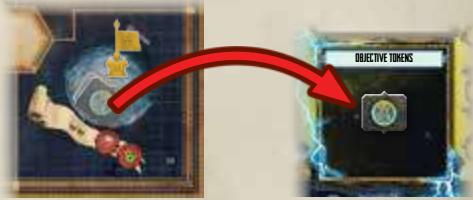
The Eldar player collects an objective token from a friendly world.
A player wins the game if he collects a number of objective tokens equal to the number of players in the game (see “Winning the Game” later).
COLLECT MATERIEL
Most worlds have a MATERIEL VALUE, which is indicated by a number on a green materiel icon.

During the Refresh Phase, each player gains materiel equal to the materiel value of each friendly world. When a player gains materiel, he increases his materiel dial by the appropriate amount.
This materiel dial is set to “4.”

RALLY ROUTED UNITS
Each player RALLIEs all of his RouTED units. Units can become routed during combat and are placed on their side to denote this. A routed unit cannot move or be used to trigger combat card abilities. It also cannot contribute its dice or morale during a combat or orbital strike. To rally a unit, the player stands the unit back up to its unrouted state.
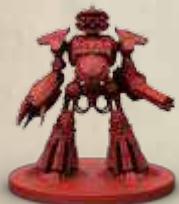

Unrouted Unit
Routed Unit
DRAW EVENTS AND MOVE WARP STORMS
Each player draws a number of cards from his event deck equal to the number of order tokens on top of it, returning the order tokens to his supply of unused order tokens. Order tokens are placed on top of this deck after resolving a Strategize Order (explained later).
Then, starting with the first player and proceeding clockwise, each player chooses one event card from among those he just drew. He moves one Warp Storm on the game board following the Warp Storm movement icon depicted on his chosen card (see “Moving Warp Storms” to the right). Then, he may resolve the event card's ability.
There are two types of event cards: TACTICs and sCHEMEs.

Tactic Event Card

Scheme Event Card
After resolving a tactic event card, the player shuffles it back into his event deck. Scheme event cards remain faceup next to the player's faction sheet, and their effects can be used in the future as described on the card.
After a player resolves his event card, he shuffles all unchosen event cards from his hand back into his deck.
WHAT ARE WARP STORMS?
Beyond the fabric of reality exists an infinite, powerful, and unpredictable realm known as the Warp. Interstellar travel and psychic powers in the Warhammer 4o,ooo universe are both made possible by the power of the Warp. Unfortunately, the Warp is volatile, unpredictable, and sometimes bleeds into our reality in the form of devastating Warp Storms. These rips in the universe can consume entire star systems and are almost impossible to navigate through.
In Forbidden Stars, Warp Storm tokens are placed on the game board along the edge of some system tiles. Units cannot move through Warp Storms. Warp Storms move at the end of each game round, making the game board an ever-changing and unpredictable environment.
MOVING WARP STORMS
To move a Warp Storm, the player chooses one Warp Storm that has not moved this phase. Then, he moves the token in one of the two directions indicated by the Warp Storm movement icon on the right side of his event card.
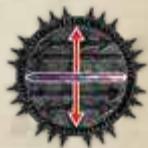
Warp Storm Movement Icon
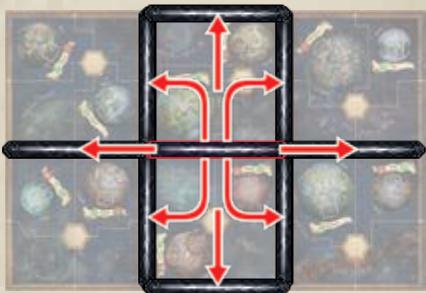
These are the eight directions in which a Warp Storm can move.
Players cannot move a Warp Storm token onto another Warp Storm.
When choosing both a Warp Storm and a direction to move it, the player must always make choices that result in a Warp Storm moving, if able.
Important: If a player did not draw any event cards, he must still move a Warp Storm. To do so, he reveals the top card of his event deck and moves one Warp Storm using the Warp Storm movement icon on that card as explained above. Then, he shuffles the event card back into his deck without resolving its ability.
END OF ROUND
The first player gives the first player token to the player to his left. Then, he advances the round marker one space on the round track. If the round marker would advance off the “8” space of the track, the game ends and the player with the most objective tokens wins the game.
WINNING THE GAME
A player wins the game when he has collected a number of his objective tokens equal to the number of players in the game. For example, during a two player game, a player wins the game when he collects two of his objective tokens.
If no player has won the game by the end of the eighth game round, the game ends and the player that has collected the most objective tokens wins the game.
WHAT ARE OBJECTIVE TOKENS?
Objective tokens represent important objects, people, or places that are vital to a faction's survival. The back of each objective token displays what the objective token thematically represents. Although each token has a unique image, this is for theme only and has no game play effect. The back of each player's faction sheet has brief descriptions of the stories surrounding his objectives.
System Lord: Lord Halovar has sworn compliance and declared his allegiance to the Imperium. He now requires our aid in safely escaping the darkness.
Objective Token Description
Objective tokens always remain faceup so that players can see the faction icon. This is important because a player cannot collect objective tokens belonging to other players. However, players may wish to place units on worlds containing enemy objective tokens so that they can prevent their opponents from achieving victory.

Faceup Objective Token
ORDERS IN DETAIL
Each faction has two tokens for each of the four orders. When a player resolves an order during the Operations Phase, the system tile on which the order was placed is the ACTIvE sYSTEM. This section describes how players resolve each of the four orders.
DEPLOY ORDER
Players use Deploy Orders to place new units and structures on the game board. To resolve a Deploy Order, the active player follows these two steps in order:

Deploy Order Token Order Token
-
Purchase Units: If the player has a factory in the active system, he may purchase units and place them on any friendly or uncontrolled (not containing any units or structures) areas in the system.
-
Purchase Structure: The player may purchase one structure and place it on any friendly world in the active system that does not already contain a structure.
PURCHASING UNITS
A player purchases a unit by spending an amount of materiel equal to the materiel cost for that unit as displayed on his faction sheet. To spend materiel, the player decreases his materiel dial by the appropriate amount. Then, he places the unit on any friendly or uncontrolled area in the active system.
Some units cost a forge token in addition to their materiel cost. To spend a forge token, a player takes a forge token from his play area and places it in the supply.
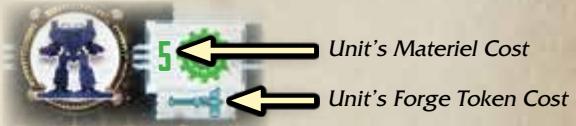
Players can only place ground units on worlds and ships on voids. In addition to these basic restrictions, a player must adhere to command level restrictions.
The maximum number of units that a player can purchase with one Deploy Order is dictated by his DEPLoY LIMIT. His deploy limit is equal to the unit capacity of the world in the active system where his factory is located. Unit capacity is shown as skulls on the world's banner.

This world's unit capacity is two.
COMMAND LEVEL
Each player has a CoMMAND LEVEL that indicates which units and upgrades he can purchase. A player's command level is equal to the number of cities he controls.
Each unit and upgrade card has a command level requirement. A player can only purchase units and upgrades with a requirement equal to or less than his command level.
Unit's Command Level Requirement

PURCHASING STRUCTURES
A player purchases a structure (city, bastion, or factory) by spending an amount of materiel equal to the materiel cost for that structure as displayed on his faction sheet. Then, he places the plastic structure on any friendly world in the active system on top of one of his STRUCTURE coNTROL TokENs. The token underneath each structure indicates who owns that structure.
Important: A player cannot place a structure on a world that already has a structure.
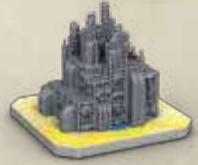
This structure is controlled by the Eldar player.
DOMINATE ORDER
Players use Dominate Orders to gain assets from worlds and resolve their special faction abilities. To resolve a Dominate Order, the active player resolves the following steps in order:
- Gain Assets: The player gains the

Dominate Order Token
assets granted by each friendly world in the active system. Assets are displayed on the right corner of a world's banner.
The player takes the corresponding tokens from the supply and places it in his play area. If the world provides multiple assets, the player collects all of them.
- Resolve Faction Ability: The player may resolve the special ability listed on his faction sheet.
ASSETS
Players can gain assets from friendly worlds by resolving a Dominate Order. Each asset has a unique effect, as described below:
Forge Tokens: Some units require the player to spend a forge token to purchase them. This is displayed on the faction sheet below the unit's materiel cost.
Alternatively, a player may spend a forge token when purchasing a unit to reduce its command level requirement by one. This allows him to purchase a unit he would normally be unable to purchase (see “Command Level” on the left).
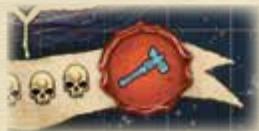

This world provides one forge token.
Cache Tokens: When purchasing a unit or structure, a player can spend a cache token to reduce the materiel cost of that unit or structure by two.


This world provides one cache token.
Reinforcement Tokens: During the reinforce step of combat, the attacker and then the defender may place some of their reinforcement tokens into the contested area.
A reinforcement token remains for the duration of the combat and is treated as the corresponding faction's ground unit or ship at command level zero. While in an area, it follows all rules and restrictions that apply to units.
For example, each reinforcement token that the Ultramarines player places on a world is treated as a Scout unit.


This world provides one reinforcement token.
Prosperity: When a player gains this asset, he gains one asset token of his choice.

This world provides one asset of any type.
STRATEGIZE ORDER
To resolve a Strategize Order, if the player has a unit or structure in the active system, he may look through all cards in his upgrade decks. Then, he may purchase one order upgrade and/or one combat upgrade if he meets each card's command level

Strategize Order Token
restrictions (see “Command Level” on page 9).
After resolving this order, he places the order token on top of his event deck, which allows him to draw an event card during the Refresh Phase.
To purchase an upgrade, the player must spend an amount of materiel equal to the materiel cost displayed on the upper left of the upgrade card. To spend materiel, the player decreases his materiel dial by the appropriate amount.
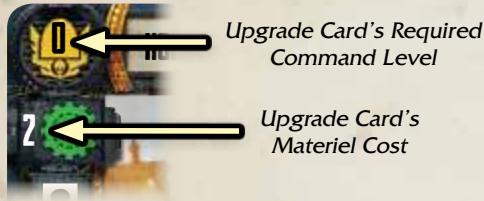
There are two types of upgrades: ORDER uPGRADEs and COMBAT UPGRADES, as folloWS:
Order Upgrades: Order upgrades increase the functionality of order tokens. After purchasing an order upgrade, the player places it in his play area next to his faction sheet. Each order upgrade corresponds to one of the four orders (Deploy, Strategize, Dominate, Advance) and provides the player with a benefit when resolving the corresponding order.

Order Upgrade Card
• Combat Upgrades: Combat upgrades are more powerful combat cards that the player shuffles into his combat deck.
PURCHASING COMBAT UPGRADES
A player purchases combat upgrades in pairs. When a player purchases one combat upgrade card, he receives both copies of the card.

Combat Upgrade Card
When a player purchases a pair of combat
cards, he must remove two copies of any other card from his combat deck and place them both into his combat upgrade deck. Then, he adds both copies of the purchased upgrade to his combat deck and shuffles the deck.
A combat deck always contains two copies of five cards for a total of ten cards.
ADVANCE ORDER
Players use Advance Orders to move units and begin combats. To resolve an Advance Order, a player moves units into the active system. After moving units, the player resolves a combat if there is a CONTESTED AREA—an area that contains both friendly and enemy units or structures.

Advance Order Token
To resolve an Advance Order, the active player performs the following steps in order:
-
Move Ships: The active player may move his ships in the active system and one adjacent system to any voids in the active system.
-
Move Ground Units: The active player may move his ground units in the active system and one adjacent system to any worlds in the active system. If he moved ships from an adjacent system, he cannot move ground units from a different adjacent system.
-
Resolve Combat: The active player resolves a combat if there is a contested area (see “Combat” on page 12). If there is not a contested area, he may resolve an orbital strike instead (see “Orbital Strike” on page 1 1).
Important: Units cannot move through Warp Storms, and a player can create a maximum of one contested area while resolving an Advance Order. A player may move any number of units with a mobilize order, but a maximum of five units can end their movement in each area.
MOVING SHIPS
When moving a ship, a player can move a ship from the void it currently occupies to any void in the active system, even if the two areas are not adjacent.
MOVING GROUND UNITS
When moving a ground unit, a player can move a unit from the world it currently occupies to any world in the active system connected via a PATí. A path is a series of contiguous, non-diagonal, friendly areas. A path can consist of worlds, voids, or a mix of both (see the “Advance Order Example” on page 11).
Ground units can move from one world to an adjacent world without the use of a ship. Thematically, they are using nonmilitary transport ships or other mundane forms of travel that are not represented in the game.
There is no limit to the number of units that a player can move through a friendly area.
UNIT CAPACITY
Each area has a uNIT CAPACITY. Voids have a unit capacity of three, and each world has a unit capacity equal to the number of skull icons presented on the world's banner. An area's unit Ur capacity indicates the maximum number of units that can exist on an area after resolving an or

World's Unit Capacity
After resolving an order, including any combat triggered by that order, a player must destroy any of his units that exceed an area's unit capacity.
ADVANCE ORDER EXAMPLE

-
It is the Ultramarines player's turn to resolve an order, so he reveals one of his Advance Orders by flipping it faceup.
-
He must move ships first. He has no ships in the active system, so he moves a Strike Cruiser from an adjacent system into the void in the active system.
-
Then, the player decides to move some of his ground units from an adjacent system into the active system. Now that he has a ship in the void
After resolving an Advance Order, if there are no contested areas (and therefore no combat has been started), the active player may resolve an orbital strike.
mn
To resolve an orbital strike, the player chooses an enemy world in the active system. Then, he chooses one void in the active system that is adjacent to this world. He rolls a number of dice equal to the combined combat value of all of his ships in that void.
ORBITAL STRIKE
Enemy units on the chosen world suffer an amount of damage equal to the number of offence icons () rolled. Combat values and suffering damage are both explained in detail later.
area, he can move ground units through it. He moves his Space Marines through the void area to the world in the upper-right corner of the active system.
A player cannot resolve an orbital strike against a world containing a bastion structure. Bastions are described later.
-
Then, the player moves his Scout through the void to the world in the lower-left corner of the active area.
-
Finally, the player decides to move his Scout that was already in the active system to the adjacent world in the lower-right corner.

COMBAT
After a player moves units using an Advance Order, he must resolve a combat if he has units on an area containing both friendly and enemy units or structures (i.e., a contested area). During combat, the player resolving the Advance Order is the ATTACKER and the other player is the DEFENDER.
Combat in Forbidden Stars uses a combination of both dice and cards. Players begin the combat by rolling a number of dice based on their units' combat values. Then, they play combat cards to trigger special abilities and gain combat icons, dice, and combat tokens. The player with the most morale () at the end of the combat is the winner and his opponent must retreat his units.
The specific steps of combat are as follows:
- Preparation: Players prepare for combat by performing the following substeps:
a. Roll Dice: Both the attacker and defender simultaneously roll a number of dice equal to the combined coMBAT vALUE of each of his unrouted units in the combat, as displayed on his faction sheet. For example, if the Ultramarines player has two Land Raiders in the combat, he rolls six dice.
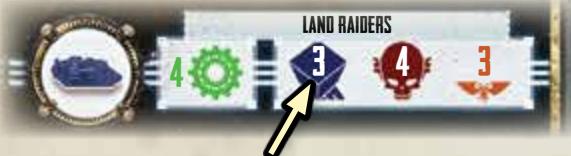
Unit's Combat Value on a Faction Sheet
Each player organizes his rolled dice into groups of identical icons so both he and his opponent can easily evaluate the results.
b. Draw Combat Cards: Each player draws five combat cards from the top of his combat deck.
c. Reinforce Step: First the attacker and then the defender have an opportunity to place some of their reinforcement tokens near their units in the contested area. The number of reinforcement tokens that a player can place is equal to the number of units he has in the combat (see “Assets” on page 9).
- Execution: Players resolve up to three execution rounds by playing combat cards from their hands. During each execution round, players perform the following substeps:
a. Choose a Combat Card: The attacker and defender simultaneously choose one combat card from their hands and place them facedown in the play area.
b. Resolve a Combat Card: The attacker reveals and resolves his combat card. Then, the defender reveals and resolves his combat card as explained on page 13.
c. Assess Damage: Starting with the attacker, both players must suffer damage equal to his opponent's total number of offence icons () from dice, combat tokens, and faceup combat cards. Each defence icon () that a player has (from dice, combat tokens and his faceup combat cards) reduces the amount of damage suffered by one. The rules for suffering damage are explained on page 13.
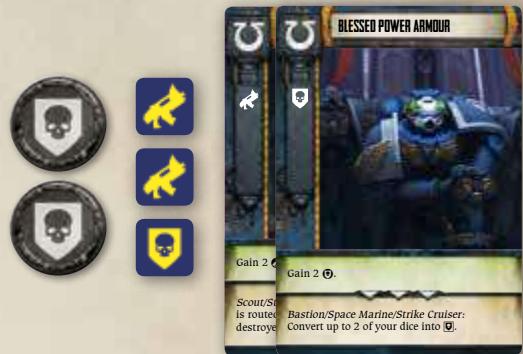
The Ultramarines player has a total of three offence () and four defence ().
After both players have suffered damage, if only one player has units and/or bastions remaining in the area, he wins the combat and proceeds to the “Capture Structures” substep of resolution as described below.
- Resolution: After resolving the third execution round, players finish resolving the combat by following these substeps:
a. Determine Winner: The player with the highest total morale value wins the combat (defender wins ties), and the enemy units must retreat (explained later).
A player determines his total morale value by adding the number of his morale icons () on his dice and faceup combat cards as well as the number of morale on his faction sheet that corresponds to each of his bastions and unrouted units in the combat.
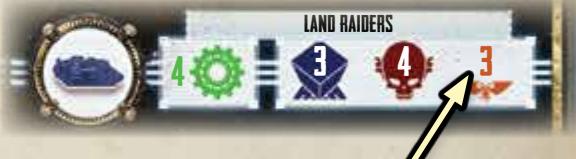
Unit's Morale Value on a Faction Sheet
b. Capture Structures: If the attacker wins the combat, he takes control of any structures on the world by removing his opponent's structure control tokens and replacing them with his own.
c. Clean Up: Each player discards any reinforcement tokens he used to the supply and shuffles all of his combat cards back into his combat deck.
RESOLVING COMBAT CAROS
All combat cards have one or two combat ability boxes. When resolving a combat card, the player first resolves all general abilities (green box), then resolves all unit abilities (brown box). He resolves each ability in the order in which it is listed, from top to bottom.
Unit abilities are always preceded by at least one unit name. To use a unit ability, the player must have at least one of the listed units in the combat, and that unit must be unrouted.

To use this unit ability, the player must have at least one Bastion, unrouted Space Marine, or unrouted Strike Cruiser in the combat.
COMBAT CARD ICONS
Most combat cards contain one or more combat icons (,, ) on the left side of the card. These icons function like the icons on dice and persist until the end of the combat.

COMBAT DICE
When a player gains a, , or from an ability, he takes one die from the supply of unused dice and places it by his other dice with the indicated icon faceup. When a player loses a die, he takes one of his dice with the matching icon and returns it to the supply.
If a game effect allows a player to gain a , he takes a die from the supply, rolls it, and places it with his other dice.
Important: The attacker and defender are each limited to eight dice during a combat.
COMBAT TOKENS
Some combat card abilities provide players with combat tokens, represented by combat token icons ( and Θ). When a player gains a or Θ, he takes a combat token from the supply and places it with the appropriate side faceup near his dice. When calculating offence or defence during combat, a player's combat tokens add to his final value.
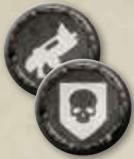
Combat Tokens
All combat tokens are temporary and are returned to the supply at the end of the execution round in which they were gained.
SUFFERING DAMAGE
When a player suffers damage, he must choose any one friendly unit on the area to suffer the damage. That unit must be unrouted unless all of his other units are routed. If the damage equals or exceeds the chosen unit's HEALTí vALuE, that unit is DEsTRoYED and removed from the game board.

Unit's Health Value on a Faction Sheet.
If the damage is lower than the health value of the chosen unit, that unit is routed. If the damage exceeds the health value of the chosen unit, any damage that exceeds the unit's health value must be applied to another friendly unit. The player repeats this process until either no more damage remains or no more units remain.
Important: When suffering damage during an orbital strike, any units that are not destroyed do not become routed.
Example: The Ultramarines player has two Scouts in a combat. During the first round, he must suffer three damage. He chooses one of his Scouts to suffer the damage first. He compares its two health to the three damage; because the Scout's health is equal to or less than the damage, it is destroyed. Then, the player assigns the one remaining damage to his other Scout. This unit is not destroyed but is routed instead, and the damage is ignored because the unit's health exceeds the damage.
ROUTED UNITS
Units can be RouTED by combat card abilities, by retreating, or by suffering damage that is less than their health value. When a unit is routed, the plastic piece is placed on its side. If the unit is represented by a reinforcement token, that token is flipped to its routed side.
Routed units do not add their morale () when determining the winner of a combat and cannot be used to fulfil a unit requisite on a combat card. Additionally, a player cannot assign damage to a routed unit if he has one or more unrouted units or bastions in the area.
During the Refresh Phase, all routed units are rallied by standing the plastic pieces back up.
BASTIONS
Bastions are not units, but they do contribute dice and morale during a combat. Additionally, bastions can be chosen to suffer damage. If a bastion suffers damage equal to its health value, it is removed from the game board and returned to the supply. Bastions cannot be routed.

COMBAT EXAMPLE PARTI
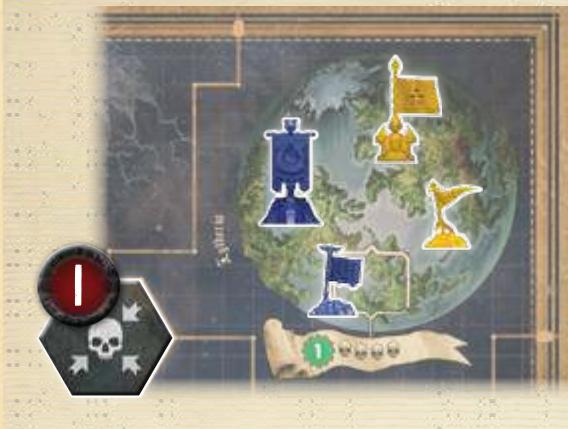

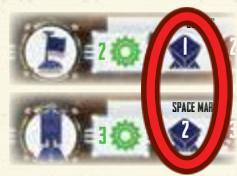

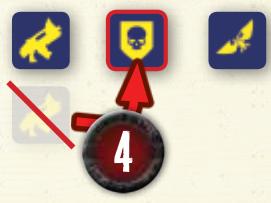
-
The Ultramarines player (blue) is resolving an Advance Order. After moving his units, he has two units on an area containing two Eldar units. The Ultramarines and Eldar players must now resolve a combat.
-
Players reference their faction sheets to determine how many dice their units provide. Both players simultaneously roll their dice.
Then, each player draws five cards from his combat deck, and keeps these cards hidden from each other (not shown).
First Execution Round: Each player chooses a combat card from his hand and places it facedown in front of him (not shown). Then, the players resolve the following steps:
-
The Ultramarines player is the attacker, so he reveals and resolves his card first. First, he resolves the general ability in the green box, which gives him two defence combat tokens.
-
Then, he resolves the unit ability in the brown box. He has the Space Marine unit required to use this ability, so he chooses to convert one of his dice into a die.
-
The Eldar player reveals and resolves his card. First, he resolves the general ability in the green box, which gives him one die. He rolls the die and places it near his other dice.
-
Then, the Eldar player resolves the unit ability in the brown box. He has an Aspect Warrior, and chooses to spend a die to force his opponent to choose and rout one unit. The Ultramarines player chooses to rout one of his Scouts.
As the final step of this execution round, players must suffer damage. Each player totals the number of combat icons he has from his dice, his combat cards, and his combat tokens.
Neither player has more offence icons () than his opponent's defence icons (), so neither player suffers damage (not shown).
Players discard all combat tokens, then resolve the next execution round (see “Combat Example Part Il” on page 15).
COMBAT EXAMPLE PARTII
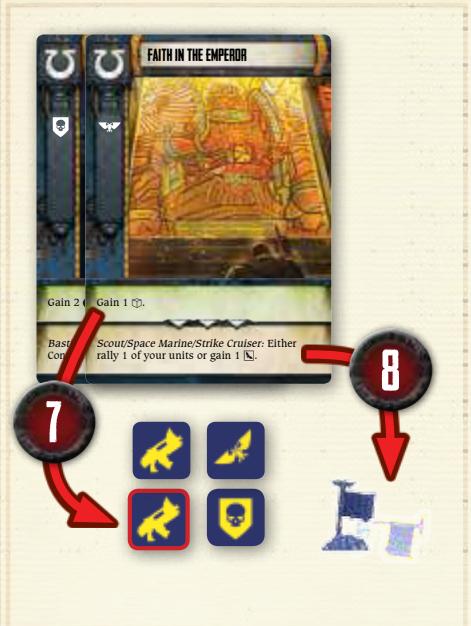

Second Execution Round: Each player chooses a combat card from his hand and places it facedown in front of him (not shown). Then, the players resolve the following steps:
-
The Ultramarines player reveals and resolves his card. First, he resolves the general ability in the green box, which gives him one die. He rolls the die and places it near his other dice.
-
Then, he resolves the unit ability in the brown box. He has the Space Marine unit required to use this ability, so he chooses to rally his Scout.
-
Then, the Eldar player reveals and resolves his card. First, he resolves the general ability in the green box, which gives him two offence combat tokens.
-
The Eldar player can now resolve the ability in the brown box, but he chooses not to.
RETREATING
Units must retreat when they lose a combat. Additionally, some combat card abilities can force units to retreat. After a unit retreats, it is routed.
Attacking and defending units follow different retreat rules, as follows:
ATTACKER RETREATS
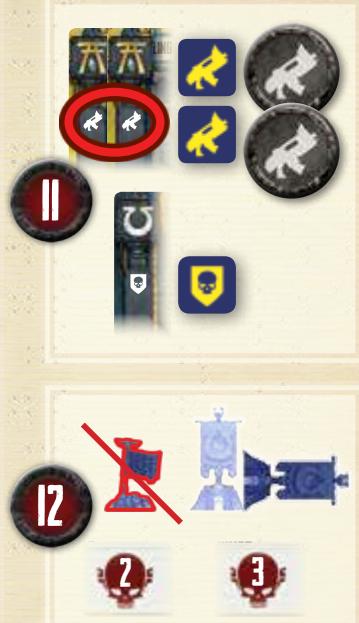
When the attacker retreats, he must move all of his remaining units from the contested area to another area— ships must retreat to a void and ground units must retreat to a world along a legal movement path. All retreating units must move to the same area, and it must be an area that at least one unit in the combat moved from.
- Each player totals the number of offence icons () he has from his dice, his combat cards, and his combat tokens.
The Eldar player is the only player that has more offence () icons than his opponent's defence () icons. He has six offence icons and his opponent has two defence icons, so his opponent suffers four damage.
- The Ultramarines player chooses to first assign damage to the Scout unit. It has only two health and is destroyed. The remaining two damage is assigned to his other unit, which has three health. This is not enough damage to destroy it, so the unit is routed.
Players discard all combat tokens. Since both players have units remaining, they resolve one more execution round. If both players have a surviving unit, the player with the most morale at the end of that round wins the combat and his opponent must retreat all of his units (not shown).
DEFENDER RETREATS
When the defender retreats, he must move all of his remaining units from the contested area to either a friendly or uncontrolled area in either the active system or an adjacent system—ships must retreat to a void and ground units must retreat to a world along a legal movement path. All retreating units must move to the same area.
If the defender is able to retreat to both a friendly and an uncontrolled area, he must retreat to the friendly area.
STOP!
You now know all the rules needed to play your first game. After playing with the introductory setup, you are ready to learn the additional rules on page 16.
m
CONSTRUCTING THE GAME BOARD
After playing a game using the game board provided in the “Introductory Setup” diagram, players are ready to play by building a unique game board during game setup.
Constructing the game board is a strategic exercise in which players choose where to place system tiles and where to deploy their initial forces. During the “Construct Game Board” step of setup, players follow these steps:
-
Distribute System Tiles: Each player claims the system tile that has his faction icon on it. Then, the first player takes all system tiles that do not have faction icons on them, randomizes them by shuffling them under the table, and deals two to each player.
-
Distribute Objective Tokens: Each player gives two of his objective tokens to each other player and returns any remaining tokens to the game box.
-
Build the Game Board: Starting with the first player and proceeding clockwise, each player places one system tile in the play area as follows:
a. Place a System Tile: The player chooses one of his system tiles and places it adjacent to at least one other system tile (see “Tile Placement Example” to the right).
b. Place Units and Structures: The player may place any number of the components from his faction sheet (in the “Initial Forces” box) on the tile he just placed.
c. Place Objective Tokens: The player must place one of his opponent's objective tokens on each objective token space on the system tile he just placed, obeying the following restrictions:
A player cannot place two tokens from the same faction on the same system tile.

Objective Token Space
A player cannot place an objective token that belongs to one faction if he has more objective tokens that belong to another faction.
After he has placed all tokens received during step 2, he does not place any more objective tokens.
Players repeat this process until each player has placed all of his system tiles and all of his components listed in the “Initial Forces” box on his faction sheet.
- Place Warp Storms: Starting with the player who placed the last system and proceeding anticlockwise, each player places one Warp Storm along any system tile edge; this may include the outer edges of the game board.
PLACING SYSTEM TILES
When placing a system tile, a player can place either his faction tile or any of his other tiles. He can place the tile with either side faceup and in any orientation; however, after the first player places his first system tile, all other tiles must be placed adjacent to another tile.
A player cannot place a tile in such a way that it violates the maximum game board size. This size varies depending upon the number of players:
• Two Players: Three tiles by two tiles
• Three Players: Three tiles by three tiles
• Four Players: Three tiles by four tiles
The orientation of the game board is not determined until the maximum number of tiles are placed in one row or column. For example, a four-player game could be either four tiles wide or four tiles high. This is determined as soon as the fourth tile is placed in a row or column.
TILE PLACEMENT EXAMPLE
It is the Eldar player's turn to place a tile during a four-player game. He decides to place his faction tile.

He can place his faction tile in any one of eight possible places, outlined in green. He cannot place his tile on any of the three spaces on the ends because doing so would violate the maximum game board size allotted for a fourplayer game, which is three tiles by four tiles.


原文为社区整理/出版社公开资料,版权归原作者,仅供个人学习查阅。