
Shake That CityShake That City
一句话概览
Shake That City 是一款已收录于村了吗规则库的桌游,支持 1–4 人,原名 Shake That City。
本页内容:一句话概览 · 常见问题
这游戏怎么玩
- 本站已收录这款游戏的规则资料,可以在对话里直接提问规则细节。
常见问题(FAQ)
以下 1 条问答中 0 条来自站内玩家的真实提问,其余 1 条为本站整理的常见疑问;答复内容保持原样。
Shake That City支持几个人玩?
1–4 人。
去哪查完整规则
想核对具体规则细节、卡牌效果或某个回合的结算方式,可以在村了吗里选中这款游戏后直接提问。
同类桌游
- 卡坦岛德式
- 工业革命:伯明翰德式
- 勃艮第城堡:特别典藏版德式
- 方舟动物园德式
- 卡卡颂抽象
- 瘟疫危机传承:第一季美式
- 阿瑞迪亚:勇踏征途美式
- 重塑宇宙德式
- 幽港迷城美式
- 埃多拉的德鲁伊德式
规则原文(Markdown)
本站收录这款游戏的规则原文 1 个文件,此处内联渲染 1 个,可直接展开阅读或下载。
ShakeThatCity_EN_1P_Rulebook_WEB.md22.7 KB
SHAKE THAT CITYTM
RULEBOOKRULEBOOK
Mads Fløe & Kåre Torndahl Kjær Mads Fløe & Kåre Torndahl Kjær

6 Black
WELCOME, CITY PLANNERS!
Design the best city block using patterns from the new and exciting Cube Shaker. You’ll place a mix of building tiles to help grow the thriving city. The best design wins the game!
GAMEPLAY OVERVIEW
Shake That City is played over 15 rounds. Each round, the active player will shake the Cube Shaker and press the slider to drop 9 cubes in a 3 x 3 pattern. That player will pick one of the building colors available from the pattern and place the corresponding Building Tile(s) onto their player board. The other players then simultaneously pick any other available building color except the one that the active player picked.
At the end of the game, players will earn victory points for tile placement combinations and for the completed Bonus Point Tiles around the edge of their board. The player with the most victory points wins!
Credits
Game Design – Mads Fløe & Kåre Torndahl Kjær
Illustrations – Olga Kim
Director of Projects – Nicolas Bongiu
Production – David Lepore
Development – Kirk W Buckendorf & Josh Wood
Graphic Design – Jay Hernishin
Rules Editor – Dan Varrette
COMPONENTS

4 Player Boards
000000000000090
1 Round Tracker Board

1 Cube Shaker


2 Score Reference Boards
1 Round Tracker Token
1 Scorepad

32 Wooden Cubes

8 Red Home Cubes
7 Blue

Shop Cubes
Factory Cubes

6 Green Park Cubes

5 Gray Road Cubes


40 Home Tiles
40 Shop Tiles

40 Factory Tiles

40 Park Tiles
40 Road Tiles

28 Bonus Point Tiles (set of 7 for each player)


16 Construction Variant Tiles (set of 4 for each player)
1 Rulebook

27 Mini Building Tiles
Playtesting
Else Bek Andersen, Ole Jacobsen, Tea Kirstine Koustrup, Erik Andersson Sundén, Jesper Kjær, Christian Keldborg, Lars Wagner Hansen, Magnus Karlsson, Dan Halstad, Jasper Kjærsgaard Petersen, Peter Langkjær Møller, Morten Månsson, Kasper Lapp, Signe Wittrup, Maila Persson, Alejandro Combalia, Allan Kirkeby, Rasmus Hervig, Majken Torndahl Kjær, Berit Kjær, Chris Backe, Joe Slack, Kevin Dunkelberger, Christian Lage, Emily Boisen Bonde, Randi Romvig Pisani, Jørgen Holm, Allan Johansen, the Pitch Project – special thanks to hosts Sen-Foong Lim and Jay Cormier, the Virtual Playtesting community, Spildesign – brætspil group @Facebook, VikingCon, Copenhagen Board Game Festival, Lystrup Brætspilscafé, Josh Wood, John Zinser, Pete McPherson, Niel Kimball, Mark Wootton, Kirk W Buckendorf, Jay Hernishin, Adelheid Zimmerman, Amanda Wong, Ashwin Kamath
CUBE SHAKER ASSEMBLY
-
Pop the Cube Shaker pieces out of the punchboards and punch out all chads.
-
Place the piece numbered 1 on the table and fold the four sides up at the hinged cuts, then flatten it out again.
-
Lay the piece numbered 2 into the base so the arrows are facing the same direction as the base.
Please find a video tutorial for assembling the Cube Shaker at alderac.com/shake-that-city
-
Slightly fold up the two sides (as shown) to line up the tabs with the holes (but not all the way yet).
-
Face the arrows of the slider, numbered 3, with the arrows the same direction as the arrows of numbers 1 and 2, then slip the front end into the slot all the way (as shown).
-
Carefully slide the other end of the slider into the back slot.


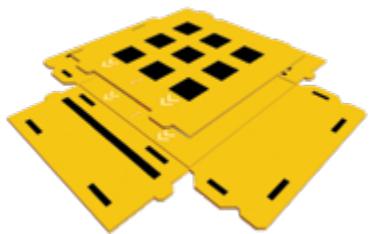

- Check to make sure the tabs of the number 2 piece are still aligned with their holes, then fold the sides almost all the way up (as shown).

- Take the top piece (with the Shake That City logo) and fit the tabs into the holes of the two folded-up sides (as shown). Make sure the cube window (the rectangle hole) of the top is above the number 3 and the arrows of the slider.
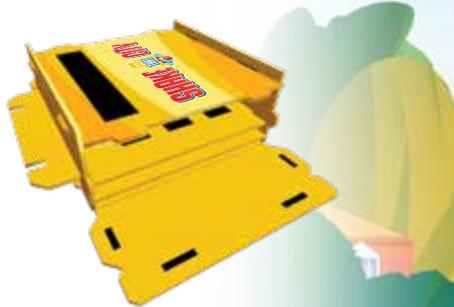
- Fold the remaining two sides up carefully and make sure all tabs and slots fit nicely.

- Place two rubber bands into the slots of the slider as shown.

- Then wrap both rubber bands around the sides of the whole assembly, fitting them into the four triangular slots.
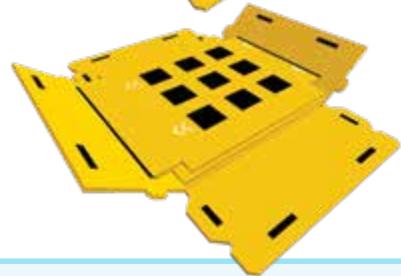


This is a green city, so we used the 27 chads from the cube holes as Mini Building Tiles. Keep them in a bag in the box. If you ever run out of Building Tiles while playing, you can use these as a backup!
Questions?
alderac.com/shake-that-city alderac.com/customer-service
©2023 Alderac Entertainment Group. 2505 Anthem Village Drive, Suite E-521, Henderson, NV 89052, USA. Shake That City and all related marks are ™, ® and © where indicated Alderac Entertainment Group, Inc. or Mads Fløe & Kåre Torndahl Kjær. All rights reserved. Printed in China.

GAME SETUP
-
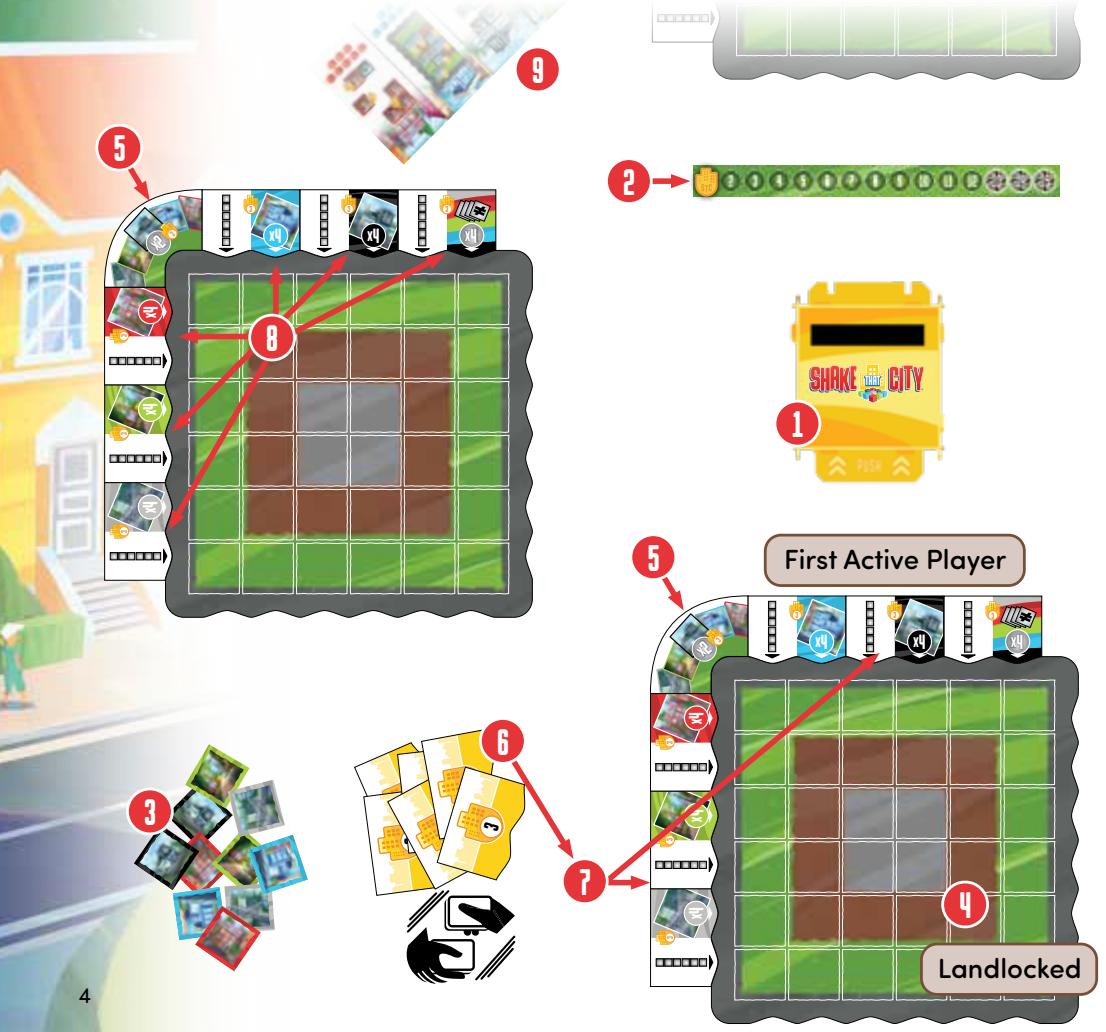
Put all 32 Wooden Cubes into the Cube Shaker and place it in the center of the table.
-
Place the Round Tracker Board above the Cube Shaker with the Round Tracker Token placed on the 1.
-
Place the Building Tiles within reach of all players.
-
Place a Player Board in front of each player. All players should play on the same side of their board for each game. (For your first game, use the Landlocked side. x4Scoring for the Beachfront side is on page 8.)
-
Give each player a set of 7 diferent Bonus Point Tiles. 4(The tile sets are numbered 1 to 4 on the yellow side.) 3Each player places their corner tile on the northwest corner of their Player Board. It is essential that all players x4use the same cardinal directions on the table regardless
of which way they are facing.
-
Whoever was the last person to shake something is the first active player. That player shufles their remaining Bonus Point Tiles facedown.
-
The active player randomly places 3 tiles along the north side and the other 3 tiles along the west side of their x4Player Board and flips them faceup.
-
All other players place their Bonus Point Tiles along the north and west sides of their own Player Boards to match the same order as the tiles of the first active player.
-
Place the Score Reference Boards in close reach of all players. Use the visual examples on these boards when teaching how tiles score to new players, as they will refer to them often while playing.

ROUND OVERVIEW
-
Shake the Cubes – The active player uses the Cube Shaker to deposit a set of 9 cubes onto the table.
-
Choose Building Colors – The active player chooses one building color from the cubes. The other players each choose any other building color.
-
Place Building Tiles – All players grab Building Tiles corresponding to the color they chose and place them on their Player Boards, matching the pattern and orientation set in the cube pattern.
-
End of Round – Move the disk forward one space on the Round Tracker Board. Put the cubes back into the Cube Shaker and pass it clockwise to the next player.
1. Shake the Cubes
The active player puts all the cubes into the Cube Shaker through the top window, then sets it on the table and shakes it around for a good mix. (Do not pick up the shaker from the table to shake it! You may lose some cubes!)
After a good shake, keep the Cube Shaker on the table and push its slider all the way in until you hear the cubes drop out the bottom, then fully release the slider. Carefully lift the Cube Shaker from the table. Set the Cube Shaker of to the side. If you do not have 9 cubes left behind in a 3 x 3 pattern, put all the cubes back into the Cube Shaker and try again.
The active player for each round will shake the cubes in the Cube Shaker to set a 3 x 3 pattern of cubes in the center of the table. Be sure to align the square pattern with the player boards and not at an angle.


2. Choose Building Colors
The active player will pick one building color from the pattern of cubes that only they can use for that round. (Note: You are just picking a color from the pattern, not the cubes themselves.) The other players will then simultaneously pick any other building color from the pattern. Non-active players are free to choose the same building color as each other as long as it’s not the building color the active player chose.
To expedite play, once the active player has chosen a building color, all other players are free to choose theirs at the same time.

For example: If player 1, the active player, chooses blue, players 2 and 3 may both choose gray, and player 4 may choose green.

3. Place Building Tiles
Each cube color corresponds to a Building Tile with the same color border:
Gray cubes are Roads.
Green cubes are Parks.

Black cubes are Factories.
Blue cubes are Shops.

Red cubes are Homes.

When you choose a building color, you must take the same number of Building Tiles in the same color and place them on your Player Board, with the following restrictions:
• You must place each tile in an empty space on your Player Board.
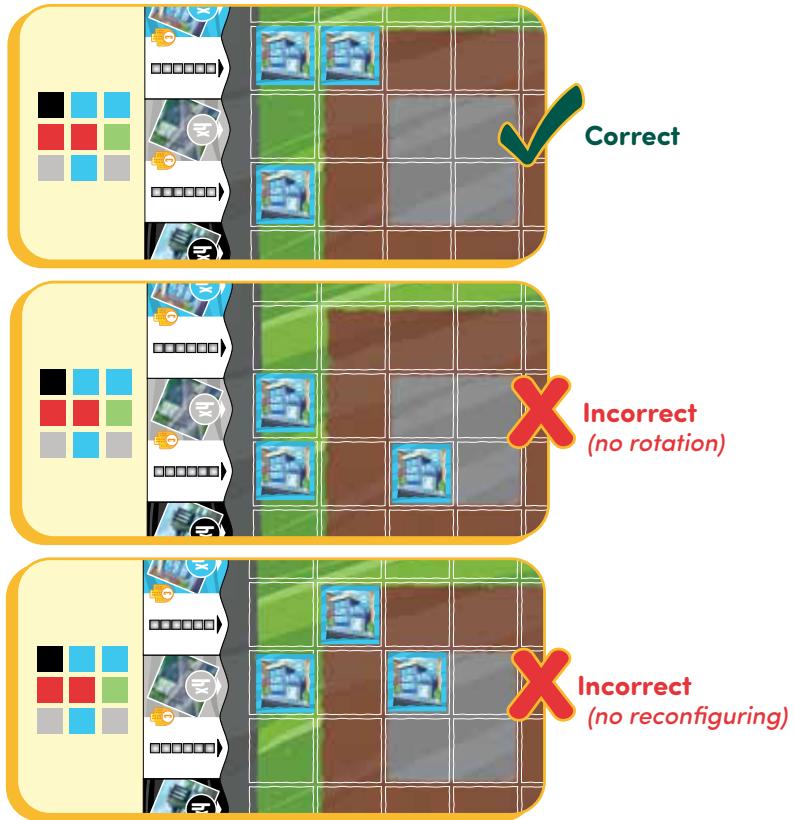
You must place your pattern of tiles in the exact same configuration and orientation as the cube pattern. You may not rotate or reconfigure the tiles into a new pattern.
You must place all tiles from the building color and pattern you have chosen. If you cannot fit all the tiles, you must choose a diferent building color that will fit. You cannot skip placing tiles.
• If there is no building color in the pattern of cubes that will fit on your Player Board, you will not place any tiles for that turn.
• Once you have placed tiles, you cannot move them, remove them, or cover them with other tiles.
Blue is the building color chosen from the pattern of cubes:
4. End of Round
When all players have finished placing their Building Tiles, the active player moves the Round Tracker Token forward one space on the Round Tracker Board. They put the cubes from the center of the table back into the Cube Shaker and pass it clockwise to the next player, who will then become the active player for the next round.
ROUNDS 13, 14, AND 15
The game lasts for 15 rounds as tracked on the Round Tracker Board. The first 12 rounds proceed as described above.
Rounds 13, 14, and 15 are played with a slight change to the Choose Building Colors step. During these last 3 rounds, all building colors in the pattern of cubes are available to all players. Whichever building color the active player chooses is not blocked to everyone else.
The Score Reference Boards are double-sided. They have scoring reminders on each side that correspond with the Landlocked and Beachfront sides of the Player Boards.
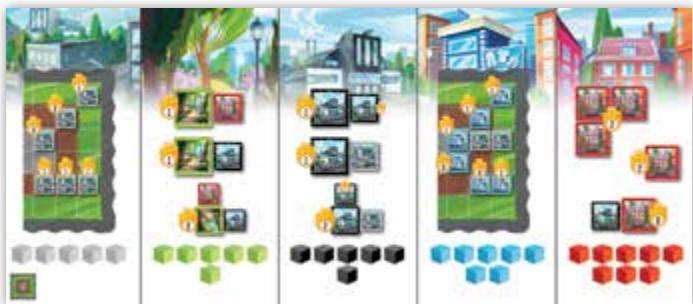
The cubes shown on the Score Reference Boards represent the number of cubes of each color inside the Cube Shaker.
GAME END
The game ends on the 15th round after all players have placed their Building Tiles. Players may now add up their scores.
The back of this book lists scoring details for both sides of the Player Board. Here are some general things to keep in mind:
• Roads need to be connected out of town to a concrete edge of the Player Board. (Note: The Beachfront has only two concrete edges!)
• Parks help beautify neighborhoods when near Homes. On the Landlocked side, they also score next to Factories. On the Beachfront side, they score next to the beach instead.
• Factories do better next to other Factories and need to be next to Roads for their operations.
• Shops do better in centralized locations (gray and brown zones) but must rely on connected Roads to bring in commerce from out of town.
• Homes do well on their own but don’t score extra for crowded neighborhoods. All Home values go down if they are orthogonally adjacent to Factories.
FAMILY VARIANT
This variant is great for teaching spatial awareness of shapes! Ignore all scoring rules for individual tiles and score only the Bonus Point Tiles around the sides of the player boards.
CONSTRUCTION VARIANT
Everyone sets up their Player Board just like the regular game. Give each player a set of 4 diferent Construction Variant Tiles. (The tile sets are numbered 1 to 4 on the yellow side.) The active player places their tiles facedown on the table and shufles them. They then place the tiles in a diagonal pattern on the board and
flip them faceup, as shown.
The rest of the players match the placement of those tiles, keeping the orientation the same. Players cannot place Building Tiles on spaces with Construction Variant Tiles until they are removed.
Objective 1: Remove all of the Construction Variant Tiles from your Player Board. To remove a blocking tile,

create an orthogonally adjacent Building Tile pairing anywhere on your Player Board that matches any pairing printed on the 3 3
Construction Variant Tiles. For example, if you place a Road orthogonally adjacent to a Home, you may remove the Road/Home Construction Variant Tile.

Objective 2: Score the highest among the
players who succeed in removing all of their Construction Variant x4 Tiles. Only the players who succeed in the first objective may score in this variant. If no players succeed in removing their Construction Variant Tiles, there is no winner. Reset and try again!
(You can play this variant on either the Landlocked side or the Beachfront side of the Player Board.)
SOLO VARIANT
Setup: Set up your Player Board with variant tiles as described above in the Construction Variant game.
Choose Building Color: You cannot pick the color with the highest number of cubes in the pattern, unless there is a tie for highest. This restriction is lifted in rounds 13, 14, and 15.
Objective 1: Remove all of the Construction Variant Tiles by creating orthogonally adjacent building pairings anywhere on your Player Board as described in the Construction Variant game.
Objective 2: Score 55 points or more at the end of the game to win.
SCORING

Players add up their scores based on their Building Tile placements and combinations and the Bonus Point Tiles they were able to flip. You will find scoring details below. The player with the most points wins.
In the case of a tie, the player with the most flipped Bonus Point Tiles wins. If there is still a tie, the player with the least amount of empty spaces on their Player Board wins. If there is still a tie, all tied players share the victory!

Landlocked Scoring
Adjacent
always refers to orthogonally adjacent; there are no connections or scoring for diagonally adjacent tiles.

When you fulfill either half of a Bonus Point Tile, flip it over to score 3 points. (You don’t need to fulfill both requirements.)
Bonus Tile Scoring:
Beachfront Scoring
Fill this row with 6 tiles of any type.
Have at least 4 Road tiles in this row.
Fill this row with 6 tiles of any type.

Have at least 4 Park tiles in this row.

Have at least 4 Factory tiles in this row.

Fill this row with 6 tiles of any type.

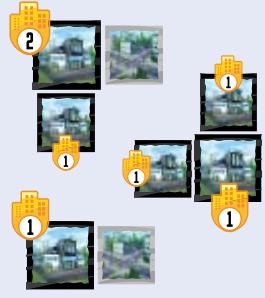
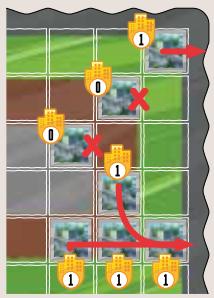
Roads score 1 point per road that leads to the edge of
the board. Connections between roads must be adjacent. Single Road tiles on the edge will score.
Fill this row with 6 tiles of any type.
Have at least 4 Shop tiles in this row.

Fill this row with 6 tiles of any type.
Parks score up
adjacent to any number of Factories and 1 point if adjacent to any number of Homes.


Have at least 4 diferent tiles in this row.
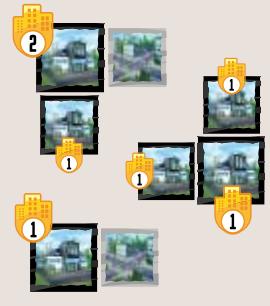
Factories score up to 2 points each. They earn 1 point if adjacent to any number of Factories and 1 point if adjacent to any number of Roads.
Have at least 4 Home tiles in this row.

Fill this row with 6 tiles of any type.

Brown zone: 2 points
Shops score only if
Gray 3 points

either by being adjacent to the edge or by being adjacent to roads that lead to the edge. Connected Shops score according to the zone they are in.
Parks score up
Green zone: 1 point

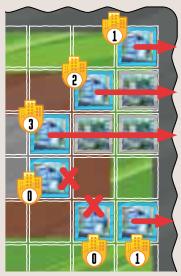
Roads score the
same as above, but they must connect to a concrete edge.
Factories score the same as above.
adjacent to any number of Homes and 1 point if adjacent to the beach edge.

Shops score the
diferently on the Beachfront side of the board. Shops need to connect to the concrete edges.


Homes score 2 points
adjacent Homes. Any Home or group of Homes adjacent to a Factory will score zero points instead.


Diversity Bonus: Have at least 2 of each tile type in your city to flip for 3 VP.

Corner Tile Scoring

Homes score the
an additiono point if the Home or group of Homes is adjacent to the beach edge.


原文为社区整理/出版社公开资料,版权归原作者,仅供个人学习查阅。