
欢斗乐园Unfair
一句话概览
欢斗乐园 是一款已收录于村了吗规则库的桌游,支持 2–5 人,原名 Unfair。
本页内容:一句话概览 · 游戏概述 · 1. 游戏组件 · 2. 游戏设置 · 3. 回合结构 · 4. 事件步骤 · 5. 公园步骤 · 6. 游客步骤 · 7. 清除步骤 · 8. 卡片详解 · 9. 计分系统 · 10. 黄金守则 · 关键规则与常见问题 · 常见问题
欢斗乐园 规则速览
以下规则速览由本站整理,与官方规则书表述不同,仅供快速上手参考。
游戏概述
在 8 轮次的进程中搭建主题乐园,利用景点设施、升级卡、蓝图卡和事件卡不断扩张,最终建成城市中最出色的主题公园。核心机制: 手牌管理、行动分配、收入计算、对抗性事件
1. 游戏组件
| 组件 | 数量 / 说明 |
|---|---|
| 游戏版图 | 1 块(含公园牌堆区 A、事件牌堆区 B、蓝图牌堆区 C、城市牌堆区 D、市场区 E) |
| 主题卡牌包 | 4 个——丛林包、机器人包、海盗包、吸血鬼包(每包 56 张卡) |
| 玩家参考表 | 4 张双面卡 |
| 乐园大门卡 | 每位玩家 1 张黄色卡 |
| 贷款标记卡 | 每位玩家 1 张灰色双面卡 |
| 金币指示物 | 30×1 金币、26×5 金币、20×25 金币、6×125 金币 |
| 起始玩家标记 | 1 个 |
| 当前步骤标记 | 1 个 |
| 城市规划关闭提醒卡 | 1 张 |
| 游戏改变卡 | 3 张(可选) |
| 计分表 | 1 张 |
每个主题包包含:1 张主题简介卡(不使用)、1 张乐园大门卡、1 张贷款标记卡、3 张"欢乐汇"城市事件卡、3 张"烦恼汇"城市事件卡、5 张蓝图卡、13 张事件卡、27 张公园卡、2 张特别展示卡。
2. 游戏设置
2.1 选择主题包
每人选 1 个主题包;无"基础"包概念,所有卡牌共用。首局推荐:
| 玩家数 | 推荐组合 |
|---|---|
| 2 人 | 机器人包 + 海盗包 |
| 3 人 | 机器人包 + 海盗包 + 吸血鬼包 |
| 4 人 | 机器人包 + 海盗包 + 吸血鬼包 + 丛林包 |
2.2 准备各牌堆
- 从每个主题包中取出白色主题简介卡,放回盒中不使用
- 将红色公园卡面朝下叠放为公园牌堆(A),绿色事件卡为事件牌堆(B),蓝图卡为蓝图牌堆(C),分别洗匀后放在版图对应区域
- 城市牌堆(D):先放 4 张"烦恼汇"卡(白加红),再在其上放 4 张"欢乐汇"卡(白加蓝)——不洗牌。剩余 6 张"烦恼汇"和 6 张"欢乐汇"放回盒中不展示。将城市规划关闭提醒卡置于最上方,"公告"面朝上
- 将金币的一半放在版图两端作为银行资金
- 将所有游戏改变卡洗匀备选(可选)
2.3 玩家个人设置
每位玩家获得:
- 1 张黄色乐园大门卡,面朝上放置于面前
- 1 张灰色贷款卡,面朝下叠放在大门卡上方
- 1 张双面玩家参考表,置于随手可及处
- 5 张公园卡作为起始手牌
- 2 张特别展示卡,可查看但保持面朝下
- 20 金币起始资金
在乐园大门卡右侧预留最多 5 个空位用于搭建景点设施。
2.4 起始手牌重抽
若起始手牌中无任何景点设施卡(标题下方标注"景点设施"的卡片),可展示手牌并全部洗回公园牌堆重新抽取,直至至少获得 1 张景点设施卡。
2.5 市场与起始玩家
- 从公园牌堆顶部翻开 6 张卡,面朝上置于版图中央市场区(E)
- 最近玩过云霄飞车的玩家成为起始玩家
2.6 初始状态图示
```
[游戏版图]
市场区(6 张面朝上牌)
┌──┬──┬──┬──┬──┬──┐
│ │ │ │ │ │ │
└──┴──┴──┴──┴──┴──┘
玩家面板:
[乐园大门][空][空][空][空][空] ← 5 个景点位置
[贷款卡(朝下)]
[员工/资源卡位]
手牌:5 张公园卡 + 2 张特别展示卡(朝下)
金币:20
```
3. 回合结构
游戏共进行 8 轮(城市牌堆有 8 张卡,第 8 轮使用最后一张城市卡)。每轮 4 个步骤:
- 事件步骤 —— 抓取并使用事件卡
- 公园步骤 —— 执行构建行动(抓取/搭建/拆除/捡硬币)
- 游客步骤 —— 计算收入
- 清除步骤 —— 弃牌、翻面、补充市场
4. 事件步骤
4.1 抓取事件
按回合顺序,每位玩家从事件牌堆顶部抽取 1 张事件卡。
4.2 城市事件
起始玩家展示城市牌堆顶牌,按回合顺序依次执行其效果,然后放入弃牌堆。城市牌堆是游戏的计时器——8 张用尽即结束。
4.3 使用事件卡
基本流程
- 按回合顺序,每位玩家可从手牌中使用任意数量的事件卡
- 每次只打 1 张,打出后轮到下一位玩家
- 你可以在同一事件步骤中让过(不打牌),之后再继续出牌
- 双方连续让过则事件步骤结束——一旦你让过且所有人都已让过,不可再出牌
事件卡结构
每张事件卡提供两个选项:
| 位置 | 内容 | 倾向 |
|---|---|---|
| 上半部分 | 对自己有利的效果 | 自助 |
| 下半部分 | 针对对手的效果 | 干扰 |
选择时只需说明使用哪个选项即可。
事件类型与防御
部分事件卡标有类型标签(如干涉、检查、城市规划)。打出时说出类型,其他持有对应防御卡时可拦截该效果。例如:"审查委员会"是城市规划事件,可用"上面有人"来阻止。
图钉延迟效果
带图钉📌符号的事件卡不立即生效,而是"钉"在桌上作为提醒,在后续特定步骤(通常是公园步骤或游客步骤)才生效,生效后移入弃牌堆。
公园卡能力作为事件
某些公园卡具有可在事件步骤使用的特殊能力。轮到你使用事件时,你可以激活这些能力,如同打出事件卡一样。其他玩家同样可以防御。
5. 公园步骤
每轮每玩家拥有 3 个行动机会。其他玩家的回合中你也可用掉自己的行动——有些卡牌允许获得第 4 个行动。
你有四种行动可选,可重复同一种:
5.1 抓取(Draw)
从以下三种方式中选 1 种执行:
A. 市场抓牌
从市场区拿走 1 张卡加入手牌,随后市场自动补满 6 张(从公园牌堆抽)。免费,搭建时才需要支付费用。
B. 搜索
从公园牌堆、事件牌堆或蓝图牌堆上抽取 2 张卡,任选 1 张保留,另 1 张弃除。两张都可以不要则一并弃掉。
C. 翻找
从手牌中弃除任意数量的卡,从公园牌堆抽取 5 张,从中选 1 张保留,其余弃掉。
> 快速游戏规则: 在执行"搜索"行动时不需要等待抽牌者的选择结果——无论他最后留哪张,对下一个玩家的回合没有影响。同样适用于任何需要从搜索到的牌中选择的情况。
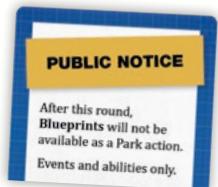
蓝图卡限制:
| 阶段 | 轮次 | 能否直接搜到蓝图卡 |
|---|---|---|
| "欢乐汇"期间 | 前 4 轮 | 可以通过行动 B/C 获取 |
| "烦恼汇"期间 | 第 5 轮起 | 只能通过事件卡或特殊能力获取 |
5.2 搭建(Build)
从手牌或市场区将 1 张公园卡放入你的公园,支付卡上的蓝色搭建费用,然后市场自动补满。
景点设施
放置于乐园大门右侧的空位中(最多 5 个位置)。一旦放置不能更改顺序。
升级卡
叠放在对应景点设施卡的背面,形成一列。升级分为三类:
| 类型 | 标识 | 说明 |
|---|---|---|
| 特征升级 | 绶带 + 菱形 | 改变景点特征的升级 |
| 客服升级 | 绶带 + 菱形 | 提升服务质量的升级 |
| 动物升级 | 绶带 + 菱形 | 添加动物元素的升级 |
| 质量升级 | 绶带 + 菱形 | 提升品质的升级 |
限制条件:
- 同一种同名升级在同一条景点设施上不可重复安装(包括自带升级)
- 不同景点设施上可以安装同名升级
- 某升级有限制标识(黄黑警示带)时仅可用于特定景点类型
- 部分升级卡需要将卡面完整显示
重复升级规则: 只要名字不同就可以多次搭建,例如可以在一条设施上安装多个不同的客服升级,但不能安装两张"空气调节"。
自带升级
部分景点设施自带一个或多个升级(卡面上以第二或第三标记标注),无需额外付费。自带主题是主题升级的一种,标记内的字母标识主题类型。自带升级计入蓝图卡要求。
主题升级限制
同一种主题升级在同一景点设施上不能超过两次,但可以混搭多种主题(如海盗 + 吸血鬼、机器 + 丛林 + 海盗均可)。
超级设施(特别展示卡)
搭建前提:
- 你的公园当前没有任何超级设施(每条设施线最多 1 个超级设施)
- 你的公园星星总数至少达到 5(仅统计已在公园中的设施,不计市场或未搭建的)
- 仍须支付超级设施的搭建费用
特别展示卡管理:
- 每位玩家起始获得 2 张特别展示卡,可随时查看但保持面朝下
- 任何时候只能搭建其中 1 张
- 如果超级设施被拆除,可以搭建另一张,但不能同时进行两个
- 如果决定不使用任何超级设施,可将 2 张卡放回盒中不展示,并获得额外 10 金币
关停中设施的升级
可以在已关停(面朝下)的景点设施上继续搭建设备或升级。
贷款辅助搭建
搭建时可以随时进行贷款获取额外金币(见第 7 节贷款卡说明),这不属于回合行动,不消耗行动次数。
5.3 拆除(Demo)
移除公园中的 1 张公园卡——可以是景点设施、升级、员工或资源卡。
- 拆除景点设施时,其上所有升级随之移除
- 被拆除的卡进入公园卡弃牌堆,不返回手牌
- 一次只能拆 1 张卡
5.4 捡硬币(Coin)
每有 1 个景点设施(不管运营中还是关停中),获得 1 金币。模拟捡起客人不小心掉落的钱币。
6. 游客步骤
游客开门入园,支付门票和消费。计算你的收入。
6.1 星星总数
将你公园中所有面朝上运营的卡牌上的星星数值相加:
- 景点设施本身的星星
- 景点设施上所有叠加的升级卡星星(含自带升级)
- 工作人员卡上的星星
- 资源卡上的星星
- 乐园大门卡的 1 颗星星
注意: 被关停(面朝下)的景点设施及其上所有升级的星星均不计入。
6.2 承载量上限
- 乐园大门给予基础 15 点承载量
- 某些员工卡、资源卡或其他公园卡可以增加承载量
- 即使星星超过 15,最多也只能接待 15 名游客
6.3 每位游客的金币
- 默认每位游客携带 1 金币
- 部分事件卡会修改此值(如"赞助协议"→2 金币,"明星游客"→4 金币)
- 计算完总金币后从银行获得相应金额
6.4 关停与失效处理
将被关停的景点设施和失效的工作人员面朝下放置。加总星星时不计入这些面朝下的卡以及其上的升级。
重要: 关停的设施上升级的能力仍然有效(除非卡面另有说明)。面朝下仅阻止星星计数,不终止卡面文字描述的持续效果。
规则铁律: 如果规则没写你能用它,你就不能使用它。
6.5 放弃收入的可选方案
你可以选择不获得任何金币收入,改为抽取 3 张事件卡。
7. 清除步骤
无固定顺序,完成以下事项:
- 弃除市场: 将市场区 6 张卡全部弃除,从公园牌堆抽 6 张补满
- 弃除事件卡: 场上所有仍在的事件卡放入弃牌堆
- 翻回公园卡: 所有面朝下的公园卡翻回正面
- 手牌管理: 手牌上限 5 张(仅计公园卡和事件卡),超出必须弃除。蓝图卡和特别展示卡不计入手牌上限
- 传递起始标记: 顺时针移交给下一位玩家
牌堆补充
当公园卡、蓝图卡或事件牌的任意牌堆被抽空时,立即将该卡弃牌堆洗匀作为新牌堆。即使是某个行动中途也必须立即补充。
8. 卡片详解
8.1 公园卡类型
| 类型 | 识别标志 | 放置位置 |
|---|---|---|
| 景点设施 | 标题下方"景点设施"字样 + 绶带圆形徽标 | 乐园大门右侧(5 格限) |
| 升级 | 标题下方"升级"字样 + 绶带菱形徽标 | 叠在对应景点设施背面 |
| 员工卡 | 特殊图标 | 乐园大门左侧 |
| 资源卡 | 特殊图标 | 乐园大门左侧 |
| 特别展示卡 | 独特边框设计 | 单独区域(限 1 个同时搭建) |
景点设施分类(7 种)
惊险刺激、杂耍演艺、休闲娱乐、自然风光、剧院演出、餐饮美食,以及各主题特有类别。
全景图标记
部分景点设施底部有方形标记——该卡属于更大的全景图美术的一部分,仅为视觉表现,不影响玩法。
8.2 蓝图卡
蓝图卡为你的特殊组合提供奖励分数。
获取方式: 通过行动 B/C 或事件卡/能力获取。第 5 轮起只能用事件卡和特殊能力获取。
保密规则:
- 蓝图卡必须面朝下放置
- 不算入你的手牌
- 即使已完成全部需求也不得向其他玩家展示
计分规则:
| 阶段 | 条件 | 结果 |
|---|---|---|
| 未完成基本需求 | 游戏结束时公园不符合要求 | 扣 -10 VP |
| 完成基本需求 | 符合蓝图文所列条件 | 获得蓝图上标明的分数 |
| 完成额外部分 | 在基本需求之上满足更高要求 | 额外获得额外部分分数(不完成不惩罚) |
注意: 蓝图卡的要求必须在游戏结束时满足,而非游戏进行中。
8.3 城市卡
城市卡分两种,决定了上半段和下半段的游戏氛围:
| 类型 | 颜色 | 轮次 | 作用 |
|---|---|---|---|
| 欢乐汇 | 白加蓝 | 第 1–4 轮 | 有益效果,帮助所有玩家 |
| 烦恼汇 | 白加红 | 第 5–8 轮 | 负面效果,干扰所有玩家 |
城市牌堆共有 8 张,每轮使用 1 张。最后一张城市卡出现即标志着最后一轮开始。
8.4 贷款卡
贷款卡是你获得额外现金的工具。
使用方式:
- 可以随时进行贷款,无需回合行动,不消耗行动次数
- 每次贷款获得 5 金币
- 每次贷款将贷款卡顺时针旋转一格,上方的格子显示你当前的贷款额度和对应的分数扣除
- 最多贷款 4 次
- 游戏过程中无法用金币提前偿还
扣分机制: 贷款卡在旋转的不同格位对应不同的分数惩罚,分数随贷款次数递增。
8.5 工作人员与资源卡
| 类型 | 放置 | 功能 |
|---|---|---|
| 工作人员 | 乐园大门左侧 | 提供特殊能力作用于整个公园;游戏结束时按其分值计入总分 |
| 资源卡 | 乐园大门左侧 | 给整个公园带来持续提升 |
- 可雇佣任意数量的工作人员
- 可拥有任意数量的资源卡
- 若在计分时尚在工作,则计入分数
8.6 游戏改变卡(可选)
提供特殊规则的扩展卡牌,用于改变游戏特性。单局可使用多张。常见示例:
| 卡牌名称 | 效果倾向 |
|---|---|
| 世界和平 | 降低对抗性 |
| 盛大开幕 | 开局即可搭建超级设施 |
| 初次约会 | 适合首局游戏的友好规则 |
9. 计分系统
游戏结束时汇总所有分数来源。
9.1 景点设施体量计分
每个景点设施独立计分,计算卡面绶带上的标记总数(含自身标记、所有叠加升级的标记、自带升级的标记)。工作人员、资源和乐园大门不计体量分。
| 标记数 | VP |
|---|---|
| 1 | 5 |
| 2 | 8 |
| 3 | 12 |
| 4 | 16 |
| 5 | 20 |
| 6 | 25 |
| 7 | 31 |
| 8 | 38 |
| 9 | 46 |
| 10 | 55 |
| 11 | 65 |
| 12 | 76 |
| 13 | 88 |
| 14 | 101 |
| 15 | 115 |
| 16 | 130 |
| 17 | 146 |
| 18 | 163 |
| 19 | 181 |
| 20 | 200 |
| 21 | 220 |
| 22 | 241 |
| 23 | 263 |
| 24 | 286 |
| 25 | 310 |
9.2 金钱计分
每 2 金币兑换 1 VP(向下取整)。
9.3 蓝图卡
- 完成基本需求:按蓝图标注加分
- 完成额外部分:额外加分
- 未完成基本需求:-10 VP
- 额外部分不完成无惩罚
9.4 工作人员计分
每个仍在为你工作的员工将其标注的 VP 加入总分。
9.5 贷款惩罚
扣除贷款卡上显示的 VP 数。
9.6 平手判定
按以下顺序逐层判断:
- 公园星星总数最高者胜
- 完成的蓝图卡数量最多者胜
- 剩余金币最多者胜
- 石头剪刀布
10. 黄金守则
守则 #1:卡牌能改变规则
卡面文字优先于规则书。两张卡冲突时,禁止性条款优先生效("你不能"胜过"你可以")。
守则 #2:所说即所做
你必须执行所有规则要求的具体行动。如果你漏掉了收入结算,发现后必须补上。但如果一张卡说"你可以做某事"而你没有做,就不能反悔补做。
关键规则与常见问题
易错规则
- 事件步骤可分批出牌——可以先让过,之后再继续打出,但双方连续让过后不可再出
- 公园步骤只有 3 个行动——不是每人独占,其他玩家的回合中你也可以使用自己的行动
- 手牌上限 5——仅计算公园卡和事件卡;蓝图卡和特别展示卡不算
- 关闭的景点设施仍可持续升级——但关停状态的设施及其升级的星星不计收入
- 关停设施的升级能力仍有效——面朝下仅阻止星星和设施本身,不终止升级卡面上的文字描述效果
- 蓝图卡需保密——游戏结束时才展示,完成后也不得亮牌
- 第 5 轮起蓝图卡只能通过事件卡和特殊能力获取——不能再通过行动 B/C 搜索
- 公园最多 5 个景点设施(含超级设施)——不是分开计算的
- 特别展示卡限同时搭建 1 个——2 张都可在手里,但板上只能有 1 座超级设施
- 蓝图未完成罚 10 VP——超额部分不完成无惩罚
- 捡硬币不论设施是否运营——关停的也算
- 城市牌堆 8 张 = 8 轮——不多不少
- 贷款不需回合行动——可随时进行,最多 4 次
- 公园卡文字优先于规则书——卡牌效力高于通用规则
- 必做与可选的区别——规则要求"必须"做的事做了再说,说了"可以"不做就是永远失去
常见问题
- Q:游客只有 15 个?每个人只给 1 金币?
A:这是简化处理。实际公园里游客数以万计(满载时每月约 15 万人次),每人消费也远超 1 金币。15 和 1 是为了便于桌面运算而设计的缩放值。
- Q:我怎么能在过山车上安装厕所?
A:每个景点设施象征的是公园中的一个区域。你在过山车旁边建厕所——只是表达方式幽默而已。
- Q:关停的景点设施怎么恢复?
A:在每个清除步骤中自动恢复。所有面朝下的公园卡会翻回正面,设施重新开始运营(除非另有事件卡持续施加关闭效果)。
- Q:我可以选择不要收入吗?
A:可以。在游客步骤中,你可以选择不获得任何金币,改为抽取 3 张事件卡。
- Q:如何认定"景点设施"卡?
A:标题下方标注"景点设施"字样,且带有绶带圆形徽标。
- Q:地图上的城市卡能用事件卡提前触发吗?
A:不能。城市卡只在事件步骤由起始玩家展示时使用,按顺序逐张抽取。
- Q:蓝图卡搜不到怎么办?
A:前 4 轮可通过行动 B(搜索)直接从牌堆获取;第 5 轮起的"烦恼汇"阶段需要用事件卡或特殊能力来获取。
- Q:拆掉的卡能回到手牌吗?
A:不能。拆除的卡全部进入公园卡弃牌堆。
- Q:我能同时在一条设施上装两个相同名字的升级吗?
A:不能。同名升级(含自带升级)在同一条设施上只能存在一份。不同设施之间则可以重复。
- Q:金计分如何精确换算?
A:每 2 金币换 1 VP,不足 2 的部分舍去。例如 7 金币 = 3 VP,5 金币 = 2 VP。
- Q:贷款扣分有多少?
A:取决于贷款次数。贷款卡有 4 个刻度格位,每次贷款顺时针旋转一格,格位上标注了对应的扣分数。
- Q:超级设施搭建的 5 星门槛怎么算?
A:统计你公园中所有已在运营的设施(不含市场和未搭建的特别展示卡)上的星星总和。市场区的卡不算。
- Q:如果我想放弃超级设施有什么好处?
A:将 2 张特别展示卡放回盒中不展示,获得额外 10 金币。
- Q:游戏改变卡一定需要使用吗?
A:不需要。这是完全可选的规则扩展。首次游玩推荐使用"初次约会"以获得更友好的体验。
常见问题(FAQ)
以下 1 条问答中 0 条来自站内玩家的真实提问,其余 1 条为本站整理的常见疑问;答复内容保持原样。
欢斗乐园支持几个人玩?
2–5 人。
去哪查完整规则
想核对具体规则细节、卡牌效果或某个回合的结算方式,可以在村了吗里选中这款游戏后直接提问。
同类桌游
- 卡坦岛德式
- 工业革命:伯明翰德式
- 勃艮第城堡:特别典藏版德式
- 方舟动物园德式
- 卡卡颂抽象
- 瘟疫危机传承:第一季美式
- 阿瑞迪亚:勇踏征途美式
- 重塑宇宙德式
- 幽港迷城美式
- 埃多拉的德鲁伊德式
规则原文(Markdown)
本站收录这款游戏的规则原文 2 个文件,此处内联渲染 2 个,可直接展开阅读或下载。
rules_zh_欢斗乐园_805.md31.6 KB

修订版
目录
目标 …… 2
盒子里有什么 …… 2
设置 …… 2
卡牌 …… 4
公园布局 …… 8
如何获胜 …… 9
如何游戏 …… 9
游戏结束计分 …… 11
整理 …… 12
黄金守则 …… 12
FAQ …… 12
小贴士 …… 12
术语合集 …… 13
工作人员 …… 15
Ages 12+

2-4 players

25 min per player
目标
不论付出什么代价,建成城市里首屈一指的主题公园!
在8轮次的游戏进程中,搭建游乐设施并使用公园卡进行升级,按照蓝图卡构建你的公园,打出事件卡来帮助你并且阻挠你的对手们。
你的目标是在游戏结束时,利用你所建造的公园获得最高的分数,使用三种主要方式来得分:建造叹为观止且拥有各种升级的高级设施,完成蓝图卡要求,使用金钱购买胜利点数。
你可以雇佣员工来帮助你,或者建造拥有特殊效果的超级设施。贿赂官员或者勒索政客也是可行,不过仅仅是选择。
然后这样就获胜了…
盒子里有什么
游戏包括了:
· 1 块游戏版图
· 4个主题的卡牌包—丛林包,机器人包,海盗包和吸血鬼包
· 4 张玩家参考表
- 4张玩家参考表
- 30个“1金币”指示物
- 26个“5金币”指示物
- 20个“25金币”指示物
- 6个“125金币”指示物
- 1个起始玩家标记
- 1个当前步骤标记
- 1张城市规划关闭提醒卡
- 3张游戏改变卡
- 1张计分表
个主题包中包含了56张卡牌:
- 1张主题简介卡
- 1张乐园大门卡
- 1张贷款标记卡
- 3张“欢乐汇”城市事件卡
- 3张“烦恼汇”城市事件卡
- 5张蓝图卡
- 13张事件卡
- 27张公园卡
- 2张特别展示卡
设置
步骤 1: 对游戏中使用的主题卡牌包进行选择,每有一名玩家就选一个包。游戏中没有 “基础” 包,玩家们也不需要把卡牌包留在手中,所有卡牌都是共用的。
第一次游戏建议选择
2 人游戏:机器人包、海盗包
3 人游戏:机器人包、海盗包、吸血鬼包
4人游戏:机器人包、海盗包、吸血鬼包、丛林包
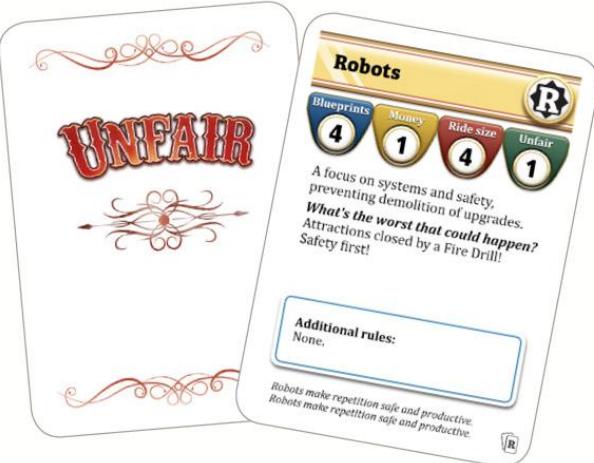
步骤 2: 将每个主题卡牌包里的白色主题简介卡取出放置在一边,游戏中不需要用到它们。
简介卡描述了每一个主题卡牌包的特点和特殊规则。
另外,如果你们决定不了使用哪些卡牌包进行游戏,还可以使用简介卡进行抽签,随机选择。
步骤3:给每位玩家:
· 1 张黄色的乐园大门卡,将其面朝上放置在你面前。
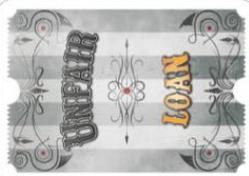
· 1 张灰色的贷款卡,将其面朝下放置在大门卡上方。
· 1 张双面的玩家参考表格,放置在随手可及的地方。
不要把它当做杯垫来用
- 起始资金20金币。
步骤 4:将剩下金币的一半放置在游戏版图的两端,方便所有玩家能随手拿到。

步骤 5:将剩下的卡牌按照背面图案分别叠放。红色的公园卡一叠,绿色的事件卡一叠,如此进行。
步骤6:将每叠牌充分洗牌。

步骤 7: 将红色公园卡面朝下放置在游戏版图的对应区域,组成公园牌堆(A)。继续如此进行,将绿色事件卡(B)组成事件牌堆,将蓝图卡组成蓝图牌堆(C)。
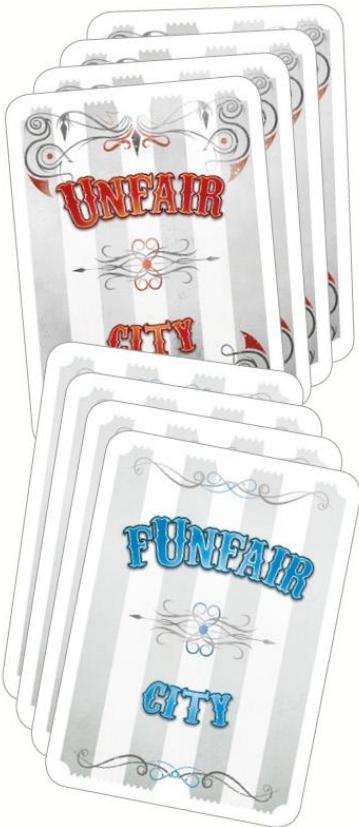
步骤 8: 数出 4 张白加红的 “烦恼汇” 城市卡牌,面朝下形成一叠临时牌堆。将剩余的 “烦恼汇” 城市卡牌放回盒子里,不要展示它们。
步骤 9: 将城市规划关闭卡放置在临时牌堆上面,将 “公告” 那面朝上放置。
步骤 10:数出 4 张白加蓝的“欢乐汇”城市卡,面朝下继续放置在临时牌堆上。不要洗在一起。将剩下的“欢乐汇”城市卡牌放回盒子里,不要展示它们。这 8 张卡牌的牌堆组成了游戏版图的城市牌堆(D)
步骤 11:为每位玩家分发 5 张公园卡,作为其起始手牌。如果某位玩家没有获得任何景点设施卡(参看第 4 页,如何认定景点设施卡),他可以展示其手牌,并将手牌洗回公园牌堆,重新抽取 5 张公园卡作为新手牌,重复如此直到手上有至少 1 张景点设施卡。
步骤 12:为每位玩家分发 2 张特别展示卡。玩家可以查看自己的特别展示卡,但他们必须将其保持面朝下,直到被搭建起来。
步骤 13:从公园牌堆上展示卡牌,填充满游戏版图中部的 6 个卡位。这些组成了市场区(E)
步骤 14:最近玩过云霄飞车的玩家成为起始玩家。
可选项:如果你们想使用游戏改变卡,现在就可以选择你们所喜欢的卡牌(参见第9页的细节)。如果你们是首次进行游戏,可以考虑使用“初次约会”

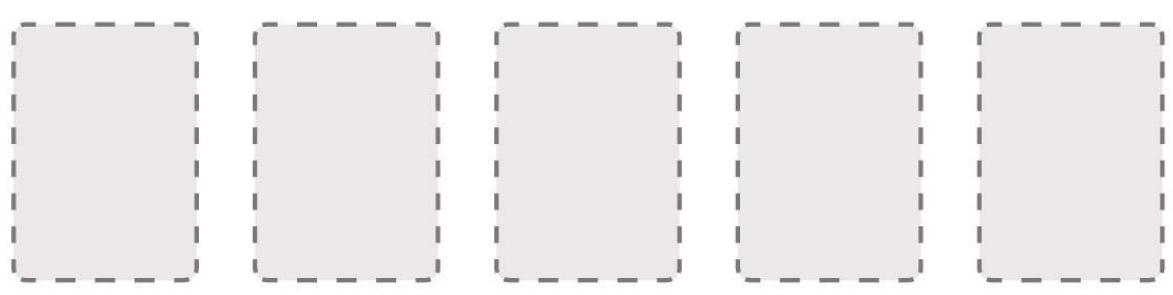
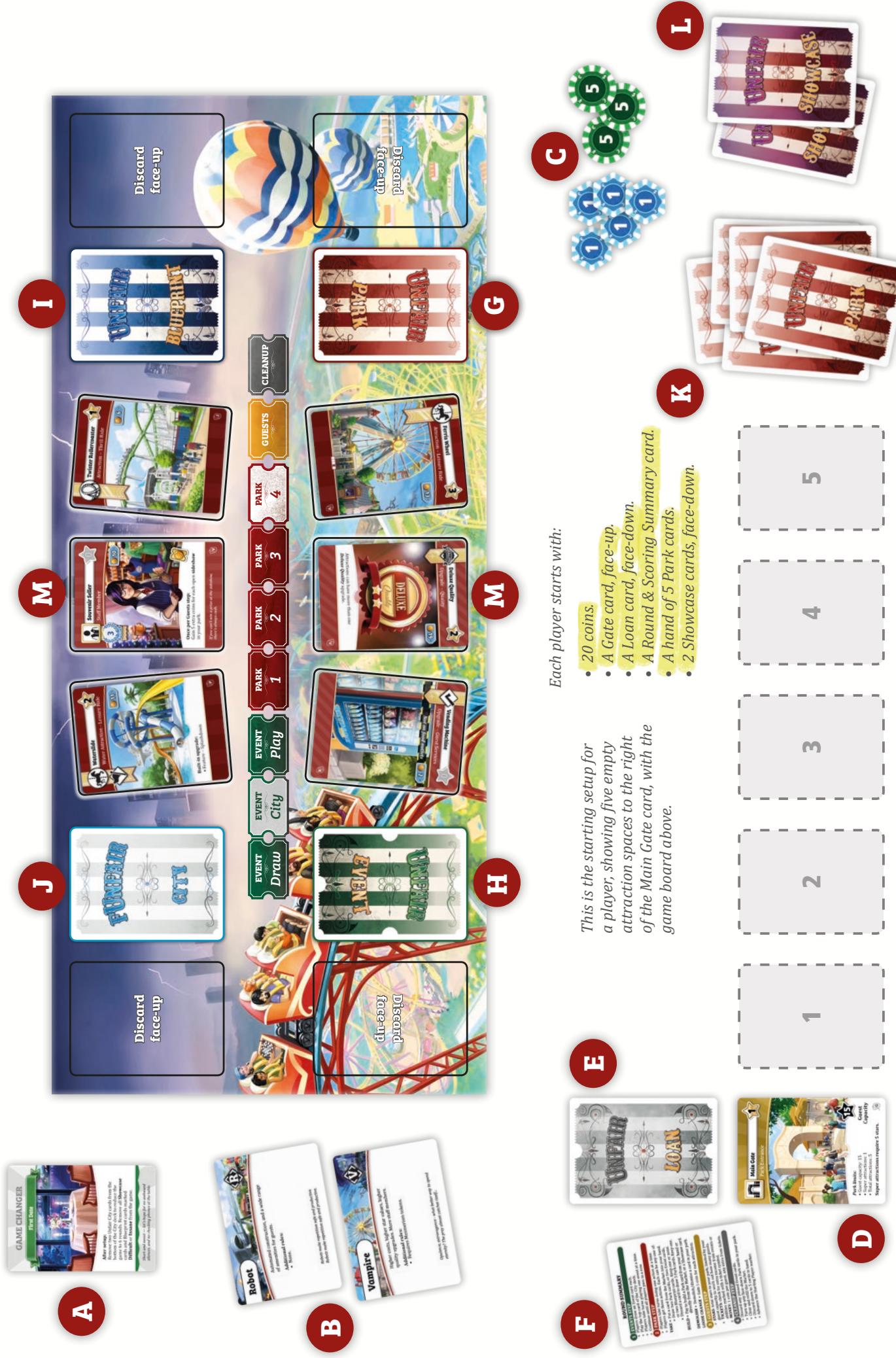
一位玩家的游戏开始设置,在乐园大门卡的右侧预留5张卡牌的位置,游戏版图在上方。
每位玩家开始游戏时有2张特别展示卡,手牌是5张公园卡,还有20金币。

卡牌
乐园大门
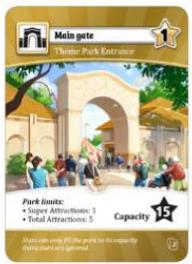
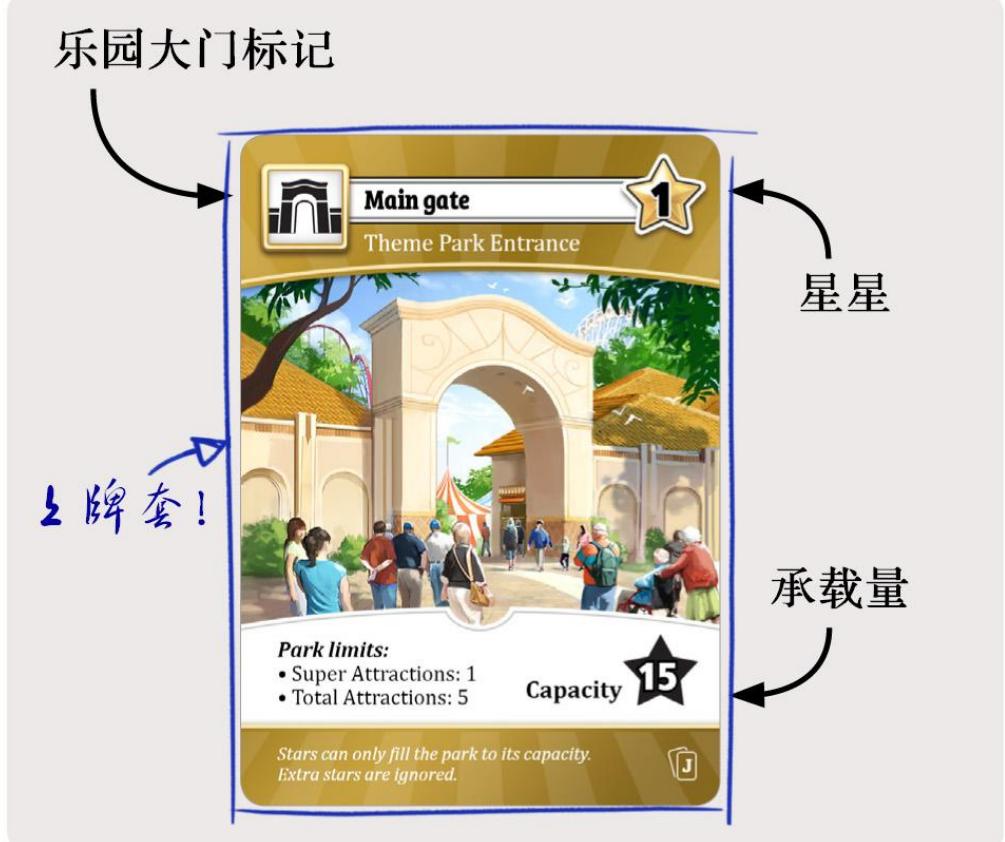
所有玩家都从他们的乐园大门开始游戏,允许有5个空位搭建景点设施。
它同样也给予你1个星星和15的公园承载量。
星星是你收入来源的一部分,承载量则是你公园客人的接待上限。
这些会在稍后进行细节解释。
其实是在第9页→
公园卡牌

你的主题公园是用各种不同类型的公园卡组成的。
所有公园卡上有些共同的部分。
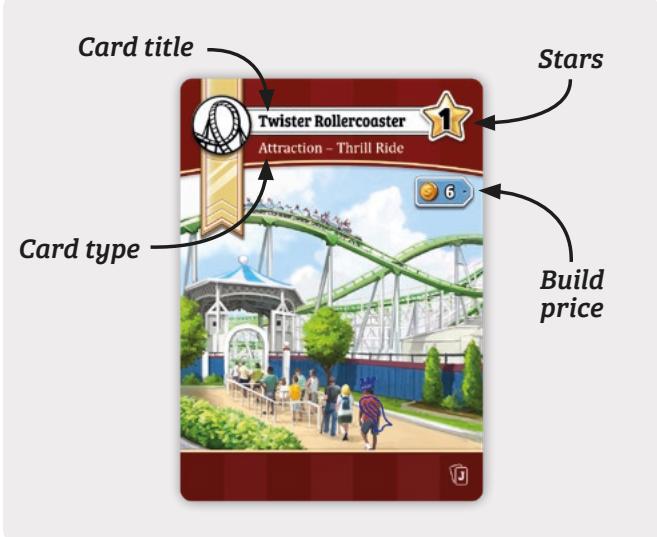
星星:每张公园卡上都有一个星星数值,意味着对游客的吸引度。
搭建费用:每张公园卡上都有一个蓝色的价格标签。支付该蓝色标签的价格,可以在你的公园搭建这张卡。
标题和类型:公园卡还有一个标题,其下是卡牌类型。

景点设施
景点设施是你的公园中最主要的组成部分。
i

你可以通过在卡牌标题下的词语“景点设施”来识别景点设施。
所有的景点设施都有这个绶带和圆形的形状。
景点设施类型

惊险刺激


杂耍演艺
休闲娱乐

自然风光

剧院演出

餐饮美食
位置:在你搭建景点设施时,将其放置在你乐园大门右侧。你一旦搭建,你不能改变它们的顺序。
标记表示景点设施类型

全景图:一些景点设施的卡牌底部有方形标记,代表这张图是一整张漂亮的全景图美工的一部分。
全景图标记

升级 一大一点,再大点!
你搭建了一个景点设施以后,你可以为它进行升级。升级可以使你的公园对游客更有吸引力,在游戏结束时获得更多计分,而且往往会在蓝图中需要(参看第6页)

你可以通过在卡牌标题下的词语“升级”来识别升级卡。
所有的升级卡都有这个绶带和菱形的形状。
景点设施类型

特征升级


客服升级

动物升级
不太常见)

质量升级
限制:有些升级卡不能为所有景点设施升级。如果有限制,会在价格标签下用黄加黑的警示带提醒。

有些升级卡使用时需要将卡面完整显示
重复升级: 同一种升级你可以按你的意愿搭建多次, 只要名字是不一样的。举个例子, 你可以在一个景点设施上拥有 2 个客服升级, 但你不能安装两个空气调节升级。
自带升级
有些景点设施上自带有升级,在卡牌上会有第二或者第三个标记表示。
如果一张卡拥有自带升级,规则框内会写明自带哪种升级。
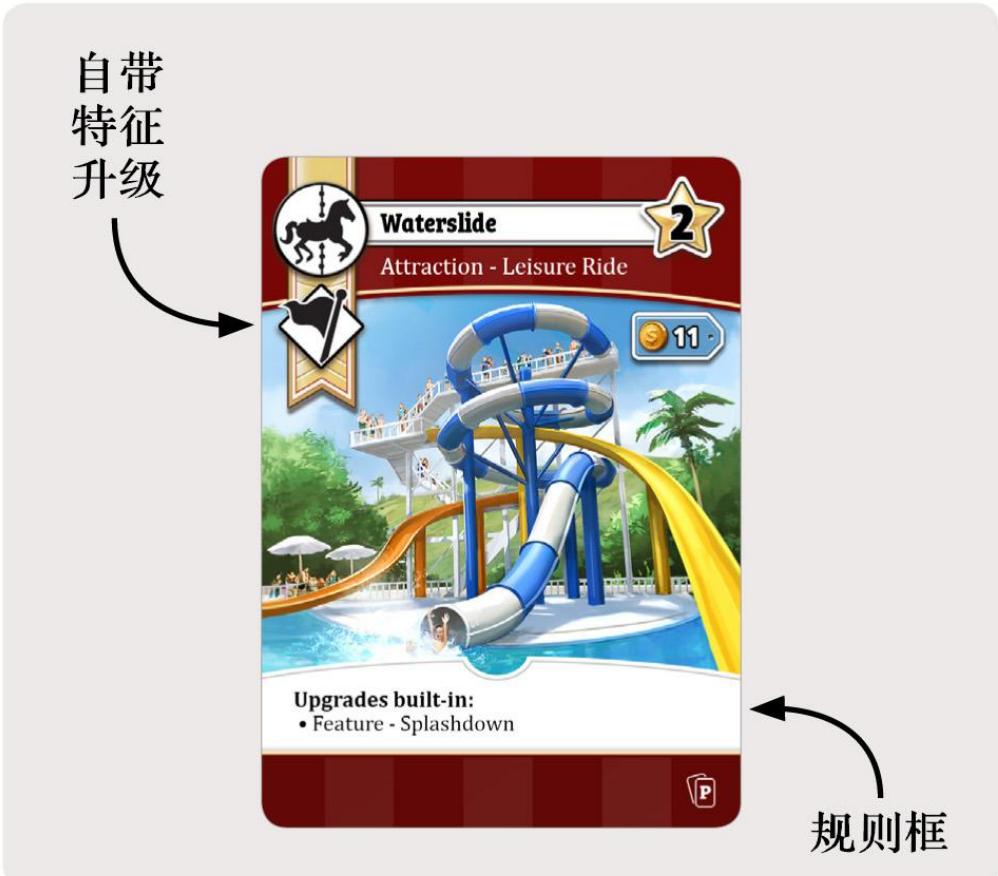
当一个自带升级是主题升级时,标记内的字母会告诉你是哪种主题升级,因此不需要额外规则框说明。
自带海盗主题升级

因为这个升级是自带的,因此你也不能在该景点设备上进行同一个升级。
自带升级同样能符合蓝图卡上的要求(参见第6页)。
当游戏结束进行计分时,自带升级将计入该景点设备的体量中。
重复主题:在一个景点设备上,你不能进行同一种主题升级两次以上,但你可以在同一个景点设备上进行多种主题的升级。你的游乐设备是海盗吸血鬼型或者机器丛林海盗型的都很棒。
工作人员
工作人员可以将他们的特殊能力应用到你整个公园中。将其放置在你乐园大门旁边,景点设施的另一边。
除了工作人员各自特殊的技能以外,每位工作人员在游戏结束时还能将其计分加入你的总分中。
只要那时他们还在为你工作…你可以雇佣任意数量的工作人员。

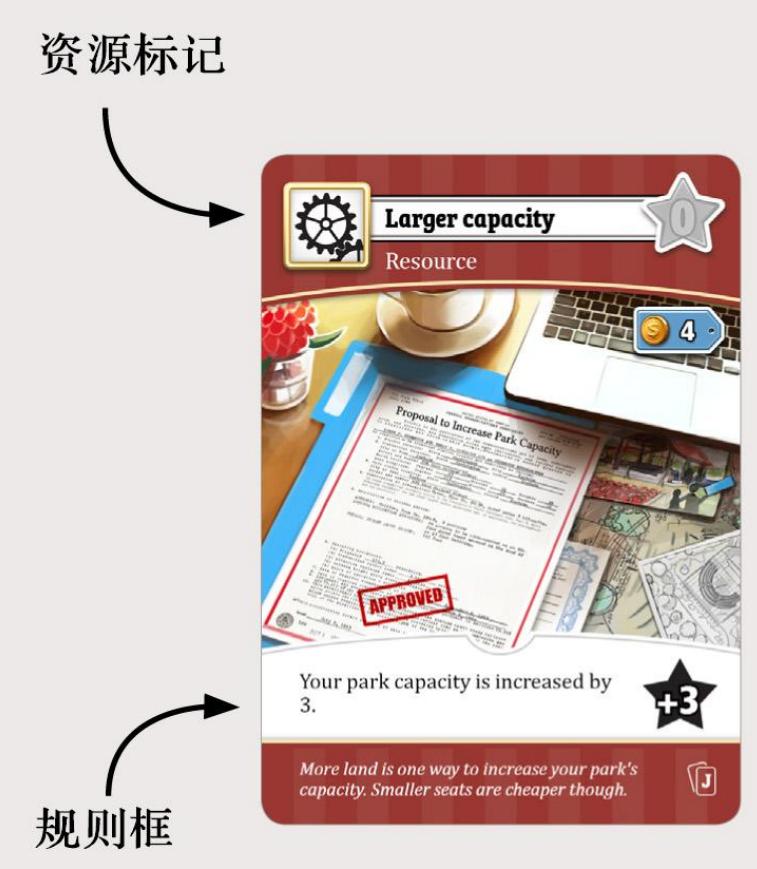
资源卡

资源卡也能为你整个公园带来提升,将其和工作人员放一起,放在乐园大门旁边。
你可以拥有任意数量的资源卡。
特别展示卡 9 Wm e
特别展示卡包括了一些独特的超级设施,一种特殊种类的景点设施拥有强大的能力。
一分价钱一分货!
每位玩家在游戏开始时被分发到两张特别展示卡,不过你在任何时候都只能搭建其中之一。
如果你的超级设施被拆除了,你可以搭建另一个,但不能同时进行两个。
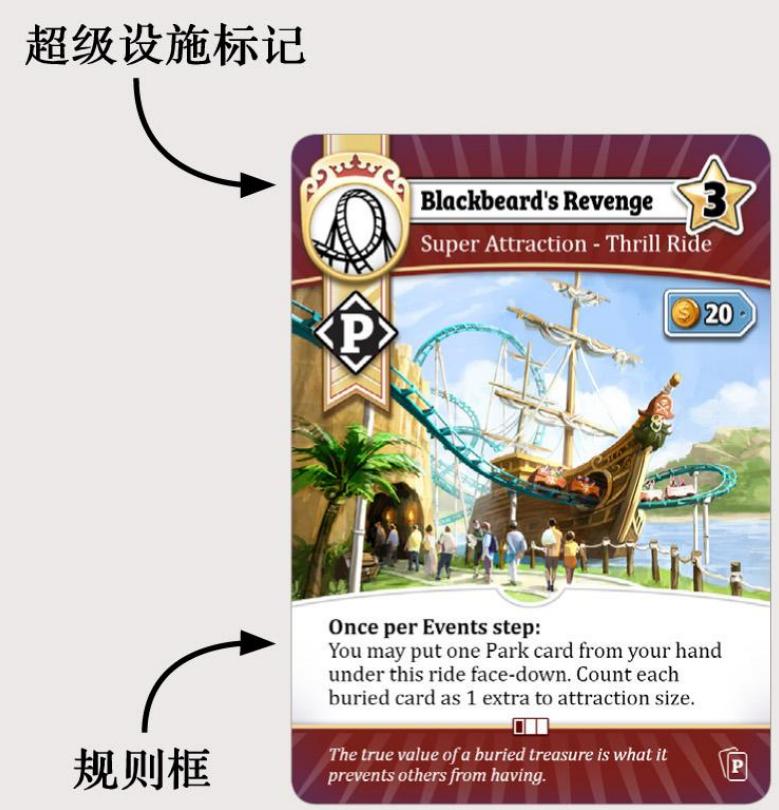
5 星需求:城市规划部门规定,当你的公园拥有至少 5 颗星星时(不管这些设施是否在运营中),才能搭建超级设施。
只计算在你公园中的星星,不计事件卡搭建超级设施你还是需要支付搭建费用,和普通公园卡一样。
不需要特别展示卡:如果你决定不搭建任何超级设施,你可以将两张特别展示卡在任意时候放回盒子,不要展示它们,并获得额外的10金币。
蓝图卡
蓝图卡为你搭建特殊组合的公园卡提供奖励。要如何获得蓝图卡,在第9页的公园步骤部分有解释。
用蓝图卡计分,在你公园中的卡必须在游戏结束时(不是游戏进行中时)符合蓝图卡上的要求。如果有没有达到要求的蓝图卡,在游戏结束时每张将-10分。
如果你完成了需求部分,你还可以继续完成额外部分。额外部分不完成不会有惩罚。
你决定进行哪张蓝图卡,但你一旦决定保留哪张,一般来说是永久存在了。
你可以拥有任意数量的蓝图卡。

保密:蓝图卡是需要保密的,面朝下放置,且不算计入你的手牌。
即使你在游戏结束前完成了一张蓝图卡,你也不要展示它。
事件卡

你可以使用事件卡影响游戏。
每张事件卡上都有两个事件进行选择。上方的事件往往对你有帮助,而下方的事件往往是对付你的对手的。
有些事件卡上有类型,诸如干涉、检查或者城市规划。如果你手上有对这样的攻击进行防御的卡,那你就可以阻止进攻。
举个例子:“审查委员会”是一个城市规划事件,会拆除你公园的一个特征升级。你可以用“上面有人”来阻止它。

延迟效果: 有些事件卡上有一个图钉符号。这意味着它们不是立即生效的, 会 “钉” 在桌上直到其生效, 然后在清除步骤中弃除它。

关停景点设施:有些事件能关停你的景点设施。为了进行表示,将为主的景点设施卡翻面朝下,这样背下面就朝上了。被关停的景点设施不会为你带来收入,其上的能力也不能使用。
重开景点设施:在每个轮次结束时,所有公园卡都会被翻成面朝上,这样你的景点设施又将重新运营。
-你之前没使用事件卡将其重开
城市卡
城市卡是一种特殊的事件卡,在每个轮次开始时都会影响所有玩家。
城市牌堆可以认为是这个游戏的计时器。每个轮次翻开一张卡牌,第八轮时最后一张城市卡被翻开,这标志着游戏最后一轮开始了。
在游戏的上半段,城市卡是带来帮助的白加蓝的“欢乐汇”卡牌。
在游戏的下半段,城市卡变成带来麻烦的白加红的“烦恼汇”卡牌。

Guests step:
You may choose to gain no coins at all. If you do, draw three Event cards instead.

"We're closed to the public - but next month we'll have something special for everyone."
Intrusion.
Close each attraction in your park which has the largest attraction size.
A careless alarm clock salesman left his sample case behind. In several places at once.
贷款卡
如果你需要更多的金钱,不管什么理由,你可以使用你的贷款卡。
每次贷款会给你 5 金币,但在游戏结束时会扣除你的计分。
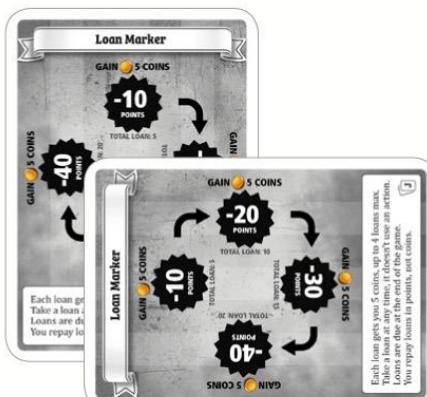
贷款卡在游戏开始时是面朝下的,表示你没有贷款。当你进行贷款时,将卡牌翻面朝上。每有一次新贷款,就进行顺时针转动,上方位置告诉你获得多少贷款,和你欠了多少计分。
你可以在任何时候进行贷款。这并不需要使用回合或者一次行动。你可以在同时进行多次贷款,最多为4次。
在游戏过程中不能使用金币提前偿还贷款,只有在游戏结束时计分会被扣除。

如何打造一个主题公园:
游乐园卡牌版图的布置和操作指导

贷款
当你进行你第一次贷款时将其翻面,每进行一次旋转一次。


升级
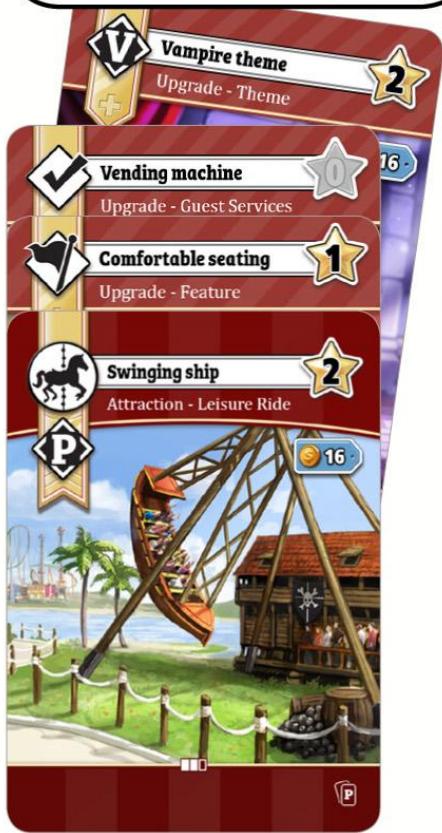
将它们堆叠在景点设施卡下,形成一列。
蓝图卡和
特别展示卡
将它们面朝下进行保密。
Air conditioning Upgrade - Guest Services

这让你的公园运营更顺畅,盈利更丰厚。

员工和资源
游乐设施高度
你的公园从这里起步,且无债一身轻。祝你好运。
乐园大门
关停中…
将最底下卡牌翻面朝下来表示整个景点设施关停了。
特殊能力
景点设施可以按你的意愿越建越高,只是不要重复升级。
不要忘记使用你公园卡上的特殊能力。
公园体量
你的公园最多只能有5个景点设施。
游戏改变卡
游戏改变卡上包含了可选的游戏特殊规则。
不想和你的朋友们对干?那就宣扬“世界和平”吧。想开始游戏的时候就拥有超级设施?试试“盛大开幕”。

在单局游戏中,你可以试试一个以上的游戏改变卡。
如何获胜
一共有三种主要形式来计分:
-
巨型设施:一个设施上拥有更多的升级,就计分更多。
-
蓝图卡:按照特殊蓝图来建设你的公园。
-
金钱:通过金钱来购买胜利。
-
保证你的对手赢不了。
如何游戏
你有 8 个轮次来建设最棒的主题公园,并阻止你的对手这么做。每个轮次有 4 个步骤:
- 事件步骤
- 公园步骤
- 游客步骤
- 清除步骤
1. 事件步骤

抓取一个事件
按照回合顺序,每个玩家从事件牌堆上抓取一张事件卡。
城市事件
起始玩家展示城市牌堆的顶牌,按照回合顺序,每位玩家按照其介绍执行。当执行完毕后将其放入弃牌堆。
城市牌堆是游戏的计时器。一共有8张卡,当最后一张城市卡被使用后,该轮次为最后一轮。
使用事件
根据回合顺序,你可以使用任意数量的事件卡,每次只使用一张后轮到另一位玩家。当你从手牌中使用一张事件卡时,你需要选择使用上半部分还是下半部分的。
在同一个事件步骤,你可以先让过,再接下去继续打出事件卡,但如果双方都让过,那事件步骤就会结束。如果你让过了且所有人都让过了,你不能继续使用事件卡。
事件类型:有些事件卡拥有类型,诸如干涉、检查或者城市规划。当你使用事件卡时说出该类型。其他玩家如果有合适的针对性防御方法就可以进行使用了。
图钉:有些事件卡会在轮次稍晚的时候生效,比如在公园步骤或游客步骤。这些事件会有图钉符号标记。会“钉”在桌上作为一个提醒,当它生效后就可以将其弃除。

作为事件效果的能力:使用公园卡上的能力在事件步骤生效,将该能力作为事件卡一样使用,当轮到你使用事件卡时,你可以激活它们。其他玩家也可以阻止其生效,和普通事件一样。
移动卡牌:事件卡可以将一张卡从一个公园移动到另一个。如果这样做了,在所移动的卡牌上保留所有的指示物或金币。如果该卡上的能力这轮次中已经被使用了,那它就不能再次使用,移动的卡牌并不认为是离场再进场。
2. 公园步骤

每轮次中你能进行3个行动,和其他玩家的回合中每次进行1个。有些卡牌允许你进行第4各行动。
当你的回合中进行一个行动时,你有三个选择:抓取,搭建和拆除,你还可以选择捡硬币。选择同一个行动可以超过一次。
A. 抓取
进行1个抓取行动来执行以下内容来获得1张卡牌,
- 从市场区获得 1 张卡并在稍后将其放置进手牌,然后重新填充市场区。这么做不需要支付金币,你在搭建的时候才需要支付。
- 从公园牌堆或事件牌堆或蓝图牌堆上抓取2张卡牌,然后从中选择1张,并弃除另一张。如果两张都没用,你可以将两张都弃除。
- 从你的手牌中弃除任意卡牌,并从公园牌堆上抓取 5 张卡牌,然后从中选择 1 张保留。
重要: 如果你选择保留一张蓝图卡,它不能被弃除,除非使用一些稀有的事件卡才能弃除。
你可以在前 4 轮次中(即 “欢乐汇” 期间)只抓取蓝图卡。从第 5 轮直到游戏结束,蓝图卡将只能使用事件卡和能力抓取了。
快速游戏:当一位玩家使用行动来抓牌时,并不需要等待该玩家的保留决定。因为不管他选择哪张对下一位玩家回合并没有影响,所以游戏可以直接进行下去。当事件卡需要玩家从搜索到的几张牌中保留一张时,同样适用。
B. 搭建
进行1个搭建行动,以在你的公园中放置1张公园卡,有以下限制:
· 你的公园中只能有 1 个超级设施。
- 你的公园中最多只能有 5 个景点设施,包括任何超级设施。
- 在同一个景点设施上你不能重复进行同名升级。这包括了自带的升级。在不同的景点设施上可以进行同名升级。
你可以从你手牌中搭建1张卡牌,或者直接从市场区进场,然后立即重新填充市场区。
支付在卡牌上价格标签上的搭建费用,并将其放置入你的公园,面朝上放在你面前的桌上。
如果你搭建的卡牌是一个景点设施,它会占据你五个景点设施位置之一。如果它是一个升级卡,它应该叠在已存在的景点设施背后。如果它是一张员工卡或者资源卡,它该放在你的乐园大门左边。
超级设施:如果你的公园里没有超级设施,你就可以从你的特别展示卡中搭建一个超级设施。在你搭建一个超级设施前,你的公园必须拥有的星星总数必须至少是5。
关停景点设施:如果你想在已关停的景点设施上继续升级也是可以的。
贷款:如果你需要额外金钱用来支付搭建费用,你可以进行一次贷款。参看第7页的贷款卡。
C. 拆除
进行 1 个拆除行动将你公园中的一些东西移除,可能是为了让路给一个全新的景点设施。
你一次只能拆除一张公园卡,如果你拆除了一个景点设施,那其上所有升级都将随之而去。

被你拆除的卡牌,将被置入公园卡弃牌堆,而不是回到你的手牌中。
D. 捡硬币
进行 1 个捡硬币行动,每有一个景点设施你便获得 1 金币,不管其是运营还是关停,你能捡起客人不小心掉下的硬币。
3. 游客步骤
当公园大门打开,游客们就来访问你的公园了,他们支付门票,并且在购买纪念品和快餐时支付额外费用。
你所有星星加总:为了计算你的收入,将你公园中所有卡牌上的星星全部加起来,包括景点设施、升级、工作人员、资源和你的乐园大门。
如果景点设施被关停了,该景点设施和其上升级的星星全部不计。

一个景点设施其上一堆升级,总计有8个星星。
检查你所使用的事件卡,是否在游客步骤中增加了额外的星星数。也不要忘记检查当前城市事件的效果。
星星的总数表示有多少游客来访问你的公园。
与公园承载量对比:你的公园有最多15位游客的承载量上限。你可以在你的公园中拥有超过15的星星,但你的公园承载量吃不消,所以你最多只能接待15位游客。
有些工作人员,资源,或其他公园卡能增加你公园的承载量。
i
游客一般在每个轮次带着1个金币。一些事件会使你在每位游客所获得的收入增加。
有“赞助协议”,你可以获得2金币,如果有“明星游客”,你可以获得4金币,而不是普通的1金币。
获得金钱:当你计算完你的星星数和每轮每位游客的金币数后,获得该金币收入。别忘了增加从工作人员和其他卡牌能力的额外收入效果。
关停景点设施和特殊能力
有些事件能够关停景点设施或使工作人员失效。将景点设施卡或者工作人员卡翻面来表示这个效果。
当加总星星数值时,不要加上已经关停的景点设施和其上的升级,也不要加失效的工作人员。
这样面朝下的卡牌上的任何特殊能力都不会生效。任何关停的景点设备上的升级卡能力仍然有效,除非卡牌本身有提及。
规则是:如果规则没有展示,那你就不能使用这个规则,懂没?
4. 清除步骤
做以下工作,没有规定的顺序
- 将市场区所有卡牌都弃除,并利用公园牌堆进行重新填充。

- 弃除还在场上的所有事件卡。
- 你公园中的面朝下的卡牌全部翻回来。
- 你的手牌上限是 5,超出部分需要弃除,计算公园卡和事件卡。蓝图卡和特别展示卡并不计算在内。
- 将“起始玩家”标记按照回合顺序交给下一位玩家。
重填牌堆
任何时候公园卡、蓝图卡或者事件卡被抓空了,将相应的弃牌堆的卡牌重洗后,形成新牌堆。如果牌堆空了,就立即这么做,即使是在一个事件卡或者行动进行的中途中。
游戏结束计分
在计分表上为每位玩家加总计分。
景点设施体量
每个景点设施单独进行加总计分,计算在绶带上的标记数量,计算所有升级上的,包括自带升级,还有景点设备自己的标记。
计算绶带上的每个标记,然后对照相应的分数。
工作人员、资源和乐园大门在体量上不计分,只有景点设施和其上的升级计分。
蓝图卡
展示你的蓝图卡然后证明你完成了它。如果你的公园符合需求部分,计算其上显示的计分。如果你并没有完成它,需要扣除10点计分。
| 标记数量 | 计分 |
| 1 | 5 |
| 2 | 8 |
| 3 | 12 |
| 4 | 16 |
| 5 | 20 |
| 6 | 25 |
| 7 | 31 |
| 8 | 38 |
| 9 | 46 |
| 10 | 55 |
| 11 | 65 |
| 12 | 76 |
| 13 | 88 |
| 14 | 101 |
| 15 | 115 |
| 16 | 130 |
| 17 | 146 |
| 18 | 163 |
| 19 | 181 |
| 20 | 200 |
| 21 | 220 |
| 22 | 241 |
| 23 | 263 |
| 24 | 286 |
| 25 | 310 |
如果你完成了需求部分,你还能继续获得额外部分的计分。对于额外部分没有必须完成的要求。
计算所有标记
金币
你挣的每2个金币换取1分。
其他卡牌
工作人员将进行计分。一些其他卡牌的能力上会有额外计分。你手牌中的卡不会计分。
贷款
如果你在游戏中有任何贷款,扣除你贷款卡上显示的点数。
平手的情况
如果出现了平手的情况,公园拥有最多星星的玩家获胜。
如果仍然是平手,完成最多蓝图卡的玩家获胜。
如果仍然是平手,拥有最多金币的获胜。
不太常见的是这样还是平手,那只能靠石头剪刀布来分出胜负了。
整理
每张卡牌的右下角有一个主题包的标记。将这些卡按主题整理在一起,放在相应的主题盒中。
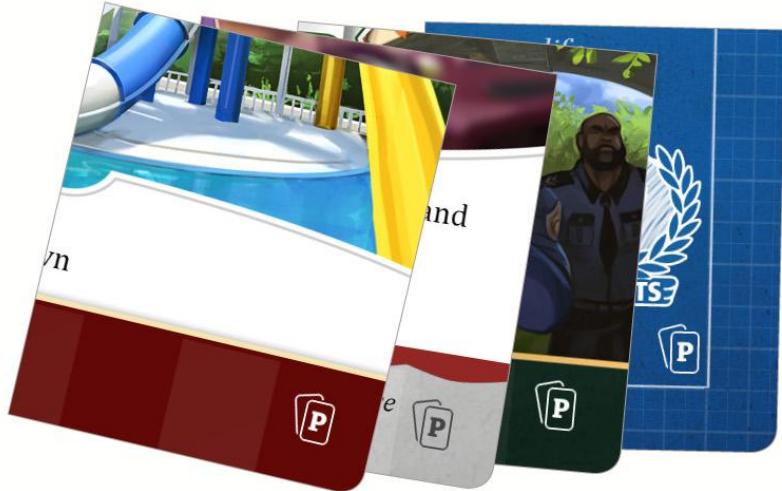
你按照卡牌的颜色进行设置的,下一局游戏,在整理时不需要按颜色整理了。
但
这
感觉
如果你和
所做的。
我
因为
不
按
那
你
会
整理
整理
黄金规则
#1: 卡牌能改变规则
如果一个卡牌内容和规则所写有冲突,那按卡牌内容进行。
一张卡牌上的规则说你不能做某事,另一张卡牌上说你能做某事,前者获胜。
举例,如果你的一个事件说你能拆除一些东西,而一张公园卡上写着你不能拆除它,那“不能”的规则获胜。
#2: 所说即所做
你必须执行所有需要的游戏行动。举个例子,获得你的收入这并不是可选项,如果你在游客步骤中忘记获得你的金钱,你必须改正这个疏忽。
然而,如果一张卡上说你可以做某事,而你没有做,你不能回去重新来过。
Sure, plead with your friends, they might be SOFTIES.
Or maybe they'll just point at the NAME OF THE GAME...
FAQS
只有15个客人?每个客人只给1金币?这是什么垃圾主题公园啊?
你的公园实际的承载量应该是成百上千的游客,一个爆满的公园每个月应该接待150000位游客。简便起见,我们说“15”位游客。
同样,你可以将金币认为是每个是100000刀。为了简化计算,我们把金钱缩小成最小单位。
我怎么在过山车上安装厕所?

每个景点设备象征的是你公园中的一个区域。尽管会很搞笑,当你进行厕所升级时,你其实并不是把厕所装在过山车上,你是在附近建了一个厕所。

你的笔记
- 选择简单的星星设施来保证早期收入
- 贷款是你的朋友,尤其是买大东西的时候。
- 蓝图卡并非那么恐怖。可能你公园里有些可以适用。如果都没有,就全部别保留。轻松点。
- 在你的对手那搞破坏会很有趣——不过还是要适可而心。因为他们也会这么搞你的!
- 复管齐下!只用一种计分途径 = 悲剧!
- 不要塞得太满,你很可能不想都保留它们…

Unfair-GJNPRV-rulebook-v3.0.9.web.md69.7 KB
A COMPREHENSIVE GUIDE TO
BUILDING & OPERATING
A TABLETOP
UNFAIR
Written by Joel Finch
Illustrated by Mr Cuddington
A Good Games Publication
v3.0.9

EXTRA REVISED

Ages 14+
2-5 players
25 min per player
Visit www.unfair-game.com for up-to-date rules and resources.
CREDITS
Game design & development: Joel Finch
Additional development: Kim Brebach, Jaime Lawrence
Illustrations: Mr Cuddington (David Forest and Lina Cossette)
Additional card illustrations: Philippe Poirier
Card frame design: Joel Finch, Mr Cuddington (David Forest and Lina Cossette)
Card reverse artwork: Nicole Castles
Roller coaster miniature sculpt: Zibobiz
Board, Rulebook, & Reference design: Kate Finch, Joel Finch
Proofreaders:
Tom Brown (lead), Brett Chaiyawat, Brooke Long, Jaime Lawrence, Jay McLeary, Rob Shankly, Susannah York, Will Sobel.
Playtesters:
Aaron Lim, Aidan McLeary, Aisling Taylor, Alex Finch, Alex Ward, Alannah Kearney, Allen Chang, Andras, Anthony Klemm, Ben Collett, Ben Nelson, Benj Davis, Bianca Wilson, Brendan Evans, Brent, Brett Chaiyawat, Brett Cuneo, Brooke Long, Caelum McLeary, Cathy Barbagallo, Cindy Wong, Craig Somerton, Damian Chappell, David Adams, David Ellis, David Oram, David
Saltwell, Gayle Richardson, Giulio Zambon, Glenn Wykes, Hendrik Lianto, Ian Ward, Igor Ferreira Komar, Jack Clarke, Jacqueline Crancher, Jaime Lawrence, Jason Wesley Kotzur-Yang, Jen Greenham, Jeremy Rosenstrauss, Karen Perkins, Kate Finch, Kate Robinson, Kenny Sabir, Kevin Brake, Kevin O'Brien, Kim Brebach, Kimberley Duncan, Lawrence Wang, Leigh Oram, Liz Saltwell, Luke Lancaster, Malcolm Dickie, Mark Fareso, Mark Martindale, Matt Taylor, Melinda Hungerford, Michael Joss, Michael Sharp, Nathan, Neil Thomson, Paul Alchin, Paul Bradley, Paul Campbell, Paul Finch, Paul Long, Pete Wrigley, Peter Maylott, Peter Tkatsch, Phoebe Wild, Rachel McLeary, Rafal Aleksiuk, Rebecca Hopkins, Richard Vickery, Rob Gollagher, Rob Shankly, Sam McNamara, Sean Fenemore, Shannon Taylor, Stephen Farquhar, Susan Hickman, Susannah York, Sye Robertson, Tara, Tim Long, Tim Roediger, Titch Ashen, Toby Saltwell, William Oey, and everyone else who was willing to risk their time playing an unknown game.
CanCon people, BorderCon people, Gen Con people, BoardGameGeek people, and Kickstarter people – you are wonderful people! Thank you all!
Muse
Extra special thanks to my wise, awesome, and lovely wife Kate, for putting up with my special brand of crazy. bull\$#!+
Contents
Credits 2
What's In The Box 3
Objective 3
Your First Game? 3
Setup.... 4
The Cards 6
How To Win 11
How To Play 11
Park Layout. 13
Scoring At Game End. 15
Scoring Web App 15
Packing Up 15
Updated Cards. 15
FAQs 15
The Golden Rules 16
Your Notes. 16
Rule Interpretation Guide. 16
Glossary. 17
Artists
See more of the work of Mr Cuddington:
www.mrcuddington.com

See more of the work of Philippe Poirier:
www.philippepoirier.ca

See more of the work of Nicole Castles:
nicolecastles. hypnopixel.com

Special Thanks
Thanks to Paul, Brooke, and Kate for playtesting even before it was fun.
Thanks to David and Lina for your endless patience and remarkable results.
Thanks to Cindy at GO Lounge in Brisbane for providing us with a supportive and fun place for many public playtest outings with the game.
Thanks to Susan Hickman and Alex Adsett for contract advice.
Board Game Geek microbadge aficionados: Craig Somerton, 'Arctica' Gary, and Raymond Haaken. Thank you!
WHAT'S IN THE BOX
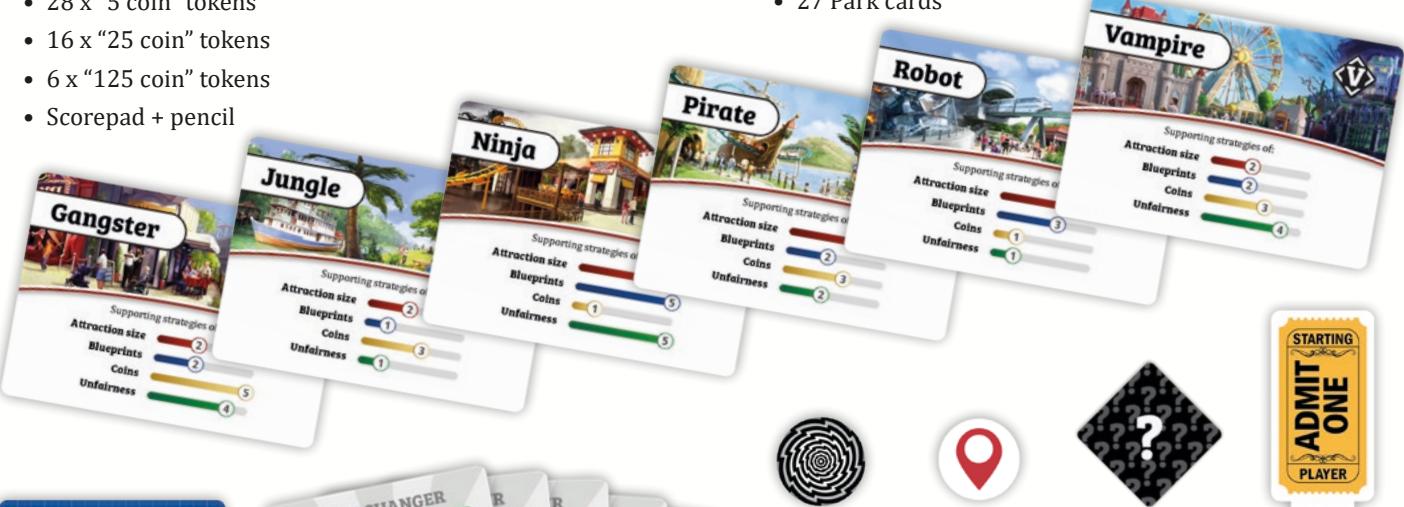
• 1 x Game board, double-sided
• 2 x Player Reference sheets
• 1 x Blueprint Closure card
• 5 x Game Changer cards
Use this one,
it's nicer
• 1 x old-style Current Step marker - "You Are Here" symbol
• 1 x upgraded Current Step marker - roller coaster mini
• 14 x Mesmerism tokens (for use with Vampire theme)
• 6 x Theme Randomiser tokens + spares
• 1 x Starting Player marker + plastic base
• 2 x 6-sided dice (for use with Gangster theme)
• 36 x “1 coin" tokens
• 28 x “5 coin" tokens
• 1 Theme Overview card
6 themed packs of 57 cards each – Gangster, Jungle, Ninja, Pirate, Robot, and Vampire. Each theme pack contains:
• 1 Gate card
• 1 Loan card
• 1 Round & Scoring Summary card
• 2 Showcase cards
• 3 “Funfair" City cards
• 3 “Unfair" City cards
• 5 Blueprint cards
• 13 Event cards
• 27 Park cards
6 themed packs of cards

The City Planning Office Blueprint Department is now closed. Blueprint access by events or abilities only.
Blueprint Closure card

Game Changer cards
Mesmerism token
Old-style Current Step marker
Theme Randomiser token
Starting Player marker
Upgraded Current Step marker

Coin tokens
OBJECTIVE
Build the city's greatest theme park, whatever it takes!
Your goal is to build the park that scores the most points at game end, using three main ways to score:
• Build impressively tall attractions with lots of upgrades.
• Match your park to blueprints to achieve hidden goals.
• Buy your way to victory with good old-fashioned cash.
You can also play events to help yourself and hinder your opponents as you build your park over the course of 8 rounds.
Recruit staff members to help you, or build a super attraction with a unique ability. Bribing officials and blackmailing politicians is entirely optional. and so is winning.
YOUR FIRST GAME?
Unfair has a lot to look at, and even if you are an experienced gamer who will understand the strategies of the game quickly, there are still many unique rules to learn and cards to read during your first play.
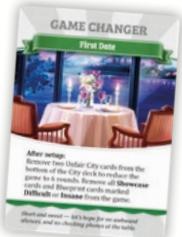
For this reason, we added the First Date Game Changer card, to be used whenever any of the players are new to the game. It shortens the game from 8 rounds to only 6, and removes some of the cards that need a longer game to give their full benefit.
This helps every player to have a smooth first Unfair experience, whether all players are new or only some of them.
Please trust us on this.

SETUP
If any players are new to the game, please use the First Date Game Changer card and these themes:
2 PLAYERS: Robot, Pirate
3 PLAYERS: Robot, Pirate, Vampire
4 PLAYERS: Robot, Pirate, Vampire, Jungle
Unfair plays well with 5 players, but don't play a 5-player game if any players are new to the game. All players should be familiar with the rules and cards first
Before starting: If you wish to use any of the optional Game Changer cards, select one or more now so that you can apply their rules during setup. We recommend using the First Date Game Changer by itself if this is your first game.
Step 1: Decide which side of the board to use and place it on the table. Both sides play the same game, but one side is more colourful with a layout suited to players sitting opposite each other. The other side has higher contrast and a layout suited to players sitting beside each other.
Step 2: Choose which theme packs to play. Each player can choose one pack to include, or you can mix and draw Theme Randomiser tokens to choose them at random – one pack per player. There is no “core" pack and players don't keep one pack for themselves. All cards are shared. To make setup quicker, give each player one pack to split up.
Step 3: Set aside the Theme Overview card from each theme pack. Any additional rules shown on the Overview card are active during the game, so keep them visible for reference.B

Step 4: Give each player:
• 20 coins. ©
• A yellow Gate card, placed face-up. ①
• A grey Loan card, placed face-down above the Gate card.
• A double-sided Round & Scoring Summary card. 0
Dont use it as a coaster

Step 5: Place half of the remaining coins at each end of the board, to give all players convenient access.
Step 6: Separate the remaining cards by the design on their backs. The red Park cards from all packs go into one shared pile, green Event cards into another pile, and so on.

Step 7: Shuffle each pile separately.
Step 8: Place the red Park cards face-down on the board in the matching spot to form the Park deck. Do the same for the green Event cards to form the Event deckH and the blue Blueprint cards to form the Blueprint deck. Set the purple Showcase cards aside for now.
Step 9: Count out 4 white-and-red “Unfair" City cards facedown into a temporary pile. Put the remaining "Unfair" City cards back into the box without revealing them.
Step 10: Place the Blueprint Closure card on top of the temporary "Unfair" pile, with the “Public Notice" side face-up.
Step 11: Count out 4 white-and-blue “Funfair" City cards facedown on top of that pile. Do NOT shuffle these together. Put the remaining "Funfair" City cards back into the box without revealing them. Match this 9-card pile to its place on the board to form the City deck.J

Step 12: Deal 5 Park cards to each player as their starting hand.K If a player receives no attraction cards (that is, cards marked with the word "attraction" below their title), they may choose to reveal their cards and shuffle them back into the Park deck to draw a new hand of 5 Park cards, repeating until they have at least one attraction card.
Step 13: Deal 2 Showcase cards to each player. Players may look at their own Showcase cards, but they are otherwise kept face-down on the table until used.L
Step 14: Reveal cards from the Park deck to fill the 6 spaces labelled "Market" to form the Market. M
Step 15: Give the Starting Player marker to the person who most recently rode a roller coaster. calls WSHOTGUNM
STAG SUUP
THE CARDS
Gate card
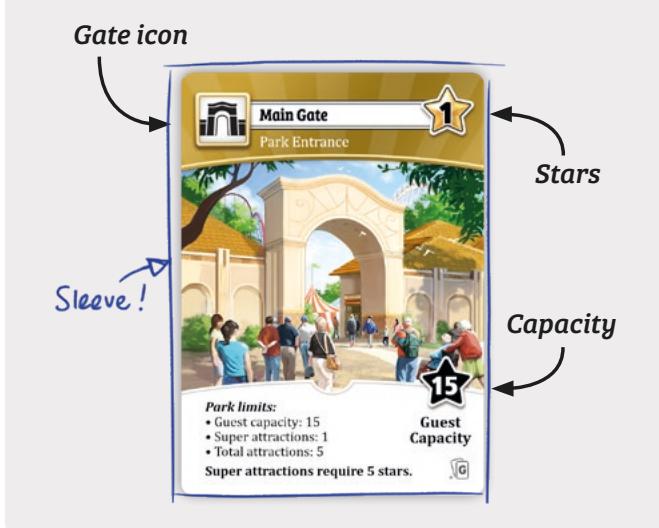
Each player starts with their own Gate card. It allows you to build up to 5 attractions (including a super attraction), and also gives you 1 star and a guest capacity of 15.
Stars are part of how you get income, and guest capacity is a limit on how many guests you can fit in your park. These will be explained in detail a little later. on page 14, in $f _ { a c } + - \infty$
Park cards

Your theme park is built out of Park cards of different types.
All Park cards have some parts in common.
CARD TITLE & CARD TYPE: Each Park card has a title, with its card type shown underneath.
STARS: Each Park card has a star value, to show how well it attracts paying guests.Suckers
BUILD PRICE: Each Park card has a blue price tag. Pay the price marked on this tag to build the card into your park.
Attractions
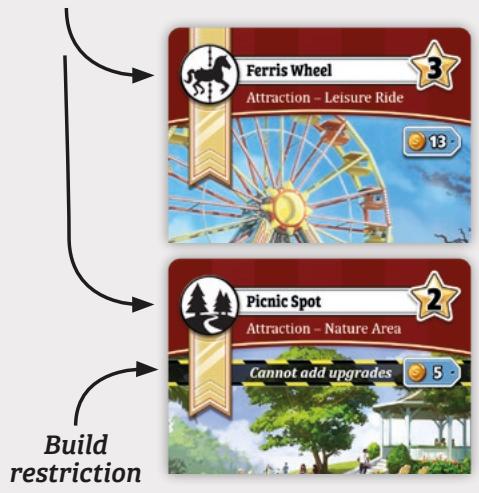
Attractions are the main structures in your park.

You can recognise attraction cards by the word “attraction" in their card type under the title.
All attraction cards use this ribbon and circular icon shape.

ATTRACTION TYPES:

Thrill Ride

Leisure Ride


Theatre


Food Outlet
POSITION: Attractions must be built in the first empty attraction space in your park, to the right of your Gate card.
If an attraction is demolished somehow, the attraction space it was built in becomes empty again. Other attractions do not slide over to close the gap.
You cannot move attractions to another space after they are built just because you want to.
RESTRICTIONS: Some attractions have restrictions on what can be built on them. These are shown on a black-and-yellow strip beside the price tag.
Icon shows attraction type
PANORAMA: Some attraction cards have an indicator near the bottom of the card, showing that the illustration is part of a larger panoramic scene.
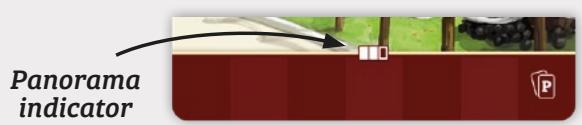
Attractions cannot be moved after they are built, so if you wish to complete a panorama you will need to build the attractions in the correct order.
Future expansions will add scoring for panoramas, but they currently have no points value. but they look nice.
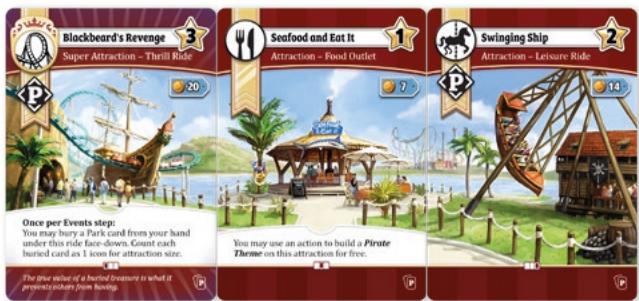
Upgrades – bigger, BIGGER !
Once you have an attraction in your park, you can build upgrades onto it. Upgrades increase your park's appeal to guests, earn you more points at game end, and are often needed to match blueprints (see page 9).

You can recognise upgrade cards by the word “upgrade" in their card type under the title.
All upgrade cards use this ribbon and diamond icon shape.

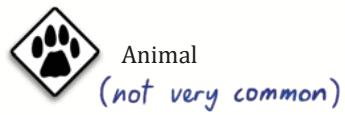
UPGRADE TYPES:

Feature


Guest Services

Quality
POSITION: Tuck the upgrade card under the attraction (and any other upgrade cards the attraction already has) with the striped top section of the upgrade card visible at the top. Once built, you cannot rearrange them.
Some Event cards or Park card abilities (see page 10) allow you to move an upgrade from one attraction to another. Whether upgrades are built or moved, always tuck them behind the top of the stack, in the next available position. Don't insert them in the middle of the stack.
RESTRICTIONS: Some upgrades have limits on how or where they can be built. Such restrictions are shown on a black-andyellow strip beside the price tag.

DUPLICATE UPGRADES: You cannot build more than one upgrade with the same name on the same attraction. For example, you can have as many Guest Services check-mark icons as you wish, but you cannot have two Air Conditioning upgrades on the same attraction.

A Park card is all of the types shown on its card type line. For example, this card is an "attraction" and a "sideshow". The dash between them makes no difference; it is included for ease of reading only.

When a rule talks about a "thrill ride" or a "feature upgrade", the card must have all of those words in its card type to match that rule, but it can have other words too.
Built-in upgrades
Some attractions come with upgrades already built-in, as indicated by a second or third icon on the card.
On cards with built-in upgrades, the rule box shows exactly which upgrade it is.

BUILT-IN THEMES: There is one special case. When the builtin upgrade is a theme, the letter on the icon shows which theme it is. Each theme letter icon matches only one theme name, so a separate rule box isn't needed to show which upgrade it is.

The built-in theme upgrade is considered to have the same name as the separate theme upgrade card with the same icon.
You cannot add a theme upgrade with the identical letter to a theme icon already built-in.
You can have several different themes on the same attraction. Having your ride themed for Pirate Vampires or Robot Jungle Pirates is perfectly fine.
BUILT-IN UPGRADE SCORING: Built-in upgrades count toward matching blueprints (see page 9). When scoring at game end, built-in icons are counted as part of the attraction's icon size, scoring more points.
BUILT-IN UPGRADE PROPERTIES: Built-in upgrades do not have their own star value, and they do not have a separate build price. The star and the price belong to the attraction.
Built-in upgrades do not get the same rule abilities as the separate upgrade card with the same name. For example, a Pirate Theme upgrade card gives you 5 coins after you build it, but a built-in Pirate theme icon does not.
Staff Members
Staff members add their special abilities to your whole park. Place them to the left of your Gate card, on the opposite side to your attractions.
You can have as many staff members as you wish.
In addition to any abilities they have, each staff member also adds their points value to your score at game end.
Assuming they still work for you..


Resources
Resources also improve your whole park, and are placed with staff members, to the left of your Gate card.
You can have as many resources as you wish.
They're not common, but can be useful.
Resource icon

Showcase cards e
Showcase cards are unique super attractions that you can build in your park to gain powerful abilities.
with a pricetag to match!
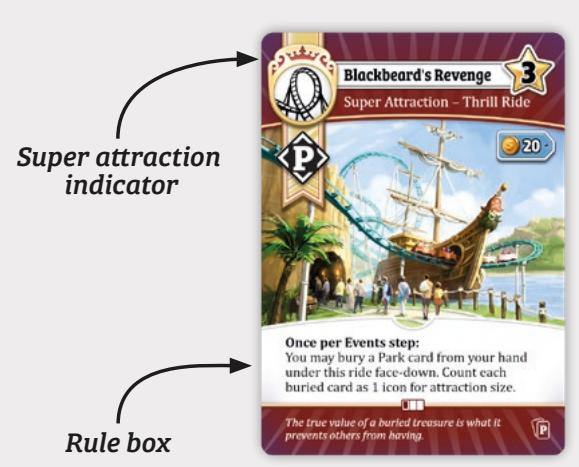
Each player is dealt two random Showcase cards face-down during setup as their options for that game.
5-STAR REQUIREMENT: Your park must have a star total of at least 5 from cards in your park, but not including events, before you can build one of your super attractions.
The City Planning Office requires a certain level of development before they will issue a permit. Because the City is only looking at the development of the park, it doesn't matter whether the attractions are open or closed at the time.
Stars from temporary effects such as City cards or Event cards are not counted toward this 5-star requirement.
The build price for a Showcase card is marked on the blue price tag just like a normal Park card.
BUILDING LIMITS: Your Gate card sets the limit of super attractions in your park at 1, so you can't have both of them built at once. If your super attraction is demolished somehow, you can then build the other one.
Super attractions may be super, but they are also attractions, which means they are included when counting attractions against your park's 5 attraction limit.
DEMOLITION: A super attraction can be demolished in the same way as any other attraction (see page 12). A demolished Showcase card is removed from the game.
NO SHOWCASE BUILD: If you decide not to build any of your Showcase cards, you may return both of them to the box at any time, without revealing them, to gain an extra 10 coins. This does not take up a turn or use an action.

Blueprint cards
Blueprints provide goals that reward you for building particular combinations of Park cards. How to get them is explained in the Park step section (see page 11).
To score a blueprint, the cards in your park must match the blueprint's requirements at the end of the game (not during). Each unmatched blueprint scores -10 points at game end.
OUCH!

If you complete the "Complete All Items" section, you can then also complete and score the "Bonus Target" section. There is no penalty for incomplete bonus sections.
You must have at least the items that the blueprint requires, but you can have other items too (unless the blueprint says otherwise).
If a blueprint offers more than one way to match, you can complete one or more of those choices. Options separated by "OR" don't exclude the other choices (unless the blueprint says otherwise).
You decide which blueprints you'll commit to when you draw the cards, but once you choose to keep a blueprint, it's usually permanent.
You can have as many blueprints as you wish.

The difficulty rating for blueprints assumes that you have at least the required attraction already available, either built or in hand.
If you keep a blueprint, even one marked Easy, without having the base attraction it requires, you may find that Easy becomes Difficult.
SECRET: Blueprints are kept secret, face-down on the table, and don't count as part of your hand.
Even if you complete a blueprint before game end, don't reveal it. Blueprints only score at game end, so it's best not to let your competitors know what items are important to you before then.
Event cards are how youinfluence the game in your favour. Each Event card offers you a choice between two options. The top half is usually helpful to you straight away. The bottom half is often useful later, to interfere with your competitors.
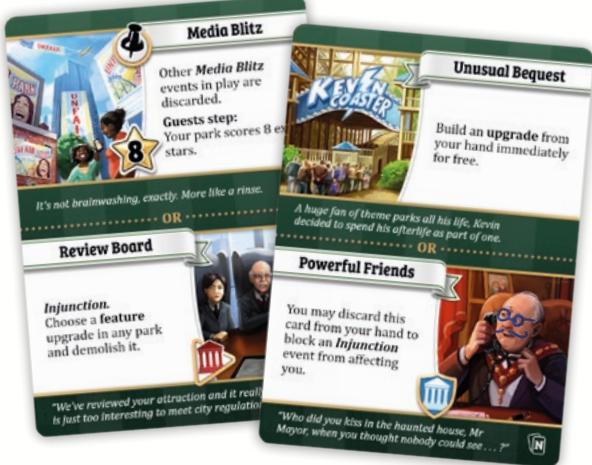
Some events have a type, such as Intrusion, Inspection, or Injunction. You can defend against these attacks if you have a card that blocks them.
For example, Review Board is an Injunction event that tries to demolish a feature upgrade in your park. You can block it if you have Powerful Friends, or another card that blocks Injunction events.

You may use a defensive card to block an attack immediately after the attacking event is played, without waiting for your next event turn. Blocking an attack puts the blocking Event card into play, but does not use up your own event turn.
DELAYED EFFECT: Some Event cards have a pushpin symbol. This indicates that they don't take effect immediately and should be kept “pinned" on the table for later use. Pinned cards are discarded at the end of the round in the Cleanup step.

CLOSING ATTRACTIONS: Some events can close your attractions. To indicate this, flip only the main attraction card face-down so that the back is showing. You gain no income from an attraction while it's closed, and any abilities of the main attraction card are not active.
The rule is: if you can't see the rule, you can't use' the rule. See?
REOPENING ATTRACTIONS: Any cards that are closed or unavailable, such as attractions and staff members, are turned face-up again in the Cleanup step at the end of each round, so your attractions will reopen by themselves at that time.
—if you dort use an event to reopen them earlier
A City card is a special kind of event that affects all players at the start of each round.

The City deck acts as the timer for the game. One card is revealed each round, and when the final City card is played, the current round is the final one.
For the first half of the game, the City cards are helpful whiteand-blue "Funfair" events.
In the second half, the City cards become white-and-red "Unfair" events, and are not helpful at all.
BLUEPRINT CLOSURE: The Blueprint Closure card is not a City card and is not considered part of the City deck. It is just used to give a reminder of when the Blueprint deck closes. If you need to do an activity with a card from the City deck, skip over the Blueprint Closure card.
Loan card

If you need extra money, for whatever reason, you can use your Loan card to get it.
The Loan card starts out face-down to indicate you haven't taken any loans. If you take a loan, flip the card face-up. Turn it
anti-clockwise with each new loan so that the top position shows how many loans you've taken and the total points you owe.
Each loan gains you 5 coins, but costs you points at game end.

You can take a loan at any time. It doesn't use a turn or take up an action. You can take as many loans at once as you wish, but you cannot take more than 4 loans per game.
Loans are due at game end. They cannot be repaid early with coins – only payment in points will satisfy the lender.
loan shark
Game Changer cards
Game Changers are optional cards with special rules that affect the way the game plays. They can change any aspect of
the game and must be chosen before setting up the game.
Don't want to beat up your friends? Declare World Peace. Prefer to start with a Showcase card already built? Have a Grand Opening.
You may choose to play with more than one Game Changer at once if you wish.

HOW TO WIN
At game end, the player with the most points wins. There are three main ways to score:
-
Attraction size – each icon added scores more points.
-
Blueprints – build your park to match a specific plan.
-
Coins – buy victory with cold hard cash.
-
Make sure your competitors don't.
HOW TO PLAY
You have 8 rounds to build the best theme park, and to stop your competitors from doing the same.
Each round has 4 steps:
-
Events step
-
Park step
-
Guests step


- Cleanup step
Use the Current Step marker by sliding it along the row of steps on the board as the round progresses. The game includes two Current Step markers. The "You Are Here" marker is the original version. The roller coaster mini was added as an upgrade, thanks to our Kickstarter backers.
1. Events step

All three parts together form the Events step.
Draw an Event card
Each player draws one card from the Event deck in turn order.
Play the City event
The starting player reveals the top card from the City deck, and each player follows its instructions in turn order. The City card remains active for the whole round. It is not officially discarded until the end of the round, but for convenience you can place it on top of the discard pile immediately.
The City deck is the timer for the game. When the final City card is played, it signals that the current round is the final one.
Play events
Players take turns to play an event. When it is your turn, you may play one event or pass. You may play as many events as you like in the Events step, but only one at a time, taking turns with the other players.
When playing an Event card from your hand, you must choose whether to use the top half or the bottom half, but not both.
You can pass and still play an event again later in the same Events step, but the Events step ends as soon as each player has passed in a row. You cannot play again if you pass and everyone else passes too.
Passing so you can go last will end in tears.
WHAT IS AN EVENT: Anything that occurs during the Events step is considered to be an event, whether it comes from an Event card, a City card, a Park card, or any other type of card.
ABILITIES: Park card abilities that apply to the Events step are used as if they were Event cards, and you can activate them as your turn whenever it's your turn to play an event. Other players may block them, just like normal events. Abilities of closed attractions or unavailable staff cannot be used.
EVENT TYPES: Some events have a type, such as Intrusion, Inspection, or Injunction. These are attacks that affect other players. Announce the type of the event when you play it and read out its effect, so that players can block it if they have a suitable defence.
PUSH-PIN: Some Event cards apply later in the round, during the Park or Guests step. Such cards have a push-pin symbol. Keep these cards “pinned" on the table for later use, then discard them during the Cleanup step.

MOVING CARDS: Some events can move a card from one location to another. When this happens, the card being moved keeps any tokens, coins, or any other attached item it has. If the card has an ability that has already been used this round, it cannot be used again – since the card doesn't leave or reenter play, it's not a new card and its ability doesn't reset.
2. Park step

Players always take three actions each round, one at a time in turn with the other players. All of the Park actions together form the Park step. Each action is not a separate Park step by itself.
In turn order, each player completes their turn for Park action 1, then each player completes Park action 2, then Park action 3. Sometimes cards permit one or more players to take a Park action 4.
When it's your turn for an action, you have four choices: Take, Build, Demolish, or Loose Change. You may choose the same action more than once in a round.
Park step action: Take
Use a Take action to gain a card by doing one of the following:
• Put a card from the Market into your hand for later, then refill the Market. There is no coin cost for taking a card – you only pay when you build.
• Draw two cards from either the Park deck, the Events deck, or the Blueprints deck, and then choose one or none to keep.
• Discard any card from your hand to draw five cards from the Park deck. Choose one to keep, then discard the rest.
IMPORTANT: You are not required to keep a blueprint if you use your action to draw two Blueprint cards, but if you do choose to keep one, it's usually permanent. Blueprints can only be discarded by some rare events.
BLUEPRINT CLOSURE: You can only draw Blueprint cards as an action during the first 4 rounds (the "Funfair" rounds). From round 5 onward (the "Unfair" rounds), Blueprint cards are only available using events and abilities.
REFILLING THE DECKS: Whenever the Park, Blueprint, or Event deck runs out of cards, shuffle the matching discard pile and replace it as the new deck. Do this as soon as the deck is emptied, even in the middle of an event or action.

SPEEDY PLAY: If the player before you draws cards, you can wait to see what they discard if you wish, but if your move doesn't depend on what they do, you can take your action straight away to reduce the time between turns.
Park step action: Build

Use a Build action to place a Park card into your park, with these limitations:
• Your park can only have 1 super attraction.
• Your park can have 5 attractions in total, including a super attraction.
• You cannot repeat upgrades with the same name on the same attraction. This includes upgrades that are built-in. You can have the same upgrade on different attractions.
You can build a card from your hand, or directly from the Market. Always refill the Market immediately after a card is removed. For all practical purposes, the Market never has a blank space.
Pay the build price marked on the card's price tag, and place it into your park, face-up in front of you on the table. Check for any abilities that occur after the card is built.
If the card you build is an attraction, place it into the first empty space of your park's five attraction spaces, to the right of your park entrance. If it's an upgrade, add it to the top of an attraction by sliding it behind the existing attraction card, leaving the top section poking out. If it's a staff member or a resource, it goes to the left of your park entrance.
The sequence in which cards are built is important to some Event, City, and Park cards. Some events and abilities allow rearranging items, but you cannot move cards after they are built just because you wish to. This includes rearranging attractions into a different order, and rearranging upgrades on an attraction.
SUPER ATTRACTIONS: You can build a super attraction from your Showcase cards if your park doesn't already have one. Your park must have a star total of at least 5, not including stars from any events, before you can build a super attraction.
CLOSED ATTRACTIONS: You may build upgrades on a closed attraction if you wish.
LOANS: If you need extra coins to pay the build price, you can take a loan (see page 10).
No money? Don't like loans? Take an Event or Blueprint.
Park step action: Demolish
Use a Demolish action to remove something from your park perhaps to make way for a different attraction.
You can only demolish a single Park or Showcase card with a Demolish action, but if you demolish an attraction, all of its upgrades are then demolished along with it, since they are no longer attached to anything.
boom.
Call this "DISMISs" if you do it to staff.
They hate being demolished.
Park cards you demolish in this way
go into the Park discard pile, not into your hand. Showcase cards you demolish are removed from the game.
When an attraction is demolished, other attractions do not move to close the gap. The attraction space is now empty, and a new attraction can be built in the space.
There is no refund for demolishing.
BUILT-IN UPGRADES: If a built-in upgrade would be demolished by an event, the attraction it's part of closes instead. The upgrade iş automatically repaired by the time it opens again. Tricky!
However, you cannot use the Demolish action in the Park step to target a built-in upgrade as a way of closing the attraction. When you choose Build as your action, you add one card to your park, and when you choose Demolish, you remove one card. You must demolish the attraction itself to remove the built-in upgrade or not demolish at all.
TOKENS, COINS: When a card is demolished or dismissed, it leaves play, usually going to the discard pile. A card that is not in play cannot hold tokens, coins, or other items, so any items on that card are discarded back to the central pool.
BURIED CARDS: Some abilities allow you to bury card, tucking it face-down under another card. As with tokens and coins, when a card leaves play it cannot hold other items, so anything buried under the card is exhumed and discarded.
Park step action: Loose Change
Use a Loose Change action to gain 1 coin for each attraction in your park by picking up the lost coins that have fallen out of your guests' pockets. Loose Change counts all of the attractions in your park whether they are open or closed.
You may use an action...
When a card says "You may use an action...", it is offering an extra option for you to choose in the Park step, in addition to the normal options of Draw, Build, Demolish, and Loose Change.
If the card says "Once per Park step" you can only choose that option once each round, but if it doesn't have a limit, you can use it each time it is your turn for an action, as many times as you have actions.
You cannot combine options that say "You may use an action". You can choose one option or the other, but you cannot use the same action for more than one option at the same time.
HO RK Ae d n


3. Guests step

There is just one part to the Guests step. All players work out their income at the same time.
Gold stars in your park show how many people want to visit your park, and the black stars show the guest capacity, telling you how many of those people will actually fit.
People become guests once they have paid at the gate and been let inside to visit your park. They may also spend extra on things like souvenirs and snacks.
To determine your income:
1. Count your stars
To work out your star total, add up the numbers shown in the gold stars on all the open and available cards in your park. This includes

attractions and upgrades, staff members, resources, and your Main Gate, along with any extra Event cards you've played (and sometimes the City card too).
DO NOT count stars on closed attractions or their upgrades, or on unavailable staff members.
2. Limit to guest capacity
Guest capacity is a limit on how many guests fit in your park in one round. Your park might have a star total of 21 (people who want to visit), but

the City has fire codes and safety regulations, so the usual limit is 15 guests, and the other people go home disappointed.
• If your star total is less than your park's capacity, your number of guests is the same as your star total.
• If your star total is equal to or greater than your park's capacity, your number of guests is capped to the same as your capacity.
You can build more than 15 stars in your park, but it cannot hold more guests than its capacity allows.
Some staff members, resources, and other cards can increase your park's guest capacity.
Income example: Stars within capacity

Star total = 9 stars. 9 people want to visit.

Guest capacity of 15. They all fit! 9 guests in your park this round.
Tickets:

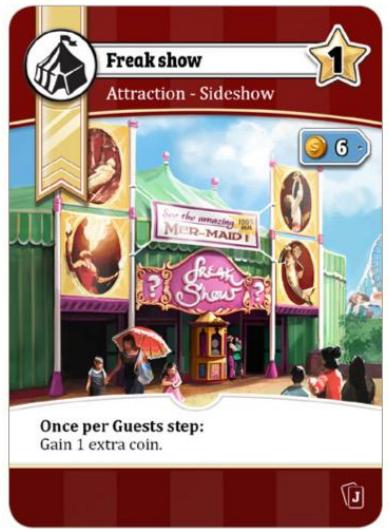
Example: Freak Show attraction ability gives 1 extra coin.

Normally 1 coin per guest. 9 guests at 1 coin per guest = 9 coins. Ticket ability gives 1 extra coin. Total income: 10 coins
3. Check your tickets
A ticket symbol is a reminder that a card has an ability that takes effect during the Guests step.

Cards marked with this symbol often give you ways to make more coins from your guests, beyond the price of admission. Don't forget to check the City card each round too.
4. Take your coins
Once you've worked out the number of guests, next you need to know how many coins you gain for each guest.
The normal base income for your park is 1 coin per guest.
Some cards may increase that to 2 coins per guest, or more.
After you have worked out your guest income, don't forget to add any extra income from card abilities marked with a ticket that you checked earlier. There is no limit on your income.
Closed attractions and special abilities
Abilities of face-down cards such as closed attractions are not active, however any abilities of upgrades on closed attractions are still active, unless the upgrade itself says otherwise.
4. Cleanup step

There is just one part to the Cleanup step
Do these things, in this order:
-
Discard any pinned Event cards still in play.
-
Reopen all closed attractions and make any unavailable cards available again by turning them face-up.
-
Enact any active Cleanup step abilities.
-
Discard all the cards in the Market and refill it.
-
Discard cards from your hand until you are within the hand limit of 5 cards, counting both Park and Event cards. Blueprint and Showcase cards are not part of your hand — they are kept face-down on the table.
-
Move the Starting Player marker to the next player in turn order.
Income example: Stars over capacity
Stars:

Star total = 21 stars.
21 people want to visit. Guest capacity of 18.
Sadly, 21 people won't all fit..
18 guests in your park this round.

Tickets:

Example: Sponsorship Deal event ability gives +1 coin for each guest.
Coins:

Normally 1 coin per guest. Ticket ability gives +1 coin per guest. 18 guests at 2 coins per guest Total income: 36 coins
SCORING AT GAME END
Total the scores for each player on the scorepad provided, or use the web app to do all the hard work.
Attraction size
Count every icon
| Score each attraction separately for the total number of icons included in its ribbon, counting all upgrades, including built-in upgrades, and the main attraction icon itself. Count every icon on its ribbon, then look up the corresponding score for that size. Staff Blueprints | Icons Points | |
| 1 | 5 | |
| 2 | 8 | |
| 3 | 12 | |
| 4 | 16 | |
| 5 | 20 | |
| 6 | 25 | |
| 7 members, resources, and the | 31 | |
| 8 Main Gate score nothing for size - only | 38 | |
| 9 attractions and their upgrades are counted. | 46 | |
| 10 | 55 | |
| Attractions with more than 25 icons score | 11 65 | |
| the maximum points. #unfair | 12 76 | |
| 13 | 88 | |
| 14 | 101 | |
| 15 | 115 | |
| Reveal your blueprints and show that you have completed them. If your park matches | 16 130 | |
| the "Complete All Items" section, score | 17 146 | |
| the points shown. If you fail to match the | 18 163 | |
| requirements, subtract 10 points instead. | 19 181 | |
| 20 200 | ||
| If you complete the "Complete All Items" | 21 220 | |
| section, you can also score the "Bonus | 22 241 | |
| Target" section if you have also met its | 23 263 | |
| requirements. There is no penalty for | 24 286 | |
| incomplete bonus sections. | 25 310 |
Coins
Score 1 point for every 2 coins you've earned. or stolen
Other cards
Staff members all have points marked on them. Some other cards have extra scoring noted in their abilities.
Cards in your hand score nothing.
Loans
If you have taken any loans during the game, deduct the points shown on your Loan card.
Tie-breaker
In the event of a tie, the winner is the player with the largest star total in their park.
If still a tie, most completed blueprints wins.
If still a tie, most coins wins.
If still a tie, all of those aspects of their parks being equal the tied player who is wearing the most items of Unfair merchandise wins.
In the unlikely event that it's still a tie, it's winner-takes-all Rock/Paper/Scissors for victory.
SCORING WEB APP

Free! Available at the Unfair website:
www.unfair-game.com/scoring
Bookmark it to your phone's home screen.
PACKING UP
Each card has a theme pack indicator in the bottom right corner. Separate the cards into piles with the same theme pack indicator and put them back into their slot in the box.

End-of-game etiquette for Unfair is that all players take some of the cards and help to sort them back into their theme packs. Packup time is only a few minutes if all players help out.
Since you will sort the cards by colour when setting up the next game, there's no need to sort by colour when pacķing up. but if you're like me, you will anyway, because having them out of order just feels wrong..
UPDATED CARDS
Some cards have one or more dots marked beside the theme pack indicator, to show that the rules for that card have been updated. Your game may already be pre-updated with these, or you may get them through future expansions. If you receive updated cards separately, always keep only the version of the card with the most dots.


FAQS
Only 15 guests?! Only 1 coin per guest?! What kind of shabby theme park is this?
The capacity of your park is actually measured in tens of thousands of guests, so a full park can have 150,000 guests each month. For simplicity, we just say “15 guests".
Likewise, you can consider coins to be worth \$100,000 each.
To minimise the maths, we've kept the money to single digits.
How could I build a restroom on a roller coaster?

Each attraction represents a section of your park. You're not actually adding toilets to your roller coaster cars when you add a Restrooms upgrade; you're just building a restroom conveniently nearby. II Il
THE GOLDEN RULES
#1: Cards can change the rules.
If a rule on a card contradicts a rule written in any Unfair rulebook, the card wins.
A rule on a card that says you cannot do something takes priority over a rule on a card that says you can do something.
For example, if you have an Event card that says you can demolish something, and a Park card that says you cannot demolish it, the “cannot" rule wins.
#2: What's done is done.No takesy - backsies"
You must carry out all required game actions. For example, collecting your income is not an optional task, so if you forget to take your coins in the Guests step you must fix that oversight. What were you thinking?!
However, if a card says you may do something and you don't do it, there's no rewinding to change it.
If you discover an error, such as incorrect placement of an upgrade on an attraction where it cannot be placed, correct the mistake with the fewest changes possible and continue.
#3: It's not a memory game.
The existence and number of cards, coins, tokens, and any other items in your park is public knowledge.
You may hold and place your cards and tokens in whatever manner is most convenient to your play space, but you must not obscure any items completely from view to conceal their existence or number, and you must correctly report the count of those items and their face-up or face-down status whenever asked. In short, place things how you like, as long as people can see them.
You must allow other players to examine any face-up item in your park so they can review its rules or requirements, but you are not required to show the face of cards whose identity is private, such as Showcase, Blueprint, buried cards, or hand cards.
Cards in a discard pile are public knowledge and can be searched by any player at any time. Searching between turns is encouraged to allow for speedy play. Cards in discard piles have no set sequence, and can be rearranged if you wish.
YOUR NOTES
- Choose cheap stars for early income.
- Loans are your friend- buying big can pay off.
- Blueprints are not that Scary. Maybe you find one that fits your park. If not, don't keep any. Easy.
- Mix it up! Trying to score only one way = tragedy!
- Don't get too attached to your stuff. You probably won't get to keep it al...
RULEINTERPRETATION GUIDE
"Cards do what they say, and don't do what they don't say."
Card rules appear as text on the card describing the effect the card has when it is active.
A CARD RULE IS ACTIVE WHEN:
• the card is in play, and
• the card is face-up, and
• no rule makes it inactive.
Card rules are active in hand only when the rule specifically permits its use from hand.
A CARD RULE IS NOT ACTIVE WHEN:
• the card is in a deck, or
• the card is in a discard pile, or
• the card is in the Market, or
• the card is in play face-down, or
• the card is removed from the game, or
• a rule makes it inactive.
SCOPE OF RULES
Card rules can modify rulebook rules. A card rule that says something cannot happen always takes precedence over any rule that says it can happen.
Rules that appear after a timing indicator (such as Events step, Park step, Guests step, Cleanup step, Game end) apply only during the indicated period and apply for the whole of that period unless a limit is specified, such as “Once per", or "At the start of'. Rules that do not have an indicator apply immediately.
Rules that state a condition of indefinite duration, such as “can be" or “cannot be”, or use words such as “when", “ever", "never", or "always", are ongoing. They are applied constantly, at the end of each other rule sentence, to ensure the game is not in a state that breaks the ongoing condition.
A rule only affects the items in play at the time it is enacted. Items put into play after the rule is enacted are not affected, unless an ongoing condition is described in the rule.
If a card leaves play while its rule is being enacted, the remainder of its rulebox that is relevant to the current step continues; leaving play does not interrupt rule completion.
READING & ENACTING RULES
Each sentence in a card rule is a separate directive. Sentences must be enacted in the order they appear on the card.
If a sentence contains two or more options separated by “or", one of those options must be enacted if possible. If more than one option is possible, the owner chooses which option is enacted.
If a sentence contains two parts separated by “otherwise", the first must be enacted if possible. The second part must be enacted if the first part is not. If neither part is possible, the entire sentence is ignored.
If a sentence contains more than one part to be enacted in sequence, separated by “and" or “then", those parts are enacted in the order given in the sentence. If a part cannot be enacted, ignore any remaining parts of the same sentence and proceed to the next sentence.
If a later sentence refers to an optional part from a previous sentence that was not enacted, or relies on the success of an earlier sentence that could not be enacted, the later sentence is ignored also.
SIMULTANEOUS RULES
If multiple rules apply at the same time, first resolve them by card type, in this order: Game Changer, Theme Overview, Park, Showcase, Event, Blueprint, City.
If multiple cards of the same type apply, resolve them in turn order according to who owns the card, beginning with the starting player.
If multiple cards of the same type apply that are owned by the same player, the owner chooses the order in which they resolve.
If a rule applies to more than one player, resolve it in turn order, beginning with the starting player.
PARK STATE
Your park can never be in a state that breaks any of the currently active rules or limits. If a card comes into play that changes those limits, you must immediately update your park to meet the new limits. Any changes required, such as demolition or dismissal, do not use a turn or action to complete.
DEFINITIONS
Rules use the glossary definition of key words. If another meaning of the word that is in use outside the game conflicts with the glossary definition, the glossary definition is taken as the intended meaning. R
GLOSSARY

Unfair has a searchable online glossary:
www.unfair-game.com/glossary
It includes entries from all rulebooks.
ABILITY – The portion of the rule on a card that allows or requires something to change in the game. This includes events, which are abilities played in the Events step.
ACTION – Each round, in the Park step, players get three actions in total to draw cards, build or demolish something in their park, or to look for loose change. Actions are taken one at a time, in turn with other players. Events or abilities may sometimes allow a player to take a fourth action.
ADDED – When a card is built or moved so that it is in a location where it was not previously, then it has been added. See also: Build, Move.
ADJACENT – An attraction card is adjacent to another if it is placed directly beside it, on either side. For example, the first attraction you build must be adjacent to your Main Gate. Staff members and resources don't have a fixed location, and are not considered adjacent to anything.
AFFECTED – An event affects you if the rules of that event would make a measurable change to anything you own or control, and the event is not blocked. You probably want to know if you can use Instant Karma on someone who just tried to hit you, and the answer is “only if they actually succeeded".
AFTER – Directly subsequent to, straight away. This does not mean any other time later in the game.
ATTRACTION – A Park card that has the word “attraction" in its card type. A card with "Super Attraction – Thrill Ride" is still an attraction; it's just not a basic attraction.
ATTRACTION SIZE – See: Icon size.
ATTRACTION SPACE – A space in which an attraction can be built. Each park starts with 5 empty attraction spaces, allowing up to 5 attractions (including a super attraction).
ATTRACTION TYPE - If you are allowed to choose an attraction type, you can choose anything that occurs in the card type text on an attraction card, other than “Attraction" itself. Super, Theatre, Sideshow, Thrill Ride, Leisure Ride, Food Outlet, even just Ride by itself, are all acceptable choices.
AVAILABLE – This has the same meaning as "open", but is used to refer to items other than attractions, such as staff members. A staff member is available when they are face-up in the park.
AVAILABLE COINS – The coins you have ready to spend. Your available coin total doesn't include any coins that have been placed on your cards by abilities, nor does it include coins you could get by taking a loan.
BLOCK – To prevent an event from affecting you. When an event is blocked, it is not cancelled. Any effects it has on other players still happen.
BUILD – Placing a Park or Showcase card into your park that wasn't in play previously. The new card can come from the Market, your hand, your Showcase cards, or another source if a card allows it. Building usually requires paying the build price marked on the card's price tag, but in some cases it's discounted or free. See also: Recruit.
BUILD PRICE – The build price of a Park card is the price marked on the card in the blue price tag. It can be adjusted by any events or abilities that change the price.
BURY – To place a card face-down under another card in play. Once buried, the card is no longer active and has no special abilities. It is not turned face-up in the Cleanup step. Buried cards cannot be concealed completely from view, and the number of buried cards must be visible to competitors.
CAPACITY – See: Guest capacity.
CARD TYPE – Each Park card has a line of text under its title indicating the type of that card. A card is all of the types indicated by each word in this line. For example, a "Super Attraction - Thrill Ride" is a "Super" card, an "Attraction" card, a "Thrill" card and a "Ride" card. Sometimes these types are used in pairs, such as "close all thrill rides". To be affected, a card must have both types, not just one of them.
CITY EVENT – Each round a City card is revealed and played. These are events initiated by the City, not by any player. Any cards that talk about events, particularly blocking those events, work equally well on City events as on regular events.
CLOSE – When an attraction is closed, guests can't use it. None of its stars are counted, including those on all of its upgrades. The main attraction card is turned face down when an attraction is closed, and any abilities on that card are not available. Abilities on the upgrades remain available.

COINS – The standard currency. Yes, when it says “gain 1 coin", a “25" coin is technically one coin, but you know what it means, and so do the people you're playing with. [stern look] Yes, they could have been called “dollars" or “bucks", but they're not.
COMPETITOR - A player who is competing with you;
specifically, any player except you.
DECK – A pile of cards, face-down, of one particular type such as Park, Event, Blueprint, or City.
DEMOLISH – To remove a Park card from play. When a card is demolished it usually goes to the discard pile. However, some attraction cards have built-in upgrades; if a built-in upgrade would be demolished, the attraction closes instead and the card does not leave play. When a card that has something buried under it is demolished, all buried cards are exhumed and discarded. See also: Dismiss.
DISCARD – To place a card into its matching discard pile from wherever it currently is. Demolishing something usually leads to discarding it, but demolish and discard are not exactly the same.
DISCARD PILE – Cards that have been used and are no longer in play are added face-up to the discard pile for that card type. Cards in any discard pile are public
内容过长,此处只内联前一部分;完整内容请下载或到规则页阅读。
下载 Markdown原文为社区整理/出版社公开资料,版权归原作者,仅供个人学习查阅。